
zoopa Q Evo550 - Remote control toy ACME - Free user manual and instructions
Find the device manual for free zoopa Q Evo550 ACME in PDF.


| Product Type | Remote Control Toy |
| Brand | Acme |
| Model | zoopa Q Evo550 |
| Dimensions (L x W x H) | Approx. 30 x 20 x 15 cm |
| Weight | Approx. 500 g |
| Vehicle Power | 4x AA batteries (not included) |
| Remote Control Power | 2x AA batteries (not included) |
| Remote Control Frequency | 2.4 GHz |
| Maximum Range | Approx. 30 meters |
| Maximum Speed | Up to 10 km/h |
| Main Functions | Forward/backward, left/right turn, stop, LED lights |
| Chassis Material | Durable ABS Plastic |
| Recommended Age | Ages 6 and up |
| Safety | Small parts, choking hazard. Not suitable for children under 3 years. |
| Care and Cleaning | Wipe with a soft, dry cloth. Do not immerse in water. |
| Spare Parts | Batteries, remote control, replacement wheels available on request. |
| Repairability | Openable for battery replacement. Simple repairs by user. |
| Box Contents | 1 vehicle, 1 remote control, 1 user manual |
| Warranty | 2 years |
| Certifications | CE, RoHS |
Frequently Asked Questions - zoopa Q Evo550 ACME
User questions about zoopa Q Evo550 ACME
0 question about this device. Answer the ones you know or ask your own.
Ask a new question about this device
Download the instructions for your Remote control toy in PDF format for free! Find your manual zoopa Q Evo550 - ACME and take your electronic device back in hand. On this page are published all the documents necessary for the use of your device. zoopa Q Evo550 by ACME.
USER MANUAL zoopa Q Evo550 ACME
natural_image
Two black and orange quadcopter drones with visible propellers and control panels, no text or symbols present.Benutzerhandbuch
http://www.ACME-online.de
Vers. 2.2
ACME the game company GmbH
Boikweg 24
33129 Delbrück
Germany
Tel: +49 2944 9738 30
service@ACME-online.de
oder
http://www.ACME-online.de
natural_image
Top-down view of a black quadcopter drone with orange propellers and camera module (no text or symbols visible)natural_image
Close-up of a black drone with orange propeller and black body, no visible text or symbolsFirmware Updates
natural_image
Close-up of a black quadcopter drone with a camera module and red accent stripe (no visible text or symbols)Verbindung
natural_image
Product photo showing a camera module, a 3D camera assembly with green and orange components, and a wireless network device (no visible text or symbols)Technische Details:
ACME the game company GmbH
Boikweg 24
33129 Delbrück Germany
Telefon: +49 2944 9738 30
"CamOneTec", "CarCamOne" and the "FlyCamOne" Logo are registered trademarks of ACME the game company GmbH, Germany © Copyright 2015 ACME the game company GmbH
This user manual is protected by international copyright laws.
No part of this manual shall be, without the prior written permission of ACME the game company GmbH, in any form or by any means, electronic or mechanical, including photocopying, recording or storing in any information storage and retrieval system, reproduced, distributed, translated or reduced.
Safety Advice
WARNING:
Follow these instruction to prevent damage of the unit:
- DO NOT USE UNPROTECTED IF RAIN OR WATER. PREVENT CONTACT WITH ANY KIND OF LIQUIDS.
- USE RECOMMENDED ACCESSORIES ONLY.
• DO NOT DISASSEMBLE.
- THERE ARE NO INTERNAL PARTS THAT NEED TO ME MAINTENANCE.
- REPAIRS SHOULD BE CARRIED OUT BY QUALIFIED PERSONNEL ONLY.
SERVICE & SUPPORT
ACME the game company GmbH Boikweg 24
33129 Delbrück Germany
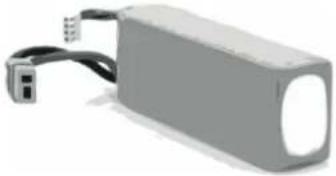
Information on the contained LiPo-battery
WARNING BATTERY
Mishandling the battery may occur explosion, fire and smoke including damage of health or goods. It will also reduce battery performance.
Never charge a damaged LiPo battery pack.
Stop charging if the LiPo battery pack is getting deformed (blown up).
Charge and store the LiPo battery pack at a temperature of 0^ C to 40^ C – avoid a temperature higher than 50^ C when discharging.
Do not shortcut – Risk of explosion and fire!
CE Declaration
Herewith we declare that this item is in accordance with the essential requirements and other relevant regulations of the directive 1999/5/EC. A copy of the original declaration of conformity can be obtained at the address above.

This Product contains a LiPo Battery LiPo batteries are recyclable, and a valuable resource. To dispose of the battery, remove it and take it to a resource recovery facility.

WEEE Reg. No.: DE64989527
Information for disposal of crossed Bin marked products
This symbol is marked on a product or packaging, it means that the product including the batteries must not be disposed of with your general household waste. Only discard electrical/electronic items in separate collection schemes, which cater for the recovery and recycling of materials contained within. Your co-operation is vital to ensure the success of these schemes and for the protection of the environment
Thank you for choosing the zoopa Q Evo 550 Quadrocopter
This quadrocopter is based on the exceptional technology and high standards of ACME and offers flight experience at the highest level and best quality.
This user manual has been specially designed to guide you step by step through the functions and options of the quadrocopter. Please read the following information carefully before using the product.
Please read the following part!
- To ensure safe and proper use, please carefully read all safety precautions and instructions before you activate the product.
- The instructions of this manual refer on the standard settings of your zoopa Q Evo 550.
- Photos and illustrations in this manual may differ from the actual look of the product.
- Possible content updates in this manual are subject to change without prior notice. The latest version of this manual is available for download on www.ACME-online.de
- The legal situation in regards to the usage of flying objects depends on country and region. Please contact an appropriate authority for further details.
- Store this manual for further use.

natural_image
Top-down view of a black quadcopter drone with orange propellers and camera module (no text or symbols visible)The CamOne infinity camera and gimbal are not part of the content.
Content of the box
Please check the completeness before using the product.
| zoopa Q Evo 550 model 1 Controller | Landing gear 1xL + 1xR | |
 |  |  |
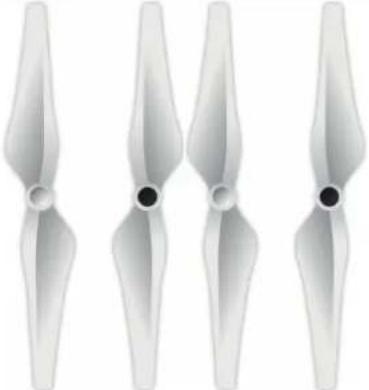
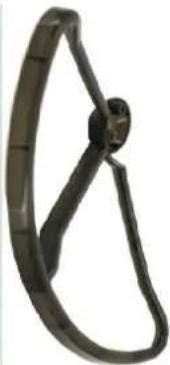
| LiPo Charger incl. Power cable | 4 Rotors(2 left / 2 right) | 4 rotor protectors |
 |  |  |
| Micro USB cable Small pieces 1 LiPo-battery 11.1V 3S | ||
 |  |  |
Required accessories
4 AA-batteries 1.5V

Important notice!
On our ACME website (http://www.ACME-online.de) more advice, notes and updates are available.
Always refer on this manual when assembling or activating the model!
Index
Safety Advice.... 23
Information on the contained LiPo battery. 23
Introduction.... 24
Content of the box/required components.... 25
Important notes.... 25
Index....26
Disclaimer and warnings.... 26
Precautions before very flight.... 27
Safety advice on the LiPo battery and charging.... 27
Model features and description.... 27
Controller.... 28
Preparation.... 29
Description on the balancer and charging process.... 30
Battery maintenance.... 31
Rotor protections.... 32
10 points before the first flight.... 32
Controlling the model.... 33
First flight – we start.... 34
Flightmode „Home lock“ 35
Fail Safe = Automated safety landing.... 36
Fence Mode / Virtual fence.... 36
Action – zoopa Q Evo 550 Movie 37
Technical Data.... 38
Spares and accessories.... 39
Warranty.... 40
Disclaimer and warnings
Disclaimer and warnings
Please read this before handling and use of the model and its components!
With the commissioning of the model you agree to the terms of the disclaimer and agree to the instructions.
The use is not suitable for persons under 18 years!
Build the model according to the instructions. Any changes to this or uses of
Third-party products / spare parts can cause damage.
This excludes the acquisition of warranty claims!
The model is already in the default flight in a finished state. Please note that allowed for a functional test, a calibration and a firmware upgrade, the propellers are not mounted for safety reasons.
Take your time for the first start.
There is no responsibility for damage or injury from the manufacturer, importer or distributor acquired, resulting from the use of the product.
This applies to:
- Persons who are not in a condition to operate the model completely and safely. This is especially true under the influence of alcohol, medication, drugs or any substances, as well as potential physical or mental disabilities
Note that even diseases have a negative impact on your constitution and perception
• Damages and injuries caused intentionally
- Damage is based on the use of foreign equipment or spare parts
- incorrect operation and faulty construction / setting
• consequential damages that go from worn parts not exchanged out
• damage from effects of overvoltage
- Fly or structure in improper conditions, such as Moisture, darkness, dirt, bad weather conditions, etc.
• Influence of magnetic or interferences (especially 2.4 GHz Wi-Fi signals)
• Violation of privacy of third persons in respect of the use of video and audio recordings
- Improper handling of the charging units
- losses during the flight of the model
Precautions before each flight
- Check if the proper condition and operation of all components is ensured
• The LiPo battery is in a proper condition as well - batteries inside the remote control have neither nor the model the full battery voltage Interfere with the signal from the remote control and the GPS module • No sources of interference
- The order of operation is observed: only remote control and then switch on the model
- The order is maintained when switching off: Switch off only model and then the remote control
- The start and at the landing point min. 5 meters in radius without disturbing objects are
- That there are no children, animals, obstructions or power lines are located in the airfield
- Only original spare parts and accessories are used
- The model of magnets (tools, car speakers, etc.) is kept away. To avoid damaging the compass If errors or irritation occur, contact your dealer directly.
Safety Information for LiPo battery and charging
- Use only the original 3S LiPo battery / 11.1V
- If the battery is deformed, discolored or soft is, this may no longer be used
- Store. The battery between 15^ and 25^ in a dry and dark places The charge must be min.
Amount to 75% - Store out of reach of children and animals
- Keep away from fire, water, heat sources and contaminants that can cause a short circuit
- Only use the original charger
- Avoid Any mechanical stress and not open
- NEVER SHORT CIRCUIT
- If gases or liquids escaping from the battery, you must not come into contact with the battery
- Any improper use can lead to health problems
- Dispose of used batteries properly and professionally
- The battery cannot be fully discharged (under 10.2V)
Model features and description
The zoopa Q Evo 550 is delivered in almost flightready condition and has been tested and configured. A few steps need to be performed before the first flight.
| Integrated modules:- Flight stabilizing control unit- GPS- and compass module- RC-receiver- ESC-units (4 pcs.)- Motor (4 pcs.)- LED indicator- USB-connection cable (for upgrades) | Functions:- Fence (Virtual fence)- Fixed height (free flight)- Fixed point (GPS- supported flight)- Evo mode (flight without descent)- Home Lock (start-point related flight)- Fail-Safe- mode- Undervoltage LED-alarm (optical)- Auto landing / auto home / return home |


The zoopa Q Evo GPS RTF Quadrocopter features an automatized (and autonomous) trim function. Manual trimming is generally not required and may lead into drifting when GPS mode is activated.
Please contact the supplier ACME the game company GmbH (Phone: +49 2944 973830) if you have any further questions.
Controller features
The controller offers various possibilities to control and modify the zoopa Q Evo 550.
| Left rotary switch „Fence“(Virtual fence) | Optimized beginner mode. Limitation of the flight area |
| Left flip switch | 0 – Fixed height1 – Evo Mode2 – Home lock |
| Left control stick | Motor speed and vertical axis control |
| Trims | Manual trimming – for Evo 550 is generally not required and may lead into drifting when GPS mode is activated. |
| Binding | Binding between model and controller(already paired at delivery) |
| Control mode 1 | Mode 1 gas stick on the right |
| Control mode 2 | Mode 2 gas stick on the left (most popular style) |
| Dual Rate | Switch between beginner- (1 beep) and professional mode (2 beeps) |
| On/Off switch | Switches the controller On and Off |
| Right rotary switch „Camera Roll“ | Optional Gimbal control |
| Right flip switch | 0 – Fixed height1 – Fixed point2 – Auto home |
| Right control stick | Turn and Pan of the model |
Preparation
Only a few steps are required to get the zoopa Q Evo 550 ready to fly.
Prepare sufficient space to work and get the content of the box ready.
You additionally require 4pcs. AA batteries 1.5V
---do not connect the flight battery yet--
1. Landing gear
Turn the zoopa Q Evo 550 upside down and make sure that the motors or GPS tower don't take any damage. Plug the two landing gears into the model, so that the longer part points towards flight direction.
Use the four 12x2.5 mm screws to mount it. Lead these through the holes and tighten them with the supplied tools. The middle hole won't be used.
2. Rotors
Prepare the 4 rotors. Their movement directions differ:
2 turning left (CCW)- and 2 turning right (CW).
Matching symbols are placed on the rotors. In addition, 2 rotor nuts have different colors.
Silver nut >fixed turning right
Black nut >fixed turning left
!!The rotors have to be mounted tightly and in the correct way!!!
Perform this step for step.
Assembly from pilot's view
Motor 1: front right – orange rotor with silver cap
Motor 2: front left – orange rotor with black cap
Motor 3: rear left – white rotor with silver cap
Motor 4: rear right – white rotor with black cap

3. Controller batteries
The controller requires 4pcs. AA-batteries 1.5V or rechargeable batteries with 1.2V. Please only use new and valuable batteries.
Check the polarity and insert the batteries into the compartment of the controller. Make sure it is safely closed after inserting. The batteries shall be replaced after 10 uses!
As soon as the voltage goes down, the controller starts to beep and the LED flashes red.
A quick beep signalizes low voltage. Starting the model is not possible then.
Battery charger and how to charge
A high quality charger is included with the zoopa Q Evo 550 quadrocopter.
It helps you to charge and maintain the battery.
The following section shows you the details.
Only use original ACME zoopa Q Evo 550 LiPo-batteries.
!!! Third-party products can damage the model!!!
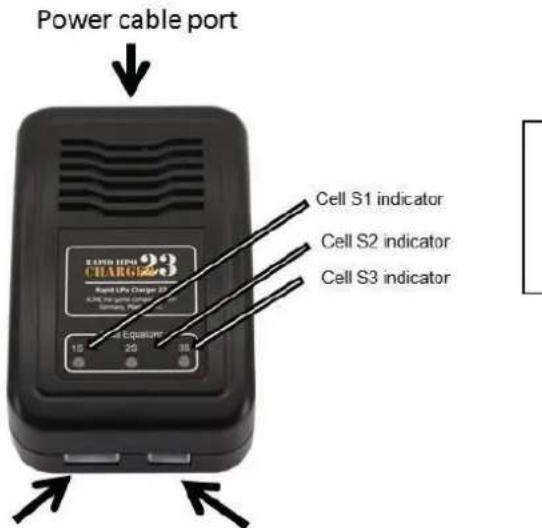
Battery port (connect with balancer plug)
Technical details: Input voltage: 100-240V AC Output: 1200mA Display: 3× Bicolor LED
Optional port for a 2S LiPo 7.4V battery
Make sure that there is sufficient air circulation and a dry and clean area while charging.
!!!Pay attention on the warning- and security notices!!!
Connect the power cable to the charger and then to your power outlet (100-240V).
Never connect two batteries at once!
Once the charger is ready for use, a red/green blinking will appear.
Connect the LiPo- batteries balancer cable (white plug) with the chargers front port.
Please note that it can only be plugged in one direction! The cable with the T-plug (black/red) are not required for charging.
Charging starts automatically.
The three LEDs on the charger will light up in red.
Depending the batteries capacity, charging takes up to 1 till 1.5 hours. Each cell (3pcs) are being charged one another.
As soon as one cell is fully charged, the matching LED switches to green, this may happen in various orders.
The battery is fully charged and ready for use as soon as all LEDs turn green. After you have carefully disconnected the battery from the charger, the LEDs turn to standby mode again (Green/red flash).
NOTE:
If you disconnect the battery before charging is complete, the charger automatically switches to standby mode.
If the battery charger detects an overload or short circuit, charging stops automatically.
Battery maintenance
Please note the following steps to ensure a long battery life:
- Never store the model with connected battery and disconnect the battery after every use
- Before you store the battery for a longer time, make sure that it is charged (minimum 50%)
- Disconnect the battery from the model
- Always store at regular room temperature
- Constantly charge the battery every 3 months if you are not using it
Disregarding these steps may lead into total damage of the LiPo- battery due to the batteries physically conditions.
Batteryvoltages
Battery charged 100%: Every cell has approx. 4.2V, total voltage 12.6V
Battery charged 90%: Every cell has approx. 4.0V, total voltage 12.0V
Battery charged 75%: Every cell has approx. 3.9V, total voltage 11.7V
Battery charged 50%: Every cell has approx. 3.7V, total voltage 11.1V
Battery charged 20%: Every cell has approx. 3.6V, total voltage 10.8V
Rotor protectors
Rotor protectors are included. They differ in A/B remarks. The marks are placed between the two screw bits.
Rotorprection A = Black cap
Rotorprotection B = Silver cap
Unmount the 2 screws that hold the white LED board on the arm. Attach the rotor protection instead and fix it with the screws.

natural_image
Close-up of a black and orange propeller with a circular base, showing no text or symbols.We highly recommend to mount the rotor protectors if you are a beginner as these prevent damages on the model!
10 Steps before flight
Do not ignore these points. They ease you to start and fly the model safely.
- Sign a Model-flight insurance:
Since 2005, an insurance for RC models is required. Obtain information from your local RC club or dealer and through the local model association. - You need a special approval for commercial flights.*
- Get the permission from the owner of the area you are flying in.*
-
Check the allowed flight height - especially in airport areas!*
Especially check the allowed flight height in areas close to airports and make sure you hold a minimum distance of 1500m. Regularly, the allowed max. height is 100m. -
Make sure that the LiPo- battery is fully charged and in good condition.
-
Check the controller batteries as well. Replace them after 10 flights.
-
Check other components like the landing gear or screws, make sure that they are fixed firmly.
-
Check all propellers. Tighten the spinners with the supplied wrench. Check the motors ease of movement and the condition of the propellers. Remove dirt. Replace damaged propellers!
-
Safe starting position
Make sure that the position offers at least 5 meters free space in all directions and that no power plants or other obstacles may disturb the flight. Avoid airfields with high-voltage power lines.
- GPS-Signal allocated?
!!Wait until the initialization is completely finished!!
DEFINITELY note, that the GPS-signal has to be refound after EVERY location change! Disregard may lead to a „FlyAway“ – a return flight to the previous start point.
A quadrocopter is not suited to fly over crowds, for example festivals. A technical defect, which can't be excluded, may lead into a crash. Personal injuries may appear!
You are responsible for your acts!
*Regularly check your countries latest legislation in regards to multicopters.
!! Done!!
Controls
Please perform the following settings on the controller (Mode2 = Gas left):
Left stick > center Upper left switch > 0
Right stick > center Upper right switch > 0
| Controller (Mode 2) | Model(←front) | Action | ||
 |  | The left stick (front / back) of the controller controls the motor speed and thus the ascent and descent of the model. In the center, the model holds the current altitude. | ||
 |  | YawThe left stick (left or right) turns the model around the vertical axis.-Stick to the left> Counterclockwise yaw- Stick to the right>Clockwise yaw | ||
 | 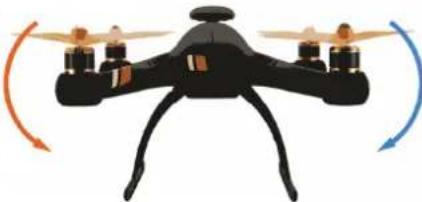 | Roll / NickThrough the right strick, the roll axis of the quadrocopter is addressed. For a forward / backward movement (pitch) move the stick forward / back. | ||
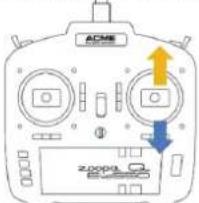 | 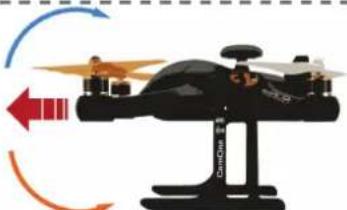 | • In GPS mode, the copter will hold the position when you release this stick. | ||
 |  |  | 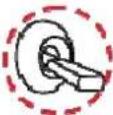 | To activate a function on the right side, note that theleftswitch is set to 0 = Fixed height.L0 + R0: Starting without GPSL0 + R1: GPS-supported flyL0 + R2: Return to start point(Only with full GPS support) |
| Fixed height | Fixed point | Auto Home | ||
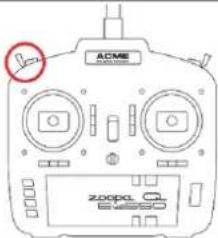 |  Fixed height Lock Fixed height Lock |  Evo Mode Evo Mode |  Home Home | To activate a function on the left, the right switch has to be set to 0=Fixed height. L0 + R0: Starting without GPS L1 + R0: No Descent L2 + R0: Startpoint-orientated flight |
 | Fence = Virtual Fence This mode limits the distance on 150m on the horizontal and 80m on the vertical line. | |||
 | Camera Roll This rotary switch enables a tilt axis control of an optional camera gimbal. | |||
First flight
To have the full support while flying, we recommend to activate GPS. Switches have to be set as followed:
Left 0 + Right 1
Also check the previous section „10 points before flight“
Beginners!
Activate the D/R button after you have switched on the controller. The beginner mode will be confirmed with a beep sound. Speed will be reduced now.
Please note that the quadrocopter reacts oppositely if it is flying towards you. When moving the stick to the left, the model flies to the right – when moving the stick to the right, the zoopa Q Evo 550 flies to the right! Limit yourself on Position hold, forwards and backwards fly at the beginning.
Start
Set both flip switches (left and right) to „0“.
Wait for the flash of the blue LEDs inside the GPS tower, beginners shall wait a bit longer for an extended GPS-support.
To start the motors, pull down the left stick into the right corner and wait for the motors to start running. Then release the stick, so it returns into center position.
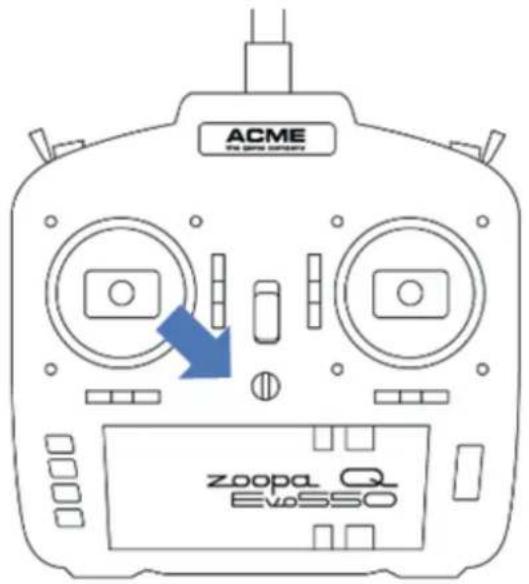
Now switch on the GPS- mode, left switch = 0 / right switch = 1. Slowly lift up the left stick. The model takes off.

For details on how to control the model in the air, please check the section „Controls“.
Undervoltage protection
The flight time depends on your flight attitude. If the battery voltage decreases to it's minimum,
the 1st stage of the undervoltage protection will be automatically activated. The LEDs flash red, fly back and land as fast as possible. This will be performed from 10.8V.
In an additional 2nd stage, the model performs an automatic landing process, starting from 10.5V. The model has no obstacle recognition, so make sure that you fly above a free area that ensures safe landing. You can adjust the automatic return flight with manual controls. This is not an emergency brake and shall be used carefully
Landing
To land the model, bring into a horizontal and stable flight attitude, approx. 1 meter above the landing site. This shall be plain. Carefully pull down the left stick (Gas) until the model has landed.
Push down the stick into the left corner and release it until the motors have stopped working.
Put away the controller without switching off and disconnect the LiPo battery from the model. You can now switch off the controller!
Flight mode „Home lock“
When turning the quadrocopter during flight, pilots can be confused with the commands. The „home lock“ mode will assist you in this matter.
The mode safes the models adjustment during start.
Home lock >basepoint orientated (Starting point)
In Home lock mode, the zoopa Q Evo 550 flies in orientation of the starting point. This means, that the model flies away from the starting point when pushing the right stick forwards and returns to the starting point when pulling it back again, independent from the models adjustment and its position in regards to the starting point.

Fail Safe/ Auto Home = Automated landing
In case of signal loss, the zoopa Q Evo 550 features a Fail Safe mode.
This causes a return to the starting point with automated landing.
When will the Fail Safe be performed?
If the controller signal (defect, switch off or low voltage) is lost, the quadrocopter waits 10 seconds for incoming commands. If no commands given, the zoopa Q Evo 550 rises onto 20m height and returns to the starting point. It waits another 10 seconds and then starts landing.
By using the right switch in „Auto Home“ mode, the zoopa Q Evo 550 (Left switch = 0 / right = 2) automatically returns and lands.

Fence Mode
Optimized for beginners, this mode offers a great protection at first flights.
This mode limits the flight distance for 150m on the horizontal and 80m on the vertical line, calculated from the starting point.
To activate the virtual fence, the left rotary switch has to be turned to the right till end position.

Firmware Updates
To keep the model up to date, visit our homepage:
http://www.ACME-online.de
The page also offers further and detailed information.
Action! --- zoopa Q Evo 550 Movie FPV – First Person View
Turn your zoopa evo into a FPV-quadrocopter. Add a HD-camera, expand it with a video transmitter, screen/video goggles and be the pilot aboard. The so-called FPV flight (First-Person-View/ flying from pilots view) belongs to the specialty events in RC modeling and becomes more famous every day.

natural_image
Close-up of a black drone with a camera module mounted on an arched frame (no visible text or symbols)Connection
The zoopa Q Evo 550 offers connection possibilities as shown on the below picture.

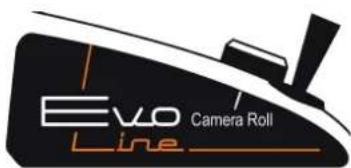
The rotary switch „Camera Roll“ enables Gimbal control, max. values are 45^ upwards and 130^ downwards.
Highest aspirations are our motivation. Therefore we have developed a solution that harmonizes perfectly and delivers excellent results.
Following options are available:
-CamOne Infinity (COIN01)
1080p Full-HD, integrated display and Live-Video Out are only a few highlights of the flagship http://www.CamOneTec.com
-CamOne Xplore (COXP01)
dynamic shape,1080p Full-HD, integrated display, Live-Video Out
-FlyCamOne 1080p with Gimbal Light control
1080p Full-HD recordsings and Gimbal Light control. Adjusts the camera into the best vertical position.

natural_image
Product photo showing a camera module, a 3D camera assembly with green and orange components, and an wireless network device (no visible text or symbols)Technical Details:
| - | Operating | temperature | -10°C | ~ | 50°C | |
| - | Flight | weight | 1000g | ≤ | ||
| - | Charger | AC-port | 100-240V | |||
| - | Charging | current | 800mA | |||
| - | Compensation current consumption | 200mA | ||||
| - | Charging output | 20w | ||||
| - | Battery | type | LiPo | |||
| - | Working | frequency | 2.4GHz | IS | ||
| - | Control | channels | 6-channel | + | ||
| - | Range | 300m | ||||
| - | Receiver sensitivity (1% PER) | >-93dBm | ||||
| - | Sender current drain | <20dBm | ||||
| - | Controller batteries | AA 4 pcs. |
zoopa Q Evo 550 Spares- / Accessories
Please note that only original parts grant full functionality and warranty.
| Art. No. | Description | EAN-No. |
| ZQE550-01 | zoopa Q Evo 550 Rotor Set white self-tightening 1x CW 1x CCW | 4260403220016 |
| ZQE550-02 | zoopa Q Evo 550 Rotor Set orange self-tightening 1x CW 1x CCW | 4260403220023 |
| ZQE550-03 | zoopa Q Evo 550 Screw set | 4260403220030 |
| ZQE550-04 | zoopa Q Evo 550 Tools | 4260403220047 |
| ZQE550-05 | zoopa Q Evo 550 Landing gear | 4260403220054 |
| ZQE550-06 | zoopa Q Evo 550 Rotor protection 4pcs. | 4260403220061 |
| ZQE550-07 | zoopa Q Evo 550 Body topside | 4260403220078 |
| ZQE550-08 | zoopa Q Evo 550 Body subshell | 4260403220085 |
| ZQE550-09 | zoopa Q Evo 550 Multi controller box | 4260403220092 |
| ZQE550-10 | zoopa Q Evo 550 GPS Module | 4260403220108 |
| ZQE550-11 | zoopa Q Evo 550 18A ESC 1 piece | 4260403220115 |
| ZQE550-12 | zoopa Q Evo 550 USB cable micro plug | 4260403220122 |
| ZQE550-13 | zoopa Q Evo 550 LiPo battery 3S/11.1V 2200mAh | 4260403220139 |
| ZQE550-14 | zoopa Q Evo 550 LiPo battery 3S/11.1V 3300mAh | 4260403220146 |
| ZQE550-15 | zoopa Q Evo 550 Brushless Motor 1300KV CW | 4260403220153 |
| ZQE550-16 | zoopa Q Evo 550 Brushless Motor 1300KV CCW | 4260403220160 |
| ZQE550-17 | zoopa Q Evo 550 LED Set | 4260403220177 |
| ZQE550-18 | zoopa Q Evo 550 Mainboard | 4260403220184 |
| ZQE550-19 | zoopa Q Evo 550 2.4GHz receiver 6 channel | 4260033043108 |
| ZQE550-20 | zoopa Q Evo 550 2.4GHz controller 6 channel | 4260403220207 |
| ZQE550-22 | zoopa Q Evo 550 Camera mount | 4260403220221 |
CamOne FPV video cameras and accessories
| Art. No. | Description | EAN-No. |
| COIN01 CamOne infinity Full HD 1080p camera 4260033041906 | ||
| COIN31 CamOne Infinity 142° lens 4260033042811 | ||
| COIN32 CamOne Infinity 96° lens 4260033042828 | ||
| COIN36 CamOne Infinity Power + View cable 4260033049346 | ||
| FCHD77 | CamOne FPV-Screen Stratos 7" 5,8GHz Diversity Screen "ABF" | 4260033042699 |
| FCHD77-N CamOne | Stratos Power cable 220V 12V | 1,5A | 3,5mm 4260033042705 | |
| FCHD78 | CamOne FPV- Screen Stratos+ Movie 7" DVR 5,8GHz Diversity Screen "ABF" | 4260033042910 |
| FCHD78-B CamOne | Stratos+ replacement battery 1800mAh 4260033043078 | |
| FCHD79 | CamOne FPV- Screen Stratos+ 7" 5,8GHz Diversity Screen "ABF"HIGH RESOLUTION | 4260033042927 |
| FCHD98 | CamOne FPV- Screen Stratos+ Mega 9" 5,8GHz Diversity Screen "ABF"HIGH RESOLUTION | 4260033042934 |
| FCHD91 CamOne Video Transmitter 5,8GHz 25mW 4260033047496 | ||
| ZQE131 zoopa Q Evo | 2D Air Gimbal 4260403220887 | |
| PNX058-F | Phoenix CPL Antenna Set 5,8GHz Black | 4260033045362 |
FAQ
| Problem | Solution |
| The controller does not react to any commands | Check the controller batteriesCheck the polarity of the batteriesOn/Off switch activated? |
| The controller immediately shows undervoltage after activation | Replace the batteriesUse high- quality Alcaline batteries |
| The motors do not react at fully charged battery | The control sticks are mechanically blocked and do not reach the end positions in the corner/center |
| The quadrocopter shows undervoltage | Check the batteries voltage. It has to be at least 12V in total.Check each cell with a LiPo tester |
| The quadrocopter does not gain height | Propellers are not mounted correctly or invertedThe battery is not fully chargedThe mounted propellers do not match to the quadrocopterIf still no solution, please contact our service! |
Warranty
The consumer is without prejudice to any claim against the seller granted a guarantee to the following conditions:
» New devices and their components exhibiting defects within 24 months from the purchase due to manufacturing and / or material faults, are ACME the game company at its option, reflecting the current state of the art exchanged or repaired free device. For wear parts (eg batteries, motors, etc.), his warranty is valid or 3 months from purchase.
» This warranty does not apply if the device defect is due to improper treatment and / or failure to comply with these instructions.
» This warranty does not extend to self- paid by the customer services.
» Warranty claims are to make immediate payment of the Guarantee case.
» Ownership of devices or components that are returned to ACME the game company as part of the exchange, shall become the property of ACME the game company.
» By services rendered under warranty, the warranty period is not extended.
» So far there is no warranty case to ACME the game company reserves the right to charge the customer for replacement, repair, or shipping costs. The customer will be informed in advance.
Damages resulting from mechanical influences are not covered under warranty.
Service & Support
ACME the game company GmbH
Westwood
Boikweg 24
33129 Delbrück
Germany
Telefon: +49 2944 9738 30
natural_image
Two black and orange quadcopter drones with attached control panels, one with visible propellers and the other with red accents (no text or symbols on the drone body)natural_image
Black quadcopter drone with orange propellers and camera module (no text or symbols visible)Battery port (connect with balancer plug)
natural_image
Close-up of a black quadcopter with an orange propeller, showing no text or symbols.Action! --- zoopa Q Evo 550 Movie FPV – First Person View
natural_image
Close-up of a black drone with a camera module mounted on an arched frame, no visible text or symbols.Connection
natural_image
Product photo showing a camera module, a 3D camera assembly with green and orange components, and a wireless network device (no visible text or symbols)ACME the game company GmbH
Westwood
Boikweg 24
33129 Delbrück
Germany
Téléphone: +49 2944 9738 30
- Benutzerhandbuch
- Vers. 2.2
- Firmware Updates
- Verbindung
- Safety Advice
- WARNING:
- SERVICE & SUPPORT
- Information on the contained LiPo-battery
- WARNING BATTERY
- CE Declaration
- WEEE Reg. No.: DE64989527
- Thank you for choosing the zoopa Q Evo 550 Quadrocopter
- Please read the following part!
- Content of the box
- Required accessories
- Important notice!
- Index
- Disclaimer and warnings
- Precautions before each flight
- Safety Information for LiPo battery and charging
- Model features and description
- Controller features
- Preparation
- Landing gear
- Rotors
- Assembly from pilot's view
- Controller batteries
- Battery charger and how to charge
- NOTE:
- Battery maintenance
- Batteryvoltages
- Rotor protectors
- Steps before flight
- !! Done!!
- Controls
- First flight
- Beginners!
- Start
- Undervoltage protection
- Landing
- Flight mode „Home lock“
- Home lock >basepoint orientated (Starting point)
- Fail Safe/ Auto Home = Automated landing
- Fence Mode
- Action! --- zoopa Q Evo 550 Movie FPV – First Person View
- Connection
- Warranty
Brand : ACME
Model : zoopa Q Evo550
Category : Remote control toy