
MGD150 - Can opener BLACK & DECKER - Free user manual and instructions
Find the device manual for free MGD150 BLACK & DECKER in PDF.


| Product Type | Electric Can Opener |
| Brand | Black & Decker |
| Model | MGD150 |
| Color | White/Stainless Steel |
| Dimensions (Approx.) | 7.5 x 4 x 10 inches (19 x 10 x 25 cm) |
| Weight | 1.5 lbs (0.7 kg) |
| Power Source | 120V AC, 60 Hz |
| Power Consumption | 100W |
| Cutting Mechanism | Rotating serrated blade |
| Lid Holding | Magnetic holder |
| Safety Features | Automatic shut-off when lid removed; blade guard; non-slip base |
| Materials | Stainless steel blade, ABS plastic body |
| Cord Length | 3 ft (0.9 m) |
| Warranty | 2 years limited |
| Includes | Can opener unit, instruction manual |
| Main Functions | Opens standard metal cans; magnetic lid retention; hands-free operation |
| Cleaning and Maintenance | Wipe with damp cloth; removable cutting lever for cleaning |
| Repairability | Blade replacement possible with service kit |
| Spare Parts Available | Yes (cutting blade, magnetic lid holder) |
Frequently Asked Questions - MGD150 BLACK & DECKER
User questions about MGD150 BLACK & DECKER
0 question about this device. Answer the ones you know or ask your own.
Ask a new question about this device
Download the instructions for your Can opener in PDF format for free! Find your manual MGD150 - BLACK & DECKER and take your electronic device back in hand. On this page are published all the documents necessary for the use of your device. MGD150 by BLACK & DECKER.
USER MANUAL MGD150 BLACK & DECKER
SAVE THIS USE AND CARE BOOK

MGD150

BLACK & DECKER®
IMPORTANT SAFEGUARDS
When using electrical appliances, basic safety precautions should always be followed, including the following:
■ PLEASE READ ALL INSTRUCTIONS.
■ To protect against risk of electrical shock, do not put can opener, cord, or plug in water or other liquid.
■ Close supervision is necessary when any appliance is used by or near children.
■ Unplug from outlet when not in use, before putting on or taking off parts, and before cleaning.
■ Avoid contacting moving parts.
- Do not operate any appliance with a damaged cord or plug or after the appliance malfunctions or is dropped or damaged in any manner. Return the appliance to an authorized service facility for examination, repair, or electrical or mechanical adjustment.
- Keep the cord away from the Knife Sharpener and the path of the knife being sharpened to prevent fire or shock hazard.
■ The use of attachments not recommended or sold by the appliance manufacturer may cause fire, electric shock or injury.
■ Do not use outdoors.
■ Do not let cord hang over edge of table or counter or touch hot surfaces.
■ Do not open pressurized (aerosol type) cans.
■ Do not open cans of flammable liquids such as lighter fluids.
■ Do not operate this appliance in the presence of explosive and/or flammable fumes.
■ This appliance is intended for household use only and not for commercial or industrial use.
SAVE THESE INSTRUCTIONS
POLARIZED PLUG
This appliance has a polarized plug — one blade is wider than the other. To reduce the risk of electric shock, this plug will fit into a polarized outlet only one way. If the plug does not fit fully into the outlet, reverse it. If it still does not fit, contact a qualified electrician. Do not attempt to defeat this safety feature by modifying the plug in any way.
CAN OPENER PARTS
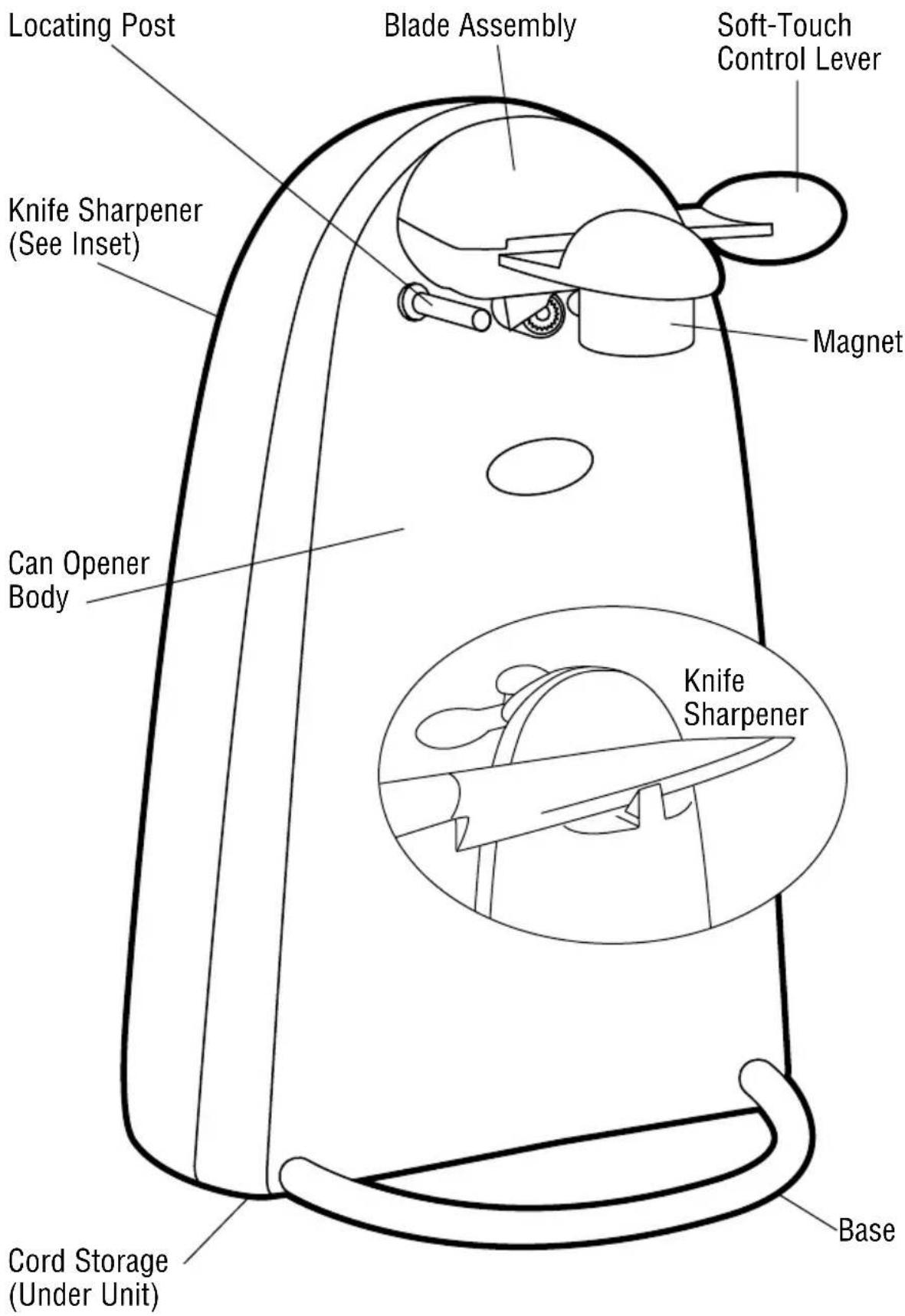
* BLACK&DECKER* is a trademark of The Black & Decker Corporation, Towson, Maryland, U.S.A.
HOW TO USE
-
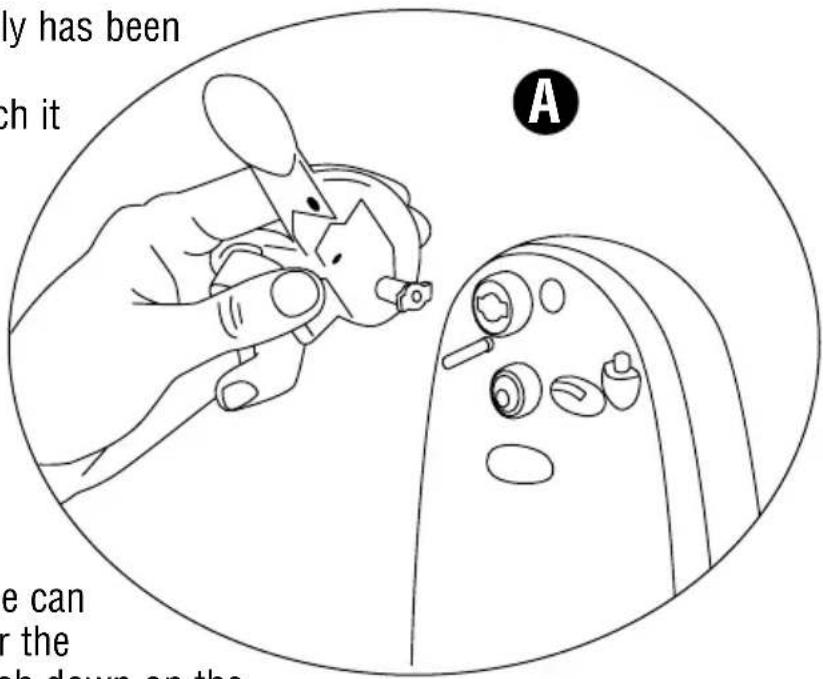
Your Blade Assembly has been packed in a separate cardboard insert. Attach it to the can opener by lining up the key tabs with the key slots, push in and turn (A) until it locks into position.
-
Plug the cord into a standard, 120-volt electrical outlet.
-
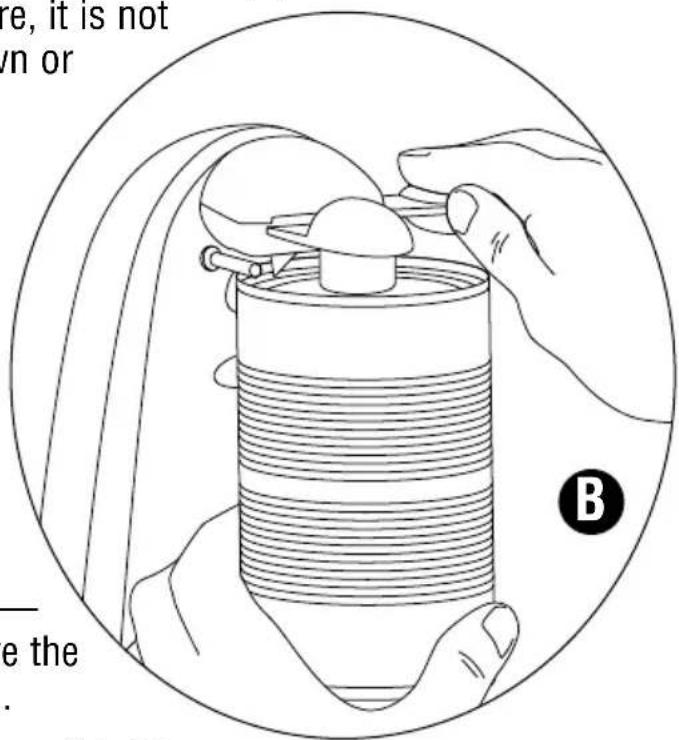
Lift the Lever, tip the can so that the rim is under the Locating Post, then push down on the Lever, making sure the blade is inside the rim. (B) Because of the hands-free feature, it is not necessary to hold the Lever down or support the can during cutting. However, you may have to hold the Can Opener Body when cutting very tall or heavy cans.
-
When the can is opened, the Can Opener will stop automatically. To remove the can, tilt it slightly away from the unit with one hand and raise the Lever with the other.
CAUTION: Avoid contact with the cut edges of the can or lids — they are sharp. Carefully remove the lid from the magnet and discard.
- Unplug when finished. You may "stuff" excess cord back into the bottom of the unit and feed the cord through the notch for convenient storage.
CAN OPENING TIPS
■This Can Opener should not be used to open cans designed to be opened by another method, such as a pull tab, peel-off foil seal, or rolling key. This Can Opener will not open rimless cans or cans with angled corners.
■If there is a dent in the rim of a can, open the other end or start the cutting action just beyond the dent. Cans with heavy seams, uneven rims or odd shapes may cause the Can Opener to stall. If this occurs, turn the can slightly by hand to aid the cutting action.
■Frozen juices or foods in cardboard cans should be opened as soon as they are removed from the freezer. Aluminum lids will not stick to the Magnet.
KNIFE SHARPENING TIPS
■Clean and dry knives before sharpening.
■Do not attempt to sharpen serrated blades, as this will smooth their edges. Do not attempt to sharpen scissors.
USING THE KNIFE SHARPENER
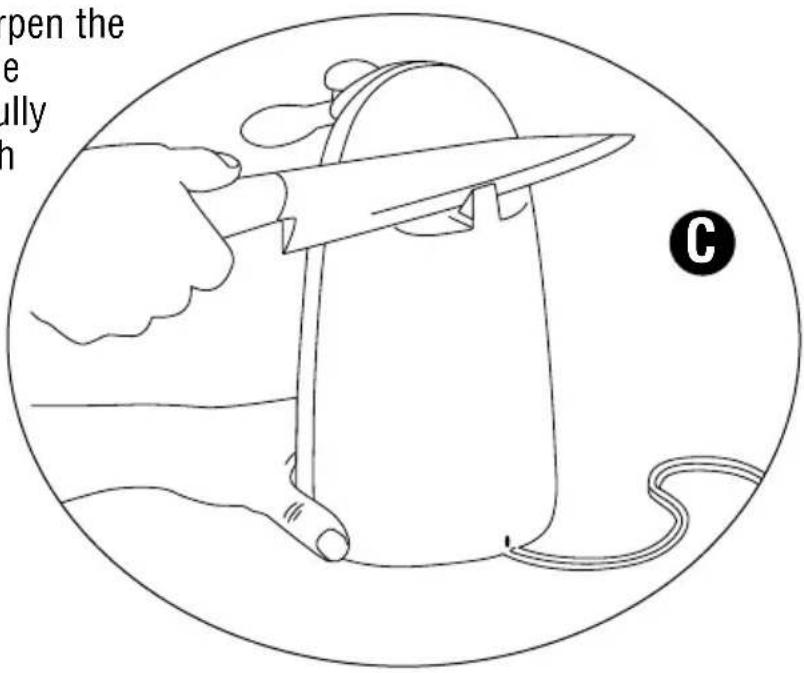
- The slot in the Knife Sharpener is slanted for left or right-handed use.
- For best results, sharpen the entire blade length in one continuous stroke carefully pulling the blade through the slot and slightly up towards you. (C) Repeat until you achieve desired sharpness. Wash and dry knives after sharpening. Use caution with blade after sharpening.
CLEANING YOUR CAN OPENER
- Before cleaning any part of the Can Opener, unplug the cord.
- To remove the Blade Assembly for easy cleaning, lift the Lever up and pull the Blade Assembly out (see A). The Assembly can be washed by hand in hot, sudsy water, rinsed or wiped with a sponge and dried
thoroughly. It is NOT dishwasher-safe. Reverse the procedure to replace the Blade Assembly.
- Before replacing the Blade Assembly, wipe the Can Opener body, and area around the drive wheel with a slightly damp cloth or sponge. To remove stubborn spots, wipe surfaces with a nylon or mesh pad and sudsy water. Follow with a clean, damp cloth. Do not use abrasive cleaners on any part of the Can Opener as they can damage the finish.
NEED HELP?
For any questions on usage of this product, please call the toll-free number on the cover of this book.
FULL ONE-YEAR WARRANTY
Household Products, Inc. warrants this product against any defects that are due to faulty material or workmanship for a one-year period after the original date of consumer purchase. This warranty does not include damage to the product resulting from accident or misuse. If the product should become defective within the warranty period, we will repair it or elect to replace it free of charge. We will return your product, transportation charges prepaid, provided it is delivered prepaid to any Black & Decker Company-Owned or Authorized Household Appliance Service Center.
This warranty gives you specific legal rights and you may also have other rights which vary from state to state. Answers to any questions regarding warranty or service locations may be obtained by calling Consumer Assistance and Information toll free: 1-800-231-9786.

120V 60Hz 1.2 Amps
Listed by Underwriters Laboratories, Inc.
Copyright © 1998 Household Products, Inc.
Pub. No. 174645-00-RV00
Printed in People's Republic of China

natural_image
Black-and-white portrait of an elderly man smiling and holding a small object (no visible text or symbols)Michael Graves
The highly acclaimed work of Michael Graves has restored a sense of humanity to modern architecture, which in turn makes him one of the most recognized architects of our time. Together with Disney™, he designed their corporate headquarters and the Walt Disney™ World Swan and Dolphin Hotels. Notable for his ability to craft inventive items for the home, Michael has designed products for companies such as Alessi, F.A.O. Schwartz and Steuben. In light of his vast body of work, Michael Graves has, and continues to, define the aesthetic of the 1980's and 90's.
The Michael Graves product line is an inspired balance of form and function. At once it is sensible and sublime, practical and whimsical, utilitarian and aesthetically pleasing. Michael Graves creates useful objects, which not only carry their weight, but simultaneously lift our spirits.
Brand : BLACK & DECKER
Model : MGD150
Category : Can opener