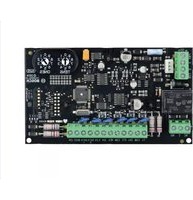
B901 - Access Control System BOSCH - Free user manual and instructions
Find the device manual for free B901 BOSCH in PDF.


| Product Type | Access Control System Controller |
| Model | B901 |
| Brand | Bosch |
| Dimensions (W x H x D) | 120 x 80 x 30 mm |
| Weight | 200 g |
| Power Supply | 12V DC, 500 mA |
| Power Consumption | < 3 W |
| Operating Temperature | 0°C to 50°C |
| Storage Temperature | -20°C to 70°C |
| Humidity | 5% to 95% RH (non-condensing) |
| Read Range | Up to 5 cm (proximity card) |
| Supported Card Types | 13.56 MHz MIFARE, DESFire, etc. |
| Communication Interface | RS-485, Wiegand |
| Maximum Users | 10,000 |
| Event Log Capacity | 50,000 events |
| Enclosure Material | ABS plastic, vandal-resistant |
| Protection Rating | IP54 (indoor/outdoor with housing) |
| Main Functions | Access control, card reading, door lock control, alarm output |
| Maintenance | Clean with a soft dry cloth; do not use solvents |
| Security Features | Encrypted communication, tamper detection |
| Spare Parts | Mounting bracket, screw kit, connecting cables |
| Repairability | Modular design; replaceable reader module |
| Certifications | CE, FCC, UL |
Frequently Asked Questions - B901 BOSCH
User questions about B901 BOSCH
0 question about this device. Answer the ones you know or ask your own.
Ask a new question about this device
Download the instructions for your Access Control System in PDF format for free! Find your manual B901 - BOSCH and take your electronic device back in hand. On this page are published all the documents necessary for the use of your device. B901 by BOSCH.
USER MANUAL B901 BOSCH
The B901 Access Control Interface Module is a fully supervised, addressable SDI/SDI2 bus device that allows access control integration for Bosch compatible control panels. This module offers 14 programmable levels of access authority. Authority for access is controlled by the user level, the group of the user, the time of day, the door state, and the area armed state. Control each authority restriction through automatic and manual functions.
A door that has been automatically released by the control panel will require manually re-engaging to return to normal.
In a combination Fire/Intrusion system, the B901 should not be used to lock doors used for emergency egress unless these doors have a mechanical release mechanism.
Functions
Reader input
- Standard 5-wire Weigand interface.
• +5 VDC or +12 VDC supplied to power readers. - Open collector output for reader LED.
Unsupervised inputs
- Tamper. Supports normally open devices.
- REX. Supports normally open devices. Request to Exit (REX) on short.
- RTE. Supports normally open devices. Request to Enter (RTE) on short.


▶ Direct interface to compatible Wiegand card readers
▶ On-board buzzer output and supervised on-board points
▶ Request to Exit and Request to Enter inputs that can have a shunt only option
▶ Four door states: Locked, Unlocked, Secured, Fire Unlock
▶ SDI2 support as well as SDI compatible
Supervised input
- 1 kΩ End-of-line resistor.
- Use for door contact.
Door states
Four door states are controlled through the keypad, RPS (Remote Programming Software), scheduled events (SKEDs), and automatic programmable functions in the door controller parameters:
- Locked. The lock relay can be deactivated (door allowed to open) with a valid credential or REX/RTE input.
- Unlocked. The Lock relay is held in the deactivated state to allow access without the need of a credential.
- Secured. The lock relay is activated and no access is allowed even with valid credential (overridden by Fire Unlock).
- Fire Unlock. The lock relay is held in the deactivated state during a Fire Alarm. This allows free access to and from the building during an emergency.
Two automatic functions link the door state to the arming state of the area:
- Auto Door. When the area is Off (disarmed), the door state is switched to “Unlocked”.
- Disarm on Open. With this function as "Yes," a user with valid access rights activates the strike and turns off (disarms) the system after the door is opened. With this function as "No," the area turns off (disarms) upon the strike activation.
Indicators
- Heartbeat LED. Blue LED blinks on and off when system is operational. A rapid three-blink sequence indicates a system error.
- Reader LED. Rapidly blinking LED indicates the Card data is being received. When the LED is off, no card data is being received.
Certifications and approvals
| Region Regulatory compliance/quality marks | |
| Australia RCM ACMA | |
| Europe CE EMC, RoHS [B915, B920, B930, B430, B208, B308, B901] | |
| USA UL Underwriters Laboratories | |
| UL UL 294 - Standard for Access Control Units and Systems | |
| UL UL 365 - Police Station Connected Bur-glar Alarm Units | |
| UL UL 609 - Standard for Local Burglar Alarm Units and Systems | |
| UL UL 864 - Standard for Control Units and Accessories for Fire Alarm Systems (10th edition) | |
| UL UL 985 - Household Fire Warning Sys-tem Units (6th edition) | |
| UL UL 1023 - Household Burglar Alarm Sys-tem Units | |
| UL UL 1076 - Proprietary Burglar Alarm Units and Systems | |
| UL UL 1610 - Central Station Burglar Alarm Units | |
| CSFM California State Fire Marshal (see our website) | |
| FCC Part 15 Class B | |
| Canada ULC Underwriters Laboratories of Canada | |
| ULC CAN/ULC S303 - Local Burglar Alarm Units and Systems | |
| ULC CAN/ULC S304 - Standard for Signal Re-ceiving Center and Premise Burglar Alarm | |
| ULC ULC-ORD C1023 - Household Burglar Alarm System Units | |
| ULC ULC-ORD C1076 - Proprietary Burglar Alarm Units and Systems | |
| IC ICES-003 - Information Technology Equipment (ITE) | |
Installation/configuration notes
The B901 Access Control Interface Module is individually programmed through the control panel. The module is compatible with several credential models and readers.
Notice
Not all products and features are available in all regions. Consult your local Bosch representative for availability details.
Compatibility
| Bosch readers and accessories | ARD-AYJ12 EM Prox MullionARD-MINIPROXARD-PROX-PPLARD-SER90-WIARD-SER40-WIARD-SER10-WID8223 HID Prox Wall MountD8224 HID Prox MullionD8224-SP Low-profile card reader, HIDproxD8225 HID Prox Mini MullionD8229 PIN Reader |
| Bosch tokens and cards ACA-ATR13 EM TokensACD-ATR11ISO EM CardsACD-ATR14CS EM Clamshell CardsACD-IC2K26-50 iClass CardsACT-IC2K26-10 iClass TokensD8236-10 HID Prox CardsD8236KF-10 HID Prox Tokens | |
Parts included
| Quantity | Component |
| 1 B901 | |
| 1 1 kΩ 12 watt end of line resistor | |
| 1 Innerconnect cable (included) | |
| 3 # 6x3/8 self-tapping screws | |
| 1 Literature pack | |
Technical specifications
Environmental considerations
| Relative humidity 5% to 93% at +32°C (+90°F) |
| Temperature (operating) 0°C to +49°C (+32°F to +120°F) |
Properties
| Dimensions | 2.9 in x 5.0 in x 0.6 in(73.5 mm x 127 mm x 15.25 mm) |
Power requirements
| Current | Standby:110 mA + reader currentAlarm: 110 mA + reader current |
| Output (alarm) Form C relay (COM, NC, NO) at 12/24V @ 2.0 A | |
| Voltage (input) 12 VDC nominal | |
Wiring
| Terminal wire size 18 AWG to 22 AWG (1.02 mm to 0.65 mm) | |
| SDI2/SDI wiring to B901 + Reader with external power supply | Maximum distance – wire size (unshielded wire only): 1000 ft (305 m) – 22 AWG (0.65 mm), 2500 ft (762 m) – 18 AWG (1.02 mm) |
| SDI2/SDI wiring to B901 + Reader from control panel | 175 ft (61 m) – 22 AWG (0.65 mm), 500 ft (152 m) – 18 AWG (1.02 mm) |
| Wiring distance from B901 to Reader | 200 ft (61 m) – 22 AWG (0.65 mm), 500 ft (152 m) – 18 AWG (1.02 mm) Reader dependant |
Credentials
| Compatible credential formats | 37 bit. HID H10304 (With Site Code)37 bit. HID H10302 (No Site Code)26 bit. HID H10301 EM-EM4200 (3-byte or 5-byte) |
Ordering information
B901 Door Controller
Fully supervised, addressable SDI2/SDI bus device that allows access control integration for Bosch G and B Series Control Panels. Order number B901
Represented by:
Europe, Middle East, Africa:
Bosch Security Systems B.V.
P.O. Box 80002
5600 JB Eindhoven, The Netherlands
Phone: +31 40 2577 284
emea.securitysystems@bosch.com
emea.boschsecurity.com
Germany:
Bosch Security Systems, Inc.
130 Perinton Parkway
Fairport, New York, 14450, USA
Phone: +1 800 289 0096
Fax: +1 585 223 9180
onlinehelp@us.bosch.com
www.boschsecurity.us
Asia-Pacific:
Robert Bosch (SEA) Pte Ltd, Security Systems
11 Bishan Street 21
Singapore 573943
Phone: +65 6571 2808
Fax: +65 6571 2699
apr.securitysystems@bosch.com
www.boschsecurity.asia

Brand : BOSCH
Model : B901
Category : Access Control System