
Matica 1160 Ceramic - Iron TERMOZETA - Free user manual and instructions
Find the device manual for free Matica 1160 Ceramic TERMOZETA in PDF.


| Product Type | Iron |
| Brand | Termozeta |
| Model | Matica 1160 Ceramic |
| Soleplate | Ceramic |
| Power | 2400 W |
| Water Tank Capacity | 300 ml |
| Continuous Steam Output | 30 g/min |
| Variable Steam Output | Yes |
| Spray Function | Yes |
| Anti-Drip Function | Yes |
| Calc'net (Anti-Scale) Function | Yes |
| Auto Shut-Off | Yes, after 8 minutes |
| Power Cord | 2 meters, swivel |
| Cord Length | 2 m |
| Weight | 1.2 kg |
| Dimensions (L x W x H) | 30 x 12 x 15 cm |
| Color | White and purple |
| Care and Cleaning | Clean the soleplate with a damp cloth after cooling. Use the self-cleaning function regularly. |
| Safety | Auto shut-off when idle. Thermal fuse. |
| Spare Parts | Available from Termozeta customer service. |
| Repairability | Repairability index not communicated. Contact customer service. |
| General Information | Iron suitable for all fabric types. Supplied with measuring cup and instruction manual. |
Frequently Asked Questions - Matica 1160 Ceramic TERMOZETA
User questions about Matica 1160 Ceramic TERMOZETA
0 question about this device. Answer the ones you know or ask your own.
Ask a new question about this device
Download the instructions for your Iron in PDF format for free! Find your manual Matica 1160 Ceramic - TERMOZETA and take your electronic device back in hand. On this page are published all the documents necessary for the use of your device. Matica 1160 Ceramic by TERMOZETA.
USER MANUAL Matica 1160 Ceramic TERMOZETA
natural_image
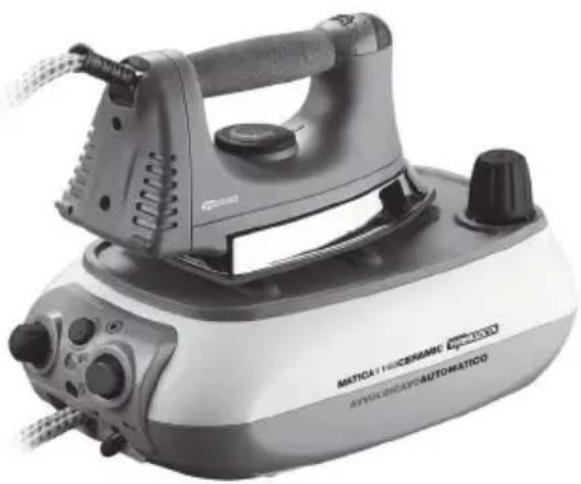
Exterior view of a Matica 1160 Ceramic Automatico air iron (no signage or text on the device itself)MATICA1160
CERAMIC
natural_image
Exterior view of a vintage steam iron with visible branding and control knobs (no text-heavy elements)- DATI TECNICI
- TECHNICAL DATA
- DONNÉES TECHNIQUES
- TECHNISCHE DATEN
- DATOS TÉCNICOS
MATICA 1160 CERAMIC
Steam Station
Type: 105031
230V \~ 50Hz 2000W
Made in China
I
GB
DESCRIZIONE
BASE CALDAIA
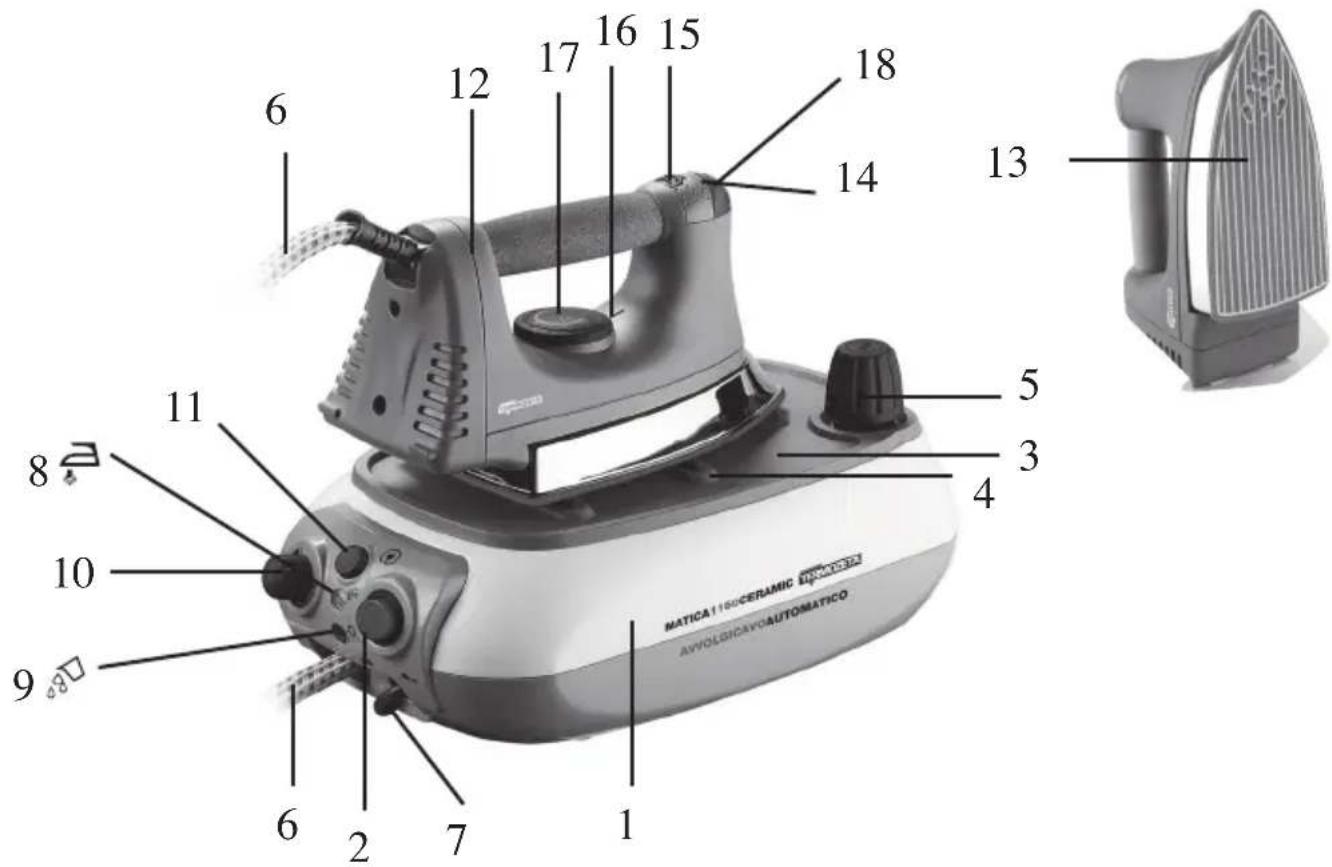
1 Body of steam boiler
2 Iron on/off button
3 Iron support base
4 Non-slip rubber tips for iron
5 Boiler cap
6 Iron-boiler connecting tube
7 Cord
8 "Steam ready" indicating light
9 No-water LED
10 Steam control dial
11 Cord rewind button
IRON
12 Iron
13 Soleplate
14 Steam spray button
15 Cursor for continuos steam
16 Temperature control indicator
17 Temperature control knob
18 Thermostat indicator lamp
DESCRIPTION
BASE CALDAIA
natural_image
Abstract circular emblem with gear-like border and central white symbol (no text or numbers)
This manual is an integral part of the appliance and must be carefully read before using it as it gives important indications with regard to safety of installation, use and maintenance. Keep it with care.
- After taking off the packing make sure that the appliance is intact. In case of doubt do not use it and contact an assistance centre authorised by TERMOZETA.
- Do not leave pieces of packing (plastic bags, polystyrene foam, nails etc.) within reach of children or persons with reduced mental capabilities, since these are potential sources of danger.
- The electrical safety of this appliance is ensured only if it is correctly connected to an effective earthing system in compliance with the existing electrical safety standards. TERMOZETA shall not be held responsible for any damage caused by the lack of an earthing system.
- Before connecting the plug to the outlet check that the working voltage of the appliance corresponds to the one in your house. If in doubt, contact professionally qualified staff.
- Use of adaptors, multiple outlets and extension leads is not advisable. In case of necessity use exclusively approved appliances in conformity with the current safety regulations while making sure that they are compatible with the appliance power. If in doubt, contact professionally qualified staff.
- Any installation which doesn’t comply with what is specified can endanger your safety and the warranty expires.
- The appliance must only be used to iron cloths for domestic purposes.
- For safety reasons pay attention and:
- do not use the appliance when you are barefoot or having wet hands or feet
- do not use the appliance outside the domestic environment
- do not leave the appliance exposed to atmospheric agents (sun, rain, etc.)
- never pull the power cord or the appliance itself in order to disconnect the plug from the outlet
- do not leave the appliance unattended when it is plugged into the main power supply
- never immerse the appliance in water or other liquids
- The appliance can be used by children aged from 8 and above and by people with reduced physical, sensory or mental capabilities, or lack of experience and knowledge, only if they have been given supervision or instructions concerning use of the appliance in a safe way and understand the hazards involved. Children shall not play with the appliance. Cleaning and user maintenance shall not be made by children without supervision.
- The power cord of the appliance should never be replaced by the user himself. In case of necessity contact an assistance centre authorised by TERMOZETA or professionally qualified staff.
- In case of failure and/or malfunctioning of the appliance, turn it off and do not tamper with it. For any repairs contact an assistance centre authorised by TERMOZETA and ask for the use of original spare parts.
- At the end of the life-cycle of the appliance, put it out of service by cutting the power cord after disconnecting the plug from the outlet. For the disposal of the appliance follow the regulations which are
GB
valid in your place of residence.
- TERMOZETA cannot be considered responsible for any damage to persons, animals or things caused by the incorrect installation or as a result of an illegitimate, mistaken or unreasonable use.
- The iron must be used and rested on a firm surface.
- When placing the iron on its base, ensure that the surface on which the base is placed is firm.
- The iron is not to be used if it has been dropped, if there are visible signs of damage or if it is leaking.
- Keep the iron and its cord out of reach of children less than 8 years of age when it is supplied with power or when it is cooling down.
- Never unscrew the boiler cap while the appliance is working but wait for the appliance to completely cool down before opening it.
- Do not iron clothes while wearing them since the steam is very hot and it could cause burnings.
USE INSTRUCTIONS
CHOICE OF THE IRON TEMPERATURE
Turn the iron temperature control knob (17) so that the proper temperature corresponds to the indicator (16) according to the type of cloth to be ironed.
Fig.: 1

natural_image
Circular emblem with gear-like border and central symbol (no text or numbers)

High temperature steam ironing (cotton, linen)

Medium temperature steam ironing (wool, silk)

Low temperature ironing (synthetic, fibres)
FOR STEAM IRONING
HOW TO FILL THE BOILER WITH WATER
• Always unplug the iron from the outlet when filling the boiler with water.
- Unscrew cap (5) counterclockwise and slowly pour the water through the boiler opening by using the provided funnel to avoid any leakage. Screw up the cap again clockwise.
- Only use running water to fill the boiler without exceeding its maximum capacity: never add detergents, chemical additives or water softeners.
SUGGESTION: If water in your area is particularly calcareous, it is advisable to use distilled water.

WARNING!
Never unscrew the boiler cap (5) while the appliance is working but wait for the appliance to completely cool down before opening it.
STARTING UP
- Rest the appliance on a firm flat surface.
- Place the iron on the boiler base (3).
- Fill up the boiler as described in the previous paragraph.
- Completely unwind the power cord (7) and plug into the outlet.
- Press the on/off button (2) on the boiler taking it to (ON).
- Turn the iron temperature control knob (17) to the steam ironing position.
- The pilot light (18) on the iron will go on immediately and will go out a few minutes later, when the required temperature is reached.
- When the pilot light (8) goes on, it is possible to use the jet of steam.
- During operation, the iron light (18) and the “steam ready” pilot light (8) go on and then automatically go out indicating that the iron temperature and the pressure in the boiler are constantly under control.
- Rest the iron on the boiler base (3) during ironing pauses.
GB
IRONING
- Press button (14) on the iron for the steam jet: the steam will stop coming out when you release the button.
- To use the continuous steam function, press the steam button (14) and at the same time slide cursor (15) towards the cork handle. To disable this function, slide cursor (15) in the opposite direction to the handle.
- With the iron held upright at a distance of about 20 cm you can use the jet of steam to smooth out creases and freshen up clothes while they are hanging. Avoid carrying out this operation on any worn garment as the steam is extremely hot and it is possible to get burned.
- Before ironing delicate fabrics it is best to make trial run on a hidden piece e.g. the hem.
- We advise you to iron more delicate fabrics needing low temperatures first, then go on ironing more resistant fabrics needing higher temperatures.
- The amount of steam you want to use during ironing can be set via the steam control dial (10): for more steam, turn the dial in a clockwise direction, for less steam, turn the dial in a counter clockwise direction.

WARNING!
Some drops of water may leak out of the iron soleplate (13) when the first jet of steam starts coming out; this is quite normal and is due to condensation forming inside the iron-boiler connecting tube (6).
This will disappear with the following jets of steam. It is therefore not recommended to point the first jet of steam directly on the item to be ironed. The iron must be used and left at rest on a firm surface.
NO MORE WATER DURING USE
- When the water in the boiler is missing, the indicator lamp (9 ⚡) will light on.
- Carefully follow the instructions given below to fill up the boiler again:
- Press the ON/OFF switch of the boiler (2) bringing it to the "OFF" position;
- press button (14) on the iron, until no more steam is being produced;
- unplug the appliance from the outlet;
- slowly unscrew the boiler cap (5) being careful of any possible residual steam;
- fill up the boiler following instructions given in the “HOW TO FILL THE BOILER WITH WATER” paragraph;
- switch on the appliance again following the same instructions given in the “STARTING UP” paragraph.

WARNING!
Always unplug the iron from the outlet before filling the boiler with water.
WHEN YOU HAVE FINISHED IRONING
- Press the ON/OFF switch of the boiler (2) bringing it to the "OFF" position.
- Press button (14) on the iron, until no more steam is being produced.
- Unplug the appliance from the outlet.
- Press the button (11) to automatically wind-up the power cord: when carrying out this operation, make sure to accompany the cord while it is being wound up. If the power cord does not wind up completely, pull it out of its compartment again and repeat the operation.
- Rest the iron on base (3) and wait for the appliance to completely cool down before carrying out any operations.
FOR DRY IRONING
- Place the appliance on a firm flat surface.
- Rest the iron on the boiler base (3).
- Select the proper temperature by turning the control knob (17) on the iron (figure 1).
- Completely unwind the power cord (7) and plug into the outlet.
- Put switch (2) to position "1" to turn on the appliance.
- When the pilot light (18) goes out, the iron is ready for use.
- The pilot light (18) on the iron will light up and go out automatically while you are ironing to show that the soleplate is being kept at a constant temperature.
- When you have finished ironing to turn off the appliance. Let the iron cool down.
CLEANING
Always unplug the iron from the outlet and wait for the appliance to completely cool down before starting any cleaning operations.
Use a normal damp sponge to clean the ceramic coated soleplate.
Use a damp cloth to clean the rest of the iron and the boiler shell only.
Never immerse the appliance or parts of it into water or other liquid, do not use steam, chemical or abrasive substances.
TABLE TO BE USED IN CASE OF ANOMALIES
In case of anomalies, see the table below before calling the Service Centre.
| PROBLEMSSOLUTIONS | |
| The appliance is not working Make sure the power cord is plugged into the outlet.Make sure there are no problems with the mains. | |
| The iron soleplate does not heat Make sure you turned the temperature control knob on the iron | |
| The appliance is connected to the mains and stops working | Call the Service Centre |
| The appliance is connected to the mains and the switch is put to position “1”, but the appliance does not work | Call the Service Centre |
| The appliance is on but it does not work Call the Service Centre | |
INFORMATION FOR USERS
In accordance with European Directives 2011/65/CE, 2002/96/CE and 2003/108/CE on the restriction of the use of dangerous substances in electric and electronic equipment as well as their waste disposal.
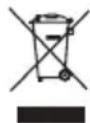
- The barred symbol of the rubbish bin shown on the equipment indicates that, at the end of its useful life, the product must be collected separately from other waste.
- Therefore, any products that have reached the end of their useful life must be given to waste disposal centres specialising in separate collection of waste electrical and electronic equipment, or given back to the retailer at the time of purchasing new similar equipment, on a one for one basis.
- The adequate separate collection for the subsequent start-up of the equipment sent to be recycled, treated and disposal of in an environmentally compatible way contributes to preventing possible negative effects on the environment and health and optimises the recycling and reuse of components making up the apparatus.
- Abusive disposal of the product by the user involves application of the administrative sanctions according to the laws in force.

natural_image
Circular emblem with gear and diamond motifs, no text or symbols present

natural_image
Circular emblem with gear and central symbol, no readable text or symbols

natural_image
Circular emblem with gear and diamond design, no text or symbols present

- MATICA1160
- CERAMIC
- MATICA 1160 CERAMIC
- I
- GB
- DESCRIZIONE
- BASE CALDAIA
- IRON
- DESCRIPTION
- USE INSTRUCTIONS
- CHOICE OF THE IRON TEMPERATURE
- FOR STEAM IRONING
- HOW TO FILL THE BOILER WITH WATER
- WARNING!
- STARTING UP
- IRONING
- NO MORE WATER DURING USE
- WHEN YOU HAVE FINISHED IRONING
- FOR DRY IRONING
- CLEANING
- Always unplug the iron from the outlet and wait for the appliance to completely cool down before starting any cleaning operations.
- TABLE TO BE USED IN CASE OF ANOMALIES
- INFORMATION FOR USERS
Brand : TERMOZETA
Model : Matica 1160 Ceramic
Category : Iron