
SP-925 - Loudspeaker BUSH - Free user manual and instructions
Find the device manual for free SP-925 BUSH in PDF.


| Product Type | Portable Bluetooth Speaker |
| Model | SP-925 |
| Brand | Bush |
| Dimensions (W x H x D) | 6.5 x 3.0 x 2.5 inches (approx.) |
| Weight | 0.8 lbs (approx.) |
| Power Supply | Built-in rechargeable battery (USB-C charging) |
| Battery Life | Up to 10 hours |
| Bluetooth Version | 5.0 |
| Wireless Range | Up to 33 ft (10 m) |
| Speaker Type | Full-range driver with passive radiator |
| Output Power | 5W RMS |
| Frequency Response | 100 Hz - 18 kHz |
| Audio Inputs | Bluetooth, AUX 3.5mm |
| Controls | Power, Volume+, Volume-, Play/Pause, Bluetooth pairing |
| Microphone | Built-in for hands-free calling |
| Water Resistance | IPX5 (splash-proof) |
| Included Accessories | USB-C cable, AUX cable, user manual |
| Cleaning | Wipe with soft, dry cloth. Do not use liquids or solvents. |
| Safety | Keep away from heat sources and water. Do not disassemble. |
| Spare Parts Availability | Contact Bush customer support for replacement parts. |
| Warranty | 1 year limited warranty |
Frequently Asked Questions - SP-925 BUSH
User questions about SP-925 BUSH
0 question about this device. Answer the ones you know or ask your own.
Ask a new question about this device
Download the instructions for your Loudspeaker in PDF format for free! Find your manual SP-925 - BUSH and take your electronic device back in hand. On this page are published all the documents necessary for the use of your device. SP-925 by BUSH.
USER MANUAL SP-925 BUSH
natural_image
Black BUSH-branded portable electronic device with sound waves and speaker grille (no visible text or symbols on body)You'll soon be enjoying your new Bush Stereo Bluetooth Speaker.
It all begins here, with this instruction manual. Don't worry, there's not too technical to do so. Just step-by-step to let you understand the features and operations. Let us start now.
Help and Guidance
We're here to help you to get the most information of your Bush Stereo Bluetooth Speaker. If you require any guidance, a simple solution can be found online at:
www.argos-support.co.uk
Contents
1. Safety information
Safety information .... 1
2. Getting to know your Bush Stereo Bluetooth Speaker
Inside the packaging 2
Let us begin now 2
3. Using your Bush Stereo Bluetooth Speaker
Getting start 3
Power up & Bluetooth pairing 4
Play music 4
Handfree phone answering 5
Drop a phone call 6
Redial last call 6
AUX input 7
Power off 7
4. Other information
Technical specifications 8
5. Product support
Troubleshooting 8
Disposal 9
Help and assistance 10
Guarantee 11

Safety information

Important - Please read these instructions fully before installing or operating.
- Turn the Bluetooth speaker off when it is put into a bag.
- Don't clean the Bluetooth speaker with something corrosive.
- Don't expose the Bluetooth speaker to high or low temperature conditions.
- Don't put the Bluetooth speaker under direct sunlight for a long time.
- Don't put the Bluetooth speaker close to fire or stove.
- Don't dispose the Bluetooth speaker into fire as it will result in a blast.
- Don't let the Bluetooth speaker touch something sharp as the damage.
- Don't try to open the Bluetooth speaker because there is no reparable parts inside.
- If it is not used for a long period of time, please charge it every month to prolong the life span of battery.
- Don't charge the Bluetooth speaker in a high or low temperature environment.
- Don't dispose the Bluetooth speaker as household rubbish. The battery inside is harmful to environment. Please dispose according to battery recycle rule.
Inside the packaging
Inside the packaging, you will find
- Bluetooth speaker
- USB charging cable
- Instruction manual
- Warranty card
Let us begin now
Please read these instructions carefully. They contain important information which will help you to get full understanding of both features and operations, as well as safe and correct installation and operation.
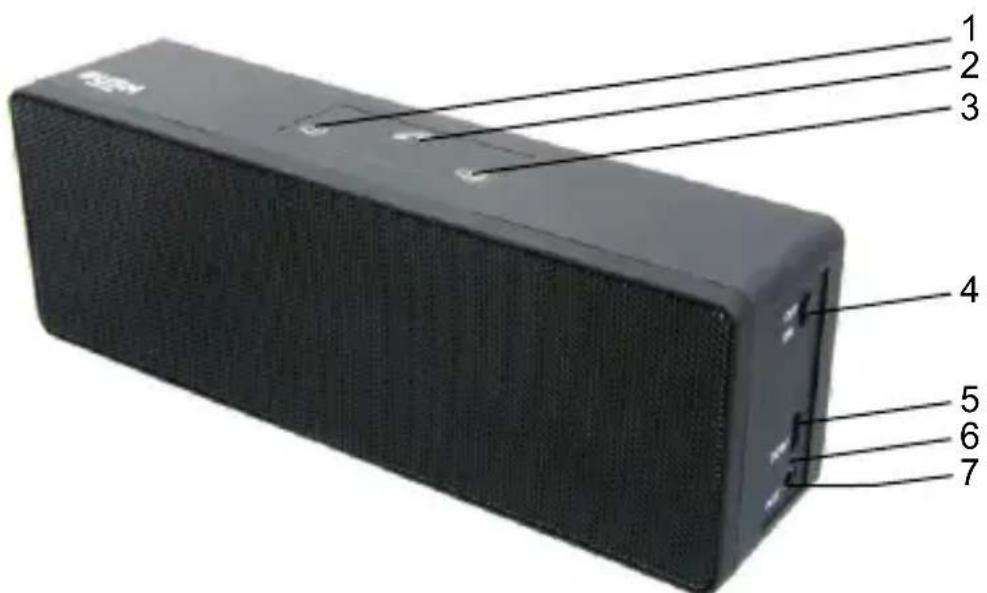
- PREVIOUS SONG/ VOLUME- 2. PLAY/PAUSE/PHONE
- NEXT SONG/VOLUME+ 4. POWER switch
- Charging port 6. Dual light indicator
- Audio input jack

Using your Bush Splashproof Speaker
Getting start
- The Bluetooth speaker has built in lithium ion rechargeable battery.
- Keep POWER SWITCH (4) at off position.
- Connect the micro USB plug of the provided USB cable to the USB charging port (5) of the Bluetooth speaker, and connect the other end to a 5Vdc USB output of computer or USB charger. (Fig. 1)

Fig. 1
- The red light next to USB port (5) will light up to indicate the charging status. The red light will turn off when the battery is fully charged. (Fig. 2)

Fig. 2
- It is highly recommended to fully charge the Bluetooth speaker before use.
* Use 5V/1A USB charger or computer to charge the Bluetooth speaker. It will take around 3 hours if the battery is exhausted.
Power up & pair Bluetooth
POWER switch (4)
- Switch on the power by pushing POWER switch (4) downward. Blue light next to the USB port (6) is flashing. Bluetooth mode is entered automatically. If no device has been paired, it will start pairing. (Fig. 3) A sound signal is played.

- Turn on your Bluetooth pairing mode of your smart phone or computer. Inside the paring page, select SP-925. The blue light will be steady if the speaker is paired up. A sound signal will be played also.
It is ready to play music now.
Play music
PLAY/PAUSE/PHONE button (2)
- Press once the PLAY button (2) to play music. Press once again to pause. (Fig. 4)

Fig. 4

PREVIOUS SONG/VOL- button (1)
- Press PREVIOUS SONG button (1) once to play previous song or hold to lower down the sound volume. (Fig. 5)

Fig. 5
NEXT SONG/VOL+ button (3)
- Press NEXT SONG button (3) once to play next song or hold to raise up the sound volume. (Fig. 6) A sound signal will be played when the volume reaches its maximum level.

Fig. 6
Handfree phone answering
PLAY/PAUSE/PHONE button (2)
-
When a phone call is coming, a sound signal will be played. Press PHONE button (2) once to pick up the call. (Fig. 7)
-
Talk towards your smart phone.
-
When the call is finished, press PHONE button (2) once again to hang up the call.

Fig. 7
Drop a phone call
PLAY/PAUSE/PHONE button (2)
- When a phone call is coming, but you don't want to pick up, press and hold PHONE button (2) for 1 second to drop the call. (Fig. 8)

Fig. 8
Redial last call
PLAY/PAUSE/PHONE button (2)
- Press twice continuously the PHONE button (2) to redial the last call. (Fig. 9)
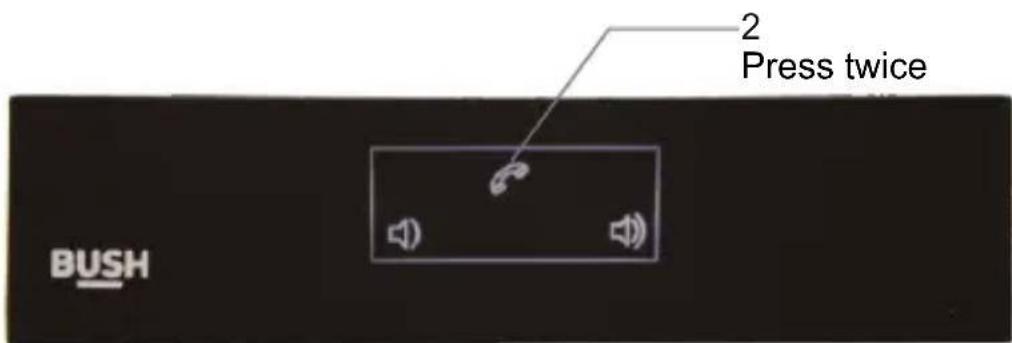
Fig. 9

AUX input
AUX input (7)
Plug in the 3.5mm plug of an audio cable into the AUX input (7). The Bluetooth speaker will detect it and turn to Aux mode automatically. (Fig. 10) Play music as usual.

Fig. 10
Powering off
POWER button (4)
Pull up the POWER switch (4) to power off the Bluetooth speaker. The blue light next to POWER button will be off. (Fig. 11).

Fig. 11
Technical specifications
Bluetooth version: 2.1
Maximum power output: 6W
Signal-to-noise ratio: 85dB
Frequency response: 80 - 15kHz
Battery: Lithium ion, 3.7V, 400mAh
Charging power: DC 5V/1A
Charging time: 2-3 hours
Play time: around 4 hours
Working range: 10m
Troubleshooting
If the unit cannot be turned on.
* Try to charge the Bluetooth speaker with the provided USB cable with a 5V charger until the red light next to USB port is off.
If the unit cannot connect to smart phone.
* Turn off the unit and turn on again. Try again to connect with your smart phone. If still cannot, delete the registered SP-925 from the Bluetooth device list and pair again.
Music is intermittent on and off.
* If it is connected by Bluetooth, check whether the unit is too far away from your smart phone.
* If it is connected by 3.5mm jack, check whether the connection is loosen. Turn the plug left or right for half a circle, or take it off and plug in again.
Product Support
Help is always at hand

The symbol on the product or its packaging indicates that this product must not be disposed with your other household waste. Instead, it is your responsibility to dispose of your waste equipment by handing it over to a designated collection point for the recycling of waste electrical and electronic equipment. The separate collection and recycling of your waste equipment at the time of disposal will help conserve natural resources and ensure that it is recycled in a manner that protects human health and the environment. For more information about where you can drop off your waste for recycling, please contact your local authority, or where you purchased your product.
CE Notes for battery disposal
The batteries used with this product contain chemicals that are harmful to the environment. To preserve our environment, dispose of used batteries according to your local laws or regulations. Do not dispose of batteries with normal household waste. For more information, please contact the local authority or your retailer where you purchased the product.
This product is intended for use within the UK. This equipment complies with the essential requirements for the Radio Equipment and Telecommunications Terminal Equipment Directive 1999/5/EC.
Declaration of Conformance
Hereby, Argos Ltd, declares that this Band II LPD device is in compliance with the essential requirements and other relevant provisions of Directive 1999/5/EC. The complete declaration of conformity can be obtained by contacting http://www.argos-support.co.uk/
Product support
Help is always at hand
Help and assistance
If you require any technical guidance or find that your unit is not operating as intended, a simple solution can often be found in the Troubleshooting section of these instructions or online at www.agros-support.co.uk. If you still require further assistance, call one of our experts on 0345 604 0105 to help us to give you a fast and efficient service. Please have the following information ready:
| Model Ref. | You can find these on the rating plate - a small information panel (usually a sticker or metal plate) on the rear of your product. | |
| Serial number | ||
| Date of purchase | This will be shown on your receipt |
Local call rates applies*
Lines open 8am-7pm Monday to Saturday and 10am-4pm Sunday.
* Calls to Agros enquiry lines may attract a charge and set up fee from residential lines depending on your call plan/tariff. Mobile and other providers costs may vary, see www.bt.com/pricing for details.
For security and training purposes, telephone calls to and from customer service centers may be recorded and monitored. Calls from Republic of Ireland will attract international call charges.
Product support
Help is always at hand
BUSH
Call us now and activate your 12 month guarantee
Thank you for choosing Bush. Your new product is guaranteed against faults and breakdowns for 12 months. Don't forget to register it with us today so we can provide you with our best possible after-sales service and useful updates.
www.bushregistration.co.uk
FREEPHONE*
0800 597 8548
Lines are open 8am - 8pm, 365 days an year. *Calls may be recorded and monitored.
Your Bush Guarantee
This product is guaranteed for twelve months from the date of original purchase. Any defect that arises due to faulty materials or workmanship will be repaired free of charge (or if applicable the product will be replaced or the purchase price refunded) where possible during this period by the dealer from who your purchased the unit.
The guarantee is subject to the following provisions:
- The guarantee does not cover accidental damage, misuse, cabinet parts, knobs or consumable items.
- The product must be correctly installed and operated in accordance with the instructions contained in the manual.
- It must be used solely for domestic purposes. The guarantee will be rendered invalid if the product is re-sold or has been damaged by inexpert repair.
- Specifications are subject to change without notice.
- Bush disclaim any liability for loss or damage arising from the breakdown of the product.
Important Data Protection Information
If you provide us with information about another person, you confirm that they have appointed you to act for them, to consent to the processing of their personal data including sensitive personal data and that you have informed them of our identity and the purposes (as set out in the Important Data Privacy notice displayed overleaf) for which their personal data will be processed. You are entitled to ask for a copy of the information we hold about you (for which we may charge a small fee) and to have any inaccuracies in your information corrected. For quality control and training purposes, we may monitor or record your communications with us.
If your personal details change, if you change your mind about any of your marketing preference or if you have any queries about how we use your information, please let us know by contacting our Data Protection Officer, Domestic & General, Leicester House 17 Leicester Street, Bedworth, Warwickshire CV12 8JP.
Guarantor: Argos Limited - 489 - 499 Avebury Blvd. - Milton Keynes - MK9 2NW
- You'll soon be enjoying your new Bush Stereo Bluetooth Speaker.
- Help and Guidance
- Contents
- Safety information
- Getting to know your Bush Stereo Bluetooth Speaker
- Using your Bush Stereo Bluetooth Speaker
- Other information
- Product support
- Safety information
- Inside the packaging
- Let us begin now
- Using your Bush Splashproof Speaker
- Getting start
- Power up & pair Bluetooth
- POWER switch (4)
- Play music
- PLAY/PAUSE/PHONE button (2)
- PREVIOUS SONG/VOL- button (1)
- NEXT SONG/VOL+ button (3)
- Handfree phone answering
- Drop a phone call
- Redial last call
- AUX input
- AUX input (7)
- Powering off
- POWER button (4)
- Technical specifications
- Troubleshooting
- Product Support
- CE Notes for battery disposal
- Declaration of Conformance
- Help and assistance
- BUSH
- Call us now and activate your 12 month guarantee
- Your Bush Guarantee
- The guarantee is subject to the following provisions:
- Important Data Protection Information
Brand : BUSH
Model : SP-925
Category : Loudspeaker