
107/8419 - Loudspeaker BUSH - Free user manual and instructions
Find the device manual for free 107/8419 BUSH in PDF.


| Product Type | Portable Bluetooth Speaker |
| Brand | Bush |
| Model | 107/8419 |
| Dimensions (W x H x D) | 200 x 100 x 100 mm (approx.) |
| Weight | 0.5 kg (approx.) |
| Power Source | Built-in rechargeable battery (USB charging) or AC adapter |
| Battery Life | Up to 6 hours (approx.) |
| Bluetooth Version | Bluetooth 4.2 |
| Wireless Range | 10 meters (33 feet) |
| Audio Inputs | 3.5mm AUX input, Bluetooth |
| Controls | Power, Volume +/-, Play/Pause, Next/Previous track, Pairing button |
| Speaker Type | Full-range driver |
| Output Power | 5W RMS |
| Frequency Response | 100 Hz – 20 kHz |
| Impedance | 4 Ohms |
| Material | Plastic with fabric grille |
| Water Resistance | Not waterproof; keep away from liquids |
| Mounting Options | Desk or shelf placement |
| Included Accessories | USB charging cable, AUX cable (optional), user manual |
| Compliance | CE, RoHS |
| Maintenance | Clean with a soft dry cloth; do not use solvents |
| Safety Warnings | Do not expose to heat, moisture, or direct sunlight |
| Repairability | No user-serviceable parts; contact support for issues |
| General Information | Portable Bluetooth speaker for indoor use |
Frequently Asked Questions - 107/8419 BUSH
User questions about 107/8419 BUSH
0 question about this device. Answer the ones you know or ask your own.
Ask a new question about this device
Download the instructions for your Loudspeaker in PDF format for free! Find your manual 107/8419 - BUSH and take your electronic device back in hand. On this page are published all the documents necessary for the use of your device. 107/8419 by BUSH.
USER MANUAL 107/8419 BUSH
BUSH - Portable Speaker Dock
Installation & User Instructions – Please keep for future reference
107/1777 (D)
107/8419 (D)
ABUSH
Real Life Technology
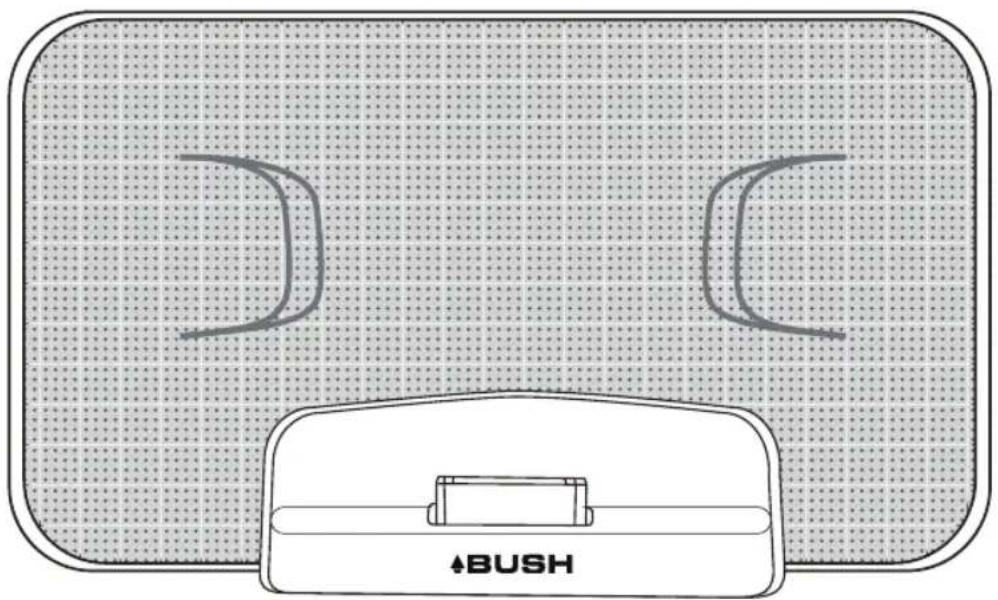
natural_image
Diagram of a Bush device with two curved slots on a dotted grid background (no text or symbols)Important — Please read these instructions fully before installing or using
These instructions contain important information which will help you get the best from your appliance and ensure safe and correct installation, use and maintenance.
Contents
Safety Information 2-3
Safety precaution 2
Mains plug information 2
Functions & Controls 3
User Instructions 4
Powe Supply 3-4
Docking an iPhone 4
AUX In Jack 4
Folding iPhone DOCK 4
Care and Maintenance 5
Troubleshooting 5
Technical Specifications 6
Disposal information 6
Guarantee 7
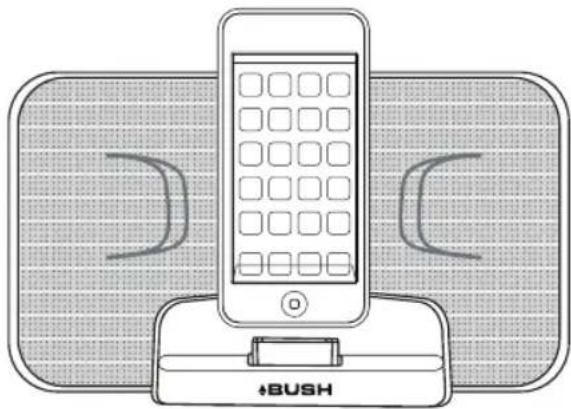
natural_image
Line drawing of a mobile phone with a BUSH charger, no text or symbols presentProduct Codes
251i
Rev:1.0
Important – Please read these instructions fully before installation
CAUTION: TO REDUCE THE RISK OF ELECTRIC SHOCK, DO NOT REMOVE ANY COVER. NO USER-SERVICEABLE PARTS INSIDE, REFER ANY SERVICING TO QUALIFIED SERVICE PERSONNEL.
- Please read this owner's guide
- Please take the time to follow the instructions in this owner's guide carefully. It will help you set up and operate your system properly and enjoy all of its advanced features.
- Please save this owner's guide for future reference.
- The product label is located on the back of the product.
- This product must be used indoors. It is neither designed nor tested for use outdoors, in recreation vehicles, or on boats.
- Heed all warnings - on the product and in the owner's guide.
- Do not use this apparatus near water or moisture. Do not use this product near a bathtub, washbowl, kitchen sink, and laundry tub, in a wet basement, near a swimming pool, or anywhere else that water or moisture is present.
- Only use attachments/accessories specified by the manufacturer.
- Unplug this apparatus during lightning storms or when unused for long periods of time - to prevent damage to this product.
• Refer all servicing to qualified service personnel - Servicing is required when the apparatus has been damaged in any way: such as liquid has been spilled or objects have fallen into the apparatus; the apparatus has been exposed to rain or moisture, does not operate normally, or has been dropped - Do not attempt to service this product yourself. Opening or removing covers may expose you to dangerous voltages or other hazards.
- To prevent risk of fire or electric shock, avoid overloading wall outlets, extension cords, or integral convenience receptacles.
- Use proper power sources - Plug the product into a proper power source, as described in the operating instructions or as marked on the product.
- The mains plug is used as the disconnect device, the disconnect device shall remain readily accessible

CAUTION
RISK OF ELECTRIC SHOCK!
DO NOT OPEN!


This symbol means that this unit is double insulated. An earth connection is not required.
Mains adaptor information
- Ensure the mains adaptor supplied is not submerged in liquid
- Ensure the mains adaptor is not forced into incorrect mains outlet sockets
- Do not allow the power cable to become snagged or damaged
- Disconnect the mains power supply if bare wires are visible and replace the mains adaptor accordingly
- Do not overload mains outlet sockets with multiple plugs or power adaptors
- Do not insert foreign objects (especially metal) into the DC plug at the end of the power cable
Functions & controls
Please familiarize yourself with the parts and accessories listed
below Accessories included
• 1 x 251i
1 x Instruction Manual
- 1 x Mains adapter
controls

1: Power indicator (behind speaker grille)
2: Volume up button
3: iPhone dock
4: Volume down button

5: Battery compartments
6: Aux In jack
7: DC In jack
8: ON/OFF switch
Power supply
Mains adapter
When using the mains cable insert the adaptor plug into the the 251i (7), the other end into a UK mains socket.
Battery operation
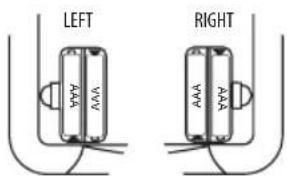
The 251i requires 4 x AAA batteries (not supplied).
1: Open the battery compartments on the rear of the unit (5).
2: Insert 2 x AA batteries into each compartment taking care to match the + & - polarity symbols correctly.
3: Replace the battery compartment covers.

flowchart
graph LR
    A["Component"] --> B["Shipment"]
    B --> C["Shipment"]
NOTE: Please dispose of old batteries according to your local rules and do not dispose of your old products with your normal household waste.
User Instructions
Power supply
- Slide the ON/OFF switch to the ON position, the power indicator behind the grill will linght up.
- Slide the ON/OFF switch to the OFF position, the power indicator behind the grill will switch off.
Docking an iPhone
The 251i has been designed to work correctly with the following Apple products:
• iPod touch (4th generation)
• iPod nano (6th generation)
- iPhone 4s
- iPhone 4
- iPhone 3GS
- To dock your iPhone:
- Locate the iPhone on the Docking Connector and press it gently.
-
Play a docked iPhone:
-
Unlock the phone
• Use the controls on the iPhone to choose the tracks you want to play. -
To remove your iPhone from the dock:
- Grip the iPhone at the sides and lift the iPhone from the docking connects.
- Charging an iPhone
- When an iPhone is docked it will charge when the unit is connected to main's power.
NOTE: The iPhone will continue to charge when the unit is set to Standby
- Adjusting the Volume:
To adjust the volume of the music playing press repeatedly the - button or + button (2),(4),see page 3), or press and hold these buttons to automatically adjust the volume to minimum or maximum accordingly.
AUX In Jack
The AUX In jack on the back panel may be used to connect sound sources with a Line or Headphone analogue output to paly through your unit. These may include:
- iPod models that cannot be docked to the unit.
- MP3 players
• CD walkman palyers -
Tape walkman players
• Personal computers or laptops -
Connecting to the AUX In jack:
- Connect a 3.5mm jack cable (not supplied) between the headphone or AUX output of the personal audio player and the AUX in jack on the back panel.
-
Playing the external source: The AUX source will automatically be selected when a cable is connected to AUX In jack.
-
Set your personal audio player to PLAY.
- Set the volume to the level you want.
- If there is no sound or if the volume level is not loud enough, you may need to increase the volume setting on your personal audio player.
FOLDING iPhone DOCK
The iPhone dock is a folding design that can be closed up when travelling.

natural_image
Simple line drawing of a mechanical component with a curved arrow indicating direction (no text or symbols)Before docking an iphone, open the dock fully.

The iPhone docking connector will now be visible.
Care & Maintenance

Important: Always unplug the appliance from the power socket during cleaning and maintenance.
- Ensure the unit is switched off and unplugged from any electrical outlet
• Wipe the case with a slightly moist lint free cloth
• Do not use any cleaning fluids containing alcohol, ammonia or abrasives
• Do not spray an aerosol at or near the object - Do not allow liquids to spill or objects to drop into any openings
- Do not insert sharp items into speaker grills or any other openings
• Always us the original packaging if it is necessary to transport the unit at any time
If the unit is used in a dusty environment, it may be necessary to have the unit serviced at your local dealer periodically. It is not advisable to allow large deposits of dust to accumulate within the unit as it may prevent adequate cooling. Similarly dust deposits which become damp can sometimes lead to electrical problems which may cause severe damage to the delicate electronics within this unit.
Troubleshooting
In the unlikely event of difficulties with your appliance please follow the trouble shooting guide below.
| Problem Reason(s) Solution(s) | ||
| No Power • Main adaptor not connected | properly• POWER button not pressed | • Ensure mains adaptor is inserted correctly into wall socket and the power is switched on• Ensure the DC jack plug is inserted into the correct socket on the rear of the 251i (see page 3)• Ensure the power button (1, see page 8) is pressed and the POWER LED (1, see page 3) is illuminated |
| No Sound | • AUX source not connected• Volume is not turned up• iPod is not playing• AUX source not playing | • Ensure either AUX source has been connected properly (see page 4)•Adjust volume using – button or + button (2,4 see page 3)• Press Play/Pause button on your personal audio.• Press Play/Pause button on your AUX source, or adjust the volume upwards |
| Sound is distorted • Poor audio connections | • Volume too high on AUX source | • Ensure iPhone is docked correctly ensuring adequate connections• Ensure AUX line input lead is pushed firmly home at either end• Reduce volume of AUX music source equipment |
| No sound after quickly removing and replacing iPod on dock | • The iPod/iPhone authentication did not complete | • Remove the device and wait a few seconds before re docking. Ensure your device has the latest software installed. |
Technical Specifications
| General | |
| Power Adaptor | Input Voltage: AC: 100-240V ~ 50/60Hz,350 mAOutput Voltage: DC 5V 2A |
| Battery 4 x AAA | |
| Dimensions | Approx. 138mm(H) x 240mm(W) x 50mm(D) (Dock Extended) |
| AUX INPUT | |
| Sensitivity | 920 mV |
| iPhone / iPod Models supported | |
| iPhone | iPhone - 3GS, 4 and 4s |
| iPod | iPod touch (4th generation)iPod nano (6th generation) |
| Audio | |
| Output Power | 2x 2 W |

This appliance complies with the following EU directives: 2006/95/EC Low voltage directive / 2004/108/EC EMC directive, 2002/96/EC WEEE directive.
Disposal Information

The symbol on the product or its packaging indicates that this product may not be treated as household waste. Instead it should be handed over to the applicable collection point for the recycling of electrical and electronic equipment. By ensuring this product is disposed of correctly, you will help prevent potential negative consequences for the environment and human health, which could otherwise be caused by inappropriate waste handling of this product. For more detailed information about recycling this product, please contact your local council office, your household waste disposal service or the shop where the product was purchased.
We apologise for any inconvenience caused by any minor inconsistencies in these instructions, which may occur as a result of product improvements and development.

PRODUCT GUARANTEE
This product is guaranteed against manufacturing defects for a period of

Year
This product is guaranteed for twelve months from the date of original purchase.
Any defect that arises due to faulty materials or workmanship will either be replaced, refunded or repaired free of charge where possible during this period by the dealer from whom you purchased the unit.
The guarantee is subject to the following provisions:
- The guarantee does not cover accidental damage, misuse, cabinet parts, knobs or consumable items.
- The product must be correctly installed and operated in accordance with the instructions contained in this manual.
- It must be used solely for domestic purpose.
- The guarantee will be rendered invalid if the product is re-sold or has been damaged by inexpert repair.
- Specifications are subject to change without notice.
- The manufacturer disclaims any liability for the incidental or consequential damages.
- The guarantee is in addition to, and does not diminish your statutory or legal rights.
Guarantor: Argos Limited
489 - 499 Avebury Boulevard
Central Milton Keynes
MK9 2NW
- ABUSH
- Important — Please read these instructions fully before installing or using
- Contents
- Functions & Controls 3
- Care and Maintenance 5
- Important – Please read these instructions fully before installation
- CAUTION: TO REDUCE THE RISK OF ELECTRIC SHOCK, DO NOT REMOVE ANY COVER. NO USER-SERVICEABLE PARTS INSIDE, REFER ANY SERVICING TO QUALIFIED SERVICE PERSONNEL.
- Mains adaptor information
- Functions & controls
- Power supply
- Mains adapter
- Battery operation
- User Instructions
- Docking an iPhone
- AUX In Jack
- FOLDING iPhone DOCK
- Care & Maintenance
- Troubleshooting
- Technical Specifications
- Disposal Information
- PRODUCT GUARANTEE
Brand : BUSH
Model : 107/8419
Category : Loudspeaker