
Spira D5.5 - Mobile Phone BUSH - Free user manual and instructions
Find the device manual for free Spira D5.5 BUSH in PDF.


| Product Type | Feature Phone |
| Brand | BUSH |
| Model | Spira D5.5 |
| Dimensions | Approx. 125 x 55 x 12 mm |
| Weight | Approx. 100 g |
| Display Size | 2.4-inch QVGA |
| Battery Capacity | 1200 mAh Li-Ion |
| Standby Time | Up to 300 hours |
| Talk Time | Up to 8 hours |
| SIM Card Type | Dual SIM (Mini SIM) |
| Memory Card Support | microSD up to 32 GB |
| Camera | 0.3 MP rear camera with flashlight |
| Connectivity | GSM 850/900/1800/1900, Bluetooth 3.0, micro USB 2.0 |
| FM Radio | Yes, with external antenna |
| Torch | Yes, integrated LED |
| Audio Jack | 3.5 mm headphone jack |
| Operating Frequency | Dual-band GSM (900/1800 MHz) |
| Power Supply | 5V/1A via micro USB charger (included) |
| Main Functions | Call, SMS, FM radio, MP3 player, torch, alarm, calculator, calendar |
| Languages | Multi-language support including English |
| Cleaning Instructions | Wipe with a soft dry cloth; avoid water and solvents |
| Safety | Compliant with CE standards; do not disassemble or expose to moisture |
| Spare Parts Availability | Battery, charger, earphones available from authorized service centers |
| Repairability | Limited: battery and SIM card replaceable; screen repair by professional only |
Frequently Asked Questions - Spira D5.5 BUSH
User questions about Spira D5.5 BUSH
0 question about this device. Answer the ones you know or ask your own.
Ask a new question about this device
Download the instructions for your Mobile Phone in PDF format for free! Find your manual Spira D5.5 - BUSH and take your electronic device back in hand. On this page are published all the documents necessary for the use of your device. Spira D5.5 by BUSH.
USER MANUAL Spira D5.5 BUSH
Dual Camera Smartphone
Instruction manual

You'll soon be up and running
Looking forward to your new BUSH SPIRA D5.5 Smartphone? Great.
Then let's get you started.
Just follow this simple step-by-step guide and you'll be good to go.
Help and Guidance
We're here to help you get the most from your BUSH SPIRA D5.5 Smartphone.
Should you require any guidance, a simple solution can often be found online at: www.argos-support.co.uk
If you still require further assistance, call one of our experts on 0208 068 1044.
If you require any technical guidance or find that your product is not operating as intended, a simple solution can often be found in the
2 BUSH
Contents
Safety information....5
Getting to know your BUSH SPIRA D5.5...21
Ready let's begin....22
Accessories....23
Device description....24
Assembling....27
SIM size guide....28
Inserting SIM cards & memory card.....29
Turning on....32
On your homescreen....33
Mobile data connection....34
WiFi connection....35
Using your BUSH SPIRA D5.5 ....37
Adding a Google account....38
Hints and tips for Android....40
Improving security on your Bush phone..42
Product support....47
Troubleshooting....48
Help and assistance....50
Environmental considerations....51
Your Bush guarantee....52
Troubleshooting section of these instructions, or online at www.argos-support.co.uk If you still require further assistance, call one of our experts on 0208 068 1044.
BUSH 3
Safety information 1
Safety information
Important - Please read these instructions fully before installing or operating
Warranty and limited liability
In this document, with regard to the use of the name "Bush", Bush is a brand owned by Argos Ltd, 489 – 499 Avebury Boulevard, Milton Keynes, MK9 2NW.
This product is sold with a limited warranty and specific remedies are available to the original purchaser in the event the product fails to conform to the limited warranty.
Manufacturer's liability may be further limited in accordance with its sales contract.
Nothing in this document affects the consumers statutory rights under UK law, in particular Sale of Goods Act 1979 (as Amended), Consumer Rights Act 2015 and Consumer Contract (Information, Cancellation and Additional Charges) Regulations 2013.
In general, and in an non-limited manner, the manufacturer shall not be responsible for product damages caused by natural disasters, fire, static discharge, misuse, abuse, neglect, improper handling or installation, unauthorized repair, alteration or accident. In no event shall the manufacturer be liable for loss of data stored on disk media unless the cause is proven to be a defective product or a defect in any digital content supplied with the unit.
Please see Argos.co.uk for a complete statement of warranty rights, remedies and limitation of liability.
If you require any technical guidance or find that your product is not operating as intended, a simple solution can often be found in the
Safety information
Important - Please read these instructions fully before installing or operating
Furthermore, the warranty as far as is permitted by law does not apply to:
- Damages or problems resulting from misuse, abuse, accident, alteration or incorrect electrical current or voltage.
- Any product tampered-with or damaged warranty seal or serial number label.
- Any product without a warranty or serial number label.
The end user is required to use this product only in conformity with its original purpose and is strictly forbidden to make any technical modifications that could potentially impinge on the rights of third parties. Any modification to the hardware, software, or physical enclosure of the product must be approved in writing by Bush. Non approved modified products are subject to the withdrawal of any or all guarantee clauses. In the event that your product ceases to operate within 24 months of purchase, return it along with all accessories to your place of purchase along with proof of purchase for either a free repair, replacement or refund to be determined by Bush on receipt of your faulty device. This Guarantee is provided by Argos Ltd, 489 – 499 Avebury Boulevard MK9 2NW, and does not affect your consumer rights.
Lithium-ion battery caution
This product is equipped with a Lithium-Ion battery. Do not pierce, open,
Troubleshooting section of these instructions, or online at www.argos-support.co.uk If you still require further assistance, call one of our experts on 0208 068 1044.
Safety information
BUSH 7
Safety information
Important - Please read these instructions fully before installing or operating
disassemble it, or use it in a humid and/or corrosive environment. Do not put, store or leave your product in or near sources of heat, in direct strong sunlight, in a high temperature location, in a pressurized container or in a microwave oven. Do not expose it to temperatures over 60 C (140 F). If the battery leaks and you come into contact with the leaked fluids, rinse thoroughly with water and seek medical attention immediately. Failure to follow these instructions could cause the Lithium-Ion battery to leak acid, become hot, explode or ignite and cause injury and/or damage.
Optimising battery performance
Do not leave your battery charging for more than one day. Doing so runs the risk of overcharging the battery and shortening its total life span. If the device is not used for an extended period of time, the battery will slowly discharge and the device will need to be recharged before using again. Unplug the charger from the wall when it is not being used. Use only a Bush approved battery in the device.
Warnings and safety instructions
Caution
To prevent risks of electric shock, this unit must only be opened by qualified service
If you require any technical guidance or find that your product is not operating as intended, a simple solution can often be found in the
Safety information
Important - Please read these instructions fully before installing or operating
personnel. Power off and disconnect the power supply cable before opening the unit.
Warning
To prevent fire or shock hazard, do not expose the unit to rain or moisture.
Use of this product is for personal use only. Copying CDs or loading music, video, or picture files for sale or other business purposes is or may be a violation of copyright law.
Copyrighted materials, works of art, and/or presentations may require authorization to be fully or partially recorded. Please be aware of all such applicable laws concerning the recording and use of such for your country and jurisdiction.
Safety
For driving safety, only a passenger should operate the device when the car is in motion and not the driver. Laws governing the usage of electronic devices by the driver may be applicable in your jurisdiction and/or country.
Install your Bush product carefully
Make sure your Bush product and its accessories are solidly secured when you are
Troubleshooting section of these instructions, or online at www.argos-support.co.uk If you still require further assistance, call one of our experts on 0208 068 1044.
Safety information
BUSH 9
Safety information
Important - Please read these instructions fully before installing or operating
using them in a car. Avoid mounting your Bush device and its accessories near the airbag opening areas. Equipment that is not securely fixed in a car could result in serious injury when the airbag activates. Handle the batteries and charger with care and respect the recycling instructions. Use only Bush certified batteries and charger for your Bush product. Using batteries or a charger that is not certified by Bush can result in serious injury or damage your product. Never throw a battery into a fire. See your current local regulations for information on battery recycling.
Never put your Bush device inside of, or on top of, a heating device such as microwave oven, toaster oven, or heater. When batteries heat up, there is a risk of explosion. Be careful to never crush or perforate the battery. Avoid exposing the battery to high external pressure which could provoke an internal short-circuit and overheating.
Use only accessories that are Bush branded or recommended by Bush. The use of incompatible accessories with the Bush device can cause injury. Handle your Bush product with care. Keep your product away from any sources of humidity. This can seriously damage the device. Do not manipulate your Bush device with wet hands.
If you require any technical guidance or find that your product is not operating as intended, a simple solution can often be found in the
Safety information
Important - Please read these instructions fully before installing or operating
Any damage done to the device due to its contact with water voids your guaranty. Do not use or store your product in an area that is dusty or dirty. This can deteriorate the components in your device. Your Bush device is a complex electronic product. Keep it protected from falls and physical shock. Do not subject it to violent movements. Do not paint your product. Doing so could make movable parts unusable and reduce or limit its functionality. Only Bush certified technicians are qualified to repair your Bush device. In calling upon non qualified persons to repair your Bush product, you run the risk of damaging your device and voiding your guarantee, this does not affect your consumer rights.
Avoid interference with other electronic products
Your Bush device radiates radio frequency (RF) signals that could interfere with the functioning of other electronic devices that are insufficiently or incorrectly protected from RF energy, such as pacemakers, hearing aids, medical devices, or any other electronic device found in your home or car. Contact the maker of the maker of the equipment to resolve any possible interference problems.
Troubleshooting section of these instructions, or online at www.argos-support.co.uk If you still require further assistance, call one of our experts on 0208 068 1044.
Safety information

Safety information
Important - Please read these instructions fully before installing or operating
Other security instructions
Always manipulate your Bush device with care. Keep it in a clean environment away from dust. Do no expose the device to extreme temperatures. Do not drop or throw the device. Do not allow the device to come in close contact to a flame.
Child protection
This device is not a toy. Keep the device away from babies and infants, young children should only use the item under adult supervision. Unsupervised play can lead to injury or damage to the device. The mains adapter should be connected to the power supply close to the equipment and be easily accessible. To isolate the unit from power switch off power to the mains adapter and disconnect it from the power supply before disconnecting the USB lead from the product.
Electrostatic discharge (ESD)
Normal functioning of the product may be disturbed by ESD. If so, simply reset the product to resume normal operation by following the instruction manual. During file transmission, please handle with care and operate in a static-free environment.
If you require any technical guidance or find that your product is not operating as intended, a simple solution can often be found in the
12 BUSH Safety information
Safety information
Important - Please read these instructions fully before installing or operating
Avoiding hearing damage

This product respects the current regulations for limiting the output volume of consumer audio devices to a safe level. It must be only used with earphones complying with the EN 50332 norm. By listening to your device with headphones or earbuds at high volumes, you run the risk of permanent damage to your ears. Even if you get used to listening at high volumes and it seems normal to you, you still risk the possibility of damaging your hearing. Reduce the volume of your device to a reasonable level to avoid permanent hearing damage. If you hear ringing in your ears, reduce the volume or shut off your device and see a doctor.
Copyright notice
Copyright Argos Limited © 2017. All rights reserved.
This document may not, in whole or part, be copied, photocopied, reproduced, translated or reduced to any electronic medium or machine-readable form without prior consent, in writing, from Argos Limited. All brands and products names are registered trademarks and the property of their respective owners. Specifications are
Troubleshooting section of these instructions, or online at www.argos-support.co.uk If you still require further assistance, call one of our experts on 0208 068 1044.
Safety information

Safety information
Important - Please read these instructions fully before installing or operating
subject to change without notification. Errors and omissions accepted. Images and illustrations may not always match contents.
Disclaimer of warranty
To the extent allowed by applicable law, representations and warranties of non-infringement of copyrights or other intellectual property rights resulting from the use of the product under conditions other than as here above specified, are hereby excluded.
End user license agreement for Bush software
Please carefully read the below terms and conditions of the end user license agreement (eula) before using your Bush product. The Bush software (all software distributed within the Bush hardware product) on this device is licensed to you, you do not own it. By using the software on the device, you are thus giving your consent to be bound by this agreement. If you do not agree with any part of this eula, Bush will not license the software to you. In such a case, promptly see your vendor or contact Bush directly in order to find an adequate solution to this disagreement. On first use you may be required to accept license agreements, terms and conditions for
If you require any technical guidance or find that your product is not operating as intended, a simple solution can often be found in the
Safety information
Important - Please read these instructions fully before installing or operating
third party software
supplied with the device additional to the terms set out here.
- Grant of license – Subject to the terms and conditions of this license, Bush grants you the nonexclusive right to use the software within the Bush hardware product. The Bush software can only be used on the Bush manufactured product that it is delivered with.
- Title – You have no title, ownership rights, rights to trade secrets, or intellectual rights to the Bush software.
- Limitations - You may not alter, decrypt, disassemble, decompile, or reverse engineer in part or in whole the Bush software except as permitted by mandatory applicable law.
- Copyright/intellectual rights – The Bush software is protected by the laws of England and Wales, United States and other applicable International Copyright and intellectual property laws and treaties.
- No warranty/limited liability
A. Bush software is licensed to you.
Troubleshooting section of these instructions, or online at www.argos-support.co.uk If you still require further assistance, call one of our experts on 0208 068 1044.
Safety information

Safety information
Important - Please read these instructions fully before installing or operating
B. Bush makes not guarantees either expressed or implied as to the correctness, accuracy, reliability, fitness of use for a particular purpose or otherwise of its software. This does not affect your consumer rights set out in the Consumer Rights Act 2015
- Licensed components – Within the Bush software are components licensed to Bush and/or its partners and/or suppliers and such licensors reserve rights that may not be expressed herein. Bush's licensor(s) makes no warranties, express or implied, including, without limitation, the implied warranties of merchantability and fitness for a particular purpose, regarding the licensed materials. Bush' licensor(s) does not warrant, guarantee or make any representations regarding the use or the results of the use of the licensed materials in terms of its correctness, accuracy, reliability, or otherwise. You assume the entire risk as to the results and performance of the licensed materials. Where the exclusion of implied warranties is not permitted by some jurisdictions, this exclusion may not apply to you.
In no event will Bush's licensor(s), and their directors, officers, employees or agents (collectively Bush's licensor) be liable to you for any consequential, incidental or indirect damages (including damages for loss of business profits, business interruption, loss of business information, and the like) arising out of the use of
If you require any technical guidance or find that your product is not operating as intended, a simple solution can often be found in the
Safety information
Important - Please read these instructions fully before installing or operating inability to use the licensed materials even if Bush's licensor has been advised of the possibility of such damages. Where some jurisdictions do not allow the exclusion or limitation of liability for consequential or incidental damages, the above limitations may not apply to you.
- Illegal use – You cannot use the Bush software to engage in illegal activities including the reproduction, storage and/or distribution of copyrighted materials that you do not have the express written consent to.
- Transfer – You can permanently transfer your rights to the Bush software through the transfer or the sale of your Bush hardware product to a second party. You must not retain any copy of the software, upgrades, versions, or documentation, and the party to whom you transfer the agreement must make written notice that he accepts the conditions of this eula.
- Termination – You may terminate this agreement at any time, at which point you cannot use the Bush software. To do so, you must destroy all originals and copies of the Bush Software and all documentation. You can write to Bush for instructions on having the software removed from your device. This license will terminate
Troubleshooting section of these instructions, or online at www.argos-support.co.uk if you still require further assistance, call one of our experts on 0208 068 1044.
Safety information

Safety information
Important - Please read these instructions fully before installing or operating automatically (without notice from Bush) if any part of this license agreement is violated.
- Decomposition – If any part or condition of this agreement is held by governing law to be invalid or unenforceable, such part will be enforceable to the extent allowed by law and will have no effect on any other sections of this agreement.
- Governing law – This license is governed under the law of England and Wales, If you have any questions about this end user license agreement please write to Argos Ltd (owner of the Bush Brand), 489 Avebury Boulevard, Milton Keynes, MK9 2NW, UK. Argos declares that this device is in compliance with the essential requirements and other relevant provisions of Directive 2014/53/EU.
A copy of the declaration of conformity can be obtained from:
Argos Ltd.
489-499 Avebury Boulevard
Milton Keynes, MK9 2NW, UK

If you require any technical guidance or find that your product is not operating as intended, a simple solution can often be found in the
Safety information
Important - Please read these instructions fully before installing or operating
Open Source Software Offer
The software bundled with this product may include software files subject to certain open source license requirements. Such open source software files are subject solely to the terms of the relevant open source software license. Such open source software is provided on an "AS IS" basis to the maximum extent permitted by applicable law.
For the open source files contained herein, please access "Open source license" section located at: Settings\About phone\Legal information on the device for the relevant copyright and licensing terms. You may obtain a copy of Apache License, Version 2.0 at http://www.apache.org/licenses/LICENSE-2.0.
You may also obtain a copy of GNU General Public License, Version 2 at the Free Software Foundation, INC, 51 Franklin Street, Fifth Floor, Boston, MA 02110-1301, USA. Until the date that is three years after our last shipment of this product, you may obtain a copy of the source code corresponding to the binaries for any GPL-Licensed file by contacting Argos customer service at http://www.argos.co.uk and Argos will send you a link to such source code or will provide instructions to get the source on a physical medium. This offer is valid to anyone in receipt of this information.
Troubleshooting section of these instructions, or online at www.argos-support.co.uk If you still require further assistance, call one of our experts on 0208 068 1044.
Getting to know your BUSH SPIRA D5.5 Smartphone
2
Getting to know your BUSH SPIRA D5.5 Smartphone
You'll be up and running in no time
Ready? Let's begin...
Please read these instructions carefully.
They contain important information which will help you get the best from your Bush phone and ensure safe and correct installation and operation.
If you require any further assistance, our technical experts are happy to help.
For full details, refer to the product support section at the end of these instructions.
If you require any technical guidance or find that your product is not operating as intended, a simple solution can often be found in the
22 BUSH Getting to know your phone
Getting to know your BUSH SPIRA D5.5 Smartphone
You'll be up and running in no time
Accessories

Bush
Phone

Instruction
manual
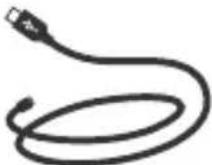
USB cable
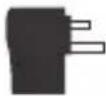
Charger

TPU
Screen
protector
Troubleshooting section of these instructions, or online at www.argos-support.co.uk if you still require further assistance, call one of our experts on 0208 068 1044.
Getting to know your phone

Getting to know your BUSH SPIRA D5.5 Smartphone
You'll be up and running in no time
Device description
If you require any technical guidance or find that your product is not operating as intended, a simple solution can often be found in the
Getting to know your BUSH SPIRA D5.5 Smartphone
You'll be up and running in no time
Device description
Troubleshooting section of these instructions, or online at www.argos-support.co.uk if you still require further assistance, call one of our experts on 0208 068 1044.
Getting to know your phone

Getting to know your BUSH SPIRA D5.5 Smartphone
You'll be up and running in no time
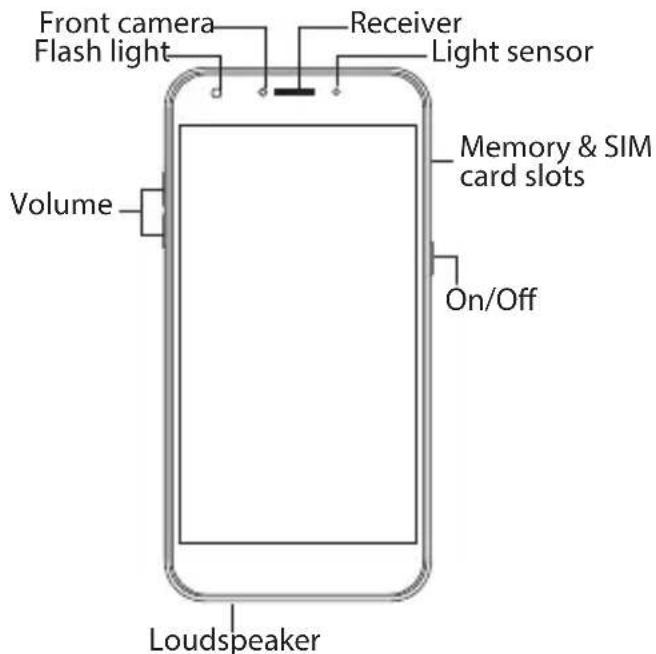
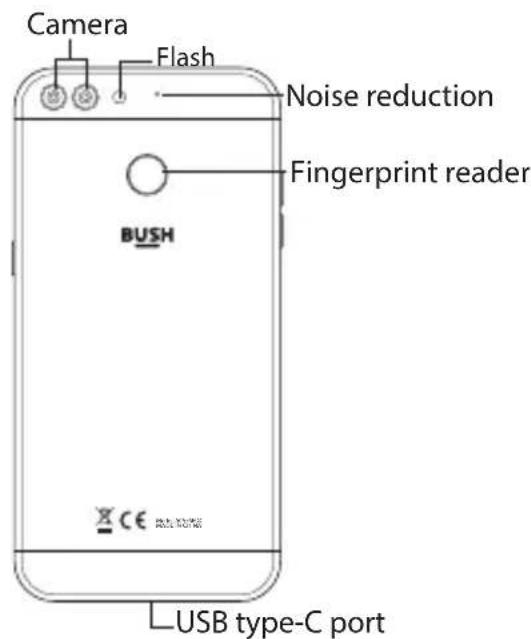
ON/OFF: when the device is off, long press to turn on. When the device is on, short press to turn off the screen and long press to display options.
Volume +/-: press +/- to adjust the volume. When you press the button, an arrow √ is also displayed. Select it to adjust the desired volume type.
Back: press to go back to the previous screen.
Home: short press to return to the homescreen, long press to access Google Now.
Recent apps: press to display recent apps.
Micro USB port. plug the provided cable to charge the device or to connect it to a computer.
● Headphone jack: connect the provided earphones to make hand-free calls.
Camera & Flash: take pictures or make movies. To extend movies duration, insert a micro-SD card. Activate the flash option in a dark environment and use it as a torch through the quick settings.
If you require any technical guidance or find that your product is not operating as intended, a simple solution can often be found in the
Getting to know your BUSH SPIRA D5.5 Smartphone
You'll be up and running in no time
Assembling
After you have unpacked your mobile phone box:
-
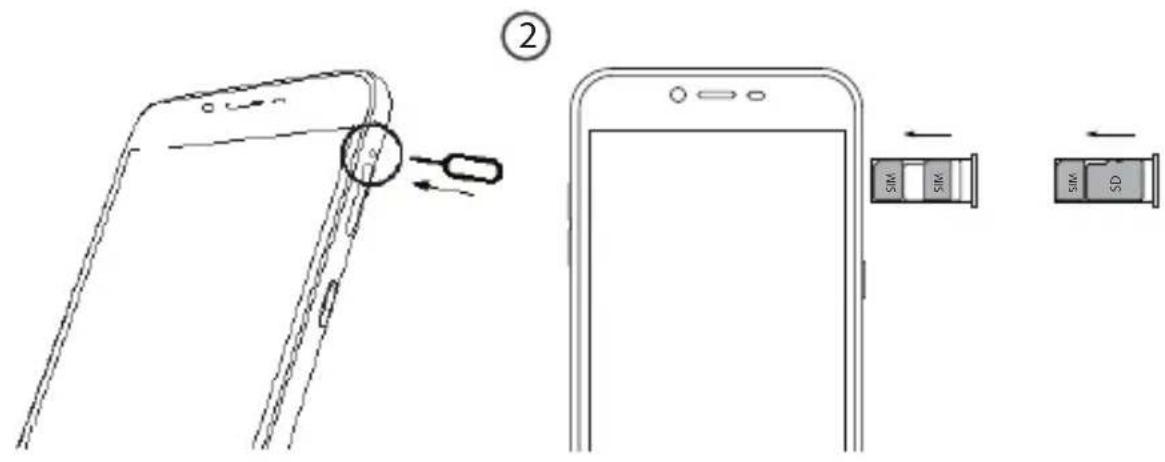
Remove the card tray by inserting the tool provided, into the tray release hole.
-
Insert 1 nano SIM card into slot 1 and a micro SD Memory card into slot 2 OR 1 nano SIM card into slot 1 and 1 nano SIM card into slot 2 as shown in the diagram.
-
Replace the tray in the right position and push it inside to close.
| Card type Slot Format When inserting your SIM | ||
| 4G/3G/2G slot 1 Nano-SIM | card or micro-SD card, make sure to follow the illustration, otherwise you may damage the slot or the card. | |
| 4G/3G/2G slot 2 Nano-SIM | ||
| Micro-SD card slot 2 Micro-SD not included) | Max. 128GB (FAT 32, card | |
Please note that you must turn the phone off before removing or inserting a SIM. Failure to do so may result in damage to the SIM.
Troubleshooting section of these instructions, or online at www.argos-support.co.uk If you still require further assistance, call one of our experts on 0208 068 1044.
Getting to know your phone

Getting to know your BUSH SPIRA D5.5 Smartphone
You'll be up and running in no time
SIM size guide
Use the following guide to identify the card required for each slot.
Standard-SIM

natural_image
Pure diagram of a symmetrical mechanical or electrical component outline without any text, numbers, or symbols25mm15mm
Micro-SIM

Nano-SIMMicro-SD

12mm

15mm
If you require any technical guidance or find that your product is not operating as intended, a simple solution can often be found in the
Getting to know your BUSH SPIRA D5.5 Smartphone
You'll be up and running in no time
Inserting SIM cards & memory card
1
Troubleshooting section of these instructions, or online at www.argos-support.co.uk If you still require further assistance, call one of our experts on 0208 068 1044.
Getting to know your phone

Getting to know your BUSH SPIRA D5.5 Smartphone
You'll be up and running in no time
Adding a micro-SD card
You can increase the memory of your phone quite cheaply by buying a micro SD card. For insertion diagram see page 29. When you insert the card into the phone and switch it back on, the phone will offer you 2 options.
- Use as portable storage – for moving photos and other media between devices
- Use micro-SD as internal memory – for storing anything on this device only, including apps.
If your phone does not automatically offer you the SD options above, you can find them in Settings – storage – SD card – settings.
If you pick option 1 you can take the card out anytime you like and use it in other compatible devices, e.g. a PC or tablet. You can load files onto it to use in your phone (e.g. mp3 files), and to take photos or downloaded files off your phone to store or view on your PC/tablet. Note that in this method you can only store media files, you cannot store Android apps on the card. The operating system will not allow it.
If you require any technical guidance or find that your product is not operating as intended, a simple solution can often be found in the
Getting to know your BUSH SPIRA D5.5 Smartphone
You'll be up and running in no time
If you chose option 2 (to format as internal memory) you increase capacity for apps as well as files. However, the memory is truly integrated with the phone, so if you remove it, you will lose files and apps. So if you pick option 2, its best to pick a large capacity card so you don't ever need to upgrade. It's also very important to use a fast card or the performance of your apps may be affected. We recommend you use App Performance Class A1 cards for integrated storage. The next best choice is to opt for a card with fast read write speeds like Ultra High Speed (UHS) cards. See page 27 for maximum recommended capacity.
Note its best to format the card in your phone/Android tablet before you load anything onto it. Your Android phone knows what format to use. If you prefer to do this in your PC, the format required is FAT32. Your phone will not work with cards formatted in NTFS or other formats and may not even recognize them.
Troubleshooting section of these instructions, or online at www.argos-support.co.uk If you still require further assistance, call one of our experts on 0208 068 1044.
Getting to know your phone

Getting to know your BUSH SPIRA D5.5 Smartphone
You'll be up and running in no time
Turning on
-
Plug the charging cable in the Micro-USB port and connect it to its charger. Before using your device for the first time, charge its battery completely.
-
Press and hold the ON/OFF button to turn on the device.
The first time you start up your Bush, the installation wizard will help you set up your device.
- Follow the instructions.
If you have inserted a SIM card, you may need to enter a PIN code.
Beware of typing a wrong PIN code.
Tip:
Your device goes in standby mode when you do not use it for a specific period of time. To wake up your device, press the ON/OFF button. To set the duration, go to Settings > Display > Sleep.
If you require any technical guidance or find that your product is not operating as intended, a simple solution can often be found in the
Getting to know your BUSH SPIRA D5.5 Smartphone
You'll be up and running in no time
On your homescreen
- Swipe right to access Google Now, once it
is activated - Swipe up to access all your apps
- Hold your finger on an app to move it right and create a new homescreen.
- Say "Ok Google" or to launch the search page press the Mic icon
- Touch and pull down the status bar to display it. Touch again the bar to reveal the quick settings.


Troubleshooting section of these instructions, or online at www.argos-support.co.uk If you still require further assistance, call one of our experts on 0208 068 1044.
Getting to know your phone

Getting to know your BUSH SPIRA D5.5 Smartphone
You'll be up and running in no time
Mobile data connection
If your mobile phone subscription includes a mobile data option, you should be connected to the Internet without any further setup. The phone will only have data signal if you are in an area covered by your provider's 2G/3G/4G network.
Activating/Deactivating the mobile data
- Touch and pull down the status bar to display it.
- Touch the bar again to reveal the quick settings.
- Select the Settings icon.
- In Wireless & networks, select Data usage, then the SIM card tab.
- Touch the Mobile data switch to turn on/off.

If you require any technical guidance or find that your product is not operating as intended, a simple solution can often be found in the
Getting to know your BUSH SPIRA D5.5 Smartphone
You'll be up and running in no time
WiFi connection
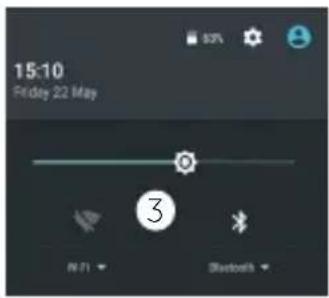
WARNING: Make sure that you are in a WiFi zone. You can access the WiFi settings quickly from the status bar.
- Touch and pull down the status bar to display it.
- Touch again the bar to reveal the quick settings.
- Select the WiFi icon 📋 to activate the WiFi connection 🖱️.
- Select "WiFi" below the WiFi icon.
- Touch the name of network you want to connect to. Private networks are shown with a lock icon and will require you to enter your password.

Troubleshooting section of these instructions, or online at www.argos-support.co.uk If you still require further assistance, call one of our experts on 0208 068 1044.
Getting to know your phone

BUSH SPIRA D5.5 Smartphone
3Using :
Using your BUSH SPIRA D5.5 Smartphone
You'll be up and running in no time
Adding a Google account
A Google account lets you take full advantage of any Google apps and services that you may want to use.
- Go to "Settings" > "Personal" > "Accounts" > "Add account".
- Select the account type "Google" to add.
- Follow the onscreen instructions to enter information about the account.
Once the account is created, you can access Play Store, Gmail, Hangouts, Maps and many other apps.
Synchronizing info
To back up your data and settings to Google's servers you need to sync your phone to your Google account..
- Go to "Settings" > "Personal" > "Accounts" > "Google".
- Select your account.
The list of data that can be synced is displayed.
Automatic sync should be activated. To manually launch the sync, press the Menu button ☐ then Sync now. You can get them back in case of loss of your device or SIM card. Also when your Google account is added to a new device, all your saved information is transferred.
If you require any technical guidance or find that your product is not operating as intended, a simple solution can often be found in the
Using your BUSH SPIRA D5.5 Smartphone
You'll be up and running in no time
Saving your contacts
When your contacts are saved, they are always available on the web and can be synced to any Android phone that's set up with your Google account.
- Make sure you have transferred all your contacts from your old phone to your SIM.
- Install the SIM card with your contacts in your phone.
- From the Home screen or the All Apps screen, select the Contacts app
- Touch the Menu button: > "Import/Export".
- In Import/export contacts, select "Import from SIM card".
- Select your Google account.
- Check contacts to be imported and validate.
- Once the contacts are imported in the Google account, go to "Settings"
"Accounts" > "Google".
-
Select your Google account.
-
Select the Menu button ☐, then "Sync now".
Your contacts are saved to your Google account.
Troubleshooting section of these instructions, or online at www.argos-support.co.uk If you still require further assistance, call one of our experts on 0208 068 1044.
Using your phone

Using your BUSH SPIRA D5.5 Smartphone
You'll be up and running in no time
Hints and tips for Android
Moving a home screen item: Touch and hold your finger onto it, then slide it to the desired location, and release your finger.
Removing a home screen item: Touch and hold it, slide your finger towards the top of the screen and drop it over the "Remove" icon.
Uninstalling an item: From the "All apps" screens, touch and hold it, slide your finger towards the top of the screen and drop it over "Uninstall" bin.
Creating application folders: Drop one app icon over another on a home screen and the two icons will be combined.
If you require any technical guidance or find that your product is not operating as intended, a simple solution can often be found in the
Using your BUSH SPIRA D5.5 Smartphone
You'll be up and running in no time
Hints and tips for Android
Changing your wallpaper: Hold your finger on a home screen at an empty location. Touch "Wallpapers".
Locking the touchscreen: Select the "Settings" app, then scroll down and touch "Security". Touch "Screen lock". Touch the type of lock you would like to use. After you set a lock, a lock screen is displayed whenever your screen wakes up, requesting the pattern, pin or other specified key.
Widgets: Hold your finger on a homescreen at an empty location. Touch "Widgets".
Troubleshooting section of these instructions, or online at www.argos-support.co.uk If you still require further assistance, call one of our experts on 0208 068 1044.
Using your phone

Using your BUSH SPIRA D5.5 Smartphone
You'll be up and running in no time
Improving security on your Bush Phone
Online
In order to avoid online threats we recommend that you install antivirus and security software on your device and keep these and your browser and other software up to date to take advantage of security fixes.
Physical theft
If you store valuable information on your phone including passwords and logins for personal accounts etc. you may want to enhance the security of your phone in case it is stolen or lost.
Setting a PIN or password
You can set a pin code (4-8 digit numerical code) or you can set a password which is 4 to 17 digits. We recommend you set a password, the longer and more complex it is the harder it is to break. For the best passwords use a mixture of upper and lower case letters, numbers and special characters such as %, # and *.
If you require any technical guidance or find that your product is not operating as intended, a simple solution can often be found in the
Using your BUSH SPIRA D5.5 Smartphone
You'll be up and running in no time
Improving security on your Bush Phone
•In 'Settings', select 'Security', then 'screen lock', then select PIN or Password. It is important to remember your password, without it your device will be useless. Make a note of it in this book and keep the book somewhere safe away from your phone.
Encryption
As a feature of Android 7, the personal data on your Bush phone is encrypted to prevent any unauthorized persons getting access to it. So, in the event of your phone being lost or stolen your data is safe. In order for encryption to be effective you must set an effective password. Security on your device is very effective so remember to write down your password and Google account address and password. In the event that you forget them you will not be able to access your device by any means. We suggest that you write down your account details and passwords in this book and then keep this book in a safe place.
Troubleshooting section of these instructions, or online at www.argos-support.co.uk If you still require further assistance, call one of our experts on 0208 068 1044.
Using your phone

Using your BUSH SPIRA D5.5 Smartphone
You'll be up and running in no time
Improving security on your Bush Phone
Erasing your personal data
If you sell your phone on or discard it, you should remove your personal data from it.
- Remove your Google account
Settings – accounts – Google – select your account then press and press remove account.
- Return your phone to factory defaults
Settings – Back up and reset – Factory data reset – reset phone.
If you prefer to be extra sure, you can also use an eraser app.
- To download a file eraser go to Google Play store, select a file eraser program such as Remo File Eraser – download and install.
- Open the app and follow instructions to securely erase your data.
Further Advice
For further advice on how to stay safe there are government lead initiatives such as Get Safe Online https://www.getsafeonline.org/ which give good advice about
If you require any technical guidance or find that your product is not operating as intended, a simple solution can often be found in the
Using your BUSH SPIRA D5.5 Smartphone
You'll be up and running in no time
Improving security on your Bush Phone
how to avoid a range of security threats. Don't let security issues spoil your enjoyment of your phone.
Troubleshooting section of these instructions, or online at www.argos-support.co.uk If you still require further assistance, call one of our experts on 0208 068 1044.
Using your phone

Product support 4
Product support
Help is always at hand
Troubleshooting
My phone is frozen or cannot switch on:
Check the battery power level, charge for at least 20 minutes.
My phone cannot connect to a network or "No service" is displayed:
Try connecting in another location. Verify the network coverage with your operator.
Unable to make outgoing calls:
Make sure your phone is connected to a network, and the network is not overloaded or unavailable. Ring your network to check that you have credit and that your SIM is still valid.
Unable to receive incoming calls:
Make sure your phone is switched on and connected to a network (check for overloaded or unavailable network). Ring your network to check that you have credit and that your SIM is still valid.
SIM card PIN locked:
Contact your network operator to obtain the PUK code (Personal Unblocking Key).
To configure a new 4G network:
For most networks, your APN network settings will usually set up automatically when you insert your SIM card, but if they do not:
On your device, tap Settings.
If you require any technical guidance or find that your product is not operating as intended, a simple solution can often be found
Product support
Help is always at hand
Troubleshooting
Select Wireless & networks > More... > Mobile networks.
In Network operators, select your operator.
In Access Point Names, select the correct access point name and enter the exact connection parameters provided by your 4G provider.
The most common causes of operational problems on mobile phones is interference from 3rd party apps and malware picked up from internet use. If your phone starts to misbehave or seems faulty, first consider that the problem may be due to a new app. Back track to see what apps you have loaded recently to see what may have caused an issue. In some cases, uninstalling the app may be enough to fix the issue. In other cases, you will need to perform a factory data reset to recover your phone to working order. If you are synced up to your Google account, your apps and settings are backed up, so this is not such an extreme remedy. First check that you have your Google account set up and that you can remember the account e-mail address and password. You will need these after the reset. If you can't remember them do not reset, your phone would be useless afterwards. To reset, go to settings – back up and reset - factory data reset – reset phone.
in the Troubleshooting section of these instructions, or online at www.argos-support.co.uk If you still require further assistance, call one of our experts on 0208 068 1044.
Product support

Product support
Help is always at hand
Help and assistance
If you require any technical guidance or find that your Bush phone is not operating as intended, a simple solution can often be found in the Troubleshooting section of these instructions or online at www.argos-support.co.uk If you still require further assistance, call one of our experts on 0208 068 1044 ^* . Please have the following information ready: 7 digit Argos catalogue code e.g. 123/4567 from your receipt of product packaging or 7 digit PN e.g. 503XXX from the product or packaging Date of purchase – from your receipt
Helpline business hours:
Monday to Friday 9.00 – 18.00
Saturday 9.00 - 16.00
Sunday Closed
Or e-mail for written support to; argos@cordonweb.com
If you require any technical guidance or find that your product is not operating as intended, a simple solution can often be found
Product support
Help is always at hand
Environmental Considerations

Protection of the environment is an important concern to Bush. In order to put this concern into tangible actions, Bush has consciously included a set of methods that favour a respect for the environment into the entire cycle of its products; from fabrication to consumer usage, to final disposal.
Batteries : If your product contains a detachable battery pack, you should only dispose of it in a designated collection point for used batteries.
The Product : The crossed-out wheelie bin symbol on your product
signifies that it falls into the category of electric/electronic equipment. Products of this type contain substances that are potentially dangerous to the environment and to human health. Therefore, you should not dispose of the Bush electronic device in a regular trash. As such, the current European directives ask that this device be collected: at places of distribution in the case of a purchase of a similar electronic product. At locally created disposal areas (waste disposal centres, sorted trash system, etc.). By doing this, you are actively participating in the reuse and recycling of disposed electronic and electric equipment that could have potential effects on the environment and human health.
in the Troubleshooting section of these instructions, or online at www.argos-support.co.uk If you still require further assistance, call one of our experts on 0208 068 1044.
Product support

Product support
Help is always at hand
BUSH
Call us now and activate your 24 month guarantee
Thank you for choosing Bush. Your new product is guaranteed against faults and breakdowns for 24 months. Don't forget to register it with us today so we can provide you with our best possible after-sales service and useful updates.
www.bushregistration.co.uk
FREEPHONE*
0800 597 8548
Lines are open 8am - 8pm, 365 days a year. *Calls may be recorded and monitored.
Your Bush Guarantee
This product is guaranteed for 24 months from the date of original purchase. Any defect that arises due to faulty materials or workmanship will be repaired free of charge (or if applicable the product will be replaced or the purchase price refunded) where possible during this period by the dealer from who your purchased the unit.
If you require any technical guidance or find that your product is not operating as intended, a simple solution can often be found
Product support
Help is always at hand
The guarantee is subject to the following provisions:
The guarantee does not cover accidental damage, misuse, cabinet parts, knobs or consumable items. The product must be correctly installed and operated in accordance with the instructions contained in the manual.
It must be used solely for domestic purposes. The guarantee will be rendered invalid if the product is re-sold or has been damaged by inexpert repair.
Specifications are subject to change without notice.
Bush disclaim any liability for loss or damage arising from the breakdown of the product.
This guarantee is in addition to and does not diminish your statutory or legal rights.
in the Troubleshooting section of these instructions, or online at www.argos-support.co.uk If you still require further assistance, call one of our experts on 0208 068 1044.
Product support

Product support
Help is always at hand
Important Data Protection Information
If you provide us with information about another person, you confirm that they have appointed you to act for them, to consent to the processing of their personal data including sensitive personal data and that you have informed them of our identity and the purposes (as set out in the Important Data Privacy notice displayed overleaf) for which their personal data will be
processed.
You are entitled to ask for a copy of the information we hold about you (for which we may charge a small fee) and to have any inaccuracies in your information corrected.
For quality control and training purposes, we may monitor or record your communications with us.
If your personal details change, if
If you require any technical guidance or find that your product is not operating as intended, a simple solution can often be found
Product support
Help is always at hand
you change your mind about any of your marketing preferences or if you have any queries about how we use your information, please let us know by contacting our Data Protection Officer, Domestic & General, Leicester House 17 Leicester Street, Bedworth, Warwickshire CV12 8JP.
in the Troubleshooting section of these instructions, or online at www.argos-support.co.uk If you still require further assistance, call one of our experts on 0208 068 1044.
Product support

Product support
Help is always at hand
Sar - After the laboratory measurements, when it is kept at 0.5 cm from your body, the SAR values for this device are:
Head Max: 0.773W/Kg (10g)
Body Max: 1.702W/Kg (10g)
Argos declares that this device is in compliance with the essential requirements and other relevant provisions of Directive 2014/53/EU. A copy of the declaration of conformity can be obtained from: Argos Ltd. 489-499 Avebury Boulevard, Milton Keynes, MK9 2NW, UK
If you require any technical guidance or find that your product is not operating as intended, a simple solution can often be found
Product support
Help is always at hand
| WMAN | ||
| Frequency band | Maximum output power | |
| GSM B2/B3 | 21~ 32dBm | |
| GSM B5/B8 | 22~ 30dBm | |
| UMTS B1/B8 | 21~ 25dBm | |
| FDD LTE B1/B3/B7/B20 | 23~ 25dBm | |
| WLAN | ||
| Standard | Frequency | Avg. Power (dBm) |
| 802.11b | 2.4~ 2.4935GHz | 15.15~17.60dBm |
| 802.11g | 2.4~ 2.4935GHz | 12.11~13.33dBm |
| 802.11n | 2.4~ 2.4935GHz | 11.81~13.59dBm |
| Bluetooth | ||
| Bluetooth Version | Frequency Range | Avg. Power (dBm) |
| EDR | 2.4~ 2.48GHz | 4.21~5.91dBm |
| BLE | 2.4~ 2.48GHz | -0.89~0.00dBm |
in the Troubleshooting section of these instructions, or online at www.argos-support.co.uk If you still require further assistance, call one of our experts on 0208 068 1044.
BUSH
Contact: www.argos-support.co.uk
Helpline: 0208 068 1044
PN: 115969


- Help and Guidance
- Contents
- Safety information 1
- Safety information
- Warranty and limited liability
- Lithium-ion battery caution
- Optimising battery performance
- Warnings and safety instructions
- Caution
- Warning
- Safety
- Install your Bush product carefully
- Avoid interference with other electronic products
- Other security instructions
- Child protection
- Electrostatic discharge (ESD)
- Avoiding hearing damage
- Copyright notice
- Disclaimer of warranty
- End user license agreement for Bush software
- Open Source Software Offer
- Getting to know your BUSH SPIRA D5.5 Smartphone
- Ready? Let's begin...
- Accessories
- Assembling
- SIM size guide
- Adding a micro-SD card
- Turning on
- Tip:
- On your homescreen
- Mobile data connection
- Activating/Deactivating the mobile data
- WiFi connection
- BUSH SPIRA D5.5 Smartphone
- Using your BUSH SPIRA D5.5 Smartphone
- Adding a Google account
- Synchronizing info
- Saving your contacts
- Hints and tips for Android
- Improving security on your Bush Phone
- Online
- Physical theft
- Setting a PIN or password
- Encryption
- Erasing your personal data
- Further Advice
- Product support 4
- Product support
- Troubleshooting
- Help and assistance
- Helpline business hours:
- Environmental Considerations
- BUSH
- Your Bush Guarantee
- The guarantee is subject to the following provisions:
- Important Data Protection Information
Brand : BUSH
Model : Spira D5.5
Category : Mobile Phone