L02TSS17 - Toaster Logik - Free user manual and instructions
Find the device manual for free L02TSS17 Logik in PDF.


| Product Type | Toaster |
| Brand | Logik |
| Model | L02TSS17 |
| Dimensions (approx.) | 25 cm x 15 cm x 20 cm |
| Weight | 1.2 kg |
| Power Rating | 1000 W |
| Number of Slots | 2 |
| Browning Control | Adjustable with 6 settings |
| Functions | Cancel, Defrost, Reheat |
| Crumb Tray | Removable for easy cleaning |
| Cord Storage | Integrated cord wrap |
| Automatic Shut-off | Yes |
| Cool-Touch Exterior | Yes |
| Non-Slip Feet | Yes |
| Cleaning Instructions | Wipe with damp cloth; empty crumb tray regularly |
| Spare Parts Availability | Contact Logik customer service |
| Repairability | Professional repair recommended |
Frequently Asked Questions - L02TSS17 Logik
User questions about L02TSS17 Logik
0 question about this device. Answer the ones you know or ask your own.
Ask a new question about this device
Download the instructions for your Toaster in PDF format for free! Find your manual L02TSS17 - Logik and take your electronic device back in hand. On this page are published all the documents necessary for the use of your device. L02TSS17 by Logik.
USER MANUAL L02TSS17 Logik
We recommend that you spend some time reading this instruction manual in order that you fully understand all the operational features it offers.
Read all the safety instructions carefully before use and keep this instruction manual for future reference.
Unpacking
Remove all items from the packaging. Retain the packaging. If you dispose of it please do so according to local regulations. The following items are included:
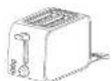
Main Unit

Instruction Manual
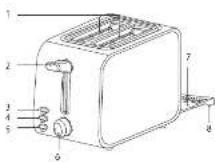
Product Overview
- Toast Slots
- Toasting Lever
3 Cancel Button - Reheat Button
- Defrost Button
- Browning
7.6.15 - 2014年1月
- Clumb tray Handle
First Time Use
Please note there may be manufacturing residue or oil remaining in the toaster or heating element. Odour may be emitted the first time you use it. This is normal and will not occur after using your toaster several times. The first time you use your toaster we suggest that you operate it without bread.
Toasting Bread
To prevent jamming do not use your toaster with torn slices of bread. Make sure the size and thickness of the bread slices fit easily into the toast slices. Always watch your toaster when in use. Never leave your toaster unattended.
-
Plug the mains plug into the mains socket.
-
Remove all protective wrapping prior to putting the bread into the toaster.
-
Put 1 or 2 slices of bread into the bread slots.
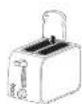

- For optimum browning, always place the bread as close as possible to the centre of the slots.
• Make sure the crumb tray is completely inserted before
use.
- Avoid toasting food with extremely funny ingredients such as butter.
- The bread slot is only suitable for toasting regular bread
slices.
- Select the level of browning by turning the Browning Control. There are 7 settings:

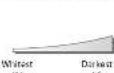

Select a lower position (i.e. 1 or 2) for light browning, especially for toasting only one slice or for dry (old) bread. Note that the toasting colour for one slice will be darker than that for two slices at the same level.
- Note that the higher browning level, the higher chance of burning the toast.
- If you have initially toasted some bread, the toaster elements will be hot, so when you put some more bread into the toaster it may brown faster than the first slices that were toasted, even if the Browning Control is set to the same level.
- Lower the toasting lever until it is positioned in place. The toaster will begin at once.


- Only when the toaster is connected to the mains power, can the toasting lever be locked in the downward position.
- During the toasting process, you can observe the toasting colour. Press the Cancel button to cancel the operation at any time if you are satisfied with the colour.
- Once the bread has been toasted to the preset browning level, the toasting lever will automatically pop up which means your toast is ready.
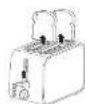
Other Functions
Defrost
Insert the frozen bread. Set the browning control to your desired colour. Lower the toasting lever until it remains in position, then press the Defrost button. The indicator will illuminate. In this mode, the frozen bread will be toasted to your desired colour.
Reheat
To reheat the toast, lower the toasting lever until it remains in position, and then press the Reheat button. The indicator will illuminate, and the unit will reheat the toast for about 30 seconds.
Cancel
If the toaster starts to smoke, press the Cancel button to stop toasting immediately.

Lift the toasting lever further if the bread slices have not popped up above the body of the toaster.
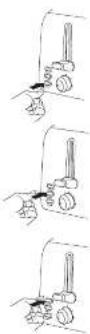
Removing Crumbs
- First remove the mains plug from the mains socket.
- Slide the crumb tray cut at the bottom of toaster by holding the crumb tray handle.
- Empty the crumbs into the bin and clean the crumb tray.
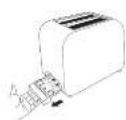

- Ensure the toaster is cool enough to handle. The metal part may be hot.
- Let the crumb tray dry thoroughly before reinserting it back into the toaster.
- Ensure the crumb tray is completely inserted before using your toaster again.
Clear a Piece of Blocked Bread
- Remove the mains plug from the mains socket.
- Allow the toaster to completely cool down.
- Push and hold the toasting lever down then release.
- Cently dislodge the blockage with a non-metallic object, for example the handle of a wooden spoon.

Ensure you don't make contact with the heating elements, as you may damage them.
- Lift the toasting lever to remove the blockage.
Cleaning and Maintenance
Unplug the mains plug from the mains socket and allow the toaster to cool down before cleaning.
Do not use harsh cleaners or solvents as they may damage the casing. The body of the toaster should be cleaned using a cloth dampened with warm water. Make sure you do not allow water to seep into the controls or heating elements.
When not in use, the mains cable may be wound under the bottom of the toaster.
Specifications
Power Supply 170 - 24W \~ 58Hz Power Consumption 30 - 650W
Features and specifications are subject to change without prior notice.
LOGIK | Instruction Manual
2 Slice Toaster
L02TSS17
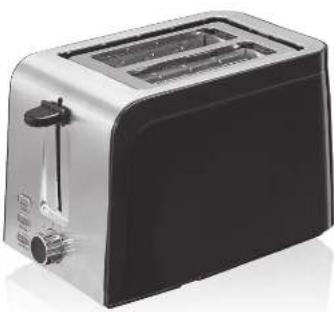
natural_image
Exterior view of a modern kitchen toaster with black and silver casing (no text or symbols visible)Safety Warnings
For your continued safety and to reduce the risk of injury or electric shock, please follow all the safety precautions listed below.
- Read all the instructions carefully before using the appliance and keep them for future reference.
- Retain the manual. If you pass the appliance onto a third party, make sure to include this manual.
- Check that the voltage marked on the rating label matches your mains voltage.
Damage
- Please inspect the appliance for damage after unpacking. - Do not continue to operate the appliance if you are in any doubt about it working normally, or if it is damaged in any way - switch off, withdraw the mains plug and consult your dealer.
Location of Appliance
- This appliance is intended for indoor household use and similar applications such as:
- farm houses and by clients in hotels, motels and other residential type environment;
• bed and breakfast type environment;
- catering and similar non-retail applications.
- Make sure the unit is earthed properly during use. Use of extension sockets are not recommended. If in doubt, contact a qualified electrician.
Temperature
- Avoid extreme degrees of temperature, either hot or cold. Place the appliance well away from heat sources such as radiators or gas/electric fires.
- Avoid exposure to direct sunlight and other sources of heat.
- Do not touch hot surfaces. Temperature of accessible surfaces may be very high when the appliance is operating.
Naked Flames
- Never place any type of candle or naked flame on the top of or near the appliance.
Moisture
• To reduce the risk of fire, electric shock or product damage, do not expose this appliance to rain, moisture, dripping or splashing. No objects filled with liquids, such as vases, should be placed on the appliance.
- If you spill any liquid into the appliance, it can cause serious damage. Switch it off at the mains immediately and withdraw the mains plug.
Ventilation
- To prevent the risk of electric shock or fire hazard due to overheating, ensure that curtains and other materials do not obstruct the ventilation vents.
- Do not install or place this appliance in a bookcase, built-in cabinet or in another confined space. Ensure the appliance is well ventilated.
Safety
- The appliance is not intended to be operated by means of an external timer or separate remote-control system.
• Always disconnect the appliance from the mains supply before moving the appliance.
- In the interests of safety and to avoid unnecessary energy consumption, never leave the appliance unattended for long periods of time, e.g. overnight, while on holiday or while out of the house. Disconnect the mains plug from the mains socket.
- Bread may burn. Your appliance must not be used near or below curtains or other combustible materials. It must be watched when in use.
- Only place toast bread in your appliance. Do not attempt to toast any pastry or bread product which is filled with a fruit or sugary filling (pop tarts etc). The stuffings may leak from the appliance and cause damage to your appliance with the possible risk of a fire occurring.
- Oversize food, metal foil packages or utensils must not be inserted in the appliance as they may cause fire or electric shock.
- Don't attempt to dislodge food while the appliance is operating.
• Take the bread out carefully after toasting to avoid injuries.
- Do not use the appliance for uses other than its intended use.
Mains Cable
• Make sure the appliance is not resting on top of the mains cable, as the weight of the appliance may damage the mains cable and create a safety hazard.
- Do not let the mains cable overhang the edge of the work surface or allow it to touch hot surfaces or sources of heat or flame.
- If the mains cable is damaged it must be replaced by the manufacturer, its service agent, or similarly qualified persons in order to avoid a hazard.
Supervision
- This appliance can be used by children aged from 8 years and above and persons with reduced physical, sensory or mental capabilities or lack of experience and knowledge if they have been given supervision or instruction concerning use of the appliance in a safe way and understand the hazards involved. Children shall not play with the appliance. Cleaning and user maintenance shall not be made by children without supervision.
- Keep the appliance and its cord out of reach of children less than 8 years old.
- Never let anyone especially children push anything into the holes, slots or any other openings in the case - this could result in a fatal electric shock.
Service
- To reduce the risk of electric shock, do not remove screws. The appliance does not contain any user-serviceable parts. Please leave all maintenance work to qualified personnel.
- Do not open any fixed covers as this may expose dangerous voltages.
Maintenance
- Ensure to unplug the appliance from the mains socket before cleaning.
- Allow the appliance to cool completely before cleaning or storing.
- Do not use any type of abrasive pad or abrasive cleaning solutions as these may damage the appliance's surface.
• Do not use liquids to clean the appliance.
Team Knowhow
Help with all life's kit For general information about this appliance and handy hats and tips, please visit TeamKnowhow.com/discover or call 0344 5611234.
Partmaster Visit Partmaster.com today for the contact way to buy close local sources and accessories. With over 1 million groups and accessories available we can deliver direct in your door the very next day. Visit www.partmaster.com or call 0104 500-16th US customers only. Calls charged at National rate.
The symbol on the product or its packaging indicates that this product must not be disposed of with your other household waste. Instead, it is your responsibility to dispose of your waste equipment by handling it over to a designated collection point for the recycling of waste electrical and
Electrical equipment. The separate collection and recycling of your water equipment at the time of disposal will help to determine natural resources and ensure that it is recycled in a manner that protects human health and the environment. For more information about where you can drop off your waste for recycling, please contact your local authority, or where you purchased your product.
(295) Retail Ltd. (co. no. 504877) 1 Portal Way, London, WI 685, UK
EU Representative D&G Retail Ireland Ltd (259467) 3rd Floor Office Suite, Omni Park,SC, Santry, Dublin 9, Republic of Ireland
18-(0275517-19040492
- Unpacking
- Product Overview
- First Time Use
- Toasting Bread
- Other Functions
- Defrost
- Reheat
- Cancel
- Removing Crumbs
- Clear a Piece of Blocked Bread
- Cleaning and Maintenance
- Specifications
- LOGIK | Instruction Manual
- Slice Toaster
- Safety Warnings
- Damage
- Location of Appliance
- Temperature
- Naked Flames
- Moisture
- Ventilation
- Safety
- Mains Cable
- Supervision
- Service
- Maintenance
- Team Knowhow
Brand : Logik
Model : L02TSS17
Category : Toaster