LHDSW19 - HDMI switch Logik - Free user manual and instructions
Find the device manual for free LHDSW19 Logik in PDF.
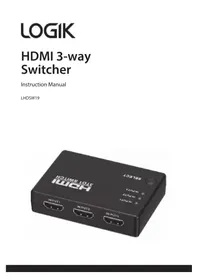


| Product Type | HDMI Switch |
| Brand | Logik |
| Model | LHDSW19 |
| Number of Inputs | 3 (HDMI) |
| Number of Outputs | 1 (HDMI) |
| Maximum Resolution | 1080p (Full HD) |
| Power Supply | USB 5V DC (cable included) |
| Dimensions (W x D x H) | Approx. 100 x 60 x 20 mm |
| Weight | Approx. 50 g |
| Switching Method | Manual push button or IR remote (not included) |
| HDMI Version | 1.4 |
| Supported Audio Formats | Stereo, Dolby Digital, DTS |
| HDCP Support | Yes (HDCP 1.4) |
| LED Indicators | Yes (for active input) |
| Compliance | CE, RoHS |
| Operating Temperature | 0°C to 40°C |
| Storage Temperature | -20°C to 60°C |
Frequently Asked Questions - LHDSW19 Logik
User questions about LHDSW19 Logik
0 question about this device. Answer the ones you know or ask your own.
Ask a new question about this device
Download the instructions for your HDMI switch in PDF format for free! Find your manual LHDSW19 - Logik and take your electronic device back in hand. On this page are published all the documents necessary for the use of your device. LHDSW19 by Logik.
USER MANUAL LHDSW19 Logik
Safety Warnings....4
Unpacking......6
Connections ....7
Remove the Plastic Strip from the Remote Control .....8
Battery Replacement for the Remote Control......8
Remote Control Operation Range......11
Selecting Modes 11
Maintenance ....12
Hints and Tips....13
Specifications....14
Read all the instructions carefully before using the unit and keep them for future reference.
Retain the manual. If you pass the unit onto a third party make sure to include this manual.
Check that the voltage marked on the rating label matches your mains voltage.
Temperature
- Avoid extreme degrees of temperature, either hot or cold. Place the unit well away from heat sources such as radiators or gas / electric fires.
- Avoid exposure to direct sunlight and other sources of heat.
Batteries
- Batteries used in the unit are easily swallowed by young children and this is dangerous.
- Keep loose batteries away from young children and make sure that the battery holder tray is secure in the unit. Seek medical advice if you believe a cell has been swallowed.
- Please dispose of batteries correctly by following the guidance in this manual.
- Do not expose the battery to direct sunlight or sources of excessive heat.
Supervision
- Children should be supervised to ensure that they do not play with the unit.
- Never let anyone especially children push anything into the holes, slots or any other openings in the case - this could result in a fatal electric shock.
Maintenance
- Ensure to unplug the unit from the power supply before cleaning.
- Do not use any type of abrasive pad or abrasive cleaning solutions as these may damage the unit's surface.
- Do not use liquids to clean the unit.
Thank you for purchasing your new product.
We recommend that you spend some time reading this instruction manual in order that you fully understand all the operational features it offers. You will also find some hints and tips to help you resolve any issues.
Read all the safety instructions carefully before use and keep this instruction manual for future reference.
Unpacking
Remove all items from the packaging. Retain the packaging. If you dispose of it, please do so according to local regulations.
The following items are included:
- Main Unit
- Remote Control
- USB Power Cable
- IR Receiver
- Sticker
- Instruction Manual
Connections
![graph TD A["IR Receiver"] --> B["Device"] C["HDMI Cable"] --> B D["USB Power Cable"] --> B E["Computer monitor"] --> B](/content/2026/05/968443/images/d40525afa663406b3be365b3f167f51f738d97d68d6cbe26ee092f3f4fee6a89.jpg)
Remove the Plastic Strip from the Remote Control
Remove the plastic strip from the battery if the battery is being used for the first time. It is located at the bottom rear of the remote control.
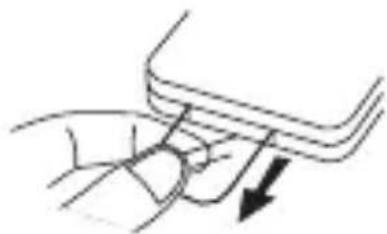
Battery Replacement for the Remote Control
The remote control requires a CR2025, 3V Lithium battery.
- Slide and hold the battery release tab in the direction of the arrow.
- Pull out the battery holder and remove the old battery.
- Replace with a new battery.
- Insert the battery holder back into the remote control.
![graph TD A["Rectangular Component"] --> B["Internal Components"] B --> C["Electronic Device with Intrinsic Component"]](/content/2026/05/968443/images/4727b374088eb9c5fa77a3d32b5bc2c1a29098c6449aa1ab279efe46f05a5050.jpg)

Handling the Battery
- Improper or incorrect use of batteries may cause corrosion or battery leakage, which could cause fire, personal injury or damage to property.
- Install the battery correctly by following the polarity (+ and –) indications in the battery compartment.
- Use only the battery type indicated in this manual.
- Do not dispose of the used battery as domestic waste. Dispose of it in accordance with local regulations.
- Small button cell batteries such as the one used in the remote control are easily swallowed by young children and this is dangerous. Keep loose button cells away from young children and make sure that the battery is secure in the remote control. Seek medical advice if you believe a battery cell has been swallowed.

Handling the Remote Control
• Take care of your fingernails when you slide and pull the battery release tab. - Do not drop the remote control. - Do not allow anything to impact the remote control. - Do not spill water or liquid on the remote control. - Do not place the remote control on a wet object. - Remove the battery from the remote control when not in use for a long period of time, as corrosion or battery leakage may occur and result in physical injury, and/or property damage, and/or fire. - When the battery is exhausted, the remote control will not function.
Remote Control Operation Range
- The remote control sensor on the front unit is sensitive to the remote control's commands up to a maximum of 5 metres away.
- Please note that the operating distance may vary depending on the brightness of the room.
Selecting Modes
To select the input source, press SELECT repeatedly. Alternatively, press ①②③ or ⓞ on the remote control to select the input source.
![graph TD A["HDMI Switcher Remote Control"] --> B["1"] A --> C["2"] A --> D["3"] A --> E["✓"] A --> F["∧"] A --> G["✓"] H["SELECT"] --> I["○ INPUT 1"] H --> J["○ INPUT 2"] H --> K["○ INPUT 3"]](/content/2026/05/968443/images/c926cfbdf08b945ce67462ec531bb0098457f508f9e925940d478703f18c42d4.jpg)
Maintenance
- To clean the unit, wipe the case with a slightly moist, lint-free cloth.
- Do not use any cleaning fluids containing alcohol, ammonia, or abrasives.
- Do not spray aerosol at or near the unit.
Hints and Tips
If a problem occurs, it may often be due to something very minor. The following table contains various tips:
| Problem Solution | |
| No power • Ensure the USB power cable is connected securely at both ends. | |
| The remote control does not function | • Use the remote control near the unit.• Point the remote control at the remote sensor on the unit.• Replace the battery in the remote control with a new one.• Remove any obstacles between the remote control and the unit. |

If any functional abnormality is encountered, unplug the USB power supply from the unit and reconnect it again.
Specifications
| Model LHDSW19 | |
| Input 5V | --- 250mA |
| Dimension (L x W x H) 82 x 58 x 18 mm | |
| Net Weight 111g | |
Features and specifications are subject to change without prior notice.

For general information about this appliance and handy hints and tips, please visit: www.TeamKnowhow.com/discover or call 0344 561 1234

Visit Partmaster.co.uk today for the easiest way to buy electrical spares and accessories. With over 1 million spares and accessories available we can deliver direct to your door the very next day. Visit www.partmaster.co.uk or call 0344 800 3456 (UK customers only). Calls charged at National Rate.
The symbol on the product or its packaging indicates that this product must not be disposed of with your other household waste. Instead, it is your responsibility to dispose of your waste equipment by handing it over to a designated collection point for the recycling of waste electrical and electronic equipment. The separate collection and recycling of your waste equipment at the time of disposal will help conserve natural resources and ensure that it is recycled in a manner that protects human health and the environment.
For more information about where you can drop off your waste for recycling, please contact your local authority, or where you purchased your product.
Notes for battery disposal
The batteries used with this product contain chemicals that are harmful to the environment.
To preserve our environment, dispose of used batteries according
to your local laws or regulations. Do not dispose of batteries with normal household waste.
For more information, please contact the local authority or your retailer where you purchased the product.
DSG Retail Ltd. (co. no. 504877)
1 Portal Way, London, W3 6RS, UK
EU Representative
DSG Retail Ireland Ltd (259460)
3rd Floor Office Suite
Omni Park SC, Santry, Dublin 9, Republic of Ireland
IB-LHDSW19-190408V2
- TEMPERATURE
- BATTERIES
- SUPERVISION
- MAINTENANCE
- THANK YOU FOR PURCHASING YOUR NEW PRODUCT
- UNPACKING
- CONNECTIONS
- REMOVE THE PLASTIC STRIP FROM THE REMOTE CONTROL
- BATTERY REPLACEMENT FOR THE REMOTE CONTROL
- HANDLING THE BATTERY
- HANDLING THE REMOTE CONTROL
- REMOTE CONTROL OPERATION RANGE
- SELECTING MODES
- HINTS AND TIPS
- SPECIFICATIONS
- NOTES FOR BATTERY DISPOSAL
Brand : Logik
Model : LHDSW19
Category : HDMI switch