
BS-GU2008 - Network switch BUFFALO - Free user manual and instructions
Find the device manual for free BS-GU2008 BUFFALO in PDF.


| Product Type | Network Switch |
| Brand | Buffalo |
| Model | BS-GU2008 |
| Number of Ports | 8 |
| Interface Type | RJ-45 Gigabit Ethernet |
| Data Rate | 10/100/1000 Mbps |
| LED Indicators | Power, Link/Act (per port), Speed (1000/100/10M), Loop |
| Loop Detection | Yes, with on/off switch and LED alarm |
| Power Supply | External power adapter (included) |
| Mounting Options | Floor/shelf, wall, metal surface (with magnet kit) |
| Form Factor | Desktop |
| Cooling | Fanless |
| Operating Temperature | 0°C to 40°C |
| Dimensions (approx.) | 160 x 100 x 30 mm |
| Weight (approx.) | 0.3 kg |
| Color | Black |
| Package Contents | Switch, power adapter, magnet kit, quick start guide |
| Certifications | FCC, CE |
| Warranty | 1 year limited |
Frequently Asked Questions - BS-GU2008 BUFFALO
User questions about BS-GU2008 BUFFALO
0 question about this device. Answer the ones you know or ask your own.
Ask a new question about this device
Download the instructions for your Network switch in PDF format for free! Find your manual BS-GU2008 - BUFFALO and take your electronic device back in hand. On this page are published all the documents necessary for the use of your device. BS-GU2008 by BUFFALO.
USER MANUAL BS-GU2008 BUFFALO
The package contains the items shown below. If any items are missing, please contact the dealer where you purchased the BS-GU2008. The appearance of the BS-GU2008 may vary from the illustration.
Layout

1. Indicators
Indicators are located on the front panel of the product. The functions of each indicator are shown below.
Link/Act (Green)
On: Link established
Blinking: Data transfer
Off: Link not established
1000/100/10M (Green or Orange)
Loop (Red)
Blinking: Loop detected
Off: Normal
Power (Green)
2. Loop detection switch
Switch loop detection on and off.
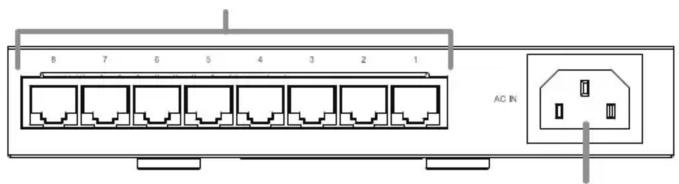
3. LAN ports
4. Power connector
Connect the included power cable to this connector.
Installation
Precautions for Installation
table or an inclined surface.
unit.
them.
or walls.
cables may result in damage or fire.
Floor or Shelf Mounting
use.
Mounting to a Metal Surface
To mount to a metal surface, such as the side of a steel desk, use the
the bottom corners of the unit before using the magnet kit.
Caution:
media near magnets. Doing so may delete or corrupt data.
Mounting to a Wall
holes in the base of the BS-GU2008 over them.
Use screws where this section is

Loop Detection
This unit can detect network loops that can cause interference in the network.
What Is a Loop?
multiple connections exist between two hubs, data may be sent in a loop around the network, wasting network capacity and never getting to its destination. This continuously circulating data may interfere with other network communication.
Loop Detection
Turning Loop Detection On and Off
Use the switch on the front of the BS-GU2008 to turn loop detection on and off.
- Disconnect the power cable, then reconnect it.
Note: The setting isn't changed until power cable is disconnected and reconnected.
Caution :
detection packet through the network every two seconds. If these packets disrupt your network in any way, disable loop detection.
When a Loop is Detected
loop.
Specifications
| Connector | |
| Weight | |
Federal Communication Commission Interference Statement
Trouble Shooting
If you are unable to connect to a network, check the following.
Brand : BUFFALO
Model : BS-GU2008
Category : Network switch