ST04 - Lawn mower G-TECHNOLOGY - Free user manual and instructions
Find the device manual for free ST04 G-TECHNOLOGY in PDF.


| Product Type | Lawn Mower |
| Model | ST04 |
| Brand | G-Technology |
| Power Source | Electric Corded (120V AC) |
| Motor Power | 1200 W |
| Cutting Width | 40 cm (16 inches) |
| Cutting Height Adjustment | 5 positions (25-75 mm) |
| Grass Collection Bag Capacity | 40 L |
| Mulching Capability | Yes (requires mulching plug) |
| Handle Type | Foldable for storage |
| Wheel Size | Front: 180 mm, Rear: 220 mm |
| Weight | 15 kg |
| Dimensions (L x W x H) | 80 x 45 x 60 cm (folded) |
| Noise Level | 85 dB(A) |
| Safety Features | Blade brake, safety switch, handle lock |
| Maintenance | Regular blade sharpening, cleaning under deck, motor lubrication |
| Spare Parts Availability | Blades, grass bag, wheels, motor parts available online |
| Repairability | Moderate; user-replaceable parts with basic tools |
| Warranty | 2 years limited warranty |
Frequently Asked Questions - ST04 G-TECHNOLOGY
User questions about ST04 G-TECHNOLOGY
0 question about this device. Answer the ones you know or ask your own.
Ask a new question about this device
Download the instructions for your Lawn mower in PDF format for free! Find your manual ST04 - G-TECHNOLOGY and take your electronic device back in hand. On this page are published all the documents necessary for the use of your device. ST04 by G-TECHNOLOGY.
USER MANUAL ST04 G-TECHNOLOGY
Safety and Instruction Manual for ST04 Cordless Grass Trimmer

natural_image
Illustration of a Gtech 200 electric brush tool with a lever and base, mounted on grass (no text or symbols visible)ST04 Cordless Grass Trimmer
Contents:
Page 3 Safety Information
Page 6 Part Location
Page 7 Battery Charging and Recharging
Page 9 Assembly
Page 10 Fitting and Replacing the Blade
Page 11 Telescopic Tube Adjustment
Page 12 Assist Handle Adjustment
Page 13 Cutting Head Adjustment
Page 14 Using Your Trimmer
Page 15 Cutting and Edging
Page 15 Care and Maintenance
Page 16 Troubleshooting
Page 17 Environment and Product Recycling
Page 17 Technical Specification
Page 18 Warranty Information
Page 19 Declaration of Conformity
Important Safety Information

ORTANT:
YOUR OWN SAFETY AND TANDERS READ THE
INSTRUCTIONS BEFORE OPERATING THE MACHINE.
PLEASE KEEP THE INSTRUCTIONS SAFE FOR FUTURE REFERENCE.
WARNING: When using the machine the safety instructions must be followed.
WARNING: THIS PRODUCT CAN CAUSE SERIOUS INJURIES.
Read all instructions. Failure to follow all instructions listed below may result in electric shock, fire and/or serious injury. The term “power tool” in all of the warnings listed below refers to your mains-operated (corded) power tool or battery-operated (cordless) power tool.
WARNING:
When using any electrical appliance, basic safety precautions should always be observed, including the following, to reduce the risk of fire, electrical shock, or injury.
Work area:
- Keep work area clean and well lit.
Cluttered and dark areas invite accidents.
- Do not operate power tools in explosive atmospheres, such as in the presence of flammable liquids, gases or dust. Power tools create sparks which may ignite the dust and fumes.
- Keep children and bystanders away while operating a power tool. Distractions can cause you to lose control.
- Not to be used as a toy. Not to be used near children. Never allow children to use the power tool. When not in use store the power tool out of the reach of children.
•Always be sure of your footing on ladders or slopes, do not over-reach or use on excessively steep slopes.
Electrical safety:
- Power tool plugs must match the outlet. Never modify the plug in any way.
- Do not use any adaptor plugs with earthed (grounded) power tools.
Unmodified plugs and matching outlets will reduce the risk of electric shock.
- Avoid body contact with earthed or grounded surfaces such as pipes, radiators, ranges and refrigerators. There is an increased risk of electric shock if your body is earthed or grounded.
- Do not expose power tools to rain or wet conditions. Water entering a power tool will increase the risk of electric shock.
- Do not abuse the cord. Never use the cord for carrying, pulling or unplugging the power tool. Keep cord away from heat, oil, sharp edges or moving parts.
Damaged or entangled cords increase the risk of electric shock.
- When operating a power tool outdoors, use an extension cord suitable for outdoor use. Use of a cord suitable for outdoor use reduces the risk of electric shock.
- If the cord becomes damaged during use disconnect the cord from the power supply immediately- DO NOT touch the cable before disconnecting.
- Before use check the power supply and charger cables for signs of damage or ageing.
- When charging or operating the power tool it is recommended that the appliance should be supplied via a residual current device (RCD) with a tripping current of not more than 30mA.
- Do not handle the charger or the power tool with wet hands.
Personal Safety:
- Stay alert, watch what you are doing and use common sense when operating a power tool. Do not use any power tool while you are tired or under the influence of drugs, alcohol or medication. A moment
of inattention while operating power tools may result in serious personal injury.
•Always be aware of your surroundings and stay alert for possible hazards that you may not be aware of due to concentration on the power tool.
- Use safety equipment. Always wear eye protection. Safety equipment such as non-skid shoes, safety glasses, sturdy gloves and hearing protection are recommended and will reduce the risk of personal injury. - Do not operate when barefoot or wearing open sandals.
•Always wear substantial footwear and long trousers.
- Dress appropriately. Do not wear loose clothing or jewellery. Keep your hair, clothing and gloves away from moving parts. Loose clothes, jewellery or long hair can be caught in moving parts.
- Avoid accidental starting. Ensure the switch is in the off position before plugging in. Carrying power tools with your fingers on the switches or plugging in power tools that have the switch on invites accidents.
- Remove any adjusting key or wrench before starting the power tool. A key or wrench left in a rotating part of the power tool may result in personal injury.
- Do not overreach. Keep proper footing and balance at all times. This enables better control of the power tool in unexpected situations.
•Take care in slippery conditions, and on slopes and uneven ground.
- Do not run with the power tool.
- When operating the power tool ensure that both hands are correctly positioned on both handles. Do not operate this product if incomplete or with unauthorized modifications.
- Keep hands and feet away from the cutting element at all times, and especially when switching on.
- Warning, the cutting element will continue to move after the motor is switched off.
- Ensure that the motor has fully stopped before cleaning, clearing a blockage,
checking, or carrying out maintenance on the power tool.
- Never operate the power tool with damaged guards or without the guards in place.
•The operator or user is responsible for accidents or hazards occurring to other people at their property.
- Never fit metal cutting elements.
- This appliance is not intended for use by persons (including children) with reduced physical, sensory or mental capabilities, or lack of experience and knowledge, unless they have been given supervision or instruction concerning use of the appliance by a person responsible for their safety.
•Children should be supervised to ensure that they do not play with the appliance.
•Take care against any device fitted for trimming the filament line length. After extending a new cutter line always return the machine to its normal operating position before switching on.
Power tool use and care:
- Do not force the power tool. Use the correct power tool for your application.
The correct power tool will do the job better and safer at the rate for which it was designed.
- Do not use the power tool if the switch does not turn it on and off. Any power tool that cannot be controlled with the switch is dangerous and must be repaired.
- Disconnect the plug from the power source and/or the battery pack from the power tool before making any adjustments, changing accessories, or storing power tools. Such preventive safety measure reduce the risk of starting the power tool accidentally,
- Store idle power tools out of the reach of children and do not allow persons unfamiliar with the power tool or these instructions to operate the power tool.
Power tools are dangerous in the hands of untrained users.
- Maintain power tools. Check for misalignment or binding of moving parts, breakage of parts and any other condition that may affect the power tools operation. If damaged, have the power tool repaired before use. Many accidents are caused by poorly maintained power tools.
- Check that the cutting blades are clean and without damage. If the blade becomes worn a replacement should be fitted before use.
- Use the power tool, accessories etc. In accordance with these instructions and inthe manner intended for the particular type of power tool, taking into account the working conditions and the work to be performed. Use of the power tool for operations different from those intended could result in a hazardous situation.
- Only use the machine in daylight or good artificial light.
- Before using the machine and after any impact, check for signs of wear or damage and repair as necessary.
•Always ensure that ventilation openings are kept clear of debris. - Keep the product and all accessories away from hot surfaces.
- Store the tool in a secure, dry place out of reach of children and animals.
- Never modify the trimmer in any way as this may increase the risk of personal injury.
Battery use and care:
- Do not attempt to use the charger with any other product nor attempt to charge this product with another charger.
- Using a charger from a different product may cause a risk of fire.
-
Leaks from battery cells can occur under extreme conditions. If the liquid gets on the skin wash immediately with soap and water. If the liquid gets into the eyes, flush them immediately with clean water for a minimum of 10 minutes and seek medical attention.
-
This product contains Ni-Cd batteries. Do not incinerate batteries or expose to high temperatures, as they may explode.
- Use power tools only with specifically designated battery packs. Use of any other battery packs may create a risk of injury and fire.
- When the battery pack is not in use, keep away from other metal objects such as: paper clips, coins, keys, nails, screws, or other small metal objects that can make a connection from one terminal to another.
- Shorting the battery terminals may cause burns or fire.
• In an emergency situation contact professional help immediately!
• Under abusive conditions liquid may be ejected from the battery; avoid contact. If contact accidentally occurs, flush with water. If liquid contacts eyes additionally seek medical help. Liquid ejected from a battery may cause irritation or burns.
Service:
- Have your power tool serviced by a qualified repair person using only identical replacement parts. This will ensure that the safety of the power tool is maintained.
- Do not attempt to repair any damaged parts on this product unless you are qualified to do so.
- Never use replacement parts or accessories not provided or recommended by the manufacturer.
Intended use:
This product is intended for DOMESTIC USE ONLY
Warning Label Descriptions

Read instruction manual before use

General hazard safety alert.

Beware of thrown or flying objects to bystanders.

Do not use in rain or leave outdoors whilst raining.

Wear eye protection when using this product.

Measured sound
power level: 86dB(A)
Guaranteed sound
power level: 87dB(A)
Note: Measured noise values determined according to 2000/14 EC (1.60m height, 1.0m distance away).
Part Location
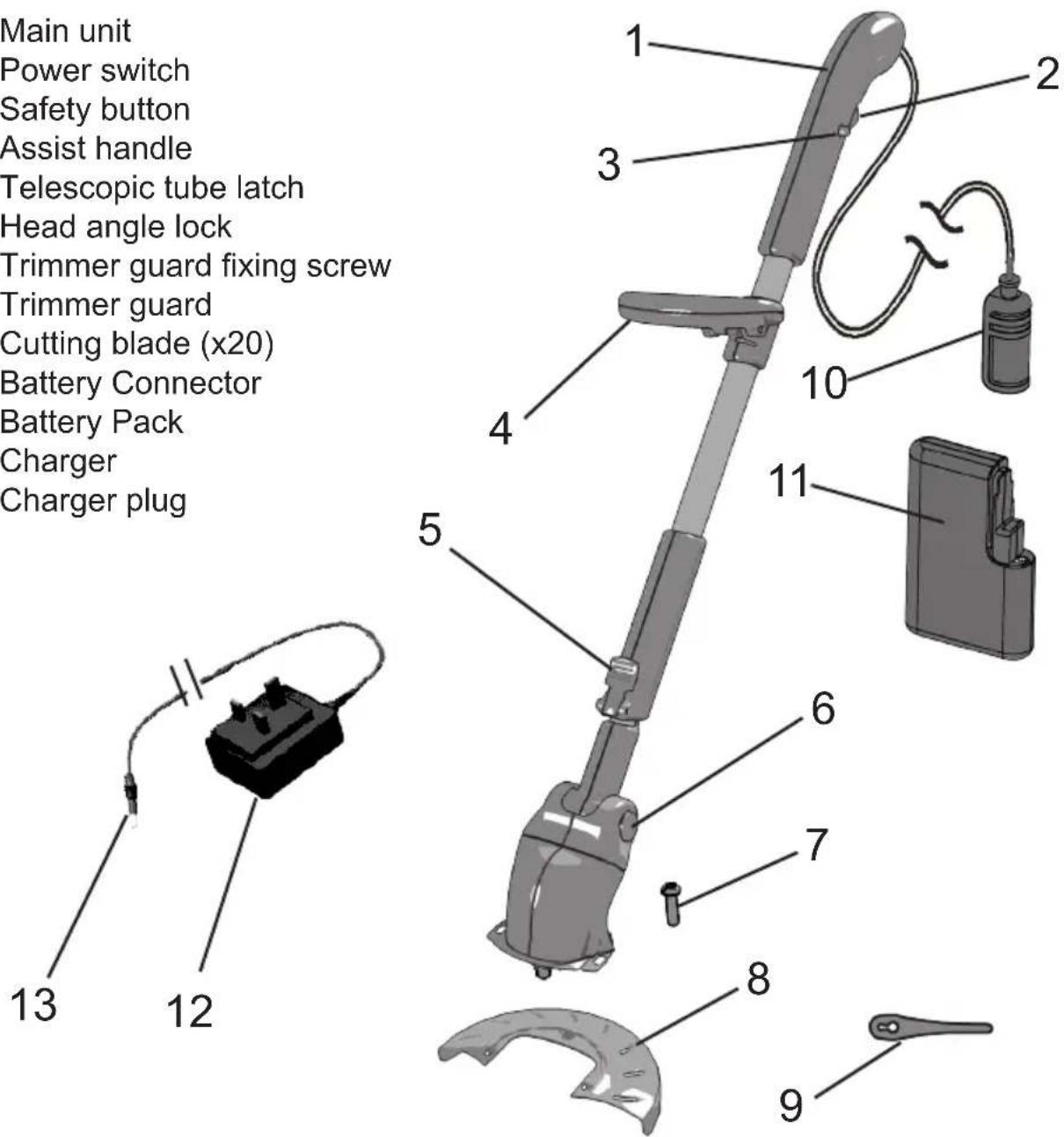
- Main unit
- Power switch
- Safety button
- Assist handle
- Telescopic tube latch
- Head angle lock
- Trimmer guard fixing screw
- Trimmer guard
- Cutting blade (x20)
- Battery Connector
- Battery Pack
- Charger
- Charger plug
Battery Charging & Recharging
The battery has to be removed from the product to charge it
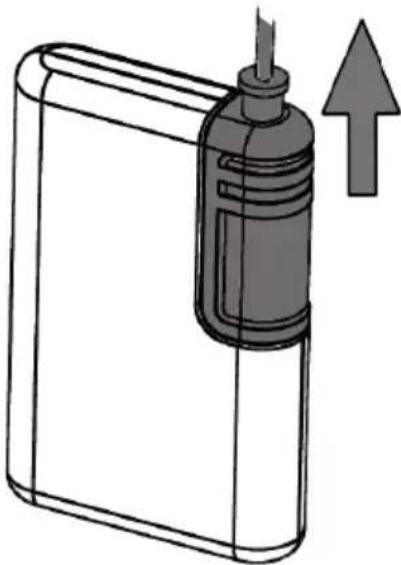
To disconnect the battery pack, grip the battery connector and slide it off the battery pack.
natural_image
Illustration of a device with a cylindrical component and an upward arrow, no text or symbols presentConnect the charging jack into the socket on the battery pack. Plug the charger into a suitable electrical socket and switch on. From flat the battery requires 15 hours to fully charge.

natural_image
Diagram of a battery pack with a screwdriver inserted, showing internal components and a downward arrow indicating process (no text or symbols present)There is NO indicator to show when the battery is charged. Charge for 15 hours to ensure a full charged battery.
Note: the battery will not be damaged if charged for longer than 15 hours but should not be charged for longer than 24 hours.
Once the battery is fully charged switch off the charger at the mains socket, remove the charging jack form the battery pack, and unplug the charger from the mains socket.
WARNING : DO NOT PULL THE CHARGER BY THE CORD.
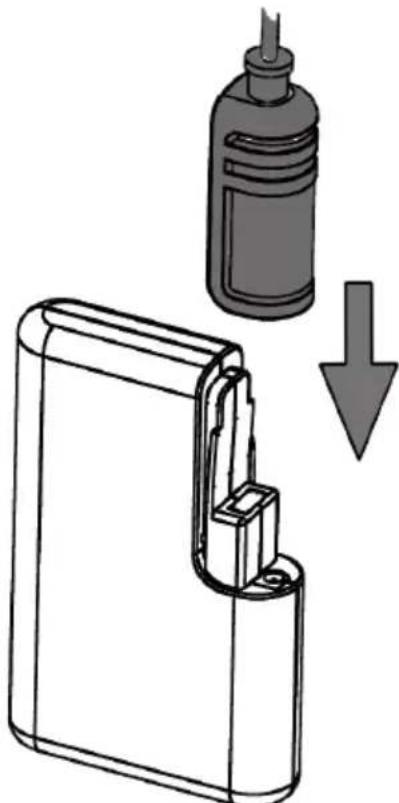
Push the battery connector onto the battery pack until it securely locates into place.
natural_image
Diagram showing a device being inserted into a container with a downward arrow indicating process (no text or symbols present)WARNING : ONLY USE THE CHARGER PROVIDED WITH THE PRODUCT.
USING ANY OTHER CHARGER MAY DAMAGE THE PRODUCT AND THE BATTERY.
Only use replacement batteries as supplied by the manufacturer.
Spare and replacement batteries can be purchased from Grey Technology Tel 0870 7944001 or online at www.greytechnology.co.uk
Assembly
Locate the guard onto the head of the trimmer ensuring that the two location hooks engage into the slots on the trimmer head.
Push the guard forward until the hooks are fully engaged in the slots.
Fit the guard fixing screw to secure the guard to the trimmer head.

natural_image
Diagram of a car interior showing a hand holding a tool, with an inset close-up highlighting the mechanical component (no text or symbols present)
Fitting and replacing the blade
The trimmer has a removable plastic blade that can be replaced with a new blade quickly and easily.
WARNING : do not attempt to remove the blade while the unit is running.
Wait until the blade has stopped before attempting to remove the blade.
Never fit metal blades.
Only fit blades recommended by the manufacturer.
To fit the blade :
Place the blade over blade retaining pin, then pull the blade outwards to lock into position. blade retaining pin

natural_image
Diagram of a mechanical component with a needle inserted into a circular housing (no text or symbols)blade retaining pin

natural_image
Simple line drawing of a steering wheel with a fulcrum and circular head, no text or symbols present.
natural_image
Diagram of a steering wheel with an upward arrow indicating motion (no text or symbols)To remove the blade :
Push the blade toward the centre of the trimmer and lift off the blade retaining pin.

natural_image
Circular diagram showing a pointer with a downward arrow, no text or symbols presentWarning : only fit blades recommended by the manufacturer.
Replacement blades can be purchased from Grey Technology Ltd Tel 0870 7944001 or online at www.greytechnology.co.uk
Telescopic tube adjustment
The telescopic tube length on the trimmer can be varied to suit different user heights.
WARNING : do not attempt to adjust the telescopic tube whilst the blade is rotating.
Adjusting the handle length:
Grip the trimmer firmly and release the latch on the lower handle.
Extend the telescopic tube to the desired length.
Press the latch down firmly to lock the telescopic tube in position.

Assist handle adjustment
The angle and reach of the assist handle can be adjusted to your preference.
WARNING : do not attempt to adjust the assist handle whilst the blade is rotating.
Adjusting the assist handle:
Loosen the knob on the side of the handle.
Slide the handle along the tube and adjust the angle of the handle to a position which is most comfortable.
Tighten the knob to fix the assist handle in the new position.

Cutting head adjustment
The cutting head can be adjusted to different angles for ease of cutting in different conditions.
WARNING : do not attempt to adjust the cutting head while the blades are rotating.
Grip the head of the trimmer, press and hold the button marked 'PUSH'.
Rotate the head to the desired angle.
Release the button to lock the head in position.
Ensure the button and head are securely locked in position before starting the trimmer.

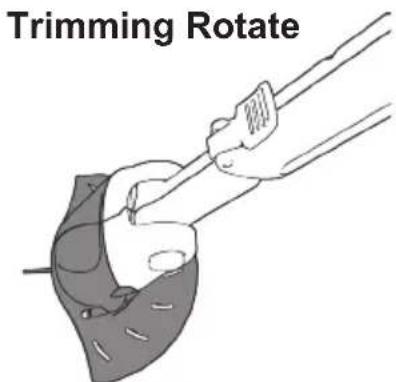
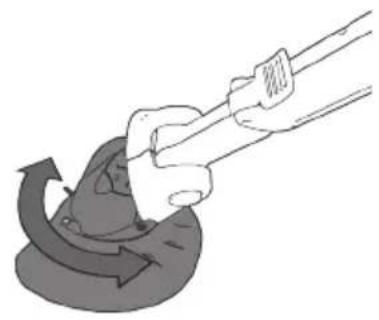
The cutting head can be rotated to a vertical position for edge trimming around lawns.
WARNING : do not attempt to rotate the cutting head while the blades are rotating.
Grip the head of the trimmer and twist half a turn around the handle.
Caution: Ensure the power button is not engaged during adjustment.
Ensure the button and head are securely locked in position before starting the trimmer.
natural_image
Illustration of a hand using a tool to lift a curved object with directional arrows (no text or symbols)Edging

natural_image
Illustration of a hand gripping a cylindrical object with a circular base (no text or symbols)Using your trimmer
Fully charge the battery as described in the section Battery Charging and Recharging
Push the battery connector onto the battery pack until it securely locates into place.
The battery pack can be carried in a pocket, or the clip fitted onto a waistband or belt.

Starting and Stopping:
The handle is designed with a safety button to prevent accidental starting.
To start the trimmer:
Press and hold the safety button located on either side of the handle, then press the trigger.
Continue holding the trigger and release the safety button.
The trimmer will be on for as long as the trigger is pressed.

To stop the trimmer:
Release the trigger to stop the trimmer.
WARNING : the blade continues to rotate for a few seconds after the trimmer is switched off.
Do not touch the rotating blade, and keep hands and feet clear until the blade stops rotating.
WARNING : always wear eye protection when using the trimmer.
Cutting and edging
Caution: before use remove any stones, loose debris and other objects from the cutting area.
Always take care when other people are around you. The trimmer may throw out stones and debris at high speed.
WARNING : always wear eye protection when using the trimmer.
Hold the trimmer away from the body using both hands. Stand in a secure and stable position. When cutting move slowly and steadily along the line of cut, moving the trimmer from side to side.
Take care not to overload the trimmer. Attempting to force the trimmer to cut may damage the motor. To prevent overloading cut long or difficult foliage in stages with several light cuts.
NOTE: the trimmer is fitted with a self-resetting protective cut-out. This will stop the trimmer if the motor becomes overloaded. If this occurs, wait a few seconds for the cut-out to reset and then use lighter cuts.
Take care not to grind the rotating parts against the ground as this will wear parts and cause damage to the trimmer.
Take care when trimming around objects such as stone or concrete as these can damage the trimmer blade and parts that attach the blade.
Care and maintenance
To ensure long and reliable service, carry out the following maintenance regularly:
Check for obvious defects such as loose, dislodged, worn or damaged parts.
Check that covers and guards are correctly fitted and undamaged.
Before use, visually check the condition of the cutting blade. If worn replace with a fresh blade.
Clean inside the guard after use. Remove any dirt or debris using a suitable wooden or plastic tool. Do not use water, solvents, or polishes to clean the trimmer. Wipe clean with a dry cloth. Store in a dry place. Do not expose to moisture.
15 Gtech helpline: 0870 7944001 email: support@greytechnology.co.uk www.greytechnology.co.uk
Troubleshooting
| PROBLEM POSSIBLE REASON POSSIBLE SOLUTION | ||
| Trimmer fails to operate | 1. Battery flat2. Cord not connected to battery pack3. Faulty switch | 1. Recharge battery2. Check connection of cord3. Switch in handle will ‘click’ if operating properly |
| Cutting blade will not cut | 1. Blade worn2. Blade damaged3. Trimmer not fast enough | 1. Replace blade2. Replace blade3. Charge battery |
| Cutting time low | 1. Battery not fully charged2. Blade damaged3. Guard has build up of debris4. Overloaded motor5. Battery damaged or not holding charge | 1. Recharge battery2. Replace blade3. Clean guard4. Use lighter cutting action5. Replace battery |
| Trimmer vibrates when running | 1. Blade worn / damaged or missing2. Balance weight damaged or missing | 1. Fit new blade2. Call helpline |
| Trimmer stops when cutting | 1. Overloaded motor2. Battery flat | 1. Wait for cut-out to reset, use lighter cutting action2. Charge battery |
| Battery not charging | 1. Charger not well connected to battery pack.2. Charger not fully pushed into mains socket.3. Mains socket not switched on4. Defective mains socket, cable, or charger5. Charger faulty | 1. Check charger plug is well connected to battery pack2. Push the charger fully into mains socket3. Switch on mains socket4. Consult a qualified electrician to check the socket. Contact customer service centre or dealer.5. Charger should feel warm when charging correctly. |
If the product needs to be repaired or replaced only use parts which are approved by the manufacturer.
Should you experience any problems please do not return the product to the shop. For any help and assistance please contact the customer support helpline:
tel: 0870 7944001
email: support@greytechnology.co.uk
Environmental and Product Recycling
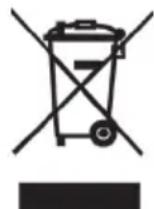
The ⚪ symbol indicates that this product is covered by legislation for waste electrical and electronic products (EN2002/96/EC)
When the product has reached the end of its life please do not dispose of it with general household waste. Consider the environment and take it to a recognised recycling facility. Call your local council, civic amenity site, or recycling centre for information on the disposal and recycling of electrical products.
Alternatively visit www.recycle-more.co.uk for advice on recycling and to find your nearest recycling facilities.

Battery Disposal
The product contains a NiCd battery which should not be disposed of with general household waste. At the end of the product's or battery's life the battery pack should be disposed of properly at a recycling facility.
For safety we do not recommend to dis-assemble and remove the battery from the battery pack, and this should only be carried out by a professional or technically competent person. It is recommended to dispose of the complete battery pack at a recognised recycling facility.
| ST04 Technical specification | |
| Cutting Width 23cm | |
| No load speed 8500/min | |
| Battery type 12V DC, 1.5Ah Ni-Cd | |
| Charging period for fully discharged battery 15 hours | |
| Charger output 15.0V DC, 160mA | |
| Charger input 230V AC 50Hz 7.5W | |
| Charger type AD-1516-BS8P | |
| Measured sound power level, LpA,d 86 dB(A) | |
| Guaranteed sound power level, LwA,d 87 dB(A) | |
| Weight 1.2Kg | |
| Vibration (according to EN50144-2-15) below 2.5m/s ^2 | |
WARNING : ONLY USE THE CHARGER PROVIDED WITH THE PRODUCT. USING ANY OTHER CHARGER MAY DAMAGE THE PRODUCT AND THE BATTERY.
Warranty Information
Grey Technology has provided the ST04 Cordless Grass Trimmer with a 12 month guarantee.
In Guarantee: Please retain your receipt as proof of purchase. In the rare and unfortunate event of your Gtech product being faulty, please accept our apologies and we will aim to remedy the problem as fast as possible once brought to our attention. However please be aware that due to company policy Grey Technology can only repair or replace all or part of the product if proof of purchase is provided and the claim is made within 12 months of the purchase date.
If your product is within the 12 months warranty period you should either return this product with its receipt to the retailers where the product was purchased or if a simple part or advice is required ring the Gtech customer services line where we will be more than happy to assist.
Please note: Gtech can not refund any monies if the product was brought from a third party.
We would like to remind our customers that the Gtech guarantee does not cover any unauthorised repairs and will be annulled:
- if the product has been damaged due to incorrect use or maintenance.
- if any part is modified or replaced or if it is used in any way that is not recommended by Gtech.
- if it is used with any parts not produced or not recommended by Gtech.
- if it is used for purposes other than those specified by Gtech.
Please note: the battery is a consumable item and is not covered by the 12 month guarantee.
If after reading the manual and following the instructions you are sure that the product is defective please call the Gtech customer service helpline on 0870 7944001. A customer service advisor will be on hand to deal with any problems you have with our product. To assist them please be ready with the product, a detailed description of the problem, and your proof of purchase.
Out of Guarantee: If your Gtech product is over 12 month old and you need any parts or advice then please contact our customer services department. Parts will be sent out usually within 3 weeks of request.
WARNING : only use the charger supplied with the product. Using another charger may damage the product and the battery and will invalidate your guarantee.
EC Declaration of Conformity
We, manufacturer/importer
Grey Technology Ltd
Units 1&2 Cupola Court
Spetchley
Worcester
WR5 1RL
declare that the product
ST04 Cordless Grass Trimmer
complies with the essential health and safety requirements of the following directives:
2004/108/EC - EMC Directive.
98/37 EC - Machinery Directive
2006/95/EC - Low Voltage Directive
2000/14/EC - Noise emission in the environment by equipment for use outdoors.
- Measured Sound Power Level = 86 dB(A)
- Declared Guaranteed Sound Power Level = 87 dB(A)
Technical documentation holder: Grey Technology Ltd
Standards and technical specifications referred to:
EN60335-1
EN60335-2-91
EN ISO 10518
EN786
EN55014-1
EN55014-2
EN61000-3-2
EN61000-3-3
CE
Grey Technology Ltd
Units 1&2 Cupola Court
Spetchley
Worcester
WR5 1RL
tel: 0870 7944001
email: support@greytechnology.co.uk
www.greytechnology.co.uk


- ST04 Cordless Grass Trimmer
- Contents:
- Important Safety Information
- ORTANT:
- WARNING: THIS PRODUCT CAN CAUSE SERIOUS INJURIES.
- WARNING:
- Work area:
- Electrical safety:
- Personal Safety:
- Power tool use and care:
- Battery use and care:
- Service:
- Intended use:
- Warning Label Descriptions
- Part Location
- Battery Charging & Recharging
- WARNING : DO NOT PULL THE CHARGER BY THE CORD.
- Assembly
- Fitting and replacing the blade
- Telescopic tube adjustment
- Adjusting the handle length:
- Assist handle adjustment
- Adjusting the assist handle:
- Cutting head adjustment
- WARNING : do not attempt to adjust the cutting head while the blades are rotating.
- Ensure the button and head are securely locked in position before starting the trimmer.
- WARNING : do not attempt to rotate the cutting head while the blades are rotating.
- Using your trimmer
- Starting and Stopping:
- To start the trimmer:
- To stop the trimmer:
- Cutting and edging
- Care and maintenance
- Troubleshooting
- Environmental and Product Recycling
- Battery Disposal
- Warranty Information
- EC Declaration of Conformity
Brand : G-TECHNOLOGY
Model : ST04
Category : Lawn mower