LC12DCB17 - Coffee maker Logik - Free user manual and instructions
Find the device manual for free LC12DCB17 Logik in PDF.


| Product Type | Coffee Maker |
| Brand | Logik |
| Model | LC12DCB17 |
| Dimensions (approx.) | 25 x 20 x 30 cm |
| Weight | 1.5 kg |
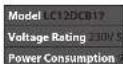
| Power Consumption | 900 W |
| Voltage | 220-240 V ~ 50/60 Hz |
| Carafe Capacity | 12 cups (1.5 L) |
| Water Tank | Removable, 1.5 L |
| Filter Type | Permanent filter (reusable) |
| Functions | Auto shut-off, keep warm plate |
| Cleaning | Descaling recommended every 3 months |
| Safety Features | Non-slip feet, overheat protection |
| Spare Parts Availability | Carafe, filter basket, drip tray |
| Warranty | 1 year |
Frequently Asked Questions - LC12DCB17 Logik
User questions about LC12DCB17 Logik
0 question about this device. Answer the ones you know or ask your own.
Ask a new question about this device
Download the instructions for your Coffee maker in PDF format for free! Find your manual LC12DCB17 - Logik and take your electronic device back in hand. On this page are published all the documents necessary for the use of your device. LC12DCB17 by Logik.
USER MANUAL LC12DCB17 Logik
Thank you for purchasing your new product. We recommend that you spend some time reading this instruction manual in order that you fully understand all the operational features it offers. You will also find some hints and tips to help you resolve any issues. Read all the safety instructions carefully before use and keep this instruction manual for future reference.
Unpacking
Remove all items from the packaging, retain the packaging. If you dispose of it please do so according to local regulations. The following items are included: main unit, jug, funnel, filter, measuring spoon and instruction manual.
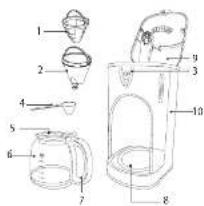
Product Overview
- Filter
- Funnel
- Control Panel
- Measuring Spoon
- Jug Lid
- lug
- Jug Handle
- Warning Plate
- Water Tank Cover
- Water Tank
First Time Use
- Fill the tank with clean water up to the maximum level inside the tank. Follow the steps in the section "Manual Operation" (without adding ground coffee) once or twice, then discard the hot water.
- Clean the jug, filter and funnel thoroughly with warm water. You may now use your coffee maker.
Jug Use and Care
The jug may break if the following instructions are not followed:
• Do not set a hot jug on a wet or cold surface.
- Do not use a cracked jug or a jug with a loose or weakened handle.
• Do not clean the jug with cleaners, steel wool pads or other abrasive materials.
• Discard the jug immediately if it has boiled dry.
- Avoid sharp blows, scratches or rough handling
To reduce the risk of fire or electrical shock, do not remove any service covers. There are no user serviceable parts inside. Repairs should be done by qualified personnel only.
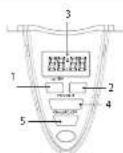
Control Panel
-
HR Button
Press to set hour digit. -
MIN Button
Press to set minute digit.
-
Display Window
-
PROGRAM Button
Press to set clock and timer.
- ON/AUTO/OFF Button Press repeatedly to select between ON, AUTO and OFF mode.
Automatic Operation
If using the Automatic function, first ensure the unit's clock has been set correctly.
- Press the PROGRAM button. The display will show the clock.
- Press the HR or MIN button to adjust the hour and minute digits. Press the the PROGRAM button to confirm the clock.
- Select the time you want to start brewing coffee by using the HR button, then the MIN button. Press the PROGRAM button to confirm. The display will show the pre-set time.
-
After setting the auto brew start time, prepare coffee by following the section "Manual Operation" steps 1-4.
Once the unit is unplugged, all the preset clock and timer will be cleared. -
Press the ON/AUTO/OFF button repeatedly to select AUTO mode. Green light will show. When the set time for brewing has arrived, green light will extinguish and red light will show. The coffee maker has started brewing coffee.
- When the brewing cycle is complete, the red light will extinguish. Follow steps 6-7 in the section "Manual Operation".
Manual Operation
- Open the water tank cover of the coffee maker and fill with the correct amount of water. The water level should not exceed the maximum level indicated.
- Add ground coffee into the filter. Usually a cup of coffee needs a level spoonful of ground coffee, but you may adjust according to your taste.
- Place the filter with the ground coffee in the funnel and then place the funnel into the funnel support of the coffee maker, making sure it is assembled correctly.
- Place the jug on the warming plate horizontally.
- Press the ON/AUTO/OFF button to select ON mode. Red light will show. The coffee maker has started brewing coffee.
-
When the brewing cycle is complete, the red light will extinguish. Press the ON/AUTO/OFF button repeatedly to set the unit to OFF mode. You can remove the jug when brewing is finished after the coffee stops dripping into the jugl.
-
You can remove the jug, pour and serve at any time once the coffee is made. But as the water is accumulated in the funnel, it may overflow if the jug is not replaced shortly.
- Do not open the tank cover while the coffee maker is brewing.
The amount of coffee you get will be less than the water you have put in the tank, as some water is absorbed by the ground coffee. - The coffee maker will keep your coffee warm for about 30 minutes, then automatically shut off. Always turn the coffee maker off and unplug when the coffee maker is not in use.
- Keep the lid of the jug closed when pouring.
- The brewed coffee in the jug and the grounds in the filter are very hot. Handle with care to avoid scalding.
Cleaning and Maintenance

Unplug the appliance before cleaning. To protect against electrical shock, do not immerse the mains cable, mains plug or the appliance in water or liquids. After each use, always make sure the mains plug is first removed from the mains socket.
- Clean the filter, funnel, jug and jug lid after each use in hot, soapy water. Never use a dishwasher.
- Wipe the appliance's exterior surface and warming plate with a soft, damp cloth to remove stains. Do not use strong detergents or abrasive cleaners.
- Water droplets may build up in the area above the filter and drip onto the product base during brewing. To control the dripping, wipe off the area with a clean, dry cloth after use.
Cleaning Mineral Deposits
To keep the coffee maker operating efficiently, regularly clean mineral deposits left by the water. The amount of mineral deposit depends on water quality in your area and the frequency of use.
Fill the jug with one part white vinegar and three parts cold water. Pour only the water and vinegar mixture into the tank. Heat the water-vinegar solution as per steps 1-5 in the section "Manual Operation". Repeat until no yellow liquid comes out. Pour away the mixture. Clean the funnel, filter, jug and jug lip with hot soapy water until no vinegar is left.
Hints and Tips
| Issue Possible cause/solution | |
| Unit doesn't light up. | Check that you have plugged your coffee maker into the mains socket. |
| Coffee doesn't brew. | Funnel is not properly inserted, or water tank is empty/not enough water. Maybe a power outage. |
| Only water is brewed. | No coffee in the filter, check that the desired amount of coffee is added. |
| Coffee tastes bad. | Maybe the coffee type is not recommended for automatic drip coffee makers. The ground coffee to water ratio was unbalanced. The coffee maker needs to be cleaned. |
| Grounds appear in the coffee. | Filter is not properly seated in the funnel or the filter has collapsed. |
LOGIK
Instruction Manual
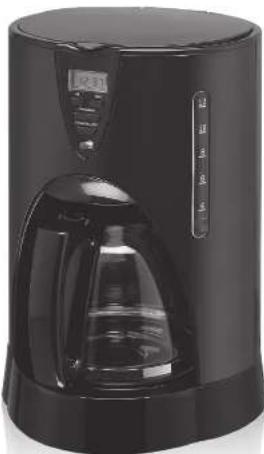
Stainless steel filter coffee maker
LC12DCB17
natural_image
Black and white photo of a black coffee maker with digital display and glass pitcher (no visible text or symbols)Safety Warnings
For your continued safety and to reduce the risk of injury or electric shock, please follow all the safety precautions listed below.
- Read all the instructions carefully before using this appliance and keep them for future reference.
- Retain the manual. If you pass the appliance on to a third party, make sure to include this manual.
• Make sure that your outlet voltage corresponds to the voltage stated on the rating label of the appliance. - Unplug the appliance from the mains socket when not in use, or before cleaning any part of the appliance.
- Do not operate any appliance with a damaged mains cable or mains plug, or in an abnormal state. If the mains cable is damaged it must be replaced by the manufacturer, its service agent, or similarly qualified persons in order to avoid a hazard.
- Do not use an extension cable, it may result in fire, electrical shock and/or personal injuries.
- Do not let the mains cable hang over the edge of the table or counter, or touch hot surfaces.
- To disconnect, remove the mains plug from the mains socket. Never pull the mains cable to remove the mains plug from the mains socket.
- Do not immerse the appliance, mains cable or mains plug in water or other liquids.
• Be careful not to get scalded by the steam.
• Use handles or oven gloves. Accessible
surfaces may get hot.
- Do not touch the appliance whilst in use as there are hot surfaces on this appliance.
- Never use the appliance if the jug shows any signs of cracks. Only use the jug supplied with this appliance. Handle the jug with caution as it is very fragile.
- Never leave an empty jug on the warming plate otherwise the jug is liable to crack.
- Never switch your appliance on without water in it.
- Stand the appliance on a stable flat surface before use.
• This appliance is intended for household use only. Do not use outdoors. - This appliance can be used by children aged from 8 years and above and persons with reduced physical, sensory or mental capabilities or lack of experience and knowledge if they have been given supervision or instruction concerning use of the appliance in a safe way and understand the hazards involved. Children shall not play with the appliance.
- Children should be supervised to ensure that they do not play with the appliance. This appliance is intended for indoor household use and similar applications such as:
- farm houses and by clients in hotels, motels and other residential type environment;
- bed and breakfast type environment;
– catering and similar non-retail applications.
• Make sure the unit is earthed properly during use. Use of any extension sockets must have an earth connection.
Specifications
Hz
(1)
We continually strive to improve our products. Features and specifications are subject to change without prior notice.

For general information about this appliance and handy hints and tips,
please visit www.knowhow.com/knowledgebank c:call:0344 561 1224
0.016544 301 1234
Partmaster
Visit Parimester to ok today for the easiest way to
buy electrical spares and accessories. Moreover
deliver direct to your dear the very next day. Visit www.partmacer.co.uk or call 0344 900 3450 UK customers only. Calls charged at National Rate.

The symbol on the product or its packaging indicates that this product must not be disposed of with your other household waste, instead, it is your responsibility to dispose of your waste equipment by handling it over to a designated collection point for the recycling of waste electrical and electronic equipment. The separate collection
and recycling of your waste equipment at the time of disposal will help conserve natural resources and ensure that it is recycled in a manner that protects human health and the environment.
For more information about where you can drop off your waste for recycling, please contact your local authority, or where you purchased your product.
DSG Retail Ltd. (co. no. 504877)
1 Portal Way, London, W3 6RS, UK
IE-LC12DCB17-170110V1
Brand : Logik
Model : LC12DCB17
Category : Coffee maker