
MG10MK.II - Guitar amplifier MARSHALL - Free user manual and instructions
Find the device manual for free MG10MK.II MARSHALL in PDF.


| Product Type | Guitar Amplifier |
| Brand | Marshall |
| Model | MG10MK.II |
| Power Output | 10 Watts RMS |
| Speaker | 1 x 8" Custom Marshall Speaker |
| Channels | 2 (Clean and Overdrive) |
| Controls | Volume, Overdrive Gain, Tone, Power Indicator |
| Inputs | 1 x 1/4" Guitar Input, 1 x 3.5mm Aux Input |
| Outputs | 1 x 1/4" Headphone Output |
| Dimensions (W x D x H) | 375 x 220 x 330 mm (14.8 x 8.7 x 13.0 in) |
| Weight | 7.2 kg (15.9 lbs) |
| Power Supply | AC 120V/230V 50/60Hz (detachable IEC cord) |
| Cabinet Material | Vinyl-covered plywood with metal corners |
| Overall Frequency Response | 70 Hz – 16 kHz |
| Recommended Usage | Practice, Rehearsal, Home Recording |
| Special Features | Overdrive channel emulates classic Marshall tone |
| Protection Circuitry | Thermal and overload protection |
| Audio Type | Solid-state |
| Compatible Devices | Electric guitar, audio players (aux) |
| Included Accessories | Power cord, user manual |
| Cleaning Instructions | Wipe with dry cloth; avoid solvents |
| Repairability | Modular components; serviceable by qualified technician |
Frequently Asked Questions - MG10MK.II MARSHALL
User questions about MG10MK.II MARSHALL
0 question about this device. Answer the ones you know or ask your own.
Ask a new question about this device
Download the instructions for your Guitar amplifier in PDF format for free! Find your manual MG10MK.II - MARSHALL and take your electronic device back in hand. On this page are published all the documents necessary for the use of your device. MG10MK.II by MARSHALL.
USER MANUAL MG10MK.II MARSHALL
Here follows four sample settings to act as starting points from which to develop your own sounds. N.B. Volume should be adjusted to taste.
Clean
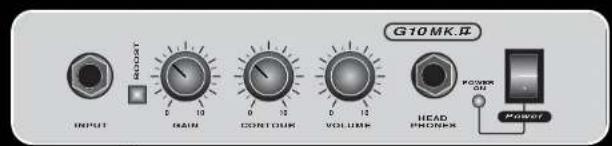
Out
BluesRock
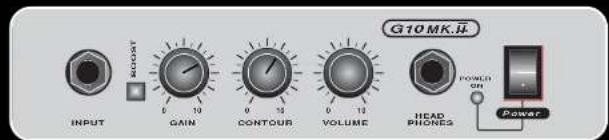
Out
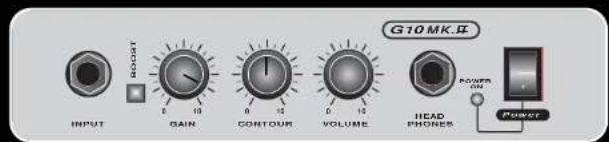
Out
Metal/Thrash
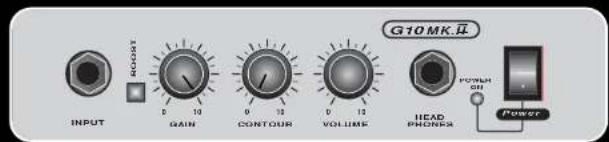
In
Marshall
Marshall Amplification plc
Denbigh Road, Bletchley, Milton Keynes, MK1 1DQ, England
Tel : [01908] 375411 Fax : [01908] 376118
Web Site - http://www.marshallamps.com
Whilst the information contained herein is correct at the time of publication, due to our policy of constant improvement and
development, Marshall Amplification plc reserve the right to alter specifications without prior notice.
10 watt Guitar Amplifier
From Jim Marshall
I would like to thank you personally for selecting one of our Marshall MG Serles guitar combos. Your new amplifier has been designed by the same team of British designers who created all of the great Marshall amps. It is built to the customary exacting Marshall standards and will give you an incredible spectrum of sounds to complement a wide range of playing styles, as well as being designed to stand the test of time.
The Marshall name has adorned many of Britain's finest amps, from the early 1960's through to the present day. Some of the original vintage amps have become highly sought after by both amp collectors and working guitarists alike.
This new line of transistor guitar and bass guitar combos have been released to unanimous acclaim. Your combo is part of a new breed of Marshall amplifier, which has benefited from years of experience and continual investment in research and development.
Not only is the sound quality of your Marshall MG Series amp of a standard that you would only expect to come from our own design team, you will also find that the front panel is exceptionally easy to understand and intuitive to use.
I would like to wish you every success with your new Marshall MG Series amplifier, which I am sure you will find a pleasure to play for years to come.
Yours Sincerely,

1
WARNING! - Important safety instructions
PLEASE READ THE FOLLOWING LIST CAREFULLY
A. THE PLUG attached to the mains lead provided is wired in accordance with the following colour code: Blue - Neutral. Green/Yellow - Earth. Brown - Live (UK Only).
B. ALWAYS ensure that the value of the fuse corresponds to the rating marked on the plug.
C. DO NOT use your Marshall MG amp in damp or wet conditions.
D. ALWAYS have this equipment serviced or repaired by competent, qualified personnel.
E. PLEASE READ this instruction manual carefully before switching on.
F. WARNING This apparatus must be earthed.
KEEP THESE INSTRUCTIONS
G10MK.II Front Panel Features
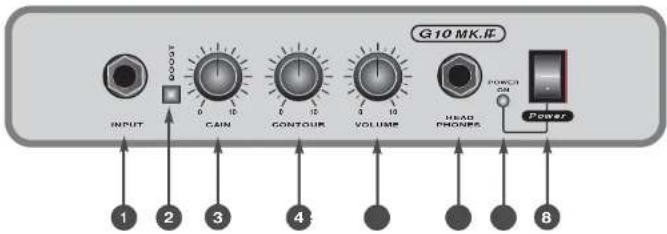
- Input Jack
Plug your guitar in here.
- Boost Switch
Switches the combo from clean to distortion. Switch in gives distortion - Switch out gives clean.
- Gain
This controls the amount of distortion in your guitar sound. With the Boost Switch out you will notice your sound crunching up at higher gain settings, ideal for vintage blues or classic rock. For maximum distortion, push the Boost Switch in and turn the Gain Control full up.
- Contour
The Contour control shifts the mid-range frequencies in your guitar tone. By turning the Contour control fully anti-clockwise you will scoop most of the middle frequencies out of your sound,
ideal for thrash tones if combined with high gain settings. By turning the control fully clockwise you can get some great fusion type tones. Experiment with this control to find your favourite settings.
- Volume
Controls the overall volume of the amp.
- Headphone Jack
Plug your headphones in here. This will disconnect the internal speaker.
- LED
Indicates the operating status of the amp. Red indicates that the amp is switched on.
- Power Switch
Switches the mains power to the combo on/off.
Brand : MARSHALL
Model : MG10MK.II
Category : Guitar amplifier