
Primo 22481 - Docking Station TRUST - Free user manual and instructions
Find the device manual for free Primo 22481 TRUST in PDF.


Pick your language and provide your email: we'll send you a specifically translated version.
| Product Type | Docking Station |
| Brand | Trust |
| Model | Primo 22481 |
| Dimensions (approx.) | 17 x 10 x 5 cm |
| Weight | 0.5 kg |
| Power Supply | USB-C or DC adapter (5V, 2A) |
| Interfaces | USB-C (Host), 2x USB-A, HDMI, VGA, Ethernet, 3.5mm audio |
| Max Video Resolution | HDMI: 1920x1080 @60Hz, VGA: 1920x1080 @60Hz |
| Data Transfer Speed | USB 3.0 up to 5 Gbps |
| Charging Support | Yes, power delivery up to 60W (depending on adapter) |
| Supported Operating Systems | Windows, macOS, Linux (kernel 3.0+) |
| Compatibility | Laptops/tablets with USB-C (Thunderbolt 3/4 or DP Alt Mode) |
| Main Functions | Expand ports, charge device, connect external display, network, audio |
| Package Contents | Docking station, USB-C cable, power adapter (if included), user manual |
| Maintenance & Cleaning | Wipe with a dry, soft cloth; no liquids or solvents |
| Safety | Use only compatible devices; avoid moisture and extreme temperatures |
| Repairability & Spare Parts | Not user-serviceable; contact Trust support or authorized service |
| Warranty | 2 years limited warranty |
Frequently Asked Questions - Primo 22481 TRUST
What devices are compatible with the Trust Primo 22481?
The docking station works with laptops, tablets, and smartphones that support USB-C with DisplayPort Alt Mode or Thunderbolt 3/4. It is compatible with Windows, macOS, and Linux.
Can I charge my laptop through the docking station?
Yes, if your laptop supports USB Power Delivery (PD) and you use the included (or compatible) power adapter. The dock can deliver up to 60W.
Does the dock support dual monitors?
It supports connecting one external monitor via HDMI or VGA, but not both simultaneously. Extended or mirrored display is possible.
How do I set up the docking station?
Connect the USB-C cable to your device, then plug in the power adapter (if needed). The dock will automatically install drivers on most systems. Connect your peripherals to the available ports.
Why is my external monitor not working?
Ensure your device supports DisplayPort Alt Mode over USB-C. Try a different cable or port. Check your display settings and update graphics drivers.
Can I use the dock with a Nintendo Switch?
The Switch supports USB-C video output, but it may require a specific adapter. Compatibility is not guaranteed; Trust recommends checking with Nintendo.
How do I clean the docking station?
Use a soft, dry cloth to wipe the surface. Do not use liquids, chemicals, or abrasive materials.
What is the maximum data transfer speed?
USB 3.0 ports support up to 5 Gbps. The Ethernet port provides up to 1 Gbps.
Is the dock compatible with Thunderbolt 3/4?
Yes, it works with Thunderbolt 3 and 4 ports (backward compatible). Note that Thunderbolt devices may offer additional features, but basic functions will work.
What should I do if the dock stops working?
Try disconnecting and reconnecting the USB-C cable and power. Test with another device. If the problem persists, contact Trust support or check the manual for troubleshooting.
User questions about Primo 22481 TRUST
0 question about this device. Answer the ones you know or ask your own.
Ask a new question about this device
No questions yet. Be the first to ask one.
Download the instructions for your Docking Station in PDF format for free! Find your manual Primo 22481 - TRUST and take your electronic device back in hand. On this page are published all the documents necessary for the use of your device. Primo 22481 by TRUST.
USER MANUAL Primo 22481 TRUST
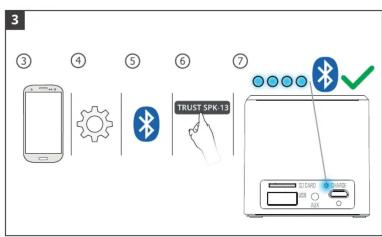
flowchart
graph TD
    A["Smartphone"] --> B["Gear"]
    B --> C["Bluetooth"]
    C --> D["USB Interface"]
    D --> E["TRUST SPK-13 Trigger"]
    E --> F["USB Interface"]




Manual assistant
Powered by Anthropic
Waiting for your message
Product information
Brand : TRUST
Model : Primo 22481
Category : Docking Station