
21967 - Docking Station TRUST - Free user manual and instructions
Find the device manual for free 21967 TRUST in PDF.


Pick your language and provide your email: we'll send you a specifically translated version.
| Product Type | Docking Station |
| Brand | Trust |
| Model | 21967 |
| Compatibility | Laptops and tablets with USB-C or Thunderbolt 3 |
| Dimensions (L x W x H) | 19.5 x 8.5 x 2.5 cm |
| Weight | 480 g |
| Power Supply | External AC adapter (included) |
| Input Voltage | 100-240 V AC, 50/60 Hz |
| Output Voltage | 20 V DC, 3.25 A |
| Video Output Ports | 1x HDMI, 1x DisplayPort |
| USB Ports | 2x USB 3.0 Type-A, 1x USB-C |
| Ethernet Port | RJ45 Gigabit Ethernet |
| Audio Jack | 3.5 mm combo audio |
| Max Resolution | 4K@60Hz |
| Cable Length | 20 cm (attached) |
| Operating Temperature | 0°C to 40°C |
| Storage Temperature | -20°C to 60°C |
| Material | Aluminum and plastic |
| LED Indicators | Power/connection status |
| Package Contents | Docking station, power adapter, user manual |
| Clean and Care | Wipe with a dry cloth; do not use liquids or solvents |
| Safety Precautions | Avoid moisture, excessive heat, and physical shock |
Frequently Asked Questions - 21967 TRUST
What devices are compatible with the Trust 21967 docking station?
The Trust 21967 docking station is compatible with laptops, tablets, and smartphones that support USB-C or Thunderbolt 3 with DisplayPort Alt Mode.
Does the docking station support dual monitors?
Yes, it supports dual monitors via its HDMI and DisplayPort outputs, allowing you to extend or mirror your display up to 4K@60Hz.
Can I charge my laptop through the docking station?
Yes, it provides power delivery (PD) up to 65W to charge your laptop while connected.
How do I connect the docking station to my computer?
Simply connect the attached USB-C cable to your computer's USB-C or Thunderbolt port. Connect the power adapter to the docking station and a wall outlet.
Does it have an Ethernet port?
Yes, it features a Gigabit Ethernet (RJ45) port for stable wired internet connectivity.
How many USB ports are available?
It includes 2x USB 3.0 Type-A ports and 1x USB-C data port (with PD).
Is the docking station plug-and-play?
Yes, it is plug-and-play on Windows, macOS, and Chrome OS. No additional drivers are required.
What should I do if the docking station is not working?
Ensure the power adapter is connected and the USB-C cable is firmly plugged into your device. Try a different USB-C port if available. Restart your computer. If the issue persists, check for firmware updates on the Trust website.
Can I use the docking station with a tablet?
Yes, if your tablet supports USB-C with DisplayPort Alt Mode, it will work. Note that some tablets may not support full power delivery.
How do I clean the docking station?
Use a dry, lint-free cloth to wipe the surface. Do not use any liquids, solvents, or abrasive cleaners.
User questions about 21967 TRUST
0 question about this device. Answer the ones you know or ask your own.
Ask a new question about this device
No questions yet. Be the first to ask one.
Download the instructions for your Docking Station in PDF format for free! Find your manual 21967 - TRUST and take your electronic device back in hand. On this page are published all the documents necessary for the use of your device. 21967 by TRUST.
USER MANUAL 21967 TRUST
flowchart
graph TD
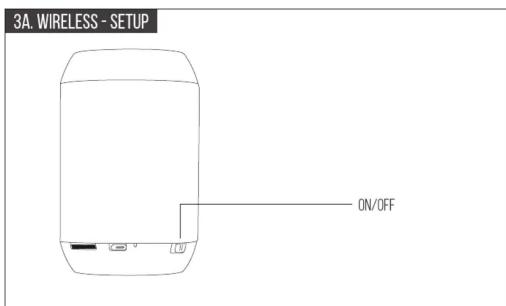
    A["3B. WIRELESS - SETUP"] --> B["Settings"]
    B --> C["Bluetooth"]
    C --> D["Trust SPK-21"]
    E["WIRELESS TROUBLESHOOT"] --> F["no devices found"]
    F --> G["3 SECONDS"]
    G --> H["Trust SPK-21"]

Trust URBAN


flowchart
graph TD
    A["Press 1X"] --> B["Control"]
    C["Hold"] --> B
    B --> D["Action Indicator"]
    style A fill:#f9f,stroke:#333
    style C fill:#ccf,stroke:#333



Manual assistant
Powered by Anthropic
Waiting for your message
Product information
Brand : TRUST
Model : 21967
Category : Docking Station