
Octiv M+ - Hearing aid SIEMENS - Free user manual and instructions
Find the device manual for free Octiv M+ SIEMENS in PDF.


| Product Type | Behind-the-Ear (BTE) Hearing Aid |
| Brand | Siemens |
| Model | Octiv M+ |
| Dimensions (Approx.) | 10 x 5 x 2 mm (without tube) |
| Weight (Approx.) | 1.5 g (without battery) |
| Power Source | Size 312 Zinc-Air Battery |
| Battery Life | Up to 10 days (depending on usage) |
| Main Functions | Adaptive noise reduction, feedback cancellation, directional microphone, telecoil, multiple programs |
| Number of Channels | 16 |
| Connectivity | Compatible with Siemens EasyTek streaming device |
| Maintenance | Clean daily with soft dry cloth; avoid moisture and extreme temperatures |
| Safety | Keep away from magnets, X-rays, and direct heat; consult audiologist for adjustments |
| Spare Parts | Batteries, domes, wax guards, tubes |
| Repairability | Serviceable by authorized Siemens hearing care professionals |
| Warranty | 2 years limited manufacturer warranty |
| General Information | Programmable via Siemens Connexx software; suitable for mild to moderate hearing loss |
Frequently Asked Questions - Octiv M+ SIEMENS
User questions about Octiv M+ SIEMENS
0 question about this device. Answer the ones you know or ask your own.
Ask a new question about this device
Download the instructions for your Hearing aid in PDF format for free! Find your manual Octiv M+ - SIEMENS and take your electronic device back in hand. On this page are published all the documents necessary for the use of your device. Octiv M+ by SIEMENS.
USER MANUAL Octiv M+ SIEMENS
miniTek™ wireless enhancement
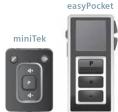
Your Octiv + hearing instrument can be used with the miniTek wireless enhancement system. miniTek provides a wireless connection from your Octiv + hearing instruments to your television, mobile phone, MP3 player and stereo. miniTek is also an easy-to-use remote control for your Octiv + hearing instruments for convenient and discreet program and volume adjustment. The miniTek package comprises the miniTek itself which controls the hearing instruments, a Tek transmitter and all cables necessary to link the miniTek into a variety of devices such as TVs, MP3 players, etc.
Optional
Octiv+ instruments are miniTek and easyPocket compatible. The easyPocket remote control is available as an optional accessory allowing for convenient and discreet hearing instrument adjustment. It is extremely ergonomic, has an easy-to-read display and a modern, stylish look.

NOTICE
miniTek and easyPocket are additional products to your hearing instrument which may be available to purchase. If you think it would assist you in your day-to-day life talk to your NHS Provider about how you can obtain a miniTek or easyPocket. Further information is available on our website www.bestsound-technology.co.uk or email info-hearingaids.uk@sivantos.com
Controls
With the controls you can, for example, adjust the volume or switch hearing programs. Your hearing instruments either have a push button and a rocker switch or a push button only. The NHS Provider has assigned your desired functions to the controls. i Ask your NHS Provider to mark your controls and their functions on the following pages.
Pushbutton
| Function Left Right | ||||
| ^4 | ^2 | ^4 | ^2 | |
| Program change | ||||
| Volume up | ||||
| Volume down | ||||
| Standby/turn on | ||||
| ^4 press briefly y_1 ^2 press 2 seconds | ||||


You can also use a remote control.
Rockerswitch
| Function Left Right | ||||||
| F | B | F | E | A | F | |
| Program up/down | ||||||
| Volume up/down | ||||||
| Tinnitus noiser level up/down | ||||||
| Sound balance | ||||||
| Standbyl turn on | ||||||
| F press briefly R press 2 seconds, B press 5 seconds | ||||||
Push button and rocker switch
| Function Left Right | ||
| Lock / Unlock the controls | ||
| Read more in section "Locking the controls". | ||
Settings
| i | Ask your NHS Provider to mark your individual settings on the following pages. |
Hearing programs
| 1 | |
| 2 | |
| 3 | |
| 4 | |
| 5 | |
| 6 |
Read more in section "Changing the hearing program".
| Features |
Power-on delay enables
| whistle-free insertion of hearing instruments. Read more in section "Turning on and off". |
e2e wireless enables simultaneous control of both hearing instruments
| Read more in section "Using two hearing instruments". |
A telecoil is built into the instrument, so it can connect with audio induction.
| Accessories | |
| Remote control | |
| Battery size and ear pieces | |
| Batteries | |
| Non-rechargeable (size 13) | |
| Non-rechargeable (size 312) | |
| Exchangeable ear pieces(only with LifeTubes) | Size | |
| LifeTip open or closed | ||
| LifeTip double | ||
| LifeTip semi-open | ||
Important information
Intendeduse
Hearing instruments are intended to improve the hearing of hearing impaired persons. Diagnosis and prescription of a hearing instrument must be performed by hearing health specialists, e.g. acousticians, audiologists or ENT doctors.
| i | Use the hearing instruments and accessories only as described in this user guide. |
Transport and storage
conditions
During extended periods of
transport and storage, please observe the following conditions
Storage Transport
| Temperature | 10 to 40 °C | -20 to 60 °C |
Relative humidity
| Air pressure | 700 to 1050 hPa | 200 to 1200 hPa |
For other parts, such as batteries, other conditions may apply.

NOTICE
To avoid environmental pollution, do not throw batteries into household waste.
▶ Recycle or dispose of batteries according to national regulations or return them to your NHS Provider.
▶ Recycle hearing instruments, accessories and packaging according to national regulations.
In case of instrument failure
Is the instrument switched on? Is the battery inserted correctly?
Is the battery run down?
Is the battery compartment closed?
Is the sound opening in the ear mould clogged with wax?
Troubleshooting
Sound is weak
▶ Increase the volume.
▶ Replace the empty ba
- Replace the empty battery.
- Clean or exchange the tube and the ear piece.
Conformance information
With the CE marking, Sivantos coni rms compliance with the European guidelines, in particular directive 93/42 EEC of the European Council applying to medical products.
For the products with e2e wireless 2.0 Sivantos additionally confi rms compliance with the European Directive 99/5/EC (R&TTE) concerning radio and telecommunications terminal equipment
Our quality management system, certified by an independent authority, assures consistently high product quality and reliability to the customer.
2011/65/EU RoHs concerning the restriction of hazardous substances
UnitedKingdom
Sivantos Limited
Platinum House
Sussex Manor Business Park
Gatwick Road, Crawley West Bureau: RH10 GNU
Email: info-hearingaids.uk@sivantos.com
www.bestsound-technology.co.uk
Manufactured by Sivantos GmbH under Trademark License of Siemens AG Based on Document No. 101547-02422-00T04-7600 EN CBRL D00119053
JN7484| Pt No: 10824115 | Issue 4 | © 05.2015 Siemens AG
Hearing instrument emits whistling sounds
Whistling sounds.
▶ Reinsert the car piece until it is securely.
Decrease the volume.
Clean or exchange the ear piece.
Sound is distorted.
▶ Decrease the volume. ▶ Replace the empty battery.
Clean or exchange the tube and the ear piece.
Hearing instrument emits signal tones.
▶ Replace the empty battery.
Hearing instrument does not work.
▶ Gently close the battery door
▶ Replace the empty battery.
▶ Make sure the battery is inserted
▶ Power-on delay is active. Wait
several seconds and check again.
NOTICE
Your hearing instruments are designed to comply with international standards on electromagnetic compatibility but interference with nearby electronic devices could occur. In this case, move away from the source of interference.
Technical information
FCC ID: SGI-WL002BTE
IC: 26/AB-WL002
Operating frequencies: Pc=3.28 MHz
Disposal information
Within the European Union, the marked equipment is covered by "Directive 2002/96/EC of the European Parliament and of the Council of 27 January 2003 on waste electrical and electronic equipment." Amended by "Directive 2003/108 EC" (WEEE).


LegalManufacturer
Sivantos GmbH Henri Dunant Strasse 100
91058 Erlangen
Germany
Phone +49 9131 308 0
Important safety information
Personalsafety
WARNING
Risk of impairing the residual hearing of the user.
▶ Use only hearing instruments that have been fitted especially
for your needs. Risk of interest
Risk of injury:
▶ Do not use obviously damaged devices and return them to point of sale.
Risk of explosion!
Do not use your hearing instruments in explosive atmospheres (e.g. in mining areas).
(d.g. in mining areas).
Risk of affecting electronic equipment. In areas where the use of electronics
in areas where the use of electronics of wireless devices are restricted, verify if your device has to be turned off.
Risk of interference with active and non-active implants! If you
wear an active or a non-active implant, e.g. a brain implant:
Prior to use, have the electromagnetic compatibility verified.
Consult the physician that implanted the device before using your hearing instruments.
- Keep a safe distance of ab
- keep a safe distance of about 1.6 inches (4 cm) between the implant and hearing instruments.
▶ Your hearing instruments may reduce certain background
sounds, potentially also traffic or warning signals.
Tinnitus noiser
Your hearing instrument may be equipped with a tinnitus noiser. The use of the tinnitus noiser should be only on the advice and in consultation with your NHS Provider.
WARNING
Risk of further impairment to the user's hearing health.
The volume of the tinnitus noiser can be set to a level which could lead to permanent heating demand when used for a prolonged
lead to permanent hearing damage when used for a prolonged period of time.
The tinnitus noiser should never be used at uncomfortable
levels.
For NHS Providers:
The target population is primarily the adult population over 21 years of
age. The patient may have some control of the level or volume of the signal and the patient should discuss this adjustment as well as his or her comfort level and sound of the signal with their NHS Provider.
WARNING
Risk of further impairment to the user's hearing health.
The volume of the tinnitus noiser can be set to a level which could lead to permanent hearing damage when used for a prolonged period of time.
Should the tinnitus noiser be set to such a level in the hearing
instrument, advise the user of the maximum amount of time pe day he asks should use the tivity noise.
For example, occupational safety guidelines restrict continuous
noise exposure of 80 dBA SPL to 8 hours per day.
The tinnitus noiser should never be used at uncomfortable levels.

WARNING
Choking hazard!
Your hearing instruments contain small parts which can be swallowed.
Keep hearing instruments, batteries and ac of children and mentally disabled persons.
If parts have been swallowed consult a physician or hospital
immediately
▶ Ensure adequate supervision if infants, small children or mentally
disabled persons need to wear hearing instruments.
▶ Check the completeness of the hearing instruments regularly and ensure

WARNING
Consult your NHS Provider if you experience any unusual side
effects like skin irritation, excessive accumulation of ear wax,
dizziness, change in your hearing, or if you think there may be a foreign object in your ear canal.

广力云智慧零售收银系统
CAUTION Risk of injury
▶ Always wear the tube with an ear piece.
▶ Make sure that the ear piece is completely attached.
Risk of injury!
Insert the ear piece carefully and not too deeply into the ear.
Risk of injury!
In very rare cases the ear piece could remain in your ear when
Removing the hearing instrument. If this happens, have the ear piece removed by a medical professional.

WARNING
Risk of further impairment to the user's hearing health.
An NHS Provider should advise a prospective hearing instrument or tinnitus noiser user to consult promptly with a licensed physician (preferably an ear specialist) before using the hearing instrument or hearing instrument with tinnitus noiser function if the NHS Provider determines through inquiry, actual observation, or review of any other available information concerning the prospective user that the prospective user has any of the following conditions:
▶ Visible congenital or traumatic deformity of the ear.
History of active drainage from the ear within the previous 90 days.
History of sudden or rapidly progressive hearing loss within the previous 30 days.
previous to day. Acute or chronic
▶ Unilateral hearing loss of
previous 90 days.
▶ Audiometric air-bone gap equal to or greater than 15 dB at
500Hz, 1,000Hz and 2,000Hz.
Visible evidence of significant cerumen accumulation or a
Rain or discomfort in the car
(1)
Productsafety

NOTICE
Leaking batteries damage the hearing instruments.
▶ turn the hearing instruments on when not in use to preserve the battery.
Remove bat
Remove batteries when the instruments are not in use for a prolonged period of time.

NOTICE
Protect your hearing instruments from extreme heat. Do not
expose them to direct sunlight

NOTICE
Do not dry your hearing instruments in the microwave oven.

NOTICE Different types of compression, using during X-ray on MRI head
Different types of strong radiation, e.g. during X-ray of MKI head examinations, may damage hearing instruments
Do not wear the hearing instruments during these or similar procedures. Weaker radiation, e.g. from radio equipment or airport security, does not damage the hearing instruments.

NOTICE
Protect your hearing instruments from high humidity. Do not wear them in the shower or when you apply make-up, perfume, aftershave, hairspray or suntan lotion.
Only for two instruments or the use of a remote control:

In some countries restrictions for the usage of wireless equipment exist. Refer to local authorities for further information.
Explanation of symbols
Points out a situation that could lead to serious, moderate, or minor injuries
Indicates possible property damage
i Advice and tips on how to handle your device better
Information and warnings for children with hearing instruments
Optional symbol for custom models with wireless functionality
CE 0123 CE compliance label, confi rms compliance with certain European Directives, refer to section "Conformance information".
Conformance information Indicates the legal manufacturer of the device
Do not dispose of the device with general domestic
waste. Read more in section "Disposal information"
Read and follow the instructions in the user guide
Getting to know your hearing instruments It is recommended to familiarise yourself with your new hearing instruments. With the instruments in your hand try using the controls and note their location on the instrument. This will make it easier for you to feel and press the controls while wearing the hearing instruments.
CAUTION
Read this user guide thoroughly and completely and follow the safety information in this document to avoid damage or injury.

If you have problems pressing the controls of your hearing instruments while wearing them, you can ask your NHS Provider about a remote control option.
To benefit most from your hearing instrument, wear it daily and all day long. Especially after long periods of living with hearing loss, a dedicated hearing training is recommended - ask your NHS Provider.
Inserting
Your hearing instruments have been fi ne-tuned for your right and left ear. Coloured markers indicate the side:
- red marker = right ear - blue marker = left ear

To insert the hearing instrument: ▶ Hold the tube at the bend
that is closer to the ear
piece. Carefully push the ear piece.
in the ear canal
Twist it slightly until it sits well.
▶ Open and close your mouth to avoid accumulation of air in the ear canal.
Lift the hearing instrument and slide it over the top of your ear Ⓞ.
■ Insert the right hearing instrument with the right hand and the left hearing instrument with the left hand.
If you have problems inserting the ear piece, use the other hand to gently pull your earlobe downwards. This opens the ear canal and eases insertion of the ear piece
The optional concha lock helps to securely retain the ear piece in your ear. To position the concha lock:
Bend the concha lock and position it carefully into the bowl of your ear (refer to the picture)

Audio induction loops
Many telephones as well as public places like theatres offer the audio signal (music and speech) via an audio induction loop. With this system, your hearing instruments can directly receive the desired signal – without distracting noise in the environment.
You can usually recognise audio induction loop systems by certain signs.

Ask your NHS Provider to configure a
telecoil program. ▶ Switch to the telecoil program whenever you are in a place with an audio induction loop.
Whether the telecoil program is configured for your hearing instrument is listed in section "Settings".
Telecoil program and remote control
NOTICE
For instruments with wireless connectivity: When the telecoil program is active, the remote control may cause a pulsing noise. ▶ Use the remote control with a distance greater than 10 cm (4 inches).
Your Octiv™+ hearing instrument
Components and names

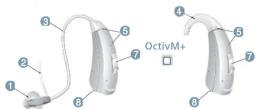
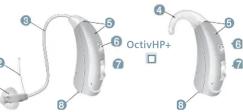
1 Ear piece (LifeTip)
② Concha lock (option)
③ Tube (LifeTube)
4 EarHook
⑤ Microphone openings
6 Push button
7 Rocker switch
Battery compartment
Removing
▶ Lift the hearing instrument and
▶ Holdthetube and pull the ear piece carefully
out ②.
Clean and dry your hearing instruments after usage. Read more in section "Maintenance and care".
Adjusting the volume
Your hearing instruments automatically adjust the volume to the listening situation.
If you prefer manual volume adjustment, press the rocker switch briefly or use a remote control.
Refer to section "Controls" for
your personal settings. An optional signal can indicate the volume change.

Note that manual volume adjustment may not be available for Octiv S+ instruments.
Changing the hearing program
Hearing programs change the characteristics of the sound coming through the hearing instrument. They help you to select the optimal setup for every listening situation. An optional signal can indicate the change of the hearing program.
To change the hearing program, press the push button briefy or use a remote control.
Refer to section "Controls" and to section "Settings" for your personal settings and for a list of your hearing programs.
Your NHS Provider can confi gure your hearing instruments so that they switch automatically to the audio shoe program if the audio shoe has been attached. Read more in section "Audio input".
Audio input
With an audio shoe you can connect your hearing instrument to an FM system. An FM system gathers speech at the voice source (via a separate microphone) and transmits the sound directly to the hearing instrument. This can be useful for adults in diffi cult listening situations and for children in classrooms.
Nowadays, most FM systems allow for coupling with audio devices like a MP3 player.
Your NHS Provider can configure your hearing instruments so that they switch automatically to the audio shoe program if the audio shoe has been attached.

If you want to use an audio shoe, a special battery compartment is required. Ask your NHS Provider to exchange the battery compartment.

WARNING
Risk of electric shock! Connect audio input only to a device conforming to IEC 60065, the IEC-Norm for audio, video and other electronic devices.
NOTICE
Use an approved audio shoe only. Ask your NHS Provider for this accessory. The audio shoe is only available for Octiv M+ & HP+ hearing instruments.
Attaching and removing the audio shoe
The audio shoe is integrated into a battery compartment.
To attach or remove the audio shoe, the battery compartment has to be exchanged. A special tool is required.
▶ Ask your NHS Provider to attach or remove the audio shoe.
Batteries
Changing the batteries
1 Openthebattery compartment


2 Removecolouredsticker from new battery, place battery in drawer with + symbol on battery + side up. (You should only remove the protective sticker if you actually use the battery)


③ Close battery door
Carefully close the battery compartment. If you feel resistance, the battery is not inserted correctly. Do not attempt to close the battery compartment by force. It can be damaged.
Low Battery indicator

▶ Always use the right size batteries
Your hearing instrument may be programmed to inform you when the battery should be replaced for best system performance. You may hear an intermittent series of beeps and/or experience low amplification power or volume. Change the battery when either of these occur. Remove empty batteries immediately and dispose of according to local regulations.

Remember to have your replacement batteries with you at all times.
■ Only use zinc-air batteries or nickel-metal hydride (NiMH) rechargeable batteries.
Do not use e.g. silver-zinc or lithium-ion rechargeable batteries.
Daily use
Turning on and off
You have several options to turn your hearing instruments on or off. Via battery compartment:
▶ Turning on: Close the battery compartment. The default volume and hearing program are set
▶ Turning off: Open the battery compartment.
Via push button or rocker switch: Turning on or off: Press the push button. Refer to section "Controls" for your personal settings.
After turning on, the previously used volume and hearing
program are set
▶ Follow the instructions in the remote control's user guide. After turning on, the previously used volume and hearing program are set.

- When wearing the hearing instruments, an optional signal can indicate when an instrument is turned on or off.
■ Remove the batteries if the hearing instruments are not used for several days.
When the power-on delay is activated, the hearing instruments turn on after a delay of several seconds. During this time you can insert the hearing instruments without experiencing unpleasant whistling.
The "power-on delay" can be activated by your NHS Provider.
Furtheradjustments (optional)
The controls of your hearing instruments can also be used to change, for example, the tinnitus noiser level.
Refer to section "Controls" for your personal settings.
Locking the controls (optional)
To prevent any accidental operation you can lock the controls. When the controls are locked, both push button and rocker switch are disabled.
To lock the controls, press the top of the rocker switch and hold it. Simultaneously press the push button on the same hearing instrument for 3 seconds.
To unlock the controls, press the bottom of the rocker switch and hold it. Simultaneously press the push button on the same hearing instrument for 3 seconds.
Whether this function is configured for your hearing instruments is listed in section "Controls".

If you are wearing two hearing instruments, you have to lock or unlock the controls on each hearing instrument separately.
■ Locking or unlocking can optionally be indicated by an acoustic signal.
When you turn your hearing instruments off and on again, the key lock remains in the previously selected state.

WARNING
Note that any unauthorized changes to the product may cause damage to the product or cause injury.
Use only approved parts and accessories. Ask your NHS Provider for support.
Using two hearing instruments
When controlling two instruments you have the following options to, for example, change the hearing program:
You can control each hearing instrument separately.
You can control both hearing instruments simultaneously.
Your NHS Provider has to activate the "e2e wireless" function, enabling both hearing instruments to exchange information. You can then use either a remote control or the user controls on either of your instruments for the desired function e.g. volume change.
The control elements of both instruments can even be set differently – thus offering you the degree of control you really need.
On the phone
When you are on the phone, hold the telephone receiver slightly above your ear. The hearing instrument and telephone receiver have to be aligned. Turn the receiver slightly so that the ear is not completely covered.
Telephone program
You may prefer a certain volume when using the phone. Ask your NHS Provider to confi gure a telephone program.
Switch to the telephone program whenever you are on the phone.
Whether a telephone program is configured for your hearing instrument is listed in section "Settings".
Maintenance and care
Your hearing instruments are so robust that they will function reliably for years. It is, however, important that you take care of your instruments and observe a few basic rules, which will soon become habit.
Cleaning
For hygiene reasons and to maintain functionality, clean your hearing instruments daily.
NOTICE
- Donotput the hearing instruments in water. Do not put LifeTubes or LifeTips in water.
Clean your hearing instruments with a soft, dry tissue.
If your hearing instruments are equipped with LifeTubes, regularly clean the tubes with special cleaning wires. Refer to section "Cleaning the LifeTubes" for details.
▶ Ask your NHS Provider for recommended cleaning products, special care sets and further information on how to keep your hearing instruments in good condition.
For a more thorough professional cleaning, take your instruments to your NHS Provider.
Cleaning the LifeTubes If your hearing instruments are equipped with LifeTubes, you can remove cerumen from the tubes using a special cleaning wire. Ask your NHS Provider for suitable cleaning wires.
Screw off
the tube. Carefully insert the cleaning wire into the tube. Start from the side opposite to the ear piece adapter.

▶ Push the cleaning wire
all the way through the tube. ▶ Wipe away any cerumen or debris
that is dislodged from the tube. Completely remove the cleaning wire from the tube.
Screw the tube onto the hearing instrument.
CAUTION
Risk of damage to ear canal and ear drum
Always remove the Life
Cleaning Wire from
the LifeLube before
teattaching it to your hearing instrument.
Drying
Dry you hearing instruments
▶ Ask your Hearing Care Professional for recommended drying products.
Exchanging ear pieces and tubes
- Ask your NHS Provider to exchange the LifeTube approximately every 3 to 6 months or as needed. - Ask your NHS Provider to exchange LifeTips every 1 to 2 months or as needed.
Storage
During longer periods of non-use, store your hearing instruments with open battery compartment (and batteries removed) in a drying system in order to prevent the penetration of moisture.
[Non-Text]
[Non-Text]
- Optional
- NOTICE
- Intendeduse
- Transport and storage
- conditions
- Conformance information
- UnitedKingdom
- Hearing instrument emits whistling sounds
- Whistling sounds.
- Sound is distorted.
- Hearing instrument emits signal tones.
- ▶ Replace the empty battery.
- Technical information
- Disposal information
- LegalManufacturer
- WARNING
- Risk of explosion!
- For NHS Providers:
- Choking hazard!
- 广力云智慧零售收银系统
- CAUTION Risk of injury
- Explanation of symbols
- CAUTION
- Inserting
- Audio induction loops
- Your Octiv™+ hearing instrument
- Removing
- Adjusting the volume
- Changing the hearing program
- Audio input
- Batteries
- Daily use
- Furtheradjustments (optional)
- Using two hearing instruments
- On the phone
- Telephone program
- Maintenance and care
- Drying
- Storage
Brand : SIEMENS
Model : Octiv M+
Category : Hearing aid