
Intuis ITE - Hearing aid SIEMENS - Free user manual and instructions
Find the device manual for free Intuis ITE SIEMENS in PDF.


| Product Type | In-the-Ear (ITE) Hearing Aid |
| Brand | Siemens |
| Model | Intuis ITE |
| Dimensions (approximate) | 15.5 x 10.5 x 4.5 mm |
| Weight (per device) | Approx. 2.5 g |
| Battery Type | Size 312 zinc-air battery |
| Battery Life | Up to 5-7 days typical use |
| Sound Processing | Digital 16-channel signal processing |
| Feedback Management | Adaptive feedback cancellation |
| Noise Reduction | Multi-channel noise reduction |
| Programs | Up to 4 listening programs (e.g., Universal, Noise, Music, TV) |
| Volume Control | Manual wheel or remote control |
| Telecoil | Integrated telecoil for phone and loop systems |
| Water Resistance | IP67 rated (dust and water resistant) |
| Cleaning | Wipe with dry cloth; use cleaning brush for wax |
| Storage | Store in dry, cool place with battery removed |
| Safety Features | Low battery alert, volume limiter |
| Spare Parts | Replacement batteries, wax guards, domes, and cleaning tools |
| Warranty | 2 years manufacturer warranty |
| Manual Languages | English, French, German, Spanish, Italian, Dutch, etc. |
Frequently Asked Questions - Intuis ITE SIEMENS
User questions about Intuis ITE SIEMENS
0 question about this device. Answer the ones you know or ask your own.
Ask a new question about this device
Download the instructions for your Hearing aid in PDF format for free! Find your manual Intuis ITE - SIEMENS and take your electronic device back in hand. On this page are published all the documents necessary for the use of your device. Intuis ITE by SIEMENS.
USER MANUAL Intuis ITE SIEMENS
natural_image
Illustration of dental implants in various shapes and colors, arranged in a row (no text or symbols)INTUIS™
User Guide
Custom hearing system
SIEMENS
Congratulations!
As the owner of a new hearing instrument, you may once again enjoy the sounds of your environment, and conversation with your family and friends.
These instructions as well as guidance from your Hearing Care Professional will help you understand how your new hearing instrument works. In this guide, you'll find instructions on insertion, removal and use of your INTUIS ^M hearing instrument. There are also tips and information on proper handling, cleaning, care and changing of the batteries. In addition, a troubleshooting section is offered for your reference.
Your hearing improvement with a hearing instrument depends on the fit of the hearing instruments, the type and degree of hearing loss, and proper diagnostic testing. Of course, a hearing instrument cannot restore normal hearing, and not everyone will benefit equally.
More than 80 percent of individuals with a hearing loss have a hearing loss in both ears. Studies show that even when a hearing loss is worse in one ear, most people with a hearing loss in both ears will benefit from wearing two hearing instruments.
Remember, a hearing instrument consists of finely-tuned devices that have been specially designed and expertly adjusted for your individual needs. Proper care and handling will ensure the best possible performance of your INTUIS hearing instrument.
Contents
Page
Description of your INTUIS custom hearing instrument 4
Handling the battery 5
Inserting and removing your custom hearing instruments 8
Turning your hearing instrument on and off 10
Using the program button 11
Using the volume control 13
Using the telephone 14
Maintenance and care 16
Important notes 18
Troubleshooting tips 19
Disposal information 21
Description of your INTUIS custom hearing instrument
IT

CT
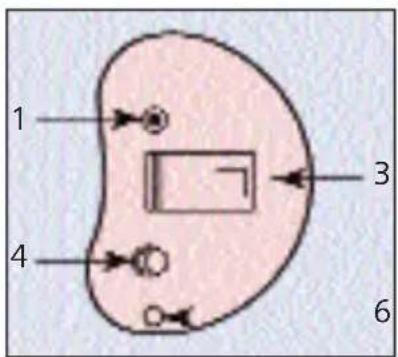
CS
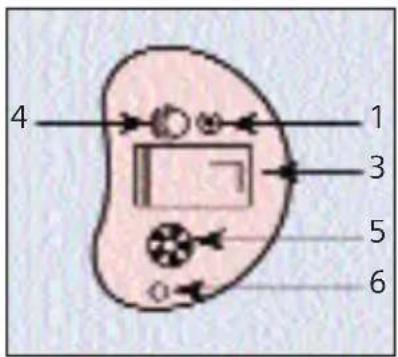
CIC

Your hearing instrument is individually manufactured according to the shape of your ears or ear canals.
- First Microphone
- Second microphone TwinMic™ (optional)
- Battery compartment
Hearing system Battery type
IT 312 or 13*
CT 312
CS/ CIC 10
* Consult your Hearing Care Professional.
- Program button (optional)
- Volume control (optional)
- Vent
- Removal cord (optional)
Each hearing instrument can be identified by the serial number located on the outside of the instrument. If the number is written in red, the hearing instrument is for the right ear. If the number is written in blue, the hearing instrument is for the left ear.
Handling the battery

Battery type original size
Low battery indicator
Your hearing instrument may be pro grammed to inform you when the battery should be replaced for best system performance. You may hear an intermittent series of beeps and/or experience low amplification power or volume.
Change the battery when either of these occurs.

natural_image
Simple diagram showing a cell with an arrow pointing to a circular object with a cross, next to two irregular shapes (no text or symbols)The protective tab on your battery should only be removed when you are ready to use the battery.
Three useful tips:
- The positive (+) side of the battery is always the smooth side. You can recognize the negative (-) side by the colored ring.
• Always keep spare batteries with you. - If you think you cannot change the battery by yourself, ask someone to help you: a family member, friend or your Hearing Care Professional.
Handling the battery
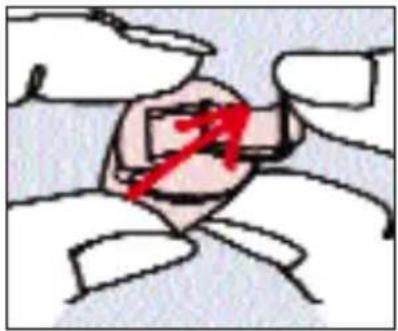
Inserting the battery:
Before using your hearing instrument, place the battery into the battery compartment door. Using the fingernail of either your thumb or index finger, pull the tab on the battery compartment door outward until the door swings open all the way (see illustration).

natural_image
Illustration of hands using a tool to adjust a mechanical component (no text or symbols visible)Place the proper size battery into the battery compartment door, making sure that the "+" symbol on the smooth side of the battery matches the "+" symbol on the edge of the battery compartment door, as shown in the illustration. (Ask your Hearing Care Professional if you have questions about the correct battery size for your hearing instrument.)
Gently close the battery compartment. Do not force the door shut. If it does not close easily, check to see if the battery is inserted properly. When the battery compartment is completely closed, your hearing instrument is ready for use.
Change the batteries when any of the following occur:
- volume becomes softer or weak
- you hear a battery signal beep
Do not throw used batteries into household trash. Return them to your Hearing Care Professional for environmentally correct disposal.
Warning:
Batteries are toxic when swallowed.
- Keep batteries out of children's reach.
- If swallowed consult a physician or a hospital immediately.
Choking hazard posed by small parts
- Keep hearing instruments out of children's reach.
- If infants, small children or mentally disabled persons need to wear hearing instruments ensure adequate supervision.
Inserting and removing your custom hearing instruments
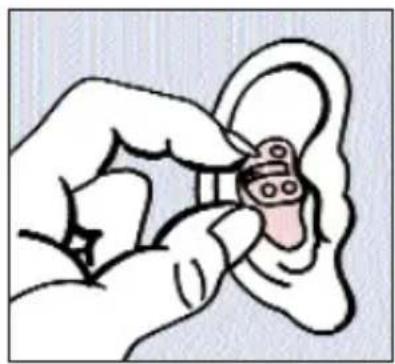
natural_image
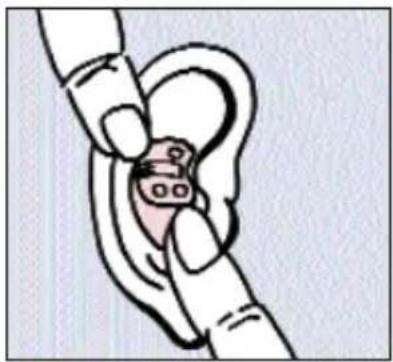
Illustration of a hand holding an ear with a small object inside (no text or symbols)Hold the hearing instrument with your thumb and index finger, carefully push the instrument in the ear canal. Gently work it into its proper position by slightly twisting until it is firmly seated. Lightly press inward for a secure and comfortable fit.
natural_image
Illustration of a hand inserting a small object into a circular ear (no text or symbols)You may find it helpful to pull your ear slightly upward or to the back. Once inserted, you should be able to feel if the hearing instrument is correctly positioned.
Tip:
Practice inserting and removing your hearing instrument correctly. An easy way to practice is to sit down at a table. Place a mirror in front of you and prop your elbows on the table so you can guide your hands easily and safely. This will help you stay relaxed and comfortable while you practice.
Inserting and removing your custom hearing instruments
natural_image
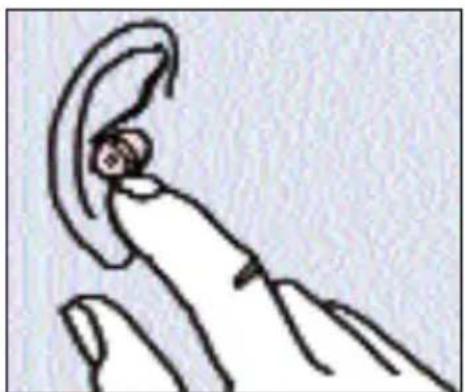
Simple line drawing of a human ear with a curved ear (no text or symbols)To remove the hearing instrument, push lightly on the back of your ear to help loosen it or pull gently on your ear. Then using your index finger, slowly pull the hearing instrument from your ear.
The completely-in-the-canal hearing instruments can be removed by pulling the small removal cord toward the back of your head.
Caution:
Never pull on the battery compartment door or volume control wheel to remove the hearing instrument, as this could cause damage to your hearing instrument.
Turning your hearing instrument on and off
Using the battery compartment
Insert a battery into your INTUIS hearing instrument and completely close the compartment to turn the instrument on. To turn it off open the compartment completely.
Using the program button
Your hearing instrument may also be programmed to allow you to turn it on and off using the program button.
Press and hold the button for approximately 2 seconds to turn your hearing instrument off.
To turn your hearing instrument on again, press and hold the program button for approximately 2 seconds.
Please note that after having turned the instrument off, you must wait approximately 10 seconds for the system to reset before turning the instrument back on again by using the button.
Using the volume control
The volume control also incorporates an on/off switch. In the full backwards position the hearing instrument will be switched off.
Power-on Delay
Your hearing instrument may be equipped with an advanced "Power-on Delay" feature. This feature delays sound from entering your hearing instrument when it is first turned on, so that you may insert the hearing instrument in to your ear without experiencing unpleasant feedback (whistling).
Using the program button
natural_image
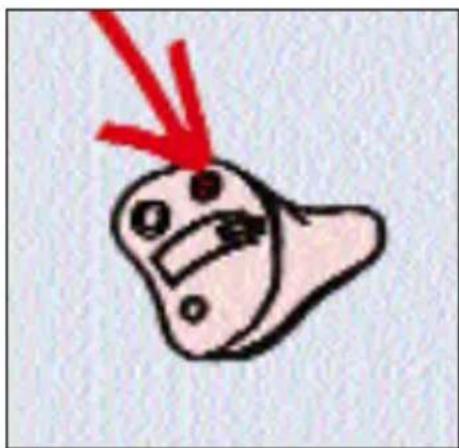
Simple cartoon drawing of a smiling face with a red arrow pointing downward (no text or symbols)Your INTUIS hearing instrument can have up to 4 programs. They can be selected with the program button.
These programs change the characteristics of the sound coming through the hearing instrument for specific listening environments.
How to select programs
To change programs using the program button, press the button. Each time the button is pressed the system changes to the next program, which may be confirmed with a beep. The number of beeps you hear coincides with the selected program. That means when Program "4" is selected, for example, you will hear 4 beeps.
Using the program button
Your Hearing Care Professional has programmed your instruments as follows:
| Hearing program | Description of the hearing situation |
| 1 | |
| 2 | |
| 3 | |
| 4 |
Using the directional microphone system (where provided)
natural_image
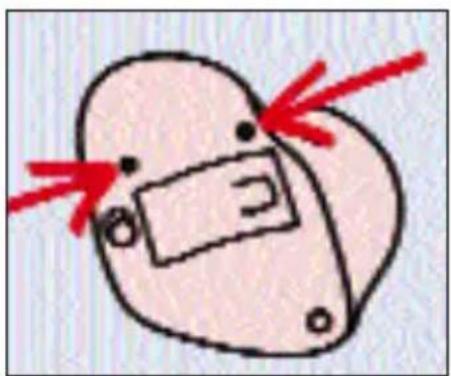
Simple line drawing of a heart-shaped object with a rectangular box and red arrows pointing to its sides (no text or symbols)According to your hearing needs, your INTUIS hearing instrument can be adjusted to focus on those sounds in front of you (directional mode) when you are having a face-to-face conversation in a noisy environment. The hearing instrument can also be adjusted when you are in quieter
environments and want to hear the sounds around you (omnidirectional mode). To make this adjustment use the program button to change to the directional program. Your Hearing Care Professional will tell you which program is configured for directional mode.
Using the volume control
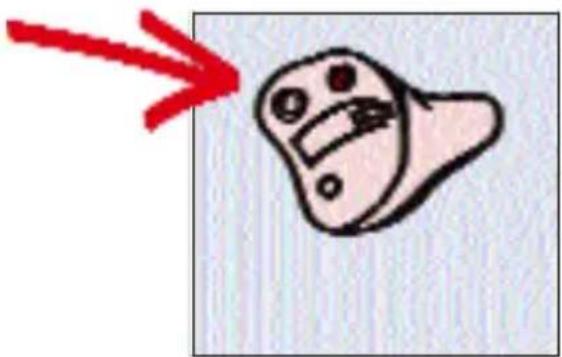
natural_image
Simple cartoon drawing of a smiling face with a red arrow pointing to it (no text or symbols)Volume control
Your INTUIS hearing instrument is fully automatic. There is no need to manually adjust the volume control. However, if you prefer manual volume control, your INTUIS hearing instrument
can be programmed for manual adjustment, too.
If your hearing instrument is programmed for manual adjustment, the wheel-shaped volume control can be rotated forward (louder) or backwards (softer) to select the desired listening volume.
The volume control incorporates an on/off switch. In the full backwards position the hearing instrument will be switched off.
If your hearing instrument has not been programmed for manual control adjustment, the volume will automatically adjust and rotating the volume control wheel will have no effect.
Using the telephone

natural_image
Illustration of a human ear with visible teeth and facial features (no text or symbols)Automatic telephone program
(Not all instrument)
With the AutoPhone function, your INTUIS hearing instrument will automatically switch to the telephone program when you hold a telephone handset near your hearing ins-trument. It will return to the previously used hearing
program after you have finished speaking and move the handset away from the hearing instrument.
You can also select the telephone program manually by using the program push button.
The telephone program can be set to microphone mode or telecoil mode. Your Hearing Care Professional will program your hearing instrument to fit your individual requirements.
AutoPhone magnet accessory
Not all telephones produce a magnetic field strong enough to activate the AutoPhone function. In this case, use the Siemens AutoPhone magnet, which is available as accessory, and attach it to the telephone receiver to activate the AutoPhone function.
Consult your Hearing Care Professional to find out if this accessory is right for your hearing care needs.
Note:
Magnets can pose risks to electronics and magnetic storage mediums when placed in close proximity. Take care not to set magnets near computers, color monitors, television sets, floppy discs, video/audio tapes and other electronic equipment.
Keep magnets out of the reach of children. If swallowed consult a physician or a hospital.
Magnets may interfere with the operation of life supporting systems (e.g. pacemakers, magnetic valves etc). Use magnet only if not in doubt about the safe distance.
The Safe distance between pacemaker and magnet should be at least 10 cm (4 inches).
See the AutoPhone magnet user guide for instructions on how to position the magnet.
Use only the Siemens magnet, which is available as accessory.
Maintenance and care
Your new INTUIS hearing instrument is a highly sensitive system. Proper care and handling will ensure best possible performance.
If soreness or skin irritation develops in the ear, discontinue wearing your hearing instrument, and bring it to your Hearing Care Professional. Minor fit adjustments and polishing can often correct this condition. If soreness persists, discontinue wearing the hearing instrument and see your physician.
If excessive earwax accumulates when wearing your hearing instrument, consult your Hearing Care Professional.
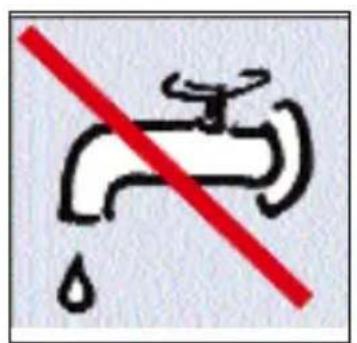
- Caution: Water will damage your hearing instrument. Never put your hearing instrument in water!

natural_image
Simple cartoon drawing of a smiling character with a red downward arrow (no text or symbols)- Your hearing instrument may be equipped with a sieve, recess or guard on the sound outlet to prevent earwax from entering the hearing instrument. Your Hearing Care Professional will provide you with the wax protection appropriate for your hearing instrument and can advise you how to clean or replace it.
Maintenance and care

natural_image
Illustration of a hand holding a small object next to an open cosmetic box (no text or symbols visible)Always store your hearing instrument in the case provided.
- Occasionally bring your hearing instrument to your Hearing Care Professional to change the wax guard, clean the venting channel, the microphone and sound outlets, and for general system maintenance. Your Hearing Care Professional will make sure that the hearing instrument functions correctly and fits properly in your ear.
Note:
If your hearing instrument sounds distorted or weak and cleaning it does not improve the sound then exchange the wax protection or have it exchanged.
Care tips:
- You should place your hearing instrument in a "dry aid kit" with a special moisture-attracting capsule overnight. The drying capsule draws damaging moisture out of the system.
- Your Hearing Care Professional can provide you with special care sets and drying capsules to keep your hearing instrument in good condition.
Important notes
Your hearing instrument is sensitive to extreme heat, high humidity, strong magnetic fields (>0.1T), X-rays and mechanical stress.
- Do not expose your hearing instrument to extreme temperature or high humidity. Do not leave it in direct sunlight. Do not wear it in the shower or when you apply make-up, perfume or aftershave, hairspray or suntan lotion.
- Do not wear your hearing instrument when you are exposed to short-waves, a strong magnetic field, a high frequency field or X-rays.
- Turn your hearing instrument off when not in use to preserve the battery.
- Leaking batteries damage the instrument. Remove batteries when the instrument is not in use for a prolonged period of time.
- Do not use your hearing instruments in areas where there is a danger of explosions (e. g. mining areas).
- Do not place your hearing instruments in a microwave oven.
Troubleshooting tips
Your INTUIS hearing instrument is an extremely reliable device. However, should a problem occur, this can usually be corrected quickly. Use this trouble shouting guide to sort out simple problems.
| PROBLEM | CAUSE | POSSIBLE |
| System has no sound or reversed sound is weak | Battery polarity Make inserted correctly | sure battery is |
| Weak or dead Replace with new Battery battery | ||
| Instrument not Close turned on completely | battery door or press and hold program button (if present) for 3 seconds | |
| System clogged Clean volume too low Turn | system /ex change wax protection up volume control (if present) | |
| System Improper whistles | seating in Try reinserting the ear | instrument until it fits securely |
| Volume control too high | Lower the volume control (if present) |
Troubleshooting tips
| PROBLEM | CAUSE | POSSIBLE |
| System Clogged whistles or excessive | with wax Clean your instruments | instruments Hearing Care |
| Sound is Volume distorted or high intermittent | control too Lower volume (if present) Weak battery Replace battery | |
| “Buzzing” or “whistling” sound | battery compartment Gently close the battery compartment is not completely closed Weak battery Replace battery | |
| Change to another program Instrument is in telecoil mode | ||
| Hearing instrument does not work | Instrument not turned on Battery compartment is not completely close Dead battery | Turn on hearing instrument Gently close the battery compartment completely Replace with new battery |
If you still encounter problems after trying these suggestions, take the hearing instrument to your Hearing Care Professional.
Disposal infomation
Within the European Union, the marked equipment is covered by "Directive 2002/96/EC of the European Parliament and of the Council of 27 January 2003 on waste electrical and electronic equipment.

Amended by Directive 2003/108/EC" (WEEE).
Note:
Recycle your hearing instruments and batteries according to national regulations.
www.siemens.com/hearing
With the CE marking Siemens confirms compliance with the European Directive 93/42/EEC concerning medical devices.

0123
www.siemens.com/hearing
Order-No.: A91SAT-00079-99T5-7600
Printed in Germany
10.2009·FB
101 75 154
- INTUIS™
- Congratulations!
- Contents
- Page
- Description of your INTUIS custom hearing instrument
- Handling the battery
- Low battery indicator
- Three useful tips:
- Inserting the battery:
- Warning:
- Inserting and removing your custom hearing instruments
- Tip:
- Caution:
- Turning your hearing instrument on and off
- Using the battery compartment
- Using the program button
- Using the volume control
- Power-on Delay
- How to select programs
- Your Hearing Care Professional has programmed your instruments as follows:
- Using the directional microphone system (where provided)
- Volume control
- Using the telephone
- Automatic telephone program
- AutoPhone magnet accessory
- Note:
- Maintenance and care
- Care tips:
- Important notes
- Troubleshooting tips
- Disposal infomation
Brand : SIEMENS
Model : Intuis ITE
Category : Hearing aid