STV-19LED15 - Television Shivaki - Free user manual and instructions
Find the device manual for free STV-19LED15 Shivaki in PDF.


Pick your language and provide your email: we'll send you a specifically translated version.
| Product Type | LED Television |
| Brand | Shivaki |
| Model | STV-19LED15 |
| Display Size | 19 inches (48 cm diagonal) |
| Resolution | 1366 x 768 pixels (HD) |
| Display Technology | LED-backlit LCD |
| Power Supply | AC 100-240V, 50/60Hz |
| Power Consumption (Max) | 35 W |
| Dimensions (with stand) | 450 x 320 x 160 mm |
| Weight (with stand) | 3.2 kg |
| Inputs | HDMI, USB, VGA, AV (Composite), RF (Antenna) |
| Audio Output | 3.5 mm headphone jack, built-in speakers (2 x 3W) |
| Remote Control | Yes, included (battery type AAA) |
| Wall Mount Compatibility | VESA 75 x 75 mm |
| Key Functions | TV tuning (DVB-T/C), channel storage, sleep timer, aspect ratio adjustments |
| Cleaning Instructions | Wipe gently with a soft, dry cloth. Do not use liquid cleaners. |
| Safety Precautions | Place on stable surface; ensure ventilation slots are unobstructed; avoid moisture. |
| Repairability / Spare Parts | Contact Shivaki service center for replacement parts; typical spare: remote control, power cord |
Frequently Asked Questions - STV-19LED15 Shivaki
How do I connect my external device (e.g., DVD player) to the TV?
Use an HDMI cable for best quality. Connect one end to the device and the other to the HDMI port on the TV. Then select the corresponding HDMI input using the Source button on the remote.
The TV screen shows 'No Signal'. What should I do?
Ensure the connected device is powered on. Press the Source button to select the correct input (HDMI, AV, VGA). For antenna connection, go to Menu > Channel Scan to search for available channels.
Can I mount this TV on a wall?
Yes, the TV supports VESA 75x75 mm wall mounts. Use a suitable bracket and follow the installation instructions. Ensure the wall can support the TV's weight (approx. 3.2 kg).
How do I reset the TV to factory settings?
Go to Menu > Settings > Factory Reset. Enter the default password (usually 0000 or 1234) and confirm. This will erase all custom settings and channel lists.
The remote control is not working. What can I do?
First, check the batteries and replace them if needed. Ensure there are no obstacles between the remote and the TV. Try pointing directly at the TV sensor. If still not working, clean the battery contacts.
How do I connect the TV to a computer?
You can connect a computer via VGA (for video) or HDMI (video+audio). For VGA, also connect a separate audio cable from your computer to the TV's PC Audio In (3.5mm jack).
The sound is distorted or too low. How to fix?
Check the volume level and mute status. Go to Menu > Sound and adjust Bass and Treble. Ensure audio cables are firmly connected. If using external speakers, verify they are powered on.
Can I use a USB flash drive to play media?
Yes, insert a USB drive into the USB port. Use the Media Player function from the main menu. Supported formats include MP4, AVI, JPEG, and MP3. File system should be FAT32.
How do I perform a channel scan?
Press Menu, go to Channel or Setup, select Auto Scan or Channel Search. Choose your signal type (Antenna or Cable) and start the scan. The TV will store all available channels automatically.
What are the recommended cleaning methods?
Turn off the TV and unplug it. Use a soft, lint-free cloth slightly dampened with water (or special screen cleaner) to gently wipe the screen and frame. Do not spray liquid directly on the TV. Avoid using alcohol or abrasive cleaners.
User questions about STV-19LED15 Shivaki
0 question about this device. Answer the ones you know or ask your own.
Ask a new question about this device
No questions yet. Be the first to ask one.
Download the instructions for your Television in PDF format for free! Find your manual STV-19LED15 - Shivaki and take your electronic device back in hand. On this page are published all the documents necessary for the use of your device. STV-19LED15 by Shivaki.
USER MANUAL STV-19LED15 Shivaki
Вниманные
- ИСТОЧНИК СИГНАЛА
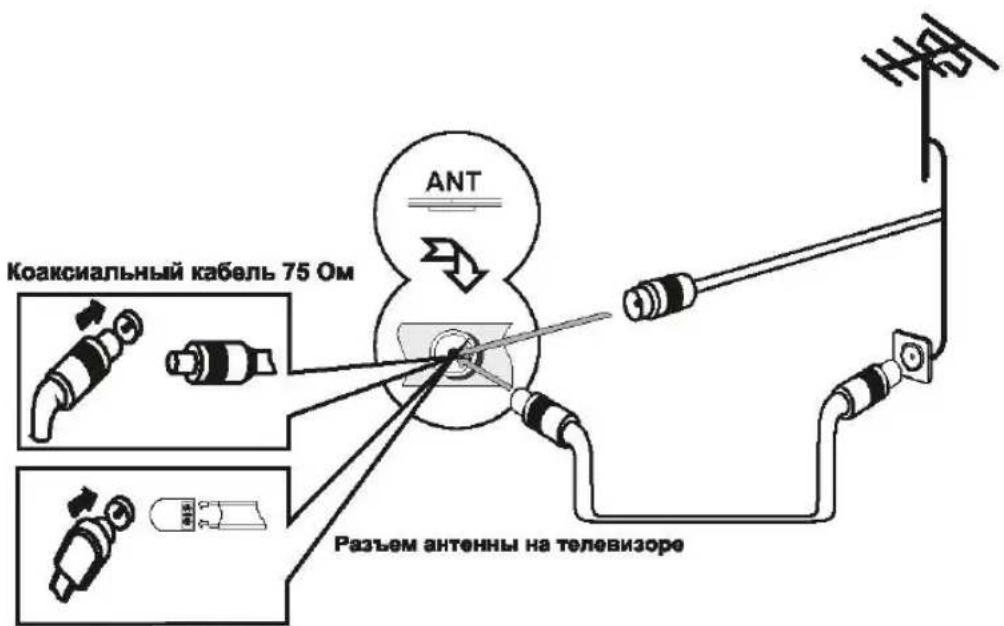
УСТАНОВКА АНТЕННЫ
МЕНЮ
2.Treble (Тембр ВЧ) / Bass (Бас) / Balance (Баланс)
MEHIO

8. Signal Information (Информация о сигнале)
МЕНЮ
3. Subtitle (Субтитры)
MEHIO
МЕНО
Music (Музыка)
Table of contents
Click a title to access it
Manual assistant
Powered by Anthropic
Waiting for your message
Product information
Brand : Shivaki
Model : STV-19LED15
Category : Television