ASF50 - Household Fan Andrews - Free user manual and instructions
Find the device manual for free ASF50 Andrews in PDF.


| Product Type | Domestic Fan |
| Model | ASF50 |
| Brand | Andrews |
| Fan Diameter | 50 cm (19.7 inches) |
| Dimensions (HxWxD) | 130 x 50 x 50 cm |
| Net Weight | 5.5 kg |
| Power Supply | 220-240 V ~ 50 Hz |
| Power Consumption | 50 W |
| Speed Settings | 3 speeds |
| Oscillation | Yes, wide-angle |
| Adjustable Height | Yes, telescopic pole |
| Blade Material | ABS plastic |
| Grille Material | Steel with anti-rust coating |
| Control Type | Rotary switch on motor head |
| Protection Class | IPX2 (splash-proof) |
| Noise Level | ≤ 60 dB (A) |
| Assembly Required | Yes, easy tool-free assembly |
| Cord Length | 1.5 m |
| Cleaning Instructions | Wipe with damp cloth; do not immerse |
| Safety Features | Overheat protection, stable base |
| Spare Parts Availability | Blades, grille, motor, switch available |
| Warranty | 2 years |
| Includes | Fan unit, stand base, pole, screws, manual |
Frequently Asked Questions - ASF50 Andrews
User questions about ASF50 Andrews
0 question about this device. Answer the ones you know or ask your own.
Ask a new question about this device
Download the instructions for your Household Fan in PDF format for free! Find your manual ASF50 - Andrews and take your electronic device back in hand. On this page are published all the documents necessary for the use of your device. ASF50 by Andrews.
USER MANUAL ASF50 Andrews
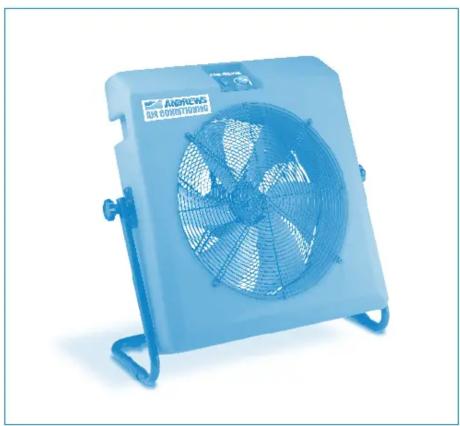
ASF21/50 Cooling & Ventilation Fans
natural_image
Blue industrial fan with visible blades and mounting base (no text or symbols)Operating Instructions & Safety Guide
ANDREWS AIR CONDITIONING
General Safety
Never place anything of top of the unit and never obstruct the air inlet / outlet grills. Leave a 300 mm gap all around the unit to let the air circulate. Always switch OFF and unplug the equipment when not in use.
Electrical Safety
This fan unit plugs into either a standard 230v 13 amp or a 110v power supply, depending on model (see data plate for voltage type). The plug (230v models only) is fitted with a 13 amp fuse.
Extension leads should be: correctly rated for the inductive load fully unwound, loosely coiled and never run through water or over sharp edges.
To reduce the risk of electric shock, use a suitable RCD (residual current device).
Never pull the equipment by its power cord.
Ensure the machine and power socket are switched OFF before plugging into the power supply.
Warnings
Do not use in wet or damp conditions.
Please ensure you read and understand the operating instructions before using the unit.
If you are in any doubt regarding the electrical supply, please contact your supplier.
All electrical installations must comply with the IEE regulations.
Do not use fan if there is damage to the power cord, plug or guard.
Do not attempt to modify or repair this unit.
Earth fans (class 1)
Plugs must be wired to the following code
Brown - Live
Blue - Neutral
Gree/Yellow - Earth
Set up & operation
Set the unit up on a firm, level surface and do not site the unit close to any personnel wearing contact lenses, sensitive to any dust movement, hay fever sufferers etc. This unit moves air only, but minute particles of dust / pollen etc will also be moved, especially on highest fan setting, so careful location / fan angle / use of speed control will require consideration.
The body of the fan is held in position via the side-mounted hand-wheels. To adjust, slacken the wheels to allow the fan body to be moved. Once the desired angel is reached, ensure the hand-wheels are turned hand tight to prevent movement (fig. 1).
The air-flow from the fan exits from the side with the speed controller on it (the front), the intake side is where the power supply cable enters the rear of the unit.

natural_image
Close-up of a hand holding a medical device, likely a catheter or tube, in blue-tinted image (no visible text or symbols)Click www.andrews-sykes.com
or Call Us Free 0800 211 611
Operating Instructions - ASF21/50
Operation
To start
Plug the unit into the relevant power supply and switch the supply ON (fig. 2).
Press the red ‘rocker’ switch on the front of the unit to ON, which will then illuminate.
The fan blade should immediately start to turn & the speed can be controlled with the knob on the control panel. Do not force the knob past the stop point; you will damage the switchgear.
To stop
Move the on/off switch to the off position. Isolate from electrical supply when not in use.

Fig. 2
Equipment care & storage
Never use an air mover except for its intended purpose.
- Keep the equipment clean & especially the grill faces. Blow out the grills with compressed air if ‘clogged’ up.
Never move the unit whilst in operation!
Switch the unit OFF and unplug from its power supply, wrap the cable round the storage ears.
Troubleshooting
Below is a trouble shooting guide, which will help should any difficulties be experienced.
Always consult this guide before ringing your supplier. The majority of reported problems are simply solved in this manner.
| Problem Likely Cause Solution | ||
| Unit fails to operate Power failure Check unit is plugged in to power supply | ||
| Check plug fuse (230v only) for failure & correct 13 amp rating | ||
| 110v Models, check power supply | ||
| Check building ring circuit is not overloaded | ||
| Poor airflow Speed control on low setting | Turn speed control knob clockwise to increase airflow | |
| Blow compressed air through grills to clean | ||
| Remove obstruction | ||
If none of the above solves the problem, please contact your supplier for advice
Brand : Andrews
Model : ASF50
Category : Household Fan