C8A0 - Paper shredder Wallner - Free user manual and instructions
Find the device manual for free C8A0 Wallner in PDF.


| Product Type | Paper Shredder |
| Brand | Wallner |
| Model | C8A0 |
| Shred Type | Cross-cut (4 x 50 mm) |
| Security Level | DIN 32757 Level 3 |
| Entry Width | 225 mm |
| Paper Capacity | 10 sheets (70% recommended for durability: 7 sheets) |
| CD Capacity | 1 CD |
| Credit Card Capacity | 1 card |
| Waste Basket Capacity | 25 L |
| Dimensions (W x D x H) | 365 x 240 x 500 mm |
| Power Supply | 230-240 V ~50 Hz |
| Motor Protection | Thermal overload protection; automatic shutdown after 3 minutes continuous use |
| Cooling Time After Overload | 60 minutes (or 15 minutes for minor overload) |
| Reverse Function | Yes |
| Automatic Start/Stop | Yes |
| Oiling Required | Yes; every 5-6 times emptying basket using vegetable oil-based lubricant |
| Safety Features | Safety interlock switch on waste basket; warning labels; automatic shut-off |
| Shreddable Materials | Paper, CDs, credit cards |
| Included Accessories | Waste basket, CD/credit card bin |
Frequently Asked Questions - C8A0 Wallner
User questions about C8A0 Wallner
0 question about this device. Answer the ones you know or ask your own.
Ask a new question about this device
Download the instructions for your Paper shredder in PDF format for free! Find your manual C8A0 - Wallner and take your electronic device back in hand. On this page are published all the documents necessary for the use of your device. C8A0 by Wallner.
USER MANUAL C8A0 Wallner
natural_image
Exterior view of a modern stainless steel water heater with black and silver casing (no visible text or symbols)NISZCZARKI WALLNER C860/C8A0

UWAGA!
natural_image
Close-up of a silver and black electronic device with a curved top and control panel (no visible text or symbols)OBSŁUGA URZĄDZENIA
NISZCZENIE PAPIERU / PŁYT CD/ KART PLASTIKOWYCH
- read the manual carefully before starting to work
- check whether the voltage and frequency given in the table at the bottom of the equipment are the same as in your socket
- do not use the machine if the waste basket is not installed
- do not use the machine if the waste basket is full
- pull the plug from the socket:
a) before emptying the waste basket
b) before any servicing or preservation actions are taken
c) before opening the equipment in case of repair - take note of the warning plate on the top of the machine to avoid serious injury when your jewellery, tie or hand are too close to the machine
- the machine may not be operated by children
IMPORTANT SAFETY NOTES
 | The machine can not be operated by more than one person at any given time! The machine was designed for safe operation by „one person only”. |
 | During the shredding process no other work may be performed on the machine (for example cleaning, etc). |
 | Keep children away from the machine. This machine's design and safety concept are based on adult dimensions to ensure that it can be operated safely by adults only. |
 | Repairs must be executed by a qualified service personnel. |
 | Keep all loose articles of clothing, ties, jewelry, long hair or other loose objects away from opening, injury may result! |
 | Never insert fingers into opening. Serious injury may result! |
 | In case of danger unplug the machine. |
 | Always unplug the machine from the main power supply before opening the machine. |
 | Shredder designed to shred paper, credit cards and CDs. The shredding of other materials may damage the machine. |
© ARGO S.A. www.argo.pl
INSTALLATION:
- Unpack and set the machine upright.
- Put the machine on a horizontal surface.
- Place the CD/ Credit card's plastic bin inside the wastebasket
- Place the shredder on top of the wastebasket
- Plug in the machine.
- The socket-outlet should be installed near the equipment and should be easily accessible.
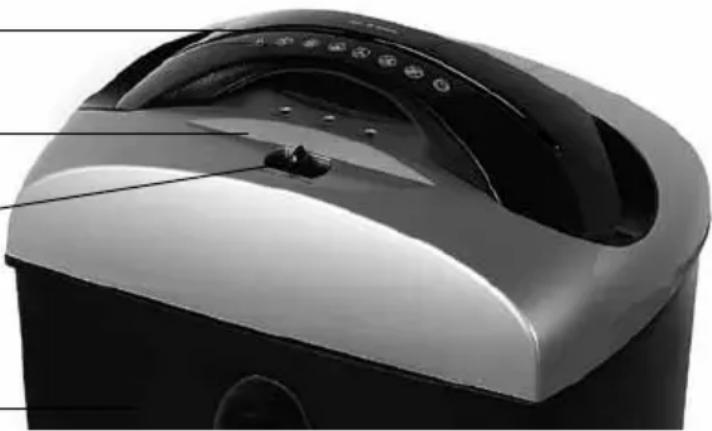
PARTS AND FUNCTION
Paper entry
CD/DVD/ Credit Card entry
Operation button:
Reverse (Rev),
OFF
AUTO
Waste basket
natural_image
Close-up of a modern kitchen appliance with a curved top and black casing, showing control buttons and a handle (no visible text or symbols)OPERATION
FEEDING THE PAPER / CD'S
- Please check the voltage of your shredders carefully before using and then plug in.
- Set to (AUTO), the shredder is going to standby mode.
- Feed the paper / CD / Credit Card into the proper entry of the shredder, the machine will start automatically.
- The machine switches off automatically after shredding

CAUTION:
It is forbidden to place more sheets of paper / CD's / Credit Card then the maximum amount indicated by the producer. If the machine will be overloaded, then please proceed according to the information given in the "paper jam" section.
MOTOR PROTECTION
The shredder is equipped with a motor overload device.
After 3 minutes of continuous work allow the unit to cool for 60 minutes before restarting.
If:
a) the shredder is operated continuously for too long
b) excess paper is fed in or the paper is not fed squarely into the shredder the overload device may shut off the motor.
If any of this happens:
- unplug the shredder and leave 15 minutes to cool
- plug the shredder in, put the switch in (Rev), pull the excess paper from the cutters and ensure the feed slot is clear
• normal shredding may now be resumed.
CUTTER OILING INSTRUCTIONS
To ensure proper operation and function, periodic oiling of the cutting system is required. Failure to oil your cutting system could result in reduced sheet capacity performance, excess noise, paper jams and possibly machine failure. Oil your cutters every 5th or 6th time you empty the basket, if excess squeaking and rubbing noise is coming from the machine or if the shredders sheet capacity has diminished.
Squeeze the lubricant across the full width of the cutters. Insert paper into sensor to activate the cutting system forward for 3 seconds. Then press „REV“ to make shredder reverse for 3 seconds. Alternate between forward and reverse at least three times or until all paper clears the cutters.

CAUTION: Never use flammable synthetic oil, petroleum based or aero- bricants to oil your cutting system. Use only a vegetable oil based lubricant in aerosol container with extension nozzle.
BASIC EXPLOITATION RULES
It is not advised to cut as many sheets as indicated as the maximum capacity of the shredder. By exploiting the machine at its top capacity we significantly reduce its vitality. Therefore, to maintain a durable and faultless work of the shredder, it is advised to place no more than 70% of the maximum amount of sheets to be shred at one time indicated for each model by the producer. The maximum amount of sheet should be used only occasionally.
It is forbidden to shred more sheets then the maximum amount of sheets to be shred at one time indicated by the producer. It may cause the blockade of the machine and massive engine overloading, which will diminish shredder's durability or even damage it. Also you should not shred soft objects such as foil, paper towels, toilet paper or fabrics. Nor paper with self-adhesive tape should be placed into the shredder. Those materials wrap around and jam the knives.

IMPORTANT RECOMMENDATIONS / WARNINGS
For your own safety please maintain particular care while installing and using the machine.
GENERAL
Keep hands, long hair, loose articles of clothing, jewellery and ties away from shredder's opening to avoid serious injury. Unstable surfaces may cause the fall of the shredder, which can result in body injuries. Please avoid fast stopping, use of additional force or surface unevenness while transporting the shredder on trolley, casters or table. Do not remove mechanical and electrical securities such as locks, covers or others. It is forbidden to use objects not dedicated to do so or liquids.
ELECTRICAL
The machine should be plugged to the electric circuit only as presented in the manual. The socket must be in close vicinity with easy access to the shredder. While moving the machine, pull the plug from the socket. Do not use the machine when the wire or plug are damaged or after noticing symptoms of machine's damage. Please contact seller to obtain help.
SERVICE
Proceed only with routine actions according to the manual. Do not repair or service machines on your own. Unplug the machine from the circuit and contact seller when one or more of the following faults occur:
- liquid gets into the machine
• machine malfunctions as a result of improper use
• machine does not work accordingly to the manual
PROBLEM SOLVING
| problemschecklistssolutions | ||
| No operation Is the power plug properly inserted to main power supply? | Fully put the power plug to the outlet. | |
| Is the switch set to „AUTO" position? | Set switch to „AUTO" position for operation. | |
| Is the switch at „AUTO" position, but power light is off? | Check if basket is out of stand. Put basket back on stand. | |
| Is the basket on the stand, but power light is off? | Basket should be put on the stand to trigger the safety interlock switch for operation. | |
| No operation when you insert the paper? | Paper should be inserted to trigger the sensor in the centre. | |
| You checked the above, but no operation and no power light? | Send back to your local service for repair. | |
| No operation after long time operation | Power lamp is on? | Unplug the machine from main supply. Allow it to cool down to room temperature and resume operation. |
| Stop at shredding | Machine is continuously shredding for a long time? | Unplug the machine from main supply. Allow it to cool down to room temperature and resume operation. |
| Excess squeaking and rubbing noise | Without oiling of the cutting system periodically, squeaking and rubbing noise will increase while shredding. | Perform the cutter oiling instruction to lubricate the cutting system. |
| Paper jam | - Did you exceed the shredding capacity- Is the paper fed squarely into the feed opening. | Set switch to „REV" for reverse running and free excess paper. Then set to „AUTO" for cutting the remaining paper in the cutting system. If serious jam occurred, send back to local service for repair. |
If any faults should appear, please pass the machine along with the warranty card to the seller or closest authorised dealer. The machine might be passed further, thus the user should maintain the original and complete packaging. In cases when the machine is passed for repair in a not original or incomplete package, the risks of further damages that might arise in transportation are on the user's side. Thus, in such a case, it is in the user's best interest to make the best possible replacement packaging.
TECHNICAL DATA
| model: Wallner C860 Wallner C8A0 | ||
| Shred type shreds shreds | ||
| Shred size (mm) 3 x 9 4 x 50 | ||
| Security level DIN 32757 4 3 | ||
| Entry Width (mm) 225 225 | ||
| Shred Capacity (paper) 6 10 | ||
| Shred Capacity (CD) 1 1 | ||
| Automatic on/off | + | + |
| Reverse function | + | + |
| Waste basket's capacity (l) | 25 | 25 |
| Dimensions (mm) 365x240x500 | 365x240x500 | |
| Power (V) | 230-240 V ~50 Hz | 230-240 V ~50 Hz |
NOTE ON ENVIRONMENTAL PROTECTION
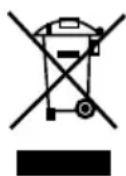
After the implementation of the European Directive 2002/96/EU in the national legal system, the following applies: Electrical and electronic devices may not be disposed of with domestic waste.
Consumers are obliged by law to return electrical and electronic devices at the end of their service lives to the public collecting points set up for this purpose or
point of sale. Details to this are defined by the national law of the respective country. This symbol on the product, the instruction manual or the package indicates that a product is subject to these regulations. By recycling, reusing the materials or other forms of utilising old devices, you are making an important contribution to protecting our environment.

- NISZCZARKI WALLNER C860/C8A0
- UWAGA!
- OBSŁUGA URZĄDZENIA
- NISZCZENIE PAPIERU / PŁYT CD/ KART PLASTIKOWYCH
- INSTALLATION:
- PARTS AND FUNCTION
- OPERATION
- FEEDING THE PAPER / CD'S
- CAUTION:
- MOTOR PROTECTION
- CUTTER OILING INSTRUCTIONS
- BASIC EXPLOITATION RULES
- IMPORTANT RECOMMENDATIONS / WARNINGS
- GENERAL
- ELECTRICAL
- SERVICE
- NOTE ON ENVIRONMENTAL PROTECTION
Brand : Wallner
Model : C8A0
Category : Paper shredder