
EC505 - Calculator AURORA - Free user manual and instructions
Find the device manual for free EC505 AURORA in PDF.


| Brand | Aurora |
| Model | EC505 |
| Product Type | Calculator |
| Display | 8-digit LCD |
| Dimensions | Approx. 10 x 6 x 1 cm |
| Weight | Approx. 50 g |
| Power Source | 1 x LR54 battery |
| Functions | Basic arithmetic, percentage, square root, memory |
| Auto Power Off | Yes, after approx. 7 minutes |
| Keyboard | Plastic keys, tactile feedback |
| Case Material | Plastic |
| Color | Black/white (typical) |
| Cleaning | Wipe with a soft, dry cloth |
| Safety | Keep away from water and extreme temperatures |
| Battery Replacement | Easy access via sliding cover |
| Spare Parts Availability | Battery available at electronics stores |
| Repairability | Not user-serviceable beyond battery replacement |
| Included Accessories | None |
| Warranty | Standard 1 year (check retailer) |
Frequently Asked Questions - EC505 AURORA
User questions about EC505 AURORA
0 question about this device. Answer the ones you know or ask your own.
Ask a new question about this device
Download the instructions for your Calculator in PDF format for free! Find your manual EC505 - AURORA and take your electronic device back in hand. On this page are published all the documents necessary for the use of your device. EC505 by AURORA.
USER MANUAL EC505 AURORA
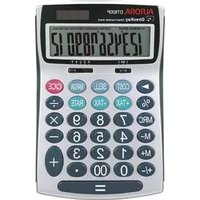
Multi Function Calculator
12-Digit
EC505 / EC707
Solar Only Power
This calculator is battery free and uses solar power only. Please use the calculator in good lighting conditions. If the light source is not sufficient the display will fade.
Auto Power Off
If the calculator is not used for a period of 5-12 minutes, the unit will automatically switch off.
Turning On
Please press the "ON/AC" key first to turn the calculator on & clear all previous entries.
Key Function:
OFF.... Turns the calculator off
C/CE .... Clear entry
ON/AC ...... Turns the calculator on, and clear all entries and memory
+ Addition Key
- Subtraction Key
÷ Division Key
× …… Multiplication Key
= ...... Equal Key
0\~9/00 Number Key
• Decimal Key
+/- Symbol Key
→ Backspace Key
M+/M-/MRC .... Memory Operation Key
COST ...... Function Key "Cost"
SELL ...... Function Key "SELL"
MARGIN …… Function key "MARGIN"
Calculation Examples:
Basic calculation
| Example | Operation | Display |
| 23+203-56= | 23+203-56= | 170. |
| 562×(38-96)= | 38-96×562= | -32596. |
| (23×6+78)+2.3-89= | 23×6+78+2.3-89= | 4.9130434782 |
| 1234567×9876543= | 1234567×9876543= | 12.1932540618 |
| C/CE | 12.1932540618 | |
| C/CE or ON/AC | 0. |
□ Constant calculation
| Example | Operation | Display |
| 2+3=5 | 2+3= | 5. |
| 4+3=7 | 4= | 7. |
| 2-3=-1 | 2-3= | -1. |
| 4-3=1 | 4= | 1. |
| 2×3=6 | 2×3= | 6. |
| 2×4=8 | 4= | 8. |
| 2+4=0.5 | 2+4= | 0.5 |
| 3+4=0.75 | 3= | 0.75 |
Memory calculation
| Example | Operation | Display |
| 2×3=6 | 2×3M+ | MEMORY 6. |
| - ) 3×4=12 | 3×4M- | MEMORY 12. |
| +) 4×5=20 | 4×5M+ | MEMORY 20. |
| 14 | MRC | MEMORY 14. |
| MRC | 14. |
□ COST, SELL, MARGIN Function
To find the cost price if the sell price = 200 and the margin is 6%
| Example | Operation | Display |
| Sell = 200 Margin = 6% Cost =? | 200 [SELL] 6 [MARGIN] | COST 188. |
To find the margin if the cost is 60 and the sell price is 100
| Example | Operation | Display |
| Cost=60 Sell =100 Margin=? | 60 [COST] 100 [SELL] | MARGIN% 40. |
To find the sell price if cost price = 200 and the margin is 10%
| Example | Operation | Display |
| Cost = 200 Margin = 10% Sell=? | 200 [COST] 10 [MARGIN] | SELL 222.222222222 |
Decimal Selector & Rounding Operation
| Example | Decimal | Round | Operation | Display |
| C/CE | 0. | |||
| 5 ÷ 3 = 1.66666666666 | F | 5/4 | 5 ÷ 3 = | 1.66666666666 |
| 5 ÷ 3 = 1.66 | 2 | ↓ | 5 ÷ 3 = | 1.66 |
| 5 ÷ 3 = 1.67 | 2 | 5/4 | 5 ÷ 3 = | 1.67 |
| 5 ÷ 3 = 1.67 | 2 | ↑ | 5 ÷ 3 = | 1.67 |
| 4 ÷ 3 = 1.33333333333 | F | 5/4 | 4 ÷ 3 = | 1.33333333333 |
| 4 ÷ 3 = 1.3333 | 4 | ↓ | 4 ÷ 3 = | 1.3333 |
| 4 ÷ 3 = 1.3333 | 4 | 5/4 | 4 ÷ 3 = | 1.3333 |
| 4 ÷ 3 = 1.3334 | 4 | ↑ | 4 ÷ 3 = | 1.3334 |
| 2 + 3 = 0.05 | A | ↓ | 2 + 3 = | 0.05 |
| 5 - 3 = 0.02 | A | ↓ | 5 - 3 = | 0.02 |
| 5 ÷ 3 = 1.66 | A | ↓ | 5 ÷ 3 = | 1.66 |
| 5 ÷ 3 = 1.67 | A | 5/4 | 5 ÷ 3 = | 1.67 |
| 4 ÷ 3 = 1.34 | A | ↑ | 4 ÷ 3 = | 1.34 |
| 2 × 3 = 6.00 | A | ↑ | 2 × 3 = | 6.00 |
Producer
Aurora Electronics (UK) LTD. Unit 1.4.2 China Industrial Fe
Unit 1 & 2 Shires Industrial Estate Lichfield, Staffordshire, WS14 9AZ, U.K.
9219472

Brand : AURORA
Model : EC505
Category : Calculator