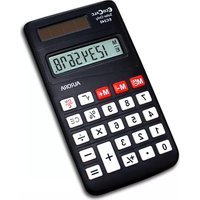
EC240 - Calculator AURORA - Free user manual and instructions
Find the device manual for free EC240 AURORA in PDF.


| Product Type | Basic Desktop Calculator |
| Brand | Aurora |
| Model | EC240 |
| Display | 8-digit LCD |
| Power Source | Solar cell with LR54 battery backup |
| Dimensions (L x W x H) | 100 x 60 x 10 mm |
| Weight | 45 g |
| Basic Arithmetic | Addition, subtraction, multiplication, division |
| Additional Functions | Percentage, square root, memory (M+, M-, MR, MC) |
| Auto Power-Off | Approximately 7 minutes of inactivity |
| Keyboard | Plastic keys with tactile feedback |
| Case Material | ABS plastic |
| Operating Temperature | 0°C to 40°C |
| Cleaning | Wipe with a dry soft cloth; avoid solvents |
| Safety | Keep away from water and excessive heat |
| Spare Parts / Repairability | Battery replacement (LR54); no user-serviceable parts inside |
| General Information | Designed for everyday calculations at home or office |
Frequently Asked Questions - EC240 AURORA
User questions about EC240 AURORA
0 question about this device. Answer the ones you know or ask your own.
Ask a new question about this device
Download the instructions for your Calculator in PDF format for free! Find your manual EC240 - AURORA and take your electronic device back in hand. On this page are published all the documents necessary for the use of your device. EC240 by AURORA.
USER MANUAL EC240 AURORA
Please use the calculator in good lighting conditions.
Auto Power Off
If the calculator is not used for a period of 6-10 minutes, the unit will automatically switch off.
Calculation Examples:
□ Basic calculation
| PROBLEM | INPUT | DISPLAY |
| 2+3-1=4 | 2 + 3 - 1 = | 4. |
| -2.4×6÷8=-1.8 | 2. 4 + 6 ÷ 8 = | -1.8 |
| 2×(3+4)-5=9 | 3 + 4 2 - 5 = | 9. |
| 3×2.54=7.62 | 2 3 2. 5 4 = | 7.62 |
| 2+3=5 | 2 + 3 = | 5. |
| 4+3=7 | 4 = | 7. |
| 2-3=-1 | 2 - 3 = | -1. |
| 4-3=1 | 4 = | 1. |
| 2×3=6 | 2 3 = | 6. |
| 2×4=8 | 4 = | 8. |
| 2÷4=0.5 | 2 ÷ 4 = | 0.5 |
| 3÷4=0.75 | 3 = | 0.75 |
| 2+3+3=8 | 2+3= | 8. |
| 6-2-2=2 | 6-2= | 2. |
| 21=8 | 2X= | 8. |
| 20×25%=5 | 20X25% | 5. |
| 5÷20%=25 | 5÷20% | 25. |
| 20×(1+15%)=23 | 20+15% | 23. |
| 20×(1-20%)=16 | 20-20% | 16. |
| 2×3=6 | 2X3M+ | M 6. |
| -) 3×4=12 | 3X4M- | M 12. |
| +) 4×5=20 | 4X5M+ | M 20. |
| 14 | M 14. | |
| 14. | ||
| √32+42=5 | 3X3M+4X4M+ | |
| M 5. |
Producer
Aurora Electronics (UK) LTD.
Unit 1 & 2 Shires Industrial Estate
Lichfield, Staffordshire, WS14 9AZ, U.K.
www.aurora-ltd.co.uk

Brand : AURORA
Model : EC240
Category : Calculator