TP-87 - Security Camera Jablotron - Free user manual and instructions
Find the device manual for free TP-87 Jablotron in PDF.


| Product Type | Indoor/Outdoor Security Camera |
| Dimensions (approx.) | 10 cm x 6 cm x 6 cm |
| Weight (approx.) | 300 g |
| Power Supply | 5V DC via USB cable (adapter included) |
| Resolution | Full HD 1080p |
| Field of View | 120° wide angle |
| Night Vision | Infrared LEDs, up to 10m range |
| Motion Detection | Yes, with push notifications |
| Two-Way Audio | Built-in microphone and speaker |
| Storage | MicroSD card (up to 128 GB, not included) and cloud storage |
| Connectivity | Wi-Fi 2.4 GHz 802.11 b/g/n |
| Weather Resistance | IP65 rated for outdoor use |
| Mounting | Wall mount bracket included |
| Compatibility | iOS and Android app |
| Cleaning | Wipe lens with dry microfiber cloth |
| Safety | Keep away from water sources; do not disassemble |
| Spare Parts | USB cable and adapter available separately |
| Reparability | Contact Joblotron support for repairs |
| General Information | Brand: Joblotron, Model: TP-87 |
Frequently Asked Questions - TP-87 Jablotron
User questions about TP-87 Jablotron
0 question about this device. Answer the ones you know or ask your own.
Ask a new question about this device
Download the instructions for your Security Camera in PDF format for free! Find your manual TP-87 - Jablotron and take your electronic device back in hand. On this page are published all the documents necessary for the use of your device. TP-87 by Jablotron.
USER MANUAL TP-87 Jablotron
The TP-87 programmable digital-bus thermostat
The TP-87 is an indoor thermostat with a programmable weekly heating schedule. It is designed to work exclusively in combination with AC-8007 / AC-8014 devices. The thermostat provides indoor temperature regulation which balances economy with comfort. The device is capable of recognizing warm-up persistence characteristics (within 2 days) and will adjust the settings accordingly so that a high level of operational comfort is achieved. You need not find out how early the heating should start in order to get to a comfortable temperature at the desired time. The required timing is configured automatically.
Temperature adjustment can be performed by simply turning the setting knob.
The following features are also available:
- Anti-freeze protection – any drop in temperature under the (configurable) AL Lo value is detected and signalled to the receiver, causing the receiver's FRE output terminal to be activated.
- Floor temperature detection – the thermostat is equipped with an input terminal for temperature sensor connection. This is especially suitable for under-floor heating control – by placing the sensor directly into the floor the heating regulation can be performed with higher precision.
When combined with an Oasis wireless security system (Jablotron), the following are possible: - Switching the heating ON and OFF remotely (by mobile phone, remote control or Internet).
- Disabling the heating when windows are open.
• Informing the user about heating faults. - Informing on the occurrence of fire (when the temperature is above a pre-configured value).

Installation
The TP-87 should be mounted in a dry indoor location. Choose a mounting location about 1.5 meters above the floor in an area with good air circulation. Avoid places with draughts, dead air spots and radiant heat from the sun or appliances.
- Release the upper cover by pressing the plastic tab on the bottom side of the housing
- Mount the back part on to the desired location.
- Connect the receiver's digital bus wires to the BUS terminals. The polarity is irrelevant.
- Should a floor sensor be used, wire it to the SEN terminals.
- Close the thermostat.
- Enroll the thermostat to the receiver by entering menu M1. The receiver must be in enrollment mode (see the AC-8007/8014 manual).
Symbols on the display

Adjustment and programming
All the required parameters can be configured in the adjustment menu using the knob. The menu is divided into the following parts:
M1 manual temperature-adjustment
M2 setting the economical or comfortable temperature, time adjustment
M3 weekly programming schedule
M4 service menu
You can enter the menu and scroll through M1 to M4 by pressing and holding the knob. The desired submenu is selected by releasing the knob.
Scrolling inside any particular menu M1 to M4 is done by turning the knob. The currently displayed parameter can be adjusted by pressing the knob briefly, turning the knob until the desired value is displayed, and confirming the setting by re-pressing the knob (this will also cause a return to the menu so that you can configure other parameters immediately). The adjustment menu is escaped from by pressing the knob while OK is displayed or automatically after approx. 30 seconds.
1. M1 - manual mode
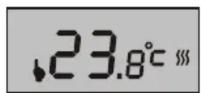
If set to manual mode, the thermostat performs fixed temperature regulation regardless of the weekly schedule. The desired temperature can be set within the range of t Lo to t Hi. The M1 menu is escaped from by pressing and holding the knob for
2 seconds.
Note: As mentioned above, entering the M1 menu causes an enrollment signal to be sent.
2. M2 - temperature & time setting
If the M2 menu is entered, turning the knob will scroll through the Economical temperature ( ), Comfortable temperature ( ) and Time ( ) parameters followed by an OK option.

Each parameter can be entered by briefly pressing the knob. When ⚙ or ⚙ is entered the displayed temperature flashes and can be adjusted by turning the knob (re-pressing the knob confirms the setting). The Time parameter adjustment is similar but requires three steps – for the day, hour and minutes.
3. M3 – programming the weekly heating schedule
This mode allows you to program when the thermostat should switch between Day (*) and Night ( ) operation. The heating schedule can be programmed either for each day separately or just for working days or just for the weekend or for all days together.

Enter the M3 menu, scroll to the desired option by turning the knob and enter the schedule programming by briefly pressing the knob (this erases the current schedule setting).
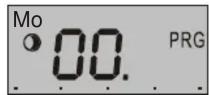
Schedule programming is done by marking periods of time for which the Day heating operation is requested. The marking bar is shown at the bottom of the display, each hour can be either marked or unmarked. You mark or unmark by turning the knob. The mark/unmark mode is displayed by ⚙/○ symbols, the currently programmed hour is shown on the display (00 to 23). Switching between mark/unmark modes is done by pressing the knob (this applies when turning clockwise, turning the knob anti-clockwise always switches to unmark mode).


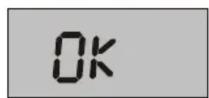
Turning the knob to the rightmost position (following hour 23) will display an OK option. Pressing the knob will then finish programming.
4. M4 – Service menu
This menu allows for the configuration of parameters which usually stay fixed during normal operation. When the service menu is entered, the 0-n symbol is shown on the display. The menu contains 9 items (they can be scrolled through by turning the knob). Each of the first 7 items corresponds to a parameter which can be configured in a standard way (by pressing the knob, turning the knob until the desired value is displayed, and re-pressing the knob).

The SPAN parameter allows you to configure the hysteresis – the accuracy to which the temperature is regulated. One of the following accuracy ranges can be selected: ±0.1^ , ±0.2^ or ±0.5^ .
Example: If the accuracy is adjusted to ±0.5^ and the temperature is set to 24^ , the thermostat switches the heating on when the temperature drops below 23.5^ and it switches it off if the temperature goes above 24.5^ . In reality the temperature scatter can be slightly higher because of the temperature persistence of the room.
Warning: too high an accuracy can cause the heating to turn on and off too frequently.
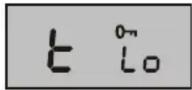
The t Lo parameter is the lower limit to which the Economical temperature can be set.
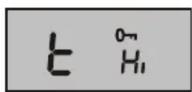
The t Hi parameter is the upper limit to which the Comfortable temperature can be set.

FL is the ON/OFF status of the floor heating sensor.

FL Lo is the lower floor-temperature threshold (only significant to the floor sensor).

FL Hi is the upper floor-temperature threshold (only significant to the floor sensor).

Selecting this item displays the current floor temperature.
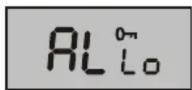
AL Lo corresponds to the critically low temperature. Any drop in temperature under AL Lo causes a Panic signal to be sent to the receiver (reporting a frost threat).

This item is reserved for future use.

The Corr parameter allows for a correction of possible temperature measurement offsets. The range of adjustable corrections is ±1^ .

This parameter allows you to enable or disable thermostat adaptive mode. If enabled, the thermostat switches on in advance according to the temperature persistence of the heating system.

Selecting this item and pressing and holding the knob for 5 seconds resets the thermostat to the factory default settings.

By selecting OK and pressing the knob the menu is escaped from.
The parameter ranges are restricted according to the following table:
| Parameter | Adjustment range | Factory default | Description |
| SPAN | 0.1°C;0.2°C;0.5°C | 0.2°C | Hysteresis for switching |
| t Lo | +6°C to +40°C* 6°C | Lower limit of | 1 |
| t Hi | +6°C to +40°C* 40°C | Upper limit of | * |
| FL | ON/OFF OFF Floor sensor ON/OFF | ||
| FL Lo | +6°C to +40°C* 22°C | Lower floor-temperature threshold | |
| FL Hi | +6°C to 40°C* | 27°C | Upper floor-temperature threshold |
| AL Lo | -9°C to +20°C | 3°C Panic alarm | |
| AL Hi | +30°C to +70°C | 60°C Not applicable | |
| Corr | ±1°C | 0 | Correction |
| Auto | On/OFF | On | Adaptive mode |
| +6°C to +40°C | 18°C Economical temperature | |
| +6°C to +40°C | 21°C Comfortable temperature |
* t Lo to t Hi, FL Lo to FL Hi, and Ⓞ to ✱ must be valid ranges: t Lo must not be greater than t Hi and Ⓞ must not be greater than ✱.
Party mode

You can put the thermostat into party mode by briefly pressing the knob (indicated by symbols ♦ and ⚙ together). After then the thermostat maintains the Comfortable temperature increased by 2°C.
Party mode terminates whenever a switch to Economy temperature regulation occurs (whether manual or scheduled).
Displaying the set temperature
When not being handled, the thermostat shows the current temperature in the room. If you want to display the temperature which is set for the current time, turn the knob. The set temperature will then flash on the display for 3 seconds.
Floor heat detection
If enabled by setting FL On, floor temperature detection is performed using a sensor located in the floor. The FL Lo and FL Hi parameters allow you to set temperature thresholds for under-floor heating regulation:
- If the current floor temperature is lower than FL Lo, the thermostat will switch the heating on.
- If the current floor temperature is higher than FL Hi, the thermostat will switch the heating off.
Note: Floor heat detection is of a higher priority than room temperature detection. This means that the current temperature in the room is taken into account only when the current floor-temperature is between FL Lo and FL Hi.
You can display the current floor temperature by entering the menu, scrolling to the FL t parameter and pressing the knob (a re-press will cause a return to the menu).
Integration into the OASiS system
- To operate a heating system the Oasis control panel can also be enrolled (sequence 299) to the MODE channel on the AC-80xx receiving unit. A thermostat enrolled to the receiver can be operated via the PGX programmable output. If the programmable output of the control panel is switched on, the thermostat maintains the programmed temperature. If the control panel's output is switched off the thermostat only triggers heating if the temperature drops below t Lo.
- To operate the heating, RC-80 or RC-88 remote controls can be enrolled to the MODE channel of the receiving unit (AC-80xx). The heating can be switched on by remote controls to heat to the desired temperature and also switched off where it only heats when the temperature is below t Lo.
- To disable heating when windows are open JA-80M or JA-82M detectors can be enrolled to the MODE channel. If the windows are closed it heats to the desired temperature and if windows are open it heats only when the temperature is below t Lo.
RESET
The RESET function allows you to reset the device to the factory defaults listed in the table. You can perform a RESET by selecting Res in the adjustment menu and pressing and holding the knob for 5 seconds.
Specifications
| Power supply: | via the receiver digital bus |
| Temperature measurement: | +6°C to +40 °C |
| Temperature accuracy: | adjustable: ± 0.1, ± 0.2 or ± 0.5 °C |
| Freeze alarm (panic transmission) temperature threshold: | < AL Lo configurable from -9°C to +20°C |
| Operational range: | up to 200 m (twisted cable) |
| Operational temperature range: | -10°C to +70°C (low humidity) |
| Dimensions: | 65 x 88 x 20 mm |
| Complies with | EN 50130-4, EN 55022 |

Jablotron Ltd. hereby declares that the TP-87 is in compliance with the essential requirements and other relevant provisions of Directive 2004/108/EC. The original of the conformity assessment can be found on the web site www.jablotron.com. Technical Support section.

Note: Although this product does not contain any harmful materials we suggest you return the product to the dealer or directly to the manufacturer after use.

Jablotron Ltd., Pod Skalkou 33 466 01 Jablonec nad Nisou Czech Republic
Tel.: +420 483 559 911 fax: +420 483 559 993 Internet: www.jablotron.com
- The TP-87 programmable digital-bus thermostat
- Installation
- Adjustment and programming
- M1 - manual mode
- M2 - temperature & time setting
- M3 – programming the weekly heating schedule
- M4 – Service menu
- Party mode
- Displaying the set temperature
- Floor heat detection
- Integration into the OASiS system
- RESET
Brand : Jablotron
Model : TP-87
Category : Security Camera