CR-11 - Security Camera Jablotron - Free user manual and instructions
Find the device manual for free CR-11 Jablotron in PDF.


| Product Type | Security Camera |
| Brand | Joblotron |
| Model | CR-11 |
| Resolution | 1080p HD |
| Night Vision | Yes, IR up to 10m |
| Field of View | 90° |
| Connectivity | Wi-Fi 2.4GHz |
| Power Supply | 5V DC adapter (included) |
| Dimensions | 100 x 60 x 50 mm |
| Weight | 150 g |
| Operating Temperature | -10°C to 50°C |
| Storage | MicroSD up to 128GB (not included) |
| Motion Detection | Yes, with alerts |
| Two-Way Audio | Yes, built-in microphone and speaker |
| Waterproof Rating | IP65 (indoor and outdoor use) |
| Mounting | Wall mount included |
| Setup | Via mobile app (iOS/Android) |
| Maintenance | Clean with a dry, soft cloth |
| Safety | Do not expose to extreme temperatures or moisture |
| Spare Parts | Not available; contact support |
| Repairability | Not user-serviceable; contact support |
| General Information | Compatible with Amazon Alexa and Google Assistant |
Frequently Asked Questions - CR-11 Jablotron
User questions about CR-11 Jablotron
0 question about this device. Answer the ones you know or ask your own.
Ask a new question about this device
Download the instructions for your Security Camera in PDF format for free! Find your manual CR-11 - Jablotron and take your electronic device back in hand. On this page are published all the documents necessary for the use of your device. CR-11 by Jablotron.
USER MANUAL CR-11 Jablotron
- Arming indication with blinkers (CA-10)

Select mode number 3 on the CR-11 module.
- An acoustic arming indication (for CA-322) and a high load courtesy (Dome) light control (for CA-10 and CA-32x)
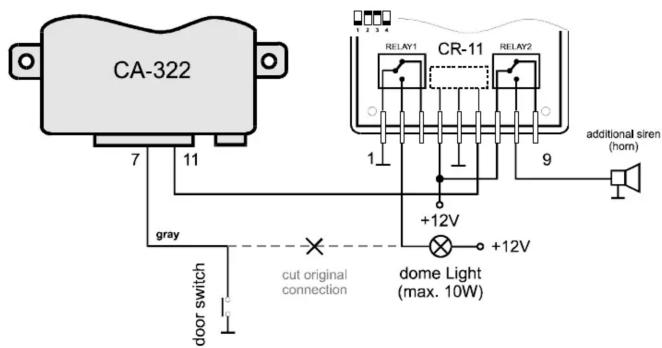
Select mode 7 on the CR-11 module. The relay no. 1 will control an additional siren arming indication (use with the CA-322).
The relay no. 2 can be used for any courtesy (Dome) light, even with a consumption higher than 10W. If you use this control of the interior light, you car battery will not be discharged, even if you leave a door open (the courtesy light will turn off automatically after 15 minutes).

Pod Skalkou 33
466 01 Jablonec nad Nisou
Czech Republic
Tel.: +420 483 559 999
fax: +420 483 559 993
Internet: www.jablotron.c

,
Extending module CR-11 - instructions
The CR-11 is an extending output module which provides additional functions for Jablotron car alarms CA-10, CA-320, CA-321 and CA-322. This module has two built in relays, each with over switching contact 15Amp. The functions of the relays are selectable by the dip switches inside each CR-11. The module receives data from the car alarm via one wire (digital communication). Up to four CR-11 units can be connected to each of the above Jablotron car alarms. The module can be used for central locking control, immobilization, additional siren, wireless pager, powered windows remote control, etc. etc.
Specifications
voltage 12VDC (10-16VDC)
consumption stand by 5 mA
max. 300 mA (both relays on)
relay output contacts (each) permanently 15 A
max 20 A (30 seconds)
working temperature -40 to +85 °C
the CR-11 complies with IEC 839-10-1 and UN ECE No. 97
Complies with the essential requirements of: 89/336/EC EMC Directive - Protection concerning electromagnetic compatibility when is used for its intended purpose. Original of the conformity assessment can be found at the web page www.jablotron.cz, section Technical support.
Note: Although this product does not contain any harmful materials we suggest you to return the product to the dealer or directly to the producer after usage.
Installation
Professional installation of CR-11 is highly recommended. The module should be installed in the passenger compartment of the car. If you drill any hole in the car, be sure to check the location of the intended hole before drilling to prevent damage of the car.
Disconnect the car battery before starting installation. Nobody should be inside a car equipped with airbags while the battery is being connected or disconnected. Refer to the car owners' manual before disconnecting the battery.
WIRING - route new wires with the pre-existing electrical harness of the car. Check each connection made to ensure that it is firm and properly insulated. Use only a real crimping tool to make connections. If you use more than one CR-11 unit with a car alarm, connect all CR-11 data inputs (LINE) parallel.
Signals on the CR-11 connector
COM1 - common contact of relay
NO1 - normally open contact of relay 1
NC1 - normally closed contact of relay 1
+12V - positive voltage from the car battery
GND - ground
LINE - data from the car alarm (AUX output)
COM2 - common contact of relay 2
NO2 - normally open contact of relay 2
NC1 - normally closed contact of relay 2

Setting of the CR-11 relays functions
Functions of the CR-11 relays can be selected inside the unit with dip switches marked 1 - 4. Available options are described in the following table. Particular functions correspond to functions of the car alarm (see car alarm manual).
| mode number | DIP switches setting | relay no. 1 function relay no. 2 function | |
| 1 | 1sec. pulse after simultaneous pressing of A&B buttons on the remote control, when car alarm is armed | 1sec. pulse after simultaneous pressing of A&B buttons on the remote control, when car alarm is disarmed | |
| 2 | relay will change status after simultaneous pressing of A&B, on RC, when car alarm is armed /* | relay will change status after simultaneous pressing of A&B, on RC, when car alarm is disarmed /* | |
| 3 | left blinker output signals (arming, disarming, alarm) | right blinker output signals (arming, disarming, alarm) | |
| 4 | lock (pulse duration selectable in the car alarm setting mode) | unlock (pulse duration selectable in the car alarm setting mode) | |
| 5 | immobilization (relay switches ON when car alarm is disarmed and the ignition key is ON) | alarm (relay switched ON during alarm condition) | |
| 6 | immobilization (relay switches ON when car alarm is disarmed and the ignition key is ON) | arming signals (1 pulse = arming, 2 pulses = disarming) | |
| 7 | courtesy (Dome) light control (relay follows door switches + 1 minute) | arming signals (1 pulse = arming, 2 pulses = disarming) | |
| 8 | immobilization (relay switches ON when car alarm is disarmed and the ignition key is ON) | courtesy (Dome) light control (relay follows door switches + 1 minute) | |
/* with each simultaneous pressing of A&B buttons, the relay will change status (on - off - on ...). The relay will also switch off 15 minutes or after an arming or disarming
/** the courtesy (Dome) light is on while a door is open (max. 15 minutes) and it will remain on until you switch on the ignition key (max. 1 minute)
Examples of use
- Trunk release by simultaneous pressing of A&B buttons on the remote control

Select mode no. 1 on the CR-11 module and disable the Panic alarm in the car alarm setting. It can be used with CA-10 and CA-32x car alarms. Opening of trunk with remote control is only possible when the car alarm is disarmed.
- Additional immobilization and an additional siren

Select mode number 5 on the CR-11 module. The additional immobilization provides a higher safety level, because it is impossible to bypass it even when somebody is tampering directly with the wire harness of the car alarm unit (CR-11 is waiting for digital data from the car alarm). The additional siren sounds during the alarm period (the car horn can also be used as the additional siren). This connection can be used with the CA-10 and the CA-32x car alarms.
- Central locking additional installation

Select mode number 4 on the CR-11 module. Duration of 0.3 sec. should be selected in the car alarm setting mode. This connection can be used with the CA-10 and the CA-32x car alarms. Similar connection can also be used for original central locking actuators when your car has them already installed.
Brand : Jablotron
Model : CR-11
Category : Security Camera