
RC136 - Satellite receiver PHILIPS - Free user manual and instructions
Find the device manual for free RC136 PHILIPS in PDF.


| Product Type | Satellite Receiver |
| Brand | Philips |
| Model | RC136 |
| Dimensions (WxDxH) | 260 x 150 x 45 mm |
| Weight | 0.8 kg |
| Power Supply | AC 230V, 50/60 Hz |
| Power Consumption | 15 W (max), <1 W (standby) |
| Supported Satellite Systems | DVB-S, DVB-S2 |
| Video Output | HDMI, Composite (CVBS) |
| Audio Output | HDMI, Digital Coaxial, Analog Stereo (RCA) |
| LNB Input | F-type, 75 Ohm |
| Tuner Type | Single |
| Remote Control | Infrared, included |
| Channel Memory | 4000 channels |
| EPG | 7-day Electronic Program Guide |
| DiSEqC Support | DiSEqC 1.0, 1.2 |
| Parental Control | Yes |
| Languages | Menu in multiple languages (including English) |
| Cleaning Instructions | Wipe with a soft, dry cloth. Do not use liquids. |
| Safety | Operate in a well-ventilated area, avoid moisture, unplug during thunderstorms. |
| Replacement Parts | Remote control (RC136-REM), power adapter, F-connectors. |
| Repairability | Refer to qualified service personnel. Do not open the device. |
| Manual Format | 16 pages, PDF available for free download |
Frequently Asked Questions - RC136 PHILIPS
User questions about RC136 PHILIPS
0 question about this device. Answer the ones you know or ask your own.
Ask a new question about this device
Download the instructions for your Satellite receiver in PDF format for free! Find your manual RC136 - PHILIPS and take your electronic device back in hand. On this page are published all the documents necessary for the use of your device. RC136 by PHILIPS.
USER MANUAL RC136 PHILIPS
Philips representatives are ready to help you with any questions about your new product. We can guide you through Connections, First-time Setup, or any of the Features. We want you to start enjoying your new product right away!
CALL US BEFORE YOU CONSIDER RETURNING THE PRODUCT.
1-800-464-1131
or
Visit us on the web at
www.philips.com
Let's make things better.

PHILIPS
3111 176 51221
PHILIPS
Congratulations on your purchase, and welcome to the "family!"
Dear PHILIPS product owner:
Thank you for your confidence in PHILIPS. You've selected one of the best-built, best-backed products available today. And we'll do everything in our power to keep you happy with your purchase for many years to come.
As a member of the PHILIPS “family,” you’re entitled to protection by one of the most comprehensive warranties and outstanding service networks in the industry.
What's more, your purchase guarantees you'll receive all the information and special offers for which you qualify, plus easy access to accessories from our convenient home shopping network.
And most importantly you can count on our uncompromising commitment to your total satisfaction.
All of this is our way of saying welcome-and thanks for investing in a PHILIPS product.
Sincerely,

Lawrence J. Blanford
President and Chief Executive Officer
Know these
safety symbols


This “bolt of lightning” indicates uninsulated material within your unit may cause an electrical shock. For the safety of everyone in your household, please do not remove product covering.

The “exclamation point” calls attention to features for which you should read the enclosed literature closely to prevent operating and maintenance problems.
WARNING: TO PREVENT FIRE OR SHOCK HAZARD, DO NOT EXPOSE THIS EQUIPMENT TO RAIN OR MOISTURE.

PHILIPS
Visit our World Wide Web Site at http://www.philips.com
Table of Contents
General Information
Table of Contents ....3
Introduction ....3
Safety Information ....4
Getting Started
Package Contents ....5
Connections 6
Remote Control Set-up .....7
Remote Control Functions
Satellite Functions .....8
TV Functions .....9
VCR/DVD Functions .....10
Remote Control Setup
Programming the Universal Remote
Control
Manual Programming .....11
Automatic Search .....12
Universal Codes .....13-15
Limited Warranty .....16
Introduction
The RC136/17 is an accessory to the Philips satellite receivers, model DSX5500 and DSX5540. It will provide remote control of the satellite receiver using RF in addition to IR signals, that allows for convenient placement of the equipment without the need for line-of-sight access. Other components, including TV, VCR, and DVD Players, are controlled using line-of-sight infrared only.
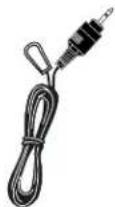
The RF receiver can be easily placed on top of the TV set or other convenient locations. Simply affix the IR emitter to the front of the DSX5500 or DSX5540, plug in the AC adapter, and the installation process is complete.
Safety Instructions- Read Before Operating Equipment
WARNING: TO PREVENT FIRE OR SHOCK HAZARD, DO NOT EXPOSE ANY ELECTRICAL EQUIPMENT TO RAIN OR MOISTURE.
I. Read Instructions – All the safety and operating instructions should be read before the appliance is operated.
-
Retain Instructions – The safety and operating instructions should be retained for future reference.
-
Heed Warnings – All warnings on the appliance and in the operating instructions should be adhered to.
-
Follow Instructions – All operating and use instructions should be followed.
-
Attachments – Do not use attachments not recommended by the manufacturer as they may cause hazards.
-
Water and Moisture – Do not use this product near water – for example, near a bath tub, wash bowl, kitchen sink, or laundry tub, in a wet basement, near a swimming pool, etc.
-
Accessories - Do not place this product on an unstable cart, stand, tripod, bracket, or table. The product may fall, causing serious injury to a child or adult, and serious damage to the appliance. Use only with a cart, stand, tripod, bracket, or table recommended by the manufacturer or sold with the product. Any mounting of the appliance should follow the manufacturer's instructions, and should use a mounting accessory recommended by the manufacturer.
-
Power Sources – This product should be operated only from the type of power source indicated on the marking label. If you are not sure of the type of power supply to your home, consult your appliance dealer or local power company.
-
Power Cord Protection – Route power supply cords so that they are not likely to be walked on or pinched by items placed upon or against them. Pay particular attention to cords at plugs, convenience receptacles, and the point where they exit from the appliance.
-
Overloading – Do not overload wall outlets and extension cords as this can result in a risk of fire or electric shock.
-
Object and Liquid Entry – Never push objects of any kind into this product through openings as they may touch dangerous voltage points or short-out parts that could result in a
fire or electric shock. Never spill liquid of any kind on the product.
-
Servicing – Do not attempt to service this product yourself, as opening or removing covers may expose you to dangerous voltage or other hazards. Refer all servicing to qualified service personnel.
-
Damage Requiring Service – Unplug this product from the wall outlet and refer servicing to qualified service personnel under the following conditions:
a. When the power supply cord or plug is damaged.
b. If liquid has been spilled, or objects have fallen into the product.
c. If the product has been exposed to rain or water.
d. If the product does not operate normally when following the operating instructions. Adjust only those controls that are covered by the operating instructions, as an improper adjustment of other controls may result in damage and will often require extensive work by a qualified technician to restore the product to its normal operation.
e. If the product has been dropped or the cabinet has been damaged in any way.
f. When the product exhibits a distinct change in performance – this indicates a need for service.
-
Replacement Parts – When replacement parts are required, be sure the service technician has used replacement parts specified by the manufacturer or which have the same characteristics as the original part. Unauthorized substitutions may result in fire, electric shock or other hazards.
-
Safety Check – Upon completion of any service or repairs to this product, ask the service technician to perform safety checks to determine that the product is in proper operating condition.
-
Carts and Stands – The appliance should be used only with a cart or stand recommended by the manufacturer.
-
Heat - The product should be situated away from heat sources such as radiators, heat registers, stoves, or other products that produce heat.
Philips is a registered trademark of Koninklijke Philips Electronics, NV.
Package Contents
User Manual

Infrared (IR) Universal with RF for the Satellite Receiver*
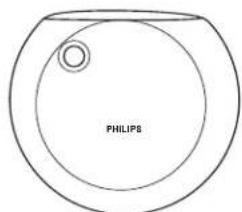
RF Receiver

natural_image
Simple line drawing of a rectangular device with a cable and connector (no text or symbols)AC AdapterIR Emitter
*The Remote Control uses 3 AAA batteries (not supplied).
Connections
Example of placement of RF Receiver on the DSX5500/5540 Receiver.
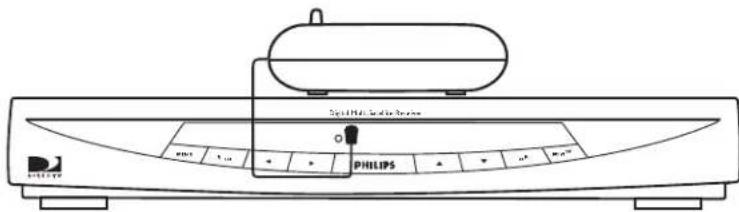
- Locate the IR sensor on your DSX5500/5540 unit. It is positioned 0.5 inches to the right of the red LED showing when the satellite receiver is powered on. Remove the backing on the IR emitter supplied with the RC136/17, and affix to the bezel in front of the IR sensor as shown in the illustration above.
- Connect the other end of the IR emitter cable into the IR emitter jack on the RF receiver.
- Plug the power cord to the RF receiver, and plug the AC adapter into a wall power outlet, as shown in the illustration below.
Note: As long as the IR emitter cable reaches the IR sensor, you are not limited as to where you place the RF receiver.

natural_image
Pure electrical circuit lines without any symbolsNote: For instructions on connecting the receiver to your TV or changing the remote control ID, please refer to the Owner's Manual for the DSX5500/5540.
Remote Control Set-Up
Preparing Your Remote Control
Battery Installation
I. Remove the battery compartment cover.
Insert three batteries (type LR6/AAA - 1.5 V) not supplied.
2. Position them in the battery compartment, as shown in the diagram.
3. Replace the cover.

Caution

CAUTION: DO NOT MIX OLD AND NEW BATTERIES, AND NEVER MIX DIFFERENT TYPES OF BATTERIES (STANDARD, ALKALINE, AND SO ON).
In many countries, exhausted batteries may not be disposed of with your household waste. Please dispose of exhausted batteries according to local regulations.
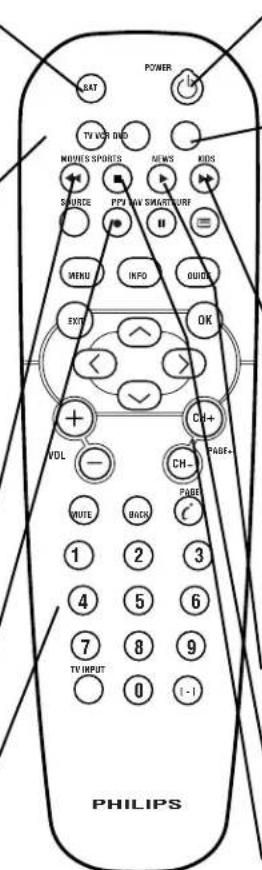
Satellite Functions
SAT-
Press SAT to control the DSX5500 Receiver. LED will blink when other buttons are pressed while in satellite mode.
PPV
Use the EZ Search PPV function to view list of PPV programs and events for purchasing..
SOURCE
Switches between the inputs of the AV Matrix.
MENU
Displays the Main Menu.
EXIT
Returns to video and cancels the transaction.
INFO
Displays program or channel information.
◀ ▶ △ ▼
Navigates through the Guide and Menus.
0-9
Lets you enter numeric values or channels.
BACK
While in menu or guide, returns you to the previous screen. While watching TV, pressing BACK will jump you to the previous channel.

POWER
Switches the DSX5500 receiver between active and standby modes.
MOVIES, SPORTS, NEWS, KIDS
Predefined SmartSurf buttons (refer to the DSX5500 Owner's Manual).
SmartSurf
Displays categories you can use with Guide and channel surfing..
FAVORITES
Allows you to select one of four custom lists to view or edit.
GUIDE
Switches between the "DIRECTV ADVANCED PROGRAM GUIDE" and the "Guide Menu".
OK
Confirms a selection.
-CH+/CH-
Displays the next or previous channel. While in the guide or menu, allows you to page up and down.
c
DIRECTV INTERACTIVE™ powered by WINK Communications™. Press this button when the DIRECTV INTERACTIVE icon appears on the screen to access interactive services.
TV Functions
Once programmed, your Universal RF Remote Control should control certain functions of your TV. Be sure to press the TV button before operating your TV.

Note: Some buttons may not work with your specific brand or products. The remote must be setup to operate your brand or product.
VCR/DVD Functions
Once programmed, your Universal RF Remote Control should control certain functions of your VCR/DVD Player. Be sure to press the VCR or DVD button before operating your TV.
VCR
Press to put the remote control in VCR mode. LED will blink when other buttons are pressed while in VCR mode.
← REWIND
VCR - When tape play-back is stopped, press to rewind at high speed. During tape playback, press to rewind the tape while the picture stays on the screen.
DVD - Press and release to select previous chapter. Press and hold to scan backwards.
■ STOP
Press to stop the tape or disc.
• RECORD (VCR
only)
Press once to start a recording.
0-9
Allows direct number entry for tuning to a channel or chapter.
POWER
Press to turn VCR or DVD on or off.
-DVD
Press to put the remote control in DVD mode. LED will blink when other buttons are pressed while in DVD mode.
FAST FORWARD
VCR - When tape playback is stopped, press to advance the tape at high speed. During tape play-back, press to advance the tape while the picture stays on the screen.
DVD - Press and release to select next chapter. Press and hold to scan forward.
PLAY
Press to play a tape or disc.
II PAUSE
Press to pause a tape or disc.
CH+ / CH- (VCR only)
Change channel up or down.
Note: Some buttons may not work with your specific brand or products. The remote must be setup to operate your brand or product.
Programming the Universal Remote Control
Manually Setting the Remote to Operate a TV, VCR or DVD Player
Your remote control may already operate your TV, VCR, or DVD player. If the remote control does not operate your TV, VCR, or DVD player, follow the steps below. These instructions guide you through setting the remote control to operate your TV. For VCR and DVD player, follow the same steps, but press the VCR or DVD button at step 3.
I. Point the remote control at your TV and press the TV button. Then, press the POWER button. If your TV turns on or off, try the other TV function buttons (see page 9). If the other functions work, the remote is ready to operate the TV without any more steps. If your TV does not turn on or off, or if the other buttons do not work, go to step 2.
2. Find the brand of your TV pages 13-15, and list the 3-digit number here: ____.
-
Press and hold the TV button until LED lights.
-
Press and hold the number 1 and number 3 buttons simultaneously for 3 seconds. The LED will blink twice and remain on.
-
Enter the 3-digit code from step 2 within 60 seconds. The LED will blink after each button press. Note: If the 3-digit code is not entered within one minute, the LED will turn off and the remote control will return to the previously programmed code.
-
After a valid 3-digit code has been entered, the LED will turn off and blink twice to confirm the new 3-digit code has been programmed. The LED will then turn off.
-
If an invalid 3-digit code has been entered, the LED will turn off.
-
Press the POWER button. If the remote control operates your TV, you're finished.
-
If the remote control doesn't operate your TV, repeat steps 2-8. If your TV brand has more than one 3-digit code, try using the next code number.
-
For future reference, list the 3-digit code numbers you programmed into your remote control:
TV code:____
VCR code:____
DVD code:____
II. If you cannot find a code that operates your TV, VCR, or DVD Player, follow the Automatic Search Steps (see page 12).
Note: If the 3-digit code is not entered within 60 seconds, the LED will turn off and the remote control will return to the previously programmed code.
Programming the Universal Remote Control (cont'd)
Automatic Search
To automatically program your remote control to operate your TV, VCR, or DVD Player, follow the steps below. For a VCR or DVD Player, follow the same steps but press the VCR or DVD button at step 1.
I. Turn on your TV. Stand close to your TV (5 to 10 feet) and point your remote control towards the remote sensor on your TV. Press TV button until LED lights. Press and hold the number 1 and the number 3 buttons simultaneously for 3 seconds. The LED will blink twice and remain on.
2. Press the POWER button. The LED will turn off. Note: If the Power button is not pressed within one minute, the remote will return to the previously programmed code. The automatic search will begin after the Power button has been released.
3. Each time a code is transmitted, the LED will blink. This process could take several minutes.
4. When the correct code is found, the TV should turn off. Immediately press the POWER button. The LED will blink twice, then turn off. If all codes have been tried and the TV has not turned on or off the LED will stay on briefly, then turn off.
Note: To stop the search process at any time, press any button other than the POWER button. The LED will give a long blink and turn off. There is no guarantee that the remote control will work with your TV, VCR, or DVD player.
Helpful Hint
- If the 3-digit code is not entered within 60 seconds, the LED will turn off and the remote control will return to the previously programmed code.
- If the batteries are left out of the remote for more than two minutes, you may have to reprogram the remote control.
Universal Remote Codes
| TV CODESAdmiral .001, 156, 188Aiko .015Akai .002Anam National .003, 036, .172, 173, 174AOC .004, 005, 006, .007, 158, 159, 175Audiovox .036Bell & Howell .001, 076, .146Celebrity .002Centurion .009Citizen .004, 006, 008, .015, 036, 095, 146, .154, 189Colortyme .004, 006, 010Contec/Cony .011, 012, .013, 036Crown .036, 056Curtis Mathes .000, 004, .006, 014, 095, 146, .154, 189Daewoo .004, 005, 006, .015, 016, 017, 113, .154, 176Daytron .004, 006, 154Dimensia .000Dumont .004, 135Electroband .002Electrohome .003, 004, .006, 018, 019, 020Emerson .004, 006, .011, 021, 022, 023, 024, .025, 026, 027, 028, 029, .030, 031, 032, 033, 034, .035, 036, 037, 038, 039, .040, 041, 042, 043, 110, .111, 146, 154, 160, 161, | ....171, 186Envision .004, 006Fisher .044, 045, 046, .146, 162Fujitsu .042Funai .036, 042GE .000, 003, 004, 006, .020, 047, 048, 049, 078, .147, 148, 149, 150, 151, .163, 190Goldstar .004, 005, 006, .011, 018, 050, 051, .052, 139, 140, 154, 155Hallmark .004, 006Hitachi .004, 006, 011, .012, 013, 053, 054, 055, .121, 122, 123, 124, 125, .126, 127, 128, 129, 130, .131, 132, 134, 161, 177, .178Infinity .056Janeil .157JBL .056JC Penney 000, 004, 005, .006, 008, 020, 047, 048, .052, 057, 058, 066, 078, .095, 114, 154, 155, 163, .180Jensen .004, 006JVC .011, 012, 013, .048, 054, 059, 060, 061, .141, 142, 143, 164Kenwood .004, 006, 018Kloss Novabeam .036, .063, 157, 165KTV .036, 064, 154, 160Loewe .056Logik .076Luxman .004, 006 | LXI .000, 006, 045, 056, .065, 066, 067, 146, 163, .185Magnavox .004, 006, 008, .018, 056, 062, 063, 068, .069, 070, 079, 116, 117, .118, 119, 120, 165, 196, .198Majestic .076Marantz .004, 006, 053, .056, 071Memorex .001, 006, 075, .076, 146MGA 004, 005, 006, 018, .020, 046, 072, 073, 075Mitsubishi .004, 005, 006, .018, 020, 046, 072, 073, .074, 075, 112Montgomery Ward .076Motorola .003, 156MTC .004, 005, 006, 095Multitech .036NAD .006, 065, 066, 166NEC .003, 004, 005, 006, .179Nikko .006, 015Onwa .036Optimus .166Optonica .086, 156Orion .033, 171Panasonic .003, 048, 056, .153, 191Philco 003, 004, 005, 006, .008, 011, 018, 056, 062, .063, 068, 070, 165Philips 003, 004, 008, 011, .018, 056, 062, 063, 068, .077, 078, 079, 080 |
Universal Remote Codes (cont'd)
TV CODES Cont'd...
Pioneer .. 004, 006, 081, .....082, 083, 161, 166
Price Club .....095
Prism .....048
Proscan .....000, 163
Proton 004, 006, 011, 084
Quasar .003, 048, 064, 085
Radio Shack/Realistic 000, .004, 006, 011, 036, 045, .....086, 146, 154, 155
RCA 000, 003, 004, 005, .006, 007, 018, 087, 088, .089, 090, 091, 092, 093, .115, 161, 163, 167, 168, ..170, 181, 182, 192, 197
Runco .....135
Sampo 004, 006, 154, 155
Samsung .004, 005, 006, .011, 014, 018, 094, 096, .....154, 155, 183
Sansui .....171
Sanyo 004, 044, 045, 073, .097, 098, 146, 152, 162
Sears 000, 004, 006, 012, .013, 018, 042, 044, 045, .046, 060, 065, 066, 099, ..100, 146, 162, 163, 169
Sharp....004, 006, 011, .027, 086, 101, 102, 103, .....109, 154
Sony 002, 184, 193, 195
Sounddesign ...004, 006, ....008, 036, 042
Starlite .....036
Supre-Macy .....157
Sylvania .....004, 006, .008, 018, 056, 062, 063,
.068, 069, 070, 079, 104,
......145, 165
Symhonic . .031, 036, 169
Tandy .....156
Tatung .....003
Technics .....048
Techwood 004, 006, 048
Telecaption .....105
Toshiba ..045, 065, 066, .095, 099, 105, 106, 144, .....146
Totevision .....154
Universal ..... 047, 078
Wards ...000, 001, 004, .005, 006, 018, 022, 031, .042, 047, 056, 062, 063,
.068, 069, 076, 078, 079, ....086, 107, 108
Yamaha. .004, 005, 006, .018
Zenith ... 004, 076, 135, ..136, 137, 138, 187, 194
VCR CODES
Admiral 125
Aiko 025
Aiwa 024
Akai .002, 003, 004, 005, ......006, 106, 107, 108
Audiovox .....012
Bell & Howell .....009
Broksonic ..... 010, 023
Calix 012
Canon ....019, 020, 109
Capehart ..... 018, 105
Carver 059
CCE .....025, 058
Citizen ...011, 012, 013, ..014, 015, 016, 017, 025
Colortyme .....007
Curtis Mathes .000, 007,
.011, 014, 016, 019, 020, .....022, 110, 124
Daewoo ..013, 015, 017, .023, 024, 025, 026, 105
Daytron .....105
Dimensia ..... 000, 124
Electrohome ...012, 027
Emerson . 010, 012, 013,
.019, 022, 023, 024, 027,
.028, 029, 030, 031, 032,
.033, 034, 035, 036, 037,
.038, 039, 040, 041, 042,
.043, 044, 062, 108, 111, .....112, 123
Fisher .... 009, 021, 045,
. .046, 047, 048, 049, 113
Fuji .....019, 114
Funai 024
Garrard .....024
GE .. 000, 001, 011, 019, .....020, 110, 115, 124
Goldstar .. 007, 012, 016, .....051, 054
Gradiente .....024
Harman Kardon ....007
Harwood .....058
Hitachi ... 052, 053, 054, ....102, 106, 115, 116
JC Penney .....007, 008,
.009, 011, 012, 019, 020,
.052, 053, 055, 056, 057,
.....058, 059, 102, 113
Jensen ....052, 053, 106
JVC 007,008,
.....009, 016, 106, 117
Universal Remote Codes (cont'd)
VCR CODES Cont'd...
Kenwood .007, 008, 009, .....014, 016, 106, 117
KLH 058
Kodak....012,019
Logik .....058
LXI 012
Magnavox . 019, 020, 059, .. 060, 099, 100, 103, 118
Marantz ..007, 008, 009, ..014, 016, 019, 059, 061
Matshushita .....019
Memorex . .009, 011, 012, .. 019, 021, 024, 099, 125
MGA .....027, 062, 108
Minolta...052,053,102
Mitsubishi 027, 052, 053, .062, 063, 064, 065, 066, .067, 068, 069, 070, 071, .....101, 108, 117
Montgomery Ward 072, 125
Motorola .....019, 125
MTC .....011,120
Multitech....011, 014, .....024, 050 058
NEC....007, 008, 009, .....014, 016, 061, 073, .....074, 075, 106, 117
Nikko .....012
Noblex .....011
Olympus .....019
Optimus .....012, 125
Optonica .....092
Panasonic .019, 020, 104, .....119, 120, 121
Pentax ....014, 052, 053 ....102, 115
Pentax Research ....016
Philco. . 019, 020, 059, 060
Philips 019, 059, 092, 118
Pioneer .. 008, 052, 076, .....077, 117
Proscan ...000, 001, 124
Quasar ...019, 020, 119
Radio Shack/Realistic .... .009, 011, 012, 019, .020, 021, 024, 027, 046, .....047, 092, 125
Radix 012
RCA ....000, 001, 002, .011, 019, 052, 053, 078, .079, 080, 081, 082, 083, .084, 085, 086, 087, 102, .....110, 115, 119, 124
Realistic .. 009, 011, 013, .019, 020, 021, 024, 027, .....046, 047, 092, 125
Ricoh .....122
Runco....099
Samsung .. 004, 011, 013, .....031, 050, 107
Sansui 008, 088, 106, 117
Sanyo .....009, 011, 021
Sears 009, 012, 019, 021, .045, 046, 047, 048, 052, ....053, 102, 113
Sharp 015, 027, 090, 091, .092, 093, 125
Shintom 003, 053, 058, 094
Singer .....019, 058, 122
Sony . .003, 094, 095, 114
STS .....019, 102
Sylvania ...019, 020, 024, .....059, 060, 062, 118
Symhonic .....024
Tandy .....009
Tashiko .....012
Tatung .....106
Teac ..... 024, 081, 106
Technics .....019, 104
Toshiba. .013, 046, 048, .....052, 062, 089, 108
Totevision .....011, 012
Unitech .....011
Vector Research ... 007,
.008, 013, 014
Video Concepts ....007, .....008, 013, 014, 108
Wards ...011, 012, 013, .019, 021, 024, 027, 052, .053, 058, 092, 096, 097, .....098, 102, 111, 125
Yamaha ...007, 008, 009, .....016, 106
Zenith .....003, 094, .....099, 114, 122
DVD CODES
Aiwa .....009
GE 000
Hitachi .....008
JVC .....002, 010
Konka .....011,012
Magnavox .....003
Mitsubishi .....004
Panasonic .....013
Philips 003, 019, 021, 022
Pioneer .....005
Proscan .....000
RCA .....000, 001
Sanyo 014
Sony .....006, 015, 016
Toshiba ...007, 017, 020
Zenith .....018
Limited Warranty
ACCESSORY
90 Days Carry-In Exchange
WHO IS COVERED?
You must have proof of purchase to receive warranty service. A sales receipt or other document showing that you purchased the product is considered proof of purchase.
WHAT IS COVERED?
Warranty coverage begins the day you buy your product. For 90 days thereafter, a defective or inoperative product will be replaced with a new, renewed or comparable product at no charge to you. A replacement product is covered only for the remainder of the original warranty period. When the warranty on the original product expires, the warranty on the replacement product also expires.
WHAT IS EXCLUDED?
Your warranty does not cover:
- labor charges for installation or setup of the product, adjustment of customer controls on the product, and installation or repair of antenna systems outside of the product.
- product repair and/or part replacement because of misuse, accident, unauthorized repair or other cause not within the control of Philips.
- reception problems caused by signal conditions or cable or antenna systems outside the unit.
- a product that requires modification or adaptation to enable it to operate in any country other than the country for which it was designed, manufactured, approved and/or authorized, or repair of products damaged by these modifications.
- incidental or consequential damages resulting from the product. (Some states do not allow the exclusion of incidental or consequential damages, so the above exclusion may not apply to you. This includes, but is not limited to, prerecorded material, whether copyrighted or not copyrighted.)
- damage caused by the use of non-VHS tapes or tapes that have not been tested and labeled for use in two, four, six and eight hour VHS recorders.
• a product used for commercial or institution-MODEL #. al purposes.
WHERE IS EXCHANGE AVAILABLE?
You may exchange the product in all countries where the product is officially distributed by Philips. In countries where Philips does not distribute the product, the local Philips service organization will attempt to provide a replacement
product (although there may be a delay if the appropriate product is not readily available).
MAKE SURE YOU KEEP...
Please keep your sales receipt or other document showing proof of purchase. Attach it to this owner's manual and keep both nearby. Also keep the original box and packing material in case you need to return your product.
BEFORE REQUESTING EXCHANGE...
Please check your owner's manual before requesting service. Adjustments of the controls discussed there may save you a service call.
EXCHANGING A PRODUCT IN THE U.S....
Ship the product freight prepaid and insured with proof of purchase to the Philips.
Philips Exchange Program
1001 Snapp Ferry Road
Greeneville, TN 37745
(In the U.S., all implied warranties, including implied warranties of merchantability and fitness for a particular purpose, are limited in duration to the duration of this express warranty. But, because some states do not allow limitations on how long an implied warranty may last, this limitation may not apply to you.)
No other warranties are expressed or implied, including any implied warranties of merchantability or fitness for a particular purpose. Philips is not liable under any circumstances for any direct, indirect, special, incidental or consequential damages, howsoever incurred, even if notified of the possibility of such damages.
REMEMBER...
Please record below the model and serial numbers found on the product. Also, please fill out and mail your warranty registration card promptly. It will be easier for us to notify you if necessary.
SERIAL #_
This warranty gives you specific legal rights. You may have other rights which vary from state/province to state/province..
EL5060E006 / 3-02
Philips, P.O. Box 520890, Miami, FL 33152 (402) 536-4171
Printed in Batam, Indonesia
3111 176 51221
- PHILIPS
- Dear PHILIPS product owner:
- Table of Contents
- General Information
- Getting Started
- Remote Control Functions
- Remote Control Setup
- Introduction
- Safety Instructions- Read Before Operating Equipment
- Package Contents
- Connections
- Remote Control Set-Up
- Preparing Your Remote Control
- Caution
- Satellite Functions
- SAT-
- PPV
- SOURCE
- MENU
- EXIT
- INFO
- ◀ ▶ △ ▼
- 0-9
- BACK
- POWER
- MOVIES, SPORTS, NEWS, KIDS
- SmartSurf
- FAVORITES
- GUIDE
- OK
- -CH+/CH-
- c
- TV Functions
- VCR/DVD Functions
- VCR
- ← REWIND
- ■ STOP
- • RECORD (VCR
- only)
- -DVD
- FAST FORWARD
- PLAY
- II PAUSE
- CH+ / CH- (VCR only)
- Programming the Universal Remote Control
- Manually Setting the Remote to Operate a TV, VCR or DVD Player
- Programming the Universal Remote Control (cont'd)
- Automatic Search
- Helpful Hint
- Universal Remote Codes (cont'd)
- TV CODES Cont'd...
- VCR CODES
- VCR CODES Cont'd...
- DVD CODES
- Limited Warranty
- ACCESSORY
- WHO IS COVERED?
- WHAT IS COVERED?
- WHAT IS EXCLUDED?
- WHERE IS EXCHANGE AVAILABLE?
- MAKE SURE YOU KEEP...
- BEFORE REQUESTING EXCHANGE...
- EXCHANGING A PRODUCT IN THE U.S....
- REMEMBER...
Brand : PHILIPS
Model : RC136
Category : Satellite receiver