
FTB7000DUO - Power bank iconBIT - Free user manual and instructions
Find the device manual for free FTB7000DUO iconBIT in PDF.


| Product Type | Power bank |
| Brand | iconBIT |
| Model | FTB7000DUO |
| Battery Capacity | 7000 mAh |
| Input Interface | Micro USB |
| Input Voltage/Current | 5V / 2A |
| Output Interface | Dual USB-A |
| Output Voltage/Current | 5V / 2.1A (total) |
| Battery Type | Lithium-ion |
| Dimensions (approx.) | 100 x 60 x 20 mm |
| Weight (approx.) | 180 g |
| Charging Time (approx.) | 4-5 hours |
| LED Indicator | Yes (battery level) |
| Protection Features | Overcharge, over-discharge, short circuit |
| Compatible Devices | Smartphones, tablets, cameras, GPS, etc. |
| Operating Temperature | 0°C to 45°C |
| Storage Temperature | -20°C to 60°C |
| Cleaning | Wipe with a soft, dry cloth |
| Safety Notes | Do not expose to water, fire, or extreme heat |
| Spare Parts Availability | Not available |
| Repair Service | Contact iconBIT support |
| Certifications | CE, RoHS |
Frequently Asked Questions - FTB7000DUO iconBIT
User questions about FTB7000DUO iconBIT
0 question about this device. Answer the ones you know or ask your own.
Ask a new question about this device
Download the instructions for your Power bank in PDF format for free! Find your manual FTB7000DUO - iconBIT and take your electronic device back in hand. On this page are published all the documents necessary for the use of your device. FTB7000DUO by iconBIT.
USER MANUAL FTB7000DUO iconBIT
PRODUCT SPECIFICATION
| Work for | mobile phone and digital product |
| Input voltage | DC 5V |
| Input current | 800mA(MAX) |
| Output voltage | DC 5V |
| Output current | 800mAh, 1000 mA |
| Capacity | 7000 mAh |
| Product weight | 193g |
| Product dimension | 99(L)x45(W)x22.5(H)mm |
| Operating temperate | -10°C ~ 60°C |
| Storage temperate | -10°C ~ 45°C |
MAINTENANCE
Keep your power bank operating to the fullest potential, by following the below steps:
- Re-charge your power bank once every three months when it is not in use.
- Keep the power bank away from any moist environment and corrosive material.
- Never wash the power bank with any chemicals, soaps or detergents.

iconBIT
FTB7000 DUO
Rechargeable Battery Pack
USER MANUAL
www.iconbit.com

HOW TO USE
- Simply using the attached USB cable to charge the digital product, One end of the USB cable connect with the "OUT" port of the power bank, another end connect with the digital product with converted tip. Press "ON" button once, it will start to charge and the green LED will indicate the charging process.
- Finishing charging or fail to connect the digital product, the green LED will stop flashing. And the power bank will turn off automatically after 20 seconds.
- When on charging process, the green LED flashes quickly means low power, and need to charge the power bank in time.
Note: If the instantaneous current is oversize when charging the digital product, the power bank will turn to protected mode automatically. To relieve the protected mode just charge the power bank.
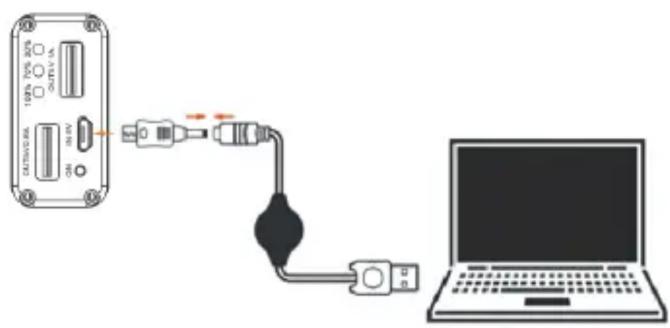
HOW TO CHARGE THE POWER BANK
The "IN" port is the charging port of the power bank. The red LED will light on when charge the power bank, and the red LED will light off after full charging.
UNIT VIEW DESCRIPTION

- USB output port
- Turn on button
- DC 5V input port
- USB output port
- Power indicator



Brand : iconBIT
Model : FTB7000DUO
Category : Power bank