
778 - Doorbell BYRON - Free user manual and instructions
Find the device manual for free 778 BYRON in PDF.


Pick your language and provide your email: we'll send you a specifically translated version.
| Product Type | Wireless Door Chime Receiver |
| Brand | Byron |
| Model | 778 |
| Power Source | 3 x AA batteries (not included) |
| Number of Melodies | 2 selectable chime sounds |
| Volume Control | Adjustable: low / high |
| Visual Indicator | Flashing LED on activation |
| Installation Method | Tabletop or wall-mount (screws included) |
| Dimensions | 105 x 80 x 30 mm |
| Weight | 120 g (without batteries) |
| Operating Frequency | 433.92 MHz |
| Maximum Range | 150 m (open field) |
| Operating Temperature | -10°C to +50°C |
| Color | White |
| Material | ABS plastic |
| Battery Life | Up to 12 months (normal use) |
| Certifications | CE, RoHS |
| Package Contents | 1 x Chime receiver, 1 x mounting kit, 1 x manual |
| Warranty | 2 years |
| Repairability | User-replaceable batteries; no other user-serviceable parts |
Frequently Asked Questions - 778 BYRON
How do I install the Byron 778 chime?
Place the chime on a flat surface or mount it on a wall using the provided screws. Insert 3 AA batteries, then pair it with your doorbell push button by following the pairing instructions in the manual.
How do I change the melody?
Press the 'Melody' button on the chime to toggle between the two available chime sounds. Each press cycles to the next melody.
How do I adjust the volume?
Use the volume switch located on the side of the chime. Slide it to 'L' for low volume or 'H' for high volume.
What batteries does the Byron 778 use?
It requires 3 AA alkaline batteries. Do not use rechargeable batteries as they may cause reduced performance.
How do I clean the chime?
Wipe the exterior with a soft, dry cloth. Do not use water, solvents, or abrasive cleaners.
Why is my chime not sounding?
Check that batteries are inserted correctly and have sufficient charge. Ensure the push button and chime are within range (max 150m) and that they are paired. Verify the volume is not set to the lowest position.
How do I pair the chime with a new push button?
Insert batteries into the chime, press and hold the 'Learn' button until the LED blinks, then press the push button. The chime will sound to confirm pairing.
Can I add multiple chimes to one push button?
Yes, you can pair multiple Byron 778 chimes to the same push button. Simply follow the pairing procedure for each chime.
What is the range of the Byron 778?
The maximum range is 150 meters in open field. Actual range may vary due to walls, furniture, and interference.
How long do the batteries last?
Battery life is approximately 12 months under normal use (e.g., 10 activations per day). Replace batteries when the chime volume drops or the LED dims.
User questions about 778 BYRON
0 question about this device. Answer the ones you know or ask your own.
Ask a new question about this device
No questions yet. Be the first to ask one.
Download the instructions for your Doorbell in PDF format for free! Find your manual 778 - BYRON and take your electronic device back in hand. On this page are published all the documents necessary for the use of your device. 778 by BYRON.
USER MANUAL 778 BYRON


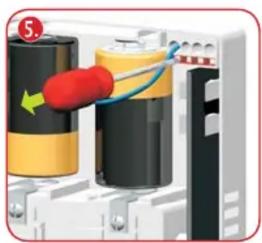


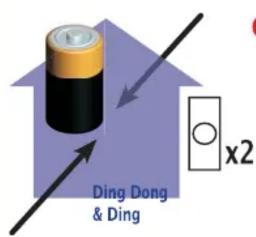
1.

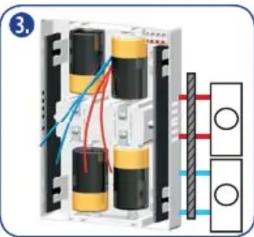
4.5.
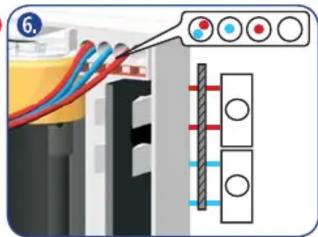
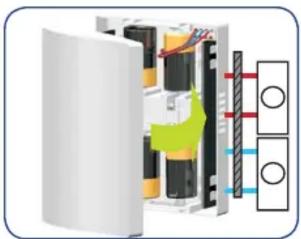
765/778/779


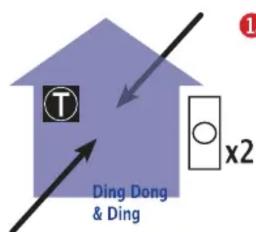
1.

3.4.
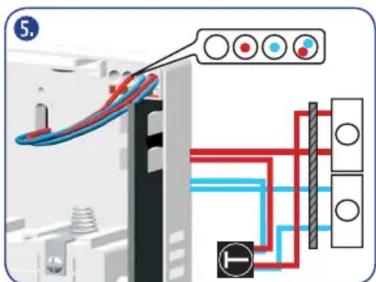


Manual assistant
Powered by Anthropic
Waiting for your message
Product information
Brand : BYRON
Model : 778
Category : Doorbell