SX 41I - Chime BYRON - Free user manual and instructions
Find the device manual for free SX 41I BYRON in PDF.


| Product Type | Wireless Door Chime |
| Brand | Byron |
| Model | SX 41I |
| Power Supply | 2 x AA batteries (not included) |
| Operating Range | Up to 100 meters (open field) |
| Number of Melodies | 8 selectable melodies |
| Volume Control | Yes, adjustable levels (low, medium, high) |
| LED Indicator | Flashes on activation |
| Dimensions | 10 x 8 x 3 cm (approx.) |
| Weight | 150 g (with batteries) |
| Material | ABS plastic |
| Color | White |
| Mounting Type | Wall mount (screws included) or freestanding |
| Operating Temperature | -10°C to 40°C |
| Battery Life | Approximately 12 months under normal use |
| Water Resistance | Indoor use only |
| Maintenance | Clean with a soft, dry cloth. Do not use water or cleaners. |
| Safety | Not a toy. Keep away from children. Do not disassemble. |
| Spare Parts & Repairability | Only batteries are user-replaceable. No other spare parts available. |
Frequently Asked Questions - SX 41I BYRON
User questions about SX 41I BYRON
0 question about this device. Answer the ones you know or ask your own.
Ask a new question about this device
Download the instructions for your Chime in PDF format for free! Find your manual SX 41I - BYRON and take your electronic device back in hand. On this page are published all the documents necessary for the use of your device. SX 41I by BYRON.
USER MANUAL SX 41I BYRON
Wire Free Plug-In Door Chime with Flashing Light
SX-14/40i/41i
12

text_image
Remove Isolation Strip CR2032 CR2032 1V Lithium BatteryPush Button
- Open up the push button by pushing in the tab at the bottom of the push with a small flat screwdriver. - Remove the isolation strip from the battery compartment then it is ready to use. - When replacing the battery, ensure the battery polarit matches the internal markings ("+" facing upwards), then press the battery down so that it is sitting firmly in its compartment.
O

text_image
Light • Light Only • Sound Only • Sound & Light Metal surface UPVD Door- Frames 1-40°C -16°CPlug-In Door Chime
- Door Chime unit is powered by A/C mains power (230-240volt\~50Hz).
Mode Selector
- Slide the mode selector to select the following functions: a) Light Only b) Sound Only c) Sound & Light

text_image
Melody SelectorMelody Selection
Press the melody selector once to select a melody as your door chime sound. There is a total of 8 melodies for selection: 1) Tubular 3-notes 5) Tubular Scare 2) Big Ben 6) Clarinet 3) Tubular 2-notes 7) Saxophone 4) Solo 8) Morning Dew Additional Byron "SX" range products can be purchased for compatibility.
4

natural_image
Line drawing of a desktop computer tower with a wall-mounted socket (no text or symbols)Plug-In Door Chime Installation
- Simply plug the door chime unit into any convenient 13amp wall socket. - The operation indicator (Green LED) will light up, then it is ready to use.
5

text_image
I Sent Indicator LightDigital Code Set Up
- Press the Push Button once, a new operation code is generated randomly and sent to the Door Chime unit. - The Door Chime will sound to indicate that a new operation code is registered and memorised.
6

text_image
Metal Surface OPVD Door Wames IP44 10°C 10°CPush Button Installation
- Using the holes on the back of push button as a template, mark the fixing position for the unit. - Drill holes and fit wall plugs and secure the push button unit to the wall with screws. - Do not mount it on any metal surface or LIPVC door frame.
7
text_image
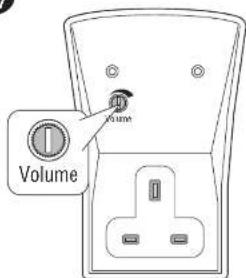
Volume GateAdjust the volume
- Rotate the switch to adjust the sound volume.
8

text_image
100mOperation
- Press the button on the Push Button unit once, it sends a wireless signal to the Door Chime and your Door Chime unit will sound. - Operate the Door Chime unit within the operation range, test it before final installation.
Wire Free Plug-In Door Chime with Flashing Light SX-14/40i/41i
Push Button unit
Power: 1 x 3volt Lithium battery (CR2032 - included)
Door Chime unit
Power: A/C mains power (230-240volt \~ 50Hz), work with any 13amp wall socket
Melody Selection
There are 8-melodies for selection -
1) Tubular 3-notes
2) Big Ben
3) Tubular 2-notes
4) Solo
5) Tubular Scare
6) Clarinet
7) Saxophone
8) Morning Dew
Additional Byron "SX" range products can be purchased for compatibility.
Digital Code Set Up
The Door Chime kit is equipped with an advanced random and self-learning operation coding ability therefore no setting is needed. Read the following instructions before use.
- First time operation:
After battery installation on the Push Button and plug Door Chime in power, press the Push Button once and it will generate a new operation code randomly and send a wireless signal to the Door Chime unit. The door chime unit will sound to indicate that new operation code is registered and memorised.
- Interference from a similar unit operating nearby:
a) Simply remove the battery from the Push Button and un-plug the Door Chime unit and rest for 10 seconds, this will erase the memory.
b) Insert the battery into the Push Button and plug Door Chime in power, the door chime unit will give 2-beeps to indicate that it is ready for the new code registration. Press the Push Button once, it will generate a new operation code randomly and send a wireless signal to the Door Chime and it will sound to indicate that new operation code is registered and memorised.
- Front and back door Bell Push operation:
a) Remove the batteries from the Push Buttons (Front & Back Door) and un-plug the Door Chime unit and rest for 10 seconds, it will erase the memory.
b) Insert the batteries into the Push Buttons and plug Door Chime in power, the door chime unit will give 2-beeps to indicate that it is ready for the new code registration.
c) Press the front door Push Button once, it will generate a new operation code randomly and send a wireless signal to the door chime unit and it will sound to indicate that a new operation code is registered and memorised.
d) After, (within 2 minutes) press the back door Push Button once. It will generate a new operation code randomly and send a wireless signal to the door chime unit and it will sound to indicate that new operation code is registered and memorised. The door chime unit has the ability to memorise both operation codes.
e) Test to ensure correct operation before final installation
Door Chime Operation
The function (Mode) selector is located at the side of the unit, slides the switch to select one of the following functions to operate the chime unit accordingly:
a) Sound and Light: The Door chime will sound as well as the Super Bright LED Light flashing to maximizing attention
b) Light Only: The Super Bright LED Light on the Door Chime unit will flash
c) Sound Only: Door Chime unit will sound
The door chime will start operate at "Sound Only" function initially.
For repeat sound, press the button again. Holding the button in will NOT repeat the sound.
Flashing Light Pattern
When (a) Sound + Light OR (b) Light Only mode is selected, press the flashing light pattern button "Light" at the side of the chime unit to select the operation in the following pattern:
1) Sound + Light mode - When the door chime sound, it will flash in following pattern:
a) Slow flashing for 5 seconds
b) Fast flashing for 5 seconds
c) Flashing intermittent, 2 seconds "On", 1 second "Off" and 2 seconds "On" again
2) Light Only mode - The door chime will flash in following pattern without the chime sound:
a) Slow flashing for 10 seconds
b) Fast flashing for 10 seconds
c) Flashing intermittent, 2 seconds "On", 1 second "Off" and 2 seconds "On" again for 2 times.
Important
-
Do not mount either unit close to fireplace or expose to high temperatures.
-
Do not expose the Door Chime unit to direct sunlight or moisture
-
Always use alkaline battery. Please dispose of old, defective batteries in an environmentally friendly manner in accordance with the relevant legislation.
-
Make sure that no naked flame sources, such as lighted candles, should be placed on the unit.
-
The unit should not be exposed to dripping or splashing and no objects filled with liquids, such as vases, should be placed on the unit.
-
CAUTION: Replace only with the same or equivalent type of battery that is recommended by the
manufacturer
-
CAUTON: Make sure batteries are installed correctly as per the internal markings.
-
CAUTION: Danger of explosion if battery is incorrectly installed or replaced
-
IMPORTANT: There are no serviceable parts in the units, do not attempt to repair it.
Trouble Shooting & User Hints
If the door chime unit does not sound, please check the following:
a) Flat batteries in either Push Button - change the battery.
b) Wrong battery polarity in either Push Button - re-insert the battery.
c) Door Chime unit is not powered - switch on the wall socket.
d) Push Button and Door Chime units are not on the same operation codes - re-set the code (see digital code set up).
e) Units are out of range - Operate the Chime unit within the operation range.
Specification
Operating Temperature: -10C - +40C
Operating Distance: 80metre (265ft approx. - in open field & at suitable condition)
Selectable Tone: Total Eight (8) melodies available
Selectable Digital Code: Total two hundred fifty six (256) possible digital codes
- Type R2 Device - device where the sound output is created by the
initial operation of the control and where the period of sound
output continues for the designed duration irrespective of
condition of the control.
CH Byron Electrical Ltd
Byran House
34 Sherwood Rd, Astonfield
Bromsgrove, B60 3DR
UK
Tel: 0845 2301231
e: support@chayron.com
2: WWW.Enbyran.com