
DB333 - Doorbell BYRON - Free user manual and instructions
Find the device manual for free DB333 BYRON in PDF.


| Product Type | Wireless Door Chime (Carillon) |
| Brand | Byron |
| Model | DB333 |
| Color | White (typical) |
| Dimensions (Receiver) | Approx. 10 x 8 x 3 cm |
| Dimensions (Transmitter) | Approx. 5 x 4 x 2 cm |
| Weight (Receiver) | Approx. 100 g |
| Weight (Transmitter) | Approx. 30 g |
| Power Supply Receiver | 3x AA batteries (not included) or 8V/12V AC transformer |
| Power Supply Transmitter | 1x 12V battery (e.g., A23 type, included) |
| Operating Frequency | 433.92 MHz |
| Range (obstacle free) | Up to 100 meters |
| Number of Melodies | 8 selectable tunes |
| Volume Control | Yes, adjustable (high/low/off) |
| LED Indicator | Yes, flashes when chime activates |
| Code Setting | Selectable code (e.g., DIP switches) to avoid interference |
| Waterproof Rating (Transmitter) | IP44 (splash proof) |
| Compatibility | Works with Byron universal transmitters |
| Mounting | Wall mount (receiver) or freestanding; transmitter external |
| Maintenance | Wipe with a dry, soft cloth. Avoid solvents. |
| Safety | Low voltage, no electrical hazard when used with batteries |
| Spare Parts | Batteries (AA for receiver, A23 for transmitter), external transformer |
| Repairability | Not user-serviceable; replace failed units |
| Package Contents | Receiver, transmitter, mounting hardware, user manual |
Frequently Asked Questions - DB333 BYRON
User questions about DB333 BYRON
0 question about this device. Answer the ones you know or ask your own.
Ask a new question about this device
Download the instructions for your Doorbell in PDF format for free! Find your manual DB333 - BYRON and take your electronic device back in hand. On this page are published all the documents necessary for the use of your device. DB333 by BYRON.
USER MANUAL DB333 BYRON
Byron™ DB333 Wire Free Chime Kit
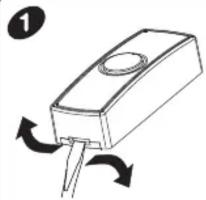
Using a small flat screwdriver, insert into the locking clip and gently twist. The back plate will unclip from the Bell Push.

Insert the 23A battery (Supplied) into the battery holder, making sure the Positive/Negative terminals match the internal markings.

Insert the Plug-through Chime into a standard 220-240V \~50Hz wall socket and switch the socket ON.

Plug in a standard plug e.g. Table light. Max load: 1000W

Bell Push & Door Chime:
1: Using back plate as template.
2: Making sure UP arrow points UP.
2: Mark and drill holes.
3: Insert wall plugs and attach to wall using screws provided.
4: Clip the Bell Push on to the back plate making sure Bell Push 'Clicks' in to place.
5: Plug the Door Chime into a socket, within the operating range (75M). Transmission of the wire free signal through Walls, Doors and Ceilings etc, may reduce the operating range. Chime is designed for INDOOR use only.

Melody Selection:
To select a new melody for the Door Chime
1: Press the Melody Select button on the front of the chime.
2: The chime will play the newly selected sound.
3: Press again to select the next melody.
Replacement and Additional Chimes/Bell Pushes:
The Byron DB door chime kit is preset to work together. For additional or replacement chimes and pushes please contact the Byron Help Line for availability
Specification
Bell Push: DBT
Power: 1 x 23A 12V DC Battery (supplied)
IP44 Weather Resistant
Plug-Through Door Chime: DB303
Power: 220-240V \~50Hz
Range: 75 Metres
Max Load: 1000W
Indoor Use Only

SN:SP020910
Installation Guide:

Avoid positioning the Bell Push/Chime on or directly near metallic surfaces as this may reduce the operation range.
UPVC Door Frames:
When positioning the bell push onto a UPVC door, always check the operating performance before final installation, internal metal frame of the door may affect performance.
Tip: Try adjusting the location of the Bell Push slightly to the Left/Right or place on external wall.

http://www.

Tel: 0845 2301231 (UK)
9-5 Mon-Fri, Local call charges apply
support@chbyron.com
www.chbyron.com
GB: CH Byron
Byron House, Sherwood Rd
Astonfields, Bromsgrove
B60 3DR
UK

V1.0
Project Manager
Mr G Hunter


Brand : BYRON
Model : DB333
Category : Doorbell