
B1664N0 - Built-in oven NEFF - Free user manual and instructions
Find the device manual for free B1664N0 NEFF in PDF.


| Product type | Built-in oven NEFF |
| Model | B1664N0 |
| Brand | NEFF |
| Power supply | Electric, 220-240 V, 50/60 Hz |
| Dimensions (H x W x D) | 595 x 595 x 550 mm (standard estimate) |
| Weight | Approximately 35 kg (estimate) |
| Usable capacity | Approximately 70 litres |
| Maximum temperature | 275 °C (depending on cooking mode) |
| Cooking modes | Hot air (Circotherm), intensive hot air, bread baking, conventional top/bottom heat, bottom heat, full surface grill, centre grill, circo-roasting, steam cooking (with accessory), dough rising, plate warming, keep warm, Sabbath cooking, memory function (10 programmes) |
| Cleaning | EasyClean (assisted steam cleaning), catalytic panels, manual cleaning possible |
| Lighting | NeffLight (LED lighting, automatic switching via door contact, can be deactivated) |
| Included accessories | Metal grid, dripping pan, enamelled baking tray, roasting tray |
| Safety | Control lock, permanent lock (child safety), automatic safety shut-off |
| Clock functions | Timer, cooking timer, delayed stop, automatic on/off programming |
| Display | Text screen with navigation wheel, temperature display, digital clock |
| Door | Removable for cleaning, reflective coated glass, tilted stop position |
| Heating elements | Top heating element, bottom heating element, grill heating element, hot air fan, folding grill element |
| Serviceability | Bulbs (E14 40W 300°C, halogen G4 12V 20W) and door seal available from after-sales service |
| General information | 68-page user manual, available in several languages. E number (E-Nr) and FD on the rating plate. |
Frequently Asked Questions - B1664N0 NEFF
User questions about B1664N0 NEFF
0 question about this device. Answer the ones you know or ask your own.
Ask a new question about this device
Download the instructions for your Built-in oven in PDF format for free! Find your manual B1664N0 - NEFF and take your electronic device back in hand. On this page are published all the documents necessary for the use of your device. B1664N0 by NEFF.
USER MANUAL B1664N0 NEFF
Instructions for use
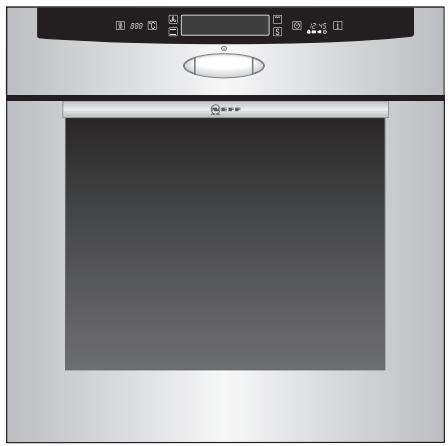
B 1664 ..
Table of contents
Important Information 4
Packaging and old appliances ..... 4
Before installation 5
Safety information 5
Reasons for damage 6
Your new cooker 7
The control panel 7
Brief overview 8
Shelf positions 9
NeffLight 9
Accessories 10
Before using your appliance for the first time ..... 11
Start-up 11
Preliminary cleaning ..... 12
Initial burn-in 12
Subsequent cleaning ..... 12
Electronic clock 13
The control panel 13
Clock functions 13
Setting the time of day 14
Minute timer 15
Automatic timer 16
Checking, correcting and cancelling settings .... 18
Special functions ..... 18
Oven operating modes ..... 19
Hot air functions 19
Conventional functions ..... 20
Grill functions ..... 21
Special functions 22
Operating the oven 24
Switching ON and OFF ..... 24
Selecting the operating mode ..... 24
Setting the temperature ..... 26
Changing the operating mode ..... 26
Changing the temperature ..... 27
Rapid heat up 28
Checks 28
Safety features .... 30
Lock 30
Permanent lock .... 31
Automatic safety off function ..... 31
Baking 32
Cooking Tips and Helpful Hints .... 33
Roasting 34
Grilling 36
Circo-roasting 37
Surface grilling 37
Steam cooking 38
Dough proving 39
Braising 40
Defrosting and warming ..... 42
Defrosting with Circotherm ..... 42
Defrost 43
Table of contents
Plate warming 44
Keep warm 44
Sannath setting 45
Memory function 46
Recording a new programme ..... 46
Ending programme recording ..... 47
Recording several programme steps 49
Playing back programme ..... 51
Deleting programme 52
Cleaning and care 53
Important cleaning basics ..... 53
Catalytic oven surfaces ..... 55
EasyClean®-system (oven cleaning system) ..... 56
Oven door 58
Lowering the heating element ..... 59
Shelf supports 59
Telescopic pull-outs 60
Settings 61
Service and Repair Information .. 62
Trouble-shooting guide 64
Important information
Packaging and old appliances
Before using your new appliance, please read these Instructions for Use carefully. They contain important information concerning your Personal safety as well as on use and care of the appliance.
The Instructions for Use apply to several versions of this appliance. Accordingly, you may find descriptions of individual features that do not apply to your specific appliance.
Please keep the operating and installation instructions in a safe place; this important documentation may also be of use to a possible subsequent owner.
Your new appliance was protected by suitable packaging while it was on its way to you. All materials used for this purpose are environmentally friendly and can be recycled. Please make a contribution to protecting the environment by disposing of the packaging appropriately.
Old appliances are not worthless rubbish.
Environmentally-conscious recycling can reclaim valuable raw materials.
Before disposing of your old appliance, please make sure that it is unusable, or label it with a sticker stating "Caution, scrap".
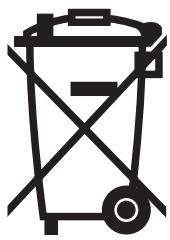
This appliance is labelled in accordance with European Directive 2002/96/EG concerning used electrical and electronic appliances (waste electrical and electronic equipment – WEEE). The guideline determines the framework for the return and recycling of used appliances as applicable throughout the EU.
Up-to-date information on how to dispose of your old appliance and the packaging from the new one can be obtained from your retailer or local authority.
Before installation
Transport damage
Electrical connection
Check the appliance after unpacking it. Do not connect the appliance if it has been damaged in transport.
The cooker may only be connected by an approved specialist. Losses resulting from damage caused by incorrect connection will invalidate warranty claims.
Safety information
Hot oven
Repairs
This appliance is intended for domestic use only. Only use the cooker for food preparation.
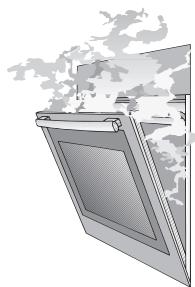
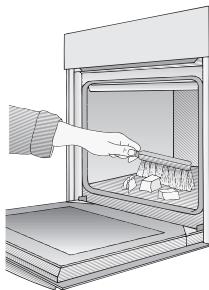
Open the oven door carefully. Hot steam may escape. Never touch the internal surfaces of the oven or the heating elements. There is a risk of burning.
Children must be kept at a safe distance from the appliance.
Never store combustible items in the oven.
Risk of fire. Never place flammable objects onto the hot plates. Fire hazard!
Never place cables of electronic devices onto the hot plates.
Never clamp leads of electrical appliances in the hot oven door. The insulation on the leads could melt. There is a risk of short-circuiting.
Caution: The extension rails heat up during oven operation. Use special care to avoid burns when extending the rails.
Remove all packaging remnants, e.g. polystyrene parts, from the oven.
Incorrectly done repairs are dangerous. There is a risk of electrocution.
Repairs may only be carried out by after-sales service technicians who have been fully trained by BSH.
If there is a fault, switch off the oven fuse at the fuse box.
Call the after-sales service.
Reasons for damage
Baking tray, aluminium foil or dishes on the oven floor
Do not place the baking tray on the oven floor.
Do not cover it with aluminium foil.
Do not place dishes on the oven floor.
This will cause heat accumulation. The baking and roasting times will no longer be correct and the enamel will be damaged.
Slide-in accessories
To avoid damage, insert slide-in accessories carefully.
Baking paper
If using hot air functions ☒, do not place greaseproof paper loosely in the oven (e.g. when heating the oven).
The hot-air fan could draw in the paper which may damage the heater and fan.
Water in the oven
Never pour water directly into a hot oven.
This could damage the enamel.
Fruit juice
When baking very moist fruit cakes, do not put too much on the baking sheet. Fruit juice dripping from the baking sheet leaves stains that cannot be removed.
It is recommended that you use the deeper universal pan.
Cooling with the oven door
Only leave the oven to cool with the door closed. Do not allow anything to become trapped in the oven door. Even if you only leave the oven door open slightly, the fronts of adjacent units may become damaged over time.
Very dirty oven seal
If the oven seal is very dirty, the oven door will no longer close properly when the oven is in use.
The fronts of adjacent units could be damaged.
Keep the oven seal clean.
Using the oven door as a seat
Do not stand or sit on the oven door.
Care and cleaning
Do not use high-pressure cleaners or steam jets.
Your new cooker
Here you will learn more about your new appliance. The control panel, its TouchControl buttons, the roller and displays are explained here. The oven functions, operating modes and the accessories included with your oven will be explained here.
The control panel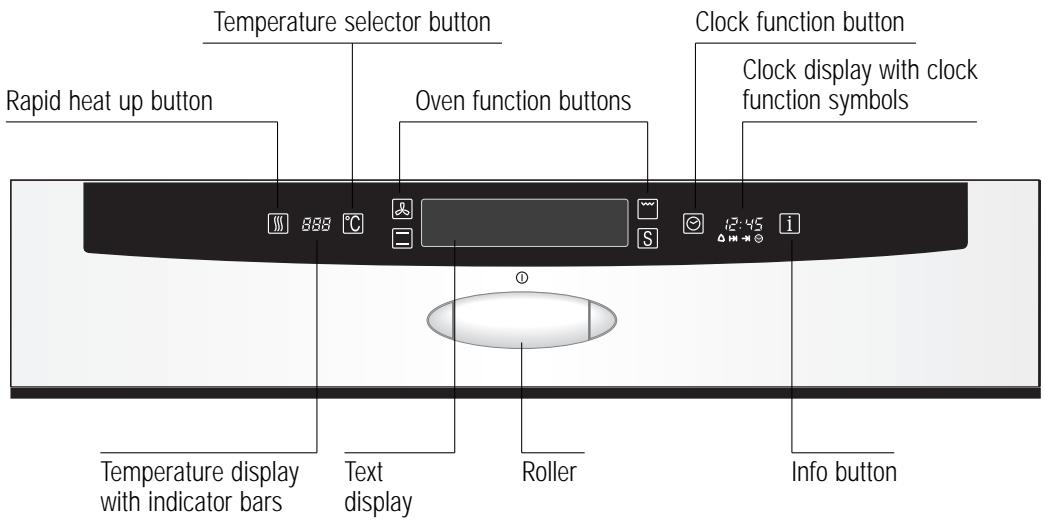
Roller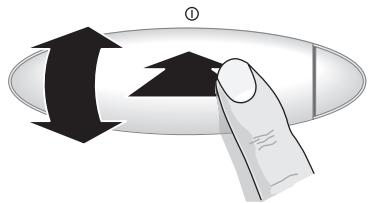
You can rotate and press the roller.
Rotate the roller
To select the functions on the text display
To set the time and temperature
Press the roller
To actuate the selected settings
To switch the oven on and off press and hold
Brief overview
| Text display | Text display for oven functions, operating modes, settings and information. |
| Oven function buttons | Tap a function button to access the required operating modes.Repeatedly tap a button to select the associated operating modes. |
| Temperature selector button | After tapping the 📄 button, you can change the temperature with the roller. |
| Temperature display with indicator bars | Indicates the temperature. The indicator bars indicate how hot the oven is. |
| Rapid heat up button | Tap the ⚪ button to switch on rapid heat up (for Circotherm and bread baking). |
| Clock function button | Tap the button to be able to select clock functions (see "Electronic clock").Repeatedly tap the 🔗 button to select the clock functions. |
| Clock display with clock function symbols | Indicates the time. The symbols are backlit as soon as the associated function is activated (see "Electronic clock"). |
| Info button | Do you want to know quickly how to do something on your appliance? Simply tap on ⓘ. You will then receive information e.g. on oven functions, operating modes, clock functions, settings and much more. |
Shelf positions
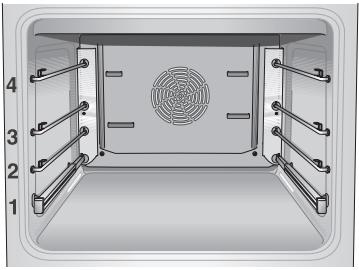
Your oven features 4 shelf positions. The shelf positions are counted from bottom to top.
The numbers are marked in the oven.
When using hot air functions ☐, do not use shelf position »2«, in order not to block air circulation.
The shelf supports and telescopic rails can be inserted at your preferred shelf position.
The simple plug-in system provides you with flexible and quick handling when changing the shelf supports and telescopic rails.
NeffLight
The oven features the additional lighting "NeffLight":
Turn the function selector to the position oven light; NeffLight will be activated.
Advantages:
– Great illumination on all levels. – Illumination of the food from the front. - Your eyes will not be blinded by lamps when looking into the oven.
Door contact switch
NeffLight is activated/deactivated automatically when the oven door is opened/closed.
Saving energy
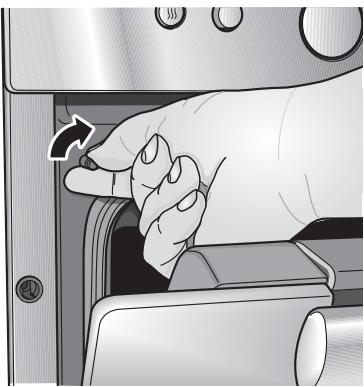
In order to save energy, you can deactivate NeffLight. Turn the door contact switch to the right. If you keep turning it to the right you re-activate NeffLight.
Accessories
Universal pan with wire shelf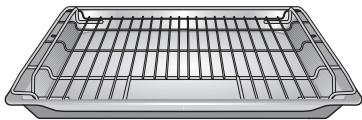
Baking tray, enamelled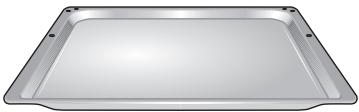
Your appliance is supplied with:
Wire shelf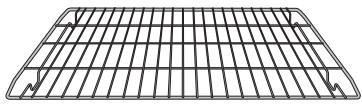
Roasting tray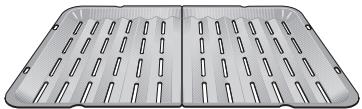
The following accessories can be obtained from a specialist dealer: Order no.
| Universal pan | Z 1232 X0 |
| Universal pan, non-stick | Z 1233 X0 |
| Glass pan | Z 1262 X0 |
| Soufflé pan | Z 1272 X0 |
| Baking tray, aluminium | Z 1332 X0 |
| Baking tray, enamelled | Z 1342 X0 |
| Baking tray, non-stick | Z 1343 X0 |
| Pizza tray | Z 1352 X0 |
| Wire shelf, high/low | Z 1432 X0 |
| Wire shelf, close mesh | Z 1442 X0 |
| Roasting tray | Z 1512 X0 |
| Upgrade set – Single Telescope | Z 1784 X0 |
| System steam cooker | N 8642 X0 |
| Pizza stone | Z 1912 X0 |
| Universal oval roaster enamelled | Z 9930 X0 |
Note:
The baking tray or universal pan may distort while the oven is operating. This is caused by major temperature differences on the utensil. These differences may occur if only one part of the utensil was covered or if deep-frozen food, e.g. pizza, was placed on the utensil.
The distortion will subside again during baking, roasting or grilling.
Before using your appliance for the first time
Start-up
Selecting the language
When the appliance has been connected to the power supply, the selectable languages are indicated on the text display.
- Rotate the roller until the required language appears on the red bar.
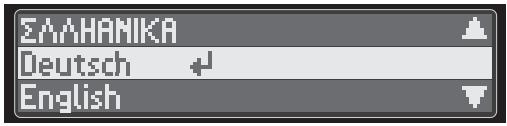
Setting the time
- Acknowledge the setting by pressing the roller.
Then Set time of day is indicated on the text display with the flashing prompt: Set time.
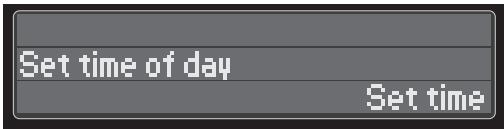
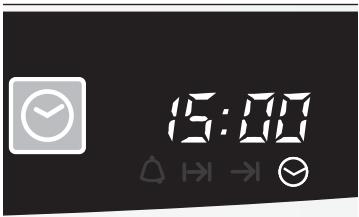
- Rotate the roller to set the current time (e.g. 15:00).
- Acknowledge the settings either by pressing the roller or the time is automatically accepted after 3 seconds.
- When the time has been accepted, the appliance switches off.
Have you set a wrong language?
Touch the 🎯 button for at least 5 seconds.
The selectable languages are indicated on the text display. Proceed as described above.
Have you set the wrong time?
See "Electronic clock" chapter.
Preliminary cleaning
Take the accessories out of the oven.
Remove all packaging remnants, e.g. polystyrene parts, from the oven.
- Clean the appliance exterior with a soft moistened cloth.
- Clean the oven and the accessories with a hot detergent solution.
- Take the shelf supports and telescopic rails out of the oven (see "Shelf supports" and "Telescopic extension rails").
Initial burn-in
- Heat the empty oven for approx. 30 minutes.
- Select top and bottom heat at a setting of 240°C (see "Operating the oven" chapter).
Subsequent cleaning
Clean the oven with a hot detergent solution.
Attach the shelf supports and telescopic extension rails (see "shelf supports" and "telescopic pull-outs").
Electronic clock
The electronic clock can be operated with one hand. After pressing the ⏻ button, select an option in the submenu and set the time with the roller. Settings are acknowledged by pressing the roller or are accepted automatically after 3 seconds.
The control panel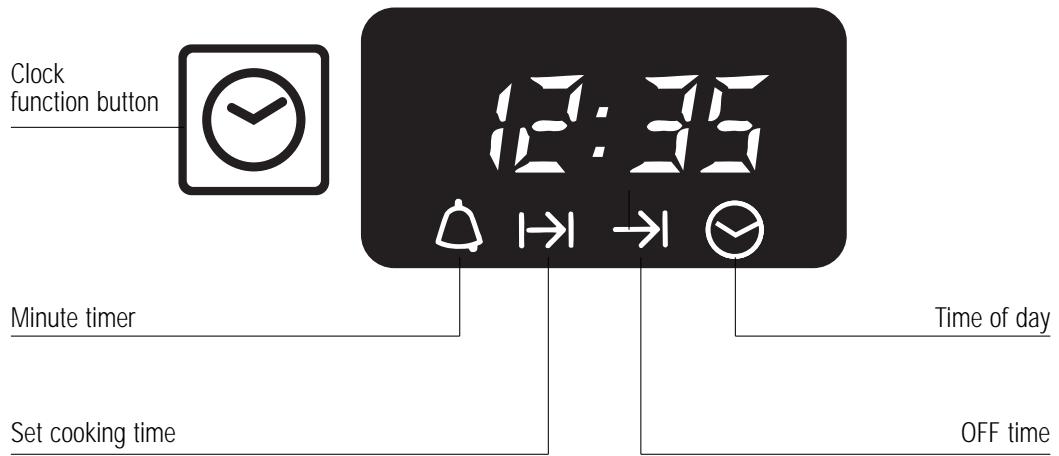
Clock functions
Minute timer
Set cooking time →
Time preselection →
Time of day 📋
Delete times
Counts down minutes (max. 24 h).
Switches off automatically. You set a cooking time for the current operating mode (max. 6 h) after which the appliance switches off automatically.
Switches on and off automatically. You specify when the oven switches on automatically and after how long it switches off again (max. 24 h).
To change the current time of day or reset following a power failure.
Delete time settings: Minute timer, Set cooking timer and Timer preselection.
Setting the time of day
Settings are accepted either by pressing the roller or automatically after 3 seconds.
- Tap the ☑ button to access the clock functions in the submenu.
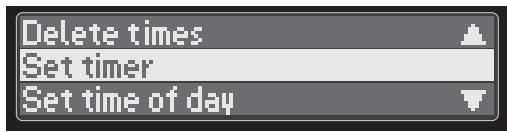
- Select Set time of day in the submenu either by tapping the ☑ button several times or by rotating the roller until Set time of day is highlighted in red on the text display. Accept the setting.
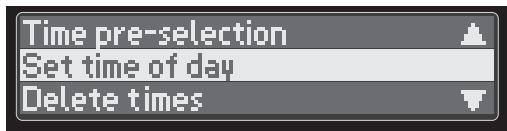
- The prompt follows: Set time.
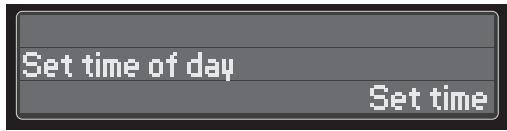
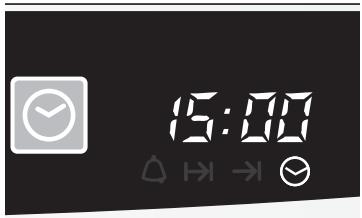
- Rotate the roller to set the current time of day (e.g. 15:00).
- Accept the setting.
Note
Following a power failure, the display ☐:☐☐ flashes. Set the time of day to use the appliance. In this case press the ☺ button and you are automatically transferred to Point 3 Set time.
It is not possible to correct the time of day if the automatic timer or minute timer is set.
Minute timer
Settings are accepted either by pressing the roller or automatically after 3 seconds.
- Press the ⏻ button to access the clock functions.
- Select Set timer and accept the selection. The lit △ signals the minute timer.
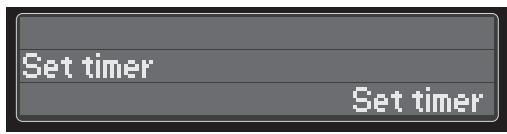
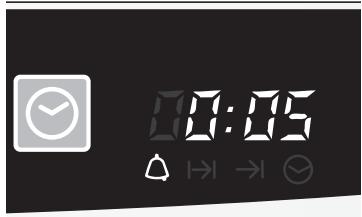
- Set the required time by rotating the roller and accept the setting. The remaining time is displayed.
When the time has elapsed, Time Elapsed is indicated on the text display, a signal is emitted and the △ symbol flashes.
You can stop the signal by tapping the ☑ button or pressing the roller.
Example: 5 minutes
Automatic timer
Set time Automatic switch off
You can switch the oven on and off via the electronic clock.
The most suitable dishes for automatic timing are those which require little attention.
Settings are accepted either by pressing the roller or automatically after 3 seconds.
Baking or roasting starts immediately for the required time.
- Select the operating mode and the oven temperature.
- Tap the ⏻ button to access the clock functions.
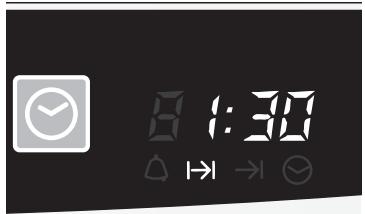
- Select Set time and set the cooking time on the roller (e.g. 1 h 30 min.).
The current time is displayed after 3 seconds. The lit → symbol signals automatic mode.
- When the time has elapsed (e.g. 1 h 30 min.), Time elapsed is indicated on the text display, a signal is emitted, the lit I→I flashes and the oven switches off automatically. You can stop the signal by tapping the ⏻ button or pressing the roller.
- To end automatic mode, press the ⏻ button again.
- Switch the oven off.
Time preselection Automatic switch on and switch off
Baking or roasting starts for the set duration at a later time which you set.
- Select the operating mode and the oven temperature.
- Tap the ☑ button to access the clock functions and select Time preselection.
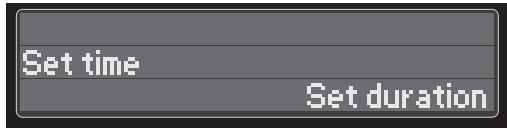
Time pre-selection
Set duration
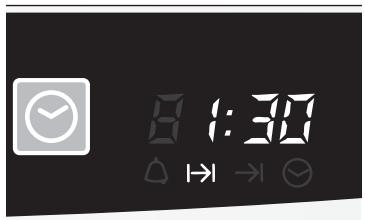
- Set cooking duration is indicated on the text display. Set the required duration with the roller (e.g. 1 h 30 min.). Accept the setting.
- Set end is indicated on the text display. Set the required end time with the roller (e.g. 12:30).
When the setting has been made, the current time is displayed after 3 seconds.
The lit → signals automatic mode.
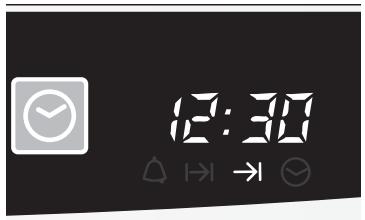
The oven is automatically switched on and off at the preset times (e.g. on 11:00, duration 1 h 30 min, off 12:30).
- When the time has elapsed, Time elapsed is indicated on the text display, a signal is emitted, the lit →I flashes and the oven switches off automatically. You can stop the signal by tapping the ⏻ button or pressing the roller.
- To end automatic mode, press the ⏻ button again.
- Switch the oven off.
Checking, correcting and cancelling settings
To check your settings, touch the ☺ button and select the required function.
To correct your settings, tap the ⏻ button and select the required function. You can change the time by rotating the roller.
If you want to cancel only one of several settings, select the function to be deleted in the clock functions. Turn the time back to 0:00 with the roller.
If you want to delete all the settings, select Delete times in the clock functions.
Special functions
Dimming the display
Radio antenna optional accessory
Switching off the clock display
Between 22.00 and 6.00 the display is automatically dimmed.
The electronic clock can be fitted with a radio antenna (see Accessories).
See "Settings".
Oven operating modes
Here you will receive an overview of the four oven functions: hot air functions, conventional functions, grill functions and special functions. The oven functions are divided into the following operating modes.
Hot air functions

Circotherm
The hot air functions include:
A fan system located in the rear oven wall circulates the circotherm in the oven, achieving an especially effective heat transfer to the food being baked or roasted.
Advantages:
- Simultaneous baking and roasting possible on up to 3 levels – low soiling of oven interior – shorter preheating times
- low oven temperatures
Defrost
A fan in the rear wall of the oven swirls the air in the oven around the frozen food. The fan runs without heating.
Advantages:
- Gentle defrosting
- Deep-frozen meat, poultry, bread and cakes defrost evenly.
Circotherm intensive
The circotherm intensive adds the bottom heat to the circotherm.
Advantages:
- Fresh preparation of food with met fillings or toppings, e.g. pizza and flan.
- Especially suited for frozen products, e.g. pizzas, chips etc.
Bread baking setting
Bread baking setting with hot-air function.
Adjustable 180–220°C.
Conventional functions
Top and bottom heat (Conventional heating system)
The conventional functions include:
The food being baked or roasted is exposed to heat radiation from heating elements located at the top and bottom of the oven cavity.
Baking and roasting is possible on one shelf position only.
Advantages:
- Baking of cake with moist fillings, pizza, quiche, e.g.
Bottom heat
With this setting, only the heating element at the bottom of the oven cavity is activated.
Advantage:
- Particularly useful with dishes and baked goods that require a distinctive bottom crust or browning.
⚠ Use just before the end of the baking or roasting time.
Braising
Roasting on a low heat.
Ideal for all tender meats which are to be cooked rare or to perfection.
Advantages:
– cooking point reliably reached – very juicy, tender and soft meat - braised meat does not require rest times and can easily be kept warm at a low temperature.
Grill functions

Full-surface grill
The grill functions include:
The food being prepared is exposed to heat radiation from the heating element at the top of the oven cavity.
Advantages:
- Particularly effective with flat, small cuts of meat, i.e., steaks, sausages, fish, vegetables and toast. – the entire grilling surface heats up
- especially useful with large amounts of food
Centre-area grill
Advantages:
- only the centre area of the grilling surface heats up
- especially useful with small amounts of food
- energy-saving operation
Circo-roasting
With circo-roasting, the air circulating fan and the grilling elements are activated alternately.
The heat generated by the grilling element is evenly distributed in the oven cavity.
Advantage:
- Particularly effective with poultry.
Special functions S
Memory function
The special functions include:
To facilitate the preparation of your favourite dishes or lavish foods, you can record the cooking process of 10 foods and play them back at any time.
The oven saves the set operating mode, temperature and duration as well as up to four other changes which you make during the recording.
Steam cooking
For system steam cooker (option available from specialist dealers)
Dough proving
The dough proving function provides ideal conditions inside the oven for getting yeast dough to rise.
Temperature: 35–38°C
Humidity: 75–100%
Advantages:
– rapid and uniform increase in volume of dough - dough does not dry out - dough does not form a skin which means that it is very easy to process and work into the required shape – exclusion of unfavourable external influences (e.g. draughts). - yoghurt can be made.
Plate warming
For prewarming porcelain dishes (fixed temperature setting). Food and drinks cool down less quickly in a prewarmed dish.
Always use an oven cloth or oven gloves when taking the dish out of the oven.
Keep warm
For keeping food warm (settings 60–120 °C).
Do not keep food warm for longer than two hours, as warm food perishes more easily.
Sabbath setting
The oven runs from 24–73 hours at a fixed temperature setting (top/bottom heat).
The recommended time is 27 hours.
EasyClean®
The oven cleaning function featured in your oven is intended to help you keep your oven neat and tidy. An amount of cleaning solution is vaporised automatically. The combined effects of heat and steam soften the soil deposits on the oven wall enamel and facilitate their removal. For more information on this function, see the section on "Cleaning and Care" later in this booklet.
Advantages:
- takes the toil out of oven cleaning
- protects the enamel on interior surfaces – constitutes an environmentally friendly cleaning method
Oven light
The oven light is switched on.
After 30 minutes the light automatically switches off again.
The oven does not heat up.
Operating the oven
i -button
Do you want to know quickly how to do something on your appliance? Simply tap on ⓘ.
Switching ON and OFF
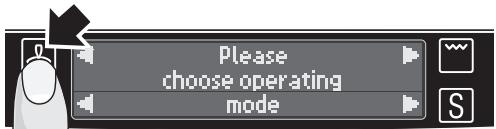
To switch on the appliance, hold down the roller for 2 seconds.
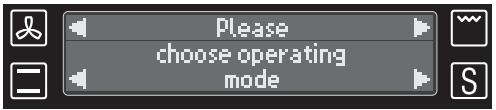
The text display lights up with the following prompt Please choose operating mode.
Note
To switch off the appliance, hold down the roller again for 2 seconds. The text display goes out.
If the appliance is switched on again within 7 seconds after it was switched off, the memory effect is actuated: The appliance then switches on again at the point at which it was switched off. If you want to prevent this effect, wait for longer than 7 seconds before you switch the appliance on again.
Selecting the operating mode
Before you switch on your oven, decide which operating mode you would like to use (see "Oven operating modes", e.g. Circotherm).
There are two different methods of operating the appliance.
Via roller
- Switch the oven on.
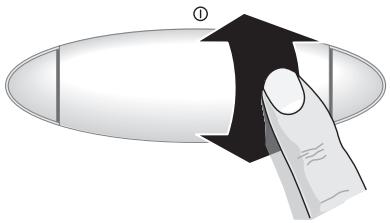
- Rotate the roller to access the main menu with the oven functions.
- Rotate the roller to highlight the oven function in the submenu in which the required operating mode is located.
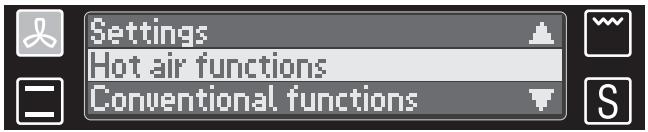
- Press the roller to acknowledge the selected function. You access the associated operating modes in the submenu.
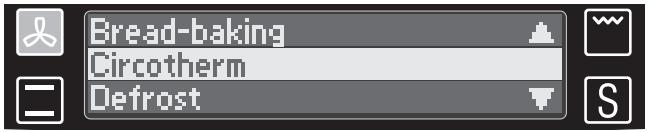
- Rotate the roller to choose the required operating mode.
- Press the roller to acknowledge your choice.
Does your oven accept settings by itself even though you have not made any?
If no oven settings are made for longer than 3 seconds, the appliance automatically accepts the current setting.
See "Changing the operating mode" to switch the operating mode.
Via oven function buttons
- Switch the oven on.
- Tap the oven function button in the menu in which the required operating mode is located (for example: 📁).
The submenu with the operating modes is displayed.
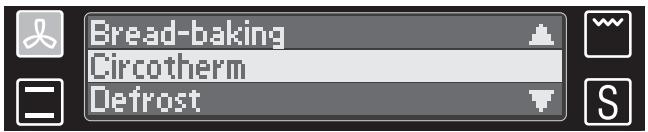
Setting the temperature
- Each time the oven function button is tapped, another operating mode is displayed.
- Choose the required operating mode and wait 3 seconds. After this time the setting is automatically accepted and the oven runs.
When the operating mode has been chosen, the temperature setting prompt flashes on the text display; the recommended temperature lights up on the temperature display (for example: Circotherm, 160°C).

- As long as the text flashes, you can change the temperature in steps of 5°C. To do this, rotate the roller up or down.
- Accept the settings either by pressing the roller or by waiting 3 seconds for the setting to be accepted automatically.
The oven begins heating.
Changing the operating mode
This is how you change from one running operating mode to another (example: from Circotherm to bottom heat).
- Tap the oven function button in the submenu in which the required operating mode is located (for example: ☐).
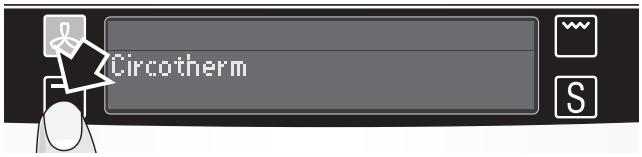
The submenu with the operating modes is displayed

- Choose the required operating mode – either by tapping repeatedly on the oven function buttons or by rotating the roller.
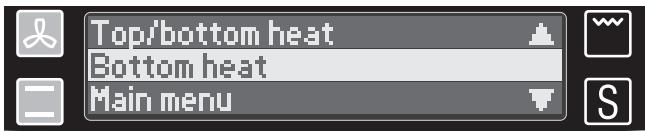
- Acknowledge the settings by pressing the roller, otherwise the appliance automatically jumps back to the previous operating mode after 3 seconds.
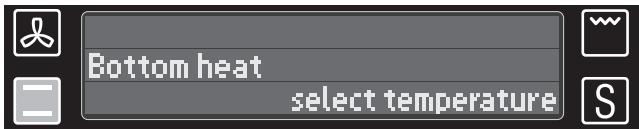
Changing the temperature
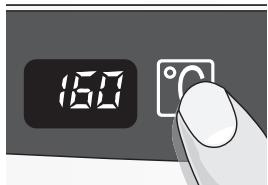
Notes
- Tap the 📋 button. The Select temperature prompt flashes on the text display.
- Set the new temperature with the roller.
Braising, steam cooking, dough proving, plate warming, Sabbath setting and EasyClean, defrost.
→ The temperature is fixed and cannot be changed.
Rapid heat up
You can switch on rapid heat up with Circotherm and bread baking. To do this, tap the 🎨 button.
Rapid heat up is indicated on the text display. Will cancel it self when temperature is reached.
Cancelling
Tap the 🎨 button again. Rapid heat up is terminated.
Rapid heat up goes out on the text display.
Checks
Checking the temperature
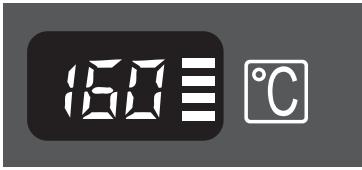
The temperature display bar shows you whether your oven has reached the set temperature.
When heating up, the four bar display bars light up one after the other depending on the current oven temperature. The set temperature is reached when the upper most bar goes out for the first time.
In subsequent oven operation, the upper bar always lights up when your oven residually heats in order to retain the set temperature.
Checking the heating
The current oven temperature can be displayed during the heating up phase. To do this, press the Ⓗ button. After approx. 5 seconds the current temperature is displayed as long as your finger remains on the Ⓗ button.
Residual heat display for the oven
When the oven has been switched off, the fan may continue running for a short time to cool the oven. The current temperature range is indicated on the text display:
Residual heat high above 120°C
Residual heat low 60–120°C.
Temperature ranges of the various heating systems
| Hot air functions | Suggested temperature in °C | Temperature range in °C |
| Circotherm | 160 | 40–200 |
| Defrost | - | Without temperature setting |
| Circotherm intensive | 220 | 50–275 |
| Bread baking | 200 | 180–220 |
| Grill functions | Suggested temperature in °C | Temperature range in °C |
| Full-surface grill | 220 | 50–275 |
| Centre-area grill | 180 | 50–275 |
| Circo-roasting | 170 | 50–250 |
| Conventional functions | Suggested temperature in °C | Temperature range in °C |
| Top/bottom heat | 170 | 50–275 |
| Bottom heat | 200 | 50–225 |
| Braising | - | Fixed setting |
| Special functions | Suggested temperature in °C | Temperature range in °C |
| Steam cooking | - | Fixed setting |
| Dough proving | - | Fixed setting |
| Plate warming | - | Fixed setting |
| Keep warm | 85 | 60 – 120 |
| Sabbath setting | - | Fixed setting |
| EasyClean | - | Fixed setting |
Safety features
When the lock is switched on, the oven can no longer be switched on inadvertently or by unauthorised persons (e.g. playing children). The lock can be used as a childproof lock.
Lock
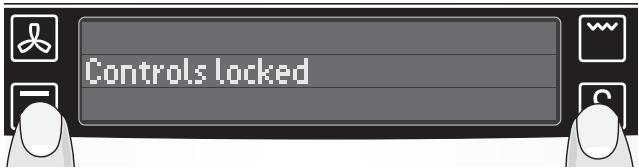
- With the appliance switched off, simultaneously touch the ☐ and Ⓗ buttons for 3 seconds. The appliance is locked and Controls locked is indicated on the display.
- To unlock the appliance, simultaneously touch the ☐ and Ⓗ buttons for 3 seconds. Controls locked goes out and you can use the oven as usual.
Note
Controls lock goes out after 15 sec.
As soon as you touch the roller or a button, the text is re-displayed.
Permanent lock
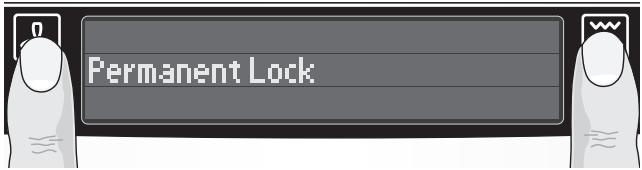
- With the appliance switched off, simultaneously touch the ☑ and 📋 buttons for 6 seconds. The appliance is locked permanently and Permanent Lock is indicated on the display.
- To use the oven while the permanent lock is active, simultaneously touch the ☐ and Ⓗ buttons for 3 seconds.
Permanent Lock goes out and you can use the oven as usual. The permanent lock switches on again 30 seconds after the appliance was switched off.
- To deactivate the permanent lock, simultaneously touch the 🔒 and 📋 buttons for 6 sec.
Permanent Lock goes out and you can use the oven as usual.
Automatic safety off function
Depending on the setting the oven switches off automatically after 6 to 30 hours (except Sabbath setting). In this case a text on the display will inform you that your appliance was switched off automatically.
Safety off only occurs if no change was made to the appliance setting.
As soon as you use the roller or press a button, the previous operating mode switches on again.
The text for safety off function goes out.
Baking
Using baking tins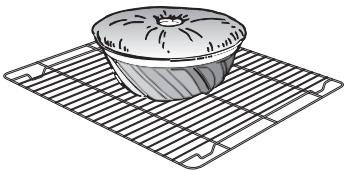
Notes
Always place baking tins in the centre of the baking wire shelf.
We recommend dark metallic baking tins.
Light coloured baking tins made from thin-wall materials lead to longer baking times and uneven browning of the cake.
You can influence the degree of browning by changing the temperature setting.
If a cake collapses after removing it from the oven, consider using a longer baking time, or use a slightly lower temperature setting.
Using baking sheets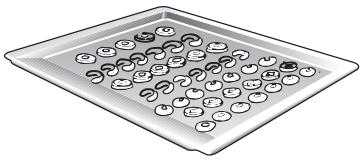
Using tinplate baking tins
The slanted (handle) end of the baking sheet must always face the oven door.
To avoid damage, insert slide-in accessories carefully.
Always fully insert baking sheets into the oven.
Use only original baking sheets.
Circotherm Shelf position 1 ☐ Top/bottom heat Shelf position 1
If the cake bottom gets too dark:
Check the shelf position. Shorten the baking time, and possibly use a lower baking temperature.
If the cake bottom stays too light:
Check the shelf position. Increase the baking time, select a lower temperature, or use a dark metal baking tin.
Do not place baking forms or high cakes too close to the rear oven wall.
Cooking Tips and Helpful Hints
| The bottom of a cake baked on a baking sheet stays too light | Remove from the oven all baking sheets or universal pan currently not in use. |
| The bottom of a cake baked in a tin stays too light | Use a wire shelf and not a baking sheet to support the cake tin during baking. |
| The bottom of cake or cookies gets too dark | Set cake or cookies into a higher set of shelf position. |
| The cake gets too dry | Select a slightly higher oven temperature, and shorter baking time. |
| The cake is too moist on the inside | Choose a slightly lower baking temperature.Note:Higher temperatures do not shorten baking times (done on the outside, raw on the inside). Choose a slightly longer baking time, allow the dough to rise slightly longer. Add less liquid to the dough. |
| When baked with circotherm, cake baked in round or square tins gets too dark at the rear | Avoid blocking the air vents at the rear wall of the oven cavity with the cake tins. |
| Very moist cake dough (e.g. fruit cake) causes a lot of steam to generate in the oven that condenses on the oven door. | You can let the steam escape from the oven and thereby reduce the forming of water droplets by briefly and carefully opening the oven door (once or twice, in case of longer baking times more often). |
| Very uneven browning when using circotherm | Check the shelf position. |
| Cake collapses when taken out of the oven | Use less liquid. |
| To save energy | Preheat only if expressly required by the recipe. Dark baking tins have a higher degree of heat absorption.Residual heat:In the case of longer baking times, you can switch off the oven 5-10 minutes before the full baking time has elapsed. |
Roasting
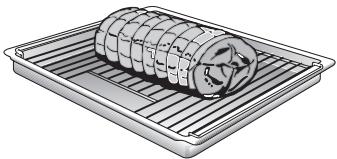
Roasting in an uncovered pot
Place the wire shelf into the universal pan and slide them together into the same shelf position.
Meat can be roasted in the oven in a particularly economical fashion if the weight of the cut exceeds 750 grams.
Rinse the universal pan and/or the roaster with water, and place the meat into it.
With fat meat and poultry, pour 125 to 250 ml of water (to suit the size and kind of roast) into the universal pan. At your discretion, baste lean meat with fat, or cover it with bacon strips.
The roast drippings collecting in the universal pan make a tasty gravy. Dissolve the drippings with hot water, bring to a boil, thicken with corn starch, season to taste and, if required, pass it through a strainer.
No preheating is required. Save energy by putting the roast into the oven while it is still cold.
Roasting in a covered pot
Place the meat into the roasting pot (or Dutch oven), cover it with a matching lid, and place it on the wire shelf in the oven. We recommend that beef roast be prepared in a covered roasting pot.
Roasting on the roasting sheet

Place the roasting sheet into the universal pan. The roasting sheet prevents soiling of the oven.
Grease and juice drippings from the roast are collected in the universal pan.
Tips Big, high roasts, goose, turkey, duck
| = Long roasting times, low temperatures |
| Medium sized, low roasts |
| = Medium roasting times, medium temperatures |
| Small, flat roasts |
| = Short roasting times, high temperatures |
Roasting time per cm of meat height without bones app. 13-15 minutes
Roasting time per cm of meat height with bones app. 15-18 minutes
We recommend using the lower of the stated temperatures first.
In general, the lower temperature ensures a more even browning.
For roasting, use only cookware with oven-proof handles.
Prepare large roast directly in the universal pan, without using the wire shelf.
Smaller cuts of meat can be roasted on aluminium foil. To do so, bend the edges of the foil upward, as if to form a dish, and place it on the wire shelf.
After the end of the selected roasting time and with the oven switched OFF, leave the roast in the closed oven for approx. 10 minutes.
The roast is not done on the inside Use a lower roasting temperature.
| Note: Higher temperatures do not shorten roasting times (done on the outside, raw on the inside). Choose slightly longer roasting times. |
Very moist roasts (e.g. roasts prepared with water) cause a lot of steam to generate in the oven that condenses on the oven door. You can let the steam escape from the oven and thereby reduce the forming of water droplets by briefly and carefully opening the oven door (once or twice, in case of longer roasting times more often).
Grilling
Notes on grilling
Exercise CAUTION when grilling. Always keep children at a safe distance.
Always close the oven door when grilling.
The grilling temperatures are variable.
Always use the wire shelf and the universal pan.
Always place food to be grilled in the centre of the wire shelf.
If the grill element (heating element) switches OFF automatically, the overheating protection was activated.
The radiator will be reactivated after a short period of time.
Place the wire shelf into the universal pan and slide them together into the same shelf position.
Circo-roasting
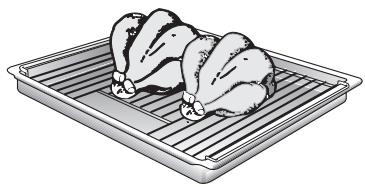
Use this method for particularly crispy poultry or roast (e.g., pork roast with rind).
Use the wire shelf and universal pan together. Turn large roasts after about half of the total grilling time has elapsed.
To prevent breakage after removing them from the oven, place glass utensils on a dry kitchen towel instead of cold or wet surfaces.
Dependent on the type of food being prepared, combination hot-air and surface grilling can cause an increased degree of oven soiling. Therefore, to prevent burning-in of the soil, thorough cleaning of the oven is recommended after each use.
Whole poultry should be turned after approx. two-thirds of the cooking time has elapsed. With duck and goose, pierce the skin under the wings to allow excess fat to drain off.
After the end of the selected roasting time and with the oven switched OFF, leave the roast in the closed oven for approx. 10 minutes.
Surface grilling
Full-surface grill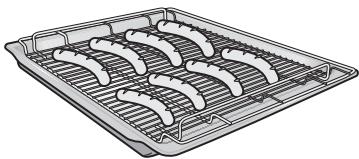
Centre-area grill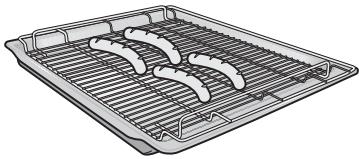
Used for smaller dishes having little height/thickness.
Always use the wire shelf and universal pan together.
Turn the food after approx. two-thirds of the grilling time has elapsed.
At your discretion, lightly baste the wire shelf and the food with oil.
Steam cooking
Attention
Can be operated with the system steam accessory only (Available as an optional accessory from specialist outlet).
Do not use the steam cooking setting until the oven has cooled down completely (room temperature).
Select only steam cooking mode for the heating system. Other settings are not permitted.
Switching on
Tap the Ⓐ button and select Steam cooking in the submenu. Acknowledge selection.
Steam cooking is indicated on the text display.
The steam cooking process is controlled automatically, the temperature is a fixed setting.
Not possible? flashes on the text display.
The oven has not cooled down fully. Switch the oven off and wait until it has cooled down to room temperature.
Restart steam cooking.
Further information can be found in the operating instructions for the Neff-System steamer.
Dough proving
Warning
Do not pour cold water into the oven while it is still hot.
Do not use dough proving until the oven has cooled down completely (room temperature).
Use normal tap water only, not distilled water.
When making yoghurt, do not put any water in the oven.
Switching on
- Carefully pour 50 ml of water (approx. 1/4 glass of water) into the base of the oven.
- Place the bowl containing the dough onto the middle of the wire shelf and insert at shelf position 1.
- Close the oven door.
- Tap the Ⓐ button and select Dough proving in the submenu. Acknowledge selection.
Dough proving is indicated on the text display; the dough proving process is controlled automatically, the temperature is a fixed setting.
Not possible? flashes on the text display.
The oven has not cooled down fully.
Switch the oven off and wait until it has cooled down to room temperature.
Restart dough proving.
| Yeast dough | Amount of flour | Proving period |
| Light dough (e.g. for pizza, plaited loaf) | 300–500 g | 25–30 min. |
| 750 g | 30–35 min. | |
| Heavy dough (e.g. for stolen) | 500 g | 40–60 min. |
| 750 g | 60–80 min. | |
| Light bread dough | 1000 g | 30–40 min. |
| Heavy bread dough | 1000 g | 50–70 min. |
| Yoghurt | 1 litre milk | 6 hours |
The details given in the table are average values. They can vary according to the type and amount of dough, as well as the condition of the ingredients, e.g. age and quality of the yeast.
Attention
Further processing, more information and recipes can be found in the enclosed dough-proving recipe book.
Before you start baking, remove the water left inside the oven. If any traces of lime are left behind, they can be dissolved with a little vinegar and wiped off using clear water.
Braising
Roasting on a low heat.
Ideal for all tender meats which are to be cooked rare or to perfection.
Advantages:
– cooking point reliably reached. – very juicy, tender and soft meat - braised meat does not require rest times and can easily be kept warm at a low temperature.
Note
Use fresh, clean meat only. Brown the meat at a very hot temperature and for an adequately long time.
Do not cover meat which is being cooked in the oven. Do not turn even fairly large pieces of meat.
No rest time required after braising. After braising, the inside of the meat always looks rare. This does not signify that the cooking time was too short.
All tender cuts of beef, pork, veal and lamb are suitable for this cooking method. The size of the piece of meat is crucial for browning and subsequent cooking times.
Switching on
- Tap the ☐ button and select Braising in the submenu. Acknowledge selection.
Please wait is indicated on the text display.
- As soon as your appliance has heated through (approx. 10 min.), a signal is emitted and you can put the meat in the oven. The text on the text display switches from Please wait to Insert food.
| Braised meat does not have such a high temperature as meat roasted in the usual way. | Ensure that the plates have been warmed (see "Plate warming") and that the sauces are served very hot. |
| Keep braised meat warm. | Switch to Keep warm operating mode and set the temperature to 60 °C. Small pieces of meat can be kept warm for up to 45 min., large pieces up to 2 h. |
| Dish | Browning on the hotplate in min. | Subsequent cooking in the oven in min. |
| Small pieces of meat | ||
| Cubes or strips | All round 1–2 | 20–30 |
| Small cutlets, steaks or medaillons | Per side 1–2 | 35–50 |
| Medium pieces of meat | ||
| Whole fillet (400–800 g) | All round 4–5 | 75–120 |
| Saddle of lamb (approx. 450 g) | Per side 2–3 | 50–60 |
| Double chop | All round 7–9 | 100–120 |
| Large pieces of meat | ||
| Whole fillet (from 900 g) | All round 6–8 | 120–150 |
| Joint (600–1000 g) | All round 8–10 | 120–150 |
| Joint (1100–2000 kg) | All round 8–10 | 180–270 |
Defrosting and warming
Defrosting with Circotherm
Important heating system information
For defrosting and cooking of frozen or deep-frozen foods, use only the circotherm heating system.
With all deep-frozen foods, follow the food processing company's instructions on the package.
As a rule, defrosted frozen or deep-frozen foods (especially meats) require less cooking time than fresh products, since freezing has a pre-cooking effect.
If frozen meat is placed in the oven, the defrosting time must be added to the required cooking time.
Always defrost deep-frozen poultry before cooking because the giblets must be removed.
For cooking deep-frozen fish, use the same temperatures as for fresh fish.
Deep-frozen ready-to-eat meals in aluminium dishes may be placed into the oven several at a time.
Shelf position
With 1 baking sheet: Shelf position 1
With 2 baking sheets: Shelf position 1 + 3.
All stated times are approximate guidelines that vary with the shape and volume of deep-frozen products.
Defrosting and cooking
Raw deep-frozen products or foods from a freezer always defrost at 50°C.
Higher defrosting temperatures may cause the food to dry out.
Defrost deep-frozen meals packed in aluminium foil or closed aluminium containers at a setting of 130 – 140°C.
Defrost and warm up deep-frozen baked goods at 100 – 140° C. Brush bread, rolls or yeast pastry lightly with water to make the crust more appealing.
Defrost dry deep-frozen yeast cakes at 160 – 170°C for 20 – 30 minutes.
Defrost moist deep-frozen yeast cakes (with fruit topping) at 160 – 170°C for 30 – 50 minutes after wrapping in aluminium foil to prevent cake from drying out.
Defrost and toast deep-frozen toast (with topping) at 160 – 170°C for about 20 minutes.
Frozen pizza:
Please follow the manufacturers' instructions.
Defrost
Especially suitable for delicate bakeware (e.g. cream gateaux).
- Tap the 📁 button and select Defrost in the submenu. Acknowledge selection. Defrost is indicated on the text display; the fan on the oven rear wall runs without heating.
- Depending on size and type of bakeware, defrost for 25–45 minutes.
- Then take out of the oven and leave to stand for 30–45 minutes.
For small quantities (pastries) the defrosting time is reduced to 15–20 minutes and the subsequent standing time to 10–15 minutes.
Plate warming
For warming plates and serving dishes.
Foods cool down less quickly in a prewarmed dish.
- Tap the Ⓐ button and select Plate warming in the submenu. Acknowledge selection. Plate warming is indicated on the display. Plate warming has a fixed temperature.
- Place the dish in the middle of the baking wire shelf.
Always use an oven cloth or oven gloves when taking the dish out of the oven.
Keep warm
For keeping food warm.
- Tap the Ⓐ button and select Keep warm in the submenu. Acknowledge selection. Keep warm and Select temperature are indicated on the text display.
- Set the required temperature with the roller. Note that only settings from 60–120 °C are possible for Keep warm.
- Place the food in the oven to keep warm.
Do not keep food warm for longer than two hours, as warm food perishes more easily.
Sabbath setting
The oven runs continuously for 24–73 hours at a temperature of 80–90°C. Food can be kept warm or can be warmed without having to switch the oven on or off during this period.
Note
The oven light is switched off while the Sabbath setting is running.
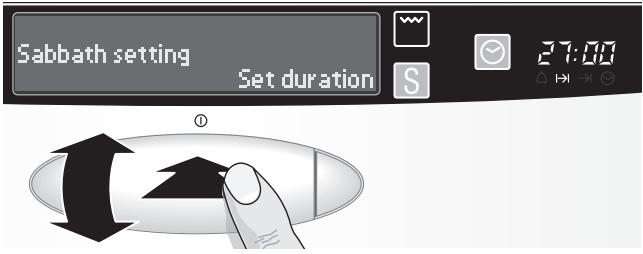
Setting
- Touch the Ⓐ button and select Sabbath setting in the submenu. Acknowledge setting. Set duration is indicated on the text display.
- Set the required duration with the roller and acknowledge the setting by pressing the roller or wait for automatic acceptance after 3 seconds.
Sabbath setting is indicated on the text display; the Sabbath setting is active for the set time.
Changing duration
You can change the time setting via Set time.
- To do this, press the ⏻ button and select Set time in the submenu. Acknowledge selection.
- Correct the duration with the roller.
Memory function
To facilitate the preparation of your favourite dishes or lavish foods, you can record the cooking process of 10 foods and play them back at any time. The oven saves the set operating mode, temperature and duration and up to four other changes which you make during the recording.
Recording a new programme
- Switch the oven on.
- Tap the Ⓐ button and select Memory function in the submenu.
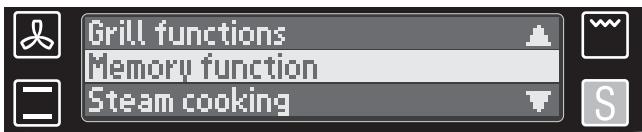
- Select New programme in the submenu. Three oven functions are available (special functions cannot be selected):
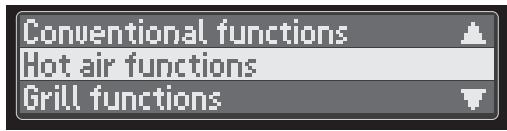
- Select a function and acknowledge your selection to access the associated operating modes.
- Select the required operating mode and acknowledge your selection.
The selected operating mode and the temperature setting prompt are indicated on the text display; the recommended temperature lights up.
- Set the required temperature and acknowledge your selection.
The oven now starts to heat.
- Start programme is indicated on the text display.
Circotherm
Start programme
Decide whether the oven is to be preheated or not.
Without preheating
- Put the food into the oven.
With preheating
- Wait until the oven has heated up (see Checking the temperature). Then put the food in the oven.
- Then press the roller to acknowledge start. Recording begins.
The current temperature is saved, the total time runs on the clock display; the text on the text display switches from Start programme to Stop programme.
- Bake, roast or grill your food as usual.
Ending programme recording
As soon as start is acknowledged, Stop programme is indicated on the text display.
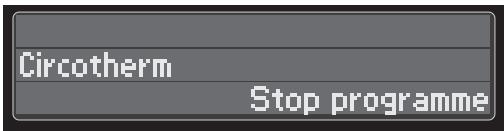
Press the roller when you want to end recording. Three options are available:
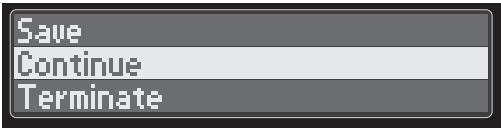
Save
if you want to save the recording. The recording ends.
Allocating a name
In the next step give the recording a name. Compose the name character by character (max. 20).
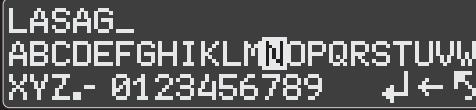
Select character:
Rotate the roller
Accept character:
Press the roller
Delete character:
Save name:
Terminate inputting of name:

Programme display: Special functions / Memory function.
Continue
If you want to continue recording, you are taken back to recording.
Terminate
If you want to end recording WITHOUT saving. The recording ends.
Note
Once a programme has been recorded, it cannot be changed, but may be cleared.
Recording several programme steps
During the recording process, you can make up to four temperature and/or operating mode changes. These changes are recorded and played back again when the programme is selected, enabling you to customise your programme.
A change is regarded as:
- Operating mode change
- Temperature change
- Operating mode change including temperature change.
Changing temperature
Start the recording as described in "Recording a new programme".
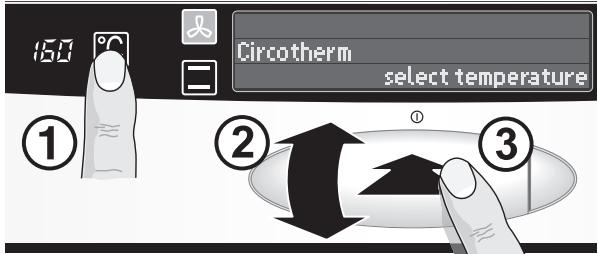
- To change the temperature while recording, tap the ℃ button. The temperature setting prompt flashes on the text display.
- Change the temperature by rotating the roller.
- Acknowledge the settings by pressing the roller, otherwise the appliance automatically jumps back to the previous temperature after 3 seconds.
The temperature change is recorded.
Changing operating mode
Start the recording as described in "Recording a new programme".
- To change the operating mode while recording, tap the oven function button in the submenu in which the required operating mode is located.
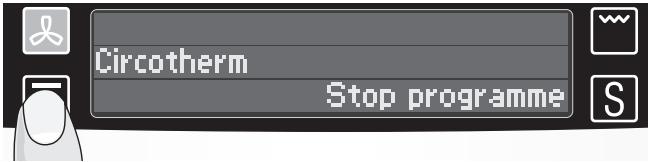
The submenu with the operating modes is displayed.
- Select the required operating mode – either by repeatedly tapping the oven function buttons or by rotating the roller.
- Acknowledge the settings by pressing the roller.
- The temperature setting prompt flashes on the text display; the recommended temperature lights up.
- Acknowledge the settings by pressing the roller.
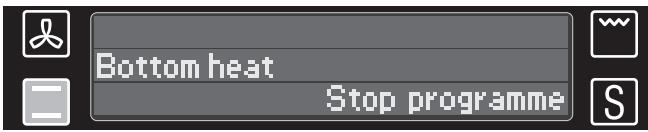
The change to the operating mode and, if required, the temperature change are recorded.
Playing back programme
Note
- Touch the Ⓐ button and select Memory function in the submenu.
- Select the required programme in the submenu. As soon as the appliance reaches the start temperature, a signal is emitted.
- Put the food in the oven according to the prompt on the text display and start the programme by pressing the roller. The programme runs. If there are several programme steps, a signal is emitted after each step.
- When the programme ends, a signal is emitted; Programme finished flashes on the text display.
- Acknowledge the end of the programme by pressing the roller. The oven switches off.
When a programme is played back, each individual programme step counts down on the clock display.
Note that the oven saves settings such as preheating. Play back the programme exactly the same as recording it.
When a programme is selected, the bar indicates the degree of heating:
All bars lit → preheated
No bars lit → not preheated.
When a programme is played back, "Please wait, oven too cold?" flashes on the text display.
The oven has not yet reached the saved start temperature. Wait for the signal and the prompt to put the food in the oven and start the programme.
Not possible, oven too hot?
The temperature is above the saved start temperature. Switch the oven off. Wait until it has cooled down adequately. Restart the programme.
Displaying programme steps
You can display the settings of the individual programme steps.
- Tap the Ⓐ button and select Memory function in the submenu.
- Highlight the required programme.
- Tap the ⓘ button and rotate the roller.
The settings for each programme step are indicated on the displays:
- Text display: operating mode and programme step
- Temperature display: saved temperature
- Bar which monitors heating up: preheating degree
- Clock display: duration of the programme steps.
Deleting programme
- Touch the Ⓐ button and select Memory function in the submenu.
- Select Delete programme in the submenu. All recorded programmes are displayed.
- Select a programme and acknowledge the deletion process by pressing the roller. Programme is deleted.
- Select back to return to the original menu.
Note
Once programmes have been deleted, they cannot be restored.
Cleaning and Care
Important cleaning basics
For cleaning, do not use abrasives, no corrosive cleaners, and no sharp objects.
Do not scratch off burnt-in food residues, but soak them off with a moist cloth and dishwashing detergent.
Cleaning products we particularly recommend can be purchased from our customer service.
Appliance exterior
Stainless steel/ aluminium front
Use commercially available detergents applied to a soft, moistened cloth or a chamois.
Do not use aggressive cleaning agents, abrasive sponges, or coarse cleaning cloths.
For heavy soiling, use commercial cleaning agents on matted stainless steel or aluminium surfaces.
Please observe the manufacturer's instructions.
Enamel and glass
Use commercially available detergents applied to a soft, moistened cloth or a chamois.
Oven door pane
The temperature of the pane inside the oven door is reduced by a heat-reflecting coating.
The reduced temperature ensures that visibility through the oven door window is not impaired.
When the oven door is open, this coating may have a bright appearance. This is quite normal and does not indicate a quality defect.
Oven interior
Clean the oven after each use, especially after roasting or grilling.
Food remnants burn in when the oven is reheated. The baked-in remnants are very difficult to remove once burnt in.
Note:
To prevent soiling, use:
- CircoTherm hot air. The CircoTherm hot air mode causes less soiling than the others. • the universal pan to bake very moist cakes. • suitable utensils (frying pan) for frying.
For easier cleaning
you can switch on the oven lamp and take off the oven door.
For cleaning the mating surface of the oven door at the front of the oven, the door should be removed.
Enamel areas in the oven
Use hot soapy water or a vinegar solution.
It is best to use oven cleaner if the oven is very dirty. Only use oven cleaner in a cold oven.
We recommend cleaning gels because these can be applied with greater precision.
⚠ Do not clean the warm oven with any of the cleaning products specifically designed for this purpose.
Leave the oven open so that it can dry after cleaning.
Note:
Enamel is baked on at very high temperatures. This can cause some slight colour variation. This is normal and does not affect the function. Do not use coarse scouring pads or strong cleaning agents to remove such discolorations.
The edges of thin trays cannot be completely enamelled. As a result, these edges can be rough. Anti-corrosion protection is guaranteed.
Catalytic oven surfaces
Cleaning the catalytic surfaces of the oven
The rear panel in the oven is coated with a self-cleaning enamel. The surface cleans itself while the oven is in operation. Large splashes sometimes only disappear after the oven has been used several times.
Should the enamel become slightly stained, this will not affect its self-cleaning properties.
Important information
Never use abrasive cleaning agents. They will scratch and destroy the self-cleaning enamel.
Never clean the self-cleaning enamel with oven cleaner. If you accidentally apply oven cleaner to the self-cleaning enamel, remove immediately with a sponge and plenty of water.
EasyClean® System
The oven cleaning function featured in your oven is intended to help you keep your oven neat and tidy. An amount of cleaning solution is vaporised automatically. The combined effects of heat and steam soften the soil deposits on the oven wall enamel and facilitate their removal.
Caution:
Never pour cold water into the oven while it is still hot.
The cleaning system can only be activated when the oven has cooled down completely (room temperature).
Use normal water only, and no distilled water.
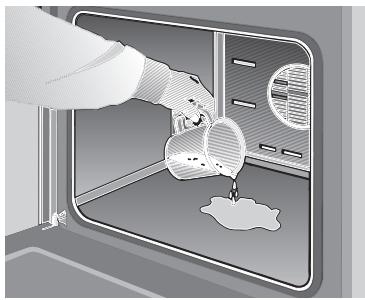
Switching on:
- Take the baking sheet and the universal pan out of the oven. The grill can remain in the oven.
- Carefully pour approx. 0.4 litres of water mixed with a little dishwashing detergent into the floor pan of the oven.
In the case of heavy soil build-up, you may wish to allow the cleaning solution to soak in for a while before you activate the cleaning function.
- Close the oven door.
- Tap the Ⓐ button and select EasyClean in the submenu.
EasyClean in operation is indicated on the text display. The cleaning aid runs automatically.
The programme ends after 21 minutes. A signal is emitted and EasyClean end is indicated on the text display.
Not possible? flashes on the text display.
The oven has not cooled down fully.
Switch the oven off and wait until it has cooled down to room temperature.
Restart EasyClean.
After deactivating the oven cleaning function
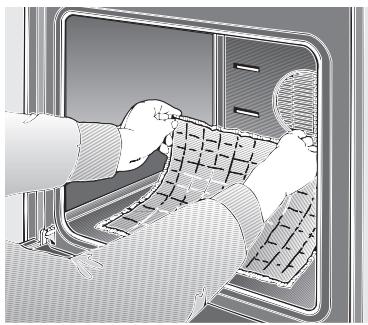
Rapid drying
Cleaning tips:
Never leave the residual water in the oven for any length of time, e.g. overnight.
- Open the oven door and pick up the remaining water with a large absorbent sponge cloth.
- Using the detergent-soaked sponge cloth, a soft brush or a plastic pot scrubber, wipe off the oven interior. Stubborn soil remnants can be removed with a cleaning scraper for glass-ceramic. Caution: Use the scraper carefully, and do not apply the tool at too flat an angle, because the enamel could be scratched!
- Calciferous deposits may be removed with a cloth soaked in vinegar.
- Wipe clean with clear water and dry with a soft cloth (do not forget to wipe under the oven door seal).
Cleaning tips:
If the oven is heavily soiled, the procedure may be repeated after the oven has cooled.
If the oven is heavily soiled with grease, e.g. after roasting or grilling, we would recommend rubbing any stubborn dirt with detergent before activating the oven cleaning function.
After cleaning, leave the oven door in its slanted detent position, i.e., at a 30-degree angle, to allow the interior enamel surfaces to dry thoroughly.
- Place the oven door into the slanted detent position, at an angle of approximately 30°.
- Press the 🔒 button and select Circotherm in the submenu.
- Set the temperature to 50°C with the roller. Duration: 5 minutes.
- Then switch the oven off again.
Removing/installing the oven door
Oven door
Note: To make the manual cleaning steps following the automatic oven cleaning function more convenient, the appliance features the following options.
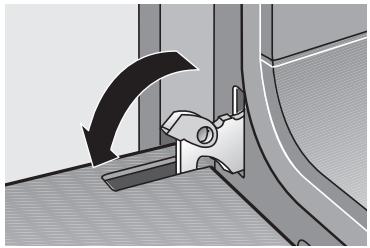
Removing the oven door
⚠ When pulling the door out, make sure that you do not reach into the hinge. There is a risk of injury.
- Fully open the oven door.
- Move the catch levers on the right and left-hand sides to the fully open position.
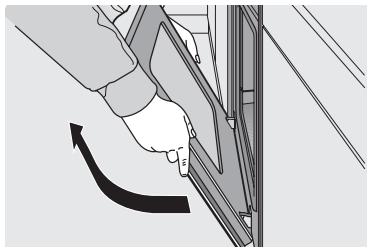
- Incline the oven door until you feel resistance. Take hold of the left and right sides of the oven door with both hands, close it a little and pull out.
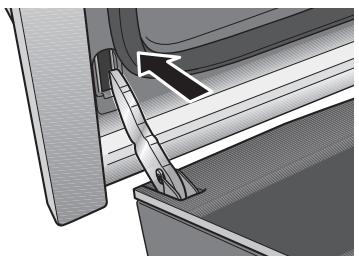
Hanging the oven door
- Set both hinges into their respective receptacles on the left and right, and swing the oven door downward.
- Close the catch levers on the left and right.
- Close the oven door.
Lowering the heating element
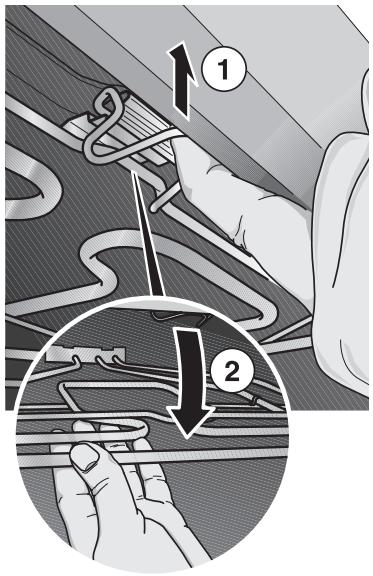
Shelf support
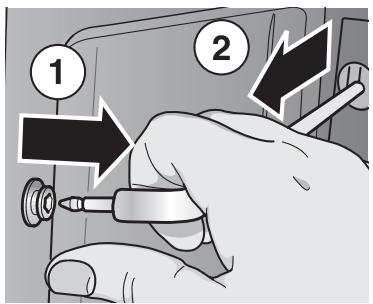
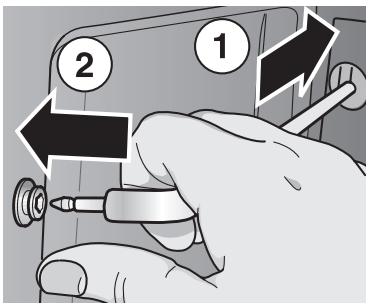
In order to clean the oven ceiling more easily turn down the grill heating element.
Warning: The heating element must have cooled down.
- Press the retaining clip upward until you hear the click.
- Hold the heating element and fold it down.
After cleaning
Fold the heating element back up.
Pull the retaining clip forward and press it up until it clicks into place.
Removing
- Pull the shelf support out of its bearing bush.
- Remove the shelf support. Clean the shelf support using washing-up liquid and pan scrapers or brushes.
Attaching
After cleaning, re-install the shelf support, following the instructions in reverse order.
Telescopic pull-outs
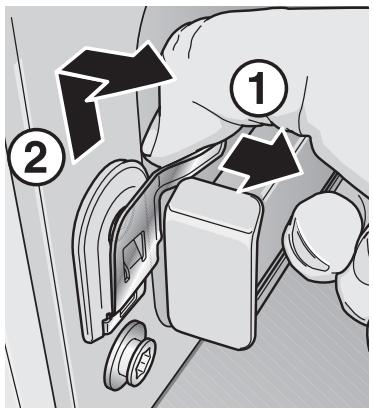
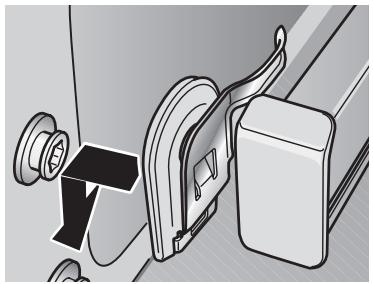
Removing
- Press the coach spring down.
- Push the telescope upwards and remove it. Clean the telescopic pull-outs using washing-up liquid and pan scrapers or brushes.
Attaching
- Insert the telescopic pull-out at the rear.
- Insert the telescopic pull-out into the guide and press down until it locks into position. Always insert the telescopic pull-outs all the way.
- Do not close the oven door until all telescopic pull-outs have been inserted.
Attention: The telescopic pull-outs become hot when the oven is on. Risk of burns when the telescopic pull-outs are pulled out.
Settings
| You can access settings by rotating the roller in the main menu until Settings are highlighted in red on the text display. Acknowledge the selection by pressing the roller or wait for automatic acceptance after 3 seconds. | |
| Signal intensity | Select this option to set the volume of the signal.The higher the intensity, the quicker the signal sequence. |
| Signal duration | Select this option to set the duration of the signal.After selecting this option, set the required signal duration with the roller.The signal can be terminated by touching the button. |
| Signal OFF (ON) | Select this option to switch off the signal completely.To switch on the signal again, select Signal ON. |
| Select language | Select this option to select a new operating language.The following languages are available: Deutsch EnglishFrançais ItalianoNederlandsEspañolΣΛΛΗΑΝΙΚΑ Attention:The language is changed immediately following acknowledgement by pressing the roller.We recommend setting only those languages which you understand. |
| Inadvertently set the wrong language?Switch the appliance off.Touch the button for 5 seconds.The selectable languages are indicated again on the text display. | |
| Clock display OFF (ON) | Select this option to switch the clock display off.To switch the clock display on again, select Clock display ON. |
Service and Repair Information
In the event of problems or repairs that you cannot solve or perform yourself, our customer service will be happy to help. Check the customer service directory for a customer service facility in your area.
Caution: Calling the customer service because of an operator error can be very costly!
E No and FD No
You can find this information on the appliance's nameplate. The nameplate is located on the appliance, behind the oven door, on the left bottom edge of the oven.
In the event of a customer service request, please have the following information handy:
E-Number
FD
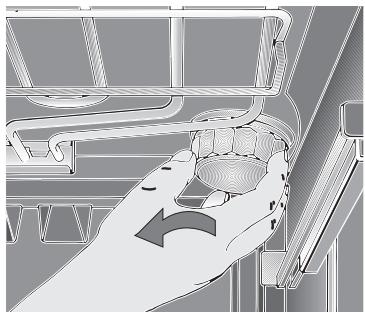
Replacing the oven light
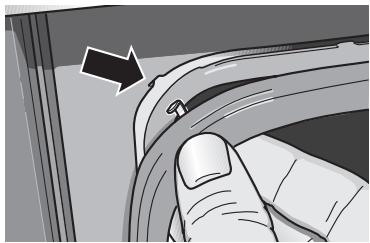
Replacing the oven door seat
Caution: Unplug the appliance or remove the fuse! By actuating the miniature circuit-breaker or by unscrewing the fuses in the fuse box in your house.
- To prevent damage, place a dish towel into the cold oven.
- Unscrew the lamp cover by turning it counter-clockwise.
- Replace the lamp.
- Type: Incandescent bulb E 14, 220 – 240 V, 40 W, heat-resistant to 300°C
- You may obtain this bulb from your customer service or from your appliance dealer.
Remove the defective oven door seal by simply unhooking it.
You may obtain the new oven door seal from your customer service.
Replacing the halogen bulb for NeffLight
Replacement bulbs and auxiliary tool are available from customer service.
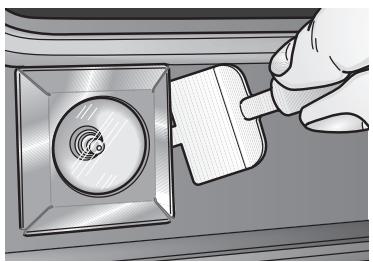
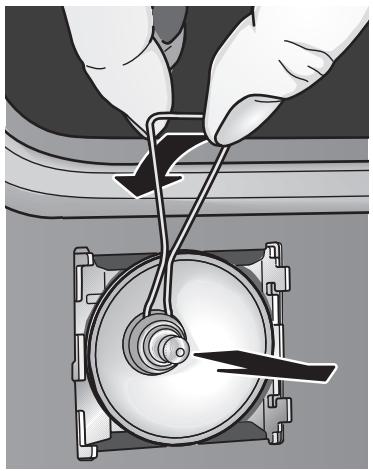
Note
Only a technician may work on the appliance electronics.
Before starting such work, isolate the appliance: By actuating the automatic circuit breakers or unscrewing the fuses in the fuse box in your house.
Before replacing the halogen bulb, detach the oven door.
Halogen bulbs become very hot when switched on. Even some time after they have been switched off, there is a risk of burns.
- Take the auxiliary tool, insert it into the slot and prise out the cover.
- Pull out the halogen bulb with the other auxiliary tool.
- Replace the halogen bulb.
Attention: Plug-in bulb holder.
Take hold of the halogen bulb with a clean cloth.
- Halogen bulb type G4, 12 volts, 20 watts, heat-resistant up to 300 °C.
- Halogen bulbs are available from customer service.
If the light does not function, check whether the bulbs have been inserted correctly.
Troubleshooting Guide
Calling customer service is not always necessary. In some cases, you can remedy the situation yourself. The following table may contain some helpful tips.
Important general safety guidelines:
Service or repair work on the electronic components may only be performed by a qualified expert. Without exception, prior to starting such repairs, the appliance must be disconnected from the mains. This may be accomplished by tripping the automatic fuse or by removing the fuse from the fuse box that controls your flat or apartment.
| Problem | Possible cause | Remedy |
| ... if there is a general failure of all electrical functions, i.e., the control lamps have suddenly ceased to function. | Defective fuse | Check the fuse in the fuse box, and replace if required. |
| ... if the oven suddenly stops functioning? | Electronic clock has been set to automatic timer (see "Automatic timer"). | Delete automatic timer. In clock functions select and acknowledge Delete times. |
| ... if the oven suddenly stop functioning and the electronic clock flashes 0:00? | The power supply was briefly interrupted. | Reset the time of day. |
| ... if electronically control functions fail? | Energy pulses (e.g. lightning flash). | Reset the relevant functions. |
| ... if a foreign language is indicated on the display. | Wrong operating language set (see "Start up"). | Switch off the appliance. Touch the button for 5 seconds.Select new language. |
| ... if the oven accepts settings by itself? | Fixed programming. | Setting automatic accepted after 3 seconds without manual setting. |
| ... if the appliance no longer heats up and the colon on the clock flashes? | Demo mode active, heating elements locked. | To deactivate the demo mode, touch the 📁 and S buttons for 5 seconds. |
| ... if the appliance cannot be operated and Controls locked is indicated on the display? | Lock or childproof lock active (see "Safety features"). | To deactivate, touch the S and □ buttons for 3 seconds. Controls locked goes out. |
| ... if the appliance cannot be operated and Permanent lock is indicated on the display? | Permanent lock or childproof lock active (see "Safety features"). | To deactivate, touch the 📁 and □ buttons for 6 seconds. Permanent Lock goes out. |
| ... if not possible flashes on the display after the operating mode was switched on? | The oven has not cooled down fully, e.g. due to prolonged use of the oven. | Wait until the oven has cooled down. Then restart the operating mode. |
| ... if your appliance has automatically switched off and the temperature display 000 flashes? | Appliance has automatically switched off to prevent overheating (see "Safety features"). | Continue using the oven by rotating the roller or selecting another operating mode. |
| ... if smoke is generated during roasting or grilling? | Roasting temperature to high.Wire shelf or universal pan slid in incorrectly. | Place wire shelf into universal pan and insert together in shelf position. |
| ... if liquids or thin viscous dough are distributed at a visibly uneven thickness? | The appliance has not been placed or installed plumb-and-level. | Level the appliance using the leveling feet, or check the installation. |
| ... if the oven shows increasing condensation water? | Normal occurrence, e.g. in the case of cakes with very moist topping (fruit) or roasts. | Briefly open the oven door occasionally during baking or roasting, wipe up the condensation water after operation. |
| ... if enamelled slide-in parts show mat bright stains? | Normal occurrence due to dripping meat juices. | Not available. |
| ... if the glass pane or window of the oven door become clouded? | Normal occurrence, due to existing temperature difference. | Switch on the oven for app.5 minutes at 100°C. |
| ... if the same settings occur after you have switched the appliance off and immediately on again? | Memory effect.Prevents the appliance from being switched off inadvertently. Appliance saves the last setting. | Switch your appliance off.Wait 7 seconds before you switch the appliance on again. |
| ... if the panes of the oven door are dirty on the inside after some time of use? | Normal soiling.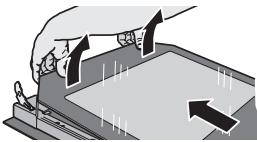 | Remove the oven door and place it facing down on a clean and soft surface.Take hold of the door glass next to the hinges, disengage and raise slightly.Remove the door glass towards the hinges.Lift and disengage inner door glass,e.g. using a spatula, on one side and then lift and disengage on the other side.Attention!The light duct must not be cleaned as it is very sensitive to scratches.Installation after cleaning:Insert inner door glass into the holder.First engage the right side and then the other side.Hang door glass and press down next to the hinges until it clicks into place. |


- INSTRUCTIONS FOR USE
- TABLE OF CONTENTS
- IMPORTANT INFORMATION
- YOUR NEW COOKER
- BEFORE USING YOUR APPLIANCE FOR THE FIRST TIME
- ELECTRONIC CLOCK
- OVEN OPERATING MODES
- OPERATING THE OVEN
- SAFETY FEATURES
- BAKING
- ROASTING
- GRILLING
- DEFROSTING AND WARMING
- PACKAGING AND OLD APPLIANCES
- BEFORE INSTALLATION
- TRANSPORT DAMAGE
- ELECTRICAL CONNECTION
- SAFETY INFORMATION
- HOT OVEN
- REPAIRS
- REASONS FOR DAMAGE
- SHELF POSITIONS
- NEFFLIGHT
- ADVANTAGES
- DOOR CONTACT SWITCH
- SAVING ENERGY
- ACCESSORIES
- NOTE
- START-UP
- PRELIMINARY CLEANING
- INITIAL BURN-IN
- SUBSEQUENT CLEANING
- CLOCK FUNCTIONS
- SETTING THE TIME OF DAY
- MINUTE TIMER
- AUTOMATIC TIMER
- TIME PRESELECTION AUTOMATIC SWITCH ON AND SWITCH OFF
- CHECKING, CORRECTING AND CANCELLING SETTINGS
- SPECIAL FUNCTIONS
- HOT AIR FUNCTIONS
- CIRCOTHERM
- DEFROST
- CIRCOTHERM INTENSIVE
- BREAD BAKING SETTING
- CONVENTIONAL FUNCTIONS
- TOP AND BOTTOM HEAT (CONVENTIONAL HEATING SYSTEM)
- BOTTOM HEAT
- ADVANTAGE
- BRAISING
- GRILL FUNCTIONS
- FULL-SURFACE GRILL
- CENTRE-AREA GRILL
- CIRCO-ROASTING
- SPECIAL FUNCTIONS S
- MEMORY FUNCTION
- STEAM COOKING
- DOUGH PROVING
- PLATE WARMING
- KEEP WARM
- SABBATH SETTING
- EASYCLEAN®
- OVEN LIGHT
- SWITCHING ON AND OFF
- SELECTING THE OPERATING MODE
- VIA ROLLER
- VIA OVEN FUNCTION BUTTONS
- SETTING THE TEMPERATURE
- CHANGING THE OPERATING MODE
- CHANGING THE TEMPERATURE
- NOTES
- RAPID HEAT UP
- CANCELLING
- CHECKS
- CHECKING THE TEMPERATURE
- CHECKING THE HEATING
- RESIDUAL HEAT DISPLAY FOR THE OVEN
- LOCK
- PERMANENT LOCK
- AUTOMATIC SAFETY OFF FUNCTION
- IF THE CAKE BOTTOM GETS TOO DARK
- IF THE CAKE BOTTOM STAYS TOO LIGHT
- PLACE THE WIRE SHELF INTO THE UNIVERSAL PAN AND SLIDE THEM TOGETHER INTO THE SAME SHELF POSITION
- EXERCISE CAUTION WHEN GRILLING. ALWAYS KEEP CHILDREN AT A SAFE DISTANCE
- SURFACE GRILLING
- ATTENTION
- SWITCHING ON
- WARNING
- DEFROSTING WITH CIRCOTHERM
- DEFROSTING AND COOKING
- RAW DEEP-FROZEN PRODUCTS OR FOODS FROM A FREEZER ALWAYS DEFROST AT 50°C
- FROZEN PIZZA
- SETTING
- CHANGING DURATION
- RECORDING A NEW PROGRAMME
- WITHOUT PREHEATING
- WITH PREHEATING
- ENDING PROGRAMME RECORDING
- SAVE
- ALLOCATING A NAME
- CONTINUE
- TERMINATE
- RECORDING SEVERAL PROGRAMME STEPS
- CHANGING TEMPERATURE
- CHANGING OPERATING MODE
- PLAYING BACK PROGRAMME
- DISPLAYING PROGRAMME STEPS
- DELETING PROGRAMME
- CLEANING AND CARE
- IMPORTANT CLEANING BASICS
- APPLIANCE EXTERIOR
- STAINLESS STEEL/ ALUMINIUM FRONT
- ENAMEL AND GLASS
- OVEN DOOR PANE
- OVEN INTERIOR
- FOR EASIER CLEANING
- ENAMEL AREAS IN THE OVEN
- CATALYTIC OVEN SURFACES
- EASYCLEAN® SYSTEM
- CAUTION
- AFTER DEACTIVATING THE OVEN CLEANING FUNCTION
- RAPID DRYING
- CLEANING TIPS
- REMOVING/INSTALLING THE OVEN DOOR
- OVEN DOOR
- REMOVING THE OVEN DOOR
- HANGING THE OVEN DOOR
- LOWERING THE HEATING ELEMENT
- SHELF SUPPORT
- AFTER CLEANING
- REMOVING
- ATTACHING
- TELESCOPIC PULL-OUTS
- SETTINGS
- SERVICE AND REPAIR INFORMATION
- E NO AND FD NO
- E-NUMBER
- FD
- REPLACING THE OVEN LIGHT
- REPLACING THE OVEN DOOR SEAT
- REPLACING THE HALOGEN BULB FOR NEFFLIGHT
- ONLY A TECHNICIAN MAY WORK ON THE APPLIANCE ELECTRONICS
- HALOGEN BULBS BECOME VERY HOT WHEN SWITCHED ON. EVEN SOME TIME AFTER THEY HAVE BEEN SWITCHED OFF, THERE IS A RISK OF BURNS
- TROUBLESHOOTING GUIDE
- IMPORTANT GENERAL SAFETY GUIDELINES
Brand : NEFF
Model : B1664N0
Category : Built-in oven