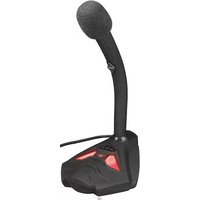
TRUST STARZZ 21678 - Microphone

STARZZ 21678 - Microphone TRUST - Free user manual and instructions

Find the device manual for free STARZZ 21678 TRUST in PDF.

📄 2 pages English EN Download 💬 AI Question 10 questions ⚙️ Specs
Notice TRUST STARZZ 21678 - page 1
Pick your language and provide your email: we'll send you a specifically translated version.
Product Type Microphone
Brand Trust
Model STARZZ 21678
Connectivity 3.5 mm jack
Power Source Plug-in power (via 3.5 mm jack)
Frequency Response 100 Hz - 16 kHz
Impedance 2.2 kΩ
Sensitivity -58 dB ± 3 dB
Cable Length 1.8 m
Directional Pattern Omnidirectional
Dimensions 10 x 10 x 40 mm (microphone head); 150 mm total length
Weight 50 g
Material Plastic
Color Black
LED Indicator No
On/Off Switch No
Compatible With PC, laptop, gaming consoles (via adapter), audio devices with 3.5 mm input
Plug and Play Yes
Operating System Compatibility Windows, macOS, Linux, Chrome OS
Package Contents Microphone, user manual
Warranty 2 years
Maintenance Wipe with a dry cloth; avoid moisture
Safety Keep away from water; do not disassemble
Spare Parts None specific; cable not replaceable

Frequently Asked Questions - STARZZ 21678 TRUST

How do I connect the Trust STARZZ 21678 microphone to my computer?
Simply plug the 3.5 mm jack into the microphone port on your computer. The microphone is plug and play and requires no additional drivers.
Does the microphone work with PlayStation or Xbox?
It can work with gaming consoles if they have a 3.5 mm input. For Xbox One or PS4, you may need an adapter. Compatibility is not guaranteed.
Can I adjust the volume on the microphone itself?
No, the microphone has no built-in volume control. Adjust volume through your device's sound settings.
Is the microphone omnidirectional or unidirectional?
The Trust STARZZ 21678 is omnidirectional, meaning it picks up sound from all directions.
What is the cable length?
The cable is approximately 1.8 meters long, giving you flexibility in placement.
Does it have a mute button?
No, there is no mute button on the microphone. You can mute it using software settings.
Can I use this microphone for recording vocals or podcasts?
Yes, it is suitable for basic vocal recording, online meetings, and podcasts, but it is a budget microphone with limited frequency range.
How do I clean the microphone?
Wipe the exterior with a soft, dry cloth. Do not use liquids or cleaners. Keep the microphone away from moisture.
Is the microphone compatible with smartphones?
It works with smartphones that have a 3.5 mm headset jack. For newer phones without a jack, use a USB-C or Lightning adapter.
What should I do if the microphone is not working?
First, check that the jack is fully inserted. Ensure your device's audio input is set to the microphone. Try on another device. If issues persist, contact Trust support.

User questions about STARZZ 21678 TRUST

0 question about this device. Answer the ones you know or ask your own.

Ask a new question about this device

The email remains private: it is only used to notify you if someone responds to your question.

No questions yet. Be the first to ask one.

Download the instructions for your Microphone in PDF format for free! Find your manual STARZZ 21678 - TRUST and take your electronic device back in hand. On this page are published all the documents necessary for the use of your device. STARZZ 21678 by TRUST.

USER MANUAL STARZZ 21678 TRUST

4
Microphone Properties General | Options | Levels | Advanced | | --- | --- | --- | --- | | Microphone | 100 | 4 | | Microphone Spect | -36.0 dB | OK Cancel Apply

FAQ

Frequently asked questions www.trust.com/21678/faq

Trust International BV - Laan van Barcelona 600 - 3317DD, Dordrecht, NL

© 09-09-2016 Trust All rights reserved.

Trust

USB Microphone

for PC and laptop

Quick Installation Guide

TRUST STARZZ 21678 - Trust - 1

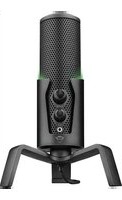
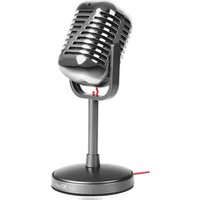
natural_image Black,Niust microphone with metallic grille and needle (no visible text or symbols)
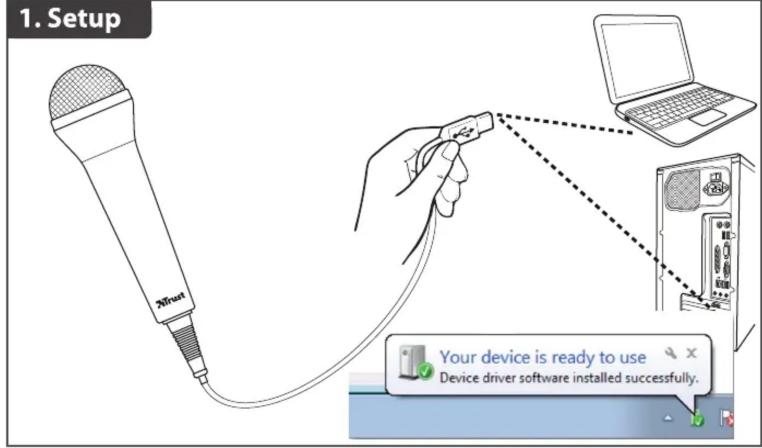
1. Setup 20/34 Your device is ready to use Device driver software installed successfully.

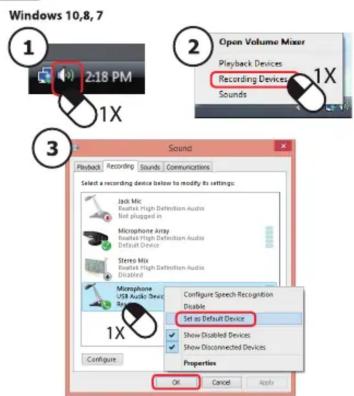
  1. Installation - Windows 10/8/7
    TRUST STARZZ 21678 - Trust - 3

Windows 10.8.7 1 2:18 PM 1X 3 Open Volume Mixer Playback Devices Recording Devices Sounds 1X Sound Playback Recording Sounds Communications Select a recording device before to modify its settings: Jab Mic Realtek High Definition Audio Not plugged in Microphone Airy Realtek High Definition Audio Default Device Stereo Mix Realtek High Definition Audio Disabled Microphone USB Audio Store 1X Configure Configure Speech Recognition Disable Set as Default Device Show Disabled Devices Show Disconnected Devices Properties OK Cancel Apply

Table of contents Click a title to access it
Manual assistant
Powered by Anthropic
Waiting for your message
Product information

Brand : TRUST

Model : STARZZ 21678

Category : Microphone