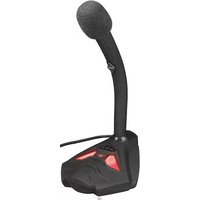
Reyno GXT 211 - Microphone TRUST - Free user manual and instructions
Find the device manual for free Reyno GXT 211 TRUST in PDF.


Pick your language and provide your email: we'll send you a specifically translated version.
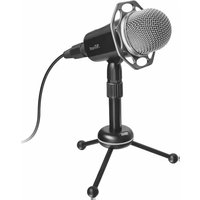
| Type | Condenser USB Microphone |
| Model | Reyno GXT 211 |
| Brand | Trust |
| Polar Pattern | Cardioid |
| Sample Rate | 48 kHz |
| Bit Depth | 16 bit |
| Frequency Response | 50 Hz - 16 kHz |
| Interface | USB 2.0 Type-A |
| Headphone Jack | 3.5 mm (monitoring) |
| Dimensions (HxWxD) | 110 x 50 x 50 mm |
| Weight | 300 g |
| Cable Length | 1.8 m |
| Power Supply | USB bus powered (5V) |
| Compatibility | Windows, macOS, PlayStation 4/5 |
| Main Functions | Plug & Play, Mute Button, Volume Control |
| Stand | Desktop tripod stand included |
| Cleaning | Wipe with a soft, dry cloth |
| Safety | Keep away from liquids and extreme temperatures |
| Spare Parts | Not available separately |
| Repairability | Product is not user-serviceable |
Frequently Asked Questions - Reyno GXT 211 TRUST
How do I set up the Trust Reyno GXT 211 microphone?
Simply connect the microphone to a USB port on your computer. It is plug and play and requires no additional drivers. Adjust the volume and mute using the controls on the microphone.
Is the Trust Reyno GXT 211 compatible with PlayStation?
Yes, it is compatible with PlayStation 4 and PlayStation 5. Connect via USB and use the headphone jack for audio monitoring.
Can I adjust the microphone gain?
The microphone has a built-in volume control for monitoring, but gain adjustment is done through your computer's sound settings.
How do I mute the microphone?
Press the mute button on the front of the microphone. A red LED indicates when the microphone is muted.
What is the polar pattern of this microphone?
The Reyno GXT 211 uses a cardioid polar pattern, which captures sound from the front and reduces background noise.
Does the microphone work with Mac?
Yes, it is compatible with macOS. It will be recognized as a USB audio device without additional software.
Why is there no sound from the microphone?
Ensure the microphone is selected as the input device in your system sound settings. Check that the mute button is off and the volume is turned up.
Can I use the microphone without the stand?
Yes, the microphone has a standard 5/8'' thread mount, so it can be attached to a boom arm or other microphone stand.
How do I clean the microphone?
Wipe the exterior with a soft, dry cloth. Do not use any liquids or cleaning agents, and avoid getting moisture into the grille.
What should I do if the microphone is not detected?
Try a different USB port or cable. Restart your computer. If the issue persists, test on another device to rule out hardware failure.
User questions about Reyno GXT 211 TRUST
0 question about this device. Answer the ones you know or ask your own.
Ask a new question about this device
No questions yet. Be the first to ask one.
Download the instructions for your Microphone in PDF format for free! Find your manual Reyno GXT 211 - TRUST and take your electronic device back in hand. On this page are published all the documents necessary for the use of your device. Reyno GXT 211 by TRUST.
USER MANUAL Reyno GXT 211 TRUST


4.

ON


OFF



Manual assistant
Powered by Anthropic
Waiting for your message
Product information
Brand : TRUST
Model : Reyno GXT 211
Category : Microphone