YUNIX GXT246 - Microphone TRUST - Free user manual and instructions
Find the device manual for free YUNIX GXT246 TRUST in PDF.


Pick your language and provide your email: we'll send you a specifically translated version.
| Product Type | USB Desktop Condenser Microphone |
| Brand | Trust |
| Model | YUNIX GXT246 |
| Connectivity | USB 2.0 (plug and play) |
| Microphone Pick-up Pattern | Cardioid (unidirectional) |
| Frequency Response | 50 Hz - 16 kHz |
| Sampling Rate | 48 kHz |
| Bit Rate | 16-bit |
| Built-in Headphone Monitor | Yes, 3.5 mm jack with volume control |
| Mute Function | Yes, dedicated mute button |
| Mounting Type | Adjustable arm with tripod base |
| Cable Length | approximately 1.5 meters |
| Power Source | USB powered (5V/500mA) |
| Dimensions (W x H x D) | 160 x 130 x 90 mm (with stand) |
| Weight | 560 g |
| Compatibility | PC, Mac, PS4, PS5, Switch (USB audio) |
| Operating Systems | Windows, macOS, Linux (no driver needed) |
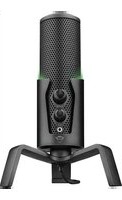
| Color | Black with red accents |
| Material | ABS plastic with metal grille |
| Maintenance | Wipe with a soft, dry cloth. Do not use harsh chemicals. |
| Safety Warnings | Keep away from moisture and heat sources to prevent damage. |
| Repairability and Spare Parts | No user-serviceable parts. Contact Trust support for repairs. |
| General Information | Designed for streaming, gaming, podcasts, and video calls. |
Frequently Asked Questions - YUNIX GXT246 TRUST
How do I set up the Trust Yunix GXT246 microphone?
Simply connect the microphone to a USB port on your computer or console. The system will automatically install the driver. Adjust the stand arm and tripod to position the microphone correctly for your voice.
Does the GXT246 require any special driver or software?
No. The Yunix GXT246 is a plug and play USB microphone. It works with standard USB audio drivers built into Windows, macOS, and Linux systems.
How can I mute the microphone quickly?
The microphone has a dedicated mute button on the front panel. Press it once to mute, and the LED indicator will light up red. Press again to unmute and resume recording.
Why is there no sound coming from my microphone?
First, check that the USB cable is securely connected. Then ensure the microphone is not muted and that the volume is turned up. On your computer, check the input level and select the GXT246 as the default recording device in the sound settings.
Can I monitor my voice in real time?
Yes, the GXT246 has a headphone output with a 3.5 mm jack. Plug headphones into this port and use the volume knob to adjust the monitoring level. This lets you hear your voice without latency.
What is the best distance from the microphone for recording?
For optimal audio quality, place the microphone about 10 to 15 cm from your mouth. Speak at a consistent volume and avoid plosive sounds. The cardioid pattern helps isolate your voice from background noise.
Can I use this microphone with a PlayStation 4 or PlayStation 5?
Yes, the GXT246 works with PS4 and PS5 as a USB audio device. Plug the microphone into the console's USB port and go to the system sound settings to select it as the input device.
How do I clean the microphone grille?
Use a soft, dry brush or cloth to gently remove dust from the metal grille. Avoid using water or cleaning spray directly on the microphone. Do not insert sharp objects into the grille openings.
Does the microphone have a stand or mounting options?
The package includes a tripod stand and an adjustable arm. You can tilt and raise the microphone to the desired height. The stand also has a standard threaded hole if you prefer to use a boom arm.
What should I do if the microphone stops working?
Try a different USB port and another cable if possible. Restart your computer and check the sound settings. If the problem persists, contact Trust support for assistance. Do not attempt to repair the device yourself, as this may void the warranty.
User questions about YUNIX GXT246 TRUST
0 question about this device. Answer the ones you know or ask your own.
Ask a new question about this device
No questions yet. Be the first to ask one.
Download the instructions for your Microphone in PDF format for free! Find your manual YUNIX GXT246 - TRUST and take your electronic device back in hand. On this page are published all the documents necessary for the use of your device. YUNIX GXT246 by TRUST.
USER MANUAL YUNIX GXT246 TRUST


Manual assistant
Powered by Anthropic
Waiting for your message
Product information
Brand : TRUST
Model : YUNIX GXT246
Category : Microphone