
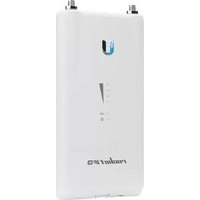
MIMO Multiplexer - Wi-Fi repeater Ubiquiti Networks - Free user manual and instructions
Find the device manual for free MIMO Multiplexer Ubiquiti Networks in PDF.


| Product Type | Wi-Fi Repeater |
| Brand | Ubiquiti Networks |
| Model | MIMO Multiplexer |
| Dimensions (L x W x H) | 180 x 120 x 30 mm |
| Weight | 300 g |
| Power Supply | PoE (Power over Ethernet) or 12V DC adapter |
| Wireless Standard | 802.11 a/b/g/n/ac (dual-band) |
| MIMO Technology | 2x2 MIMO for improved throughput and range |
| Maximum Data Rate | Up to 867 Mbps (5 GHz) + 300 Mbps (2.4 GHz) |
| Ethernet Ports | 1x Gigabit Ethernet (10/100/1000) |
| Frequency Bands | 2.4 GHz and 5 GHz |
| Antennas | Internal dual-band antennas |
| Operation Modes | Repeater/Extender, Access Point, Bridge |
| Mounting | Wall-mountable with included bracket |
| LED Indicators | Power, Link, Signal Strength |
| Security | WPA2-PSK, WPA-PSK, WEP (limited) |
| Operating Temperature | 0°C to 40°C |
| Humidity | 5% to 95% non-condensing |
| Maintenance & Cleaning | Wipe with a soft, dry cloth; do not use liquids or solvents |
| Spare Parts & Repairability | No user-serviceable parts; contact Ubiquiti support for repairs |
| General Information | Designed for indoor use; compatible with Ubiquiti UniFi software for management |
Frequently Asked Questions - MIMO Multiplexer Ubiquiti Networks
User questions about MIMO Multiplexer Ubiquiti Networks
0 question about this device. Answer the ones you know or ask your own.
Ask a new question about this device
Download the instructions for your Wi-Fi repeater in PDF format for free! Find your manual MIMO Multiplexer - Ubiquiti Networks and take your electronic device back in hand. On this page are published all the documents necessary for the use of your device. MIMO Multiplexer by Ubiquiti Networks.
USER MANUAL MIMO Multiplexer Ubiquiti Networks
natural_image
Exterior view of white fiber optic actuators (no text or symbols visible)airFiber® NxN
Scalable airFiber®
MIMO Multiplexer
Models: AF-MPx4, AF-MPx8
Introduction
Thank you for purchasing the Ubiquiti Networks® airFiber NxN MIMO Multiplexer. This Quick Start Guide is designed to guide you through installation and also includes warranty terms.
Package Contents

AF-MPx4 airFiber NxN Multiplexer
or

AF-MPx8 airFiber NxN Multiplexer

natural_image
3D mechanical component diagram showing two connected parts with mounting brackets (no text or symbols)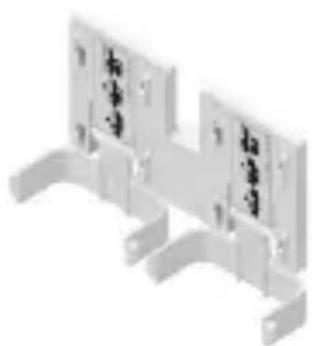
natural_image
Isometric view of a metal bracket with mounting holes and mounting brackets (no text or symbols)
natural_image
Two white plastic clip components with no visible text or symbols4x4 Radio Bracket 8x8 Radio Bracket* Protective Shrouds (Left and Right)
M4x12 Screws (Qty. 2)
M3x8 Screws * (Qty. 4)

Quick Start Guide
* Only included with the AF-MPx8.
TERMS OF USE: Ubiquiti radio devices must be professionally installed. Shielded Ethernet cable and earth grounding must be used as conditions of product warranty. TOUGHCable TM is designed for outdoor installations. It is the customer's responsibility to follow local country regulations, including operation within legal frequency channels, output power, and Dynamic Frequency Selection (DFS) requirements.
airFiber X Compatibility
The airFiber NxN is designed for use with airFiber 5X radios, (model AF-5X) and 5 GHz airFiber X or RocketDish™ antennas.

Note: The airFiber X Antenna OMT Conversion Kit (AF-5G-OMT-S45) is highly recommended when using a RocketDish for proper fitting and improved frequency isolation.
Installation Requirements
• (2) airFiber 5X radios for AF-MPx4
• (4) airFiber 5X radios for AF-MPx8
• airFiber X or RocketDish antenna
- Clear view of the sky for proper GPS operation
- Ground wires – min. 10 AWG (5 mm 2 ) and max. length: 1 m. As a safety precaution, ground the airFiber radios to grounded masts, poles, towers, or grounding bars.

WARNING: Failure to properly ground your airFiber radio will void your warranty.

Note: For guidelines about grounding and lightning protection, follow your local electrical regulatory codes.
- Outdoor, shielded Category 6 (or above) cabling and shielded RJ-45 connectors are required for all wired Ethernet connections.
Hardware Overview
airFiber NxN Multiplexer
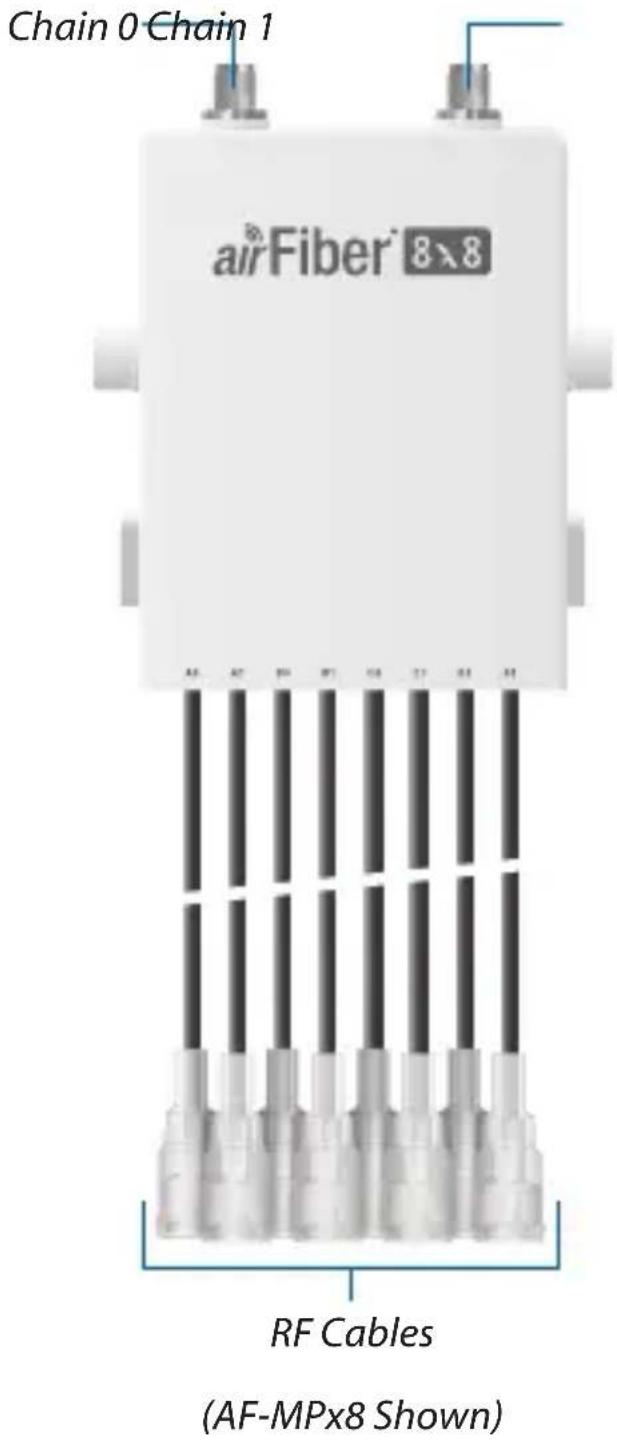
Chain 0 Connect the antenna RF +45° to this connector.
Chain 1 Connect the antenna RF -45° to this connector.
RF Cables Connect each RF Cable pair to the corresponding RF connection chain on each airFiber 5X radio. For example, connect cable A0 to Chain 0, and cable A1 to Chain 1.
Configure the airFiber 5X Radio

Note: The airFiber 5X radios must be running airOS®F v3.2.1 or newer. The latest firmware is available at: downloads.ubnt.com/airfiber
Each airFiber 5X radio must be preconfigured for use with the airFiber NxN before installing them at the site. Configuration details are available in the airFiber X User Guide, available at: downloads.ubnt.com/airfiber
Enable airFiber NxN support on each radio:
- Log into the airOS F Configuration Interface.
- Click the Wireless tab.
- Enter the additional Cable Loss value (dB):
a. 4.1 for the AF-MPx4, or
b. 7.2 for the AF-MPx8
- For the NxN Radio setting, select Enable.
![airFiber MIA NROLESS NETWORKS ANALYSIS SERVICES SYSTEM AirOS AirOS Basic Wireless Settings Wireless Mode: Onvo Link Name: ONNT Country Code: London Classical Bandwidths: 10MHz Output Power (80V) 15 dBH Power's Data: 0 0 - 241 MHz Cable Line: 0 dB Maximum Modulation Rate: 6x (25GHz/9MHz) Automatic Rate Integration Soft Radio: Enable Frequency Settings Solid Frequency: [1930 : 0.341 MHz] [0268 : 0.341 MHz] [0470 : 0.732 MHz] [0730 : 0.845 MHz] TSD Ebit Frequency Mode: Enable Frequency 1: 5000 pMHz Current Order Operating Frequency 2: 0 pMHz Frequency 3: 0 pMHz Wireless Security File Type: HKEY Key: 0000-8888-0000-8888-0000 Change © Copyright ©2013 iCloud Networks, INC.](/content/2026/05/961515/images/a480805b81e9e0fa68a7b00a8d10c2949cf63dc6357cefb9ab0696570e484c29.jpg)
- Click Change, and then click Apply.
Hardware Installation
The following installation shows the AF-MPx8. For the AF-MPx4 installation, only the mounting and connecting of two airFiber 5X radios apply.
- (For AF-MPx8 only) Attach the 8x8 Radio Bracket to the 4x4 Radio Bracket using four M3x8 Screws.

natural_image
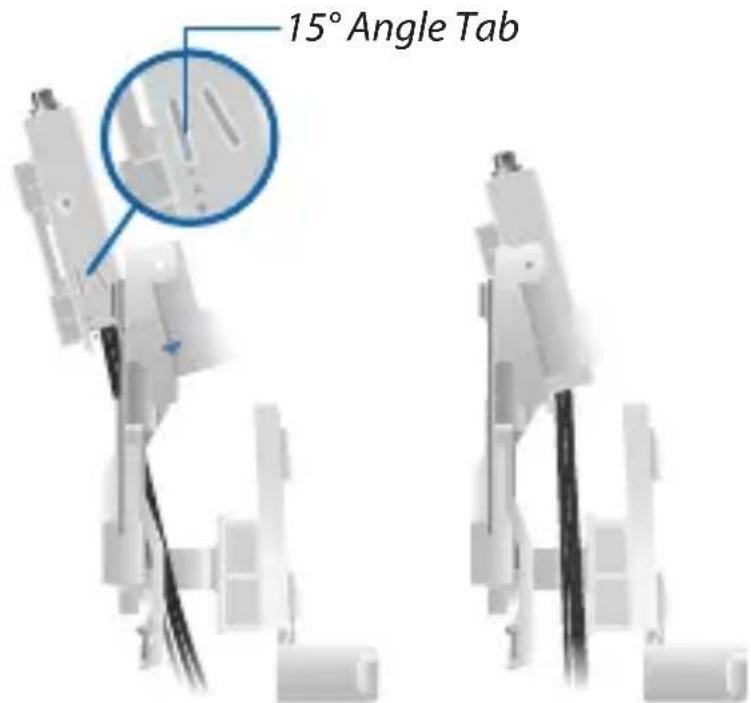
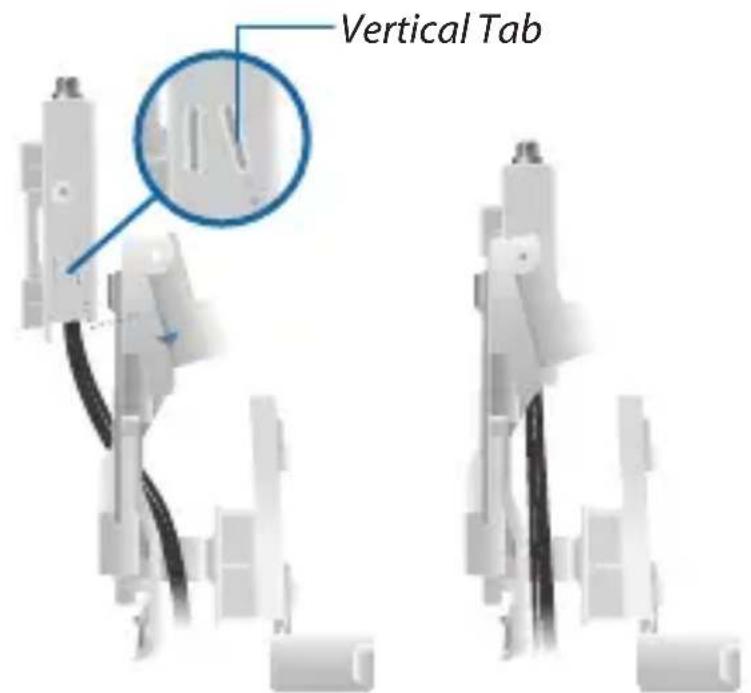
3D technical illustration of a mechanical assembly with cutaway views and internal components (no text or symbols)- Seat the airFiber NxN Multiplexer into the 4x4 Radio Bracket either at (a) a 15irc angle or (b) vertically:

natural_image
3D rendering of a mechanical assembly with coiled wires and connectors (no visible text or symbols)a. For most antenna models, the airFiber NxN Multiplexer should be installed at a 15irc angle. Insert the airFiber NxN Multiplexer from behind the 4x4 Radio Bracket and slide the 15irc Angle Tabs into the slots on the bracket.
b. For other antenna configurations that require the airFiber NxN assembly to be mounted to a pole, the airFiber NxN Multiplexer must be installed vertically. Insert the airFiber NxN Multiplexer from behind the 4x4 Radio Bracket and slide the Vertical Tabs into the slots on the bracket.
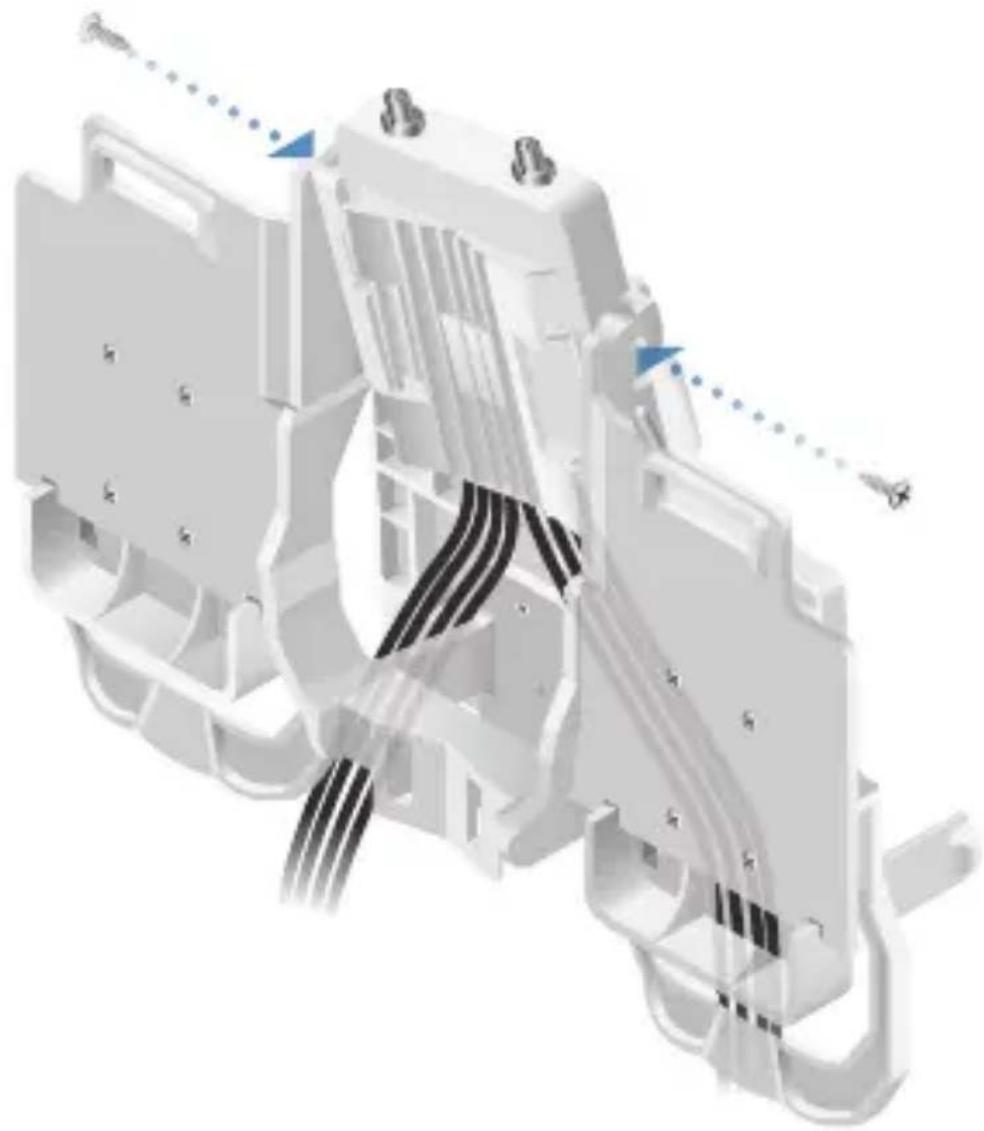
- Secure the airFiber NxN Multiplexer to the 4x4 Radio Bracket using two M4x12 Screws.
natural_image
3D technical illustration of a mechanical assembly with visible wiring and mounting points (no text or symbols)
Note: Ensure the airFiber 5X radios are preconfigured and the ground wires are installed as outlined in the radio's Quick Start Guide before mounting the radios.
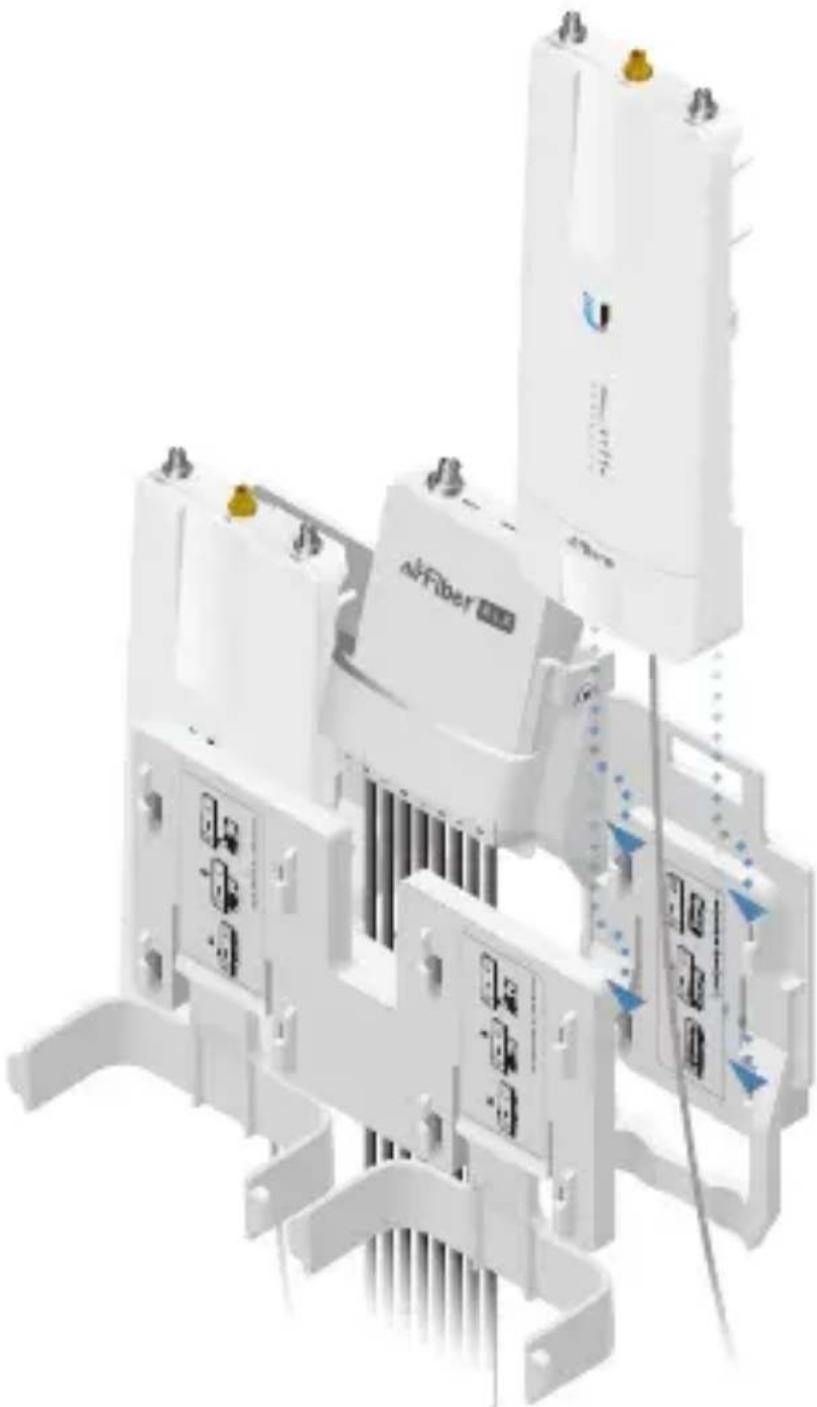
- Mount the airFiber 5X radios to the 4x4 Radio Bracket:
a. Align the mounting tabs on the back of the radio with the mounting bracket.
b. Slide the radio down to lock it into place.
natural_image
3D rendering of a white industrial electrical enclosure with attached components and wiring (no visible text or symbols)- Mount the airFiber 5X radios to the 8x8 Radio Bracket:
a. Align the mounting tabs on the back of the radio with the mounting bracket.
b. Slide the radio down to lock it into place.

natural_image
3D rendering of white industrial electrical modules with no visible text or symbols- Connect the RF Cables to the airFiber 5X radios. Connect each RF Cable pair to the corresponding RF connection chain on each radio. For example, connect cable A0 to Chain 0, and cable A1 to Chain 1.

natural_image
Illustration of white industrial electrical modules with cables and connectors, no visible text or symbols- Attach the airFiber NxN assembly to the airFiber X or RocketDish antenna:
a. Align the mounting tabs on the back of the airFiber NxN Multiplexer with the mounting bracket.
b. Slide the airFiber NxN Multiplexer down to lock it into place on the bracket.

natural_image
Technical illustration of a medical imaging device with multiple white components and wiring, no visible text or symbols
Note: The airFiber NxN assembly may be pole-mounted if it cannot be attached to the antenna. See the Pole-Mounting section for details.
- Connect the RF cables from the antenna to the RF connectors on the airFiber NxN Multiplexer. Connect +45° to Chain 0 and -45° to Chain 1.

natural_image
3D rendering of a robotic device with exposed wiring and a circular component (no visible text or symbols)- Attach the GPS antennas to each of the airFiber 5X radios.
- Mount the GPS antennas in a location that has a clear view of the sky, and is above and as far away from the radios as possible.

natural_image
Four-step medical procedure diagram showing mechanical assembly steps (no text or labels)- Attach the Protective Shrouds:
a. Insert the Protective Shroud's attachment tab between the airFiber 5X radio and the 4x4 Radio Bracket.
b. Push the Protective Shroud down until the attachment tab locks into place.

natural_image
3D cutaway view of a white robotic device with internal wiring and a large circular component (no visible text or symbols)- Secure the grounding wire from each radio to a grounded mast, pole, tower, or grounding bar.

WARNING: Failure to properly ground your airFiber radio will void your warranty.

Note: The ground wire should be as short as possible and no longer than one meter in length.
Pole-Mounting
-
Ensure the airFiber NxN Multiplexer is installed vertically in the 4x4 Radio Bracket.
-
Mount the airFiber NxN assembly to the pole using two metal straps (not included):
a. Insert a metal strap through each mounting bracket on the back of the airFiber NxN Multiplexer and 4x4 Radio Bracket.
b. Secure both staps around the pole.

natural_image
3D rendering of a mechanical assembly with cylindrical pipe and motor components (no visible text or symbols)- Connect the RF cables from the antenna to the RF connectors on the airFiber NxN Multiplexer. Connect +45° to Chain 0 and -45° to Chain 1.
Specifications
| AF-MPx4 | |
| Dimensions 197.5 x 240.9 x 103.2 mm | (7.78 x 9.48 x 4.06") |
| Weight 0.4 kg (0.8 lb) | |
| RF Connectors (2) RP-SMA Weatherproof (CH0, CH1) | (4) RP-SMA Weatherproof(A0, A1, B0, B1) |
| Cable Loss 4.1 dB | |
| Supported airFiber X Radio AF-5X | |
| Multiplex MIMO 2 x (2x2) | |
| Mounting airFiber X/Rocket Mount Compatible | |
| AF-MPx8 | |
| Dimensions 210.5 x 240.9 x 109 mm | (8.29 x 9.48 x 4.29") |
| Weight 0.45 kg (1.0 lb) | |
| RF Connectors (2) RP-SMA Weatherproof (CH0, CH1) | (8) RP-SMA Weatherproof(A0, A1, B0, B1, C0, C1, D0, D1) |
| Cable Loss 7.2 dB | |
| Supported airFiber X Radio AF-5X | |
| Multiplex MIMO 4 x (2x2) | |
| Mounting airFiber X/Rocket Mount Compatible | |
Limited Warranty
UBIQUITI NETWORKS, Inc ("UBIQUITI NETWORKS") warrants that the product(s) furnished hereunder (the "Product(s)") shall be free from defects in material and workmanship for a period of one (1) year from the date of shipment by UBIQUITI NETWORKS under normal use and operation. UBIQUITI NETWORKS' sole and exclusive obligation and liability under the foregoing warranty shall be for UBIQUITI NETWORKS, at its discretion, to repair or replace any Product that fails to conform to the above warranty during the above warranty period. The expense of removal and reinstallation of any Product is not included in this warranty. The warranty period of any repaired or replaced Product shall not extend beyond its original term.
Warranty Conditions
The above warranty does not apply if the Product:
(I) has been modified and/or altered, or an addition made thereto, except by Ubiquiti Networks, or Ubiquiti Networks' authorized representatives, or as approved by Ubiquiti Networks in writing;
(II) has been painted, rebranded or physically modified in any way;
(III) has been damaged due to errors or defects in cabling;
(IV) has been subjected to misuse, abuse, negligence, abnormal physical, electromagnetic or electrical stress, including lightning strikes, or accident;
(V) has been damaged or impaired as a result of using third party firmware;
(VI) has no original Ubiquiti MAC label, or is missing any other original Ubiquiti label(s); or
(VII) has not been received by Ubiquiti within 30 days of issuance of the RMA.
In addition, the above warranty shall apply only if: the product has been properly installed and used at all times in accordance, and in all material respects, with the applicable Product documentation; all Ethernet cabling runs use CAT5 (or above), and for outdoor installations, shielded Ethernet cabling is used, and for indoor installations, indoor cabling requirements are followed.
Returns
No Products will be accepted for replacement or repair without obtaining a Return Materials Authorization (RMA) number from UBIQUITI NETWORKS during the warranty period, and the Products being received at UBIQUITI NETWORKS' facility freight prepaid in accordance with the RMA process of UBIQUITI NETWORKS. Products returned without an RMA number will not be processed and will be returned freight collect or subject to disposal. Information on the RMA process and obtaining an RMA number can be found at: www.ubnt.com/support/warranty.
Disclaimer
EXCEPT FOR ANY EXPRESS WARRANTIES PROVIDED HEREIN, UBIQUITI NETWORKS, ITS AFFILIATES, AND ITS AND THEIR THIRD PARTY DATA, SERVICE, SOFTWARE AND HARDWARE PROVIDERS HEREBY DISCLAIM AND MAKE NO OTHER REPRESENTATION OR WARRANTY OF ANY KIND, EXPRESS, IMPLIED OR STATUTORY, INCLUDING, BUT NOT LIMITED TO, REPRESENTATIONS, GUARANTEES, OR WARRANTIES OF MERCHANTABILITY, ACCURACY, QUALITY OF SERVICE OR RESULTS, AVAILABILITY, SATISFACTORY QUALITY, LACK OF VIRUSES, QUIET ENJOYMENT, FITNESS FOR A PARTICULAR PURPOSE AND NON-INFRINGEMENT AND ANY WARRANTIES ARISING FROM ANY COURSE OF DEALING, USAGE OR TRADE PRACTICE IN CONNECTION WITH SUCH PRODUCTS AND SERVICES.
BUYER ACKNOWLEDGES THAT NEITHER UBIQUITI NETWORKS NOR ITS THIRD PARTY PROVIDERS CONTROL BUYER'S EQUIPMENT OR THE TRANSFER OF DATA OVER COMMUNICATIONS FACILITIES, INCLUDING THE INTERNET, AND THAT THE PRODUCTS AND SERVICES MAY BE SUBJECT TO LIMITATIONS, INTERRUPTIONS, DELAYS, CANCELLATIONS AND OTHER PROBLEMS INHERENT IN THE USE OF COMMUNICATIONS FACILITIES. UBIQUITI NETWORKS, ITS AFFILIATES AND ITS AND THEIR THIRD PARTY PROVIDERS ARE NOT RESPONSIBLE FOR ANY INTERRUPTIONS, DELAYS, CANCELLATIONS, DELIVERY FAILURES, DATA LOSS, CONTENT CORRUPTION, PACKET LOSS, OR OTHER DAMAGE RESULTING FROM ANY OF THE FOREGOING. In addition, UBIQUITI NETWORKS does not warrant that the operation of the Products will be error-free or that operation will be uninterrupted. In no event shall UBIQUITI NETWORKS be responsible for damages or claims of any nature or description relating to system performance, including coverage, buyer's selection of products (including the Products) for buyer's application and/or failure of products (including the Products) to meet government or regulatory requirements.
Limitation of Liability
EXCEPT TO THE EXTENT PROHIBITED BY LOCAL LAW, IN NO EVENT WILL UBIQUITI OR ITS SUBSIDIARIES, AFFILIATES OR SUPPLIERS BE LIABLE FOR DIRECT, SPECIAL, INCIDENTAL, CONSEQUENTIAL OR OTHER DAMAGES (INCLUDING LOST PROFIT, LOST DATA, OR DOWNTIME COSTS), ARISING OUT OF THE USE, INABILITY TO USE, OR THE RESULTS OF USE OF THE PRODUCT, WHETHER BASED IN WARRANTY, CONTRACT, TORT OR OTHER LEGAL THEORY, AND WHETHER OR NOT ADVISED OF THE POSSIBILITY OF SUCH DAMAGES.
Note
Some countries, states and provinces do not allow exclusions of implied warranties or conditions, so the above exclusion may not apply to you. You may have other rights that vary from country to country, state to state, or province to province. Some countries, states and provinces do not allow the exclusion or limitation of liability for incidental or consequential damages, so the above limitation may not apply to you. EXCEPT TO THE EXTENT ALLOWED BY LOCAL LAW, THESE WARRANTY TERMS DO NOT EXCLUDE, RESTRICT OR MODIFY, AND ARE IN ADDITION TO, THE MANDATORY STATUTORY RIGHTS APPLICABLE TO THE LICENSE OF ANY SOFTWARE (EMBEDDED IN THE PRODUCT) TO YOU. The United Nations Convention on Contracts for the International Sale of Goods shall not apply to any transactions regarding the sale of the Products.
Declaration of Conformity
| Česky[Czech] | UBIQUITI NETWORKS tímto prohlašuje, že toto UBIQUITI NETWORKS zařízení, je ve shod se základními požadavky a dalšími příslušnými ustanoveními směrnice 1999/5/ES. |
| Dansk[Danish] | Hermed, UBIQUITI NETWORKS, erklærer at denne UBIQUITI NETWORKS enhed, er i overensstemmelse med de væsentlige krav og øvrige relevante krav i direktiv 1999/5/EF. |
| Nederlands[Dutch] | Hierbij verklaart UBIQUITI NETWORKS, dat deze UBIQUITI NETWORKS apparaat, in overeenstemming is met de essentiële eisen en de andere relevante bepalingen van richtlijn 1999/5/EC. |
| English | Hereby, UBIQUITI NETWORKS, declares that this UBIQUITI NETWORKS device, is in compliance with the essential requirements and other relevant provisions of Directive 1999/5/EC. |
| Eesti[Estonian] | Käesolevaga UBIQUITI NETWORKS kinnitab, et antud UBIQUITI NETWORKS seade, on vastavus olulistele nõuetele ja teistele asjakohastele sätetele direktiivi 1999/5/EÜ. |
| Suomi[Finnish] | Täten UBIQUITI NETWORKS vakuuttaa, että tämä UBIQUITI NETWORKS laite, on yhdenmukainen olennaisten vaatimusten ja muiden sitä koskevien direktiivin 1999/5/EY. |
| Français[French] | Par la présente UBIQUITI NETWORKS déclare que l'appareil UBIQUITI NETWORKS, est conforme aux exigences essentielles et aux autres dispositions pertinentes de la directive 1999/5/CE. |
| Deutsch[German] | Hiermit erklärt UBIQUITI NETWORKS, dass sich dieses UBIQUITI NETWORKS Gerät, in Übereinstimmung mit den grundlegenden Anforderungen und den anderen relevanten Vorschriften der Richtlinie 1999/5/EG befindet. |
| Ελληνική[Greek] | Δια του παρόντος, UBIQUITI NETWORKS, δηλώνει ότι αυτή η συσκευή UBIQUITI NETWORKS, είναι σε συμμόρφωση με τις βασικές απαιτήσεις και τις λοιπές σχετικές διατάξεις της οδηγίας 1995/5/EK. |
| Magyar[Hungarian] | Ezennel UBIQUITI NETWORKS kijelenti, hogy ez a UBIQUITI NETWORKS készülék megfelel az alapvető követelményeknek és más vonatkozó 1999/5/EK irányely rendelkezéseit. |
| Íslenska[Icelandic] | Hér, UBIQUITI NETWORKS, því yfir að þetta UBIQUITI NETWORKS tæki er í samræmi við grunnkröfur og önnur viðeigandi ákvæði tilskipun 1999/5/EC. |
| Italiano[Italian] | Con la presente, UBIQUITI NETWORKS, dichiara che questo dispositivo UBIQUITI NETWORKS, è conforme ai requisiti essenziali ed alle altre disposizioni pertinenti della direttiva 1999/5/CE. |
| Latviski[Latvian] | Ar šo, UBIQUITI NETWORKS, deklarē, ka UBIQUITI NETWORKS ierīce, ir saskaņā ar būtiskajām prasībām un citiem attiecīgiem noteikumiem Direktīvā 1999/5/EK. |
| Lietuviškai[Lithuanian] | UBIQUITI NETWORKS deklaruoja, kad šis UBIQUITI NETWORKS jrenginys atitinka esminius reikalavimus ir kitas 1999/5/EB Direktyvos nuostatas. |
| Malti [Maltese] | Hawnhekk, UBIQUITI NETWORKS, tiddikjara li dan il-mezz UBIQUITI NETWORKS huwa konformi mar-rekwiziti essenzjali u dispożizzjonijiet rilevanti oħrajn ta ‘Direttiva 1999/5/EC. |
| Norsk [Norwegian] | Herved UBIQUITI NETWORKS, erklærer at denne UBIQUITI NETWORKS enheten, er i samsvar med de grunnleggende kravene og andre relevante bestemmelser i direktiv 1999/5/EF. |
| Slovensky [Slovak] | TýmtoUBIQUITI NETWORKS, prehlasuje, że toto UBIQUITI NETWORKS zariadenie, je v súlade so základnými požiadavkami a d’alšími relevantnými ustanoveniami smernice 1999/5/ES. |
| Svenska [Swedish] | Härmed UBIQUITI NETWORKS, intygar att denna UBIQUITI NETWORKS enhet är i överensstämmelse med de väsentliga egenskapskrav och övriga relevanta bestämmelser som framgår av direktiv 1999/5/EG. |
| Español [Spanish] | Por medio de la presente UBIQUITI NETWORKS declara que este dispositivo UBIQUITI NETWORKS, cumple con los requisitos esenciales y cualesquiera otras disposiciones aplicables o exigibles de la Directiva 1999/5/CE. |
| Polski [Polish] | Niniejszym, Ubiquiti Networks, oświadcza, że urządzenie UBIQUITI NETWORKS, jest zgodny z zasadniczymi wymaganiami oraz pozostałymi stosownymi postanowieniami Dyrektywy 1999/5/EC. |
| Português [Portuguese] | UBIQUITI NETWORKS declara que este dispositivo UBIQUITI NETWORKS, está conforme com os requisitos essenciais e outras disposições da Directiva 1999/5/CE. |
| Română [Romanian] | Prin prezenta, UBIQUITI NETWORKS declară că acest dispozitiv UBIQUITI NETWORKS este în conformitate cu cerințele esențiale și alte prevederi relevante ale Directivei 1999/5/CE. |
Online Resources
Support support.ubnt.com
Community community.ubnt.com
Downloads downloads.ubnt.com

www.ubnt.com

- airFiber® NxN
- Introduction
- Package Contents
- airFiber X Compatibility
- Installation Requirements
- Hardware Overview
- airFiber NxN Multiplexer
- Configure the airFiber 5X Radio
- Hardware Installation
- Pole-Mounting
- Specifications
- Limited Warranty
- Warranty Conditions
- Returns
- Disclaimer
- Limitation of Liability
- Note
- Online Resources
Brand : Ubiquiti Networks
Model : MIMO Multiplexer
Category : Wi-Fi repeater