
TEG-ECTX - Network card / adapter TRENDNET - Free user manual and instructions
Find the device manual for free TEG-ECTX TRENDNET in PDF.


| Product Type | Gigabit Ethernet Network Adapter |
| Model | TEG-ECTX |
| Brand | TRENDnet |
| Interface | PCI Express x1 |
| Network Standards | IEEE 802.3, 802.3u, 802.3ab |
| Data Transfer Rate | 10/100/1000 Mbps |
| Ports | 1 x RJ-45 |
| Auto-Negotiation | Yes |
| Auto-MDIX | Yes |
| Compatible Operating Systems | Windows, Linux, macOS |
| Dimensions (L x W x H) | 120 x 21 x 120 mm (approx.) |
| Weight | 50 g (approx.) |
| Power Consumption | 2.5 W (max) |
| LED Indicators | Link/Activity, Speed |
| Bracket Type | Standard (low-profile bracket included) |
| Compliance | FCC, CE, RoHS |
| Operating Temperature | 0°C to 40°C |
| Storage Temperature | -10°C to 70°C |
| Humidity | 10% to 90% non-condensing |
| Warranty | 3 years limited |
| Package Contents | TEG-ECTX adapter, low-profile bracket, driver CD, quick installation guide |
Frequently Asked Questions - TEG-ECTX TRENDNET
User questions about TEG-ECTX TRENDNET
0 question about this device. Answer the ones you know or ask your own.
Ask a new question about this device
Download the instructions for your Network card / adapter in PDF format for free! Find your manual TEG-ECTX - TRENDNET and take your electronic device back in hand. On this page are published all the documents necessary for the use of your device. TEG-ECTX by TRENDNET.
USER MANUAL TEG-ECTX TRENDNET
natural_image
Three green circuit boards with various electronic components and connectors, displayed against a plain background (no visible text or symbols)Quick Installation Guide



Table of Contents
English 1
- Before You Start 1
- How to Install 2
Troubleshooting 6
1. Before You Start
natural_image
Two green PCI expansion card modules with visible ports and connectors (no text or symbols)Package Contents
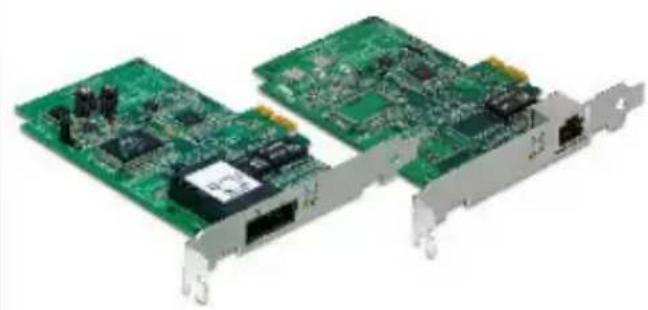
• TEG-ECTX/TEG-ECSX
- Driver CD-ROM
• Multi-Language Quick Installation
Guide
System Requirements
- PCI Express 1.0a slot
- CD-ROM Drive
• CPU: 300MHz or above / 800MHz or above (Windows Vista)
• Memory: 256MB RAM or above / 512MB RAM or above (Windows Vista
• Windows 2000/2000 Server/XP(32-/64-bit)/2003 Server/Vista(32-/64-bit)
• RJ-45 Ethernet cable (TEG-ECTX)
• 50/125μm or 62.5/125μm multi-mode fiber cable
(TEG-ECSX)
• Recommend fiber converter: TFC-1000MSC or TFC-2000MSC
• Recommend Gigabit Switch: TEG-S5 or TEG-S8
Application

flowchart
graph TD
    A["Gigabit PCI Express Adapter (TEG-ECTX)"] --> B["24-Port Gigabit Web Smart Switch (TEG-240WS)"]
    C["Gigabit Fiber PCI Express Adapter (TEG-ECSX)"] --> D["1000Base-T to 1000Base-SX Multi-Mode SC Fiber Converter (TFC-2000MSC)"]
    B --> E["300Mbps Wireless N Gigabit Router (TEW-633GR)"]
    D --> E
    E --> F["Internet"]
    E --> G["Cable/DSL Modem"]
    H["Gigabit"] --> A
    I["Gigabit"] --> C
2. How to Install
Note: Do not connect the TEG-ECTX/TEG-ECSX to your computer until instructed to do so.
-
Insert the Driver CD-ROM into your computer's CD-ROM Drive.
-
Click Run autorun.exe (Windows Vista only).
-
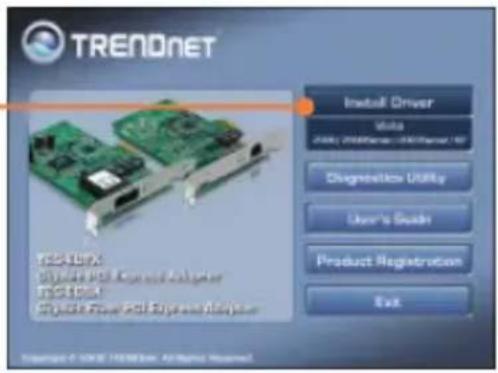
Click Install Driver, and then click your operating system.
-
Click Next. Then follow the InstallShield Wizard instructions.


- Click Finish.

- Shutdown your computer and then open your computer's case.

natural_image
Illustration of a desktop computer tower (no text or symbols visible)- Insert the PCIe card firmly into an available PCIe slot, and then turn ON the computer and wait until the Windows desktop appears.

natural_image
Close-up of a red computer motherboard with visible circuitry and a green PCB (no readable text or symbols)- Drivers will install automatically.
Connect the TEG-ECTX to your network

Connect the TEG-ECSX to your network
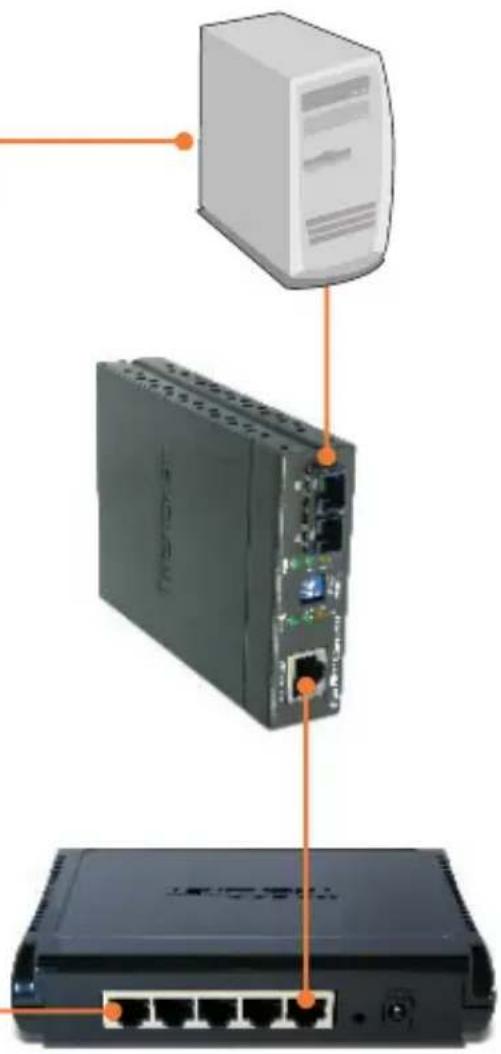
- Connect a SC-type multimode cable from the TEG-ECSX to a Gigabit fiber converter (e.g. TFC-2000MSC).
Note: Make sure the TX and RX cables are reversed on the opposing connection.
- Connect an Ethernet cable from the Fiber converter to a Gigabit Ethernet port on your switch (e.g. TEG-S5).
Your installation is now complete.
For detailed information regarding the TEGE configuration and advanced settings, please refer to User Guide on the Utility and Driver CD-ROM.
Register Your Product
To ensure the highest level of customer service and support, please take a moment to register your product Online at: www.trendnet.com/register Thank you for choosing TRENDnet
Troubleshooting
Q1: Windows doesn't recognize my new hardware. What should I do?
A1: First, verify that your computer meets the system requirements as specified in Section 1. Second, go to Start -> Control Panel -> System > Hardware -> Device Manager. In the list of device types, double-click on Network Adapters. If you see the device with a yellow question mark or exclamation point next to it, double-click on it, click on Drivers and click Update Drivers. Third, if the device manager fails to recognize the presence of a new networking adapter, verify that the network adapter is firmly seated in the PCIE Slot.
Q2: Windows recognizes my new hardware, but I'm unable to connect to my network. What should I do?
A2: First, verify that the cable is securely connected from your switch or router to your network adapter. Second, verify that the LEDs on your network card are lit. Third, verify that the TCP/IP settings are set to Obtain an IP address automatically.
Q3: Why am I only getting a network connection speed of 100Mbps instead of 1000Mbps for the TEG-ECTX?
A3: First, check the Ethernet Cable. Make sure you are using CAT-5e or CAT-6 Ethernet Cables. Some CAT-5 cables are not rated to run in Gigabit. Second, make sure you are connected to a 1000Mbps switch.
Q4: I am not getting a network connection when I connect the TEG-ECSX to my network. What should I do?
A4: First, check the fiber cable. Make sure you are using 50/125μm or 62.5/125μm multi-mode fiber cable. Second, make sure that the opposing connection is Gigabit multi-mode fiber connection. The TEG-ECSX will not auto negotiate to 10 or 100Mbps.
Q5: What is the maximum distance that is supported by the adapters?
A5: TEG-ECTX: 100 Meters. TEG-ECSX: 550 meters.
If you still encounter problems or have any questions regarding the TEG-ECTX/TEG-ECSX, please refer to the User's Guide included on the Driver CD-ROM or contact Trendnet's Technical Support Department.
Certifications
This equipment has been tested and found to comply with FCC and CE Rules. Operation is subject to the following two conditions:
(1) This device may not cause harmful interference.
(2) This device must accept any interference received. Including interference that may cause undesired operation.



Waste electrical and electronic products must not be disposed of with household waste. Please recycle where facilities exist. Check with you Local Authority or Retailer for recycling advice.

NOTE: THE MANUFACTURER IS NOT RESPONSIBLE FOR ANY RADIO OR TV INTERFERENCE CAUSED BY UNAUTHORIZED MODIFICATIONS TO THIS EQUIPMENT. SUCH MODIFICATIONS COULD VOID THE USER'S AUTHORITY TO OPERATE THE EQUIPMENT.
ADVERTENCIA
Product Warranty Registration
Please take a moment to register your product online. Go to TRENDnet's website at http://www.trendnet.com/register

- Table of Contents
- English 1
- Troubleshooting 6
- Before You Start
- Package Contents
- System Requirements
- Application
- How to Install
- Connect the TEG-ECTX to your network
- Connect the TEG-ECSX to your network
- Your installation is now complete.
- Register Your Product
- Troubleshooting
- Certifications
- ADVERTENCIA
- Product Warranty Registration
Brand : TRENDNET
Model : TEG-ECTX
Category : Network card / adapter