
BLT433 - Headphones CLARION - Free user manual and instructions
Find the device manual for free BLT433 CLARION in PDF.


| Product Type | Wireless headset |
| Brand | CLARION |
| Model | BLT433 |
| Connection Technology | Bluetooth |
| Battery Life | Approximately 10 hours |
| Charging Time | Approximately 2 hours |
| Battery Type | Rechargeable lithium-ion |
| Dimensions | 160 x 180 x 50 mm |
| Weight | 180 grams |
| Bluetooth Version | 5.0 |
| Bluetooth Range | Up to 10 meters |
| Frequency Response | 20 Hz - 20 kHz |
| Impedance | 32 ohms |
| Cushion Type | Padded faux leather |
| Main Functions | Wireless listening, volume control, track change, hands-free calling |
| Care and Cleaning | Clean with a soft, dry cloth. Do not use abrasive products. |
| Safety | Complies with FCC regulation section 15. Do not expose to water or extreme temperatures. |
| Spare Parts and Repairability | Battery replaceable by a professional. Cushions available as an option. |
| General Information | Bluetooth brand and logos are registered trademarks of Bluetooth SIG, Inc. |
Frequently Asked Questions - BLT433 CLARION
User questions about BLT433 CLARION
0 question about this device. Answer the ones you know or ask your own.
Ask a new question about this device
Download the instructions for your Headphones in PDF format for free! Find your manual BLT433 - CLARION and take your electronic device back in hand. On this page are published all the documents necessary for the use of your device. BLT433 by CLARION.
USER MANUAL BLT433 CLARION
This device complies with Part 15 of the FCC rules. Operation is subject to the following two conditions:
(1) This device may not cause harmful interference, and
(2) This device must accept any interference received, including interference that may cause undesired operation.
Francais
Déclaration FCC
What is included in this package? 4
Getting to know your module
What is CM-HS1 5
Installation
6
Fix CM-HS1 to the car sun visor 7
Fix CM-HS1 to the dashboard 7
Pairing your CM-HS1
Introduction to Bluetooth"pairing 8
Pairing the module 8
Using your CM-HS1
Operating Modes 10
Connection 10
Making a call 10
Calling with the phone's keypad 10
Calling with the module using voice commands 11
Ending a call 11
Answering a call 12
To reject a call 12
To turn off the microphone 12
Transferring a call 12
Call-waiting 13
Adjusting the volume 13
Using headset and car handsfree 13
Understanding the CM-HS1 indicators 14
Wiring Diagram (TEL003) 17
Specifications
CM-HS1 18
TEL003 19
Troubleshooting
Cannot pair the car handsfree with the phone 20
Cannot connect to the car handsfree 20
No sound contact between car handsfree and phone 20
Some car handsfree functions do not work 20
Additional information
Safe and efficient use 21
Product care 21
Installation 22
Radio frequency exposure 22
Driving 22
Electronic equipment 23
Blasting areas 23
Potentially explosive atmospheres 23
Children 23
Emergency calls 24
EC Declaration of Conformity 179
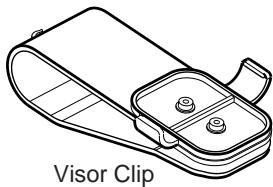
Your BLT433 Car Hands Free Kit includes:
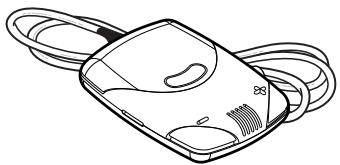
CM-HS1 Module
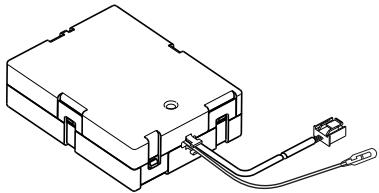
CE-NET Converter Box (TEL003)

Visor Clip Mounting Screw
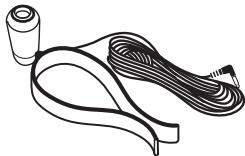
External Microphone
Note
Please check for the correct accessories before attempting to install BLT433 in your car, please refer to the Wiring & System Diagram (Page 17) section for more details.
What is CM-HS1?
The CM-HS1 is a Bluetooth® car kit that offers a high quality Bluetooth® wireless connection for in-car use and utilises your car's built-in audio system. This module works with any Bluetooth® mobile phone that supports the Bluetooth® Headset profile version 1.1 or Handsfree profile version 1.0.
After simple installation, a Bluetooth® connection is automatically forged between your mobile-phone and the module when the ignition of your vehicle is switched on. Incoming calls are accepted by pressing the "Answer" button located on the module. The audio from your car stereo will then muted whilst audio from the mobile phone is routed to either of your car's speakers while you can talk freely and wirelessly over the internal microphone of the module.
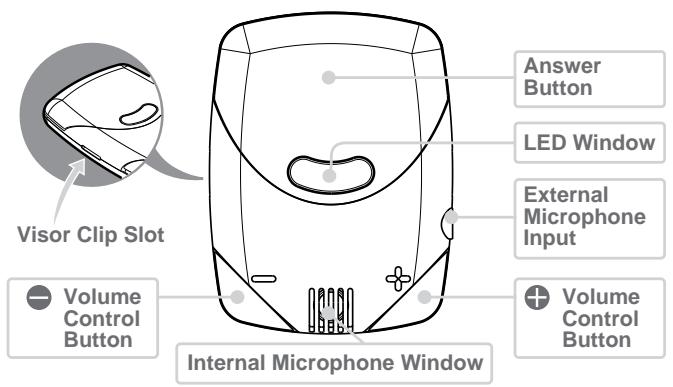
Installation
Installing CM-HS1
It is important that the module is installed with the internal microphone facing towards the user.
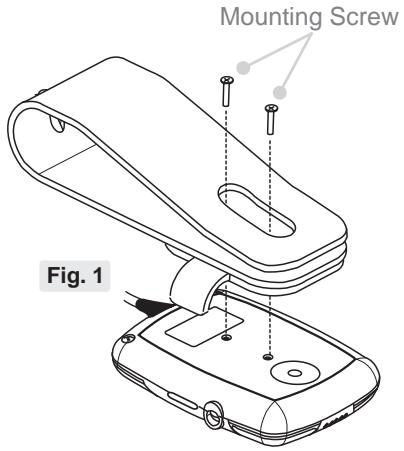
Use the Visor Clip to fix the module to the car sun visor, and route the main cable properly. (shown in Fig. 2)
Use the given mounting screws to tighten the module (shown in Fig. 1) to the Visor Clip if necessary. If installing the module anywhere else, care must be taken in order not to damage the connector of the unit. (shown in Fig. 3)
Check that the location of the microphone is adequate to pick-up the car driver voice.
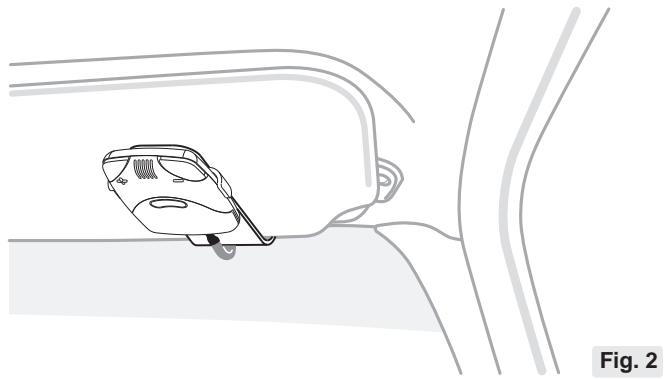
Fix CM-HS1 to the car sun visor
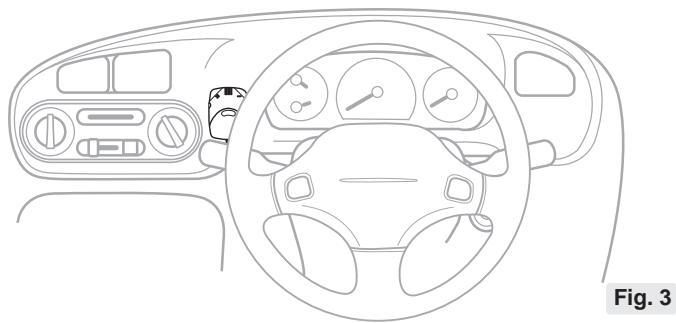
Fix CM-HS1 to the dashboard
Introduction to Bluetooth® "pairing"
With a Bluetooth® mobile phone, you must 'pair' the module with the phone before you use it for the first time.
'Pairing' creates a unique wireless link between the Bluetooth® phone and your module eliminating the need to repeat the pairing process during future use.
The Bluetooth® function in your phone has to be turned on to establish automatic connection.
Before connecting BLT433 handsfree kit make sure these adjustments on head unit "ADJ mode":
-
"Cellular phone interrupt setting" is "on"
-
"Selecting AUX / TEL" is on "AUX" (requested only for unit with AUX input)
Pairing the module
This module supports both Headset profile & Handsfree profile, the profile support may differ from phone to phone. Please refer to mobile phone user documentation for profile information.
Details on mobile phone compatibility and optimum setting visit www.clarion-eu.com Note that some mobile phones will not operate correctly if paired in the wrong mode.
To pair a mobile phone follow the step below:
-
Turn on your module by powering up the car audio system, note the Blue LED is lit to confirm that the power is on.
-
Switch on your handphone Bluetooth® function.
-
a) Press together , once if choose handsfree profile. (Blue and Red LED fast blinking alternately)
b) Press together , twice if choose headset profile. (Blue and Red LED slow blinking alternately)
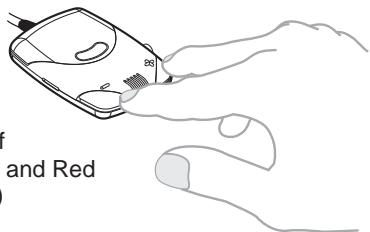
- Your mobile phone will display once it detects the device.
a) HF - CMHS1 - HF (Handsfree profile).
b) HS - CMHS1 - HF (Headset profile).
- Confirm the pairing device and the passkey or PIN is '0000' and you're successfully pair the module.
- The constant Lit Blue LED will indicate your device has been paired and it's ready to used.
Note: CM-HS1 support up to 5 paired mobile phone, but only one phone at a time with the car handsfree. To clear the paired device table just long press and together.
Once you have paired the car handsfree with your phone, you can make and receive calls using the control panel (CM-HS1 module) of the car handsfree, as long as it is turned on and within range of the phone, with no solid objects in between.
Always make sure the Bluetooth® operation mode in the phone is on when using a Bluetooth® car handsfree.
Compatible with most Clarion CeNET units from 2001 lineup. For detail please check compatibility chart on www.clarion-eu.com, or consult your Clarion dealer.
Operating Modes
Once the CM-HS1 has been paired to a phone, it will enter either Listening or Connected mode.
In Listening mode the CM-HS1 will be available to establish a connection to any of the paired devices in response to an incoming call. This is typical of phones connected as a Headset.
In Connected mode, the CM-HS1 is connected to a particular phone and communication to another paired phone is not possible. In this mode the CM-HS1 will respond quicker however most phones have a timeout that drops out of Connected Mode after a few minutes.
See your phone owner's manual for details on the operation.
Connection
Basically, after pairing process, a Bluetooth connection is established between your mobile-phone and the CM-HS1 module when the ignition of your vehicle is switched on.
Some phone model may require to you activate this connection by pressing a short time the CM-HS1 answering button.
Making a call
There are different ways to make a call.
Calling with the phone's keypad
-
Using the phone keypad, dial the phone number.
-
Press the phone "send" key - the phone is now connected to the module and your car stereo system will be mute. Talk normally to the module, the person you're talking to will be heard through your car speaker.
Calling with the module using voice commands
If your phone support voice-activated dialing, you can use this feature with your module. Note that voice-activated dialing on your phone must be enabled and voice tags (name and commands) previously stored. (Please refer to the phone's user documentation for instructions on storing voice tags.)
- Briefly press the "Answer" button on the module.
- After the tone, say the name of the person you wish to call.
- The mobile phone automatically dials your selection, and you'll see the details of the call on the phone screen (varies with phone model).
- When connected, you are free to communicate normally.
Note: The number of tones that you hear when voice dialing is dependent on the type of the phone. With some phones, you may only hear one tone. Say your voice command after the tone.
Ending a call
Use either of the following methods to end a call:
To end a call from the module,
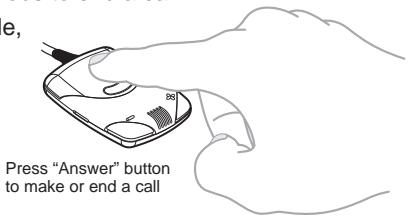
- short press the module's "Answer" button.
End a call from the
- phone's Keypad.
Answering a call
Whenever your car stereo is operating, the hand free module is in standby mode awaiting the next call with the Blue LED showing, when an incoming call arrives the car stereo is mute automatically and the ring tone is reproduced through your car's speaker. To answer the call press the "Answer" button on the module and speak normally.
Your may also answer the call by using your phone's answer keypad. In this case, you can transfer the call to the module by following the instruction in the next section.
Note: The Clarion CE-NET car stereo must set to telephone interrupt mode to able work with the BLT433, details setting of the CE-NET car stereo please refer the owner's manual of each model.
To reject a call
When the car handsfree rings, long press the answer button.
Note: This dependent on the type of phone.
To turn off the microphone
During a call, long press or button to turn off the microphone. The Red LED will blinking when the microphone has been turned off. Long press or button again to un-mute the microphone.
Transferring a call
To transfer the sound to the car handsfree. During a call, short press the answer button or using transfer call function in the phone.
To transfer the sound to the phone. During a call, long press the answer button.
Call-waiting
Some mobile phones allow you to accept another incoming call while you are using your module. This feature varies, dependent on mobile service provider and phone model. If you normally hear a beep on your mobile phone, you will still hear this beep through your car speaker or external speaker. If your phone's service support this feature, you can use either your phone's keypad or your module. To use your phone's keypad (recommended), you can switch between calls using the standard method as specified by your phone manufacturer. To use the module to switch between calls, briefly press your module's "Answer" button once. As with your phone controls, you may then return to the initial call by briefly pressing the "Answer" button once more.
Adjusting the volume
You can adjust the speaker volume in a call via your module.
To increase the volume, press the button.
- To decrease the volume, press the button.
Note: Use the and controls to adjust the telephone call reception volume and minimise any echo generated.
Using headset and car handsfree
Phones that support Connected Mode require the user to initiate the connection. To do this, turn the ignition on and initiate the connection from the phone or by press the Answer button.
Note: If you have an ongoing call in your Bluetooth® headset, and enter the car and wish to continue your conversation in the car handsfree, you must transfer the sound to the car handsfree. See "Transferring a call".
Understanding the CM-HS1 indicators
CM-HS1 provides indications of pairing and calling status as described in the following table.
| Mode | Action | Consequence | |||
| Name | LEDs | Control | Duration | ||
| Idle | Short On @6s | Off | |||
| (Pairing Table Empty) | Volume-Chord | Short | Start Handsfree pairing | ||
| Call | Short | Start Handsfree pairing | |||
| Pairing (Handsfree) | Alternating Flash on @1⁄2s | Volume-Chord | Short | Switch to Handset pairing | |
| Call | Short | Switch to Handset pairing | |||
| Pairing (Headset) | Alternating Flash on @2s | Volume-Chord | Short | Abort pairing | |
| Call | Abort pairing | ||||
| Listening | Flash On @2s | Off | |||
| Volume-Chord | Short | Start Handsfree pairing | |||
| Volume-Chord | Long | Claer pairing table Return to idle state | |||
| Call | Short | Start connecting with most recently used mobile | |||
| Call | Long | Start connecting with next most recently used mobile | |||
| Connecting | Flash On @1⁄2s | Off | |||
| Volume-Chord | Short | Start Hands-free pairing | |||
| Volume-Chord | Long | Clear pairing table Return to idle state | |||
| Call | Abort connection | ||||
Understanding the CM-HS1 indicators
| Mode | Action | Consequence | |||
| Name | LEDs | Control | Duration | ||
| Connected (Service) | On | Off | |||
| Call | Short | Start voice activated calling | |||
| Call | Long | Return to Listening mode | |||
| Connected | Flash off @2s | Off | |||
| Call | Short | Start voice activated calling | |||
| Call | Long | Return to Listening mode | |||
| Ringing | On | Short on @1⁄2s | |||
| Call | Short | Accept call | |||
| Call | Long | Reject call | |||
| Volume-Up | Short | Increase speaker volume | |||
| Volume-Down | Short | Reduce speaker volume | |||
| Voice Dailing | On | On | |||
| Call | Abort voice dialing | ||||
| Call Active (Microphone Active) | On | On | |||
| Call | Short | Clear call | |||
| Call | Long | Transfer call to mobile | |||
| Volume-Up | Short | Increase speaker volume | |||
uui6u3
Understanding the CM-HS1 indicators
u|b
| Mode | Action | Consequence | |||
| Name | LEDs | Control | Duration | Reduce speaker volume | |
| Volume-Down | Short | ||||
| Volume-Up | Long | Mute microphone | |||
| Volume-Down | Long | Mute microphone | |||
| Call Active (Microphone Mute) | On | On | |||
| Call | Short | Clear call | |||
| Call | Long | Transfer call to mobile | |||
| Volume-Up | Short | Increase speaker volume | |||
| Volume-Down | Short | Reduce speaker Volume | |||
| Volume-Up | Long | Un-mute microphone | |||
| Volume-Down | Long | Un-mute microphone | |||
| Call Avtive on Phone | On | Short on @2s | |||
| Call | Short | Transfer call to CM-HS1 | |||
| Call | Long | Clear call | |||
| Phone Audio | On | On | |||
| Call | Returned to Connected mode | ||||
Note: Volume Chord = Volume + and Volume - keys at the same time.
This table is just for reference and informations status may vary from phone to phone.
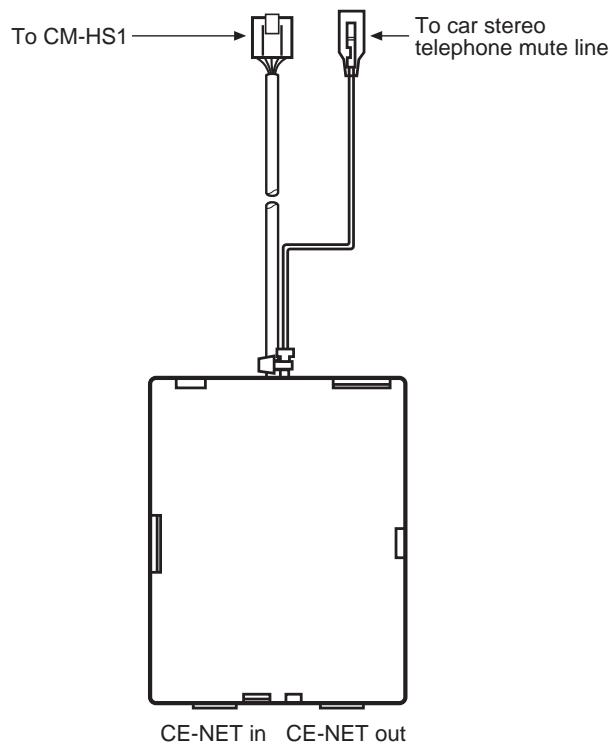
Wiring Diagram (TEL003)
English
BLT433
Specifications (CM-HS1)
| Transfer standard | Bluetooth® 1.0B/1.1, conforms to profile |
| Frequency range | 2.402~2.495 GHz, ISM band, license-free |
| Radio channels | Fast frequency hopping, 79 channels, 1600 frequency changes/second |
| Range | Sending performance 0 dBm (Class 3) ~approximately 10m |
| Sensitivity | -80 dBm |
| Profile | Headset profile + Hands Free Profile |
| Interface | Shielded 5 core cable interface between CM-HS1 and TEL003 |
| Operating temperature | -20C~80C |
| Storage temperature | -40C~105C |
| Telephone operation | Noise reduction, echo cancellation, full duplex telephony |
| Dimensions | Approx. 67 x 51 x 13mm |
| Weight | Approx. 22 grams |
| Status display | LEDs for display of the connection mode |
| System requirements | Mobile phone with Bluetooth® supporting headset profile or Hands Free profile |
| Approvals | In accordance with the technical requirements of R&TTE for all EU countries and Switzerland |
Specifications (TEL003)
| Power supply voltage | 14.4V DC (10.8~15.6V allowable) negative ground |
| Max. Current | 5A |
| Speaker Impedence | 4Ω (4Ω~8Ω allowable) |
| Max Output Power | 6W |
| Max Switching Input | 50W |
| Distortion | Less than 0.05% |
| S/N Ratio | More than 85dB |
| Frequency Response | 30Hz ~ 15kHz (±3dB) |
| Dimensions | Approx. 84 x 63 x 25mm |
Please refer carefully to the system diagram before installing your BLT433. Incorrect wiring method may cause damage to BLT433, your car audio system or even your vehicle.
We strongly recommend that BLT433 is only installed by those fully familiar with your vehicle's electrical system, please consult with the supply retailer if any doubt.
Troubleshooting
This section lists some problems that you might encounter while using your car handsfree. See your phone owner's manual for configuration.
Cannot pair the car handsfree with the phone
The Bluetooth® function in your phone must be set to Automatic or On. Your phone should be inside the car during the pairing procedure. The car handsfree must be on.
Cannot connect to the car handsfree
The car handsfree may be connected to another Bluetooth® device or your phone may be connected to another Bluetooth® device, such as a headset. Disconnect the other Bluetooth® device.
You may have paired your phone with another handsfree device. Some phones can only be paired with one handsfree device at a time. Please check in the phone's user documentation.
No sound contact between car handsfree and phone
The car handsfree and the phone you are using with it have to be paired to recognize each other, and within range.
Some car handsfree functions do not work
If you notice that you cannot make use of all the features in the BLT433, please check in your user documentation whether your phone supports the function.
The phone may be paired in the wrong mode. Try clearing the pairing and operating in the other mode.
NOTE :The compatibility and the connectability for all built-in Bluetooth® mobile is not guaranteed. CM-HS1 works only when car stereo is switched on.
Safe and efficient use
Note: Read this information before using your Bluetooth® car handsfree.
Changes or modifications to this Bluetooth® car handsfree not expressly approved by Clarion may void the user's authority to operate the equipment.
Please check for any exceptions, due to national requirements or limitations, in usage of Bluetooth® equipment before using this product.
Product care
- Do not expose your product to liquid or moisture or to humidity.
- Do not expose your product to extreme high or low temperatures.
- Do not expose your product to lit candles, cigarettes, or cigars, or to open flames etc.
- Do not drop, throw or try to bend the product as rough treatment could damage it.
- Do not use any other accessories than Clarion originals intended for use with this product. Use of non-original accessories may result in loss of performance, damage to the product, fire, electric shock or injury. The warranty does not cover product failures which have been caused by use of non-original accessories.
- Do not attempt to disassemble your product. The product does not contain consumer serviceable or replaceable components. Only Clarion service partners should perform service.
- Do not keep the product in an area prone to dust and dirt. Only use a soft damp cloth to clean your product.
- If you will not be using the product for a while, store it in a place that is dry, free from damp, dust and extreme temperatures.
- To reduce risk of electric shock, unplug the unit from any power source before attempting to clean it.
Installation
Please note that only authorised personnel should install the Bluetooth® car handsfree. Please check with your car dealer for recommendations on professional installation engineers. Check with your car manufacturer's representative to be sure that all equipment for the Bluetooth® car handsfree, including additional accessories, is placed in a safe location. If your car is equipped with an air bag, check that the handsfree equipment does not interfere with its function.
The Bluetooth® car handsfree equipment is made for use in cars with a 12 volt electrical system. Other supply voltages may cause damage to the equipment.
Radio frequency exposure
Your Bluetooth® car handsfree is a radio transmitter and receiver. When in operation, it communicates with a Bluetooth® equipped mobile device by receiving and transmitting radio frequency (RF) electromagnetic fields (microwaves) in the frequency range 2400 to 2500 MHz. The output power of the radio transmitter is low, 0.001 watt.
Your Bluetooth® car handsfree is designed to operate in compliance with the RF exposure guidelines and limits set by national authorities and international health agencies when used with any compatible Bluetooth® enable mobile phone.
Driving
Check the laws and regulations on the use of mobile phones and handsfree equipment in the areas where you drive.
Always give full attention to driving and pull off the road and park before making or answering a call if driving conditions so require.
RF energy may affect some electronic systems in motor vehicles such as car stereo, safety equipment etc. Check with your vehicle manufacturer's representative to be sure that your mobile phone or Bluetooth® car handsfree will not affect the electronic systems in your vehicle.
Electronic equipment
Most modern electronic equipment is shielded from RF energy. However, certain electronic equipment is not, therefore:
Do not use your Bluetooth® car handsfree near medical equipment without requesting permission. If you are using any personal medical devices, e.g. a pacemaker or a hearing aid, please read in your mobile phone's User's Guide for further information.
Blasting areas
Turn off all your electronic devices when in a blasting area or in areas posted turn off two-way radio to avoid interfering with blasting operations. Construction crews often use remote control RF devices to set off explosives.
Potentially explosive atmospheres
Turn off your electronic device when in any area with a potentially explosive atmosphere. It is rare, but your electronic device could generate sparks. Sparks in such areas could cause an explosion or fire resulting in bodily injury or even death.
Areas with a potentially explosive atmosphere are often, but not always, clearly marked.
Children
Do not allow children to play with your Bluetooth® car handsfree since it contains small parts that could become detached and create a choking hazard.
Additional information
Emergency calls
IMPORTANT!
This Bluetooth® car handsfree and the electronic device connected to the handsfree operate using radio signals, cellular and landline networks as well as user-programmed functions, which cannot guarantee connection under all conditions. Therefore you should never rely solely upon any electronic device for essential communications (e.g. medical emergencies).
Remember, in order to make or receive calls, the handsfree and the electronic device connected to the handsfree must be switched on and in a service area with adequate cellular signal strength. Emergency calls may not be possible on all cellular phone networks or when certain network services and/or phone features are in use. Check with your local service provider.
EC Declaration of Conformity
We: Clarion Europa GmbH
Hessenring 19-21, 64546 Mörfelden-Walldorf, Germany.
declare under our sole responsibility that the following Product(s)
Model : Bluetooth® Car Hands free Kit
Part No(s) : CM-HS1
is (are) in conformity with the following relevant harmonised standards:
EN300328-2 (2001-12) - Electromagnetic compatibility and radio spectrum matters (ERM); Wideband Transmission systems operation in the 2.4GHz ISM band. Part 2 Essential requirements under Article 3.2 of the RTTE directive.
EN301489-1 V1.3.1 (2001-9) - EMC standard for radio equipment and services. Part 1: Common technical requirements.
EN301489-17 V1.1.1 (2001-9) - EMC standard for radio equipment and services. Part 17: Specific conditions for Wideband and HIPERLAN equipment.
EN60950: 2000 - Information technology equipment Safety Part 1 General requirements.
Following the provisions of Council Directive 1999/5/EC on radio equipment and telecommunications terminal equipment and the mutual recognition of their conformity.
Mörfelden-Walldorf, Germany.
Date: 16 March 2005
On behalf of Clarion Europa GmbH
Sueuen yalee
S. Yamakawa: President
Clarion BLT433

This manual is published by Clarion, without any warranty. Improvements and changes to this manual necessitated by typographical errors, inaccuracies of current information, or improvements to programs and/or equipment, may be made by Clarion at any time and without notice. Such changes will, however, be incorporated into new editions of this manual.
The Bluetooth word mark and logos are owned by the Bluetooth SIG, Inc.

- Francais
- Déclaration FCC
- Note
- What is CM-HS1?
- Installation
- Installing CM-HS1
- Introduction to Bluetooth® "pairing"
- Pairing the module
- To pair a mobile phone follow the step below:
- Operating Modes
- Connection
- Making a call
- Calling with the phone's keypad
- Calling with the module using voice commands
- Ending a call
- Answering a call
- To reject a call
- To turn off the microphone
- Transferring a call
- Call-waiting
- Adjusting the volume
- Using headset and car handsfree
- Understanding the CM-HS1 indicators
- Wiring Diagram (TEL003)
- Specifications (CM-HS1)
- Specifications (TEL003)
- Troubleshooting
- Cannot pair the car handsfree with the phone
- Cannot connect to the car handsfree
- No sound contact between car handsfree and phone
- Some car handsfree functions do not work
- Safe and efficient use
- Product care
- Radio frequency exposure
- Driving
- Electronic equipment
- Blasting areas
- Potentially explosive atmospheres
- Children
- Additional information
- Emergency calls
- IMPORTANT!
- EC Declaration of Conformity
- Clarion BLT433
Brand : CLARION
Model : BLT433
Category : Headphones