
MT-F10 - Loudspeaker MONSTER - Free user manual and instructions
Find the device manual for free MT-F10 MONSTER in PDF.


| Product Type | Party Speaker |
| Brand | Monster |
| Model | MT-F10 |
| Power Output (RMS) | 60W |
| Woofer | 6.5" x 2 |
| Tweeter | 2" x 2 |
| Frequency Range | 80Hz - 18kHz |
| Signal-to-Noise Ratio | ≥80dB |
| Power Supply | AC 100-240V 50/60Hz, 70W Max |
| Battery | Li-Ion 7.4V 6000mAh (44.4Wh) |
| Bluetooth | Yes, with pairing code "0000" |
| FM Radio | Yes, with auto-scan and antenna |
| Inputs | AUX, USB (max 64GB), TF card (max 64GB), Guitar, Microphone (wired and wireless) |
| Output | 5V/1.5A USB for charging devices |
| Recording | Yes, via USB/TF card with microphone |
| TWS Function | Yes, pair two speakers |
| Lighting | LED atmosphere light, can be turned on/off |
| Dimensions | 278 x 324 x 640 mm |
| Warranty | 2 years |
| Compliance | AS/NZS 62368.1 |
Frequently Asked Questions - MT-F10 MONSTER
User questions about MT-F10 MONSTER
0 question about this device. Answer the ones you know or ask your own.
Ask a new question about this device
Download the instructions for your Loudspeaker in PDF format for free! Find your manual MT-F10 - MONSTER and take your electronic device back in hand. On this page are published all the documents necessary for the use of your device. MT-F10 by MONSTER.
USER MANUAL MT-F10 MONSTER
natural_image
Black and yellow MG MONSTER-branded electronic device with a colorful abstract patterned screen (no text or symbols visible)
Premium connectivity that fuels modern lifestyle and empowers innovation.
A better everyday experience through amazing products.
The user manual will provide everything you need to know about using your new product.
All our products are produced and tested to stringent standards of performance and safety, and are pleased to provide a 2 Year Warranty with your purchase.
We hope you enjoy your purchase.

MONSTER™
Always Lead. Never Follow.
ContentsWelcome
Welcome 2
Product Overview 4
Controls and Connections 5
Operation 10
Troubleshooting 12
Specifications 14
Compliance and Responsible Disposal 15
Product Overview
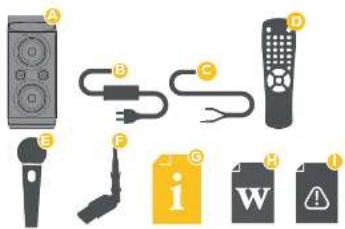
What's in the box:
A. Party Speaker
B. Power Cord
C. AUX Cable
D. Remote Control
E. Wireless Microphone
F. FM Antenna
G. User Manual
H. Warranty Card
I. General Safety Warning
2 x AAA Batteries (for Remote Control) and 2 x
AA Batteries (For Wireless Microphone) are not
included.
Controls and Connections
Top View Back View

4 | PRODUCT OVERVIEW
CONTROLS AND CONNECTIONS | 5
- Short press switch to next songs when playing music, long press to fast forward.
- ▶ short press to play/pause.
- | Short press switch to previous songs when playing music, long press to rewind.
- M : Short press mode conversion: Bluetooth, FM, AUX, U disk, TF card. Long press for TWS function.
- Eshort press to switch two different sound effects.
- REC: Please insert a U disk or TF card when in the recording function and Bluetooth internal recording, then insert a wired microphone or turn on the wireless microphone, and then short press the record button to record. When playing a recording file, long press the record button to delete the recording. When playing music, long press the record button to quickly enter the recording file.
- Short press to remove the original sound.
- Short press to turn on the light, long press to turn off the light.
- White light : Battery indicator.
- Blue light : Function indicator.
-
- VOL ±Adjust the main volume of the speaker unit.
-
- ECHO Adjust the echo of the microphone.
-
- BASS: Adjust the volume of the bass sound.
-
- TREBLE + : Adjust the volume of the Treble sound.
-
- GUITAR adjust the volume of Guitar
-
- MIC :Adjust the volume of the microphone.
- Power supply: The first gear is powered by an internal battery, and the second gear is powered by AC power charging.
6 | CONTROLS AND CONNECTIONS CONTROLS AND CONNECTIONS | 7
- FM antenna jack : Insert an external antenna to enhance the FM signal.
- AC power supply jack: Insert the AC power cable for charging.
- GUITAR : Insert an instruments to play.
- OUTPUT: Connect USB cable as a mobile power bank, output 5V-MAX 1.5A.
- Charging indicator: The red light is on when charging, the red light is off when fully charged and the green light is on.
- AUUX audio input
- TF : Insert TF card to play MP3 music.(Max workable capacity for TF Card is 64 GB, if more than 64 GB it can not work)
- USB : Insert U disk to play MP3 music.(Max workable capacity for USB is 64 GB, if more than 64 GB it can not work.)
- Midinsert wired microphone to singing.
Remote Control

- Under normal circumstances, the remote control should be used within the receiving range of about 6 meters and 30 degrees from the device receiving window.
- When operating the remote, please aim it at the receiving window of the device. There should be no obstacles between the remote and the device.
- If the receiving window of the device is placed under a strong light, the operation panel of the remote may malfunction. In this case, please move the device away to avoid direct exposure.
- When the remote battery has ran out, you can replace the AAA battery to avoid mixing old and new batteries. Please check the batteries regularly to see if they need to be replaced.
8 | CONTROLS AND CONNECTIONS CONTROLS AND CONNECTIONS | 9
Wireless Microphone Control
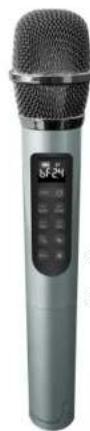
change the sound type
Microphone echo down
Microphone Volume down
Sound effect 1
Sound effect 3

ON/OFF
Microphone echo up
Microphone Volume up
Sound effect 2
Sound effect 4
- Long press to power ON/OFF.
- When the microphone is not connected to the device, the display will flicker slowly. When the microphone is successfully connected to the device, the display screen will stop flashing and display a steady state. The display blinks quickly when the battery is low.
- When wireless microphone battery is dead, you can twist the microphone to the left, and replace the AA battery. Please pay attention to the positive and negative poles when replacing the battery.
- In case of Howling, do not put the microphone close to the speaker device. Try to put the microphone a little bit away from or the back of the speaker device, or try to turn down the volume of microphone.
- Low microphone volume/No microphone volume: Please make sure the microphone volume is turn up to the maximum.
Operation
Bluetooth® Mode
- Turn on to enter the Bluetooth mode.
- Then turn on the mobile Bluetooth and search the Bluetooth name of the speaker or find a string of digital code for pairing.
- If there is a prompt to pair the password, please enter "0000" and click confirm connection.
Bluetooth® Recording Mode
- Insert TF card or U disk (should have at least one mp3 file in storage), then switch to Bluetooth mode. The mobile phone plays the accompaniment music after connecting to the bluetooth.
- Insert in a wired microphone or turn on a wireless microphone.
- Short press the record button, the Bluetooth internal recording starts to work, and then short press the record button to finish the internal recording and start to play the internal recording file.
Charging Mode
- Please use the AC power cable provided with this device for charging;
- The red light is on when charging, the red light is off when fully charged and the green light is on.
FM Mode
- Press Mutton to switch to FM function.
- Long press pause button to automatically search the station and the found station is automatically saved, after search, press the previous song or the next song to select the station.
- Short press pause to stop playing FM.
- When using the TWS function, place the two speakers horizontally in the same direction.
- In bluetooth mode, turn on the two bluetooth speaker device at the same time, and then turn on any speaker and short press TWS key to pair with another speaker to connect, long press M to disconnect TWS.
The optimal connection distance between two Bluetooth speakers is about 5 meters.
Demo Mode
- Turn on the speaker, keep pressing EQ button to play the demo.
- Short press EQ to stop demo.

Troubleshooting
If you encounter any problems with your product, please check this list of possible issues for a solution. If you don't find a solution here, contact After Sales Support on 1300 886 649.
Problem Solution
| No audio from right speaker | · Ensure that the speaker cable is connected to the left and right speakers |
| No sound in USB mode | · Adjust the volume knob.· Check that the USB cable is securely connected to the USB INPUT port.· Adjust the volume of your PC/laptop.· Check that your PC/laptop is on the correct speaker output. |
| No sound in Bluetooth mode | · Check that you are connected to the Bluetooth device. The LED status indicator should light up blue (flashing indicates it is in pairing mode).· Adjust the volume knob.· Adjust the volume of your Bluetooth device. |
| Automatically shut down when turned on | · The battery is low, please fully charge it before use. When charging, the switch must be in the AC IN switch, otherwise it will keep restarting.· The battery can also be charged when it is turned off or in AC IN switch |
| The player automatically shuts down or restarts | · The battery is low, please fully charge the speaker before use. |
12 | TROUBLESHOOTING TROUBLESHOOTING | 13
Problem Solution
| The charging light is not on, not charging | · Check whether the AC power cord is plugged in well or the AC power cord is damaged. · Please use AC100-240V 50/60Hz power supply to charge the speaker |
| TF card/U disk playback is silent | · Check whether the TF card is inserted in the correct direction and in place, whether the U disk is inserted in place or in good contact; whether the music format in the TF card or U disk is correct (Note: The music in the TF card/U disk mainly supports MPS compressed audio files and WMA lossless audio files playback); · Check if the device volume is adjusted to the minimum. |
| Recording doesn't work | · Check if there are any storage space in the TF card or U disk, If none, delete some unwanted files to regain storage space. · Recording should be in TF card mode, U disk mode and insert a wired microphone or turn on a wireless microphone. |
| The recording won't delete | · Please long press the record button or connect to a computer to delete it when playing the recording file. |
| The recording sound is low or there is noise | · Insert a wired microphone or turn on a wireless microphone when recording. |
Specifications
| Input 100-240V AC 50/60Hz, 70W Max | |
| Battery LI-Ion 7.4V 6000mAh, 44.4Wh | |
| Output 60W (RMS) | |
| Speaker | Woofer 6.5", 30W x 2Tweeter 2", 10W x 2 |
| Frequency Range 80Hz-18KHz | |
| 5/N ≥80dB | |
| Dimensions 278 x 324 x 640mm |
The Bluetooth® word mark and logos are registered trademarks owned by Bluetooth SIG, Inc., and any use of such marks by Hands (IP) Holdings Pty Ltd is under license. Other trademarks and trade names are those of their respective owners.
For Technical and Warranty Support
1300 886 649
monster@tempo.org
monsterproducts.com.au
Distributed by Tempo (Aust) Pty Ltd,
PO Box 6097, North Sydney NSW 2059
14 | SPECIFICATIONS
Compliance and Responsible Disposal

Packaging
The packaging of your product has been selected from environmentally friendly materials and can usually be recycled. Please ensure these are disposed of correctly. Plastic wrapping can be a suffocation hazard for babies and young children, please ensure all packaging materials are out of reach and are safely disposed of. Please recycle these materials rather than throwing them away.
Product
At the end of its working life, do not throw this product out with your household rubbish. An environmentally friendly method of disposal will ensure that valuable raw materials can be recycled. Electrical and electronic items contain materials and substances which, if handled or disposed of Incorrectly, could potentially be hazardous to the environment and human health.
Compliance
This product complies with the Australian Safety Standard AS/NZS 62368.1 to ensure the safety of the product.
Battery
When removing the batteries from the remote control and microphone, make sure to keep them out of reach of infants and children. Seek medical attention Immediately if a child has swallowed a battery. Please dispose of batteries responsibly by recycling at your nearest recycling centre.
WARNING: Batteries must not be exposed to excessive heat such as sunshine, fire or sources of heating.
MONSTER™


Brand : MONSTER
Model : MT-F10
Category : Loudspeaker