DU3017 - Uncategorized KENMORE - Free user manual and instructions
Find the device manual for free DU3017 KENMORE in PDF.


| Product Type | Upright Vacuum Cleaner with Detachable Canister |
| Brand | Kenmore |
| Model | DU3017 |
| Power Supply | 120V, 60Hz |
| Power Cord Length | Approximately 25 ft (7.6 m) |
| Dust Cup Capacity | 1.5 L (approx.) |
| Filtration System | Washable Primary Filter, Washable Pre-Filter, HEPA Media Exhaust Filter |
| Number of Attachments | 4 (Combination Tool, Pet HandiMate, Wand, Rotating Dusting Brush) |
| Suction Control | Adjustable (increase/decrease for different surfaces) |
| Bare Floor Selector | Yes, turns agitator off for hard floors |
| Agitator Type | Brush roll with belt drive |
| Warranty | 1 Year Limited Warranty |
| Help Line | 1-877-531-7321 (8am-5pm EST, M-F) |
| Replacement Parts Available | Exhaust Filter (561014108), Primary Filter (KC44KDMTZ000), Belt (KC28SEDCZ000) |
| Safety Features | Thermal Protector, By-Pass Valve, Agitator Overload Reset, Polarized Plug |
| Pet Tool | Pet HandiMate (pivoting for convenient cleaning) |
| Weight | Approximately 12 lbs (5.4 kg) |
| Maintenance | Empty dust cup after each use; clean pre-filter and primary filter monthly; replace HEPA filter when dirty |
| Certification | ETL Listed (assumed) |
Frequently Asked Questions - DU3017 KENMORE
User questions about DU3017 KENMORE
0 question about this device. Answer the ones you know or ask your own.
Ask a new question about this device
Download the instructions for your Uncategorized in PDF format for free! Find your manual DU3017 - KENMORE and take your electronic device back in hand. On this page are published all the documents necessary for the use of your device. DU3017 by KENMORE.
USER MANUAL DU3017 KENMORE
Vacuum Cleaner Help Line:
1-877-531-7321
8:00am-5:00pm EST, M-F
www.kenmore.com
Kenmore and the Kenmore logo are registered
trademarks of KCD IP, LLC and/or Sears Brands, LLC
and are used under license by Cleva North America, Inc.
All Rights Reserved.
TABLE OF CONTENTS
Before Using Your New Vacuum Cleaner 2
Packing List 2
Kenmore Vacuum Cleaner Warranty 3
Important Safety Instructions....4
Parts and Features.... 5
Assembly Instructions....6-7
Operating Instructions.... 8-11
Performance/Safety Features.... 12-13
Vacuum Cleaner Care....14-21
Troubleshooting 23-24
Requesting Assistance Or Service...... Back Cover
BEFORE USING YOUR NEW VACUUM CLEANER
Please read this guide. It will help you assemble and operate your new Kenmore vacuum cleaner in the safest and most effective way.
For more information about vacuum cleaner care and operation, call the Vacuum Cleaner Help Line at 1-877-531-7321. You will need the complete model and serial numbers when requesting information. Your vacuum cleaner's model and serial numbers are located on the Model and Serial Number Plate.
Use the space below to record the model number and serial number of your new Kenmore vacuum cleaner.
Model No.
Serial No. ____
Date of Purchase
Keep this book and your sales check (receipt) in a safe place for future reference.
PACKING LIST
Your KENMORE VACUUM CLEANER is packaged with the following parts and components assembled separately in the carton:
1 CrossOver Body
1 Nozzle
1 Handle & Hose Assembly
1 Combination Tool
1 Pet HandiMate®
1 Wand
1 Quick Start Guide
1 Use & Care Guide
1 Rotating Dusting Brush
KENMORE VACUUM CLEANER WARRANTY
KENMORE LIMITED WARRANTY
FOR ONE YEAR from the date of sale this product is warranted against defects in material or workmanship.
WITH PROOF OF SALE a defective product will be replaced free of charge.
The Kenmore brand is used under license. Direct all claims for warranty service to: Cleva North America, Inc., 1-877-531-7321
This warranty does not cover filters or belts, which are expendable parts that can wear out from normal use within the warranty period.
This warranty applies for only 90 days from the date of sale if this product is ever used for other than private household purposes.
This warranty gives you specific legal rights, and you may also have other rights which vary from state to state.
Cleva North America, Inc., Greenville SC 29607
IMPORTANT SAFETY INSTRUCTIONS
Read all instructions in this guide before assembling or using your vacuum cleaner.

WARNING:
Your safety is important to us. To reduce the risk of fire, electrical shock, injury to persons or damage when using your vacuum cleaner, follow basic safety precautions including the following:
Use your vacuum cleaner only as described in this manual. Use only with Kenmore recommended attachments.
Disconnect electrical supply before servicing or cleaning out the brush area. Failure to do so could result in the brush unexpectedly starting, causing personal injury from moving parts.
Do not leave vacuum cleaner when plugged in. Unplug from outlet when not in use and before performing maintenance.
To reduce the risk of electrical shock - Do not use outdoors or on wet surfaces.
Do not allow to be used as a toy. Close attention is necessary when used by or near children.
Do not use with a damaged cord or plug. If vacuum cleaner is not working as it should, has been dropped, damaged, left outdoors, return it to an authorized Kenmore service center for assessment before using again.
Do not pull or carry by cord, use cord as a handle, close a door on cord, or pull cord around sharp edges or corners. Do not run vacuum cleaner over cord. Keep cord away from heated surfaces.
Do not unplug by pulling on cord. To unplug, grasp the plug, not the cord.
Do not handle plug or vacuum cleaner with wet hands.
Do not put any objects into openings.
Do not use with any opening blocked; keep free of dust, lint, hair, and anything that may reduce air flow.
Keep hair, loose clothing, fingers, and all parts of body away from openings and moving parts.
Turn off all controls before unplugging.
Use extra care when cleaning on stairs.
Do not put on chairs, tables, etc. Keep on floor.
Do not use vacuum cleaner to pick up flammable or combustible liquids (gasoline, cleaning fluid, perfumes, etc.), or use in areas where they may be present. The fumes from these substances can create a fire hazard or explosion.
Do not pick up anything that is burning or smoking, such as cigarettes, matches, or hot ashes.
Do not use vacuum cleaner without dust cup and/or filters in place.
Always clean the dust cup after vacuuming carpet cleaners or freshener, powders, and fine dust. These products clog the filters, reduce airflow and can cause damage to the vacuum cleaner. Failure to clean the dust cup could cause permanent damage to the vacuum cleaner.
Do not use the vacuum cleaner to pick up sharp hard objects, small toys, pins, paper clips, etc. They may damage the vacuum cleaner or dust cup.
Unplug before connecting Pet HandiMate®
You are responsible for making sure that your vacuum cleaner is not used by anyone unable to operate it properly.
WARNING:
This product contains a chemical know to the state of California to cause cancer and birth defects or other reproductive harm.
SAVE THESE INSTRUCTIONS
Proper assembly and safe use of your vacuum cleaner are your responsibilities. Your vacuum cleaner is intended for Household use. Read this Use & Care Guide carefully for important use and safety information. This guide contains safety statements under warning and caution symbols.
PARTS AND FEATURES
It is important to know your vacuum cleaner's parts and features to assure its proper and safe use. Review these before using your vacuum cleaner.
REPLACEMENT PARTS
| Part | Part No. |
| Exhaust Filter | 561014108 |
| Primary Filter | KC44KDMTZ000 |
| Belt | KC28SEDCZ000 |
| To order a replacement part call 1-844-202-9924 | |
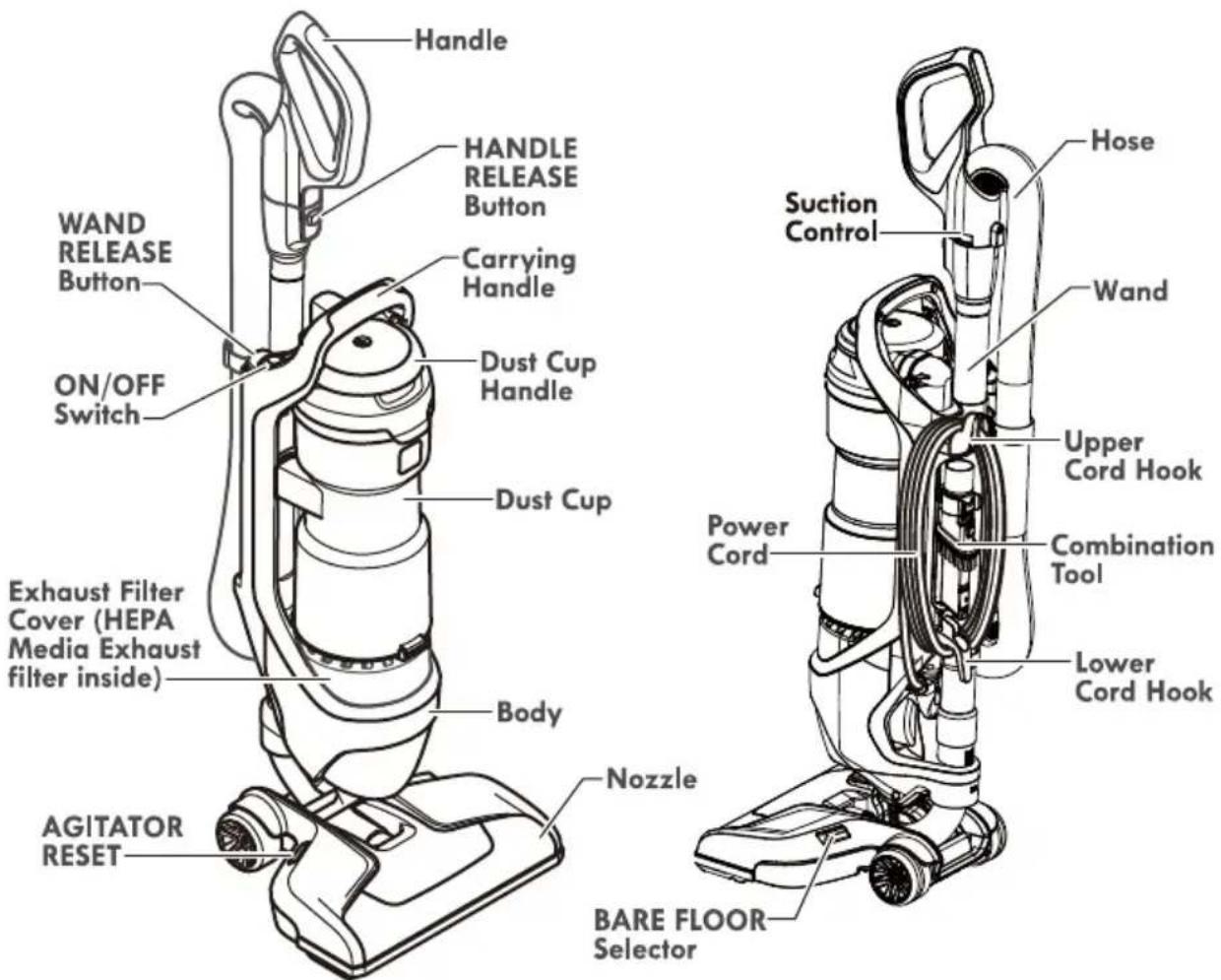

Please pay special attention to these hazard alert boxes, and follow any instructions given. WARNING statements alert you to such hazards as fire, electric shock, burns and personal injury. CAUTION statements alert you to such hazards as personal injury and/or property damage.
ASSEMBLY INSTRUCTIONS
Before assembling the vacuum cleaner, check the PACKING LIST (page 2). Use this list to verify that you have received all the components of your new Kenmore vacuum cleaner.
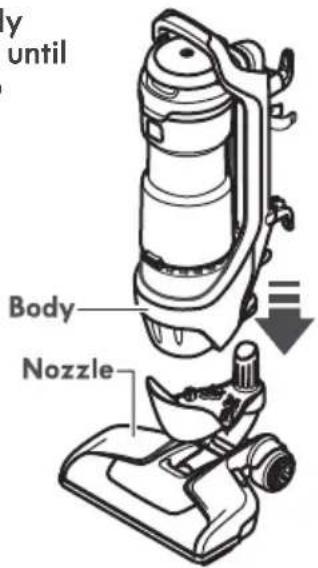
- Place the body onto the nozzle until body snaps into place.
natural_image
Diagram of a hand using a vacuum cleaner to lift a vehicle (no text or symbols visible)-
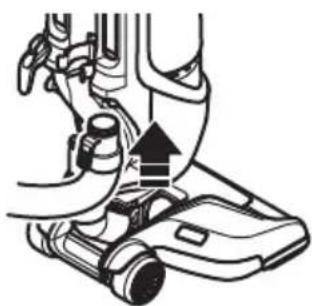
Insert the hose into body until the hose snaps into place.
-
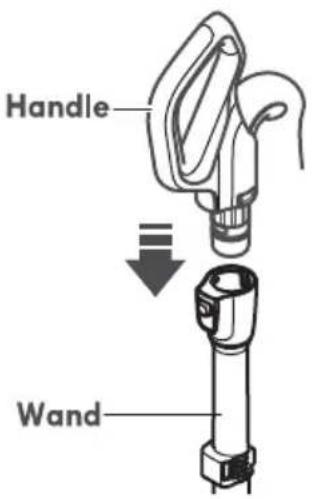
Insert the handle into wand until the handle snaps into place.
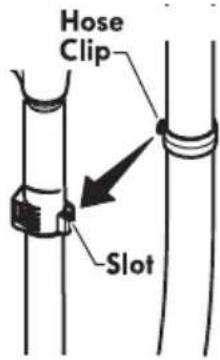
- Insert hose clip into the slot on the telescoping wand.
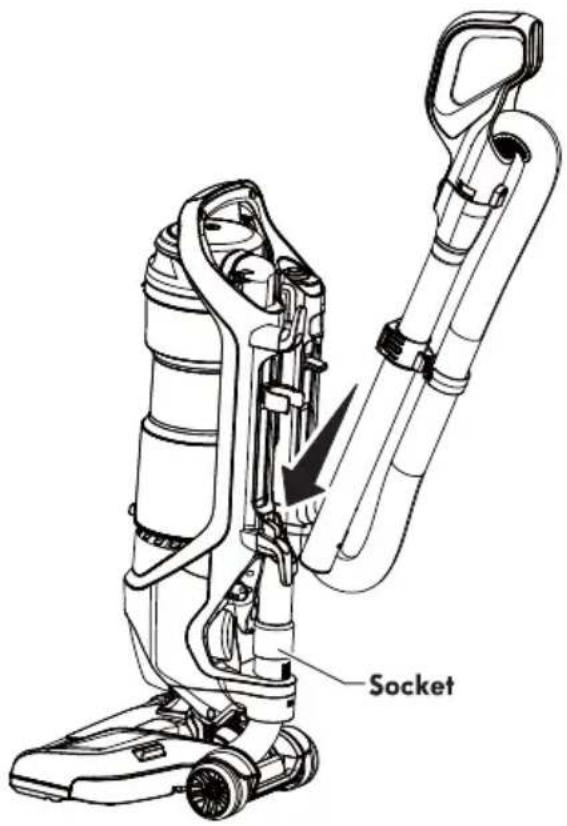
- Place the floor brush onto the socket.
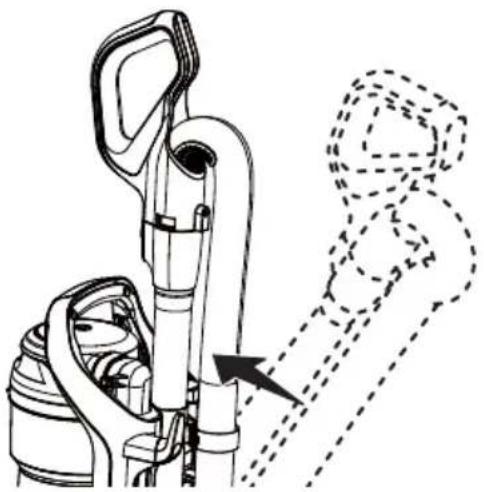
6.Push wand forward until the wand snaps in place.
natural_image
Technical line drawing of a mechanical device with an arrow indicating motion or assembly (no text or symbols present)ATTACHMENTS
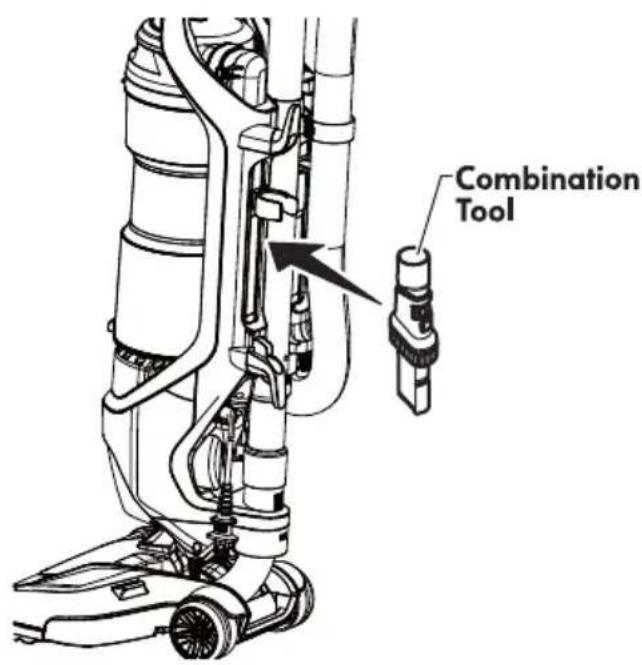
Insert the combination tool into the holder on the back of the vacuum cleaner as shown.
POWER CORD - WRAPPING

WARNING
Electrical Shock and Personal Injury Hazard
Wrapping the cord too tightly puts stress on the cord and can cause cord damage. A damaged cord is an electrical shock hazard and could cause personal injury or damage.
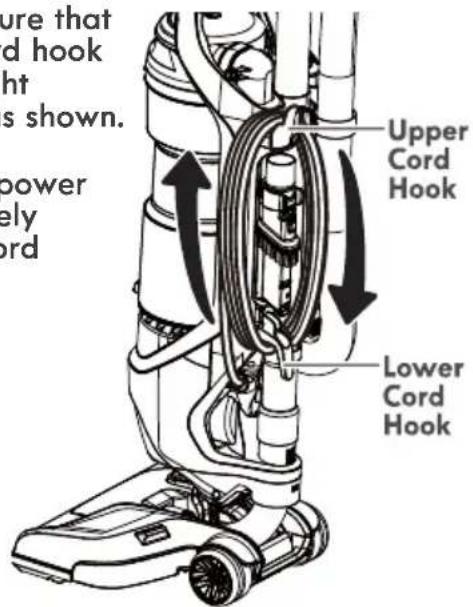
- Make sure that upper cord hook is in upright position as shown.
- Wrap power cord loosely around cord hooks.
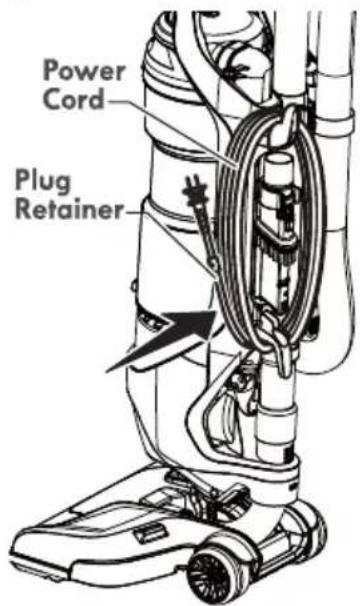
- Lock plug retainer onto the power cord.
OPERATING INSTRUCTIONS

CAUTION
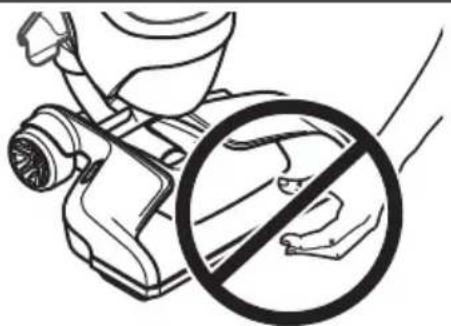
Moving parts! To reduce the risk of personal injury, DO NOT touch the agitator when vacuum cleaner is on. Contacting the agitator while it is rotating can cut, bruise or cause other injuries. Always turn off and unplug from electrical outlet before servicing. Use caution when operating near children.
natural_image
Illustration of a hand holding a bottle and a circular prohibition symbol (no text or labels)POWER CORD - RELEASE & USE
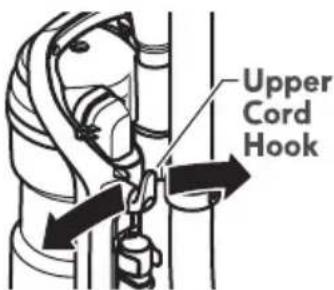
- Turn the upper cord hook to either side and down to release the power cord.

WARNING
• To reduce the risk of electric shock, this vacuum cleaner has a polarized plug (one blade is wider than the other).
- The plug will fit in a polarized outlet only one way. If the plug does not fit fully in the outlet, reverse the plug. If it still does not fit, contact a qualified technician to install the proper outlet. Do not change the plug in any way.
- Detach the power cord plug from the power cord and pull the cord off the upper cord hook.
- Be sure the power cord is locked into the locking notch as shown. This will help manage the cord when operating vacuum cleaner.
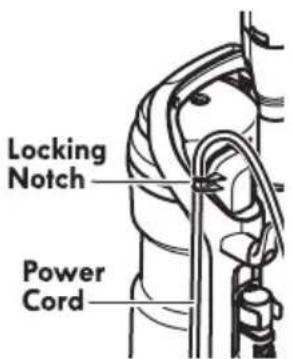
- Plug the polarized power cord into a 120 Volt outlet located near the floor.

WARNING
Personal Injury and Product Damage Hazard
When any abnormality/failure occurs, stop using the product immediately and disconnect the power plug.
DO NOT use outlets above counters. Damage from cord to items in surrounding area could occur.
- To restore cord after use turn upper cord hook to the up position, then wrap cord loosely around cord hooks.

WARNING
Electrical Shock And Personal Injury Hazard
Wrapping the cord too tightly puts stress on the cord and can cause cord damage. A damaged cord is an electrical shock hazard and could cause personal injury or damage.
OPERATION MODES
- Release the handle by placing foot on the nozzle and pull back to change handle position.
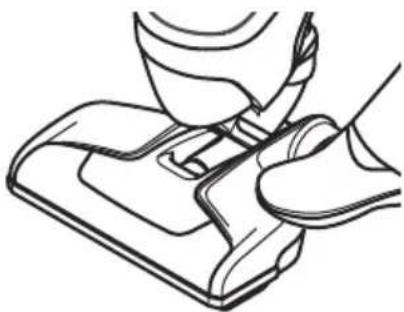
natural_image
Line drawing of a hand pressing down on a shoe component (no text or symbols)- Press the ON/OFF button to turn the vacuum cleaner on or off.
NOTE: The agitator does not rotate when the vacuum cleaner is in the upright position.
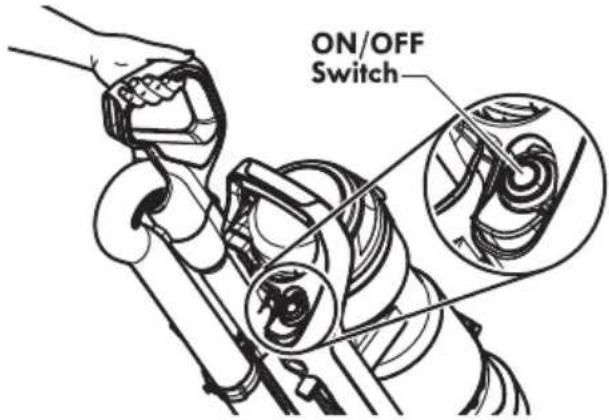
When using the vacuum cleaner on bare floors, press the BARE FLOOR selector to turn off the agitator.
Pressing the BARE FLOOR selector again will turn the agitator on.
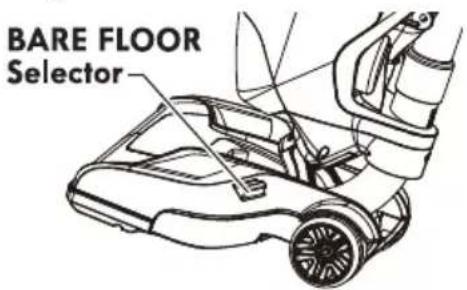
- Place vacuum cleaner in the upright position.
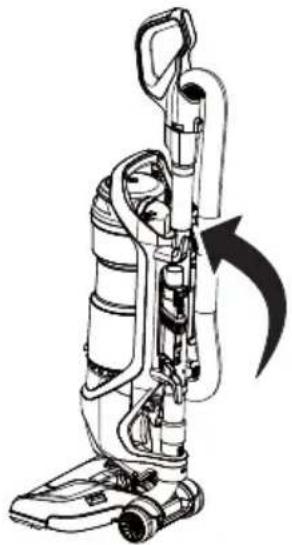
natural_image
Line drawing of a vacuum cleaner with attached tubing and a curved arrow indicating motion (no text or symbols)- Press and hold body release.
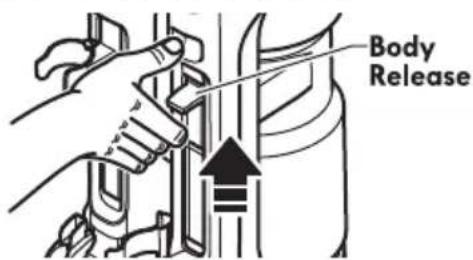
- Lift body off of nozzle.
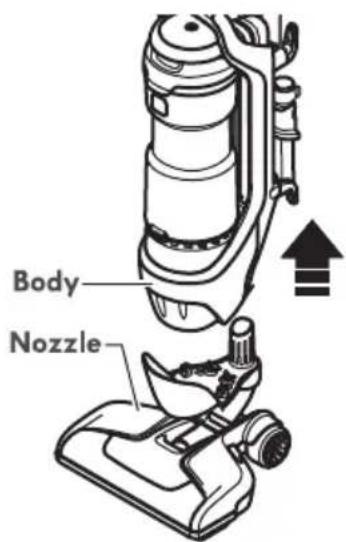
ABOVE FLOOR MODE
- Press WAND RELEASE button.
- Pull up to release wand for above floor cleaning.
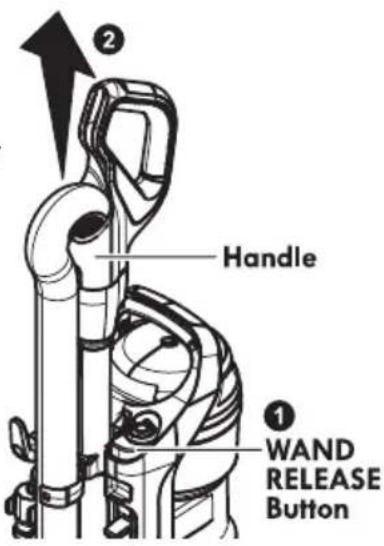
- Slide attachment collar over open end of wand. Use attachments as needed. See ATTACHMENT USE TABLE (page 11).
USING ATTACHMENTS ON HANDLE
- Place the vacuum cleaner in the upright locked position.
- Remove the handle from the wand by pressing the HANDLE RELEASE button.
- Slide attachment collar over open end of handle. Use attachments as needed. See ATTACHMENT USE TABLE (page 11).
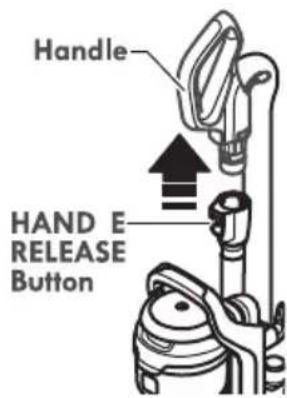

CAUTION
When using attachments, be careful not to overextend the stretch hose when reaching. Trying to reach beyond the hose stretch capability could cause the vacuum cleaner to tip over.

CAUTION
DO NOT pull the vacuum cleaner around the room by the hose. Property damage or personal injury could result.
ATTACHMENTS
COMBINATION TOOL
The combination tool can be attached to either the handle or the wand. Slide the collar of the tool over the open end of the handle or wand.
Use the combination tool in crevice tool mode for cleaning in tight spaces such as furniture, between cushions, and stairs. See ATTACHMENT USE TABLE (page 11).
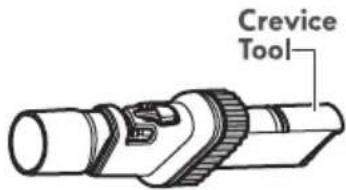
Set the combination tool in dusting brush mode by pressing the release button and sliding the dusting brush to the end of the combination tool. Use in dusting brush mode for cleaning loose surfaces such as drapes. See ATTACHMENT USE TABLE (page 11).
To return the combination tool to crevice tool mode press the release button and slide the dusting brush down the combination tool.
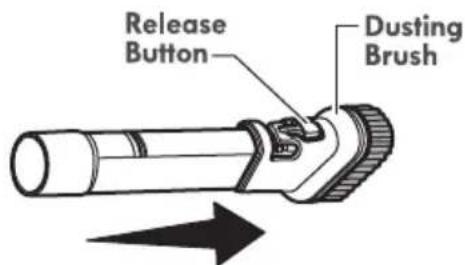
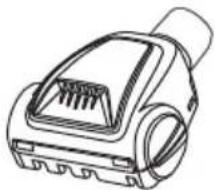
PET HANDIMATE®
The Pet HandiMate® can be attached to either the handle or the wand.
natural_image
Line drawing of a handheld electric shaver device (no text or symbols)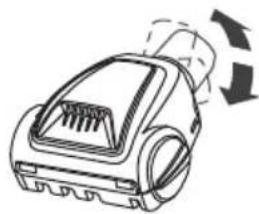
natural_image
Line drawing of a vacuum cleaner with airflow arrows indicating motion (no text or symbols)Pet HandiMate® pivots for more convenient cleaning.
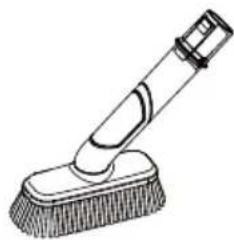
Rotating Dusting Brush
natural_image
Line drawing of a cleaning brush with a textured base (no text or symbols)Can be used for multiple applications, floor, furniture and overhead cleaning, including ceiling fans.
ATTACHMENT USE TABLE
| CLEANING AREA √ = Applicable | |||||||
| ATTACHMENT | Furniture* | Between Cushions* | Drapes* | Stairs | Floors | ||
| Carpet | Bare | ||||||
| CREVICE TOOL | 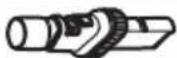 | √ | √ | √ | √ | ||
| DUSTING BRUSH | 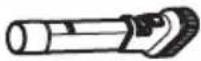 | √ | √ | √ | √ | ||
| PET HANDIMATE® |  | √ | √ | ||||
| Rotating Dusting Brush | 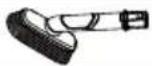 | √ | √ | √ | √ | ||
* Always clean attachments before using on fabrics.
MOTOR PROTECTION SYSTEM
THERMAL PROTECTOR
This vacuum cleaner has a thermal protector which automatically trips to protect the vacuum cleaner suction motor. If a clog prevents the normal flow of air to the motor, the thermal protector turns the motor off automatically. This allows the motor to cool in order to prevent possible damage to the vacuum cleaner.
To reset thermal protector: Turn the vacuum cleaner off and unplug the power cord from the outlet to allow the vacuum cleaner to cool and the thermal protectors to reset.

CAUTION
Always return the vacuum cleaner to the upright position before using the hose and attachments. Failure to do so may result in overheating of the agitator motors and can cause the thermal protectors to trip.
Check for and remove clogs, and empty dust cup if necessary. Also check and replace any clogged filters. Wait approximately 50 minutes before restarting vacuum cleaner.
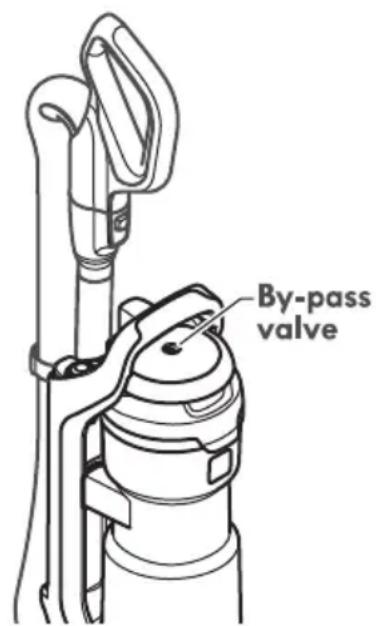
BY-PASS VALVE
This vacuum cleaner has a By-Pass Valve which prevents motor overheating and damage. The valve opens to provide cooling air when a clog prevents normal air flow to the vacuum cleaner suction motor. You will notice a change of sound as air rushes through the valve opening. To correct problem, empty the dust cup and clean the primary filter and pre-filter. If using attachments, adjust suction control to allow for greater air flow.
NOTE: The By-Pass Valve may open when using attachments or when cleaning new carpet due to reduced airflow caused by the attachments themselves or by new carpet lint filling the dust cup quickly.
NOTE: Do not block By-Pass Valve.
AGITATOR RESET
The agitator has built-in protection against motor damage should the agitator jam. If the agitator slows down or stops, the agitator overload protector shuts off the agitator motor. The vacuum cleaner suction motor will continue to run.
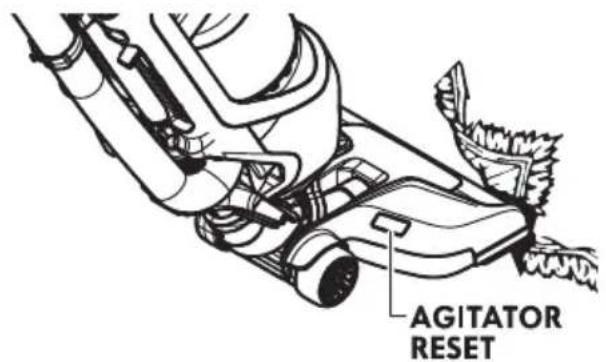
To correct problem: Turn off and unplug vacuum cleaner, remove obstruction, then press the AGITATOR RESET button.
NOTE: Once the agitator motor shuts down, clear jam from agitator and wait a minimum of 20 seconds before resetting.
If the problem persists, have the vacuum cleaner serviced by a qualified technician.
SUCTION CONTROL
The suction control allows you to change vacuum cleaner suction for different fabric and carpet weight.
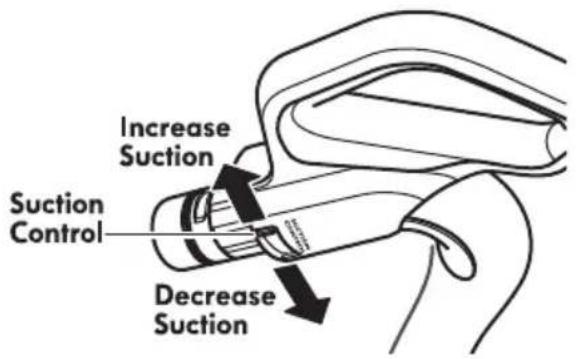
- Opening control decreases suction for draperies and lightweight rugs.
- Closing control increases suction for upholstery and carpets.
VACUUM CLEANER CARE
Always follow all safety precautions when performing maintenance to the vacuum cleaner.

WARNING
Electrical Shock And Personal Injury Hazard
Disconnect electrical supply before servicing or cleaning the vacuum cleaner. Failure to do so could result in electrical shock or personal injury from vacuum cleaner suddenly starting.
CLEANING EXTERIOR AND ATTACHMENTS
- Turn off and unplug vacuum cleaner. DO NOT drip water on vacuum cleaner.
- To clean exterior, or to reduce static electricity and dust build-up, wipe outer surface with a clean, soft cloth that has been dipped in a solution of mild liquid detergent and water, then wrung dry. Wipe dry after cleaning.
Wash crevice tool and rotating dusting brush in warm soapy water, rinse and air dry. Do not clean in dishwasher.

CAUTION
Do not use attachments if they are wet. Attachments used in dirty areas, such as under a refrigerator, should not be used on other surfaces until they are washed. They could leave marks.
VACUUM CLEANER STORAGE
Replace hose and wand in storage position if necessary (see page 6 & 7).
Gather the cord and wrap it loosely around the upper and lower cord hooks. Lock plug retainer onto the power cord.
Store the vacuum cleaner in a dry, indoor area, on the floor with the handle locked in the upright position.

WARNING
Electrical Shock And Personal Injury Hazard
Wrapping the cord too tightly puts stress on the cord and can cause cord damage. A damaged cord is an electrical shock hazard and could cause personal injury or damage.
EMPTYING DUST CUP

WARNING
Always unplug power cord from electrical outlet before performing any service on vacuum cleaner.
TO REMOVE DUST CUP
- Lift dust cup handle located at the top of the dust cup.
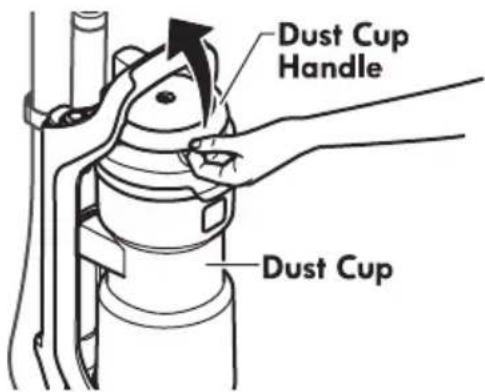
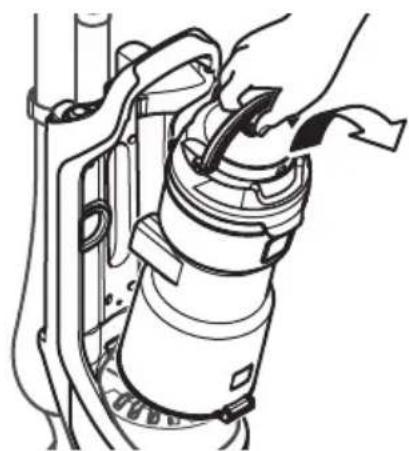
- Pull the dust cup handle up and lift dust cup up and out of the vacuum cleaner.
natural_image
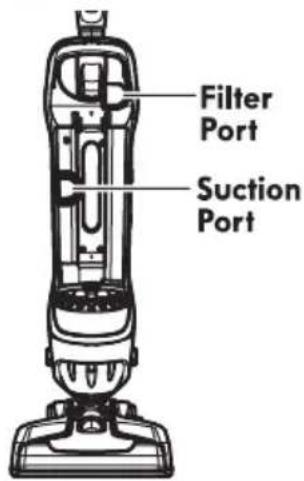
Technical line drawing of a mechanical assembly with hands operating a component (no text or symbols)- Remove any clogs that might be located in the suction port or filter port area.
TO EMPTY DUST CUP
-
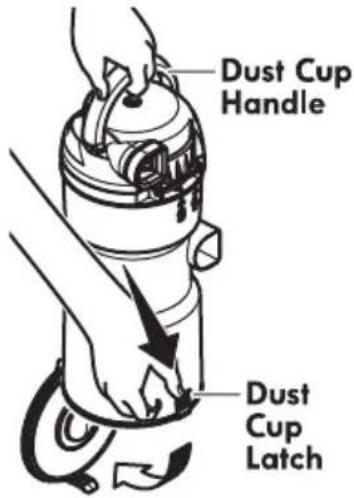
Raise dust cup handle to the vertical position.
-
Hold dust cup over a trash container.
-
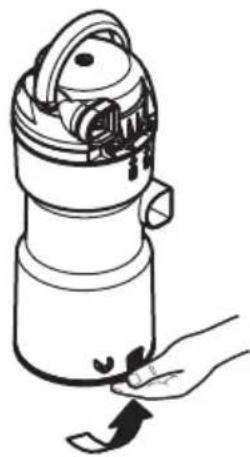
Press the dust cup latch downward to release the door.
The door will swing open and the debris will fall into the trash container.
- Shake the dust cup to release any debris that might hang in the pre-filter.
natural_image
Line drawing of a hand holding a thermospan device with a handle and scroll (no text or symbols)- After the dust cup is empty of debris, firmly close the door. Make sure you hear a "click" sound to indicate that the door is fully latched.
TO REINSTALL DUST CUP
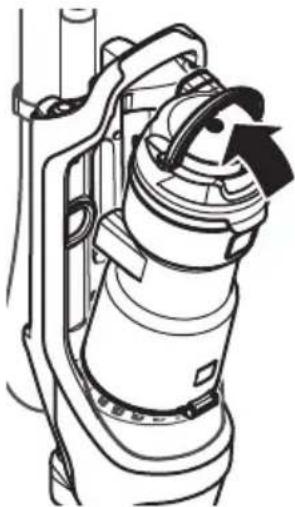
- Place dust cup back into vacuum cleaner by inserting the bottom first and tilting back with the dust cup handle raised.
natural_image
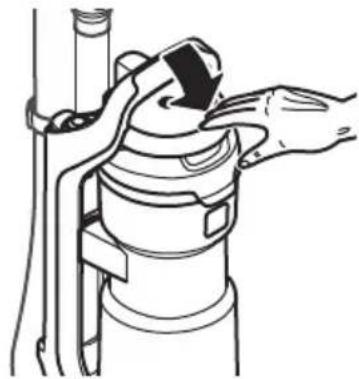
Technical line drawing of a mechanical device with no visible text or symbols- Lower the dust cup handle to lock dust cup in place. A noticeable "click" should be heard.
natural_image
Line drawing of hands installing or adjusting a mechanical component with a tool (no text or symbols)PRE-FILTER CLEANING
The pre-filter is located inside the dust cup. Check the pre-filter frequently and clean when dirty.
- Remove the dust cup as outlined in the EMPTYING DUST CUP (page 15).
NOTE: Make sure dust cup is free of debris before opening.
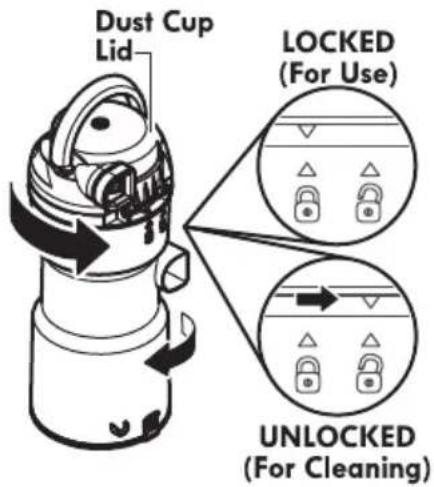
- Rotate dust cup lid assembly counterclockwise as indicated on the lid and lift off.
-
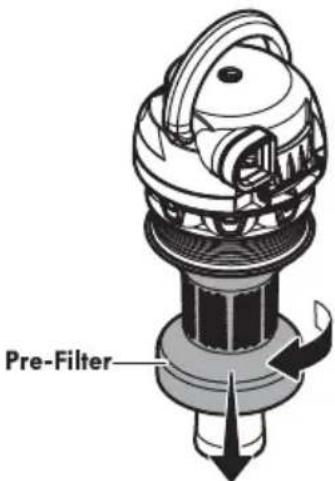
Grasp pre-filter and rotate as shown to remove.
-
Clean pre-filter by gently tapping over a trash container. Tap on several sides to ensure best cleaning.
If necessary, rinse with cold water only, DO NOT use detergent or soap. Allow parts to dry 24 hours before putting back into vacuum cleaner.
DO NOT wash in the dishwasher. DO NOT install damp.
To Reinstall:
- Align the slots on the prefilter with the alignment tabs inside dust cup lid assembly.
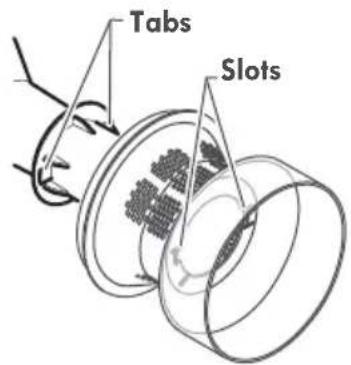
- Rotate pre-filter as shown to lock in place.
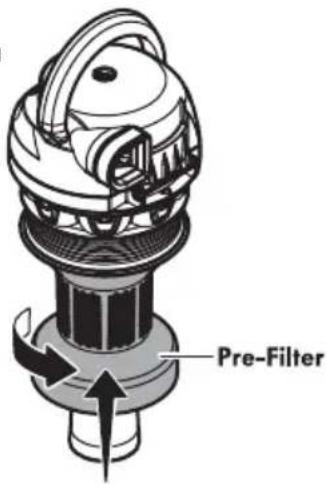
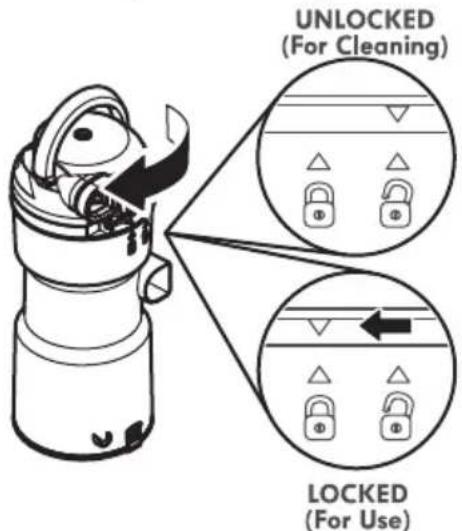
- Replace the lower portion of the dust cup by aligning marks as shown, UNLOCKED (For Cleaning).
-
Rotate while pressing downward until marks align as shown above in LOCKED (For Use).
-
Reinstall the dust cup. See EMPTYING DUST CUP (page 15).
PRIMARY FILTER CLEANING
The primary filter is located inside the dust cup lid.
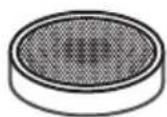
It is recommended to clean the primary filter with cold water at least once a month. Check the primary filter frequently and clean when dirty.
NOTE: When the cleaning of the filter no longer restores vacuum cleaner suction to full power, replace the filter.
- Remove the dust cup as outlined in the EMPTYING DUST CUP (page 15).
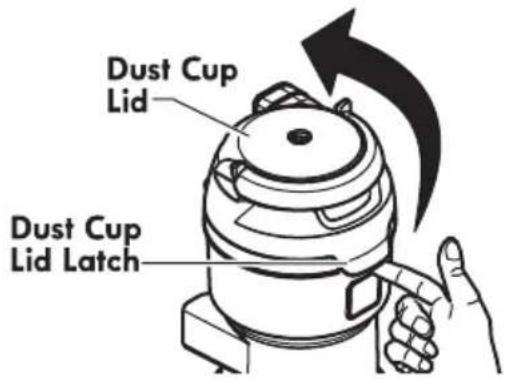
- Pull the dust cup lid latch and open the lid.
- Remove the primary filter.
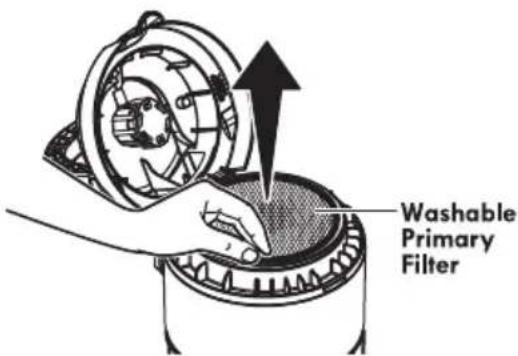
- Wash with cold water only, DO NOT use detergent or soap. squeeze by hand and allow to air dry. Allow parts to dry 24 hours before putting back into vacuum cleaner.
DO NOT operate without primary filter installed. DO NOT wash in the dishwasher. DO NOT install primary filter if damp.
To Reinstall:
- Place the primary filter into the dust cup lid.
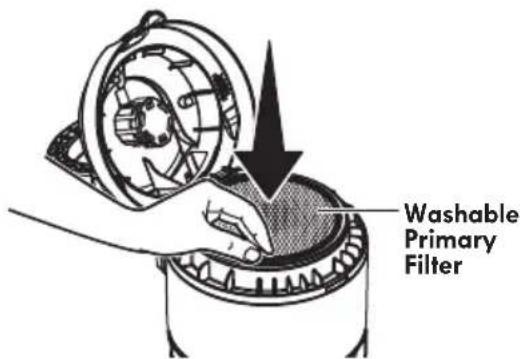
- Close the dust cup lid. Be sure the lid snaps in place. A noticeable "click" should be heard.
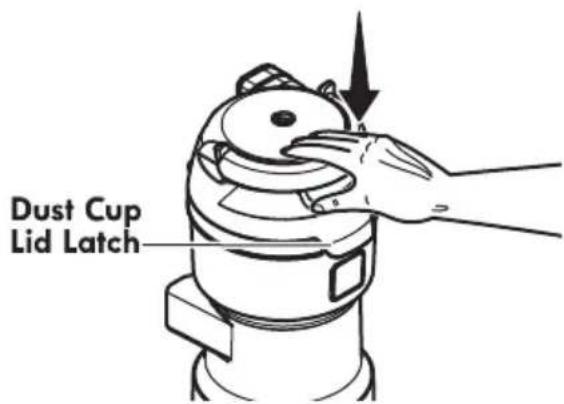
- Reinstall the dust cup. EMPTYING DUST CUP (page 15).
HEPA MEDIA EXHAUST FILTER
EXHAUST FILTER
The exhaust filter must be replaced when it becomes dirty. The timing between replacement intervals will depend on the use conditions the vacuum cleaner is exposed to. The filter should be checked when emptying the dust cup. The filter CANNOT be washed as it will lose its dust trapping ability.
- Remove exhaust filter cover by pulling the release tab on the cover and rotating out from vacuum cleaner.
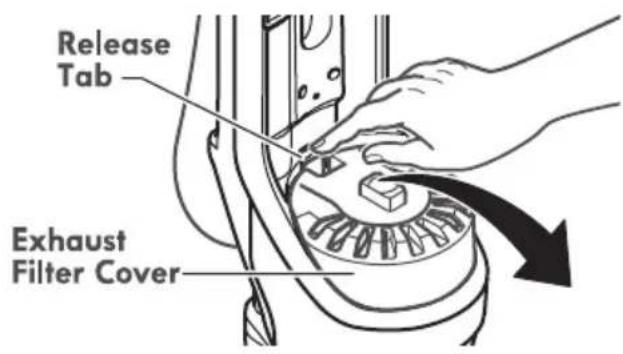
- Remove the HEPA Media exhaust filter from vacuum cleaner.
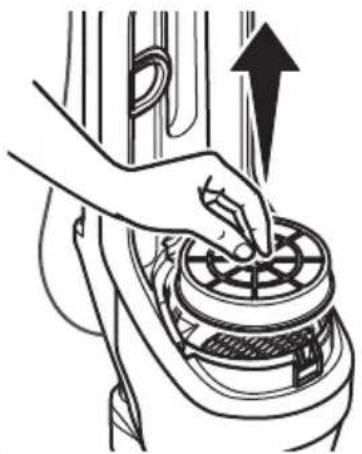
natural_image
Illustration of a hand using a rotary valve to press down a motor (no text or symbols present)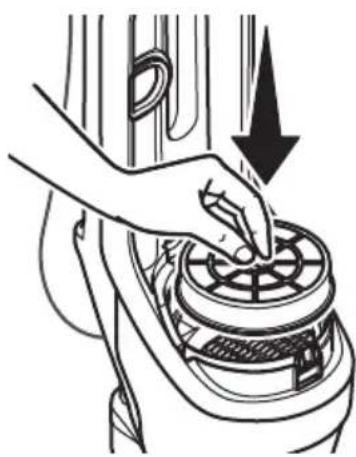
natural_image
Line drawing of a hand pressing down on a car interior fan (no text or symbols)-
Place new filter cartridge into vacuum cleaner as shown.
-
Replace the exhaust filter cover by placing bottom tab into the slot.
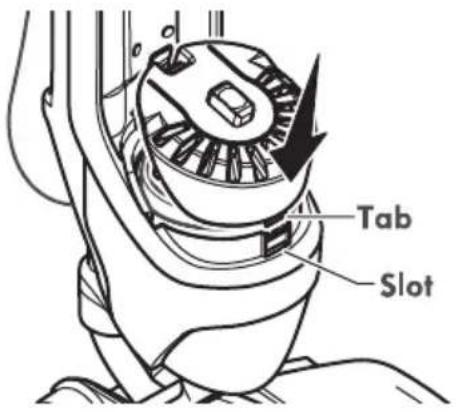
- Rotate filter cover onto vacuum cleaner, and press down as shown, until cover snaps into place.
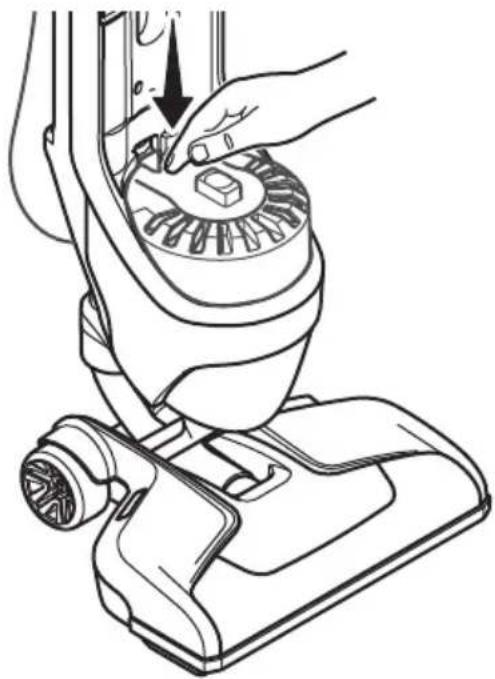
natural_image
Line drawing of a hand using a vacuum cleaner to adjust the component (no text or symbols present)BELT CHANGING

WARNING
Always unplug power cord from electrical outlet before performing maintenance to the vacuum cleaner.
Replace belt whenever a burning rubber smell caused by excessive slippage occurs.
- Lay vacuum cleaner on floor with the bottom up and nozzle flat.
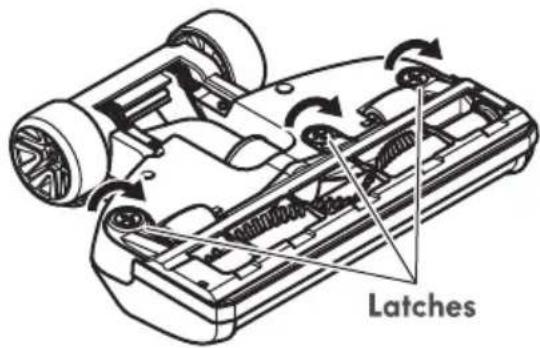
- Release lower plate by rotating the lower plate latches to the UNLOCK position. Lift off lower plate.
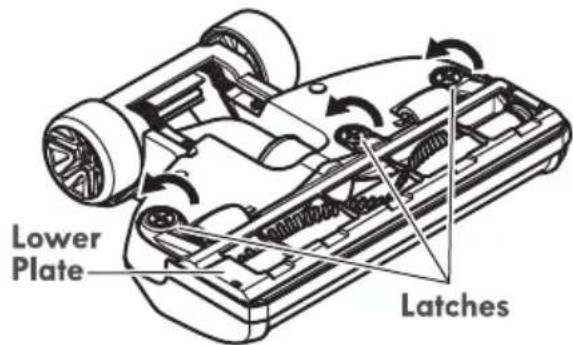

CAUTION
Motor shaft may be hot.
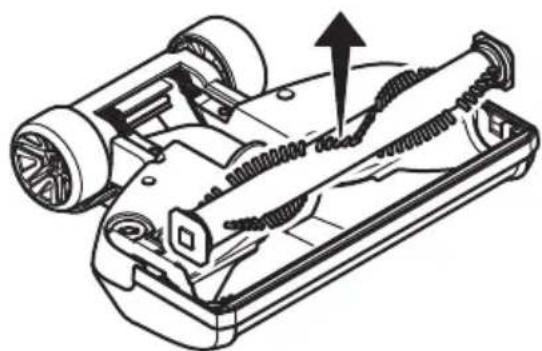
- Remove agitator by carefully lifting out.
natural_image
Technical line drawing of a mechanical device with springs and wheels, showing internal components and a directional arrow (no text or symbols)- Remove worn or broken belt.
-
Clean agitator. See AGITATOR CLEANING (page 21).
-
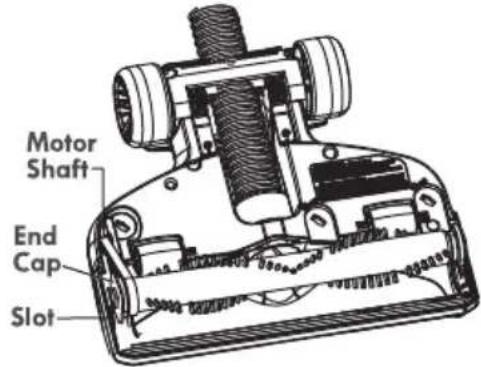
Loop new belt around motor shaft and agitator.
-
Reinstall agitator back into nozzle by placing end caps into grooves.
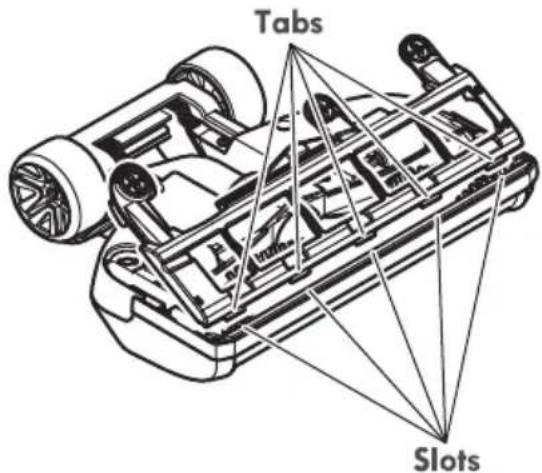
- Reinstall lower plate by aligning tabs on front edge of lower plate with slots in the nozzle and rotating to installed position.
- Press lower plate onto nozzle and secure by rotating the lower plate latches to the LOCK position.
AGITATOR CLEANING
NOZZLE
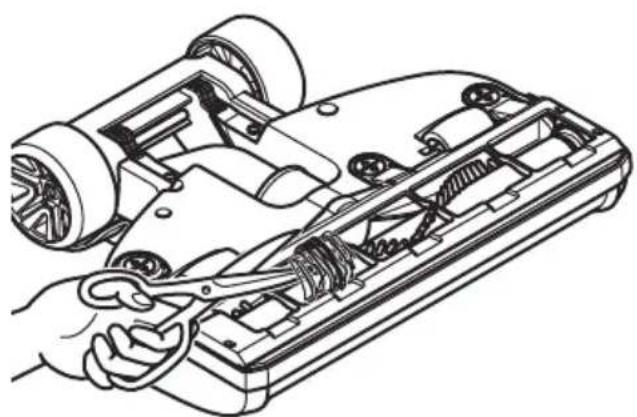
To maintain efficient cleaning, the agitator must be kept free of carpet fiber, string, or hair build-up. After every 7 to 10 uses, unplug and turn vacuum cleaner over and check agitator for fiber and hair build-up. Use scissors to remove any build-up entangled around the agitator.
natural_image
Line drawing of a car's internal components being adjusted with a tool, showing gears and suspension (no text or symbols)PET HANDIMATE®
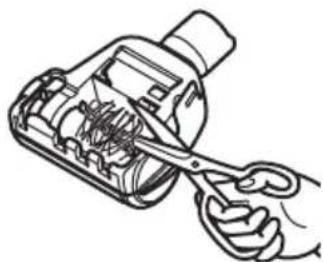
Cut off any carpet pile and lint entangled around agitator with a pair of scissors.
natural_image
Line drawing of a hand using scissors to cut or adjust internal components of a mechanical device (no text or symbols)
CAUTION
To reduce the risk of injury from moving parts, remove Pet HandiMate® from vacuum hose or wand before servicing.
REMOVING CLOGS
TO REMOVE CLOG FROM HOSE
Frequently check air path to make sure it is free of obstructions.
- Press WAND RELEASE button.
- Pull back to release wand with floor brush.
- Lift wand and floor brush from vacuum cleaner.
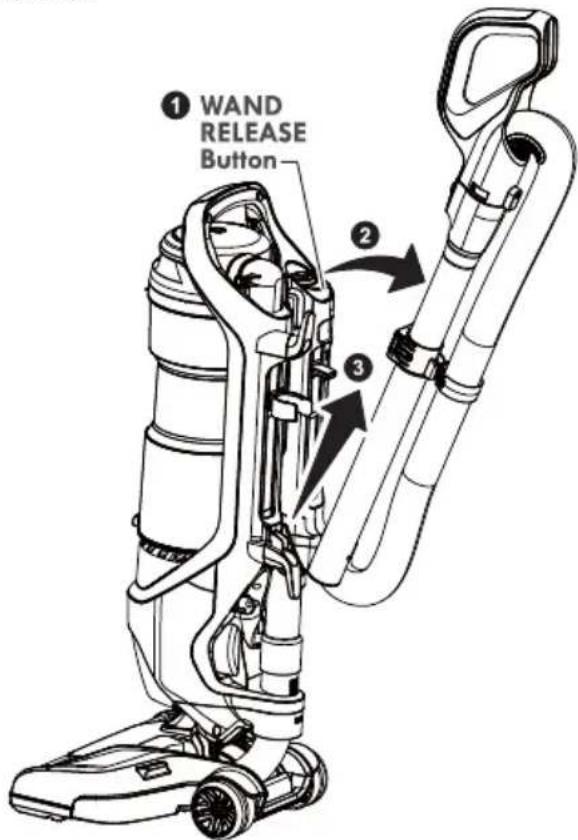
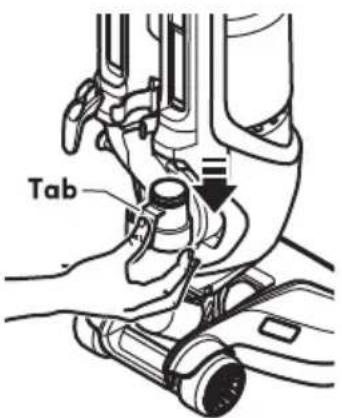
- To remove hose, press tab on hose cuff and pull down.
- Remove any clogs or residue in hose.
- Reinstall hose and wand onto vacuum cleaner. See ASSEMBLY (pages 6-7).
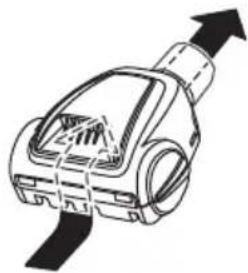
TO REMOVE CLOG FROM PET HANDIMATE®

CAUTION
To reduce the risk of injury from moving parts, remove Pet HandiMate® from vacuum hose or wand before servicing.
Frequently check air path to make sure it is free of obstructions.
natural_image
Diagram of a mechanical device with upward force arrow, no text or symbols presentTROUBLESHOOTING
Review this table to find do-it-yourself solutions for minor performance problems. Any service needed, other than maintenance described in this Use & Care Guide, should be performed by a qualified service agent.

WARNING
Disconnect electrical supply before performing maintenance to the vacuum cleaner. Failure to do so could result in electrical shock or personal injury.
| PROBLEM POSSIBLE CAUSE POSSIBLE SOLUTION | ||
| Vacuum cleaner won't run. | 1. Unplugged at wall outlet.2. Tripped circuit breaker or blown fuse.3. Thermal protector tripped.4. Defective wall outlet. | 1. Plug in firmly, press the ON/OFF switch.2. Reset circuit breaker or replace fuse.3. Allow vacuum cleaner to cool 50 minutes (page 12).4. Check with a good appliance or lamp. Have outlet properly serviced. |
| Poor job of dirt pick-up. | 1. Full or clogged dust cup.2. Wrong floor setting.3. Worn agitator.4. Worn or broken Belt.5. Clogged nozzle, hose, or wand6. Hole in hose.7. Hose not inserted fully.8. Motor protection system activated.9. Dirty filters. | 1. Empty dust cup (page 15).2. Adjust setting (page 9).3. Replace agitator.4. Replace belt (page 20).5. Check for and remove any clogs in nozzle, hose, and wand.6. Replace hose.7. Insert hose fully (page 6).8. Check for clogs in hose.9. Clean pre-filter (page 17), primary filter (page 18) or replace HEPA Media Exhaust filter (page 19). |
| Agitator does not turn. | 1. Handle in full upright position.2. Agitator overload protector tripped.3. Thermal protector tripped.4. Nozzle switch in BARE FLOOR position. | 1. Move handle from upright position.2. Press AGITATOR RESET button (page 13).3. Allow vacuum cleaner to cool 50 minutes (page 12).4. Press nozzle switch to change to carpet position (page 9). |
| Airflow restricted with attachment use; sound changes. | 1. Attachment use restricts air flow.2. New carpet fuzz clogged air path. | 1. Check attachments for fuzz, lint, pet hair or other debris.2. Check for and remove any clogs and clean hose. |
| PROBLEM POSSIBLE CAUSE POSSIBLE SOLUTION | ||
| Pet HandiMate®will not run when attached. | Carpet pile entangled around agitator.2. Worn or broken belt. | Clean agitator.2. Not a serviceable item, replace Pet HandiMate®. |
| Pet HandiMate®: Poor job of dirt pick-up. | Carpet pile entangled around agitator.2. Worn or broken belt.Problem with vacuum cleaner.4. Open suction control.5. Hole in vacuum hose. | Clean agitator.2. Not a serviceable item, replace Pet HandiMate®.3. Check vacuum cleaner troubleshooting tips.4. Close suction control (page 13).5. Replace hose. Refer to the Repair Parts List for hose purchasing information. |
TABLA DE CONTENIDO
Cleva North America, Inc., Greenville SC 29607
natural_image
Line drawing of a hand using a vacuum cleaner to lift a component (no text or symbols)natural_image
Technical line drawing of a vacuum cleaner with attached mechanical components and a dashed outline indicating assembly (no text or symbols)ACCESORIOS
natural_image
Line drawing of a hand holding a small object, possibly a tool or device, with no visible text or symbols.natural_image
Line drawing of a vacuum cleaner with internal components and airflow direction arrow (no text or symbols)natural_image
Line drawing of a mechanical component with internal slots and a bulb (no text or symbols)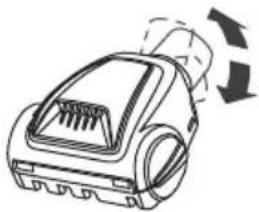
natural_image
Line drawing of a vacuum cleaner with airflow arrows indicating motion (no text or symbols)natural_image
Line drawing of a cleaning brush with a textured base and handle (no text or symbols)natural_image
Technical line drawing of a mechanical assembly with hands adjusting components (no text or symbols)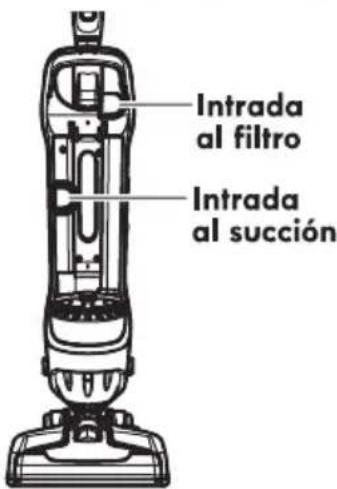
natural_image
Line drawing of a hand holding a thermospan device with a handle and scroll (no text or symbols)natural_image
Technical line drawing of a mechanical device with no visible text or symbolsnatural_image
Line drawing of hands operating a mechanical device with a handle (no text or symbols)LIMPIEZA DEL PRE-FILTRO
Para reinstalar:
natural_image
Illustration of a hand using a fan to press down a circular fan on a mechanical device (no text or symbols)natural_image
Illustration of a hand using a mechanical device to press or adjust a fan (no text or symbols visible)natural_image
Line drawing of a hand using a vacuum cleaner to adjust or install a component (no text or symbols present)CAMBIO DE LA CORREA

ADVERTENCIA
natural_image
Technical line drawing of a mechanical device with springs and wheels, showing internal components and an upward arrow (no text or symbols)natural_image
Line drawing of a car chassis with visible internal components and a hand holding a tool (no text or symbols)PET HANDIMATE®
natural_image
Line drawing of a hand using scissors to cut or adjust internal components of a mechanical device (no text or symbols)
ADVERTENCIA
natural_image
Illustration of a mechanical device with an upward arrow indicating motion or force (no text or symbols)RECONOCIMIENTO DE PROBLEMAS
Vacuum Cleaner Help Line
1-877-531-7321
8:00 am - 5:00 pm ET M-F
Refer to the Troubleshooting section of the Use & Care Guide.
For additional assistance, call the Vacuum Cleaner Help Line.

- TABLE OF CONTENTS
- BEFORE USING YOUR NEW VACUUM CLEANER
- PACKING LIST
- KENMORE VACUUM CLEANER WARRANTY
- KENMORE LIMITED WARRANTY
- IMPORTANT SAFETY INSTRUCTIONS
- WARNING:
- SAVE THESE INSTRUCTIONS
- PARTS AND FEATURES
- ASSEMBLY INSTRUCTIONS
- ATTACHMENTS
- POWER CORD - WRAPPING
- WARNING
- OPERATING INSTRUCTIONS
- CAUTION
- POWER CORD - RELEASE & USE
- OPERATION MODES
- ABOVE FLOOR MODE
- USING ATTACHMENTS ON HANDLE
- COMBINATION TOOL
- PET HANDIMATE®
- Rotating Dusting Brush
- ATTACHMENT USE TABLE
- MOTOR PROTECTION SYSTEM
- THERMAL PROTECTOR
- BY-PASS VALVE
- AGITATOR RESET
- SUCTION CONTROL
- VACUUM CLEANER CARE
- CLEANING EXTERIOR AND ATTACHMENTS
- VACUUM CLEANER STORAGE
- EMPTYING DUST CUP
- TO REMOVE DUST CUP
- TO EMPTY DUST CUP
- TO REINSTALL DUST CUP
- PRE-FILTER CLEANING
- To Reinstall:
- PRIMARY FILTER CLEANING
- HEPA MEDIA EXHAUST FILTER
- EXHAUST FILTER
- BELT CHANGING
- AGITATOR CLEANING
- NOZZLE
- REMOVING CLOGS
- TO REMOVE CLOG FROM HOSE
- TROUBLESHOOTING
- TABLA DE CONTENIDO
- ACCESORIOS
- LIMPIEZA DEL PRE-FILTRO
- Para reinstalar:
- CAMBIO DE LA CORREA
- ADVERTENCIA
- RECONOCIMIENTO DE PROBLEMAS
- Vacuum Cleaner Help Line
- 1-877-531-7321
Brand : KENMORE
Model : DU3017
Category : Uncategorized