
FZ10-8HC - Ventilateur domestique MIDEA - Free user manual and instructions
Find the device manual for free FZ10-8HC MIDEA in PDF.


| Product Type | Tower Fan |
| Brand | Midea |
| Model | FZ10-8HC |
| Timer | 120 minutes |
| Speed Settings | 3 (Low, Medium, High) plus Off |
| Oscillation | Yes, left/right push button |
| Assembly Required | Yes (chassis + body, screws, plastic nut) |
| Cleaning Method | Unplug, wipe with damp cloth and mild soap |
| Safety Features | Do not immerse, indoor use only, keep away from children |
| Maintenance | Low; refer to qualified service personnel |
| Power Cord | Must be replaced by manufacturer if damaged |
| Intended Use | Domestic, indoor only |
| Warranty | Not specified |
| Power Supply | Standard household voltage (not specified in manual) |
| Dimensions | Not specified |
| Weight | Not specified |
Frequently Asked Questions - FZ10-8HC MIDEA
User questions about FZ10-8HC MIDEA
0 question about this device. Answer the ones you know or ask your own.
Ask a new question about this device
Download the instructions for your Ventilateur domestique in PDF format for free! Find your manual FZ10-8HC - MIDEA and take your electronic device back in hand. On this page are published all the documents necessary for the use of your device. FZ10-8HC by MIDEA.
USER MANUAL FZ10-8HC MIDEA
natural_image
Line drawing of a tall vertical tower with internal grid structure (no text or symbols)OWNER'S MANUAL
TOWER FAN
MODEL:FZ10-8HC
Please read the instruction manual carefully before use and safekeeping.
CAUTION
Read Rules for Safe Operation and Instructions Carefully.
WARNING
- If the supply cord is damaged, it must be replaced by manufacturer or its service agent or a similarly qualified person in order to avoid a hazard.
- To protect against the risk of electrical shock, do not immerse the unit, cord or plug in water or other liquid.
- This appliance is not intended for use by persons (including children) with reduced physical, sensory or mental capabilities, or lack of experience and knowledge, unless they have been given supervision or instruction concerning use of the appliance by a person responsible for their safety. Young children should be supervised to ensure that they do not play with the appliance.
- When the appliance is not in use and before cleaning, unplug the appliance from the outlet.
- Keep electrical appliances out of reach from Children or infirm persons. Do not let them use the appliances without supervision.
- When the fan was assembled, the rotor blade guard shall not be taken off anymore
- Prior cleaning unplug the fan
- The rotor guard shall not be dissembled/opened to clean the rotor blades.
- Wipe the fan enclosure and rotor blade guard with a slightly damp cloth.
- Never insert fingers, pencils, or any other object through the grille when fan is running.
- Disconnect fan when moving from one location to another.
- Be sure fan is on a stable surface when operating to avoid overturning.
- DO NOT use fan in window, rain may create electrical hazard.
- Indoor use only.
PART FIGURE
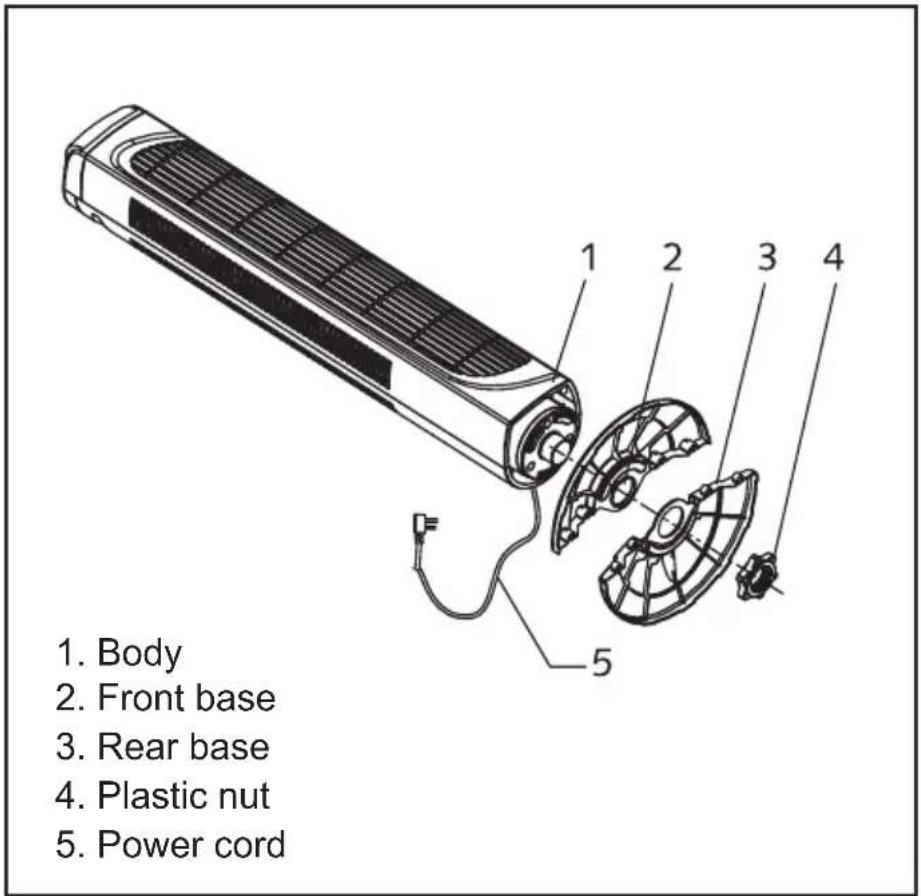
Note: All the pictures in this manual are for explanation purpose only. Any discrepancy between the real object and the illustration in the drawing shall be subject to the real subject.
ASSEMBLY INSTRUCTIONS
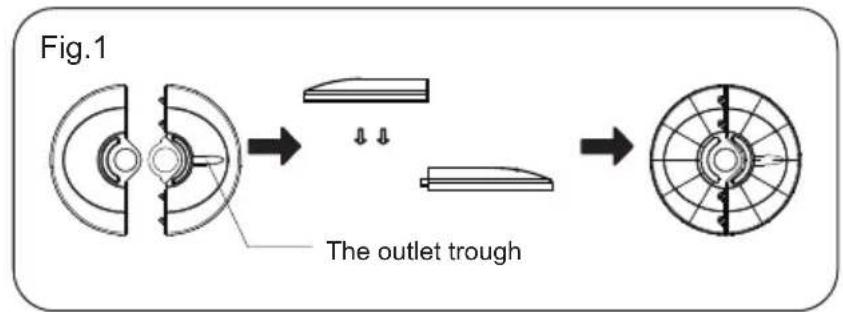
- Take the chassis, fan body from the packing box and combine two parts of the chassis with two screws.(See Fig.1)
- Pass the power cord through the flute, then Insert the fan body in the chassis. (See Fig.3)
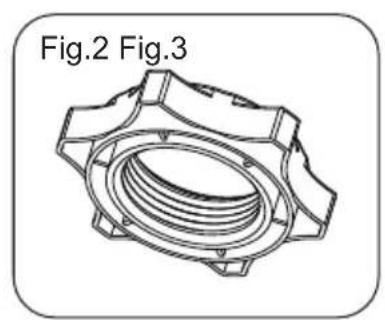
- Fix the fan body on the chassis with plastic nut. (See Fig.2)
natural_image
Technical line drawing of a mechanical component with no visible text or symbols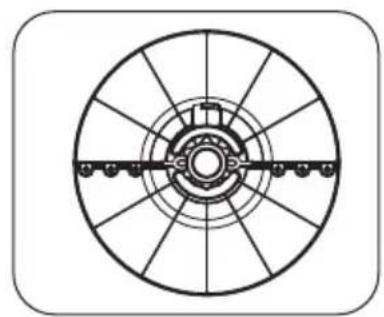
natural_image
Technical line drawing of a circular mechanical component with radial slots and central shaft (no text or symbols)- Plug the power cord into a wall outlet.
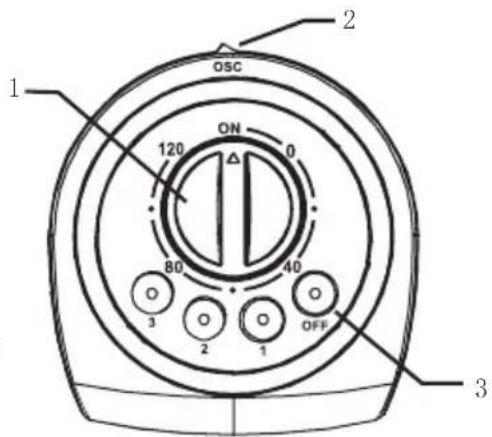
- The air flow can be set to oscillate to left or right by pushing the button of body oscillating switch (2). If you want to stop oscillation, push it again.
-
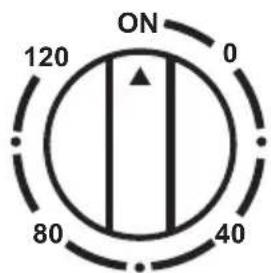
Automatic 120-minute timer. Turn the knob of the timer (1) to the desired time you want, the fan will stop when the time is over. The longest time set is 120 minutes. If the timer is not required and constant fan operation is required, then set Timer to "ON" position.
-
Speed is controlled by selecting the speed switch (3) on the top of the body. There are 4 positions: OFF ; 1--Low ; 2--Medium ; 3--High
The fan requires little maintenance. Do not try to fix it by yourself. Refer it to qualified service personnel if service is needed.
- Before cleaning and assembling, fan must be unplugged.
- To ensure adequate air circulation to the motor, keep vents at the rear of the motor free of dust. Do not disassemble the fan to remove dust.
- Please wipe the exterior parts with a soft cloth soaking a mild detergent.
- Do not use any abrasive detergent or solvents to avoid scratching the surface. Do not use any of the following as a cleaner: gasoline, thinner, bending.
- Do not allow water or any other liquid into the motor housing or interior parts.
CLEANING
- Be sure to unplug from the electrical supply source before cleaning.
- Plastic parts should be cleaned with a soft cloth moisten with mild soap. Thoroughly remove soap film with dry cloth.
GD Midea Environment Appliances Manufacturing CO.,LTD.
Midea Industrial Park, Dongfu Road, Dongfeng Town, Zhongshan, Guangdong, China

Brand : MIDEA
Model : FZ10-8HC
Category : Ventilateur domestique