XMT-703U - Multifunction tool XU1 - Free user manual and instructions
Find the device manual for free XMT-703U XU1 in PDF.


| Product Type | Multifunction oscillating tool |
| Brand | XU1 |
| Model | XMT-703U |
| Input Voltage | 220-240 V ~ 50 Hz |
| Input Power | 250 W |
| No-Load Speed | 21,300 rpm |
| Oscillation Angle | 3.2° |
| Weight | 1.7 kg |
| Dimensions (approx.) | 280 x 70 x 100 mm |
| Power Cord Length | 2.5 m |
| Tool Holder | Universal interface for standard accessories |
| Included Accessories | Straight cutting blade, sanding pad, hex key |
| Variable Speed | Yes, controlled by trigger and dial |
| Soft Grip Handle | Yes, for comfortable operation |
| Dust Extraction Port | Yes, compatible with vacuum |
| Safety Features | Double insulation, lock-off switch |
| Maintenance | Replace carbon brushes when worn |
| Warranty | 2 years against manufacturing defects |
| Certifications | CE, EAC, RoHS |
| Application | Cutting, sanding, scraping, grinding in wood, metal, plastic |
Frequently Asked Questions - XMT-703U XU1
User questions about XMT-703U XU1
0 question about this device. Answer the ones you know or ask your own.
Ask a new question about this device
Download the instructions for your Multifunction tool in PDF format for free! Find your manual XMT-703U - XU1 and take your electronic device back in hand. On this page are published all the documents necessary for the use of your device. XMT-703U by XU1.
USER MANUAL XMT-703U XU1
XU1 Power tools Telephone: GB: 0151 294 4488 / IRL: 1850 882711
XMT-71330 0417
SAFETY INSTRUCTIONS

When operating the tool
Check that the switch is in the "OFF" position before connecting to the power supply. Switch to "OFF" immediately after completion of the task. Keep the mains cable away from any moving parts or accessories.
Never cover the ventilation slots in the tool.
Electrical safety
Before you connect the charger to the mains supply make sure that the data on the rating plate are identical to the mains data.
This tool is double insulated; therefore no earth wire is required.
Using an extension lead
Always use an approved extension lead suitable for the power input of this tool. Before use, inspect the extension lead for signs of damage, wear and ageing. Replace the extension lead if damaged or defective.
When using an extension lead on a reel, always unwind the lead completely. Use of an extension lead not suitable for the power input of the tool or which is damaged or defective may result in a risk of fire and electric shock.
Description of symbols
Danger! - Read the operating instructions to reduce the risk of inquiry
Caution! Wear ear-muffs. The impact of noise can cause damage to hearing.
Caution! Wear a breathing mask. Dust which is injurious to health can be generated when working on wood and other materials. Never use the device to work on any materials containing asbestos!
Wear eye protection
C
Do not expose to rain
Double insulated
- Alternating current /min Revolutions, reciprocations or strokes per minute
No No load speed Hz Hertz W Watts Warning
Items Supplied
Please check that the article is complete as specified in the scope of delivery. If parts are missing, please contact our service center or the sales outlet where you made your purchase at the latest within 5 working days after purchasing the product and upon presentation of a valid bill of purchase. Also, refer to the warranty table in the service information at the end of the operating instructions.
• Open the packaging and take out the equipment
- Remove the packaging material and any packaging and/or transportation braces (if available).
- Check to see if all items are supplied. - Inspect the equipment and accessories for transport damage.
• If possible, please keep the packaging until the end of the guarantee period.
one of the guarantee period.
The equipment and packaging material are not toys. Do not let children play with plastic bags, foils or small parts. There is a danger of swallowing or suffocating!
• Multifunction tool
- Plunge-cut saw blade for wood
- HexKey - Original instructions
•
General Safety Instructions
for Electric Tools
Danger! Read all safety regulations and instructions. Any errors made in following the safety regulations and instructions may result in an electric shock, fire and/or serious injury. Keep all safety regulations and instructions in a safe place for future use. The term "electric tool" used in the safety instructions refers to electric tools operated from the mains power supply (with a power cable) and to battery operated electric tools (without a power cable).
1. Workplace safety
a) Keep your work area clean and well
illuminated. Untidy or unit work areas can result in accidents
b) Do not operate the electric tool in an environment where there is a risk of explosions and where there are inflammable liquids, gases or dust. Electric tools produce sparks which could set the dust or vapours alight.
c) Keep the electric tool out of the reach of children and other persons. If there is a distraction, you may lose control of the appliance.
2. Electrical safety
a) The connector plug from this electric tool must fit into the socket. The plug should never be altered in any way. Never use adapter plugs together with earthed electric tools. Unaltered plugs and correct
b) Avoid bodily contact with earthed surfaces such as pipes, heating, ovens and fridges. The risk of electric shock is increased if your body is earthed.
c) Keep the tool out of the rain and away from moisture. The ingress of water into an electric tool increases the risk of an electric shock.
d) Do not use the cable to carry the electric tool, to hang it up or to pull it out of the socket. Keep the cable away from heat, oil, sharp edges and moving parts of the appliance. Damaged or entangled cables increase the risk of an electric shaker.
e) If you are working outdoors with an electric tool, only use extension cables which are designed specifically for this purpose. Using specially designed outdoor extension cables, the risk of electric shock is reduced.
f) If operation of the electric tool in a damp environment can not be avoided, use a earth-leakage circuit-breaker. The earth-leakage circuit-breaker reduces the risk of an electric shock.
3. Safety of persons
a) Be careful, watch what you are doing and use an electric tool sensibly. Do not use the tool if you are tired or under the influence of drugs, alcohol or medication. A moment of inattention when using the electric tool can result in serious injuries.
b) Wear personal protection equipment and always wear safety goggles. Wearing personal protection (such as dust masks, non-slip safety shoes, safety helmet or ear protection, depending upon the type and use of the electric tool) reduces the risk of injury.
c) Make sure that the appliance cannot start up accidentally. Ensure that the electric tool is switched off before you connect it to the power supply and/or insert the battery, or pick up or carry the tool. If your finger is on the switch whilst carrying the electric tool or if you connect the appliance to the mains when it is switched on, this can lead to accidents.
d) Remove keys and wrenches before switching on the electric tool. A tool or key which comes into contact with rotating
e) Avoid abnormal working postures. Make sure you stand squarely and keep your balance at all times. In this way, you can control the electric tool better in unexpected circumstances.
f) Wear suitable work clothes. Do not wear loose clothing or jewellery. Keep hair, clothes and gloves away from moving parts. Loose clothing, jewellery or long hair can get trapped in moving parts.
Do not lose this safety information.
- Usage and treatment of the electric tool a) Do not overload the appliance. Use the correct tool for your work. You will be able to work better and more safely within the given performance boundaries.
b) Do not use an electric tool with a defective switch. An electric tool that cannot be switched on or off is dangerous and must be repaired.
c) Pull the plug out of the socket and/or remove the battery before making any adjustments to the appliance, changing accessories or put the appliance down. This safety measure prevents starting the electric tool unintentionally.
d) Keep unused electric tools out of the reach of children. Do not allow people who are not familiar with the appliance or who have not read these instructions to use the appliance. Electric tools are
to use the appraisal. Etcno is well and dangerous if they are used by inexperience people.
e) Clean your electric tool carefully. Check whether moving parts are functioning properly and not jamming, whether parts are broken or damaged enough
that the functioning of this electric tool is affected. Have damaged parts repaired before using the appliance. Many accidents are caused by badly maintained electric tools.
f) Keep your cutting tools sharp and clean. Carefully maintained cutting tools with sharp cutting edges will jam less and are easier to control.
g) Make sure to use electric tools, accessories, attachments, etc. in accordance with these instructions. Take the conditions in your work area and the job in hand into account. Using electric tools for any purpose other than the one for which they are intended can lead to dangerous situations.
- Service a) Have your electric tool repaired only by trained personnel using only genuine spare parts. This will ensure that your electric tool remains safe to use.
Do not lose these safety instructions
Additional Safety Instructions for Multi Function Tools
- Always guide the power cable away from the back of the tool. - Use of the tool on materials containing asbestos
- Always remove the plug from the power supply socket before carrying out any work on the machine (cleaning the tool, changing
- Always disconnect the machine by removing the plug from the socket, not by pulling on the power cable.
- Keep your workplace clean and well illuminat - Make sure that the workpiece is sufficiently secured so that it cannot slip.
- Keep children away. - For your own sake, keep the machine clean at all times and check it for signs of damage ear time after using it.
• Make sure that the switch is set to OFF before you insert the plug into the power supply sock • Make sure of your footing, particularly when working on ladders and platforms.
- Harmful or toxic dust can be produced when working on wood or metal. Touching or inhaling this dust can be harmful
• To protect your health, always wear safety goggles and a dust mask while operating! • If you discover any damage to the machine,
the exploded diagram and the spare parts list determine which parts need to be ordered from Customer Service.
• Important! Wear safety goggles and a dust mask.
This appliance is not intended for use by persons (including children) with reduced physical, sensory or mental capabilities, or lack of experience and knowledge, unless they have been given supervisor or instruction concerning use of the appliance by a person responsible for their safety. Children should be supervised to ensure that they do not play with the appliance.
Do not lose these safety instructions.
[NO TEXT]
For EU countries only
Never place any electric power tools in your household refuse.
To comply with European Directive 2012/19/EC concerning old electric and electronic equipment and its implementation in national laws, old electric power tools have to be separated from other waste and disposed of in an environment-friendly fashion, e.g. by taking to a recycling depot.
Recycling alternative to the return request; As an alternative to returning the equipment to the manufacturer, the owner of the electrical equipment must make sure that the equipment is properly disposed of if he no longer wants to keep the equipment. The old equipment can be returned to a suitable collection point that will dispose of the equipment in accordance with the national recycling and waste disposal regulations. This does not apply to any accessories or aids without electrical components supplied with the old equipment.
Subject to technical changes

SPECIFICATIONS
| Input Voltage: | 230–240V ~ 50Hz |
| Input Power: | 220W |
| No Load Speed: | 20,000/min |
| Oscillation Angle: | 3.2° |
| Protection Class: | II / ☒ |
| Weight: | 1.17kg |
Danger
Sound and vibration Sound and vibration values were measured in
Sound and vibration values were measured in accordance with EN 60745.
- Sound Pressure Level: 02.0 dV/λ
Lµt Sound Pressure Level: 82.9 dB(A)
Kµ Uncertainty: 3 dB
Lna Sound Power Level: 93.9 dB(A)
KmA Uncertainty: 3 dB
Wear e
The impact of noise can cause damage to hearing.
Total vibration values (vector sum of three
directions) determined in accordance with EN
60745.
Handle
Vibration Emission Value a: 7.96m/s 3
K Uncertainty:
The modified vibration curve was established in
The specified vibration value was established in accordance with a standardized testing method
It may change according to how the electric
equipment is used and may exceed the specifie
value in exceptional circumstances. The modified vibration valve can be used to
The specified vibration value can be used to compare the equipment with other electric power
compare the equipment and other devices power tools.
The specified vibration value can be used for initia
assessment of a harmful effect.
Keep the noise emissions and vibrations to a
minimo
• Only use appliances which are in perfect working order.
• Service and clean the appliance regularly.
• Adapt your working style to suit the appliance.
• Do not overload the appliance.
• Have the appliance serviced whenever
- Switch the appliance off when it is not in use.
• Wear protective gloves
[Non-Text]
Caution!
Residual risks Even if you use this electric power tool in
Even if you use this electric power tool in accordance with instructions, certain residual
risks cannot be rules out. The following hazard
may arise in connection with the equipment's
construction and layout: 1. Lung damage if no suitable protective due
-
Lung damage if no suitable protective dust mask is used.
-
Damage to hearing if no suitable ear protec
is used.
- Health damage caused by hand-arm vibrations if the equipment is used over a prolonged
in the equipment is used over a prolonged period or is not properly guided and maintained.
USING YOUR MULTI
FUNCTION TOOL
Your XU1 Multi Function Tool is designed for sawing
wood, plastic and similar materials, as well as
scraping on glued carpets, tiling, old paint and similar application
The equipment is to be used only for its prescribed
This equipment is to be deemed only for its designated purpose. Any other use is deemed to be a case of
misuse. The user / operator and not the manufacturer
will be liable for any damage or injuries of any kind
caused as a result of this. Please note that our equipment has not been
designed for use in commercial, trade or industrial
applications. Our warranty will be voided if the
machine is used in commercial, trade or industrial
businesses or for equivalent purposes.
This tool is intended for use in a DIY (Do It Yourself)
context or for hobbyist purposes. It is not built for continuous daily use in a trade or professional
conscious daily use in a trade or professional capacity.
。
[Non-Text]
[Non-Text]
[Non-Text]
[Non-Text]
[Non-Text]
ASSEMBLY
Attaching
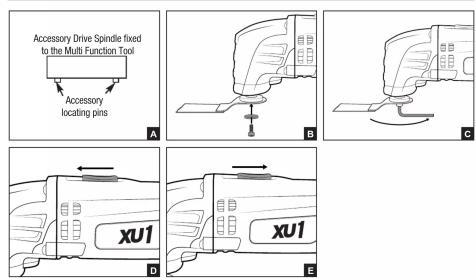
- Choose the desired angle required for your
application
- Position the perforated holes on the accessory over
the locating pins on the accessory drive spindle of
the Multi Function head (Fig. A).
-
Ensure the accessory is sitting flat against the face of the accessory drive spindle.
-
Place the necessary fixing works in alignment with
-
Place the accessory lying washer in alignment with the inner hole of the accessory drive spindle
-
Insert the locking screw through the accessory fixin
washer and into the accessory drive spindle of the
Multi Function Tool (Fig. B)
- Tighten the locking screw using the supplied hex key
(Fig. C)
Removing
-
Loosen the locking screw
-
Closed the looking screw using the Nax key in an anti-clockwise direction.
-
Remove the locking screw and the accessory fixing
washer from the Multi Function Tool. Remove the
accessory.
- To re-attach an accessory, follow the instructions on
"Attaching your accessory
OPERATION
Operating the On/Off Switch
-
To turn the Multi Function Tool on, slide the spin/off
-
To turn the wall function switch forward (Fig. D).
-
To turn the Multi Function Tool off, slide the on/off
switch backward (Fig. E)
“”
Using the Straight Cutting Blade
CAUTION: Clamp your work piece securely if possible and ensure the Multi Function Tool is not placed on the
and ensure the Multi Function Tool is not placed on the work piece before commencing your work.
Note: Ensure your blades are not blunt or damaged in
any way before commencing your application.
- In sawing mode, the Multi Function Tool can be
used on wood, plastics and sheet metal.
-
Slide the on/off switch forward to the "0" position.
-
If plunging use a slight pendulum motion, to allow
sufficient chip or debris removal.
Note: If using the Multi Function Tool for plunge cuts.
Only use this application on soft materials such as wood, vacuum polyester boards. Also check if there are
wood, gypsum plaster boards. Also check if there are no nails or screws in the work piece before cutting.
no hands of curtains in the work place before cutting.
Purchasing Additional Accessories
Purchasing Additional Accessories Additional Multi Function tool accessories such as
Additional Multi Function tool accessories such as a scraper can be purchased separately from you local
hardware store that can be fitted to this Multi Function
tool.
MAINTENANCE
-
-
-
-
-
-
-
-
-
-
-
-
-
-
-
-
-
-
-
-
-
-
-
-
-
-
-
-
-
-
-
-
-
-
-
-
-
-
-
-
-
-
-
-
-
-
-
-
-
-
-
-
-
-
-
-
-
-
-
-
-
-
-
-
-
-
-
-
-
-
-
-
-
-
-
-
-
-
-
-
-
-
-
-
-
-
-
-
-
-
-
-
-
-
-
-
-
- 99.
-
-
-
-
-
-
-
-
-
-
-
-
-
-
-
-
-
-
-
-
-
-
-
-
-
-
-
-
-
-
-
-
-
-
-
-
-
-
-
-
-
-
-
-
-
-
-
-
-
-
-
-
-
-
-
-
-
-
-
-
-
-
-
-
-
-
-
-
-
-
-
-
-
-
-
-
-
-
-
-
-
-
-
-
-
-
-
-
-
-
-
-
-
-
-
-
- Keep the ventilation slots of the Multi Function Tool screen at all times, if possible, cannot
Tool clean at all times, if possible, preve foreign matter from entering the vents.
• After each use, blow air through the Mul
Function Tool housing to ensure it is free from
all dust particles which may build up. Build up of
dust particles may cause the Multi Function Tool to prevent and fail.
- If the aperture of the Multi-Function Tool
- If the enclosure of the Multi Function Tool requires cleaning do not use solvents but a
required cleaning do not use sonnets but a moist soft cloth only. Never let any liquid get
inside the Tool; never immerse any part of the
Multi Function Tool into a liquid.
Carbon brushes
When the carbon brushes wear out the tool will
spark and/or stop. Discontinue use as soon as
this happens. They should be replaced prior to
recommencing use of the tool. Carbon brushes are a wearing component of the tool therefore
are a wearing component of the tool therefore not covered under warranty. Continuing to use
the power tool when carbon brushes need to be
replaced may cause permanent damage to the
tool. Carbon brushes will wear out after many uses but when the carbon brushes need to be renewed.
but, when the carbon brushes need to be replaced take the tool to an electrician or a power tool.
repairer for a replacement. Always
carbon brushes at the same time.
Note: XU1 will not be responsible for any damage
or injuries caused by the repair of the tool by an unauthorised person or by mishandling of the tool.
WARRANTY
All of our products undergo strict quality checks to ensure that they reach you in perfect condition. In the unlikely
event that your device develops a fault, please contact our service department at the address shown on this
guarantee card. You can also contact us by telephone using the customer service number shown. Please note
the following terms under which guarantee claims
- These warranty terms regulate additional warranty services, which the manufacturer mentioned below
promises to buyers of its new products in addition to their statutory guarantee claims are not affected by this
guarantee. Our guarantee is free of charge to you.
- The warranty services only covers defects due to material or manufacturing faults on a product which you
have bought from the manufacturer mentioned below are limited to either the rectification of said defects on the
product or the replacement of the product, whichever we prefer.
Please note that our devices are not designed for use in commercial, trade or professional applications. A guarantee contract will not be created if the device has been used by commercial, trade or industrial business or
guarantee contract, will not be created in the device has been used by commercial, trade or industrial business of has been exposed to similar stresses during the guarantee period.
has been exposed to similar dresses during the guarantee period.
- The following are not covered by our guarantee:
- Damage to the device caused by a failure to follow the assembly instructions or due to incorrect installation, a failure to follow the operation instructions (for example, connection it is an incorrect main village as current
a failure to follow the operating instructions (for example connecting it to an incorrect, mains voltage of current type) or a failure to follow the maintenance and safety instructions or by exposing the device to abnormal
(b) of a factor to follow the maintenance and safety measures on by adjusting the device to environmental conditions or by lack of care and maintenance.
- Damage to the device caused by abuse or incorrect use (for example overloading the device or the use of
unapproved tools or accessories), ingress of foreign bodies into the device (such as sand, stones or dust, transport directions), the use of force as damage caused by external forces (for example by dropping it).
- Damage to the device or parts of the device caused by normal or natural wear or tear or by normal use of the
Bargains at the device of parts of the device caused by normal or natural travel of rear or by normal sets of the device.
1.2.1
- Your Product is guaranteed for a period of 12 months from the original date of purchase and is intended for DIY /Do it Yourself use only. Warranty excludes consumable notes, for example: outfit blade. Guarantee
for DHT (Do it Yourself) use only. Warranty excludes consumable parts, for example: cutting blade. Guarantee claims should be submitted before the end of the guarantee period within two weeks of the defect being noticed.
No guarantee claims will be accepted after the end of the guarantee period. The original guarantee period
remains applicable to the device even if repairs are carried out or parts are replaced. In such cases, the work
performed or parts fitted will not result in an extension of the guarantee period, and no new guarantee has come active for the work performed or parts fitted. This also applies √ on an site service is used.
become active for the work performed or pants used. This also applies if an off-site service is used.
IN ORDER TO MAKE A CLAIM UNDER THIS WARRANTY YOU MUST RETURN THE PRODUCT TO THE PLACE
OF PURCHASE WITH YOUR REGISTER RECEIPT.
Please refer to the restrictions of this warranty concerning wearing parts, consumables and missing parts as set
It is also refer to the rest of us or this warranty concerning wearing parts, consumables and missing parts as set out in the service information in these operating instructions.
(二)利润分配
CUSTOMER SERVICE HELPLINE
GB: 0151 294 4488
IRL: 1850 882711
XU1
Unit 9 Stadium Court, Wirral International Business Park, Plantation Road, Bromborough, Wirral, CH62 3QG

- SAFETY INSTRUCTIONS
- WHEN OPERATING THE TOOL
- ELECTRICAL SAFETY
- USING AN EXTENSION LEAD
- DESCRIPTION OF SYMBOLS
- WEAR EYE PROTECTION
- ITEMS SUPPLIED
- GENERAL SAFETY INSTRUCTIONS
- WORKPLACE SAFETY
- SAFETY OF PERSONS
- [NO TEXT]
- FOR EU COUNTRIES ONLY
- SPECIFICATIONS
- DANGER
- WEAR E
- 60745
- HANDLE
- MINIMO
- [NON-TEXT]
- CAUTION
- IS USED
- USING YOUR MULTI
- FUNCTION TOOL
- ASSEMBLY
- ATTACHING
- OPERATION
- MAINTENANCE
- CARBON BRUSHES
- WARRANTY
- XU1
Brand : XU1
Model : XMT-703U
Category : Multifunction tool