
MH-TWS33 - Earphones Moonki - Free user manual and instructions
Find the device manual for free MH-TWS33 Moonki in PDF.


| Product Type | True Wireless Earbuds |
| Brand | Moonki |
| Model | MH-TWS33 |
| Bluetooth Version | V5.0 |
| Sensitivity | 100 ± 3 dB |
| Wireless Range | 10 meters (33 feet) |
| Frequency Response | 20Hz – 20kHz |
| Driver Size | 8mm |
| Impedance | 32 Ohms (at 1kHz) |
| Playback Time (Earbuds) | Up to 4 hours |
| Total Playback with Charging Case | Up to 16 hours |
| Earbud Battery Capacity | 30mAh each |
| Charging Case Battery Capacity | 400mAh (charges earbuds 3 times) |
| Charging Time (Earbuds) | 1.5 hours |
| Charging Time (Case) | 2 hours |
| Charging Port | USB Type-C |
| Charging Voltage | DC 4.5 – 5.5V |
| Auto Power On/Off | Yes (on removal/placement in case) |
| Auto Pairing (Left & Right) | Yes (simultaneous removal from case) |
| Touch Controls | Double-tap (play/pause, call answer/hang-up); Long press 2s (reject call); Long press 3s (voice assistant) |
| Single Earbud Use | Yes (supports mono mode) |
| LED Indicators | Red (charging), Blue (full charge/connected) |
| Maintenance | Clean with dry cloth; avoid moisture |
| Safety Precautions | Avoid heavy objects, high temperature/humidity; maintain 10m distance from WiFi/routers |
Frequently Asked Questions - MH-TWS33 Moonki
User questions about MH-TWS33 Moonki
0 question about this device. Answer the ones you know or ask your own.
Ask a new question about this device
Download the instructions for your Earphones in PDF format for free! Find your manual MH-TWS33 - Moonki and take your electronic device back in hand. On this page are published all the documents necessary for the use of your device. MH-TWS33 by Moonki.
USER MANUAL MH-TWS33 Moonki
natural_image
Line drawing of a mechanical device with multiple ports and housing (no text or symbols)MH-TWS33
True Wireless Earbuds
User Manual
Wireless Earbuds:
True Wireless Earbuds to achieve realize wireless stereo, separate left and right channels, HIFI sound effect, both left and right earbuds with complete wireless function, it can be used alone or in pairs, and support dual microphone calls.
Specifications:
| Wireless Version: | VS.0 | Sensitivity: | 100 ± 3 dB |
| Reach Range: | 10M | Frequency Range: | 20Hz-20KHz |
| Battery Specifications: | 30mAh | Driver: | 8 MM |
| Playing time: | 4 Hours | Impedance: | 32Ohm S.PL (at 1KHz) |
| Charging time : | 1.5 Hour |
Charging case:
Battery Specification: 400mAh (Earphones can be charged 3 times.)
Charging Voltage: DC4.5-5.5V
Charging time: 2 Hours
Function
| (K7CZ) On/Off | Power on: Take out the earbuds from the charging case, it will turn on automatically.Power off: Put the earbuds into the charging case, it will turn off automatically. |
| (CK55) Pairing | When you take out both earbuds from the charging case at the same time, they will be paired automatically.The red and blue LED indicator will flash alternatively until both earbuds are paired successfully. At this time, the earbuds are ready to be paired with your mobile phone. The LED indicator will turn blue after successful connection. (Support single earphone connection) |
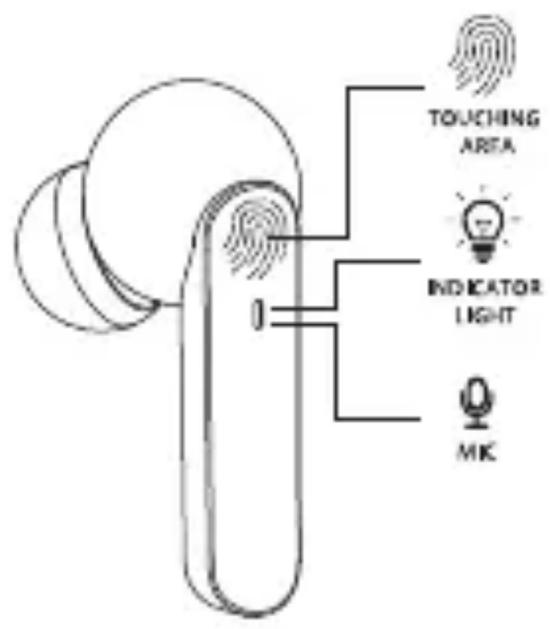
| |►/►Play/Pause | Pause: Double-press the touching area on either side to pause.Play: Double-press the touching area again to play. |
| (XSCK)Phone Calls | Answer the Call: Double-press the touching area on either side to answer the call.Hang up the Call: Double-press again to hang up the call.Reject the Call: Long press 2 seconds to reject. the call. |
| Voice Assistant | Long press the touching area for 3 seconds to start the phone's voice assistant. |
 Earphone Charging Earphone Charging | Put the earbuds into the charging case, the earbuds will automatically shut down and enter the charging state. The LED indicator will turn red while charging and turn solid blue when fully charged. |
 Charge the Case Charge the Case | Insert the small connector of the supplied Type-C charging cable into the USB charging port at the bottom of the charging case. Insert the larger connector of the supplied Type-C charging cable into the USB port on a computer, or a charging device containing a USB port, or a SV USB adapter. The LED indicator light will turn solid blue when fully charged. The LED indicator light will turn solid green while the earbuds is charging and will keep on for 10 seconds once fully charged, then it will turn off. |
Attention:
- Please do not treat the product with violence, and do not squeeze the product with heavy objects. Keep away from high temperature and humidity
- For the best performance, please avoid close contact with WIFI or router, otherwise it may affect the wireless signal or disconnect.
- Please use this product within the effective distance environment (10 meters), and there should be no physical obstacles between the wireless device and the earbuds block (such as a high wall).
Functional operation diagram


Brand : Moonki
Model : MH-TWS33
Category : Earphones