UT-SILENT1603 - Vacuum Cleaner Ursus Trotter - Free user manual and instructions
Find the device manual for free UT-SILENT1603 Ursus Trotter in PDF.


| Product Type | Vacuum Cleaner |
| Brand | Ursus Trotter |
| Model | UT-SILENT1603 |
| Power Consumption | 1600 W |
| Voltage | 220-240 V |
| Frequency | 50/60 Hz |
| Dust Bag Type | Disposable paper dust bag |
| Number of Filters | 3 (Motor filter, HEPA filter, Exhaust air filter) |
| Filter Types | Motor filter (washable), HEPA filter (washable), Exhaust air filter (washable) |
| Suction Control | Variable via motor speed regulator knob and air slide on hose |
| Cord Rewind | Automatic with foot pedal button |
| Tube Type | Telescopic metal tube with adjustable length |
| Floor Nozzle Settings | Brush bar extended for hard floors, retracted for carpets |
| Included Attachments | Floor nozzle, furniture brush |
| Safety Certifications | TUV, GS, CE |
| Carrying Handle | Yes |
| Bag Cover Latch | Yes, push latch to open |
| Usage | Dry vacuuming only; not for wet surfaces or outdoors |
| Maintenance | Change dust bag when full; clean motor filter, HEPA filter, and exhaust air filter regularly |
Frequently Asked Questions - UT-SILENT1603 Ursus Trotter
User questions about UT-SILENT1603 Ursus Trotter
0 question about this device. Answer the ones you know or ask your own.
Ask a new question about this device
Download the instructions for your Vacuum Cleaner in PDF format for free! Find your manual UT-SILENT1603 - Ursus Trotter and take your electronic device back in hand. On this page are published all the documents necessary for the use of your device. UT-SILENT1603 by Ursus Trotter.
USER MANUAL UT-SILENT1603 Ursus Trotter
natural_image
Exterior view of a beige vacuum cleaner with attached black brush and accessories (no visible text or symbols)
Prevención
natural_image
Line drawing of a hand holding a small object next to a car (no text or symbols)natural_image
Illustration of a hand holding a flexible hose with an arrow indicating direction (no text or symbols)natural_image
Diagram of a vacuum cleaner with a handle and arrow indicating motion (no text or symbols)natural_image
Two technical line drawings of a mechanical component or bracket, shown against a grid-patterned background (no text or symbols)natural_image
Simple line drawing of a rectangular object with a curved top and a black horizontal stripe (no text or symbols)Boquilla para Tapices

natural_image
Pure mechanical component diagram without any text, numbers, or symbols
natural_image
Technical line drawing of a mechanical device with labeled components A and B (no text or symbols beyond labels)natural_image
Line drawing of two identical robotic vacuum cleaner setups with connected wires (no text or symbols)natural_image
Line drawing of a robotic vacuum cleaner with open lid and internal components, showing motion arrows (no text or symbols)STAUBSAUGER ZIEHEN UT-SILENT1603 220V-240V, 50/60HZ, 1600W

Important safety instructions
When using an electrical appliance, basic precaution should always be followed, including the following:
READ ALL INSTRUCTIONS BEFORE USING (THIS APPLIANCE)
WARNING-To reduce the risk of fire, electric shock, or injury:
- Do not leave vacuum cleaner when plugged in. Unplug from outlet when no use and before servicing.
-
To reduce the risk of electric shock, do not use outdoors or on wet surfaces
-
Use only as described in this manual. Use only manufactures recommend attachments.
-
Do not use with damaged cord or plug. If vacuum cleaner is not working as it should, has been dropped, damaged, left outdoors, or dropped into water, enter it to a service center.
-
Do not pull or carry on cord, use cord as a handle, close door on cord, or pull cord around sharp edges or corners. Do not run vacuum cleaner over cord. Keep cord away from heated surfaces.
-
Do not unplug by pulling on cord. To unplug, grasp the plug, not the cord.
-
Do not handle plug or vacuum cleaner with wet hands.
-
Do not put any object into openings. Do not use with any opening blocked. Keep free of dust, lint, hair and anything that may reduce airflow.
-
Keep hair, loose clothing, fingers and all parts of body away from openings and moving parts.
-
Turn all controls off before unplugging.
-
Use extra care when cleaning on stairs.
-
Do not use to pick up flammable or combustible liquids, such as gasoline, or use in areas where they may be present
13.Hold plug when rewinding onto cord reel. Do not allow plug to whip when rewinding.
- Unplug before connecting the hose
15.Do not pick up anything that is burning or smoking, such as cigarettes, matches, or hot ashes.
16.Do not use without dust bag and/or filter in place.
- If the supply cord is damaged, it must be replaced by the manufacturer or its service agent or a similarly qualified person in order to avoid a hazard.
SAVE THESE INSTRUCTIONS

- Floor nozzle
- Telescopic tube
- Air slide
- Suction hose
- Motor speed regulator knob
- Automatic cord rewind
- On/off switch
- Suction hose connection
- Bag Cover Latch
- Carrying Handle
- Motor Filter
- Disposable Dust Bag
- Micron Filter Door

Prevention
Switch off the vacuum cleaner immediately if the air intakes, the floor brushes or the telescopes tube becomes blocked. Before starting the vacuum cleaner up again remove the substance causing the blockage:
- Never use the vacuum cleaner in the immediate vicinity of hot bodies and do not suck up hot objects such as cigarette ends or ashes.

- Only place the plug in the socket when your hands are dry.

- Please remove large of sharp objects from the floor before using the vacuum cleaner to avoid any possible damage to it.
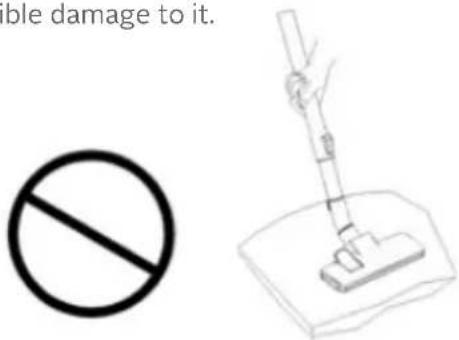
- Do not pull by the mains cable when pulling out the plug.

Assembling the vacuum cleaner
1. Assembly and disassembly of the tube - Montage:
Insert the tube in the air intake opening. Push the tube in until it locks in place
Disassembly:
Take the tube from the air intake after disconnecting from the mains socket.
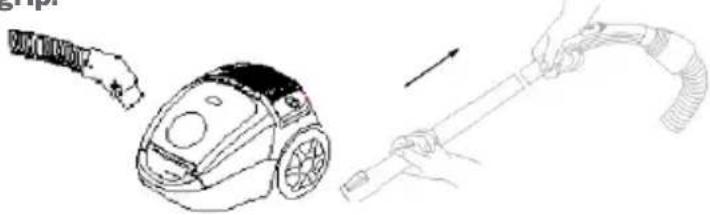
2. Assembling the telescope tube and accessories 2.1: Remove the telescope tube from the hand grip.
natural_image
Line drawing showing a vacuum cleaner and a hand holding a hose, both without any text or symbols2.2 Set the telescope tube to the correct length.
Push the telescope tube slide forwards and pull out the lower part of the tube to the extension length required. Then simply let go of the slide and let it snap into place.

natural_image
Illustration of hands measuring a ruler with an arrow indicating measurement direction (no text or symbols)2.3: Fix the floor brush to the telescope tube.

natural_image
Pure mechanical component diagram without any text, numbers, or symbols2.4: Suitable for everyday cleaning of the carpet and of wooden floors.

natural_image
Two technical line drawings of a mechanical component or bracket, one with a handle and the other with a lever, set against a grid background (no text or symbols)Cleaning carpet Cleaning wooden floor
Furniture brush

Floor nozzle settings for carpets and tiled, wood-block or similar floors:
A: Hard floors = brush bar extended
B: Carpets= brush bar retracted
Operation

Vacuum cleaning
1: Before using the device first roll out a sufficient length of electric flex cable and plug into the mains socket.
The yellow mark on the electric flex cable is the maximum length that must not be exceeded.
To switch on the device press the foot pedal button on the casing with your foot

2: To rewind the power cable, press the button with one hand and guide the cable with the other hand to ensure that it does not whip causing damage.

How to maintain
The instructions given in this booklet serve as a guide to routine maintenance. To avoid unnecessary service calls, check the hose, bag and filter often. Clear a clogged hose with the blower, change the bag if it is full, and clean the motor filter when it is dirty.
Disposable Dust Bags and Filters
The dust bag and motor filter play a very important roll in the efficiency of the vacuum cleaner. The purpose of the dust bag is to trap dirt, but at the same time, the paper bag must be porous enough to allow air to pass through. If the bag or the motor filter become clogged, no air can pass through the cleaner and no cleaning can take place regardless of how powerful the unit is. To keep the cleaner operating at maximum efficiency, change the dust bag frequently and clean the filter as needed. Some fine particles can restrict airflow very quickly and will decrease performance even before the bag appears to be full. For that reason, when vacuuming carpet fresheners or cleaners, powder, plaster dust, or similar fine substances, the bag and filter may need to be changed more often.
How to Remove Dust Bag
NOTE: Turn off vacuum and unplug the electrical cord before changing dust bag or cleaning motor filter. Never operate the vacuum cleaner without the dust bag or filter.
- Turn off and unplug cleaner.
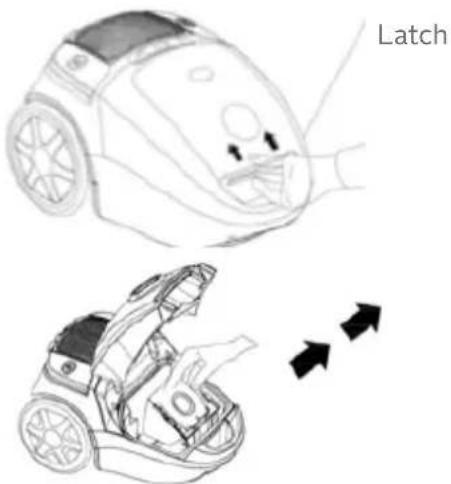
- Open bag cover by pushing latch up with fingers and lifting bag cover.
- Locate dust bag frame handle.
Raise dust bag out of dust bag compartment. - Remove dust bag from dust bag frame.
How to Install Dust Bag
NOTE: Turn off vacuum and unplug the electrical cord before changing dust bag or cleaning motor filter. Never operate the vacuum cleaner without the dust bag or filter.
- Turn off and unplug cleaner.
-
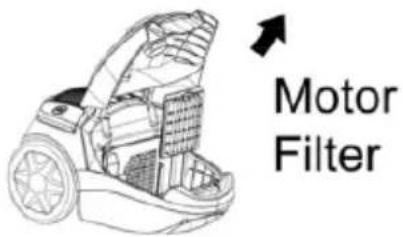
Open bag cover by pushing latch up with fingers and lifting bag cover.
-
Remove motor filter and clean by rinsing under warm water, if heavily soiled. Let completely air dry before reinstalling.
-
Open bag folds slightly.
-
Place dust bag in dust bag frame by pushing cardboard collar into ledge
on dust bag frame until collar snaps into position.
- Place dust bag frame inside dust bag compartment placing dust bag frame into the guides at the very front of
the dust bag compartment.
- Swing bag cover lid closed and push to latch.

Regulating the suction power
You can set the suction power on the device individually as you require it using the suction regulator. We recommend using minimum suction power for delicate materials.
Select medium suction power for mattresses, upholstered furniture and carpets. Select maximum suction power for tiled, wood and other robust floors.

natural_image
Line drawing of a robotic device with open lid and directional arrows indicating motion (no text or symbols)Cleaning the HEPA filter
The HEPA filter and the HEPA cover should be cleaned regularly. Cleaning is best done when emptying the dust container. To do this follow the instructions in the Emptying dust container section.
- Switch off the vacuum cleaner and disconnect the plug from the mains. To do this always pull on the plug and not on the cable.
- You can pull the dust container together with the cleaning system out of their anchoring with the aid of the carrier handle on the dust container. Take hold of the carrier handle on the dust container and pull it upwards. Now pull the dust container out and loosen the HEPA cover and HEPA filter out of the dust container with the aid of the lateral unlocking button.
- Turn the dust container cover carefully until it is released and the
HEPA filter will come away easily
- Now rinse the HEPA filter under running water and allow it to dry.
- Place the HEPA filter back in the HEPA cover (or replace with a new one) and fit it into the dust container.
Then fit the dust container back into position in the cyclone dust container until it snaps into place. Your cyclone vacuum cleaner is now ready for use again.
Cleaning the exhaust air filter
The exhaust air filter cleans the air a final time before it leaves
the vacuum cleaner. You can clean the exhaust air filter as follows:
- Switch off the vacuum cleaner and disconnect the plug from
the mains. To do this always pull on the plug and not on the cable. - Open the exhaust air grill (this is at the rear of the cyclone vacuum cleaner.)
- The exhaust air filter is visible when the grill has been opened.
- Rinse the filter under cold running water and allow dry.
- Put the exhaust air filter back into place (or replace with a new one) and place in the grill.
- Close the exhaust air filter grill.

POLIZA DE GARANTIA

natural_image
Stylized emblem featuring a winged eagle and shield, enclosed in a laurel wreath (no text or symbols)Ursus Trotter
- Prevención
- Boquilla para Tapices
- Important safety instructions
- Prevention
- Assembling the vacuum cleaner
- Assembly and disassembly of the tube - Montage:
- Disassembly:
- Assembling the telescope tube and accessories 2.1: Remove the telescope tube from the hand grip.
- Set the telescope tube to the correct length.
- 2.3: Fix the floor brush to the telescope tube.
- 2.4: Suitable for everyday cleaning of the carpet and of wooden floors.
- Operation
- Vacuum cleaning
- How to maintain
- Disposable Dust Bags and Filters
- How to Remove Dust Bag
- How to Install Dust Bag
- Regulating the suction power
- Cleaning the HEPA filter
- Cleaning the exhaust air filter
- POLIZA DE GARANTIA
- Ursus Trotter
Brand : Ursus Trotter
Model : UT-SILENT1603
Category : Vacuum Cleaner