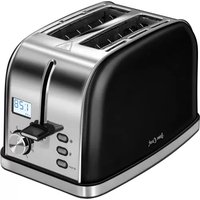
PSC-60 - Toaster Sam Cook - Free user manual and instructions
Find the device manual for free PSC-60 Sam Cook in PDF.


| Product Type | Toaster |
| Model | PSC-60 |
| Brand | Sam Cook |
| Dimensions (Approx.) | 28.0 x 18.0 x 20.0 cm (11.0 x 7.1 x 7.9 in) |
| Weight (Approx.) | 1.2 kg (2.65 lbs) |
| Power Supply | 220-240 V, 50/60 Hz |
| Power Consumption | 850 W |
| Number of Slots | 2 |
| Browning Control | 7-level adjustable |
| Cancel Function | Yes |
| Lift Function | Yes, high-lift for easy removal |
| Defrost Function | Yes |
| Reheat Function | Yes |
| Crumb Tray | Removable for easy cleaning |
| Cord Storage | Yes, under base |
| Automatic Shut-off | Yes |
| Non-slip Feet | Yes |
| Material | Stainless steel and plastic |
| Cleaning Instructions | Unplug, wipe exterior with damp cloth, empty crumb tray regularly |
| Safety Features | Auto shut-off, cool-touch exterior |
| Spare Parts Availability | Contact Sam Cook customer service |
| Repairability | Refer to manual for authorized service centers |
Frequently Asked Questions - PSC-60 Sam Cook
User questions about PSC-60 Sam Cook
0 question about this device. Answer the ones you know or ask your own.
Ask a new question about this device
Download the instructions for your Toaster in PDF format for free! Find your manual PSC-60 - Sam Cook and take your electronic device back in hand. On this page are published all the documents necessary for the use of your device. PSC-60 by Sam Cook.
USER MANUAL PSC-60 Sam Cook
natural_image
A man in an apron standing beside a set of spices and herbs on a dark surface, with no visible text or symbols.MILKOSAL, BISUMA 2018 REIT/Financed Products
natural_image
Black and white photo of a modern toaster with a stand (no visible text or symbols)
INSTRUKCIA OBSEUGI.

USER MANUAL
-
实验原理
-
实验原理
OPSLRZADZENIA/DEVICE DESCRIPTION

natural_image
Black-and-white photo of a man in a white shirt gesturing with his hand (no visible text or symbols)Sam Cook
MASTERCHEF LINE
EXECUTIVE
Cooking today has become an art.
In preparing food, art means experimenting
and breaking stereotypes. Nevertheless,
achieving great art requires us to combine
the artist's talent with excellent equipment. That is the case with Sam Cook.
5am-Clack products are designed for demanding people, based on the claims of our product to provide
based on the effects of many professionals who could assign a living pension. Their artists in cooking is
characterised by de-losing and the courage in experiment
with taste. Try our superb cookware and become a master chef in your own kitchen.
natural_image
Black-Stone Rooster with a white handle, no visible text or symbols on the device itself.DANE TECHNICZNE
natural_image
Black-and-white portrait of a man sitting on a stool, wearing a white shirt and black trousers (no visible text or symbols)Kuchnia jutra
3. GWARANCJA NIE SĄ OBJĘTE:
- Read carefully this manual before using the appliance.
- Close supervision is necessary when using the appliance near children!
- Do not use the appliance for the purposes different than it was designed for.
- Do not immerse the appliance, its cord and plug in water or any other liquids!
- Do not leave the appliance switched on when unattended.
• Always unplug the appliance when it is not in use or before cleaning.
- Do not use the appliance if it is damaged, also if the power cord or plug is damaged – return the appliance for repair to an authorized service centre.
• To avoid the risk of damage, fire or injury, always use the attachments
recommended by the manufacturer.
- Do not use the appliance outdoors.
- Do not hang the power cord over sharp edges and do not allow the power cord to touch hot surfaces.
- Do not place the appliance in vicinity of electric and gas cookers, burners, ovens, etc.
• Do not touch any hot surfaces in course of toasting.

- Before cleaning, pull out the plug from the outlet and allow the appliance to cool down completely.
- Since bread may catch fire, do not use the appliance close to curtains or other inflammable materials.
- Use the appliance on a flat and stable surface.
- The appliance shall be plugged to an outlet with a protective earth pin.
• This appliance is not intended for use by children under 8 years
of age and individuals with reduced physical, sensory or mental capabilities, or lack of experience and knowledge, unless they have been given supervision or instruction concerning use of the appliance in a safe way and if they understand the hazards involved. Cleaning and user maintenance shall not be carried out by children without supervision.
- Store the appliance and its cord out of
reach of children under 8 years of age.
• Children should be supervised to ensure that they do not play with the appliance.
- When unplugging, be sure to pull by the plug and not the cord.
- Do not use the toaster without the removable crumb tray. Crumb tray should be cleaned regularly. Avoid excessive build-up of crumbs on the tray.
- This appliance is intended for household use only.
• Make sure you hands are dry before touching the toaster plug or unplugging it.
• Note! Accessible surfaces of the toaster may get hot during use. Pay special attention to avoid the risk of burning.
- Warning! Do not remove your toast, croissant or bagel from a toaster with a knife or other tool, as it may come in contact with electrical components and
cause fatal electric shock.
Note! The appliance is not intended for use with external timers or separate remote control systems.
- Keep your children safe: do not leave any parts of the packaging readily accessible (i.e. plastic bags, cardboard boxes, polystyrene inserts, etc.).
- WARNING! Never let children play with
plastic film or bags. Choking/ asphyxia- tion hazard!
- WARNING! Check that the power parameters on the rating plate of the device correspond parameters of your mains.

Warning! Hot surface!
The temperature of surfaces may be higher when the appliance is in use.
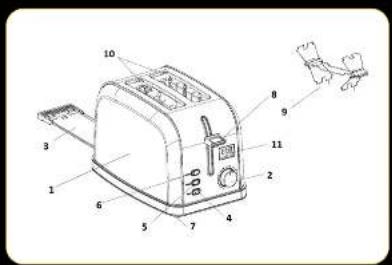
APPLIANCE DESCRIPTION
- Toaster body
- Toasting time control (1-8) - browning control dial
-
Crumb tray
-
Button STOP
- Button
- Button
-
Non-slip feet
-
Bread lowering lever
- Grill for baking rolls and croissants
- Bread Slots
- LCD display
PRIOR TO THE FIRST USE
- Before using the toaster for the first time the loasting chambers should be checked for any remaining packaging materials or other items.
- Clean the surface with a mild cleaning agents and a soft damp cloth. Dry the appliance thoroughly.
NOTE! Do not insert crumbled bread that may get blocked inside the toaster.
NOTE! Do not butter the bread before it is toasted.
NOTE! Turn the appliance immediately if the bread starts to burn!
NOTE! Repeat the toasting process for well-done bread.
- Upon using the appliance for the first time it may produce an unpleasant smell or some amount of smoke. It is not dangerous, nor indicates malfunction. It is normal for
a new appliance. The smell should vanish after several times.
NOTE! Remove all protective foil before toasting! The bread should be portioned in a way that allows putting it freely into the toaster – inserting oversized portions by force may cause damage of the appliance or electric shock! Do not insert any objects into the toaster!
TABLE OF PROGRAMMED OPERATING TIMES
Each toasting level corresponds to a preset toaster time, different for toasting, defrosting or reheating. The programmed times are shown in the table:

other
| Time Interval | Level Toasting function | Defrosting function | |---|---|---| | 1 1:15 1:35 | | | | 2 1:35 1:55 | | | | 3 1:45 2:05 | | | | 4 2:00 2:20 | | | | 5 2:15 2:35 | | | | 6 2:30 2:50 | | | | 7 2:45 3:05 | | | | 8 3:15 3:30 | | | Reheating function 0:30TOASTING
- Connect the toaster to the power supply network.
NOTE: The toaster has a sleep function - after two minutes of inactivity, the display turns off - pressing any button reactivates the unit. - Set the toasting control knob (2) to position 1 to 8. Lower levels produce light baked
goods while higher levels produce well-browned bread. Dry or thin slices of bread will toast faster and require a lower level setting – moist or thick slices of bread require a higher level setting.
- Insert the bread to be toasted and move the toasting lever (8) downwards – toasting
starts and is signalled by the elapsed time on the LCD display and the illumination of the STOP button (4)
- When the pre-selected time has been reached, the toaster will switch off automatically. To stop the toasting process early, press button (4) 4 - STOP
DEFROSTING
The defrosting function allows you to toast frozen bread.
-
Place the bread in the toaster and set the desired toasting level. The time is automatically extended due to the bread being frozen
-
After selecting the *button (6) - the *and STOP buttons lights up - move the lever (8) down
- Once the bread is toasted, the lever will automatically terminate the process. If you
want to stop the cycle before it is complete. press STOP
-
The defrosting function can be activated or deactivated at any time during the normal toasting cycle
-
If the defrosting function is selected before the toasting is complete, it will replace the toasting cycle (time will be added).
REHEATING
The reheating function allows you to heat toast without additional browning.
- Place the toasts in the toasting slots (10)
- Press the button (5) and move the lever (8) downwards.
- To heat rolls and croissants, place the grate (9) on the toaster and place the bakery products on it.
CLEANING AND MAINTENANCE
- Before cleaning, pull out the plug from the outlet and allow the appliance to cool down completely.
- Clean the main body with a wet wipe (if necessary add some detergent).
- Do not clean the appliance using strong cleaning agents, acetone, acute materials, etc.
- Regularly remove bread crumbs from the toaster by opening the tray placed in the
CAUTION! Do not use the grate (9) to heat frozen, buttered, breaded or stuffed buns.
4. Once heated, the process is automatically terminated. You can interrupt it at any time by pressing the STOP button.
bottom of the appliance.Remove crumbs each time you use the toaster.
Note! Always check if the tray is properly fitted after you put it back into the toaster!
- Do not use metal objects to take out the pieces of bread when the appliance is connected to the power source! First pull out the plug from the outlet and allow the toaster to cool down. Make sure you do not

natural_image
Black Rooster toaster with properly fitted grate (no text or symbols on the device itself)cause any damage to the internal components of the appliance.
Note! Do not immerse the appliance in water or any other liquids.
TECHNICAL SPECIFICATIONS
See the product's nameplate for technical specifications.
Length of power cord: 0.75 m

CAUTION! MPM agd S.A. may change the technical features of the product without notice.

natural_image
Black-and-white portrait of a man with long hair sitting on a stool, wearing a white shirt and black trousers (no text or symbols visible)The kitchen of tomorrow
The kitchen is the best place to make your culinary dreams come true, and allow your cooking prowess to grow.
Test out new ideas and find better ways of doing things!
Never be afraid of new challenges, of fusing the old with the new, or of innovative tastes and ingredients.
New opportunities
Plan your culinary success with the right appliances.
Choosing the Sam Cook household brand is like enlisting professional help in your kitchen.
Surprise yourself with how easy it is to make something new and feel like a professional chef!
PROPER DISPOSAL OF THE PRODUCT (waste electrical and electronic equipment)
Poland

Marking on the product indicates that after the service-life of the product expires, it should not be disposed with other type of municipal waste. Used equipment may have a negative impact on the environment and health of people due to potentially containing hazardous substances, mixtures and components. Mixing electric waste with other types of waste or disassembling those in an unpro-
fessional manner may cause a release of substances that are hazardous to the environment and health. Used equipment should be handed-over to a point for collection of electric waste. In order to obtain detailed information regarding the electric waste collection points, the user should contact the municipal point of electric waste collection or used equipment processing department.
| 10.2 | 10.3 | 10.4 | 10.5 | 10.6 | 10.7 | 10.8 | 10.9 | 11.0 | 11.1 | 11.2 | 11.3 | 11.4 | 11.5 | 11.6 | 11.7 | 11.8 | 11.9 | 12.0 | |
- Sam Cook
- DANE TECHNICZNE
- Kuchnia jutra
- GWARANCJA NIE SĄ OBJĘTE:
- APPLIANCE DESCRIPTION
- PRIOR TO THE FIRST USE
- TABLE OF PROGRAMMED OPERATING TIMES
- TOASTING
- DEFROSTING
- REHEATING
- CLEANING AND MAINTENANCE
- TECHNICAL SPECIFICATIONS
- The kitchen of tomorrow
- New opportunities
- PROPER DISPOSAL OF THE PRODUCT (waste electrical and electronic equipment)
- Poland
Brand : Sam Cook
Model : PSC-60
Category : Toaster