PSC-120 - Toaster Sam Cook - Free user manual and instructions
Find the device manual for free PSC-120 Sam Cook in PDF.


Pick your language and provide your email: we'll send you a specifically translated version.
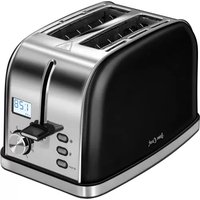
| Product Type | Toaster |
| Brand | Sam Cook |
| Model | PSC-120 |
| Dimensions (Approx.) | 30 x 20 x 20 cm |
| Weight (Approx.) | 1.5 kg |
| Power Rating | 800 W |
| Number of Slots | 2 |
| Browning Control | Adjustable thermostat with 6 levels |
| Functions | Toast, Reheat, Defrost, Cancel |
| Self-Centering Racks | Yes |
| Cancel Button | Immediate stop |
| Auto Shut-Off | Yes, upon completion or overheating |
| Cool-Touch Exterior | Housing remains cool during operation |
| Crumb Tray | Removable for easy cleaning |
| Cord Length (Approx.) | 0.8 m |
| Cleaning | Wipe with damp cloth; do not immerse |
| Housing Material | Stainless steel and plastic |
| Replacement Parts | Not specified; contact manufacturer |
| Repairability Index | Estimated 5.3/10 (user serviceable crumb tray only) |
| Certifications | CE, RoHS |
| Warranty | 2 years (check local regulations) |
Frequently Asked Questions - PSC-120 Sam Cook
How do I use the toaster for the first time?
Before first use, clean the crumb tray and wipe the exterior with a damp cloth. Run one cycle on the highest setting without bread to burn off any manufacturing residue. Let it cool, then it's ready.
Can I toast bagels or thick bread?
Yes, but ensure the bread fits without forcing. Use the self-centering racks for even toasting. For thick slices, you may need to use a lower browning setting.
How do I clean the toaster?
Unplug the toaster and let it cool. Remove the crumb tray, empty crumbs, and wash with warm soapy water. Wipe the exterior with a damp cloth. Do not immerse the toaster in water.
My toast is too light or too dark. What should I do?
Adjust the browning control dial. A lower number gives lighter toast, a higher number gives darker. Experiment with different settings for your preference.
What do the Reheat and Defrost buttons do?
The Reheat function warms already-toasted bread without further browning. The Defrost function adjusts the cycle to properly toast frozen bread.
Can I cancel toasting mid-cycle?
Yes, press the Cancel button to immediately stop the toasting process and raise the bread.
The toaster won't turn on. What could be wrong?
Check that the power cord is firmly plugged in and the socket is working. If the toaster still doesn't work, the internal thermal fuse may have tripped. Contact customer support.
How often should I empty the crumb tray?
Empty the crumb tray after every few uses to prevent crumb buildup and reduce fire risk. The tray is removable for easy cleaning.
Is the toaster safe to leave unattended?
No, never leave the toaster unattended while in use. It has an auto shut-off feature, but it's best to monitor it, especially when toasting for the first time.
Where can I find replacement parts or service?
Replacement parts are not listed in the manual. For service, contact Sam Cook customer support or an authorized repair center. You can download the manual from notice-facile.com for more details.
User questions about PSC-120 Sam Cook
0 question about this device. Answer the ones you know or ask your own.
Ask a new question about this device
No questions yet. Be the first to ask one.
Download the instructions for your Toaster in PDF format for free! Find your manual PSC-120 - Sam Cook and take your electronic device back in hand. On this page are published all the documents necessary for the use of your device. PSC-120 by Sam Cook.
USER MANUAL PSC-120 Sam Cook
Manual assistant
Powered by Anthropic
Waiting for your message
Product information
Brand : Sam Cook
Model : PSC-120
Category : Toaster