
416 - Blender ART - Free user manual and instructions
Find the device manual for free 416 ART in PDF.


| Product Type | Six Channel Personal Mixer |
| Brand | ART |
| Model | 416 |
| Channels | 6 (3 mic/line + 3 stereo line) |
| Input Connectors | 3 x XLR (mic/line), 3 x Stereo RCA (source), 1 x 1/4" TS FX Return (L/R) |
| Output Connectors | 1/4" TS Left and Right Out, RCA Rec Out |
| Phantom Power | 12 VDC, selectable per channel (DIP switch) |
| Max Input Level | XLR: -10 dBV (MIC) / +20 dBV (LINE); RCA: +24 dBV |
| Max Output Level | +17 dBV |
| Max Gain | 55 dB (MIC), 26 dB (SOURCE) |
| EQ (Bass & Treble) | ±12 dB at 100 Hz and 10 kHz |
| Dynamic Range | 82 dB |
| Effects Loop | 1/4" TS Send and L/R Return with level control and in/out button |
| Power Supply | 120 VAC 50-60 Hz or 240 VAC 50 Hz, 15 VA (IEC connector) |
| Dimensions (W x H x D) | 19 x 1.75 x 6 inches (480 x 44.5 x 152 mm) |
| Weight | 6.1 lb (2.8 kg) |
| Warranty | 1 year limited (parts and labor) |
| Construction | Rack-mountable (1U) |
| Controls per Channel | Level knob, Clip LED, Mic/Line toggle, Phantom DIP switch |
| Master Controls | Bass, Treble, Master Level, Effects Level, Effects In/Out |
| Care Instructions | Keep dry, avoid dust, clean with soft cloth, do not use solvents |
| Safety Precautions | Use only grounded outlets, do not expose to moisture, disconnect power before cleaning |
| Spare Parts & Repairability | Contact ART factory service for repairs; RA number required |
Frequently Asked Questions - 416 ART
User questions about 416 ART
0 question about this device. Answer the ones you know or ask your own.
Ask a new question about this device
Download the instructions for your Blender in PDF format for free! Find your manual 416 - ART and take your electronic device back in hand. On this page are published all the documents necessary for the use of your device. 416 by ART.
USER MANUAL 416 ART
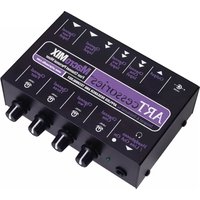
ART Model 416 Six Channel Personal Mixer with EQ and EFX

The ART Model 416 Six Channel Personal Mixer quickly and easily combines six sources – three microphones (or balanced line inputs) and three stereo line inputs into a single stereo line-level mix. It has effects patching and phantom power (included to activate condenser microphones or active DI boxes).
Specifications
- Input Impedance: Mic 600 ohms / XLR LINE 22K ohms / SOURCE RCA INPUTS 22K ohms
• FX LOOP L and R RETURN 22K Ohms (unbalanced)
• Max. Input Level: XLR -10dBV MIC level/+20dB LINE level, SOURCE RCAs 24dBV - Phantom Power: 12VDC
• Output Level: +17dBV
• Output Impedance: 51 ohms
• Max. Gain: 55dB MIC, 26dB SOURCE EQ: +/- 12dB @ 100 & 10KHz - DNR: 82dB
• Power Requirements: 120VAC / 50-60Hz, or 240VAC / 50Hz, 15VA - Dimensions: 19 inch x 1.75 inch x 6 inch (480mm x 44.5mm x 152mm)
• Weight: 6.1 lb. (2.8kg)
Features
• Three XLR MIC/line inputs each with its own LEVEL control and CLIP LED
• Three MIC/LINE input level selector buttons, one for each XLR input
- Three PHANTOM POWER DIP switch selectors, one for each XLR input
- Three sets of L and R RCA SOURCE INPUTS each with its own LEVEL control
• BASS and TREBLE master controls
- LEVEL MASTER
- 14 " inch EFFECTS SEND and L and R RETURN jacks
• EFX LOOP LEVEL control and IN/OUT push button
Usage
a) Verify proper voltage selection on the IEC style power connector for your location. Connect the AC cord to a grounded AC outlet.
b) Connect mics or balanced line inputs to the XLR sockets.
c) For mic channels requiring phantom power (for condenser mics), press the DIP switch down to activate phantom power to the appropriate XLR jack.
d) Set the MIC/LINE buttons as required for each type of input signal.
e) Connect stereo signal sources (tape deck, CD, etc.) to the SOURCE INPUTS using RCA-tipped unbalanced cables.
f) To patch-in effects, using three shielded TS (unbalanced) cables, connect the EFX LOOP SEND jack to the input of the effects unit and the unit's stereo outputs to the LEFT and RIGHT EFX LOOP RETURN jacks. Once the 416 is connected to the main mixer, tape deck or computer sound card and you are running a test, set the EFX LOOP IN/OUT button on the front panel to the IN position and adjust the LEVEL control for the desired effects intensity.
g) The L and R EFX LOOP RETURN jacks may alternately be used as a stereo line input with its own level control and in/out button.
h) Connect either the 1/4 inch LEFT and RIGHT OUT jacks or the RCA REC OUT jacks to the input of the mixer, tape deck or computer with the appropriate unbalanced, shielded cables.
i) Switch on the power and set the MASTER LEVEL to the 12 way setting, then adjust the channel LEVEL controls as required for the best mix and level while checking the MICROPHONE channel CLIP LEDs for activity. Turn down any channel with CLIP activity until it stops.
j) Adjust BASS and TREBLE controls for the desired balance. Center setting is neutral.
k) Re-adjust the MASTER LEVEL as required for best signal level.
WARRANTY INFORMATION
Limited Warranty
Applied Research and Technology will provide warranty and service for this unit in accordance with the following warrants:
Applied Research and Technology, (A R T) warrants to the original purchaser that this product and the components thereof will be free from defects in workmanship and materials for a period of one year from the date of purchase. Applied Research and Technology will, without charge, repair or replace, at its option, defective product or component parts upon prepaid delivery to the factory service department or authorized service center, accompanied by proof of purchase date in the form of a valid sales receipt.
Exclusions:
This warranty does not apply in the event of misuse or abuse of the product or as a result of unauthorized alterations or repairs. This warranty is void if the serial number is altered, defaced, or removed.
A R T reserves the right to make changes in design or make additions to or improvements upon this product without any obligation to install the same on products previously manufactured.
A R T shall not be liable for any consequential damages, including without limitation damages resulting from loss of use. Some states do not allow limitations of incidental or consequential damages, so the above limitation or exclusion may not apply to you. This warranty gives you specific rights and you may have other rights, which vary, from state to state.
For units purchased outside the United States, an authorized distributor of Applied Research and Technology will provide service.
Service:
The following information is provided in the unlikely event that your unit requires service.
1) Be sure that the unit is the cause of the problem. Check to make sure that all cables are connected correctly, and the cables themselves are in working condition.
2) If you find the unit to be at fault, write down a complete description of the problem, including how and when the problem occurs. Please write down a description of your complete setup before calling Customer Service.
3) Call the factory (585-436-2720) for a Return Authorization (RA) number.
4) Pack the unit in its original carton or a reasonable substitute. The packing box is not recommended as a shipping carton. Put the packaged unit in another box for shipping. Print the RA number clearly on the outside of the shipping box. Print your return shipping address on the outside of the box.
5) Include with your unit: a return shipping address (we cannot ship to a P.O. Box), a copy of your purchase receipt, a daytime phone number, and a description of the problem.
6) Ship only your unit (keep your manual!) to:
APPLIED
RESEARCH
AND
TECHNOLOGY
215 TREMONT STREET
ROCHESTER, NEW YORK 14608
ATTN: REPAIR DEPARTMENT
RA#
7) Contact our Customer Service department at (585) 436-2720 for your Return Authorization number or questions regarding technical assistance or repairs. Customer Service hours are 9:00 AM to 5:30 PM Eastern Time, Monday through Friday.
APPLIED RESEARCH & TECHNOLOGY
215 TREMONT STREET
ROCHESTER, NEW YORK 14608 USA
(585) 436-2720 (585) 436-3942 - Fax
www.artproaudio.com
E-mail: cserve@artproaudio.com


Brand : ART
Model : 416
Category : Blender