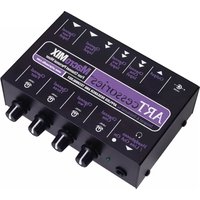
MacroMIX - Blender ART - Free user manual and instructions
Find the device manual for free MacroMIX ART in PDF.


| Product Type | 4-Channel Personal Mixer |
| Brand | ART (Applied Research and Technology) |
| Model | MacroMIX |
| Dimensions | 5.625 x 3.75 x 1.75 inches (143 x 92 x 45 mm) |
| Weight | 2 lbs (0.91 kg) |
| Power Supply | 12V DC (adapter included) |
| Input Channels | 4 channels: Ch1 & 2 dual L/R RCA, Ch3 1/4" or dual L/R RCA, Ch4 1/4" unbalanced |
| Outputs | Dual L/R RCA, 1/4" Line Out/Stereo Headphone |
| Level Controls | 4 rotary level controls (one per channel) |
| Input Impedance | 10 kOhms unbalanced (all inputs) |
| Input Gain | Ch1 & 2: 32 dB, Ch3 & 4: 26 dB |
| Signal-to-Noise Ratio | >90 dB |
| Total Harmonic Distortion (THD) | <0.008% |
| IMD (SMPTE) | <0.008% |
| Main Features | Active preamplification, mixing, headphone monitoring, RCA and 1/4" inputs |
| Cleaning Instructions | Wipe with a dry, soft cloth. Do not use liquids or solvents. |
| Safety Warnings | Use only included power adapter. Do not expose to moisture or extreme temperatures. |
| Spare Parts / Repairability | Contact ART customer service for parts or service. Device is non-user-serviceable. |
| Country of Origin | Designed in USA (Rochester, NY) |
Frequently Asked Questions - MacroMIX ART
User questions about MacroMIX ART
0 question about this device. Answer the ones you know or ask your own.
Ask a new question about this device
Download the instructions for your Blender in PDF format for free! Find your manual MacroMIX - ART and take your electronic device back in hand. On this page are published all the documents necessary for the use of your device. MacroMIX by ART.
USER MANUAL MacroMIX ART
Creative audio solutions in cool little boxes.
September 2002
MacroMIX
Four Channel Personal Mixer
The Facts About 4-Channel Personal Mixers:
Problem: You need to mix a CD and a VCR's audio output with a synthesizer and the line output of a bass amp and send it all to a PC or cassette deck.
Solution: Connect an MacroMIX between your audio sources and the PC or cassette deck. Levels can be mixed and a headphone jack lets you monitor the mix.
Specifications:
- Four input channels, Ch. 1 and 2 have dual L/R RCA inputs, with Ch. 3 you have a choice of one 1/4" or dual L/R RCA inputs and Ch 4 has a 1/4" unbalanced input.
- Four Level controls, one for each channel
• Dual L/R RCA Output connectors
• 1/4" Line Out/Stereo Headphone output jack
• Active preamplification and mixing circuitry - Input Impedance: 10K ohms unbalanced (all inputs)
• Ch. 1/2/3 and 4 Input Gains: 32dB/26dB/26dB and 26dB - S/N Ratio: >90dB
- THD: < 0.008%
- IMD (SMPTE): <0.008%
• Power: 12V DC (Adapter included) - Dimensions: 5.625 × 3.75 × 1.75 inches (143mm x 92mm x 45mm)
• Weight: 2 lbs (0.91kg)

Usage:
a.) Connect the AC adapter cable to the 12V DC Input on the MacroMIX, and plug the other end into a 120V AC power outlet.
b.) Connect your various signal sources to the appropriate Inputs on the MacroMIX with unbalanced shielded cables. Electric instruments or amplifier line outputs would go to the 1/4" input on channel 3 and/or 4. Stereo sources (tape deck, CD player, etc.) would be connected to the RCA Inputs on channels 1 and 2.
c.) Connect headphones to the Line/Headphone output. Alternatively, this jack can be connected to the stereo inputs of a powered monitor speaker or a headphone amplifier if added headphone loudness is required.
d.) Connect the MacroMIX's stereo RCA Outputs to the L&R inputs on your tape deck, PC, or a PA mixer with stereo inputs.
e.) Adjust the Level controls for the desired mix.

flowchart
graph TD
    A["Input Line 1"] --> B["Amplifier"]
    C["Input Line 2"] --> D["Amplifier"]
    E["Input Line 3"] --> F["Amplifier"]
    G["Input Line 4"] --> H["Amplifier"]
    I["Input Line 5"] --> J["Amplifier"]
    K["Input Line 6"] --> L["Amplifier"]
    M["Input Line 7"] --> N["Amplifier"]
    O["Input Line 8"] --> P["Amplifier"]
    Q["Input Line 9"] --> R["Amplifier"]
    S["Input Line 10"] --> T["Amplifier"]
    U["Output Line"] --> V["Amplifier"]
    W["Output Line"] --> X["Amplifier"]
    Y["Output Line"] --> Z["Amplifier"]
    AA["Output Line"] --> AB["Amplifier"]
    AC["Output Line"] --> AD["Amplifier"]
DESIGNED & DISTRIBUTED BY:

APPLIED RESEARCH AND TECHNOLOGY
215 Tremont St. • Rochester, NY 14608 • USA For Customer Service, please call: 585.436.2720 Email: cserve@artproaudio.com
www.artproaudio.com


Brand : ART
Model : MacroMIX
Category : Blender