
MX622 - Blender ART - Free user manual and instructions
Find the device manual for free MX622 ART in PDF.


| Product Type | Six Channel Stereo Mixer with EQ and Effects Loop |
| Brand | ART (Applied Research and Technology) |
| Model | MX622 |
| Number of Channels | 6 (3 mono mic/line + 3 stereo line) |
| Input Connections | 3 x XLR-F (balanced), 6 x RCA (unbalanced), 2 x 1/4" TS (effects send) |
| Output Connections | 2 x 1/4" TRS balanced (main), 2 x RCA (record), 2 x 1/4" TS (effects return) |
| Input Impedance | 600 Ω (mic), 22 kΩ (line), 10 kΩ (RCA), 22 kΩ (effects return) |
| Output Impedance | 50 Ω (main 1/4"), 1 kΩ (RCA record), 100 Ω (effects send) |
| Maximum Input Level | -10 dBu/+20 dBu (XLR), +20 dBu (RCA line, effects return) |
| Maximum Output Level | +24 dBu (balanced main), +20 dBu (RCA record, effects send) |
| Phantom Power | +15 V DC, selectable per channel |
| Maximum Gain | 56 dB (mic), 26 dB (line), 26 dB (RCA) |
| Equalization | Bass ±12 dB @ 100 Hz, Treble ±12 dB @ 10 kHz |
| Signal-to-Noise Ratio | > 90 dB typical |
| Total Harmonic Distortion | < 1% typical |
| Power Requirements | 105-125 VAC, 50-60 Hz, 15 W |
| Dimensions (H x W x D) | 1.75 x 19.0 x 6.0 inches (44 x 483 x 152 mm) |
| Weight | 6.2 lbs (2.8 kg) |
| Mounting | 19" rack mount, 1U height |
| Safety Features | Grounding, overload protection, phantom power switch |
| Maintenance | Clean with dry cloth; no user-serviceable parts inside |
Frequently Asked Questions - MX622 ART
User questions about MX622 ART
0 question about this device. Answer the ones you know or ask your own.
Ask a new question about this device
Download the instructions for your Blender in PDF format for free! Find your manual MX622 - ART and take your electronic device back in hand. On this page are published all the documents necessary for the use of your device. MX622 by ART.
USER MANUAL MX622 ART
APPLIED RESEARCH AND TECHNOLOGY

IMPORTANT SAFETY INSTRUCTIONS - READ FIRST

This symbol, wherever it appears, alerts you to the presence of uninsulated dangerous voltages inside the enclosure that may be sufficient to constitute a risk of shock.

This symbol, wherever it appears, alerts you to important operating and maintenance instructions in the accompanying literature. read the manual.
Read instructions
Retain these safety and operating instructions for future reference. Heed all warnings printed here and on the equipment. Follow the operating instructions printed in this user guide.
Do not open
There are no user serviceable parts inside. Refer any service work to qualified technical personnel only.
Power sources
Only connect the unit to mains power of the type described in this user guide or marked on the rear panel. The power source must provide a good ground connection.
Power cord
Use the power cord with sealed mains plug appropriate for your local main supply as provided with the equipment. If the provided plug does not fit into you outlet consult your service agent. Route the power cord so that it is not likely to be walked on, stretched or pinched by items placed upon or against.
Grounding
Do not defeat the grounding and polarization means of the power cord plug. Do not remove or tamper with the ground connection on the power cord.
Moisture
To reduce the risk of fire or electrical shock, do not expose the unit to rain, moisture or use in damp or wet conditions. Do not place container of liquid on it, which may spill into any openings
Heat
Do not locate the unit in a place close to excessive heat or direct sunlight, as this could be a fire hazard. Locate the unit away from any equipment, which produces heat such as: power supplies, power amplifiers and heaters.
Environment
Protect from excessive dirt, dust, heat, and vibration when operating and storing. Avoid tobacco ash, drink spillage and smoke especially that associated with smoke machines.
Handling
Protect the controls from damage during transit. Use adequate padding if you need to ship the unit. To avoid injury to yourself or damage to the equipment take care when lifting, moving or carrying the unit.
Servicing
Switch off the equipment and unplug the power cord immediately if it is exposed to moisture, spilled liquid or the power cord or plug becomes damaged during a lightning storm or if smoke odor or noise is noted. Refer servicing to qualified technical personnel only.
Installation
Install the unit in accordance with the instruction printed in the user guide.
INTRODUCTION
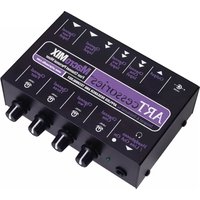
The ART MX622 Six Channel Stereo Mixer with EQ and Effects Loop is a versatile mixer combining three-balanced microphone or line level inputs with three stereo line inputs into a single stereo line level mix. Each mono balanced XLR input includes fully variable Input gain, Mic/Line switch, Clip indicator, and selectable 15 Volt Phantom power. An external effects loop section provides a mono Send from the three Mic/Line channels to external equipment and stereo Returns with Effects Level and In/Out switch. Three stereo line level inputs are also provided via RCA type jacks with separate Level controls for each stereo pair. Stereo Record output RCA jacks provide full-level signal of the entire mix at all times. Main outputs are stereo balanced 14 -inch TRS with Master Level and full range Bass/Treble equalization. The built in power supply and single high 19" rack mount format allows for easy installation and reliable operation.
Features:
- Three balanced XLR inputs with separate Mic/Line switch, Level control and Clip Indicator
- Three pairs of RCA stereo inputs with separate Level controls
- Selectable 15 Volt Phantom power for each Mic channel
• Balanced 14 -inch TRS Main outputs with Master Level control - Versatile Bass and Treble equalization on Main outputs
- Stereo Record Out RCA jacks
- Effects Loop with Effects Level control and In/Out switch
- 1/4 -inch Effects Send with stereo Returns
OPERATION

Verify proper voltage selection on the IEC style power connector for your location. Connect the AC cord to a grounded AC outlet.
Connect Mics or balanced Line inputs to the XLR sockets.
For Mic channels requiring phantom power (for condenser mics), move the DIP switch to the down position to activate phantom power for each XLR input.
Set each Mic/Line switch as required for the type of input signal level.
Connect stereo signal sources (CD, tape/MP3 player, etc.) to input channels 1, 2, and 3 using RCA type unbalanced cables.
To patch-in effects, using three shielded TS (unbalanced) cables connect the Efx Loop Send jack to the input of the effects unit and the unit's stereo outputs to the Left and Right Efx Loop Return jacks. Once the MX622 is connected to the main mixer, tape deck, computer interface, or power amplifier, apply a test signal, set the Efx Loop In/Out switch on the front panel to the IN position, and adjust the Efx Level control for the desired effects intensity.
The Left and Right Efx Loop Return jacks may alternately be used as a stereo line input with its own level control and In/Out switch.
Connect either the 14 -inch balanced Left and Right Main Output jacks or the RCA Record Out jacks to the input of the mixer, tape deck, computer, or power amplifier with the appropriate balanced or unbalanced, shielded cables.
Switch on the power and set the Master Level to the 12 way setting, then adjust the input channel Level controls as required for the best mix and level while checking the Mic/Line channel CLIP LEDs for activity. Turn down any channel with CLIP activity until the LED is on during extreme peaks only.
Adjust BASS and TREBLE controls for the desired balance. The mid position has flat frequency response.
Re-adjust the Master Level as required for best signal level.
WARRANTY INFORMATION
Limited Warranty (USA only)
Applied Research and Technology will provide warranty and service for this unit in accordance with the following warrants:
Applied Research and Technology, (ART) warrants to the original purchaser that this product and the components thereof will be free from defects in workmanship and materials for a period of three years from the date of purchase. Applied Research and Technology will, without charge, repair or replace, at its option, defective product or component parts upon prepaid delivery to the factory service department or authorized service center, accompanied by proof of purchase date in the form of a valid sales receipt.
Online Registration
We recommend that you register your product online to insure prompt warranty repair servicing on any repair issues. Please go to www.artproaudio.com. Select "Support", then "Product Registration". Then input your information here.
Exclusions
This warranty does not apply in the event of misuse or abuse of the product or as a result of unauthorized alterations or repairs. This warranty is void if the serial number is altered, defaced, or removed.
A R T reserves the right to make changes in design or make additions to or improvements upon this product without any obligation to install the same on products previously manufactured.
A R T shall not be liable for any consequential damages, including without limitation damages resulting from loss of use. Some states do not allow limitations of incidental or consequential damages, so the above limitation or exclusion may not apply to you. This warranty gives you specific rights and you may have other rights, which vary from state to state.
For units purchased outside the United States, an authorized distributor of Applied Research and Technology will provide service.
SERVICE
The following information is provided in the unlikely event that your unit requires service.
- Be sure that the unit is the cause of the problem. Check to make sure the unit has power, all cables are connected correctly, and the cables themselves are in working condition. You may want to consult with your dealer for assistance in troubleshooting or testing your particular configuration.
- If you believe that the ART unit is at fault, go to www.artproaudio.com.
- Select "Support", then "Return Authorization Request" to request a return authorization number.
- If you are returning the unit for service, pack the unit in its original carton or a reasonable substitute. The original packaging may not be suitable as a shipping carton, so consider putting the packaged unit in another box for shipping. Print the RA number clearly on the outside of the shipping box. Print your return shipping address on the outside of the box.
- Include, with your unit, a note with the RA number and your contact information, including a return shipping address (we cannot ship to a P.O. box) and a daytime phone number, and a description of the problem, preferably attached to the top of the unit. Also include a copy of your purchase receipt.
Please fill in the following information for your reference:
Date of purchase: ____
Purchased from: ____
Serial Number: ____
SPECIFICATIONS
Input Connections XLR-F balanced (3), 14 -inch unbalanced (2), RCA (6)
Output Connections 14 -inch TRS balanced (2), 14 -inch unbalanced (1), RCA (2)
Input Impedance 600/22K Ohms Mic/Line XLR inputs, 10K Ohms RCA inputs,
22K
Ohms
1/4 -inch
Efx
Returns
Output Impedance 50 Ohms 14 -inch Main outputs, 1K Ohms RCA Record outputs, 100 Ohms Efx output
Maximum Input Level -10dBu/+20dBu Mic/Line XLR inputs, +20dBu RCA line inputs,
+20dBu
Efx
inputs
Maximum Output Level +24dBu balanced Main outputs, +20dBu RCA Record outputs,
+20dBu
Efx
output
Phantom Power +15 Volts DC, regulated low noise
Maximum Gain 56dB/26dB Mic/Line, 26dB RCA inputs
Signal to Noise Ratio >90dB typical
T H D <1% typical
Equalizer Range +/-12dB @ 100Hz & 10KHz
Power Requirements USA: 105 to 125 VAC / 50-60Hz, 15 Watts typical
Dimensions (HWD) 1.75-inch x 19.0-inch x 6.0-inch
5mm x 483mm x 152mm
Weight 6.2 lbs. (2.8kg)
Note: 0 dBu = 0.775Vrms
ART maintains a policy of constant product improvement. ART reserves the right to make changes in design, or make additions to, or improvements upon, this product without any obligation to install same on products previously manufactured. Therefore, specifications are subject to change without notice.

APPLIED RESEARCH AND TECHNOLOGY
www.artproaudio.com E-mail: support@artproaudio.com
© 2017 Applied Research & Technology
MX622
SIX CHANNEL STEREO MIXER WITH EQ AND EFFECTS LOOP
6225004


- IMPORTANT SAFETY INSTRUCTIONS - READ FIRST
- Read instructions
- Do not open
- Power sources
- Power cord
- Grounding
- Moisture
- Heat
- Environment
- Handling
- Servicing
- Installation
- INTRODUCTION
- Features:
- OPERATION
- WARRANTY INFORMATION
- Limited Warranty (USA only)
- Online Registration
- Exclusions
- SERVICE
- SPECIFICATIONS
Brand : ART
Model : MX622
Category : Blender