ADX-16 - Professional Audio Appsys ProAudio - Free user manual and instructions
Find the device manual for free ADX-16 Appsys ProAudio in PDF.


| Product Type | Bidirectional ADAT/TOSLINK Extender over Cat5 |
| Brand | Appsys ProAudio |
| Model | ADX-16 |
| Dimensions (each unit) | 66.5 x 66.5 x 28 mm (2.62 x 2.62 x 1.10 in) |
| Weight (each unit) | 60 g (2.1 oz) |
| Power Supply | 9-15V DC, 150mA, center positive; supplied with AC adapter |
| Max Distance between Units | 100 m (328 ft) via Cat5/Cat6/Cat7 |
| Supported Audio Formats | ADAT Lightpipe, S/PDIF (up to 96kHz/24bit), Dolby Digital 5.1 (AC-3), DTS, and all TOSLINK compatible formats up to 13.2 MBit/s (NRZ) |
| Input/Output Connectors | TOSLINK (F05 type optical connectors) |
| Bidirectional Transmission | Yes, one TOSLINK connection in each direction over single Cat5 cable |
| Power over Cat5 | Second unit powered via Cat5 from first unit; no separate power supply needed |
| Operating Temperature | 0°C to 50°C (32°F to 122°F) |
| Storage Temperature | 0°C to 70°C (32°F to 158°F), non-condensing |
| Warranty | 2 years from date of purchase |
| Care & Cleaning | Use a dry cloth; avoid solvents. Keep optical connectors clean and dust-free. |
| Safety Precautions | Only connect ADX-16 units to each other via Cat5; never connect to network devices. |
| Spare Parts & Repairability | Contact manufacturer for service; no user-serviceable parts inside. |
| Country of Origin | Switzerland |
Frequently Asked Questions - ADX-16 Appsys ProAudio
User questions about ADX-16 Appsys ProAudio
0 question about this device. Answer the ones you know or ask your own.
Ask a new question about this device
Download the instructions for your Professional Audio in PDF format for free! Find your manual ADX-16 - Appsys ProAudio and take your electronic device back in hand. On this page are published all the documents necessary for the use of your device. ADX-16 by Appsys ProAudio.
USER MANUAL ADX-16 Appsys ProAudio
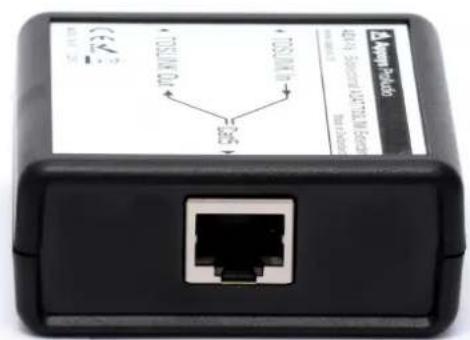
ADX·16
Bidirectional Extender for ADAT® and TOSLINK® connections over Cat5
User's Manual
((en))
1. DESCRIPTION
1.1. Foreword
The ADX-16 Kit has been designed to overcome the length limitations (5 m/16 ft) of optical TOSLINK® interconnects running ADAT Lightpipe®, S/PDIF® and other protocols, and to provide a more robust alternative to sensitive Plastic Optical Fiber (POF) cable. Although longer optical cables are sometimes available, they do not guarantee a reliable connection because they attenuate optical signals too much and make the proper distinction of 0's and 1's in the digital signal difficult. A typical indication for such problems are clicks, pops and crackles appearing in the transmitted audio signal.
The ADX-16 solves these problems by converting the optical signals to electrical ones, which can be losslessly transmitted over up to 100 meters using ubiquitous and cheap Cat5 cable. Moreover, the ADX-16 reduces cabling by transmitting a bidirectional signal (that is, one TOSLINK connection in either direction) together with power for the second unit over a single Cat5 cable.
1.2. Applications
■Economic digital 8x8 snake with lowest latency
■Recording of 8 channels from a remote location, with master clock transmitted to the remote unit
■Interconnection of ADAT enabled equipment (e.g. DAWs and digital mixers)
If analog conversion is needed at one or both ends, we recommend using 8-channel ADC/DACs (e.g. Behringer ADA8000 or Focusrite Octopre mkll Dynamics) on the respective ends
1.3. Box Contents
■Converter Box ADX-16-S
(1xTOSLINK In + 1xTOSLINK Out to Cat5 with power supply)
■Converter Box ADX-16-R
|1xTOSLINK In + 1xTOSLINK Out to Cat5|
■A C adapter
■This manual
2. SETUP
2.1. Precautions

Use the Cat5 network cable ONLY to connect the ADX-16 devices together. NEVER connect it to network devices, as this could result in damage of both the ADX-16 and/or the network device.
2.2. Connection scheme
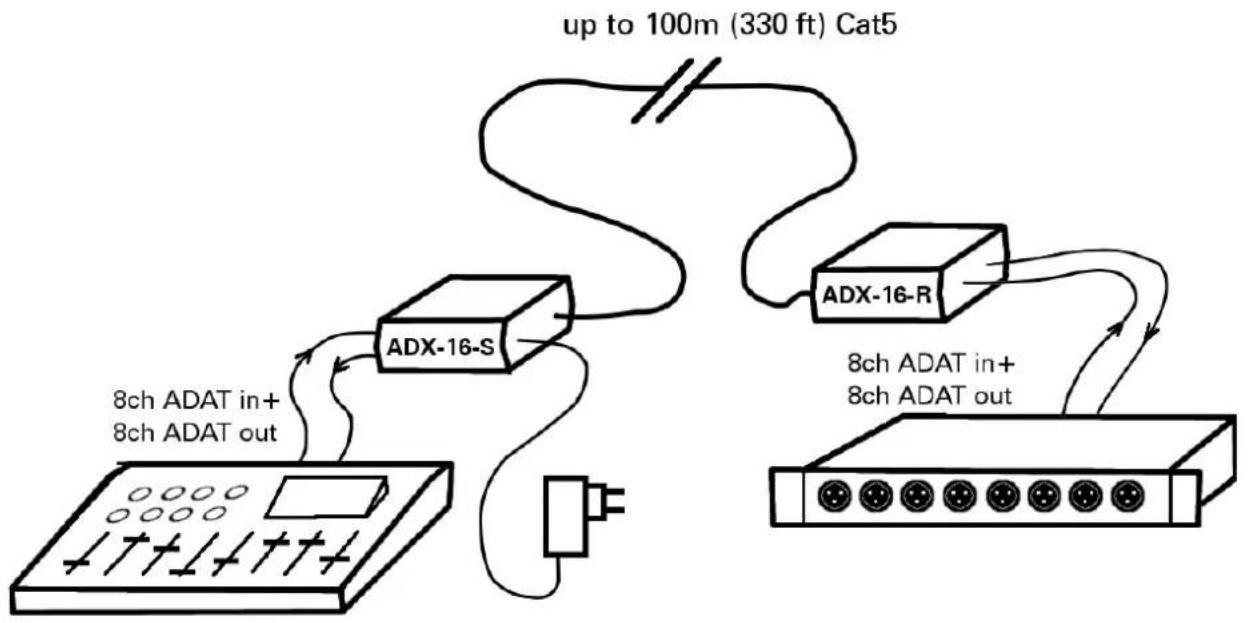
flowchart
graph TD
    A["ADX-16-S"] -->|up to 100m (330 ft) Cat5| B["ADX-16-R"]
    B -->|8ch ADAT in+ 8ch ADAT out| C["Analog Device"]
    B -->|8ch ADAT in+ 8ch ADAT out| D["Switched Device"]
First ADX·16 box (with power supply jack, "ADX·16·S")
■Connect the supplier AC adapter to the "Power" jack
■Connect the optical output of your first device [e.g. mixing desk] to the "TOSLINK In" jack, and the optical input to the "TOSLINK Out" jack.
Second ADX·16 box ("ADX·16·R")
■Connect the optical output of your second device (e.g. DAC|ADC) to the "TOSLINK In" jack, and the optical input to the "TOSLINK Out" jack.
■The second box does not need a separate power supply because it is powered from the first one over the Cat5 cable.
2.3. Cabling considerations
■Use up to 100m (330 ft| Cat5|e), Cat6(e) or Cat7 cable to connect the first ADX-16 box to the second one.
■ Note: For the ADX-16's signal transmission, the quality of the cable doesn't matter much (we use 100 meters of the cheapest cable we were able to get for testing). However, we recommend using good quality cable if mechanical stress is an issue.
3. SPECIFICATIONS
| Model number ADX-16 | ||
| Input/Outputs Optical connector, F05 Type | TOSLINK® compatible | |
| Maximum distance between sender and receiver 100 m (328 ft.) | ||
| Supported audio formatsNote: Both directions operate completely independent from each other. | •ADAT Lightpipe ®•S/PDIF ® (up to 96kHz / 24 bit)•Dolby Digital ® 5.1 (AC-3)•DTS ®•all other TOSLINK compatible formats up to 13.2 MBit/s (NRZ-encoding) | |
| Pinout Cat5 cable 1 (orange/white) DATA+ "S>R" | ||
| 2 (orange) DATA-- "S>R" | ||
| 3 (green/white) | DATA+ "R>S" | |
| 4 (blue/white) | +12V | |
| 5 (blue) | +12V | |
| 6 (green) | DATA-- "R>S" | |
| 7 (brown/white) | GND | |
| 8 (brown) | GND | |
| Power supply | 9-15V DC 150mA, Polarity: Center Positive +●- -Plug: ID=2.5mm OD=5mm Length=9mm0...50°C | |
| Operating temperatureStorage temperatureDimensionsWeight | 0...50°C0...70°C, non-condensingLx Wx H: 66.5x66.5x28 mm |each unit|60g |each box| | |
4. APPENDIX
4.1. Warranty
We offer a full two (2) year warranty from the date of purchase. Within this period, we repair or exchange your device free of charge in case of any defect*. If you experience any problems, please contact us first. We try hard to solve your problem as soon as possible, even after the warranty period.
* Not covered by the warranty are any damages resulting out of improper use, willful damage, normal wear-out (especially of the connectors) or connection with incompatible devices.
4.2. Manufacturer contact
Appsys ProAudio
Rolf Eichenseher
Bullingerstr. 63 / BK241
CH-8004 Zürich
Switzerland
www.appsys.ch
info @appsys.ch
Phone: +41 43 537 28 51
Mobile: +41 76 747 07 42
4.3. FCC Compliance
This equipment has been tested and found to comply with the limits for a class B digital device, pursuant to part 15 of the FCC Rules. These limits are designed to provide reasonable protection against harmful interference in a residential installation. This equipment generates, uses and can radiate radio frequency energy and if not installed and used in accordance with the instructions, may cause harmful interference to radio communications. However, there is no guarantee that interference will not occur in a particular installation. If this equipment does cause harmful interference to radio or television reception, which can be determined by turning the equipment off and on, the user is encouraged to try to correct the interference by one or more of the following measures:
■Reorient or relocate the receiving antenna
■ Increase the separation between the equipment and receiver
■Connect the equipment into an outlet on a circuit different from that to which the receiver is connected
■Consult the dealer or an experienced radio|TV technician for help
This equipment has been verified to comply with the limits for a class B computing device, pursuant to FCC Rules. In order to maintain compliance with FCC regulations, shielded cables must be used with this equipment. Operation with non-approved equipment or unshielded cables is likely to result in interference to radio and TV reception. The user is cautioned that changes and modifications
made to the equipment without the approval of manufacturer could void the user's authority to operate this equipment.
4.4. Recycling
According to EU directive 2002/96/EU, electronic devices with a crossed-out dustbin may not be disposed into normal domestic waste. Please return the products back for environment-friendly recycling, we'll refund you the shipping fees.
4.5. About this document
| Rev. Changes | |
| 6 Refor | matted documentAdded FCC compliance statement |
All trademarks mentioned in this document are property of the respective owners. All information provided here is subject to change without prior notice.
Document Revision: 6 · 2019-11-21
Copyright © 2010-2019 Appsys ProAudio · Printed in Switzerland
Brand : Appsys ProAudio
Model : ADX-16
Category : Professional Audio