
PWMA335BT - Karaoke Pyle - Free user manual and instructions
Find the device manual for free PWMA335BT Pyle in PDF.


| Product Type | Karaoke & PA Speaker System |
| Brand | Pyle |
| Model | PWMA335BT |
| Maximum Power Output | 550 Watts |
| Speaker Driver | 8" Subwoofer |
| Bluetooth Version | 2.0 |
| Bluetooth Range | Up to 65+ feet |
| Bluetooth Network Name | PyleUSA |
| Bluetooth Password | 0000 |
| Battery Type | Lead Acid, 11.1V, 3500mAh |
| Battery Playback Time | Up to 2 hours |
| Power Supply | 100-240V AC (DC 12V Adapter) |
| Media Playback | USB Flash Drive, Micro SD Card (up to 32GB, FAT32, MP3) |
| Audio Recording | One-button recording to USB/SD (MP3 format); records from AUX, FM, or microphone |
| Radio | FM Radio with Digital LCD Display, automatic channel search, up to 60 presets |
| Microphone Inputs | 1 x 1/4" (6.35mm) microphone input; 1 x 3.5mm headset/mic combo |
| Included Microphones | Wired Handheld Microphone, Headset Microphone, Lavalier Microphone |
| Audio Inputs | AUX (3.5mm), Line In (RCA?) |
| Audio Outputs | Headphone Jack (3.5mm) |
| Lighting Effects | Flashing DJ Party Lights with multiple modes |
| Controls | Top panel buttons and knobs (volume, treble, bass, echo, mode, EQ, etc.); remote control included |
| Equalizer Modes | Square, Meeting, Home, Hall, Personal |
| Playback Modes | All, One, Random, Folder |
| Frequency Response | Not specified |
| Impedance | 4 Ohms |
| Signal-to-Noise Ratio | ≥85 dB |
| Total Harmonic Distortion | <1.0% |
| Dimensions (Approximate) | Not specified |
| Weight | Not specified (portable with carry handle and rolling wheels) |
| What's in the Box | Portable PA Speaker, Wired Handheld Mic, Headset Mic, Lavalier Mic, Audio Cable, Power Adapter, Remote Control |
Frequently Asked Questions - PWMA335BT Pyle
User questions about PWMA335BT Pyle
0 question about this device. Answer the ones you know or ask your own.
Ask a new question about this device
Download the instructions for your Karaoke in PDF format for free! Find your manual PWMA335BT - Pyle and take your electronic device back in hand. On this page are published all the documents necessary for the use of your device. PWMA335BT by Pyle.
USER MANUAL PWMA335BT Pyle
natural_image
Black PYLE® portable electronic device with red LED lights and a black PYLE microphone, connected to a remote control (no visible text or symbols on main body)☆☆☆☆√√X☆
☆□▼○○○○○○○○○○○○○○○○○○○○○○○○○○○○○○○○○○○○○○○○○○○○○○○○○○○○○○○○○○○○○○○○○○○○○○○○○○○○○○○○○○○○○○○○○○○○○○○○○○○○
PA Loudspeaker with Flashing DJ Lights, Built-in Rechargeable Battery,
FM Radio, MP3/USB/Micro SD
User Manual
I. FEATURES
- Ultra-large magnetic circuit high-sensitivity speaker with high penetrating power, low-frequency shock and perfect medium-/high-frequency representation.
- The latest decoding chips supporting stably playback of MP3 in up to 32GB U disk/SD card.
- FM radio reception-high-quality digital radio with automatic channel search and storage of up to 60 channels.
-
- 5mm AUX audio input for each connection to a wide range of sound sources.
- Built-in high-capacity battery for consecutive playback of up to 2 hours.
- Connect the microphone, adjustable reverberation, voice and Karaoke function to present outstanding performance.
- Battery with built-in recharging protection to present a long and stable service life.
- Built-in low battery and full recharging indication. Human-oriented use.
- With belt/handle design for best choice of mobile speaker.
- Outputs to earphone or external sound sources.
- Record your favorite FM radio station or other AUX sound source to enjoy the music wherever you are.
- Microphone input recording to act as your personal business assistant.
- With Wireless BT function.
II. RECORDING
Recording in AUX Mode:
Connect a storage device (USB/SD card) and press Mode key to enter AUX mode. Short press Record key to start recording for a time depending on the storage capacity. The signal should be strong during recording.
Recording in FM Receiving Mode:
Connect a storage device (USB/SD card) and press Mode key to enter FM mode. Select your favorite radio station and short press record key to start recording for a time depending on the storage capacity. During recording, keep the device in a proper location with strong radio signal to ensure optimized recording performance.
Recording via External Microphone:
Connect a storage device (USB/SD card) and short press RECORD key to start recording for a time depending on the storage capacity. During recording, turn the "-ECHO+" knob to the minimum. It is best that the microphone should have a proper distance away from the speaker to prevent any feedback.
NOTE: This product starts recording from the time as displayed on the LED screen.
III. WIRELESS BT PAIRING OPERATION
- ON/OFF: switch the power to ON, press the key "MODE" to enter the Wireless BT mode, the display screen will show "BLUE" indicating Wireless BT mode is active.
- Make sure the Wireless BT function of the Mobile device is active and begin searching. Connect to mobile device when "PyleUSA" shows. Mobile device connections do not need password, however if prompted, input "0000" to go on pairing. After a successful pairing, the speaker will send out a voice prompt indicating it has successfully been paired with the mobile device.
- Play the music from your mobile device directly and enjoy.
IV. FUNCTIONAL OPERATIONS AND FEATURES

-
LED Screen
-
Master Volume: In MP3/FM/AUX mode, use it to regulate volume output from the speaker.
-
SD Port: Read audio files in MP3 format in SD card in capacity up to 32G (FAT32).
-
USB Port: Read audio files in MP3 format in USB storage device in capacity up to 32G (FAT32).
-
In USB/Micro SD card reading mode, short press to go to the previous track, or press and hold to switch to the previous folder. In FM receiving status, short press it to select the previous channel after a full station search has been executed.
-
▶II: In USB/SD card reading mode, short press it to play/pause, or press and hold to select one of four playback sequencing modes (All - play all tracks in sequence; ONE - repeat one track). In FM receiving status, press and hold to execute a full search (it is recommended to execute at least one full search before using radio receiving function. All founded stations will be saved even in power-off). In AUX input / FM radio status, short press it to toggle between mute and normal volume.
-
▶▶: In USB/SD card reading mode, short press it to go to the next track. In FM receiving status, short press it to select the next channel after a full station search has been executed.
-
Mode/SHIFT: Short press it to toggle between USB/SD and FM receiving modes. Press and hold to toggle between recording folder and MP3 folder.
-
Recording/DEL: Short press it to enable recording (USB/SD storage device need be connected first). During recording, reverberation should be tuned to the minimum. Press and hold to delete a recording file. Recording in AUX or FM mode is available.
-
EAR MIC: Headphone/MIC Port
-
EQ: Environment Switching: In USB/SD reading status, short press it to select an environment mode (from Square, Meeting, Home, Hall and Personal).
-
Microphone input: Microphone input jack
-
LINE IN: External sound source input port (plug-and-play).
-
Reverberation: Microphone reverberation regulating knob.
-
Microphone volume: Microphone volume regulating knob.
-
DC 12V recharging: DC 12V recharging port.
- LED Power: The ON/OFF button of light
- ⚙: In MP3 mode, Press and hold to toggle between 6 kinds of flash modes/ the flash light switch. In FM/MIC IN mode, press and hold to control the flashlight switch.
- Power switch: " = " - ON: " O " - OFF.
- TREBLE: The control knob of treble.
- BASS: The control knob of bass
- LED MODE 1: First lighting mode
- LED MODE 2: Second Lighting mode
- IR: Infrared remote receiver module
NOTE: Please charge the speaker when the unit is off or lower the volume to avoid distortion.
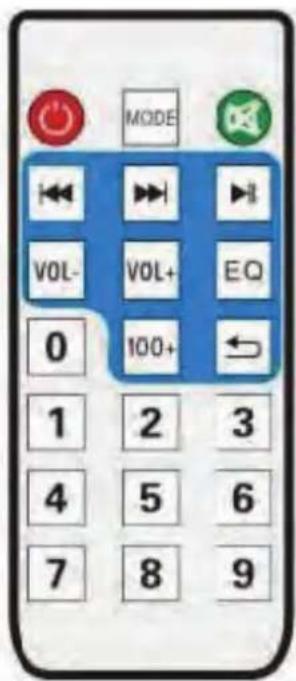
V. REMOTE INSTRUCTIONS
- Power Button: Short press to enter standby mode; short press it again to resume. If no device is connected, the system goes to "-NO-".
- ◀◀: Functions as "◀◀" on the master device.
- ▶II: Functions as "▶II" on the master device.
- ▶▶I: Functions as "▶▶I" on the master device.
- Mode: Functions as "Mode" on the master device.
- V + / V- Keys: In USB/SDF/FM/AUX mode, press them to volume up/down.
- Numeric Keys 0\~9: In USB/SD card reading status, to play Track 12, just input numbers "1" and "2", and in 2 seconds the system will go to Track 12 and start playback. Any input of number larger than number of the total available tracks is invalid. In FM status, to listen to channel 107.5MHZ, just input "1075".
- Environment Key: In USB/SD card reading status, short press it to toggle among Square, Meeting, Home, Hall and Personal modes.
- Sequencing Key: In USB/SD card reading status, short press it to toggle among four playback sequencing modes (All - play all tracks in sequence; RAND - play in random; ONE - repeat one track; FOL - repeat all tracks in a folder).
- ☒: In USB/SD/FM/AUX mode, short press it to mute the device.
- 100+: Number selection key - in MP3 mode (USB/SD card), short press it to add "100" to current track number.
What's in the Box:
- Portable PA Speaker
• Wired Handheld Microphone
• Headset Microphone
• Lavalier Microphone
• Audio (Aux) Connection Cable - Power Adaptor
- Remote Control
Audio Recording:
• It's Easy: One Button Recording Activation
• Record Audio as Streamed through the Speaker System
- Ability to Record Vocals via Microphone
• Records to USB Flash or Micro SD Card
• Audio File Type Created: .MP3
- Easy Transfer to PC & Mac
Features:
- Karaoke & Music Streaming Speaker System
- Compact, Portable & Powerful
- Bluetooth Wireless Audio Streaming
• Built-in Rechargeable Battery - Flashing DJ Party Lights
• FM Radio with Digital LCD Display
• USB Flash & Micro SD Memory Card Readers
• MP3 Digital Audio File Compatibility - Includes Handheld Wireless Microphone
• Audio File Recording Function - Headphone Jack
- Aux (3.5mm) Input
- Microphone Input
- Connect & Stream From External Devices
• Full Range Stereo Sound Reproduction - Impressive Bass Response
- Convenient Carry Handle & Rolling Wheels
• Rugged & Heavy Duty Design - Top Panel Button Control Center
Wireless BT Connectivity:
• Built-in BT for Wireless Streaming
- Works with All of Your Favorite Devices (Smartphone, Tablet, Laptop, Computer, etc.)
• Wireless BT Network Name: 'PyleUSA'
• Wireless BT Password: '0000'
- Wireless BT Wireless Range: 65'+ Ft.
• Wireless BT Version: 2.0
Technical Specs:
• Power Output: 550 Watt MAX
• Sound System: 8" Subwoofer
- Wired Microphone Cable Length: 16.5' ft.
• Battery: Lead Acid, 3500mah 11.1V
- Impedance: 4 Ohm
• Sound Distortion: <1.0%
- S/N Ratio: ≥85dB
• Max USB/SD Memory Card Support: 32GB
• Power Supply: 100/240V (DC 12V Power Adapter)
PYLE
PyleUSA.com

natural_image
Illustration of a laptop with a red checkmark on the screen (no text or symbols)VISIT US ONLINE:
Have a question?
Need service or repair?
Want to leave a comment?
PyleUSA.com/ContactUs
PYLE
Questions? Issues?
We are here to help!
Phone: (1) 718-535-1800
Email: support@pyleusa.com


Brand : Pyle
Model : PWMA335BT
Category : Karaoke