
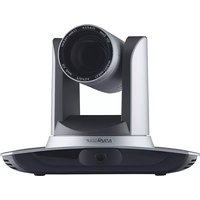
BG-4KPTZ-12XUHP - Security Camera BZBGear - Free user manual and instructions
Find the device manual for free BG-4KPTZ-12XUHP BZBGear in PDF.


| Product Type | Security Camera |
| Model | BG-4KPTZ-12XUHP |
| Image Sensor | 1/2.5-inch CMOS |
| Resolution | 4K (3840 x 2160) at 30 fps |
| Optical Zoom | 12x |
| Digital Zoom | 16x |
| Pan Range | 360° continuous |
| Tilt Range | -15° to +90° |
| Night Vision | Up to 100m IR distance |
| Compression | H.265 / H.264 |
| Power Supply | PoE (Power over Ethernet) IEEE 802.3af |
| Power Consumption | ≤12W |
| Dimensions (Φ x H) | Φ 150 mm x 220 mm |
| Weight | 1.8 kg |
| Weatherproof Rating | IP66 |
| Operating Temperature | -40°C to +60°C |
| Network Interface | RJ45 10/100/1000Mbps |
| Audio | Built-in microphone and speaker |
| Storage | MicroSD slot up to 256GB, NVR, or cloud |
| ONVIF Support | ONVIF Profile S/G/T |
| Maintenance | Wipe with dry cloth; avoid solvents |
| Safety | Use only with included power adapter; surge protection |
Frequently Asked Questions - BG-4KPTZ-12XUHP BZBGear
User questions about BG-4KPTZ-12XUHP BZBGear
0 question about this device. Answer the ones you know or ask your own.
Ask a new question about this device
Download the instructions for your Security Camera in PDF format for free! Find your manual BG-4KPTZ-12XUHP - BZBGear and take your electronic device back in hand. On this page are published all the documents necessary for the use of your device. BG-4KPTZ-12XUHP by BZBGear.
USER MANUAL BG-4KPTZ-12XUHP BZBGear
This manual introduces functions, installations and operations for this 4K camera in details. Please read this manual carefully before installation and use.
1. Cautions
1.1 Avoid damage to product caused by heavy pressure, strong vibration or immersion during transportation, storage and installation.
1.2 Housing of this product is made of organic materials. Do not expose it to any liquid, gas or solids which may corrode the shell.
1.3 Do not expose the product to rain or moisture.
1.4 To prevent the risk of electric shock, do not open the case. Installation and maintenance should only be carried out by qualified technicians.
1.5 Do not use the product beyond the specified temperature, humidity or power supply specifications.
1.6 Wipe it with a soft, dry cloth when cleaning the camera lens. Wipe it gently with a mild detergent if needed. Do not use strong or corrosive detergents to avoid scratching the lens and affecting the image.
1.7 This product contains no parts which can be maintained by users themselves. Any damage caused by dismantling the product by user without permission is not covered by warranty.
2. Electrical Safety
Installation and use of this product must strictly comply with local electrical safety standards.
The power supply of the product is ±12V, the max electrical current is 2A.
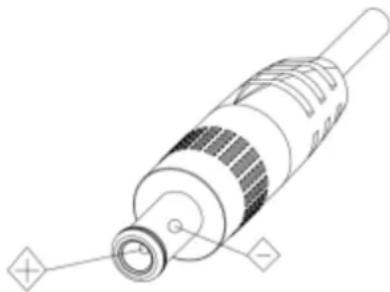
3. Install
3.1 Do not rotate the camera head violently, otherwise it may cause mechanical failure;
3.2 This product should be placed on a stable desktop or other horizontal surface. Do not install the product obliquely, otherwise it may display inclined image.
3.3 Ensure there are no obstacles within rotation range of the holder.
3.4 Do not power on before completely installation.
4. Magnetic Interference
Electromagnetic fields at specific frequencies may affect the video image. This product is Class A. It may cause radio interference in household application. Appropriate measure is required.
Content
1. CAMERA INSTALLATION....4
1.1 CAMERA INTERFACES....4
1.2 POWER-ON INITIAL CONFIGURATION 4
1.3VIDEO OUTPUT 5
1.4 MOUNTING BRACKETS....5
2.PRODUCT OVERVIEW 7
2.1 PRODUCT INTRODUCTION....7
2.1.1 Dimension....7
2.1.2 Accessories....8
2.2 MAIN FEATURES 8
2.3 TECHNICAL PARAMETERS....8
2.4 INTERFACES INSTRUCTION 10
2.4.1 External Interface 10
2.4.2 RS-232 Interface....11
3. APPLICATION INSTRUCTION 13
3.1VIDEO OUTPUT 13
3.1.1 Power-On Initial Configuration.... 13
3.1.2 Video Output 13
3.2 REMOTE CONTROL.... 13
3.2.1 MATCH CODE FOR WIRELESS REMOTE CONTROL.... 13
3.2.2 Keys Introduction for IR Remote Control 14
3.3 MENU INTRODUCTION.... 17
3.3.1 Main Menu.... 17
3.3.2 System Setting.... 18
3.3.3 Camera Setting 19
3.3.4 P/T/Z....22
3.3.5 Video Format....23
3.3.6 Version 23
4.NETWORK CONNECTION 24
4.1 CONNECTION MODE....24
4.2 WEB BROWSER LOGIN 26
4.2.1 Web Client.... 26
4.2.2 Preview 26
4.2.3 Playback.... 27
4.2.4 Configuration 27
4.2.5 Video Configuration 28
4.2.6 Network Configuration.... 30
4.2.7 System Configuration 31
4.2.8 Logout.... 32
5. SERIAL PORT COMMUNICATION AND CONTROL.... 33
5.1 VISCA PROTOCOL LIST 33
5.1.1 VISCA Protocol Return Command 33
5.1.2 VISCA Protocol Control Command....33
5.1.3 VISCA PROTOCOL INQUIRY COMMAND.... 36
5.2 PELCO-D PROTOCOL COMMAND LIST.... 38
5.3 PELCO-P PROTOCOL COMMAND LIST 38
6. MAINTENANCE AND TROUBLESHOOTING 39
6.1 CAMERA MAINTENANCE....39
6.2 TROUBLESHOOTING 39
7. WARRANTY....41
8. MISSION STATEMENT....41
COPYRIGHT STATEMENT 42
1. Camera Installation
1.1 Camera Interfaces
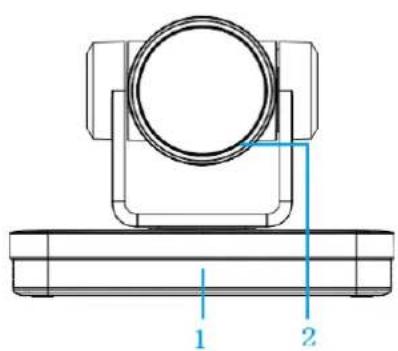


Figure 1.1 Product Interfaces
- Remote Control Receiving Indicator
- Camera Lens
- Tripod Screw Hole
- Screw Hole for Tripod
- Power Switch
- DC12V Input Power Supply Socket
-
LAN Port
-
Rotary DIP Switch
- RS232 Control Interface (input)
- RS232 Control Interface (output)
- RS422/RS485 Input
- Audio Input Interface
- USB 3.0 Interface
- HDMI Output Interface
1.2 Power-on Initial Configuration
1) Power-on: Connect DC12V power supply adapter with power supply socket.
2) Initial Configuration: The remote control receiving indicator flashes after power on, the pan-tilt turns left to the lowest left to the lowest, and then turns to the HOME position (both the horizontal and vertical positions are in the middle), while the movement first shrinks and then stretches. When remote control receiving indicator stops flashing, the self-checking is completed.
Notes:
1) After power on and self-checking, the camera will automatically return to the preset 0 position if it's pre-set.
2) The default address for the IR remote control is 1#. If the menu restored to factory defaults, the remote control default address will restore to 1#.
1.3 Video Output
1) Network output
a. Network cable connection: as shown in Figure 1.1 label 7. b. Webpage Login: open your browser and enter 192.168.5.163 (factory default) in the address bar; press Enter to enter into the login page, click on the "player is not installed, please download and install!" and follow the installation steps for installation. Then enter the username admin and password admin (factory default); press Enter to enter into the preview page, users can carry out PTZ control, video recording, playback, configuration and other operations.
2) HDMI Video Output
a. HDMI video cable connection: as shown in Figure1.1 label 14. b. Connect the camera and the monitor via HDMI video cable, and the video output is available after the camera self-test.
3) USB3.0 Video Output
a. USB 3.0 video cable connection: as shown in Figure1.1 label 13. b. Connect the camera and the computer via USB3.0 video cable, open the video software and select the image device to output the video.
1.4 Mounting Brackets
Notes:
Ceiling or wall mounting brackets can only be mounted on template and concrete wall. For safety reason, plasterboard is not recommended.
1) Wall Mounting

Anti-vibrate Cushion

Limited Post

1/4-20UNC Bolt

M6 Nut and Shim

M6 Swelling Bolt

Wall Mount Bracket

Camera
STEP 1 | STEP 2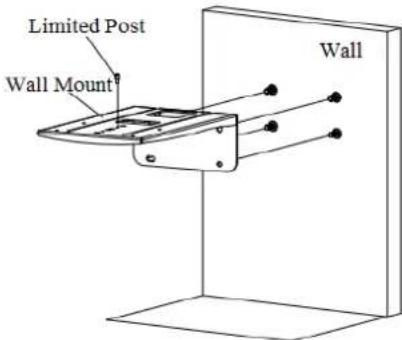 | STEP 3 |
STEP 4 | STEP 5 | FINISH |
2) Ceiling Mounting


2.Product Overview
2.1 Product Introduction
2.1.1 Dimension
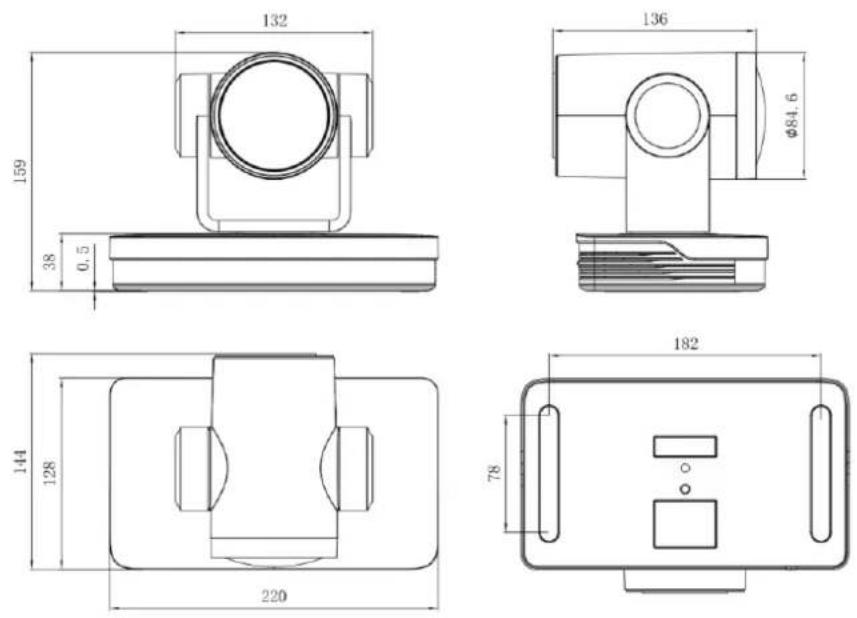
Figure 2.1 Product Dimension
2.1.2 Accessories
| Standard Accessories | Optional Accessories |
| Power adapter | Wireless Remote Control |
| IR Remote Control | Wall Mount |
| RS232 Cable | Ceiling Mount |
| User Manual | |
| USB3.0 Cable |
2.2 Main Features
This series camera is a new UHD 4K camera with 12X optical zoom and 80.4° wide angle lens. It has perfect functions, superior performance and rich video output interfaces. Featuring with advanced ISP processing algorithms, offering vivid and high-resolution video with a strong sense of depth and fantastic color rendition.
- 4K UHD Resolution: 1/2.5-inch high quality SONY CMOS sensor. Resolution is up to 4K with frame rate up to 60fps.
- Dual Stream Output: USB can support the main stream and sub stream output at the same time, and can meet the needs of near-end and far-end.
● Optical Zoom Lens: 12X optical zoom lens and 80.4° wide angle lens. - Rich and Perfect Interfaces: Support HDMI, USB 3.0, LAN, and output 4K audio and video at the same time.
● Leading Auto Focus Technology: Fast, accurate and stable auto focusing technology.
● Low Noise and High SNR: Super high SNR image is achieved with low noise CMOS. Advanced 2D/3D noise reduction technology further reduces the noise while ensuring high image clarity. - Multiple Audio/Video Compression Standards: LAN interface supports H.264/H.265 video compression, USB3.0 interface supports MJPG, H264, YUY2, NV12, H265; support AAC, MP3 and G.711A audio compression, 8000, 16000, 32000, 44100, 48000 sampling frequency.
- Multiple Network Protocol: Support ONVIF, GB/T28181, RTSP, RTMP protocols; Support RTMP push mode, easy to be connected to streaming server (Wowza, FMS); Support RTP multicast mode; Support network full command VISCA control protocol.
● Control Interface: RS422 input (compatible with RS485), RS232 input/output, RS232 (cascade connection)
● Multiple Control Protocol: Support VISCA, PELCO-D, PELCO-P protocols; Support automatic identification protocols.
● Multiple presets: Up to 255 presets (10 presets via remote control).
● Multiple Application: Online-education, Lecture Capture, Webcasting, Video conferencing, Tele-medicine, Unified Communication, Emergency command and control systems, etc.
2.3 Technical Parameters
| Camera Parameter | |
| Optical Zoom | 12Xf=3.85 mm~ 43.06 mm ±5% |
| View Angle | Parallel: 7.59° (N) ~ 80.4° (W)Vertical: 4.6° (N) ~ 50.0° (W) |
| AV | F1.8 ~ F3.56±5% |
| Sensor | 1/2.5-inch SONY CMOS sensor |
| Effective Pixels | 8.51M megapixel 16: 9 |
| Video Format | HDMI video format4KP@60fps/4KP@50fps/4KP@30fps/4KP@25fps/1080P@60fps/1080P@50fps/1080I@60fps/1080I@50fps/1080P@30fps/1080P@25fps/720P@60fps/720P@50fpsUSB3.0 interface video formatYUY2/NV12:1920×1080@30/25fps/1280×720@30/25fps/960×540@30/25fps/640×480@30/25fps/320×176@30/25fpsMJPEG/H.264/H.265:3840×2160@30/25fps/1920×1080@30/25fps/1280×720@30/25fps/960×540@30/25fps/640×360@30/25fps/640×480@30/25fps/320×176@30/25fpsUSB3.0 is compatible with USB2.0 video formatYUY2/NV12:640×360@30/25fps/640×480@30/25fps/320×176@30/25fpsMJPEG/H.264/H265:3840×2160@30/25fps/1920×1080@30/25fps/1280×720@30/25fps/960×540@30/25fps/640×360@30/25fps/640×480@30/25fps/176@30/25fps |
| Minimum Illumination | 0.05Lux (F1.8, AGC ON) |
| DNR | 2D & 3D DNR |
| White Balance | Auto / Manual/ One Push/ Specify color temperature |
| Focus | Auto/Manual/One Push Focus |
| Exposure Mode | Auto/Manual/Shutter priority/Aperture priority/brightness priority |
| Aperture | F1.8 ~ F11 CLOSE |
| Shutter Speed | 1/25~1/10000 |
| BLC | ON/OFF |
| WDR | OFF/ Dynamic level adjustment |
| Video Adjustment | Brightness, Color, Saturation, Contrast, Sharpness, B/W mode, Gamma curve |
| SNR | ≥50dB |
| Input/Output Interface | |
| Video Interfaces | HDMI, LAN(POE), USB3.0 (TypeB compatible with USB2.0) , A-IN, RS232-IN, RS232-OUT, RS422 (compatible with RS485) , Rotary DIP switch, DC12V Power Supply, Power Switch |
| Video Compression Format | LAN Interface: H.264, H.265USB 3.0 Interface: MJPG, H264, YUY2, NV12, H265 |
| Audio Input Interface | Double track 3.5mm linear input |
| Audio Output Interface | HDMI, LAN, USB3.0 |
| Audio Compression Format | AAC, MP3, G.711A |
| Network Interface | 10M/100M/1000M Adaptive Ethernet port, support POE power supply, support audio and video output |
| Network Protocols | RTSP, RTMP, ONVIF, GB/T28181; Network VISCA control protocol;Support remote upgrade, reboot and reset |
| Control Interface | RS232-IN, RS232-OUT, RS422 compatible with RS485 |
| Serial Communication protocol | VISCA/Pelco-D/Pelco-PBaud Rate: 115200/38400/9600/4800/2400 |
| USB Communication Protocol | UVC (Video), UAC (Audio) |
| Power Interface | HEC3800 outlet (DC12V) |
| Supply Adapter | AC110V~AC220V to DC12V/2.5A |
| Input Voltage | DC12V±10% |
| Input Current | <1A |
| Power Consumption | <12W |
| PTZ Parameter | |
| Pan Rotation | -110°~+110° |
| Tilt Rotation | -30°~+30° |
| Pan Control Speed | 0.1°/s~100°/s |
| Tilt Control Speed | 0.1°/s~70°/s |
| Preset Speed | Pan: 78.8°/s, Tilt: 31.7°/s |
| Preset Number | 255 presets (10 presets via remote control) |
| Other Parameter | |
| Stored Temperature | -10°C~+60°C |
| Storage Humidity | 20%~95% |
| Working Temperature | -10°C~+50°C |
| Working Humidity | 20%~80% |
| Dimension | 220(L)mm*144mm(W)*159mm(H) |
| Weight | 1.7kg |
| Application | Indoor |
| Accessory | |
| Package | Power Supply, RS232 Control Cable, USB 3.0 Cable, IR Remote Control, User Manual |
| Optional Accessories | Ceiling / Wall Mount (sold separately) |
2.4 Interfaces Instruction
2.4.1 External Interface

Figure2.5 Wiring Diagram
2.4.2 RS-232 Interface
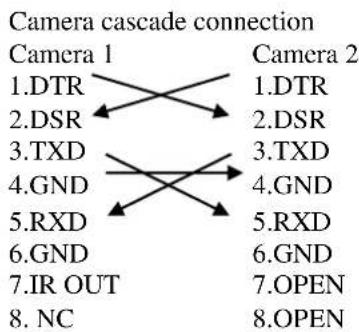
1) RS-232 Interface Definition

2) RS-232 Mini-DIN 8-pin Port Definition

| NO. | Port | Definition |
| 1 | DTR | Data Terminal Ready |
| 2 | DSR | Data Set Ready |
| 3 | TXD | Transmit Data |
| 4 | GND | Signal Ground |
| 5 | RXD | Receive Data |
| 6 | GND | Signal Ground |
| 7 | IR OUT | IR Commander Signal |
| 8 | NC | No Connection |
3) RS232(DB9) Port Definition
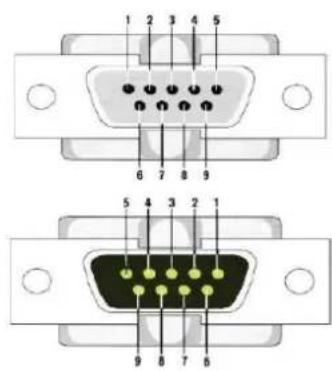
| NO. | Port | Definition |
| 1 | DCD | Data Carrier Detect |
| 2 | RXD | Receive Data |
| 3 | TXD | Transmit Data |
| 4 | DTR | Data Terminal Ready |
| 5 | GND | System Ground |
| 6 | DSR | Data Set Ready |
| 7 | RTS | Request to Send |
| 8 | CTS | Clear to Send |
| 9 | RI | Ring Indicator |
4) VISCA networking as shown below
![graph TD A["VISCA Controller"] --> B["VISCA Equipment"] B --> C["IN OUT"] B --> D["IN OUT"] B --> E["IN OUT"] C --> F["Out"] D --> G["Out"] E --> H["Out"]](/content/2026/05/954985/images/61b0dfce62fc081c32b241813707fdedb596684293eaeb737f08ab5ae0e8886a.jpg)
3. Application Instruction
3.1 Video Output
3.1.1 Power-On Initial Configuration
The remote control receiving indicator flashes after power on, the pan-tilt turns left to the lowest left to the lowest, and then turns to the HOME position (both the horizontal and vertical positions are in the middle), while the movement first shrinks and then stretches. When remote control receiving indicator stops flashing, the self-checking is completed. After power on and self-checking, the camera will automatically return to the preset 0 position if it's pre-set.
3.1.2 Video Output
Connect to the video output cable: the user can refer to Figure 1.1 product interfaces.
1) Network output: connect this product and your computer through network cable, then open the browser, enter the camera IP address (factory default 192.168.5.163) in the address bar, then to the login page and input a user name and password (factory default are "admin"), Finally enter the preview page, and the image comes out. (Note: If you forget your username, password, IP address, you can manually restore the default by the RESET key at the bottom of the machine.)
2) HDMI output: Connect the monitor with the corresponding video output interface, then the monitor outputs image.
3) USB3.0 output: Connect the camera with the computer USB3.0 interface (blue), open the Device Manager to see whether there is an imaging device and whether the Universal Serial Bus controllers recognize the USB3.0 device. After properly identified, open the software, choose the imaging device, and then it will output the image.
4) USB3.0 compatible with USB2.0 output: Connect the camera with a computer USB2.0 interface (black), open the Device Manager to see whether there is an imaging device and whether the Universal Serial Bus controllers recognize USB3.0/USB2.0 device. After properly identified, open the software, choose the imaging device, and then it will output the image.
3.2 Remote Control
3.2.1 Match Code for Wireless Remote Control

One to One Code Matching:
Press the "set" and "*" keys combined for 3 seconds, LED indicator starts flashing. Camera receive the signal and power on, LED indicator will go off if code matching successfully. The camera can be controlled by this wireless remote control only after one to one code pairing. Otherwise please clear the code matching of this remote control, or use other remote control to pair with the camera again.
If one to one code matching failed, the red LED light flashes for 20 seconds and then goes off, camera will stop code match and turn on sleep mode; Press any key to wake up the camera and re-match code.
Note: After code matching successfully, please select the camera address to control it.
Clear Code:
Press the "set" and "*" keys combined for 3 seconds, LED indicator starts flashing. Camera will power off and on, the LED indicator will go off if clear code successfully.
Sleep Mode and Wake Up:
Press any key to wake up the camera from sleep mode.
3.2.2 Keys Introduction for IR Remote Control
1) In this manual, "press the key" means a click rather than a long-press, and a special note will be given if a long-press for more than one second is required.
2) When a key-combination is required, do it in sequence. For example, 【*】 + 【#】 + 【F1】 means press 【*】 first, then press 【#】, then press 【F1】.
1. Standby Key
The camera enters standby mode if long press 3s on standby key;
Long press 3s again on the standby key, the camera will self-check again and return to HOME position (If preset 0 position is set, the camera will return to preset 0 position).
2. Camera Selection

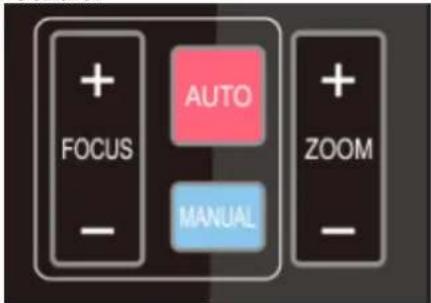
3. Focus Control

4. Zoom Control
5. Set and Clear Presets


Select the camera address to control.
Auto: auto focus mode
Manual: manual focus mode
Focus + (near):Press 【FOCUS +】 key (Valid only in manual focus mode)
Focus - (far): Press 【FOCUS -】 key (Valid only in manual focus mode)
Press and hold the keys: focusing action will continue until the key is released.
Press and hold the keys: focusing action will continue until the key is released.
Set Preset: press 【SET PRESET】 button, and then press the number key 0-9 to set preset positions.
Note: 10 presets via remote control.
Call Preset: Press a number key 0-9 directly to call a preset position.
Clear Preset: press 【CLEAR PRESET】 button, and then press the number key 0-9 to clear preset positions.
Note : press the【#】 key three times continually to clear all presets.
6. Pan/Tilt Control

7. Menu Setting

8. Camera Remote Control Address Setting

Up: press

Down: press

Left: press

Right: press

Back to middle position: press“【HOME】”
Press and hold the up/down/left/right key, the pan/tilt movements will move from slow to fast, until it gets to the endpoint. It will stop as soon as the key is released.
【MENU】: Open / close the OSD menu
【HOME】: Camera lens back to the middle position; Confirm button; Enter next menu
In normal working mode, press 【MENU】 key to display the menu, using scroll arrow to point at or highlight the selected items.
![MENU ==================== Language English (Setup) (Camera) (P/T/Z) (Video Format) (Version) (Restore Default) [↑↓]Select[←→]Change Value [Menu]Back [Home]OK](/content/2026/05/954985/images/5258f1a71cc14510a44897be6d0e1c70bcde8748a6efaa57e47fd86da9b753a7.jpg)
Language: Language setting, Chinese / English
Setup: System parameter setting
Camera: Camera parameter setting
P/T/Z: Enter into sub menu
Version: Enter into sub menu
Restore Default: Enter into reset setting, select YES or NO to confirm
[↑↓] Select: For selecting menu
|←→| Change Value: For modifying parameters
[MENU] Back: Press [Menu] to return
[Home] OK: Press [Home] to confirm
3.3.2 System Setting
Move the pointer to the (Setup) in the Main Menu, click the 【HOME】 key and enter into the (System Setting) as shown below,
![SETUP Protocol Auto Visca Address 1 Visca Address Fix OFF PELCO-P Address 1 PELCO-D Address 1 Baudrate 9600 Auto Filp OFF [↑↓]Select [←→]Change Value](/content/2026/05/954985/images/029d794fcc193b1d4e731c9c09fd8fa241d8c01c6ddb39adbd15f021ffa2b965.jpg)
Protocol: VISCA/Pelco-P/Pelco-D/Auto
Visca Address: VISCA=1\~7 Pelco-P=1\~255 Pelco-D=1\~255
Baudrate: 2400/4800/9600/115200
Visca Address Fix: On/Off
Auto Filp: On/Off
3.3.3 Camera Setting
Move the pointer to the (CAMERA) in the Main Menu, click the 【HOME】key and enter the (CAMERA) as follow,
![CAMERA (Exposure) (Color) (Image) (Focus) (Noise Reduction) Style Default [↑↓]Select [←→]Change Value [Menu]Back [Home]OK](/content/2026/05/954985/images/9b6bd39079f7cd7186bdf76b02010cf30c7b1fe64144c98a10316d57ccf135ab.jpg)
Exposure: Enter into Exposure setting
Color: Enter into color setting
Image: Enter into image setting
Focus: Enter into focus setting
Noise Reduction: Enter into noise reduction
1) Exposure Setting
Move the pointer to the (EXPOSURE) in the Main Menu, click the 【HOME】key and enter into the (Exposure sub menu) as shown below,
![EXPOSURE Mode Auto EV OFF BLC OFF Flicker 50Hz G.Limit 6 DRC 关闭 [↑↓]Select [←→]Change Value [Menu]Back](/content/2026/05/954985/images/769a81f0d8ef3b2fb2da08d0c530644a4e670e152bea01ff844b1d89aeb3c406.jpg)
Mode: Auto, Manual, Shutter priority, Iris priority and Brightness priority.
EV: On/Off (only available in auto mode)
Compensation Level: -7\~7 (only available in auto mode when EV is ON)
BLC: ON/OFF for options (only available in auto mode)
Dynamic Range: 1\~8, close
Anti-Flicker: OFF/50Hz/60Hz for options (only available in Auto/Iris priority/Brightness priority modes)
Gain limit: 0\~15(only available in Auto/ Iris priority /Brightness priority mode)
WDR: Off, 1\~8
ShutterPriority:1/25,1/30,1/50,1/60,1/90,1/100,1/120,1/180,1/250,1/350,1/500,1/1000,1/2000,1/3000,1/4000,1/6000,1/10000 (only available in Manual and Shutter priority mode)
IRIS Priority: OFF, F11.0, F9.6, F8.0, F6.8, F5.6, F4.8, F4.0, F3.4, F2.8, F2.4, F2.0, F1.8(only available in Manual and Iris priority mode)
Brightness: 0\~23 (only available in Brightness priority mode)
2) Color
Move the pointer to the (COLOR) in the Main Menu, click the 【HOME】 and enter the (COLOR sub menu) as follow,
![COLOR ==================== WB Mode Auto RG Tuning -10 BG Tuning -10 Saturation 100% Hue 7 AWB Sensitivity High [↑↓]Select [←→]Change Value [Menu]Back](/content/2026/05/954985/images/b2f976ee4ec11a1cc433046bfce582a92e73a9ce60ca33912bd7379be2bef259.jpg)
WB Mode: Auto, Manual, One Push, 3000K, 3500K, 4000K, 4500K, 5000K, 5500K, 6000K, 6500K, 7000K
Saturation: 60%,70%,80%,90%,100%,110%,120%,130%,140%,150%,160%,170%,180%,190%,200%
Red fine-tuning: -10\~10 (only available in automatic mode)
Blue fine-tunable: -10\~10 (only available in automatic mode)
RED GAIN: 0\~255(only available in Manual mode)
BLUE GAIN: 0\~255(only available in Manual mode)
AWB Sensitivity: high/middle/low
Chroma: 0\~14
3) Image
Move the pointer to the (IMAGE) in the Menu, click the【HOME】and enter into the (IMAGE sub menu) as follow,
| IMAGE | |
| Brightness | 7 |
| Contrast | 7 |
| Sharpness | 6 |
| Flip-H | OFF |
| Flip-V | OFF |
| B&W-Mode | Color |
| Gamma | Default |
| DZoom | OFF |
| DCI | Close |
| Low-Light Mode | Close |
| [↑↓]Select | [←→]Change Value |
| [Menu]Back | |
Brightness: 0\~14
Contrast: 0\~14
Sharpness: 0\~15
Flip-H: On/Off
Flip-V: On/Off
B&W Mode: color, black/white
Gamma: Default/0.45/0.50/0.55/0.63
DCI: Dynamic Contrast: Off/1\~8
Minimum Illumination: On/Off
4) Focus
Move the pointer to the (FOCUS) in the Menu, click the 【HOME】 and enter the (FOCUS) as follow,
![FOCUS --------= ------------------------= Focus Mode Auto AF-Zone Center AF-Sensitivity Low [↑↓]Select [←→]Change Value [Menu]Back](/content/2026/05/954985/images/05712f5eb118627dd6620ab6286b3b2eff6affd623256e7387ca00a40857f4c6.jpg)
Focus Mode: Auto/manual
AF-Zone: Up/middle/down
AF-Sensitivity: High/middle/low
5) Noise Reduction
Move the pointer to the (NOISE REDUCTION) in the Menu, click the【HOME】and enter the (NOISE REDUCTION) as follow,
![NOISE REDUCTION NR-2D 3 NR-3D 3 Dynamic Hot Pixel 3 [↑↓]Select [←→]Change Value [Menu]Back](/content/2026/05/954985/images/cc158575fd3a97935e40952ef526b6e5f5162663d493f31b5529d11c4c71e671.jpg)
2D Noise Reduction: Auto, close, 1\~7
3D Noise Reduction: Close, 1\~8
Dynamic Hot Pixel: Close, 1\~5
3.3.4 P/T/Z
Move the pointer to the (P/T/Z) in the Main Menu, click the 【HOME】 and enter the (P/T/Z) as follow,
![P/T/Z Speed by zoom ON Zoom speed 5 Image Freezing OFF Acc Curve Slow [↑↓]Select [←→]Change Value [Menu]Back](/content/2026/05/954985/images/99953ec71d5fd3f1d43fa5965861067a954f104568d85243ebdcc6e18675ecb9.jpg)
Depth of Field: Only effective for the remote controller, On/Off; (When zooming in, the PT control speed by remoter will become slow) Zoom Speed: Set the zoom speed for the remote controller, 1\~8 Image Freezing: On/Off Accelerating Curve: Fast/Slow
3.3.5 Video Format
Move the pointer to the (Video Format) in the Menu, click the 【HOME】 and enter the (Video Format) as follow,
![VIDEO FORMAT 4KP60 4KP50 4KP30 4KP25 1080P60 1080P50 1080I60 1080I50 720P60 720P50 [↑↓]Select [Menu]Back [Home]OK](/content/2026/05/954985/images/264fc5625692cfd19334cede95137af2c163b89c9b6839d348ac72b855a9eb99.jpg)
Note: Exit menu after modifying parameter to save it after powered off
3.3.6 Version
Move the pointer to the (VERSION) in the Main Menu, click the 【HOME】 and enter the (VERSION) as follow,
VERSION
MCU Version 3.1.0 2019-11-23
Camera Version 1.0.0 2019-12-4
AF Version 1.0.0 2019-08-20
MCU Version: Display MCU version information
Camera Version: Display camera version information
AF Version: Display the focus version information
Move the pointer to the (RESTORE DEFAULT) in the Main Menu, click the 【HOME】 and enter the (RESTORE DEFAULT) as follow,
RESTORE DEFAULT
Restore Default? NO
[↑↓]Select [←→]Change Value
[Menu]Back [Home]OK
Restore default: YES/NO. Color style and video format cannot be restored to factory default
Note: If the address of former remoter is not 1 but another one from 2, 3, 4, the corresponding camera address will restore to 1 when all parameters or system parameters are restored. User should change the remoter address to be 1 (press No.1 according to the camera so to get normal operation)
4.Network Connection
4.1 Connection Mode
Direct connection: Connect the camera directly to the computer by using an ethernet cable.
Internet connection mode: Connect the camera and computer to a router or switch and access via the local area network (LAN).
Note: Ensure power and network connections are secured to prevent video issues caused by poor connection quality.
The computer must be on the same subnet as the camera to connect successfully. The device will not be accessible otherwise. The camera default IP address is 192.168.5.163, therefore the computer must be connected to the 192.168.5.x subnet.
To connect to the camera open the Local Area Connection Properties on the computer.
For Windows users right-click on the internet connection in the lower right corner of the desktop.
Select "Open Network & Internet Settings."
Select "Change Adapter Options."
Right-click on your connection (Wi-Fi or Ethernet) and select "Properties."
Select "Internet protocol version 4 (TCP/IPv4)" as shown below and click "Properties."
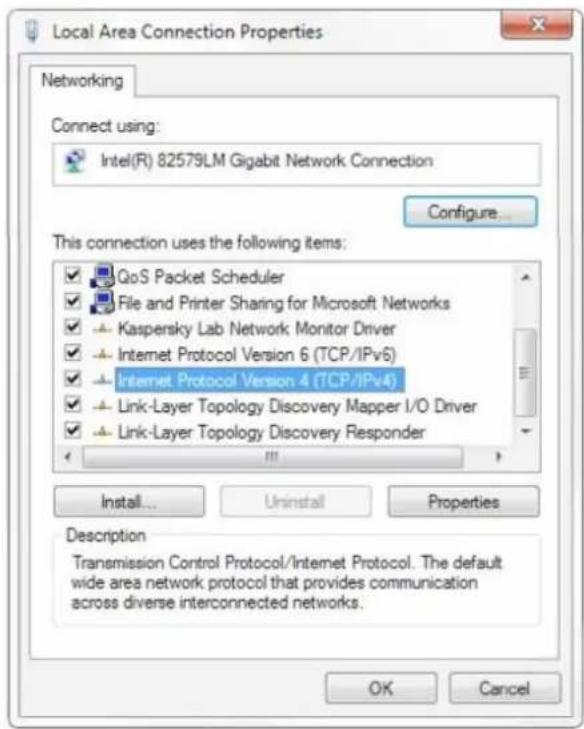
For the following steps refer to the diagram below.
Click on the bubble for "Use the following IP address"
In the IP address field enter a non-conflicting IP address on the same subnet as the camera. If there is another device with the same IP address you will not be able to connect. In the example below we are using 192.168.5.200
In the Subnet mask field enter 255.255.255.0
In the Default gateway field type 192.168.5.1
You can leave the DNS fields blank.
Click OK to apply your settings.
NOTE: When you are finished configuring the camera you will need to return to this screen and click the bubbles for “Obtain an IP address automatically” and “Obtain DNS server automatically” to restore internet connectivity to your computer. Also make sure to reconnect any ethernet cables you may have unplugged.

4.2 Web Browser Login
4.2.1 Web Client
1) Web Client Login
Enter 192.168.5.163 in the address bar of your internet browser and click Enter. If logged in as administrator (Default Username/Password: admin), users can preview, playback, and configure in the Web Client. If logged in as a normal user (Default Username/Password:user1 or user2), users can only preview and playback with no options for configuration.
2) Download/Install Plug in
The first time you connect to the camera you will receive a prompt to allow the Flash player to run. This is required to display the image in your web browser.
4.2.2 Preview
After successful login into the management interface, it enters the video preview interface. In the preview screen, users can control PTZ, zoom, focus, video capture, sound, focus, full screen and set the preset position, run, delete and other operations.
You can record the video and save it on SD Card when SD Card built-in. Video can be saved on the Computer at Local.
1) Login as administrator
Default username/password: admin
PTZ control can be carried out, zoom, focus, video capture, sound, zoom, full screen and set the preset position, run, and delete; you can preview, playback, configuration, logoff.
2) Login as normal user
Default username/password: user1 or user2
PTZ control can be carried out, zoom, focus, video capture, sound, zoom, full screen and set the preset position, run, and delete; you can preview, playback and logout.
NOTE: There are no configuration rights for normal user login.
4.2.3 Playback
1) Playback video files
First, please record, snapshot and save the file when previewing. Click "Playback" to enter recording file and picture files playback page, and then select the file "Video File" and click Search, and search out the video file, click Play to play the video file.
2) Playback picture files
First, please record, snapshot and save the file when previewing. Click "Playback" to enter recording file and picture files playback page, and then select the file "Image File" and click Search, and search out the video file, click Play to play the image file.
The default storage directory of local video/capture files is D:\MyIPCam\
4.2.4 Configuration
Click G to enter into the device parameters setting page
There are the following options: Local configuration, audio configuration, video configuration, network configuration, PTZ configuration, internet access configuration, system configuration, detailed description. See the following table.
| Menu | Explanation |
| Local configure | Including video preview mode, record video packing time, record video storage route settings etc. |
| Audio configure | Including audio compressing format, sampling frequency, sampling precision, compressing code rate settings etc. |
| Video configure | Including video encoding, video parameters, character-overlapping, character size, video output setting etc. |
| Network configure | Including basic parameters, Ethernet, DNS, GB28181, wireless network setting etc. |
| System configure | Including equipment property, system time, user management, version update, reset, reboot device settings etc. |
1) Local configuration
Video Preview Mode: user can choose real-time priority or fluency priority: The delay will be small when under real time priority mode and fluency will be good when under fluency priority mode. Setting based on the user need (Default value: real time normal (2), real time best (1), fluency normal (3), fluency good (4) and fluency best (5))
Recording packing time (minute): Set recording video packing time (default is 10, range from 1\~120 minutes)
Recording file packaging format type: set the video file packaging format type (default MP4, TS optional)
Recording/Snapshot file storage route: Set local recording video/snapshot file storage route. (Default
D:\MyIPCam\
Click the Save button to make settings effective.
2) Audio Configuration
Switch: Choose to enable the audio or not.
Compressing Format: Set audio compressing format and the device will reboot automatically after change (default MP3, AAC, G.711A optional)
Sampling Frequency: Set sampling frequency and the device will reboot automatically after change (default 44100, 8000, 16000, 32000 and 48000 optional, G.711A default 8000)
Sampling Precision: Set sampling precision (default 16bits)
Compressing Code Rate: Set audio compressing code rate (default 64bits, 32, 48, 96, 128bits optional)
Input Volume: Set the input volume (default 2, 1-10 optional)
Click “Save”, it will remind” Enable has changed. Restart the device to take effect after the success of the save.”, then please reboot the camera to make new setting effect.
4.2.5 Video Configuration
1) Video Encoding
Code stream: Stream: Different video output mode setting, use different streams. (Main stream, secondary stream)
Compression Format: Set the video compression format, save and reboot to take it effect (main / secondary stream default: H.264, H.265 optional)
Profile: Set Profile mode (default HP, BP, MP optional)
Video Size: Set video image resolution, save and reboot to take it effect (main stream default 1920*10803840*2160, 2592*1944,2304*1296, 1920*1080,1280*720 optional; default secondary stream 320*180,640*360,320*240,640*480,320*180,1280*720 optional)
Stream Rate control: Set rate control mode, save and reboot to take it effect (main / secondary stream default variable bit rate, fixed rate is for option).
Image Quality: Set the image quality, image quality can be changed only when rate control is variable bit rate, (main stream defaulted is better, secondary stream default is not good, there are best, better, good, bad, worse, worst for options).
Rate (Kb / s): Set the video bit rate (main stream default 8192b/s, 64-40960Kb/s optional; secondary stream default 512Kb/s, 64-40960Kb/s optional).
Frame rate (F/S): Set the video frame rate (main/ secondary stream default 25F/S, main stream 5-60F/S optional, secondary stream 5-30F/S optional).
Key frame interval: Set the key frame interval (main / secondary stream default 100, main stream 1-300F optional, secondary stream 1-150F optional).
Stream Name: When streaming via rtsp or rtmp, user can modify stream name. Main Stream (live/av0), secondary stream (live/av1)
Click the "Save" button to display the "saved successfully" message, then settings take effect.
2) Stream Release
Switch: To turn on/off the main / secondary stream.
Protocol: primary / secondary stream applies RTMP protocol.
Host Port: server port number (default 1935, 0-65535 optional)
Host Address: server IP addresses (default 192.168.5.11)
Stream Name: choose a different stream name (live / av0, live / av1 optional).
User: Set the username.
Password: Set the password.
Click on the "Save" button to display the "Save successful" message, then settings take effect.
Method of obtaining RTSP: RTSP: // device IP address: 554 / live / av0 (av0 main stream; av1 secondary stream)
2) Stream Release
Switch: To turn on/off the main / secondary stream.
Protocol: primary / secondary stream applies RTMP protocol.
Host Port: server port number (default 1935, 0-65535 optional)
Host Address: server IP addresses (default 192.168.5.11)
Stream Name: choose a different stream name (live / av0, live / av1 optional).
User: Set the username.
Password: Set the password.
Click on the "Save" button to display the "Save successful" message, then settings take effect.
Method of obtaining RTSP: RTSP: // device IP address: 554 / live / av0 (av0 mainstream; av1 secondary stream)
3) RTP Broadcasting
Main/Sub Stream: On/off
Protocol: RTP or TS
Address: Default 224.1.2.3. It can be edited.
Port: Main Stream Default Port: 4000, Sub Stream Default Port: 4002
Visit: Address comes up after setting. Eg ; rtp: //224.1.2.3:4000; udp: //@224.1.2.3:4000
3) Video Parameters
a. Focus: Focus mode, focus range, focus sensitivity can be set.
Focus Mode: set the focus mode (the default auto, manual optional)
Focus range: set the focus range (the default middle, the upper and lower optional)
Focus Sensitivity: Set the focus sensitivity (default is low, high, medium optional)
b. Exposure: Exposure mode, exposure compensation, back light compensation, anti-flicker, gain limit, wide dynamic, shutter speed, aperture value and brightness can be set.
Exposure Mode: Set the exposure mode (the default automatic, manual, shutter priority, aperture priority, Brightness priority optional)
Exposure compensation: Exposure compensation setting is active when it is auto status (default is off).
Exposure compensation value: Set the exposure compensation value, valid when it is set for auto (default 0, -7 to 7 optional).
BLC: Set back light compensation, valid when it is auto status (default is off).
Anti-flicker: Set up anti-flicker mode, valid when status of automatic, aperture or brightness priority (default 50Hz, closed, 60Hz optional).
Gain limit: set the gain limits, auto, active when it is status of aperture or brightness priority (default 4, 0-15 optional).
Dynamic range: Set the dynamic range (default 4, 1-8 optional).
Shutter speed: Active when it is status of manual or shutter-priority (default 1/100,
1/25,1/30,1/50,1/60,1/90,1/100,1/120,1/180,1/250,1/350,1/500,1/1000,1/2000,1/3000,1/4000,1/6000,1/10000 optional).
Aperture value: Set the aperture value, active when it is status of manual or aperture-priority(default F1.8, closed F11, F9.6, F8.0, F6.8, F5.6, F4.8, F4.0, F3.4, F2.8, F2.4, F2.0, F1.8 optional).
Brightness: Set the brightness value, active when it is a state of brightness priority (default 7, 0-23 optional).
c. Color: White balance, saturation, color, white balance, sensitivity, color temperature, gain red and blue gain can be set.
White balance modes: Set the white balance mode (the default automatic, 3000K, 3500K, 4000K, 4500K, 5000K, 5500K, 6500K, 7000K manual, One-push optional).
Note: Click the "Correction" button when selected the One-push white balance mode.
Red fine-tuning: default -10\~10 (only available in automatic mode)
Blue fine-tunable: default -10\~10 (only available in automatic mode)
Saturation: Set the saturation (default 60%, 70%, 80%, 90%, 100%, 110%, 120%, 130%, 140%, 150%, 160%, 170%, 180%, 190%, 200% optional).
Auto white balance Sensitivity: Sensitivity Auto white balance settings (default is low, high, medium optional).
Chroma: Set the chroma (default 7, 0-14 optional).
White balance sensitivity: Set the white balance sensitivity (Default setting: High, with low, middle for options)
Red Gain: Set the red gain, effective when it is manual (default 145, 0-255 optional).
Blue Gain: Sets the Blue gain, effective when it is manual (default 56, 0-255 optional).
d. Image: Brightness, contrast, sharpness, black and white mode, the gamma curve, Horizontal Flip and Vertical Flip can be set.
Brightness: Set the brightness (default 7, 0-14 optional).
Contrast: set the contrast (default 7, 0-14 optional).
Sharpness: Set the sharpness value (default 6, 0-15 optional).
Black and white mode: Set black and white mode (default color, black/white optional).
Gamma: Gamma value setting (default, 0.45, 0.50, 0.55, 0.63 optional).
Dynamic Contrast: set the dynamic contrast (default off, 1\~8 optional)
Flip Horizontal: Set Flip Horizontal (default Off, On optional).
Flip Vertical: Set vertical flip (default Off, On optional).
Electronic zoom: set the electronic zoom (default Off, On optional)
e. Noise Reduction: 2D noise reduction, 3D noise reduction and dynamic dead pixel correction available.
2D Noise Reduction: Set 2D noise reduction level (default 3, Auto, 1-7 and Off optional).
3D Noise Reduction: Set 3D noise reduction level (default 5, 1-8 and Off optional).
Dynamic dead pixel correction: Set Dynamic dead pixel correction (default Off, 1-5 optional).
Note: Click "Refresh" to make revision of any video parameters of a, b, c, d, e effective.
4) Character-Overlapping
Display date and time: Set whether to display the time and date (default display).
Display Title: Set whether to display the title (default display).
Font Color of Time: Set font color of time and date (default white, black, yellow, red, and blue optional).
Font Color of Title: Set font color of title (default white, black, yellow, red, and blue optional).
Moving characters: Set the display position of moving date, time and title, click on the "up, down, left, right" buttons to move the corresponding character position.
Title Content: Set title content (default CAMERA1).
Time Content: Set time content (default 1970/01/10 05:36:00)
Click on the "Save" button and display the "Save successful" message, then valid
5) Character Size
Main stream character size: Set the character size of the display, the device will restart
Automatically after changed and saved (default 48, 28-200 optional)
Secondary stream character size: Set the character size of the display, the device will restart automatically after changed and saved (default 48, 28-200 optional)
Click on the "Save" button to display "Parameter saved successfully" message, set to take effect
6) Video output
Output format: 3840x2160P60, 3840x2160P50, 3840x2160P30, 3840x2160P25
1080P60, 1080P50, 1080P30, 1080P25, 1080I60, 1080I50, 720P60, 720P50
Click on the "Save" button, it will be valid when display "Save successful".
4.2.6 Network Configuration
1) Network port
Data port: set the data port, the device will restart automatically after changed (default 3000, 0-65535 optional)
Web Port: Set Web port, the device will restart automatically after changed (default is 80, 0-65535 is optional)
Onvif Port: Set Onvif port, the device will restart automatically after changed (default 2000, 0-65535 optional)
Soap Port: Set Soap port (default 1936, 0-65535 optional)
RTMP Port: Set RTMP port (default 1935, 0-65535 optional)
RTSP Port: Set RTSP port, the device will restart automatically after changed (default 554, 0-65535 optional).
Visca Port: Set Visca port, the device will restart automatically after changed (default 3001,0-65535 optional).
Click on the "Save" button, it will be valid when display "Save successful".
RTSP Obtaining method: rtsp://device IP address: 554 / live / av0 (av0 main stream; av1 secondary stream)
RTMP Obtaining method: rtmp: // device IP address: 1935 / live / av0 (av0 main stream; av1 secondary stream)
2) Ethernet parameters
DHCP: Enable or disable obtain IP automatically can be set. Save changes and reboot the device to takes effect (default: OFF)
IP Address: Set the IP address, save changes and reboot the device to takes effect (default 192.168.5.163). Note:
This IP address is the same with the one used to login Web page.
Subnet Mask: Set the subnet mask (default 255.255.5.0).
Default Gateway: Set the default gateway (default 0.0.0.0).
Physical Address: Set the physical address (the parameter is read-only but cannot be modified).
Click on the "Save" button, it will be valid when display "Save successful". (Note: To prevent IP conflicts When modify)
3) DNS parameters
Preferred DNS server: set the preferred DNS server. (Default 0.0.0.0).
Alternate DNS server: Alternate DNS server settings. (Default 0.0.0.0).
Click on the "Save" button, it will be valid when display "Save successful".
4) GB28181
Switch: set whether open GB28181, can check
Time Synchronization: whether synchronization time is set, you can check
Stream Type: stream type setting (the default main stream, secondary stream optional)
Sign effective time (in seconds): 3600 Range 5-65535
Heartbeat time (seconds): 60 Range 1-65535
Register ID: 34020000001320000001
Register Username: IPC
Register Password: 12345678
Equipment ownership: Users can add their own
Administrative regions: Users can add their own
Alarm Zone: Users can add their own
Equipment installation address: Users can add their own
Local SIP Port: 5060 Range 0-65535
GB28181 Server Address: IP address of the computer
Server SIP Port: 5060 Range 0-65535
Server ID: 34020000002000000001
Click on the "Save" button, it will be valid when display "Save successful".
4.2.7 System Configuration
1) Device Properties
Device Name: Set the device name (the default Camera1, user can add their own).
Device ID: Set the device ID (default 1, Read-Only).
System Language: Set the system language (default Simplified Chinese, English optional). Need to re-login after modify and save the setting.
Click on the "Save" button, it will be valid when display "Save successful".
2) System Time
Date Format: Set the date format (YYYY-MM-DD default That year - month - day, MM-DD-YYYY namely Month - Day - Year, DD-MM-YYYY date - month - year Optional).
Date separator: set the date separator (default '/', '.', '-' Optional).
Time Zone: Set the time zone (default East eight districts, other time zones optional).
Time Type: Set the time types (default 24 hours, optional 12 hours).
Time setting: Set time mode (to choose the computer time synchronization, NTP server time synchronization, or set manually).
Computer Time: Set the computer synchronization valid.
Update interval: Set the NTP server automatic updated time interval. Valid after setting NTP server synchronization (default one day, 2-10 days Optional).
NTP server address or domain name: Set NTP server address or domain name (default time.nits.gov). Valid after setting NTP server synchronization.
NTP Server Port: Sets the NTP server port (default 123). Valid after setting NTP server synchronization.
Set the time manually, Effective when set manually.
Click on the "Save" button, it will be valid when display "Save successful".
3) User Management
Select users: Set the user type (the default administrator, Common User 1, Common User 2 optional)
Username: set the username (Select User Administrator default admin; select a common user1 default user1; to select a common user 2 default user2; user can modify their own)
Password: Set a password (Select User Administrator default admin; select a common user1 default user1; to select a common user 2 default user2; user can modify their own).
Password confirmation: Confirm the input passwords are the same or not.
Click on the "Save" button to display the "Save successfully" message, then the set is to take effect.
Please note the case-sensitivity of the username and password.
If login page by a common user's name and password, one does not have configuration privileges but can only operate to preview, playback, logout.
4) Version upgrade
Users only read the version information above which is consistent with the menu version but cannot modify. Different types of the machine have different information.
Update file: Click "Browse ..." installation, to select the upgrade file in the pop-up window.
Click on the "Upgrade" button, the upgrade dialog will appear, the device will reboot automatically after update successfully.
(Note: Make sure the power and network are kept connected during the process, or the upgrade will fail)
Note: After the version upgrade is complete, you need to restore factory defaults; a. through web to restore the factory default configuration; b. through the recovery menu; c. remote control shortcut * # 6;
Choose one of the above three ways. The IP account and password of mode a are also restored to default.
5) Restore factory setting
Click on pop-up "Restore Factory Defaults" button and choose "yes" or "no", then the device will restart automatically and restore factory setting.
6) Reboot
Click on the pop-up "Reboot" button and choose "yes" or "no", then the device will restart automatically.
4.2.8 Logout
Point "Logout" pop-up "Confirmation" dialog; select "Yes" or "No", choose "Yes" to exit the current page and return to the user login interface again.
5. Serial Port Communication and Control
The camera could be controlled through RS232/RS485 interface; RS232C serial parameter are as follows:
Baud rate: 2400/4800/9600/115200 bits / sec; Start bit: 1; data bits: 8; Stop bit: 1; Parity: None.
After power on, the camera first goes left, then back to the middle position. Self-test is finished after the zoom moved to the farthest and then back to the nearest position. If the camera saved 0 preset before, it will be back to that position after initialization. At this point, the user can control the camera by the serial commands.
5.1 VISCA Protocol List
5.1.1 VISCA Protocol Return Command
| Ack/Completion Message | ||
| Command packet | Note | |
| ACK | z0 41 FF | Returned when the command is accepted. |
| Completion | z0 51 FF | Returned when the command has been executed. |
z = camera address + 8
| Error Messages | ||
| Command packet | Note | |
| Syntax Error | z0 60 02 FF | Returned when the command format is different or when a command with illegal command parameters is accepted |
| Command Not Executable | z0 61 41 FF | Returned when a command cannot be executed due to current conditions. For example, when commands controlling the focus manually are received during auto focus. |
5.1.2 VISCA Protocol Control Command
| Command | Function | Command packet | Note |
| AddressSet | Broadcast | 88 30 0p FF | p: Address setting |
| IF_Clear | Broadcast | 88 01 00 01 FF | I/F Clear |
| CommandCancel | 8x 21 FF | ||
| CAM_Power | On | 8x 01 04 00 02 FF | Power ON/OFF |
| Off | 8x 01 04 00 03 FF | ||
| CAM_Zoom | Stop | 8x 01 04 07 00 FF | |
| Tele(Standard) | 8x 01 04 07 02 FF | ||
| Wide(Standard) | 8x 01 04 07 03 FF | ||
| Tele(Variable) | 8x 01 04 07 2p FF | p = 0(low) - F(high) | |
| Wide(Variable) | 8x 01 04 07 3p FF | ||
| Direct | 8x 01 04 47 0p 0q 0r 0s FF | pqrs: Zoom Position | |
| CAM_Focus | Stop | 8x 01 04 08 00 FF | |
| Far(Standard) | 8x 01 04 08 02 FF | ||
| Near(Standard) | 8x 01 04 08 03 FF | ||
| Far(Variable) | 8x 01 04 08 2p FF | p = 0(low) - F(high) | |
| Near (Variable) | 8x 01 04 08 3p FF | ||
| Direct | 8x 01 04 48 0p 0q 0r 0s FF | pqrs: Focus Position | |
| Auto Focus | 8x 01 04 38 02 FF | ||
| Manual Focus | 8x 01 04 38 03 FF | ||
| One Push mode | 8x 01 04 38 04 FF | ||
| CAM_Zoom Focus | Direct | 8x 01 04 47 0p 0q 0r 0s0t 0u 0v 0w FF | pqrs: Zoom Positiontuvw: Focus Position |
| CAM_WB | Auto | 8x 01 04 35 00 FF | |
| 3000K | 8x 01 04 35 01 FF | ||
| 4000k | 8x 01 04 35 02 FF | ||
| One Push mode | 8x 01 04 35 03 FF | ||
| 5000k | 8x 01 04 35 04 FF | ||
| Manual | 8x 01 04 35 05 FF | ||
| 6500k | 8x 01 04 35 06 FF | ||
| 3500K | 8x 01 04 35 07 FF | ||
| 4500K | 8x 01 04 35 08 FF | ||
| 5500K | 8x 01 04 35 09 FF | ||
| 6000K | 8x 01 04 35 0A FF | ||
| 7000K | 8x 01 04 35 0B FF | ||
| CAM_RGain | Reset | 8x 01 04 03 00 FF | Manual Control of R Gain |
| Up | 8x 01 04 03 02 FF | ||
| Down | 8x 01 04 03 03 FF | ||
| Direct | 8x 01 04 43 00 00 0p 0q FF | pq: R Gain | |
| CAM_Bgain | Reset | 8x 01 04 04 00 FF | Manual Control of B Gain |
| Up | 8x 01 04 04 02 FF | ||
| Down | 8x 01 04 04 03 FF | ||
| Direct | 8x 01 04 44 00 00 0p 0q FF | pq: B Gain | |
| CAM_AE | Full Auto | 8x 01 04 39 00 FF | Automatic Exposure mode |
| Manual | 8x 01 04 39 03 FF | Manual Control mode | |
| Shutter priority | 8x 01 04 39 0A FF | Shutter Priority Automatic Exposure mode | |
| Iris priority | 8x 01 04 39 0B FF | Iris Priority Automatic Exposure mode | |
| Bright | 8x 01 04 39 0D FF | Bright mode | |
| CAM_Shutter | Reset | 8x 01 04 0A 00 FF | Shutter Setting |
| Up | 8x 01 04 0A 02 FF | ||
| Down | 8x 01 04 0A 03 FF | ||
| Direct | 8x 01 04 4A 00 00 0p 0q FF | pq: Shutter Position | |
| CAM_Iris | Reset | 8x 01 04 0B 00 FF | Iris Setting |
| Up | 8x 01 04 0B 02 FF | ||
| Down | 8x 01 04 0B 03 FF | ||
| Direct | 8x 01 04 4B 00 00 0p 0q FF | pq: Iris Position | |
| CAM_Gain Limit | Gain Limit | 8x 01 04 2C 0p FF | p: Gain Position |
| CAM_Bright | Reset | 8x 01 04 0D 00 FF | Bright Setting |
| Up | 8x 01 04 0D 02 FF | ||
| Down | 8x 01 04 0D 03 FF | ||
| Direct | 8x 01 04 4D 00 00 0p 0q FF | pq: Bright Position | |
| CAM_ExpComp | OnOff | 8x 01 04 3E 02 FF8x 01 04 3E 03 FF | Exposure Compensation ON/OFF |
| Reset | 8x 01 04 0E 00 FF | Exposure Compensation Amount Setting | |
| Up | 8x 01 04 0E 02 FF | ||
| Down | 8x 01 04 0E 03 FF | ||
| Direct | 8x 01 04 4E 00 00 0p 0q FF | pq: ExpComp Position | |
| CAM_Back Light | On | 8x 01 04 33 02 FF | Back LightCompensation |
| Off | 8x 01 04 33 03 FF | ||
| CAM_WDRStrength | Reset | 8x 01 04 21 00 FF | WDR Level Setting |
| Up | 8x 01 04 21 02 FF | ||
| Down | 8x 01 04 21 03 FF | ||
| Direct | 8x 01 04 51 00 00 00 0p FF | p: WDR Level Positon | |
| CAM_NR (2D) | 8x 01 04 53 0p FF | P=0-7 0:OFF | |
| CAM_NR (3D) | 8x 01 04 54 0p FF | P=0-8 0:OFF | |
| CAM_Gamma | 8x 01 04 5B 0p FF | p = 0 - 4 0: Default 1: 0.45 2: 0.503: 0.55 4: 0.63 | |
| CAM_Flicker | OFF | 8x 01 04 23 00 FF | OFF |
| 50HZ | 8x 01 04 23 01 FF | 50HZ | |
| 60HZ | 8x 01 04 23 02 FF | 60HZ | |
| CAM_Aperture | Reset | 8x 01 04 02 00 FF | Aperture Control |
| Up | 8x 01 04 02 02 FF | ||
| Down | 8x 01 04 02 03 FF | ||
| Direct | 8x 01 04 42 00 00 0p 0q FF | pq: Aperture Gain | |
| CAM_Memory | Reset | 8x 01 04 3F 00 pq FF | pq: Memory Number(=0 to 254)Corresponds to 0 to 9 on the Remote Commander |
| Set | 8x 01 04 3F 01 pq FF | ||
| Recall | 8x 01 04 3F 02 pq FF | ||
| CAM_LR_Reverse | On | 8x 01 04 61 02 FF | Image Flip Horizontal ON/OFF |
| Off | 8x 01 04 61 03 FF | ||
| CAM_PictureFlip | On | 8x 01 04 66 02 FF | Image Flip Vertical ON/OFF |
| Off | 8x 01 04 66 03 FF | ||
| CAM_ColorSaturation | Direct | 8x 01 04 49 00 00 00 0p FF | P=0-E0:60% 1:70% 2:80% 3:90% 4:100%5:110% 6:120% 7:130% 8:140%9:150% 10:160% 11:160%12:180% 13:190% 14:200% |
| CAM_IDWrite | 8x 01 04 22 0p 0q 0r 0s FF | pqrs: Camera ID (=0000 to FFFF) | |
| SYS_Menu | ON | 8x 01 04 06 06 02 FF | Turn on the menu screen |
| OFF | 8x 01 04 06 06 03 FF | Turn off the menu screen | |
| IR_Receive | ON | 8x 01 06 08 02 FF | IR(remote commander)receive On/Off |
| OFF | 8x 01 06 08 03 FF | ||
| IR_ReceiveReturn | On | 8x 01 7D 01 03 00 00 FF | IR(remote commander)receive message viathe VISCA communication ON/OFF |
| Off | 8x 01 7D 01 13 00 00 FF | ||
| CAM_SettingReset | Reset | 8x 01 04 A0 10 FF | Reset Factory Setting |
| CAM_Brightness | Direct | 8x 01 04 A1 00 00 0p 0q FF | pq: Brightness Position |
| CAM_Contrast | Direct | 8x 01 04 A2 00 00 0p 0q FF | pq: Contrast Position |
| CAM_Flip | OFF | 8x 01 04 A4 00 FF | Single Command For Video Flip |
| Flip-H | 8x 01 04 A4 01 FF | ||
| Flip-V | 8x 01 04 A4 02 FF | ||
| Flip-HV | 8x 01 04 A4 03 FF | ||
| CAM_VideoSystem | Set camera video system | 8x 01 06 35 00 0p FF | P: 0~E Video format0:1080P60 8:720P301:1080P50 9:720P252:1080i60 A: 1080P59.943:1080i50 B: 1080i59.944:720P60 C: 720P59.945:720P50 D: 1080P29.976:1080P30 E: 720P29.977:1080P25 |
| Pan_tiltDrive | Up | 8x 01 06 01 VV WW 03 01 FF | VV: Pan speed 0x01 (low speed) to 0x18 (high speed)WW: Tilt speed 0x01 (low speed) to 0x14 (high speed)YYYY: Pan PositionZZZZ: Tilt Position |
| Down | 8x 01 06 01 VV WW 03 02 FF | ||
| Left | 8x 01 06 01 VV WW 01 03 FF | ||
| Right | 8x 01 06 01 VV WW 02 03 FF | ||
| Upleft | 8x 01 06 01 VV WW 01 01 FF | ||
| Upright | 8x 01 06 01 VV WW 02 01 FF | ||
| DownLeft | 8x 01 06 01 VV WW 01 02 FF | ||
| DownRight | 8x 01 06 01 VV WW 02 02 FF | ||
| Stop | 8x 01 06 01 VV WW 03 03 FF | ||
| AbsolutePosition | 8x 01 06 02 VV WW0Y 0Y 0Y 0Y 0Z 0Z 0Z FF | ||
| RelativePosition | 8x 01 06 03 VV WW0Y 0Y 0Y 0Y 0Z 0Z 0Z FF | ||
| Home | 8x 01 06 04 FF | ||
| Reset | 8x 01 06 05 FF | ||
| Pan-tiltLimitSet | Set | 8x 01 06 07 00 0W0Y 0Y 0Y 0Y 0Z 0Z 0Z FF | W:1 UpRight 0:DownLeftYYYY: Pan Limit Position(TBD)ZZZZ: Tilt Limit Position(TBD) |
| Clear | 8x 01 06 07 01 0W07 0F 0F 0F 07 0F 0F FF |
5.1.3 VISCA Protocol Inquiry Command
| Command | Command Packet | Return Packet | Note |
| CAM_PowerInq | 8x 09 04 00 FF | y0 50 02 FF | On |
| y0 50 03 FF | Off(Standby) | ||
| CAM_ZoomPosInq | 8x 09 04 47 FF | y0 50 0p 0q 0r 0s FF | pqrs: Zoom Position |
| CAM_FocusAFModeInq | 8x 09 04 38 FF | y0 50 02 FF | Auto Focus |
| y0 50 03 FF | Manual Focus | ||
| y0 50 04 FF | One Push mode | ||
| CAM_FocusPosInq | 8x 09 04 48 FF | y0 50 0p 0q 0r 0s FF | pqrs: Focus Position |
| CAM_WBModeInq | 8x 09 04 35 FF | y0 50 00 FF | Auto |
| y0 50 01 FF | 3000K | ||
| y0 50 02 FF | 4000K | ||
| y0 50 03 FF | One Push Mode | ||
| y0 50 04 FF | 5000K | ||
| y0 50 05 FF | Manual | ||
| y0 50 00 FF | 6500K | ||
| y0 50 06 FF | 6500K | ||
| y0 50 07 FF | 3500K | ||
| y0 50 08 FF | 4500K | ||
| y0 50 09 FF | 5500K | ||
| y0 50 0A FF | 6000K | ||
| CAM_RGainInq | 8x 09 04 43 FF | y0 50 0B FF | 7000K |
| CAM_BGainInq | 8x 09 04 44 FF | y0 50 00 00 0p 0q FF | pq: B Gain |
| CAM_AEModeInq | 8x 09 04 39 FF | y0 50 00 FF | Full Auto |
| y0 50 03 FF | Manual | ||
| y0 50 0A FF | Shutter priority | ||
| y0 50 0B FF | Iris priority | ||
| y0 50 0D FF | Bright | ||
| CAM_ShutterPosInq | 8x 09 04 4A FF | y0 50 00 00 0p 0q FF | pq: Shutter Position |
| CAM_IrisPosInq | 8x 09 04 4B FF | y0 50 00 00 0p 0q FF | pq: Iris Position |
| CAM_Gain LimitInq | 8x 09 04 2C FF | y0 50 0p FF | p: Gain Positon |
| CAM_BrightPosInq | 8x 09 04 4D FF | y0 50 00 00 0p 0q FF | pq: Bright Position |
| CAM_ExpCompModeInq | 8x 09 04 3E FF | y0 50 02 FF | On |
| y0 50 03 FF | Off | ||
| CAM_ExpCompPosInq | 8x 09 04 4E FF | y0 50 00 00 0p 0q FF | pq: ExpComp Position |
| CAM_BacklightModeInq | 8x 09 04 33 FF | y0 50 02 FF | On |
| y0 50 03 FF | Off | ||
| CAM_WDRStrengthInq | 8x 09 04 51 FF | y0 50 00 00 00 0p FF | p: WDR Strength |
| CAM_NRLevel(2D) Inq | 8x 09 04 53 FF | y0 50 0p FF | P: 2DNRLevel |
| CAM_NRLevel(3D) Inq | 8x 09 04 54 FF | y0 50 0p FF | P:3D NRLevel |
| CAM_FlickerModeInq | 8x 09 04 55 FF | y0 50 0p FF | p: Flicker Settings(0: OFF, 1: 50Hz, 2:60Hz) |
| CAM_ApertureInq | 8x 09 04 42 FF | y0 50 00 00 0p 0q FF | pq: Aperture Gain |
| CAM_PictureEffectModeInq | 8x 09 04 63 FF | y0 50 00 FF | Off |
| y0 50 04 FF | B&W | ||
| CAM_MemoryInq | 8x 09 04 3F FF | y0 50 0p FF | p: Memory number last operated. |
| SYS_MenuModeInq | 8x 09 06 06 FF | y0 50 02 FF | On |
| y0 50 03 FF | Off | ||
| CAM_LR_ReverseInq | 8x 09 04 61 FF | y0 50 02 FF | On |
| y0 50 03 FF | Off | ||
| CAM_PictureFlipInq | 8x 09 04 66 FF | y0 50 02 FF | On |
| y0 50 03 FF | Off | ||
| CAM_ColorSaturationInq | 8x 09 04 49 FF | y0 50 00 00 00 0p FF | p: Color Gain setting 0h (60%) to Eh (130%) |
| CAM_IDInq | 8x 09 04 22 FF | y0 50 0p FF | p: Gamma ID |
| IR_ReceiveInq | 8x 09 06 08 FF | y0 50 02 FF | On |
| y0 50 03 FF | Off | ||
| IR_ReceiveReturn | y0 07 7D 01 04 00 FF | Power ON/OFF | |
| y0 07 7D 01 04 07 FF | Zoom tele/wide | ||
| y0 07 7D 01 04 38 FF | AF ON/OFF | ||
| y0 07 7D 01 04 33 FF | Camera Backlight | ||
| y0 07 7D 01 04 3F FF | Camera Memory | ||
| y0 07 7D 01 06 01 FF | Pan_titleDriver | ||
| CAM_BrightnessInq | 8x 09 04 A1 FF | y0 50 00 00 0p 0q FF | pq: Brightness Position |
| CAM_ContrastInq | 8x 09 04 A2 FF | y0 50 00 00 0p 0q FF | pq: Contrast Position |
| CAM_FlipInq | 8x 09 04 A4 FF | y0 50 00 FF | Off |
| y0 50 01 FF | Flip-H | ||
| y0 50 02 FF | Flip-V | ||
| y0 50 03 FF | Flip-HV | ||
| CAM_GammaInq | 8x 09 04 5B FF | y0 50 0p FF | p: Gamma setting |
| CAM_VersionInq | 8x 09 00 02 FF | y0 50 ab cdmn pq rs tu vw FF | ab cd: vender ID (0220)mn pq: model ID ST (0510)、U2(0512)、U3(0513)rs tu : ARM Versionvw : reserve |
| VideoSystemInq | 8x 09 06 23 FF | y0 50 0p FF | P: 0~E Video format0:1080P608:720P301:1080P509:720P252:1080i60 A:1080P59.943:1080i50 B:1080i59.944:720P60 C:720P59.945:720P50 D:1080P29.976:1080P30 E:720P29.977:1080P25 |
| Pan-tiltMaxSpeedInq | 8x 09 06 11 FF | y0 50 ww zz FF | ww: Pan Max Speed zz: Tilt Max Speed |
| Pan-tiltPosInq | 8x 09 06 12 FF | y0 50 0w 0w 0w 0w0z 0z 0z 0z FF | www: Pan Position zzzz: Tilt Position |
5.2 Pelco-D Protocol Command List
| Function | Byte1 | Byte2 | Byte3 | Byte4 | Byte5 | Byte6 | Byte7 |
| Up | 0xFF | Address | 0x00 | 0x08 | Pan Speed | Tilt Speed | SUM |
| Down | 0xFF | Address | 0x00 | 0x10 | Pan Speed | Tilt Speed | SUM |
| Left | 0xFF | Address | 0x00 | 0x04 | Pan Speed | Tilt Speed | SUM |
| Right | 0xFF | Address | 0x00 | 0x02 | Pan Speed | Tilt Speed | SUM |
| Upleft | 0xFF | Address | 0x00 | 0x0C | Pan Speed | Tilt Speed | SUM |
| Upright | 0xFF | Address | 0x00 | 0x0A | Pan Speed | Tilt Speed | SUM |
| DownLeft | 0xFF | Address | 0x00 | 0x14 | Pan Speed | Tilt Speed | SUM |
| DownRight | 0xFF | Address | 0x00 | 0x12 | Pan Speed | Tilt Speed | SUM |
| Zoom In | 0xFF | Address | 0x00 | 0x20 | 0x00 | 0x00 | SUM |
| Zoom Out | 0xFF | Address | 0x00 | 0x40 | 0x00 | 0x00 | SUM |
| Focus Far | 0xFF | Address | 0x00 | 0x80 | 0x00 | 0x00 | SUM |
| Focus Near | 0xFF | Address | 0x01 | 0x00 | 0x00 | 0x00 | SUM |
| Stop | 0xFF | Address | 0x00 | 0x00 | 0x00 | 0x00 | SUM |
| Set Preset | 0xFF | Address | 0x00 | 0x03 | 0x00 | Preset ID | SUM |
| Clear Preset | 0xFF | Address | 0x00 | 0x05 | 0x00 | Preset ID | SUM |
| Call Preset | 0xFF | Address | 0x00 | 0x07 | 0x00 | Preset ID | SUM |
| Query Pan Position | 0xFF | Address | 0x00 | 0x51 | 0x00 | 0x00 | SUM |
| Query Pan Position Response | 0xFF | Address | 0x00 | 0x59 | Value High Byte | Value Low Byte | SUM |
| Query Tilt Position | 0xFF | Address | 0x00 | 0x53 | 0x00 | 0x00 | SUM |
| Query Tilt Position Response | 0xFF | Address | 0x00 | 0x5B | Value High Byte | Value Low Byte | SUM |
| Query Zoom Position | 0xFF | Address | 0x00 | 0x55 | 0x00 | 0x00 | SUM |
| Query Zoom Position Response | 0xFF | Address | 0x00 | 0x5D | Value High Byte | Value Low Byte | SUM |
5.3 Pelco-P Protocol Command List
| Function | Byte1 | Byte2 | Byte3 | Byte4 | Byte5 | Byte6 | Byte7 | Byte8 |
| Up | 0xA0 | Address | 0x00 | 0x08 | Pan Speed | Tilt Speed | 0xAF | XOR |
| Down | 0xA0 | Address | 0x00 | 0x10 | Pan Speed | Tilt Speed | 0xAF | XOR |
| Left | 0xA0 | Address | 0x00 | 0x04 | Pan Speed | Tilt Speed | 0xAF | XOR |
| Right | 0xA0 | Address | 0x00 | 0x02 | Pan Speed | Tilt Speed | 0xAF | XOR |
| Upleft | 0xA0 | Address | 0x00 | 0x0C | Pan Speed | Tilt Speed | 0xAF | XOR |
| Upright | 0xA0 | Address | 0x00 | 0x0A | Pan Speed | Tilt Speed | 0xAF | XOR |
| DownLeft | 0xA0 | Address | 0x00 | 0x14 | Pan Speed | Tilt Speed | 0xAF | XOR |
| DownRight | 0xA0 | Address | 0x00 | 0x12 | Pan Speed | Tilt Speed | 0xAF | XOR |
| Zoom In | 0xA0 | Address | 0x00 | 0x20 | 0x00 | 0x00 | 0xAF | XOR |
| Zoom Out | 0xA0 | Address | 0x00 | 0x40 | 0x00 | 0x00 | 0xAF | XOR |
| Stop | 0xA0 | Address | 0x00 | 0x00 | 0x00 | 0x00 | 0xAF | XOR |
| Focus Far | 0xA0 | Address | 0x01 | 0x00 | 0x00 | 0x00 | 0xAF | XOR |
| Focus Near | 0xA0 | Address | 0x02 | 0x00 | 0x00 | 0x00 | 0xAF | XOR |
| Set Preset | 0xA0 | Address | 0x00 | 0x03 | 0x00 | Preset ID | 0xAF | XOR |
| Clear Preset | 0xA0 | Address | 0x00 | 0x05 | 0x00 | Preset ID | 0xAF | XOR |
| Call Preset | 0xA0 | Address | 0x00 | 0x07 | 0x00 | Preset ID | 0xAF | XOR |
| Query Pan Position | 0xA0 | Address | 0x00 | 0x51 | 0x00 | 0x00 | 0xAF | XOR |
| Query Pan Position Response | 0xA0 | Address | 0x00 | 0x59 | Value High Byte | Value Low Byte | 0xAF | XOR |
| Query Tilt Position | 0xA0 | Address | 0x00 | 0x53 | 0x00 | 0x00 | 0xAF | XOR |
| Query Tilt Position Response | 0xA0 | Address | 0x00 | 0x5B | Value High Byte | Value Low Byte | 0xAF | XOR |
| Query Zoom Position | 0xA0 | Address | 0x00 | 0x55 | 0x00 | 0x00 | 0xAF | XOR |
| Query Zoom Position Response | 0xA0 | Address | 0x00 | 0x5D | Value High Byte | Value Low Byte | 0xAF | XOR |
6. Maintenance and Troubleshooting
6.1 Camera Maintenance
1) Please power off the camera and disconnect the power adapter and socket, if it's not used for a long run.
2) Use soft cloth or tissue to clean the camera cover.
3) Wipe it with a soft, dry cloth when cleaning the camera lens. Wipe it gently with a mild detergent if needed. Do not use strong or corrosive detergents to avoid scratching the lens and affecting the video quality.
6.2 Troubleshooting
1) No video output
a. Check whether the camera power supply is connected, the voltage is normal, the power indicator is lit.
b. Whether the machine could do self-check after restarted.
c. Check whether the bottom of the DIP switch is the normal operating mode. (see Table 2.2 and Table 2.3)
d. Check whether the video output cable or video display is normal.
2) No image sometimes
a. Check whether the video output cable or video display is normal.
3) Video dithering when zoom-in or zoom-out
a. Check whether the camera installation position is solid.
b. Whether there is shaking machine or objects around the camera.
4) Remote control not works
a. Remote control address is set to 1. (If the machine is set back to the factory defaults, remote control addresses need to be back to 1 too)
b. Check whether the battery is installed on the remote controller or low.
c. Check the camera working mode is the normal operating mode. (see Table 2.2 and Table 2.3)
d. Check the menu whether is closed, camera control through remote controller is only available after exiting the menu. If video output from LAN, menu will not be displayed, menu will automatically exit 30s later, and then it can be controlled by remote controller.
5) Serial port not works
a. Check whether the camera serial device protocol, baud rate, address is consistent.
b. Check whether the control cable is connected properly.
c. Check whether the camera working mode is the normal operating mode.
6) Web pages cannot log in
a. Check if the camera outputs video normally by connecting directly to the screen.
b. Check whether the network cable is connected properly. (Ethernet port yellow light flashes to indicate normal network cable connection)
c. Check whether your computer is added the segment and the segment is consistent with the IP address of the camera.
d. Click "Start" and select "Run" and then type "cmd" in the computer; Click "OK" then turn on a DOS command window to enter ping 192.168.5.163. Press the Enter key to appear message as follows: Description network connection is normal.
C:\Users\qq214>ping 192.168.5.163
Pinging 192.168.5.163 with 32 bytes of data:
Reply from 192.168.5.163: bytes=32 time=2ms TTL=64
Reply from 192.168.5.163: bytes=32 time=1ms TTL=64
Reply from 192.168.5.163: bytes=32 time<1ms TTL=64
Reply from 192.168.5.163: bytes=32 time=4ms TTL=64
Ping statistics for 192.168.5.163:
    Packets: Sent = 4, Received = 4, Lost = 0 (0% loss),
Approximate round trip times in milli-seconds:
    Minimum = 0ms, Maximum = 4ms, Average = 1ms
C:\Users\qq214>
7. Warranty
BZBGEAR wants to assure you peace of mind. All BZBGEAR cameras and camera-related products include our Stress-Free Three-Year Warranty.
For complete warranty information, please visit BZBGEAR.com/warranty.
For questions, please call 1.888.499.9906 or email support@bzbgear.com.
8. Mission Statement
BZBGEAR wants to assure you peace of mind. All BZBGEAR cameras and camera-related products include our Stress-Free Three-Year Warranty.
Copyright Statement
All the contents in this manual and its copyright are owned by the company. No one is allowed to imitate, copy, or translate this manual without the company's permission. This manual contains no guarantee, standpoint expression or other implies in any form. Product specification and information in this manual is for reference only and subject to change without notice.
All rights reserved. No reproducing is allowed without acknowledgement.
- CAUTIONS
- ELECTRICAL SAFETY
- INSTALL
- MAGNETIC INTERFERENCE
- CONTENT
- CAMERA INSTALLATION....4
- 2.PRODUCT OVERVIEW 7
- APPLICATION INSTRUCTION 13
- 4.NETWORK CONNECTION 24
- SERIAL PORT COMMUNICATION AND CONTROL.... 33
- MAINTENANCE AND TROUBLESHOOTING 39
- WARRANTY....41
- MISSION STATEMENT....41
- COPYRIGHT STATEMENT 42
- CAMERA INSTALLATION
- 1.1 CAMERA INTERFACES
- 1.2 POWER-ON INITIAL CONFIGURATION
- NOTES
- 1.3 VIDEO OUTPUT
- 1.4 MOUNTING BRACKETS
- WALL MOUNTING
- CEILING MOUNTING
- 2.PRODUCT OVERVIEW
- 2.1 PRODUCT INTRODUCTION
- 2.1.1 DIMENSION
- 2.1.2 ACCESSORIES
- 2.2 MAIN FEATURES
- 2.3 TECHNICAL PARAMETERS
- 2.4 INTERFACES INSTRUCTION
- 2.4.1 EXTERNAL INTERFACE
- 2.4.2 RS-232 INTERFACE
- RS-232 INTERFACE DEFINITION
- APPLICATION INSTRUCTION
- 3.1 VIDEO OUTPUT
- 3.1.1 POWER-ON INITIAL CONFIGURATION
- 3.1.2 VIDEO OUTPUT
- 3.2 REMOTE CONTROL
- 3.2.1 MATCH CODE FOR WIRELESS REMOTE CONTROL
- ONE TO ONE CODE MATCHING
- CLEAR CODE
- SLEEP MODE AND WAKE UP
- 3.2.2 KEYS INTRODUCTION FOR IR REMOTE CONTROL
- STANDBY KEY
- CAMERA SELECTION
- FOCUS CONTROL
- ZOOM CONTROL
- SET AND CLEAR PRESETS
- PAN/TILT CONTROL
- MENU SETTING
- CAMERA REMOTE CONTROL ADDRESS SETTING
- 3.3.2 SYSTEM SETTING
- 3.3.3 CAMERA SETTING
- EXPOSURE SETTING
- COLOR
- IMAGE
- FOCUS
- NOISE REDUCTION
- 3.3.4 P/T/Z
- 3.3.5 VIDEO FORMAT
- 3.3.6 VERSION
- VERSION
- RESTORE DEFAULT
- 4.NETWORK CONNECTION
- 4.1 CONNECTION MODE
- 4.2 WEB BROWSER LOGIN
- 4.2.1 WEB CLIENT
- WEB CLIENT LOGIN
- DOWNLOAD/INSTALL PLUG IN
- 4.2.2 PREVIEW
- LOGIN AS ADMINISTRATOR
- LOGIN AS NORMAL USER
- 4.2.3 PLAYBACK
- PLAYBACK VIDEO FILES
- PLAYBACK PICTURE FILES
- 4.2.4 CONFIGURATION
- LOCAL CONFIGURATION
- AUDIO CONFIGURATION
- 4.2.5 VIDEO CONFIGURATION
- VIDEO ENCODING
- STREAM RELEASE
- RTP BROADCASTING
- VIDEO PARAMETERS
- IMAGE: BRIGHTNESS, CONTRAST, SHARPNESS, BLACK AND WHITE MODE, THE GAMMA CURVE, HORIZONTAL FLIP AND VERTICAL FLIP CAN BE SET
- NOISE REDUCTION: 2D NOISE REDUCTION, 3D NOISE REDUCTION AND DYNAMIC DEAD PIXEL CORRECTION AVAILABLE
- CHARACTER-OVERLAPPING
- CHARACTER SIZE
- VIDEO OUTPUT
- 4.2.6 NETWORK CONFIGURATION
- NETWORK PORT
- ETHERNET PARAMETERS
- DNS PARAMETERS
- GB28181
- 4.2.7 SYSTEM CONFIGURATION
- DEVICE PROPERTIES
- SYSTEM TIME
- USER MANAGEMENT
- VERSION UPGRADE
- RESTORE FACTORY SETTING
- REBOOT
- 4.2.8 LOGOUT
- SERIAL PORT COMMUNICATION AND CONTROL
- 5.1 VISCA PROTOCOL LIST
- 5.1.1 VISCA PROTOCOL RETURN COMMAND
- 5.1.2 VISCA PROTOCOL CONTROL COMMAND
- 5.1.3 VISCA PROTOCOL INQUIRY COMMAND
- 5.2 PELCO-D PROTOCOL COMMAND LIST
- 5.3 PELCO-P PROTOCOL COMMAND LIST
- MAINTENANCE AND TROUBLESHOOTING
- 6.1 CAMERA MAINTENANCE
- 6.2 TROUBLESHOOTING
- NO VIDEO OUTPUT
- NO IMAGE SOMETIMES
- VIDEO DITHERING WHEN ZOOM-IN OR ZOOM-OUT
- REMOTE CONTROL NOT WORKS
- SERIAL PORT NOT WORKS
- WEB PAGES CANNOT LOG IN
- WARRANTY
- MISSION STATEMENT
- COPYRIGHT STATEMENT
Brand : BZBGear
Model : BG-4KPTZ-12XUHP
Category : Security Camera